Week 4.2: Project - Transient simulation of flow over a throttle body
AIM: The main objective of this challenge is to simulate a transient flow through an elbow-shaped pipe with a throttle valve inside it.
INTRODUCTION: The simulation was performed on a given geometry. There are a few modifications to be done to the model.
- Firstly, removing the thickness.
- Lastly, closing the open surfaces or boundaries.
- The aim of the simulation is to study the characteristics of fluid through the elbow, not the Conjugate Heat Transfer(CHT) through the wall. Select the outer surface using the "By Angle" option and press D to delete the surface. By using this method, delete the extra layers or thickness on the pipe.
- After completing the above process, close the openings on either side of the pipe using the Repair --> Patch option. Lastly, the geometry looks as below.
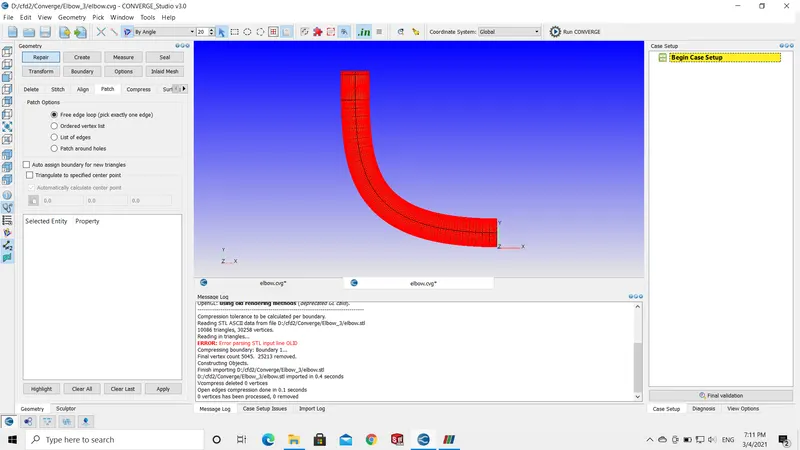
THEORY:
- Before getting started with the case setup, make sure the geometry has zero errors and flag the boundary.
- In this type, we have parts inside the geometry (throttle valve) make sure to flag them properly using the "By Surface" option.
- Start the case setup, it is a time-based application.
- The material flowing inside the geometry is air (23% O2 and 77% N2).
CASE SETUP:
- MATERIALS: The fluid inside will be air.
- The global transport parameters will have default values.
- Species: as the fluid inside the pipe, is air add O2 and N2 variables.
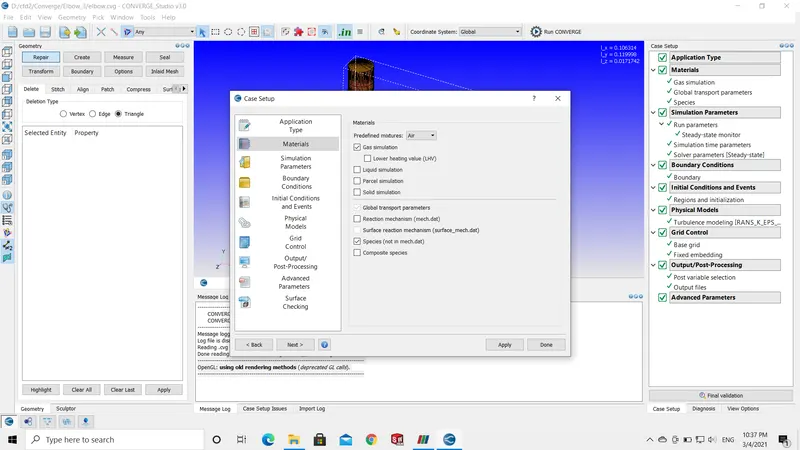
- SIMULATION PARAMETERS: It includes the type of solver used and the duration of the parameter.
- Run Parameter: Transient type of solver is used for this simulation.
- In the transient state, the simulation time parameter is in seconds.
- The end time is 0.01 (10 milliseconds). The end time calculation for the simulation is mention in later parts of this challenge. \
- Set the Solver parameter --> Equations --> Pressure preconditioner to NONE.
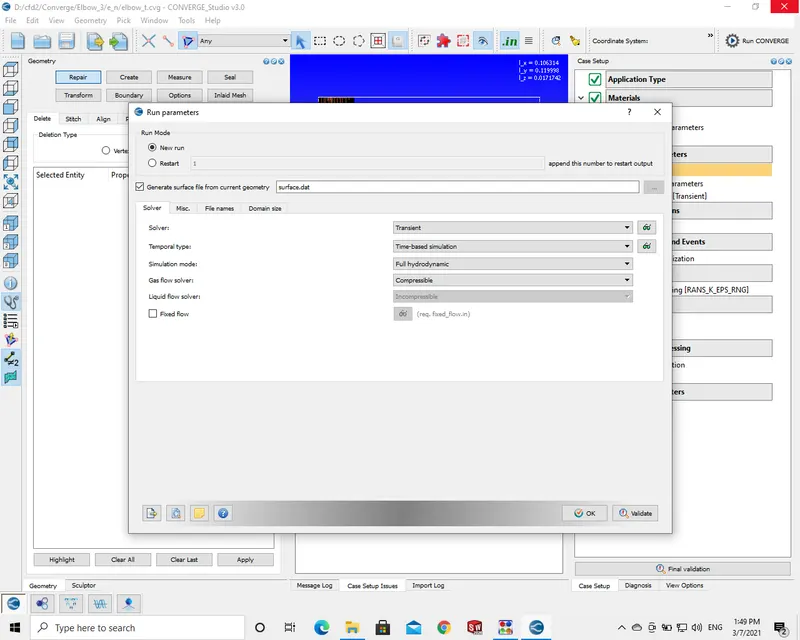
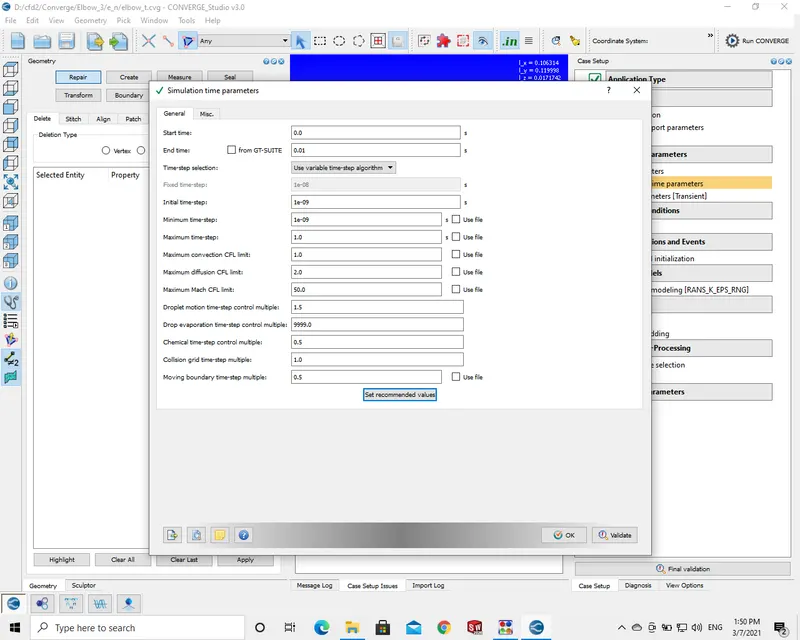
- BOUNDARY CONDITIONS AND REGIONS & INITIALIZATION:
- Both the boundary conditions and region setup are interlinked. In regions and initializations, the pressure or velocity, temperature, and type of fluid are described. Whereas in boundary conditions the geometrical model boundaries are flagged and to every condition, the regions are assigned.
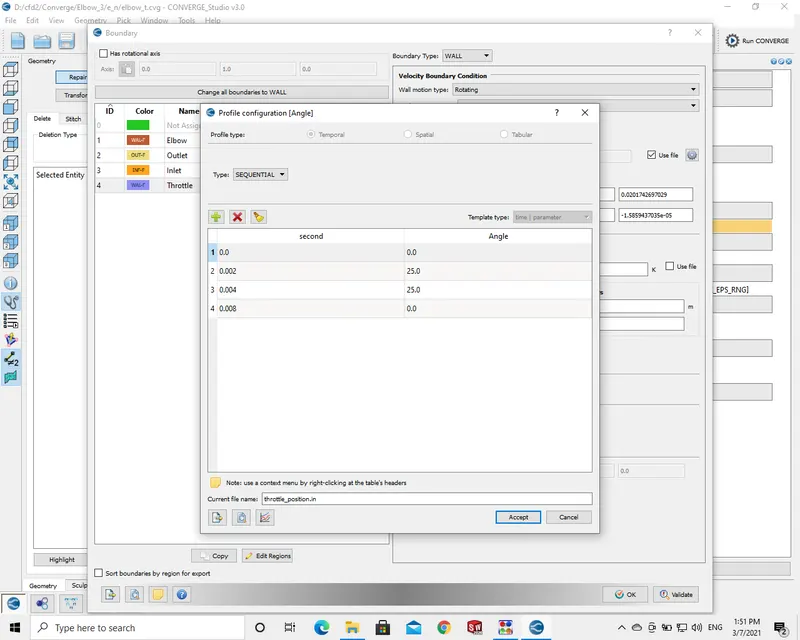
- In this simulation, there is an angle of rotation to the throttle valve for a certain time period.
- The angle is given in the boundary set up by using a configuration file as shown in the below picture.
- The inlet pressure is 150000 Pa.
- The outlet pressure is 100000Pa.
- PHYSICAL MODEL: This is a turbulence viscous flow. RANS k-epsilon model is implemented for this.
- GRID CONTROL:
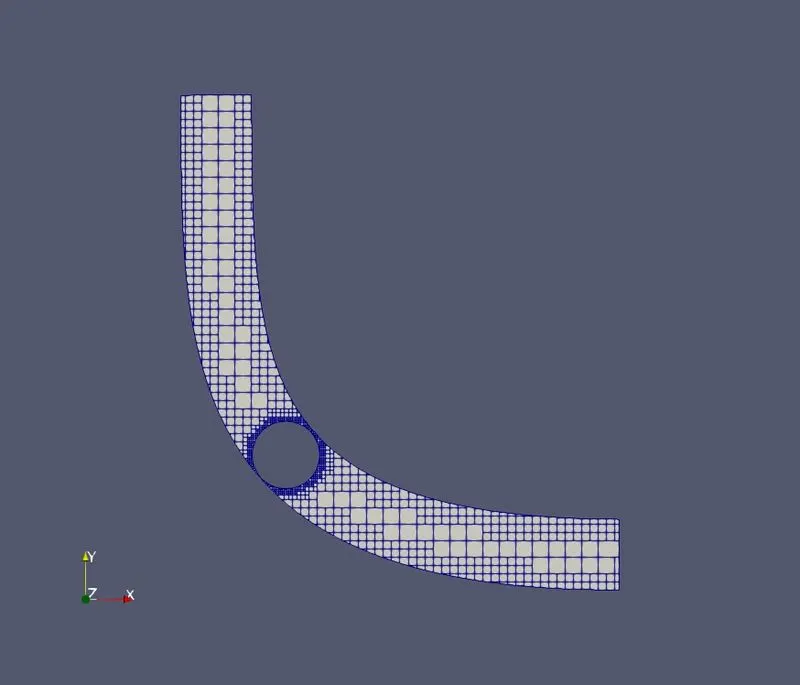
- The mesh size or grid size is 0.004 and in addition to this Fixed embedding is included.
- The fixed embedding is a permanent type and this will include the more number of cells or volumes at the desired location in fixed embedding.
- Accept the default values given by the post-processing variables. Change the output variable values to have more output files.
- The number of post-processing files size can be more or less by dividing the required number of files with the end time value.
RESULTS:
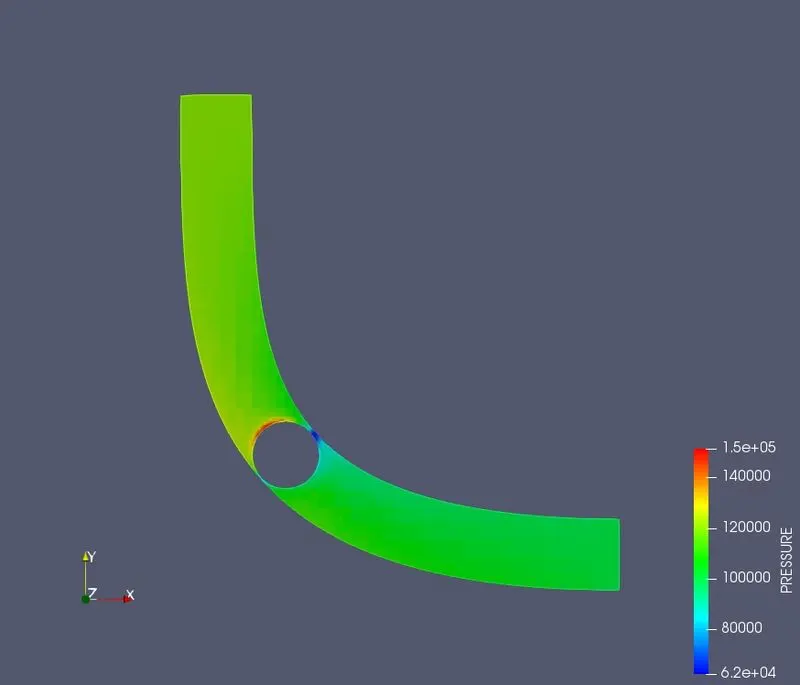
- PRESSURE CONTOUR:
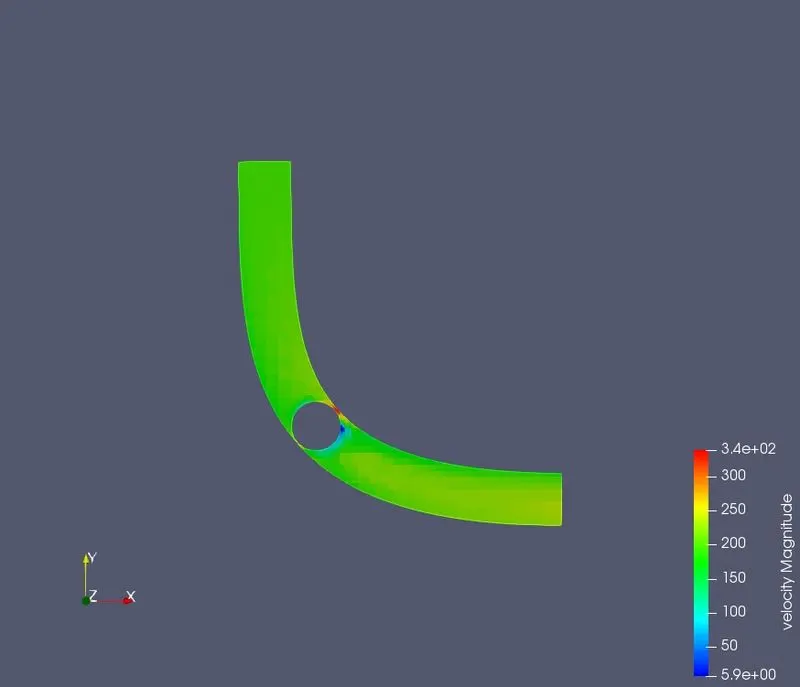
- VELOCITY CONTOUR:
- PRESSURE PLOT:
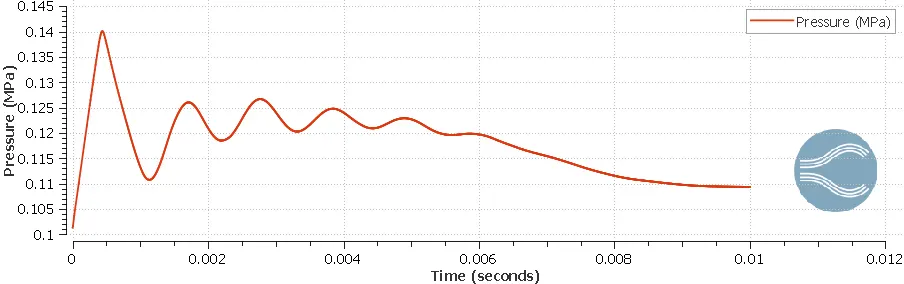
- The above plot represents the average pressure at the outlet of the pipe.
- VELOCITY PLOT:
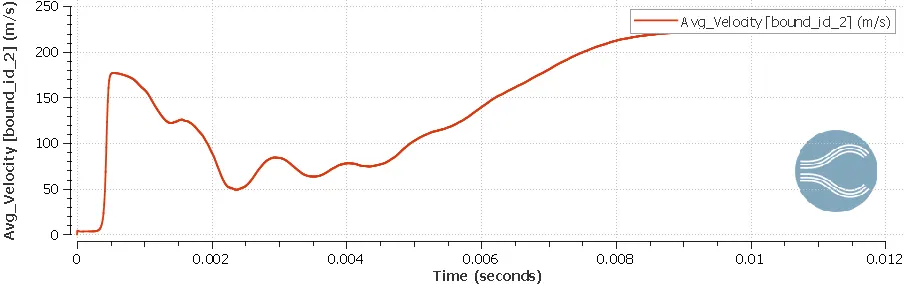
- The above plot represents the average velocity at the outlet of the pipe.
- MESH SIZE:
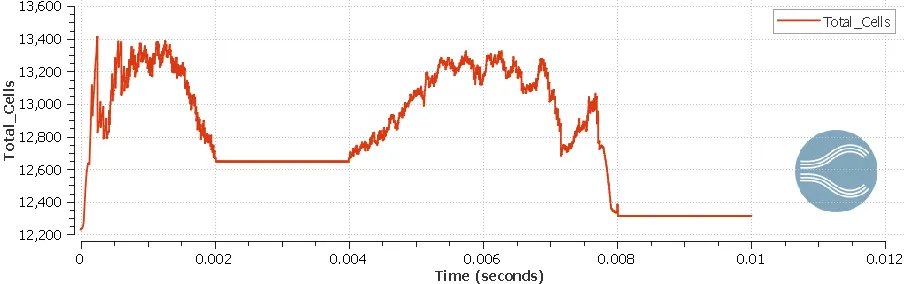
- TOTAL CELL COUNT:
- MASS FLOW RATE:
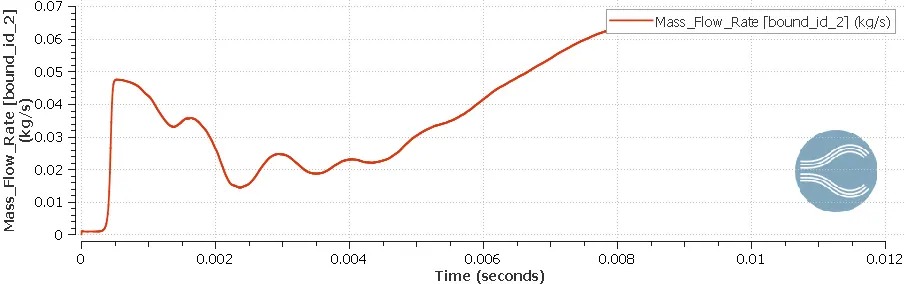
- The above plot represents the mass flow rate at the outlet of the pipe.
- END TIME CALCULATION FOR SIMULATION: The end time for the simulation is calculated using characteristic length divided by the velocity at the inlet.
- The length of the pipe is assumed to be 0.2 meters and the velocity at the inlet based on the previous plots is 80 m/s.
- By applying the above-said formula i.e. length/velocity we get the time.
- 0.2/80 = 0.0025 second. In this simulation, the challenge runs around 4 steps so 4*0.0025 is 10 milliseconds i.e. 0.01
SOLUTION ANIMATIONS:
THROTTLE ROTATION OF 25 DEGREE'S
- The above animations show the pressure and velocity changes while the throttle valve is rotating at an angle of 25 degrees.
THROTTLE ROTATION OF 50 DEGREE'S
- The above animations show the pressure and velocity changes while the throttle valve is rotating at an angle of 50 degrees.
CONCLUSION:
- In conclusion, I would like to discuss the above-mentioned Pressure and Velocity gradient results.
- From the pressure contour screenshot and pressure contour through pipe animation it is visible that, as the throttle moves or makes a rotation the pressure increases on the top surface of the valve, and the wake region or recirculation is observed at the bottom surface of the valve.
- Similarly, through the observations of the velocity contour picture and velocity contour through the pipe animation, the velocity gradient increases sharply due to the shrinkage in the area. And also the maximum amount of fluid tries to escape through these small passages thus increases the velocity gradient in that particular region.
- In this challenge, I have enclosed additional animations that represent the throttle rotation angle of 50 degrees to observe the characteristics of the fluid inside the pipe.
- The total cell count plots fluctuate largely this is because as the throttle vale makes a rotation the cell count changes rapidly. we can observe at timeline 0.02 to 0.04 the cell count is stable because there is no change in the throttle valve.
- The throttle valve rotation also affects the average mass flow rate through the outlet. This can be seen in the above given results.
- In simulations like this, the cell count varies and if the cell size is too small the simulation time also increases rapidly.