Week 3 - Solving second order ODEs
Aim
To write a Matlab program that simulates and animates the motion of a pendulum using the ODE45 Solver.
Governing ODE Equation
The ODE below represents the motion of simple pendulum with damping
`(d^2theta)/dt^2 + b/m (d theta)/dt + g/L sin theta = 0`
where,
`theta` - is the angular displacement [radians]
t - time [s]
b - damping coefficient [N.s/m]
m - mass of the pendulum [kg]
L - length of the pendulum [m]
g - acceleration due to gravity [m/s]
The above second-order ODE can be written as two first order ODE's as follows:
- `(d theta)/dt = theta_2`
- `(d theta_2)/dt = -b/m*theta_2 - g/l*sin theta`
Equations 1 and 2 will be solved using the ODE45 solver to simulate the motion of the pendulum.
Results
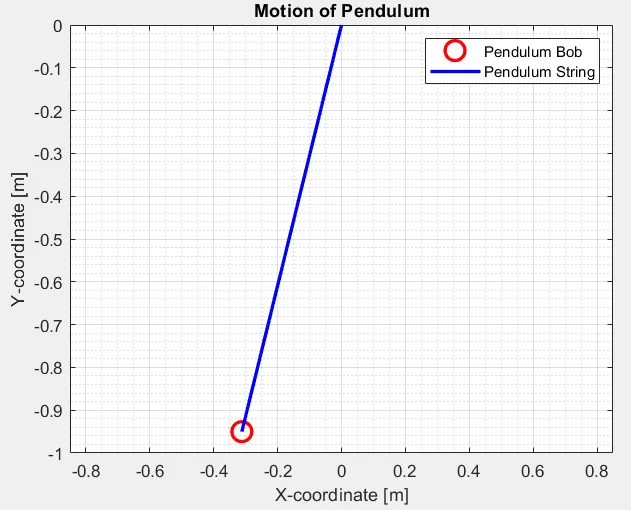
The image below shows the final state of the pendulum at t=20s.
Video Link:
https://drive.google.com/file/d/111bbq0Yeo263crllBx4z4Qd0TFy17Flh/view?usp=sharing
https://drive.google.com/file/d/111bbq0Yeo263crllBx4z4Qd0TFy17Flh/view?usp=sharing
Code
Main Code
%%%%%%%%% Pendulum Animation
clear all
close all
clc

%% Inputs to Solve ODE
b= 0.05; %Damping coefficient [N.s/m]
g=9.81; % Acceleration due to gravity [m/s]
l=1; % Length of pendulum [m]
m=1; % Mass of the pendulum [kg]

%% Initial condition

theta0 = [0;3 ]; % Initial angular displacement = 0 radians; Initial angular velocity = 3 rad/s

%% Time

T = linspace(0,20,500); % Time = 20s


%% ODE Solver

[t, results] = ode45(@(t,theta) ode_func(t,theta,b,g,l,m),T,theta0);

%where
%[t, results] are the outputs of the solver
%(t,theta) are the governing variables of the ODE function
%ode_func(t,theta,b,g,l,m) is the function to solve for
%T is the time span for integration
% theta0 are the initial conditions
%% Output

figure(1)
for i= 1: numel(results(:,1))

X_coord = cos(results(i,1)); % To determine X-coord in cartesian coordinate system
Y_coord = sin(results(i,1)); % To determine Y-coord in cartesian coordinate system

plot(Y_coord,-X_coord,'ro','Linewidth',2,'Markersize',12); % -ve sign to ensure pendulum swings from top to bottom
hold on
plot([0 Y_coord], [0 ,-X_coord],'b-','Linewidth',2,'Markersize',12); % -ve sign to ensure pendulum swings from top to bottom
hold off
grid on
grid minor
title('Motion of Pendulum')
xlabel('X-coordinate [m]')
ylabel('Y-coordinate [m]')
legend('Pendulum Bob','Pendulum String')
axis([-0.85 0.85 -1 0 ])
Frame(i)= getframe(gcf); % Stores frames of the Figure window
end

videofile = VideoWriter('Pendulum_Motion','Uncompressed AVI'); % Create video file
open(videofile)
writeVideo(videofile,Frame) % Writes Frames data from plots to the created Video file
close(videofile)
movie(Frame) % Play the Movie from the plotted frames
Function Code
function [dtheta_dt]= ode_func(t,theta,b,g,l,m)
% From simpification of the governing ODE
theta1 = theta(1);
theta2 = theta(2);
dtheta1_dt = theta2;
dtheta2_dt = -(b/m)*theta2 - (g/l)*sin(theta1);
dtheta_dt = [dtheta1_dt; dtheta2_dt]; %Output of the function
end
Explanation of Code
Main
Lines 6-10: Inputs to Solve the ODE function
Lines 12-14: Initial Conditions of the pendulum motion
Lines 16-18: Time span of the simulation
Lines 21-30: Implementation of the ODE45 Sovler
where,
[t, results] are the outputs of the solver
(t,theta) are the governing variables of the ODE function
ode_func(t,theta,b,g,l,m) is the function to solve
T is the time span for integration
theta0 are the initial conditions
Lines 31- 51: Loop to Animate the Pendulum Motion
Line 34: For loop running from 1 to number of elements in the results column
Line 36: Estimation of X-coordinate in Cartesian coordinates system
Line 37: Estimation of Y-coordinate in Cartesian coordinates system
Line 39: Plot function for Pendulum bob, % -ve sign to ensure pendulum swings from top to bottom
Line 40: Hold on command to avoid plot overwriting
Line 41: Plot function for Pendulum String, % -ve sign to ensure pendulum swings from top to bottom
Line 42: Hold off command to overwrite plot of next iteration
Line 40: Command to store frames of the figure window based on the loop iteration
Lines 53-56: Write Video File
Line 53: Create Video File Named Pendulum_Motion with format Uncompressed AVI
Line 54: Open video file
Line 55: Write Frames data from plots to the created video file
Line 56: Close video file
Line 57: Play the Movie from the Frames stored
Function
Line 1: Definition of the inputs and outputs of the ode_func function
Lines 3-5: Assigning values of theta based on the simplified governing ode equation
Line 6: Estimation of dtheta2_dt based on the simplified governing ode equation
Line 7: Assigning outputs of the function
Errors Faced
The errors faced in this project were purely based on typographical errors and missed parenthesis and were rectified quickly. No other major errors were faced in this project.