Week 2- 2R Robotic Arm Challenge
Aim
To create a Matlab program to simulate the forward kinematics of a 2R Robotic Arm and present results in the form of a video.
Results
The below figure shows the end output frame after the complete simulation of the robotic arm motion.
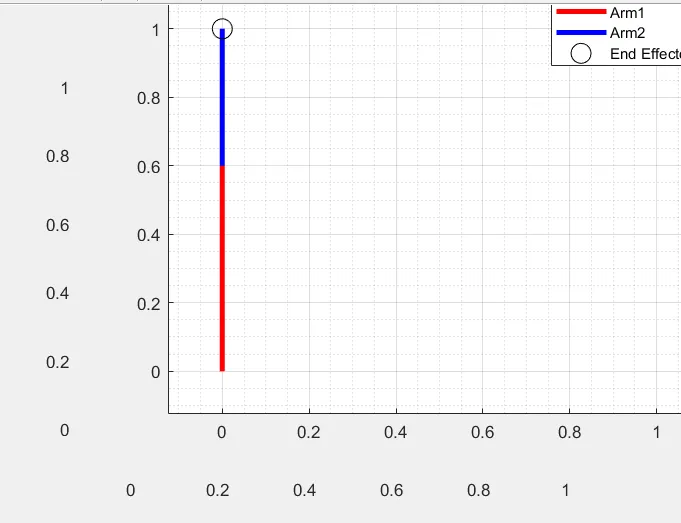
Video Link:
https://drive.google.com/file/d/1h0PIOVH8PHrMG4hOPR1OtYh3WtjssPo_/view?usp=sharing
Code
% Forward Kinematics of 2R Robotic arm
close all
clear all
clc

%% Inputs

l1 = 0.6; %Length of Arm1 in m
l2 = 0.4; %Lenght of Arm2 in m

theta1 = linspace(0,90,10); % Angle between Arm1 and horizontal
theta2 = linspace(0,90,10); % Angle between Arm2 and horizontal

x0= 0; %X-Origin
y0 =0; %Y-Origin

%% Forward Kinematics Estimation

count=1; % Counter Variable for Frames

for i = 1:numel(theta1) % For loop to estimate for all values of theta1
x1 = x0+ l1*cosd(theta1(i)); % Estimation of X-coordinate of Arm1 end position
y1 = y0+ l1*sind(theta1(i)); % Estimation of Y-coordinate of Arm1 end position

    for j = 1:numel(theta2)  % For loop to estimate for all values of theta1
    x2 = x1+l2*cosd(theta2(j)); % Estimation of X-coordinate of Arm2 end position
    y2 = y1+l2*sind(theta2(j)); % Estimation of Y-coordinate of Arm2 end position

    figure(1)
    plot([x0 x1], [y0 y1],'-r','Linewidth',3) % Plotting Arm1
    hold on
    plot([x1 x2], [y1 y2],'-b','Linewidth',3) % Plotting Arm2
    plot(x2,y2,'ok','Markersize',12) %Plotting End Effector
    hold off
    grid on
    grid minor
    axis([-0.125 1.125 -0.125 1.125])
    legend('Arm1','Arm2','End Effector') % Descrition of the lines in Figure
    title('Simulation of Forward Kinematics of 2R Robotic Arm Motion')
    Frame(count) = getframe(gcf); % Comamnd to capture frame during plot
    count=count+1; % Frame count increment
    end
end

%% Video Maker

movie(Frame) % Play the Movie from the plotted frames
videofile = VideoWriter('Forward Kinematic Robotic Arm','Uncompressed AVI'); % Create video file
open(videofile)
writeVideo(videofile,Frame) % Writes Frames data from plots to the created Video file
close(videofile)
Explanation of Code
Lines 6- 15: Input
Line 8: Defining Length of Arm 1
Line 9: Defining Length of Arm 2
Line 11: Defining Angle of Arm1 to horizontal
Line 12: Defining Angle of Arm2 to horizontal
Line 14: X-Origin
Line 15: Y-Origin
Lines 17 - 42: Loop to Simulate Robotic Arm Motion
Line 19: Counter Variable for Frames of Movie
Line 21: For loop to estimate coordinates for all values of theta 1
Line 22: Estimation of all X-coordinate of Arm1 end-positions for all values of theta1
Line 23: Estimation of all Y-coordinates of Arm1 end-positions for all values of theta1
Line 25: For loop to estimate coordinates for all values of theta 2
Line 26: Estimation of all X-coordinates of Arm2 end-positions for all values of theta2
Line 27: Estimation of all Y-coordinates of Arm2 end-positions for all values of theta2
Lines 29-40: Plotting Arm1, Arm2 and End Effector
Line 30: Plot function for Arm 1
Line 31: Hold on function to avoid replacing plot
Line 32: Plot function for Arm2
Line 33: Plot function for End Effector
Line 34: Hold off command to replace the plot in the next iteration
Line 35-36: Grid on
Line 37: Axis definition to view plot clearly
Line 38: Legends Added to describe the lines in the Figure
Line 39: Title of the plot
Line 40:Command to capture the current frame
Line 41: Increment of counter variable
Line 42-43: end of for loops
Lines 45-51: Creating and Playing Video
Line 47: Play video from the Frames captured
Line 48: Create Video file and format to save on Disk
Line 49: Open videofile
Line 50: Write Frames data to the Video file created
Line 51: Close videofile
Errors Faced:
The errors faced were mainly spelling errors and other case-sensitive typography errors in the syntax. They were resolved by spell-checking them against the Matlab syntax.
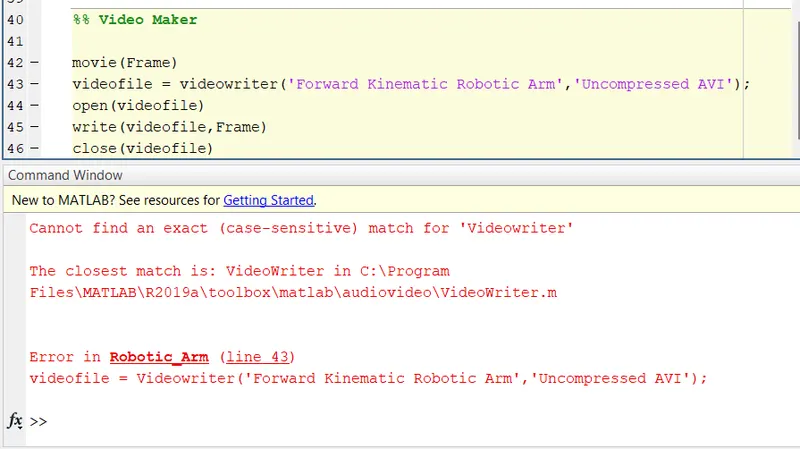
In this example, Line 43 was edited to
videofile = VideoWriter('Forward Kinematic Robotic Arm','Uncompressed AVI');
to fix the error