Using 'Mass-Spring-Damper in Simulink and Simscape' model
AIM:-
1. Find the Work Done of a Cutting Tool in Simulink Model.
2. Create a Simulink model to implement equation & Store result values using 'To File' block
3. Open 'Mass-Spring-Damper in Simulink and Simscape' model & solve the Given Problem.
#Part 1:- Find the Work Done of a Cutting Tool
Objective:- Calculate the Work Done on Simulink, as the tool moves through a distance of 100 mm under variable Force
Procedure:-
- As we have the given Data for Distance & Force
Distance (mm) 0 20 40 60 80 100
Force (kN) 60 72 65 53 44 50
- We need to find the Work Done as the tool moves through a distance of 100 mm
- Work done is when an object displaces in the direction of applied force-
Work Done = Force * Displacement
- We can calculate the work done by finding the area under the curve after plotting the values
- Here I am using two methods to Find the Workdone, in method-1 I am using the Signal Builder to provide the input value of displacement and force, and in method-2 I am using the Repeating Sequence Stair to provide the values.
- Using Integrator Block, we can plot the area under the curve.
- I use Mux block to plot the graph for both methods.
- As a result, we get the area under the curve on Scope.
Simulink Model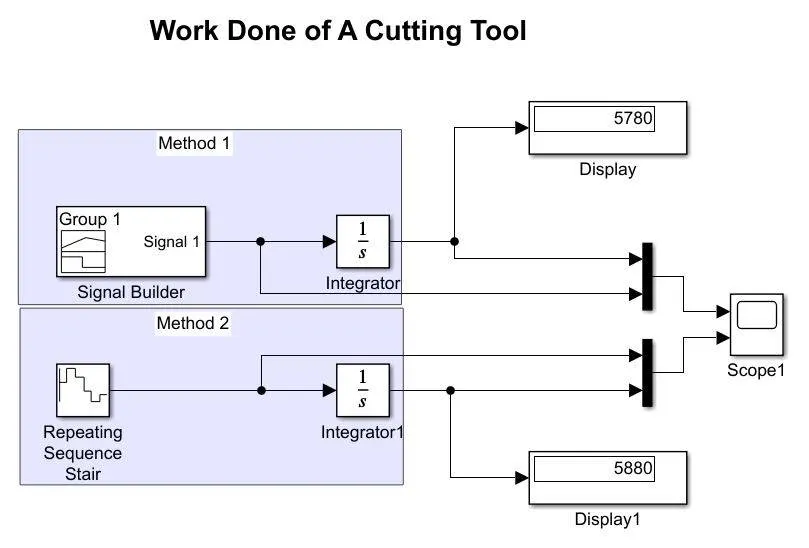
Result/Conclusion:-
As a result, we can see on the two display, there are differences in both displays result(5780 & 5880), so, we can conclude from this that the Signal Builder is reliable in getting the accurate output.
Graph- From here it shows the workdone for the cutting tool,
-Both the graph is almost the same, but the Signal Builder(left-graph) is error-free or can say more accurately.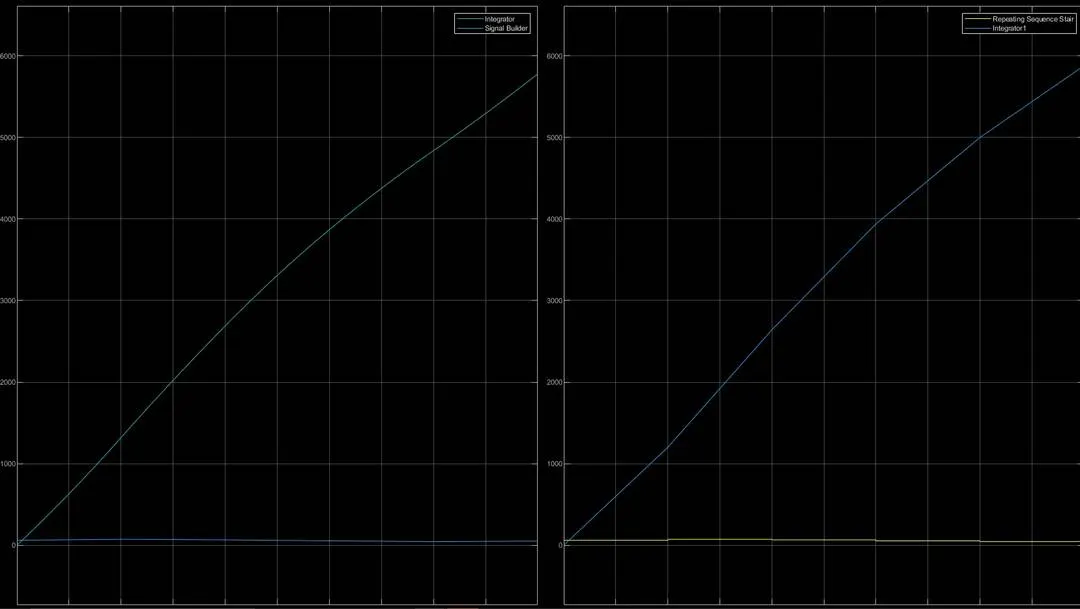
#Part 2:- Create a Simulink model to implement equation & Store result values using 'To File' block\
Objective:-
-Create two array data sets x = [22 3 55.6 9 12 10] and y = [5 31 95 56.3 77 61] from the command window.
-Create a Simulink model to implement equation z=3x2-5y+18.
-Store result values using To File block.
Procedure:-
- To calculate the values of z, I use constant blocks to provide the values of x & y
- In MATLAB command window I made two arrays to give the values of x & y, and save the file in the same directory.
- Now further I use the Math Function block to square the value of x and then multiply it by 3 by using the gain block.
- For y value, I did the same procedure. and use the Sum block to complete the equation.
- I use the Display Block to get the result for z, and also for the values of x & y.
- As per the requirement to save the result as a file in the computer directory, I use To File Block for the same and connect it after the sum of x & y.
Simulink Model-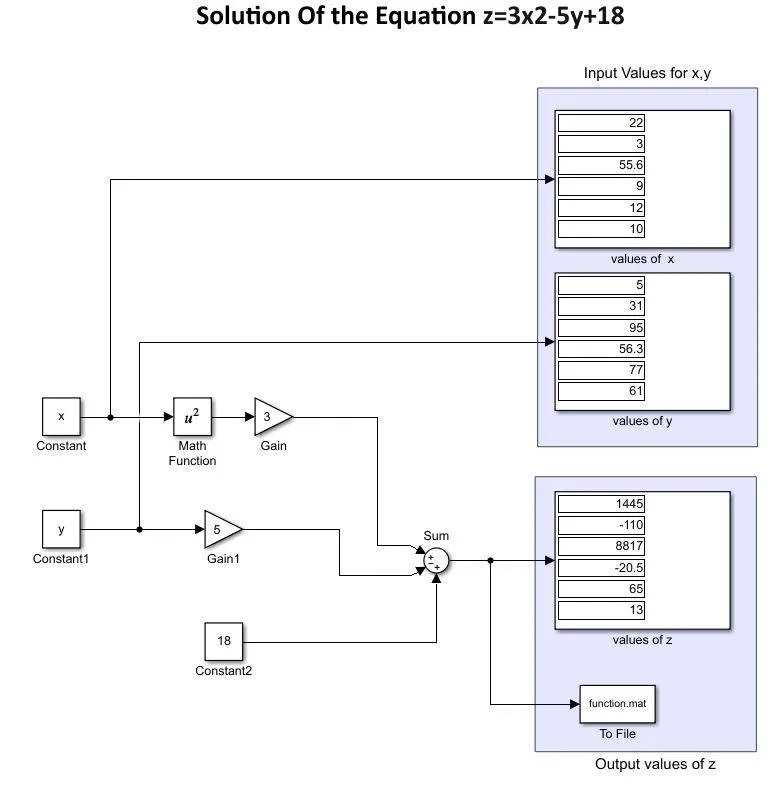
-Creating array for the value of x & y in MATLAB command window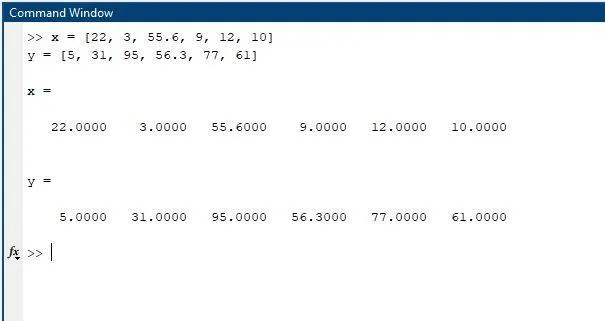
-Workspace Showing Variable x & y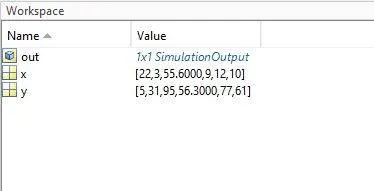
Result/Conclusion:-
- Value of z as result on Display block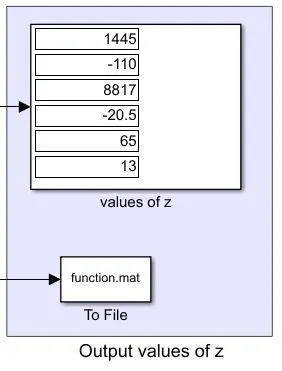
- Result saved as name function.mat file in the directory by using To File block.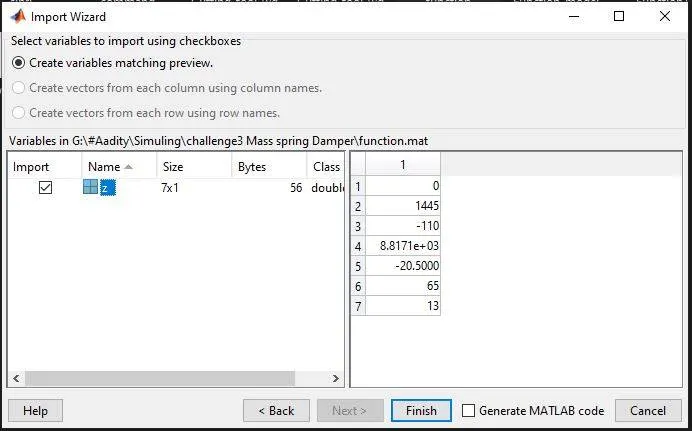
#Part 3:- Solve the following problems using ‘Mass-Spring-Damper in Simulink and Simscape' model
Objective:- By using ‘Mass-Spring-Damper in Simulink and Simscape' model solve the following;
- Derive the governing equation for the model
- Change the value of mass, damper, and spring for the Simscape model and plot the result. Change the value of Mass x0=2 in the Simulink model and plot the results.
- Make the response from Simscape and Simulink as two separate displays.
Procedure:-
-we can find the ‘Mass-Spring-Damper in Simulink and Simscape' model in the help tab.
- In this example, shows the two models of ‘Mass-Spring-Damper', one is created by Simulink and the other is created by using Simscape
- The Simulink model uses signal connections, which define how data flows from one block to another.
- The Simscape model uses physical connections, which permit a bidirectional flow of energy between components. Physical connections make it possible to add further stages to the mass-spring-damper simply by using copy and paste.
- Input/output connections require rederiving and reimplementing the equations.
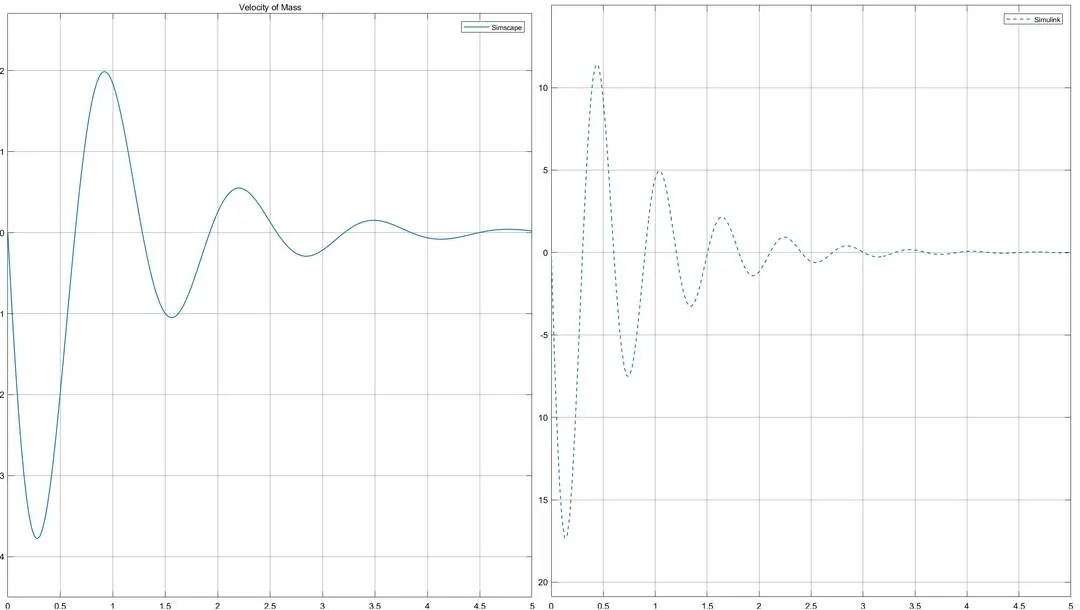
- As per the given data, I am changing the values of mass, damper, and spring for the Simscape model, and changing the value of Mass x0=2 in the Simulink model and plot the results.
Model:-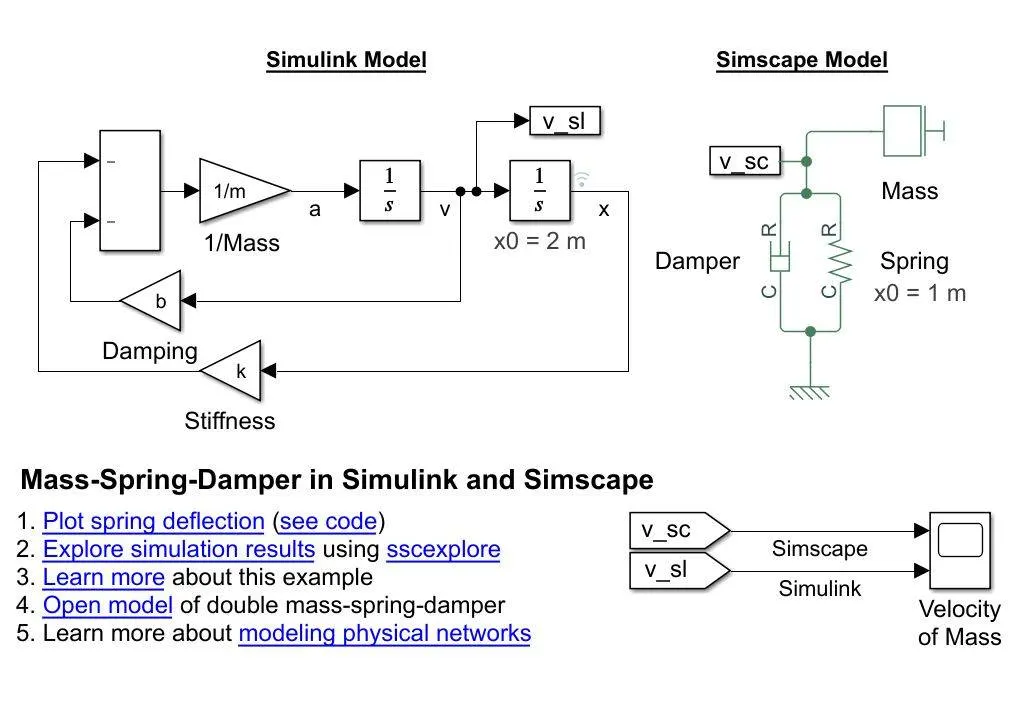
- Providing the value of Mass as 2kg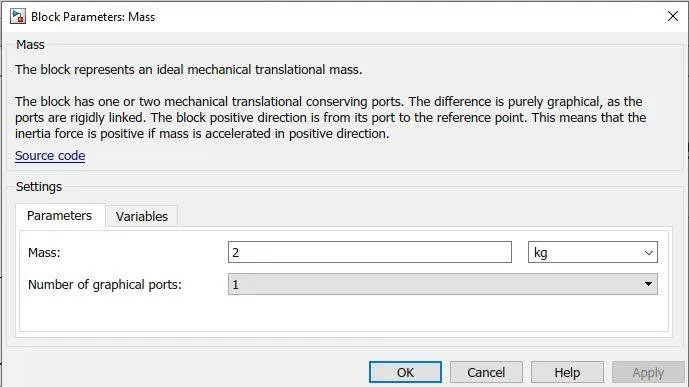
- Providing the value of Spring Coefficient= 50 N/m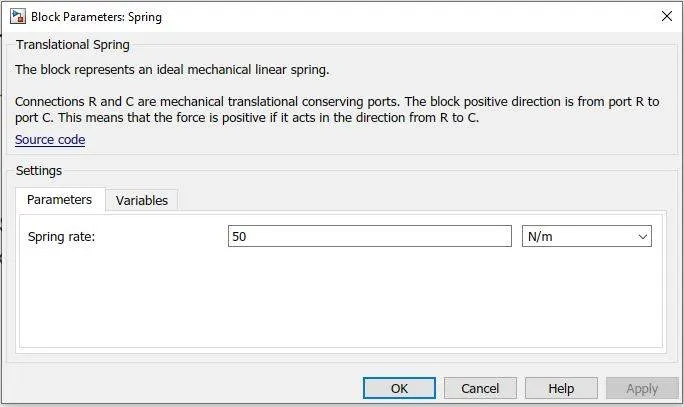
- Providing the value of Damper Coefficient = 4 N(m/s)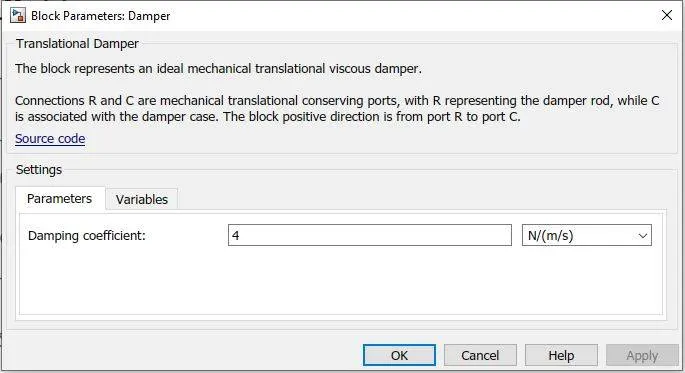
Solve Governing Equation for the Model:-
-Simple Harmonic motion (Linear)-
Oscillation Motion
- To and fro motion of a particle about a mean position is called an oscillatory motion in which a particle moves on either side of equilibrium or mean position is an oscillatory motion.
- It is a kind of periodic motion bounded between two extreme points. For example, Oscillation of Simple Pendulum, Spring-Mass System.
- The object will keep on moving between two extreme points about a fixed point is called mean position or equilibrium position along any path. (the path is not a constraint).
- There will be a restoring force directed towards equilibrium position or mean position.
- In an oscillatory motion, the net force on the particle is zero at the mean position.
Conditions for Linear SHM: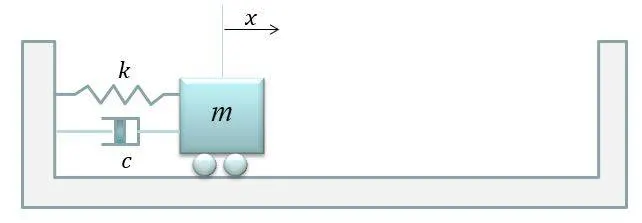
Governing law:-
Total force Applied to a body = Motion of the body
F= ma
Forces:-
1. Force to make moment = Restoring force of the spring, trying to get back to the equilibrium position
= -kx
2. Resistive force to make moment = Damping =
-Acceleration(a) is the second derivative of Distance;-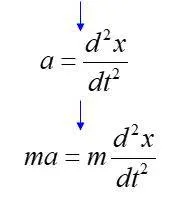
Combining the equation:-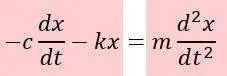
Rearranging the equation-
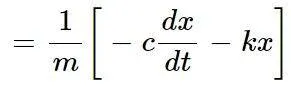
- This is the Governing Equation of the Model
Result/Conclusion:-
Graph representation on Simulink and Simscape After changing the values-
Learning Outcome:-
- Learned the basic difference between Signal Builder & Repeating Sequence Stair, how it affects the result.
- Learned how to Use the MATLAB Workspace to provide Simulink inputs
- I also learn how to save the Result in the computer directory by using To File.
- Learn how we use the premade models by editing the values as per the requirement.