Matlab Programme to simulate the forward kinematics of a 2R Robotic Arm.
AIM:- Write a program in Matlab to simulate the forward kinematics of a 2R Robotic Arm.
Theory:-
Forward Kinematics:- The forward kinematics is required to find the position and orientation of the tool tip
once the parameters of the actuators are given.
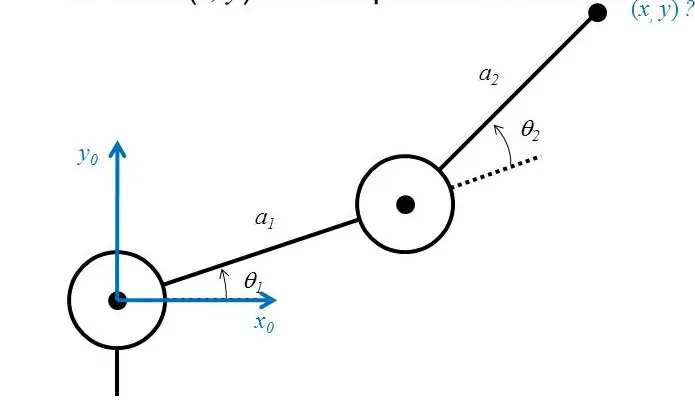
We can find the Final Postion Postion, and trace the workspace for the particular Robotic Arm,
when the length & the Angles (θ1,θ2) Robotic Arm is Known;
a1 = Given
a2 = Given
θ1 = Given
θ2 = Given
x0 = 0
y0 = 0
x1 = a1*cosd(θ1)
y1 = a1*sind(θ1)
x2 = x1 + a2*cosd(θ2)
y2 = y1 + a2*sind(θ2)
Using trignometry we can calculate the posiotn of coordinates (x1 y1), (x2 y2) and the final posiotn of the arm
Robotic Arm:- A robotic arm can be any of a number of mechanical, programmable devices that are designed
to manipulate objects in a way that is similar to the human arm. A Robot Arm can be described as a chain of links
that are moved by joints which are actuated by motors.The links of such a manipulator are connected by joints
allowing either rotational motion or translational displacement.
Autonomous robotic arms are designed to be programmed and then left alone to repeat their tasks
independent of human control.
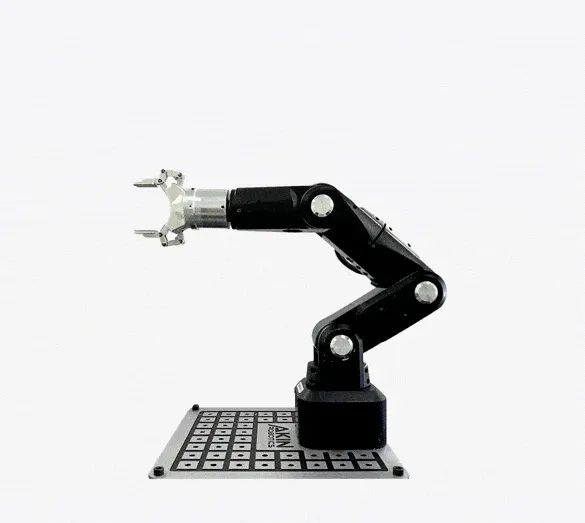
Application:- Medical application, Weldin, Painting, Hazardous Environment, Automobile industry etc.
Objective: To simulate the forward kinematics of a 2R Robotic Arm & save a video file of simulation.
MATLAB PROGRAMME:-
%Programme To Simulate Forward kinematics of a 2R Robotic Arm

clear all
close all
clc

%Inputs;
l1 = 1;
l2 = 0.5;

theta1 = linspace(0,180,20)
theta2 = linspace(0,180,40)


%Command:-
ct=1;
for i= 1:length(theta1)
    THETA1 = theta1(i)

    for j= 1:length(theta2)
    THETA2 = theta2(j)

    %Coordinates
x0 = 0;
y0 = 0;

x1 = l1*cosd(THETA1)
y1 = l1*sind(THETA1)

x2 = x1 + l2*cosd(THETA2)
y2 = y1 + l2*sind(THETA2)

    %Outputs- Graphical Representation & Animation

plot([x0 x1],[y0 y1],[x1 x2],[y1 y2],'linewidth',3)
axis([-1.5 1.5 0 2])
pause(0.01);
M(ct) = getframe(gcf);
ct=ct+1;
    end

end
%Video Animation
movie(M)
videofile = VideoWriter('forward_kinematics.avi','Uncompressed AVI');
open(videofile)
writeVideo(videofile,M)
close(videofile)
Steps Followed in Matlab Programming:-
- Very first i clear the memory and close all the plots using; 'clear all', 'close all' and 'clc' command.
- Than i provide the required inputs to the programme (lenght of links & angles of links)
- I used 'linspace' command to generate arry of fixed length, so that to get angles from 0-180 for the links.
- Than i write progamming using the 'for loop' command followed by 'counter' command,
due to the muliple value of angles for theta1 & theta2, a new vriable is added THETA1 & THETA2 inside the 'for loop',
and for THETA2 to 'j' variable is used instead of 'i' as it has its own angles. - Than i type the coordinate points of link1 and link2 with respect to its multiple theta angles.
- Than i type the codes for the Graphical representation to plot the all points on x y coordinates, add the 'pause command' to pause the grapgh for a particular time period and use 'M(ct)' to capture the current frame everytime for the 'for loops',
End the 'for loop' followed by code 'ct=ct+1' for increamenting the frame everytime when the for loop run. - And Lastly to make a video "movie' command is used, where, 'AVI' format is used in VideoWriter to save file in AVI format, and 'writeVideo' command is used to write the plots in video format. and close' is used to close and save the video file on computer.
Errors:-
I faced many erroes mostly are beacuse of mistyed in the Programming, for the correction i just recheck it and type it correctly and execute the programme again.
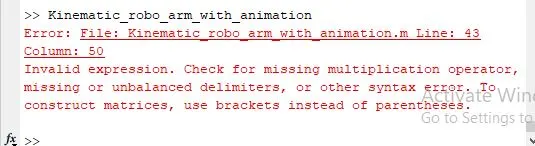
Here i forgot to type the comma before "uncompressed".
- To overcome on such errors, i used to recheck my programme twice befor executing.
Links & References:- Below i am sharing the links to support my programme along with the video.
https://drive.google.com/drive/folders/17NW7AEGVkQqtmw6QeyCYg0aMQ3t0SWp-?usp=sharing