Week 2- 2R Robotic Arm Challenge
1. Aim
Write a program in Matlab to simulate the forward kinematics of a 2R Robotic Arm
2. Theory
Kinematics of linkages
Robotic Arm considered here has 2 links L1 & L2. In that, one end of L1 is fixed to the base and is making an angle THETA1 with x axis. The cordinates are (x0,y0). The cordinates for the opposite end of L1 is (x1,y1)
This can be calculated by
x1=L1* cos(THETA1)
y1=L1*sin(THETA1)
The end of L1 os also the start of L2 which ih making an angle THETA2 with horizontal. The cordinates for the opposite end of L2 is considered as (x2,y2) and these can be explained as
x2=x1+L2*cos(THETA2)
y2=y1+L2*sin(THETA2)
If we know the values of L1, L2 , THETA1 & THETA2, then the position of the arm can be calculated. So when the robotic arm moves, the angles THETA1 & THETA2 keep on changing. So if the above cordinates are calculated with an array of different angles, an animation can be created with the plots created for each set of THETA1 & THETA2 respectivly.
3. Code Explanation
%Forward Kinematics of 2R Robotic Arm

clear all
close all
clc

%Inputs

THETA1=linspace(0,90,10);
THETA2=linspace(0,90,10);
L1=1.5;
L2=1;
F=1;
for i=1:length(THETA1)
    theta1=THETA1(i);
    for j=1:length(THETA2)
        theta2=THETA2(j);

%Cordinates calculation
x0=0;
y0=0;

x1=L1*cosd(theta1);
y1=L1*sind(theta1);

x2=x1+L2*cosd(theta2);
y2=y1+L2*sind(theta2);

%Plotting


plot([x0 x1],[y0  y1],[x1 x2],[y1  y2],'Marker','o','linewidth',3)
axis([-0.1 3 -0.1 3])
title('Robotic Arm Movement');
xlabel('x axis');
ylabel('y axis');
grid on;
pause(0.01)


M(F)=getframe(gcf);
F=F+1;
    end
end

movie(M,1,15);
videofile=VideoWriter('Robotic_Arm.avi','Uncompressed AVI');
videofile.FrameRate=15;
open(videofile);
writeVideo(videofile,M);
close(videofile);

%End of code
clear all is useed to clear all variables
close all closes all opened windows like plots
clc clears the command window
We define the input variables first. THETA1 & THETA2 arrays are created using linspace command since it will give equidistant points between 0 and 90 degrees. 10 divisions are made. So a total of 100 different positions are possible for the robotic arm.
L1 & L2 is defined as 1.5 and 1
F is a variable defined for the frames which will be used to create an array of frames containing plots for each position which can be converted to a movie.
Now first for loop is created to select THETA1 for each position. The number of loops will be the length of THETA1 array.A new variable theta1 is created which will have each value of THETA1 in every iteration.
After that a nested for loop is created for THETA2. The new variable theta2 will have each values of THETA2 in every iteration. The loop created for the THETA2 will be executed 10 times for every value of THETA1.
Now the cordinate calculation is defined as given in the theory section above.
Now since all 3 cordinates are calculated, we can plot the lines to connect the linkages.
plot command is used to plot both lines, linewidth to control line thickness, and Marker to create symbol
axis command to set the axis ranges
title command to give plot title
xlabe & ylabel for axis labels
grid on to switch on the grid
pause command is used to pause the execution of code for the specified time
Now plots will be created for every combination.
getframe command is used to capture the figure as a movie frame and gcf is used to get the current frame.
An array m is created with all the frames F created. An increment is given to frames
Now end command for both for loops is given
Now the command movie is used to play the frames captured in the array M. Array name, number of times movie needs to be played and frames per second for the movie are given
VideoWriter command is used to create a object to write the video file into. the file name is to be defined here along the profile. The profile is to be selected from a list of available profiles.
Since during running the code, it was observed that the video speed was higher. So help taken from internet and matlab documentation to control the FPS of video with FrameRate command.
Now we need to open the video file
then write the video to the videofile and finally close the video file.
Once the code is executed, the plots are plotted and movie is played once from the array. video file is saved to the same file location where the program is saved.
4. Errors observed during coding
the following errors were observed during coding
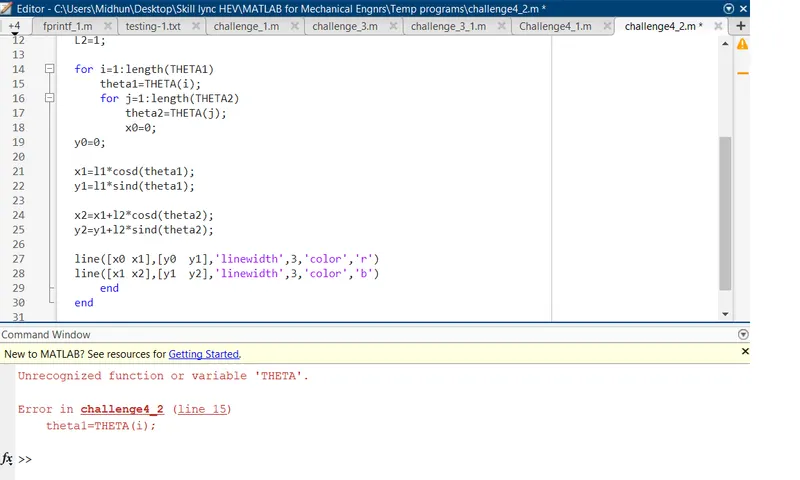
Error is observed in line 15. Since THETA is given but THETA is not defined. It should be THETA1 in line 15 and THETA2 in line 17.
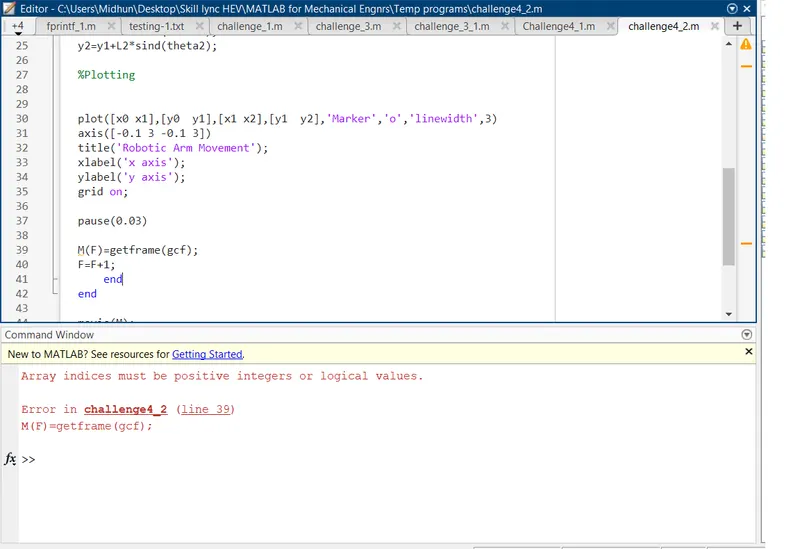
Error is in line 39. since F was defined as 0, F is the array indice for M and it cannot be 0. It should be a positive intiger. Error corrected by giving F=1
5. Final result
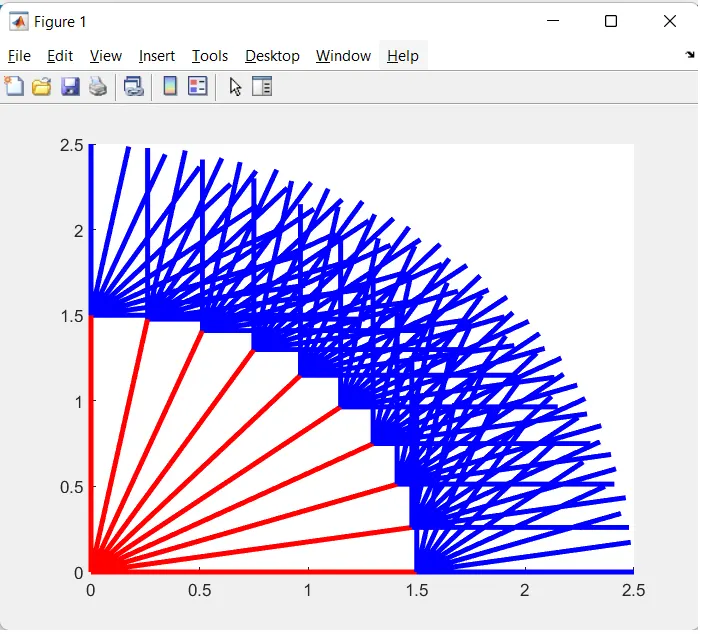
when all the lines plotted in a single figure.
The final result video created is uploaded to youtube and the link is given below.
NOTE:
The final result video found to be running with high FPS rate. So help taken from internet and MATLAB documentation and used FPS option in 'movie' command first but found that only the movie running in MATLAB got slower but still the video was fast. So used 'FrameRate' command and video FPS rate got reduced.