Week 2- 2R Robotic Arm Challenge
Aim:
To create a MATLAB program for the forward kinematics of a 2R Robotic Arm, along with their repercussions in video form.
Objective:
The main objective is to know the position (workspace) of manipulator by varying theta value & Animation.
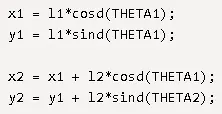
Governing Equations:
Body of Content:
Matlab Program-
clear all
close all
clc

%Inputs
l1 = 1;
l2 = 0.5;
theta1 = linspace(0,90,10);
theta2 = linspace(0,90,10);

ct = 1;
for i = 1:length(theta1)
    THETA1 = theta1(i);
    for j = 1:length(theta2)
        THETA2 = theta2(j);
        x0 = 0;
        y0 = 0;

        x1 = l1*cosd(THETA1);
        y1 = l1*sind(THETA1);

        x2 = x1 + l2*cosd(THETA1);
        y2 = y1 + l2*sind(THETA2);


        %Plotting

        plot([x0 x1],[y0 y1],[x1 x2],[y1 y2],'linewidth',3)
        axis([-0.1 1.5 0 1.5])
        pause(0.03)
        M(ct) = getframe(gcf);
        ct = ct+1;


    end

end

movie(M)
videofile = VideoWriter('challange_kinematics.avi','Uncompressed AVI');
open(videofile)
writeVideo(videofile,M)
close(videofile)
Output Video: (Youtube Link)
https://youtu.be/-qLjqt7KPOA
Explanation:
- As in every program commencing with these three commands clear all, close all & clc, following with inputs mentioning length and theta.
- Here theta is as a matrix with linspace; which helps to create regular and equal intervals
- For loop command with using i/j to length theta1 and theta2.
- THETA1 / THETA 2 are Variable
- However “theta” is an array because we are using matrix with linspace
- Adding all mathematical expressions mentioning the values of x0,x1,x2, y0,y1 & y2.
- After that using Plotting command where plots are being used instead of giving line command. As plots will give clear animation.
- Mentioning axis with [-0.1 1.5 0 1.5] will give the clear animation within the mentioned axis boundary which will look elegant also.
- For creating movie here “ct” represents each and every frame.
- Here we create an array called “M” while making movie/animation.
- At the last te video dmesify the position of manipulator with varying theta value.
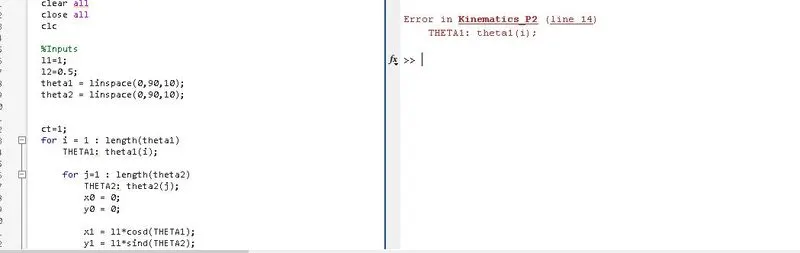
Probblem faced during generating program:
Used ":" instead of "=" while mentioning variable THETA in for loop.
Youtube link of video