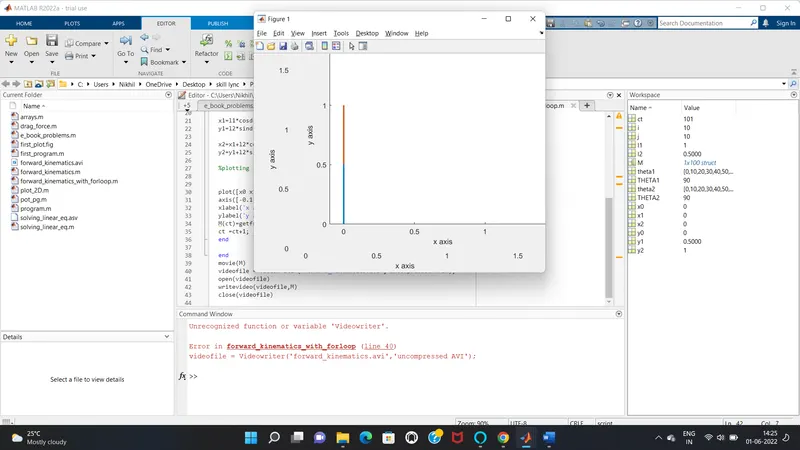
2R Robotic Arm Challenge
AIM:
To simulate the forward kinematics of a 2R Robotic Arm using MATLAB.
OBJECTClVES OF THE PROJECT:
- To write a MATLAB program to simulate the forward kinematics of a 2R Robotic Arm.
- To create a video file of the output showing the motion of end user/manipulator.
THEORY:
Kinematics is the study of motion of a mechanical points, bodies and systems without considering the forces affecting the motion.Forward kinematics refers to use of kinematic equations of a robot to compute the position of the end effector from specified values for joint parameters.
Here if we are able to figure out how the robot is going to move using math, then we can figure out the workspace of the robot. By this we can obtain the possible location where the robot can move and operate inorder to perform complex operations like Welding, assembly, loading and unloading, pick and place operation, sprag painting, inspectng critical dimensions etc.,
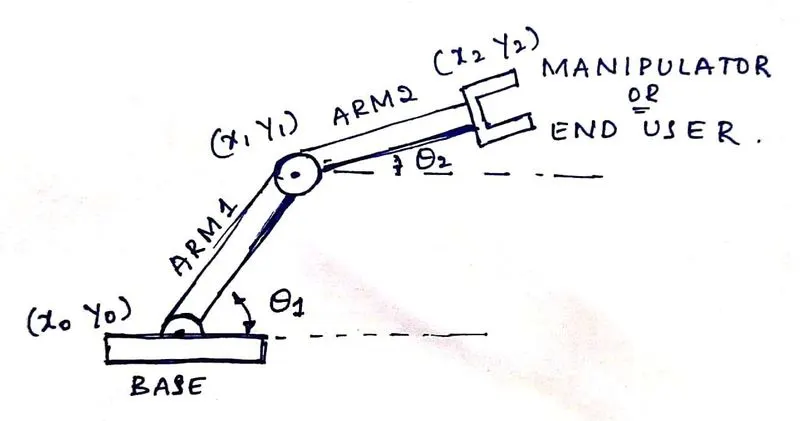
A 2R robotic arm consists of 2 arms ARM1 on length l1 and ARM2 of length l2 which makes angles of `theta1 and theta2` respectively along axis.
For ARM1,
starting point = x0 y0
x0 = 0
y0 = 0
ending point = x1 y1
x1 = l1 cosd `theta1`
y1 = l1 sind `theta2`
Similarly for ARM2
starting point = end point of ARM1 = x1 y1
ending point = x2 y2
x2 = x1+l1 cosd `theta1`
y2 = y1+l1 sind `theta2`
MATLAB PROGRAM
%program of animation for 2R robotic arm
clear all
close all
clc

%inputs
l1=1;
l2=0.5;

theta1=linspace(0,90,10);
theta2=linspace(0,90,10);

ct =1;
for i=1:length(theta1);
THETA1=theta1(i);
for j =1:length(theta2);
   THETA2=theta2(j);
   x0=0;
y0=0;

x1=l1*cosd(THETA1);
y1=l2*sind(THETA1);

x2=x1+l2*cosd(THETA2);
y2=y1+l2*sind(THETA2);

%plotting


plot([x0 x1],[y0 y1],[x1 x2],[y1 y2],'linewidth',2);
axis([-0.1 1.5 0 1.5]);
xlabel('x axis');
ylabel('y axis');
pause(0.03);
M(ct)=getframe(gcf);
ct =ct+1;
end

end
movie(M)
videofile = VideoWriter('forward_kinematics.avi','uncompressed AVI');
open(videofile)
writeVideo(videofile,M)
close(videofile)
The above written is the program to simulate the motion of a 2R robotic arm, In the code initially we are defining the inputs. l1 & l2 being the length of the arm 1 and 2 respectively and theta1 and theta2 are the angles made by arm1 and arm2 with respect to x axis. Here theta1 and theta2 are defined as an array using linspace (i.e., linspace(0,90,10) which means theta1 & theta2 are array of 10 elements varying from 00 to 900) command as we are simulating the motion of manipulator.
Here theta1 and theta2 are array of 10 elements and for each position of theta1 there are 10 different positions of theta2, hence two for loops are used one for the values of theta1 and other for the value of theta2.
Now here in 1st for loop I is varying from 1 to length(theta1) which means the value of theta is changing from 1 to 90 and for each time the for loop is executed it is going to store single value instead of an array.
As theta1 and theta2 are arrays and we need to plot separate plots of separate theta values the line inside the for loop i.e., THETA1=theta1(i) gives us a single variable for THETA1 which is further used.
After specifying the values of THETA1 in 1st for loop and THETA2 in 2nd for loop the co-ordinates are given i.e., initial point of the arm1 (x0 ,y0) which is (0 ,0) and end point of arm1 (x1 ,y1) which is (l1*cosdTHETA1 ,11*sindTHETA1)(since the values of tHETA1 and THETA2 are in degrees sind and cosd are used). Here the end point of arm1 is the initial or starting point of arm2 and end point of arm2 is (x2 ,y2) which is (x1+l2*cosdTHETA2 ,y1+l2*sindTHETA2).
After specifying the co ordinates the plotting is done using the plot command, here we are plotting both the arms using the command plot([x0 x1],[y0 y1],[x1 x2],[y1 y2],'linewidth',2) where we have specified the starting point and ending point of both the arms in single command.
Initially before for loop we have specified ct=1 where ct represents the frame now once the for loops are executed different plots for different values of THETA1 and THETA2 are plotted using those plots we are creating a movie. Here the line M(ct) = getframe(gcf), getframe captures the axes or figure displayed on the screen as a movie frame. The outputs are displayed in figures and those figures are stored in array M. Now here we have written ct=ct+1 at the end of the for loop for incrementing the value of ct.
Now the command Movie(M) helps us generate a movie using the frames captured and stored. Inorder to dump all the captured frames we need to create a avi file, to create a file the line
Videofile = VideoWriter(‘forward_kinematics.avi’,’uncompressed AVI’)
Where forward_kinematics.avi is the file name and uncompressed AVI is the profile of the file using the above line the file is created. Now open the file using open(videofile) and write the frames captured in the videofile i.e., using the line writeVideo(videofile,M) where M is an array of the captured screens. After writing the videofile close the file using command close(videofile). After executing the above program the required animation is obtained and the video file is saved.
The output video file is uploaded in youtube and link to go to the video is given below.
Errors occured while programming was due to the use of lowercase letter while writing the command VideoWriter and also in writeVideo command which was overcomed by changing the lowercase letter to uppercase letter.