MATLAB Project: 2R Robotic Arm
Aim
To write a MATLAB program to simulate the forward kinematics of a 2R Robotic Arm and create the animation of the motion.
Theory
A robotic arm is basically a type of mechanical arm, usually programmed as similar to that of a human arm. For such mechanisms, the links are connected by joints allowing it have either rotational or translational motion or displacement. A 2R robotic arm is such a robotic arm which have two rotational motion. That is, the two links of the mechanism will have rotational motion over a 2D plane with only single degree of freedom.
Concept
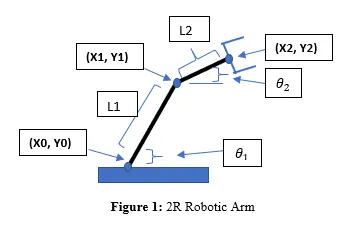
The figure shows the 2R robotic arm where it's constituent parts are labelled, namely Base, Link 1, Link 2 and robotic arm or manipulator.
Here, `L_1` and `L_2` are the dimension of two links, Link 1 and Link 2 of the mechanism which undergoes rotational motion. Link 1 rotates about the fixed point `(x_0,y_0)`. The other end of the Link 1 will be at the position `(x_1,y_1)`. The one end of the Link 2 will have the position `(x_1,y_1)` and will rotate about this point. The other end of the Link 2 will be at the position `(x_2,y_2)`.
Let's consider that the (x0,y0) is at the origin which is the fixed position. Meaning co-ordinates of (x0,y0) are (0,0).
Let `theta_1` and`theta_2`be the angles subtended by both Link1 and 2 with respect to the x-axis. Therefore,
`x_1=L_1.costheta_1` and `y_1=L_1.sintheta_1`
`x_2 = x_1 + L_2.costheta_2` and `y_2 = y_1 + L_2.costheta_2`
Objectives
- Understanding the concept of 2R Robotic arm.
- Creating the code for 2R robotic arm
- Making animation of the robotic arm.
Main Program
%challenge 3 2R robotic Arm


%inputs
l1=1.5; %length of first arm
l2=1; %length of second arm


theta1=linspace(0,90,15); %span of first arm
theta2=linspace(0,90,15); %span of second arm
ct=1;

%calculation with for loop
for i=1:length(theta1)
    for j=1:length(theta2)
        %inputting co-ordinates
        x0=0;
        y0=0;
        x1=l1*cosd(theta1(i));
        y1=l1*sind(theta1(i));
        x2=x1+l2*cosd(theta2(j));
        y2=y1+l2*sind(theta2(j));
        %plotting
        plot([x0 x1],[y0 y1],[x1 x2],[y1 y2], 'Linewidth', 3);
        axis([-0.1 3 0 3]);
        M(ct)=getframe(gcf);
        ct=ct+1; %forgot to put ct
    end
end

%making movie and writing on file
movie(M);
videofile = VideoWriter('robotic_arm_avi','Uncompressed AVI');
open(videofile);
writeVideo(videofile,M);
close(videofile);
Output of the Program
Link for video:https://drive.google.com/file/d/1LoOiQHlfL4Bpo9FKlW-mrZWJbjrmzn5l/view?usp=sharing
Conclusion
The MATLAB program to simulate the robotic arm has been successfully created and the corresponding animation has been created.