DLR Internship_task : File parsing using python
Aim:
To write a Python macro that extracts data from a user input file and arranges the data in an ascending order based on a user input column.
Theory:
Parsing means breaking it down into component parts so that its syntax can be analyzed, categorized, and understood. By doing this we are going to a string into parts and then recognise the parts to convert it into something simpler than a string. File parsing is to resolve things into component or subpart form and describe the syntactic file. That is, reading in the data stream and building a memory model of it.
In order to perform the parsing operation a simulation file named ‘example.txt’ is provided.
The program can be divided into several sub-divisions,
- File compatibility check
The program first takes the file name as input from the user and checks whether it is a file which can be operated upon. If it is a valid file name the program continues else the program exits. A logical 'equal to' operator is used to check whether the input string and the file name are matching.
- File reading and sorting
In order to successfully run the sorting program the .txt file is opened and is read line by line using a 'for loop'.
Each line is then divided into separate parts depending on the column number using the split() function.
After separating the file successfully and storing each line in a list of list form, the data is sorted using the sort() function using the user input column as a parameter. In addition, the sorted column is also stored in a variable called column_data for further use if needed.
- Writing the sorted data
After the file data has been sorted. An output file is opened in the 'write' format and the data is written onto it and saved in the directory containing the python script.
Python script
# importing necessary modules
import math
import itertools


#importing and validating the input file

file_name = input('Enter the file name with .dot extension:')

try:

   open(file_name, 'r')

except FileNotFoundError :
   print('Sorry. This file cannot be read/does not exist')
   exit()

else:
   print('File successfully recognized and opened')


#reading the necessary inputs

category = input('Enter the category name you want to sort :')
column_no = int(input('Enter the column number you want to sort with :'))
max_col = int(input('Enter the maximum number of columns in your data set'))


data = []
col_data = []
# column_no = 4
data_2 = []
temp_1 = []
row_number = 0


if category == 'GRID' and column_no >=3:
    for line in open(file_name):
        if category in line:
            temp = line.split()
            temp.pop(-1)
            data.append(temp)
            data_2.append(temp[0])
            data_2.append(temp[1])

            temp_3 = (line.split()[2])
            temp_3 = str(temp_3)

            for i in range(max_col-2):
                data_2.append(temp_3[(i*8):(i*8)+8])


            col_data_1 = (line.split()[2])
            temp = str(col_data_1)
            col_data.append(float(temp[(column_no-3)*8:((column_no-3)*8)+8]))
            row_number = row_number + 1

    # print(data_2)
    # print(data_2[0:5])
    data_3 = []
    for i in range(row_number):
        data_3.append(data_2[(i*max_col):(i*max_col+5)])
        # i = i + 6
        if i == len(data_2):
            break
    # print(data_3)


else:
    for line in open(file_name):
        if category in line:
            data.append(line.split())
            col_data.append(float(line.split()[column_no-1]))


length = len(data[0])

#sorting
if category =='GRID' and column_no>=3:
    data = data_3

def sort_item(item):
    return float(item[column_no-1])
data.sort(key=sort_item)
length = len(data[0])
data = list(itertools.chain.from_iterable(data))

#writing sorted data onto file
i = 0
j = 1
k = 0


output_file = open("output_file.txt", "w")
for i in range(len(data)):
    output_file.write(str(data[i]))
    output_file.write("t")
    if i!= 0 and i%((length-1)*j + k)==0:
        output_file.write("n")
        j = j + 1
        k = k +1

output_file.close()
Outputs sample
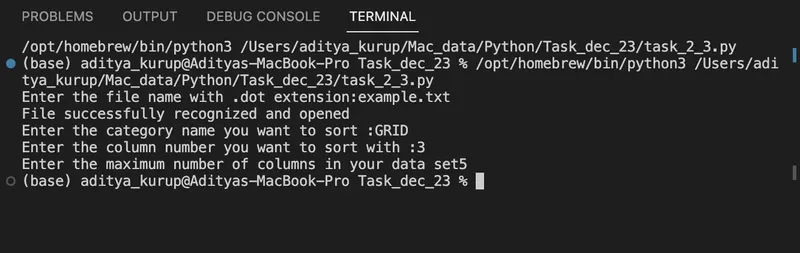
Terminal user interface
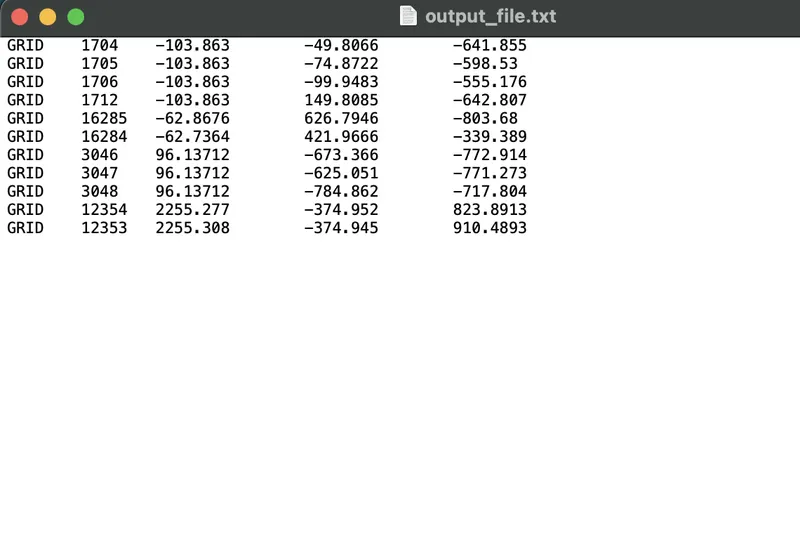
Saved output file
Result:
The user input file has been successfully parsed the the data arranged accordingly