Week 2- 2R Robotic Arm Challenge
Program for the forward kinematics of a 2R Robotic Arm :-
clear all
close all
clc

%create a forward kinematics 2R robotic arm

%inputs
l1=5;
l2=2;
l3=.5;
l4=.5;
l5=1;
l6=1;


theta1=linspace(30,150,10);
theta2=linspace(0,360,90);

ct=1;
for i=1:length(theta1)

for j=1:length(theta2)
        Theta2=theta2(j);
        c=360-Theta2;
        x0=0;
        y0=0;

        y1=l1*sind(theta1(i));
        x1=l1*cosd(theta1(i));

        x2=x1+l2*cosd(Theta2);
        y2=y1+l2*sind(Theta2);

        x3=x2+l3*sind(c);
        y3=y2+l3*cosd(c);

        x4=x2-l4*sind(c);
        y4=y2-l4*cosd(c);

        x5=x4+l5*cosd(c);
        y5=y4-l5*sind(c);

        x6=x3+l6*cosd(c);
        y6=y3-l6*sind(c);
         x8=-1;
         y8=0;

         x9=1;
         y9=0;

       plot([x0 x1],[y0 y1],[x1 x2],[y1 y2],[x2 x3],[y2 y3],[x2 x4],[y2 y4],[x4 x5],[y4 y5],[x3 x6],[y3 y6],[x8 x9],[y8 y9],'linewidth',3);
        title('Robotic arm')
        xlabel('X-axis')
        ylabel('Y-axis')
         axis([-10 10 -10 10])
         pause(.03)
         M(ct)=getframe(gcf)
         ct=ct+1;
end
end

    movie(M)
    videofile=VideoWriter('robo.avi')
    open(videofile)
    writeVideo(videofile,M)
    close(videofile)
- The above program is written for the forward kinematics of a 2R Rbotic arm.
- Before writting the program we should know all the dimension of the link and coordinate location.
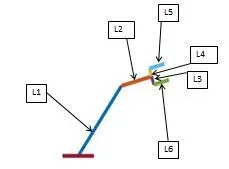 Here i mention the link name.
- %inputs
l1=5;
l2=2;
l3=.5; These are the all link dimention ,first we have to mention it.
l4=.5;
l5=1;
l6=1; - theta1=linspace(30,150,10); - That means we have to divided theta1 in 10 equal parts from 30 deg. to 150 deg. that is 120 deg.
- Note:- When we want to divided a variable into desirable equal parts ,then we used "linspace command" .
- ct=1; - This is a counter command , It used when we want to represtent a figure window.
- For i=1:length(theta1) -This is a for loop command , length(theta1) it refers to number of value of theta1.
- Here i value is change from 1 to length of theta1.
- Let theta 1 have 10 value then value of i changed from 1 to 10 and each time it store one value of theta1.
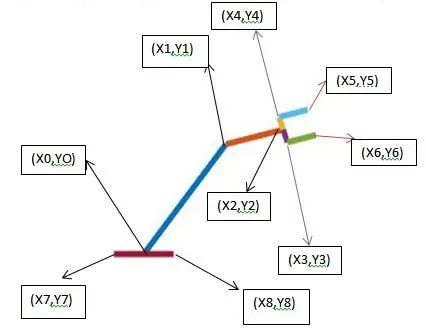
In the above figure all the coordinates name are mentioned .
x0=0;
y0=0;
y1=l1*sind(theta1(i));
x1=l1*cosd(theta1(i));
x2=x1+l2*cosd(Theta2);
y2=y1+l2*sind(Theta2);
x3=x2+l3*sind(c);
y3=y2+l3*cosd(c);
x4=x2-l4*sind(c);
y4=y2-l4*cosd(c);
x5=x4+l5*cosd(c);
y5=y4-l5*sind(c);
x6=x3+l6*cosd(c);
y6=y3-l6*sind(c);
x8=-1;
y8=0;
x9=1;
y9=0;- For calulating the coordinate we should know about the variable which are used in to calculate coordinate.
- By using of simple trigonmetry and logical operation we can easly calculate the coordinate location.
- The above command is written for the locating coordinate of the figure.
- first we start the coordinate from (X0,Y0) location.
- x2=x1+l2*cosd(Theta2);
y2=y1+l2*sind(Theta2); - Here x1 is the referance point for the x2 and y1 is for the y2.
- c=360-Theta2; Here c is a variable , we take this variable to make our calculation easy.
- plot([x0 x1],[y0 y1],[x1 x2],[y1 y2],[x2 x3],[y2 y3],[x2 x4],[y2 y4],[x4 x5],[y4 y5],[x3 x6],[y3 y6],[x8 x9],[y8 y9],'linewidth',3); :- This command is written for plot all the line we given.
- title('Robotic arm')
xlabel('X-axis')
ylabel('Y-axis') - Here we give our figure title is Robotic arm.
- we give xlabel name is x-axis and ylabel as Y-axis.
M(ct)=getframe(gcf)
- Here M is a array of figure window and getframe(gcf) means it show the current figure.
- movie(M)
videofile=VideoWriter('robo.avi')
open(videofile)
writeVideo(videofile,M)
close(videofile) - This command is written for make a movie in matlab.
- robo.avi means that the video will make in avi format .
ERROR FACED WHILE PROGRAMMING :-
- The script title should be written only in capital alphabet ,small alphbet, number and underscore otherwise you will get Error when you run the program in MATLAB.
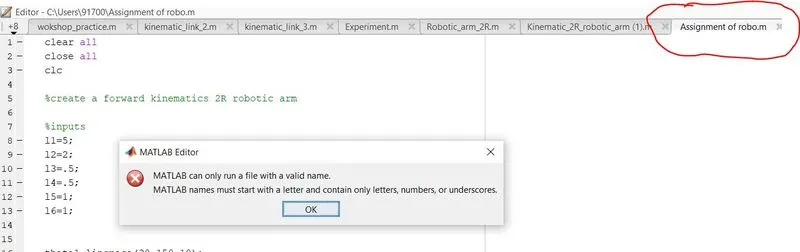
- correct way
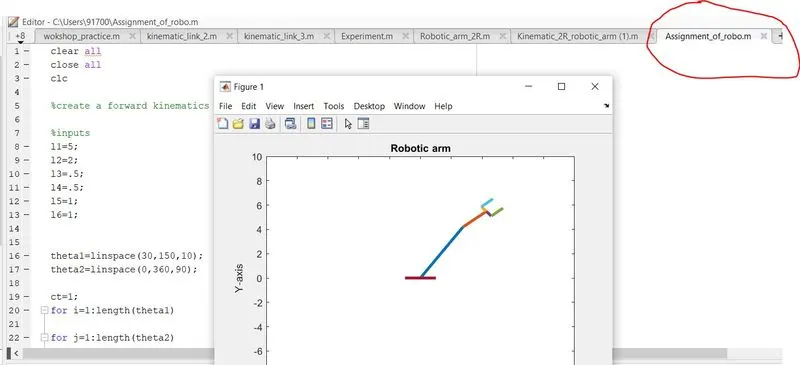
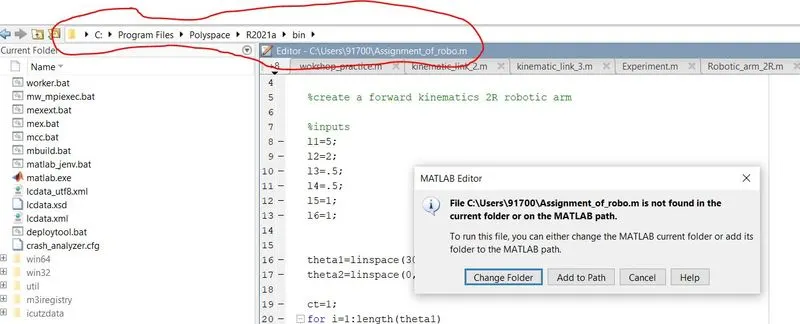
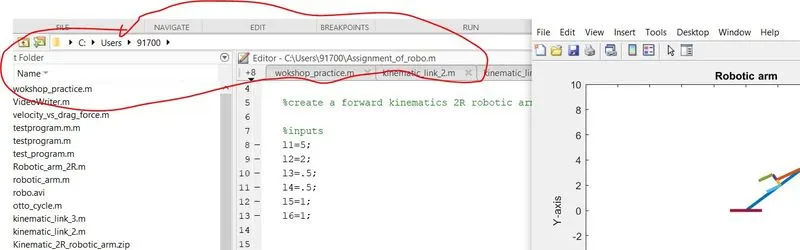
- In MATLAB make sure that the current folder window and Editor window should have same storage path.
- correct way
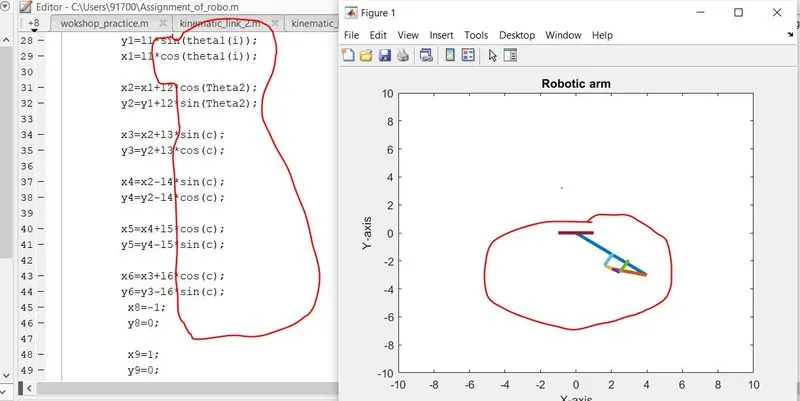
- in the time of writting program make sure that the angle unit is in dgree otherwise MATLAB take it in radian then you will get a different output.
- correct way
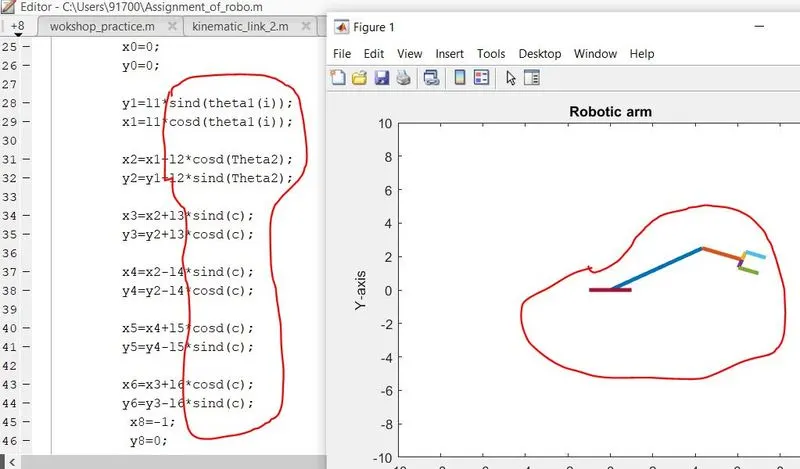
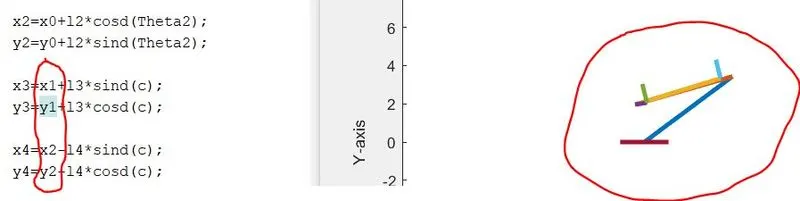
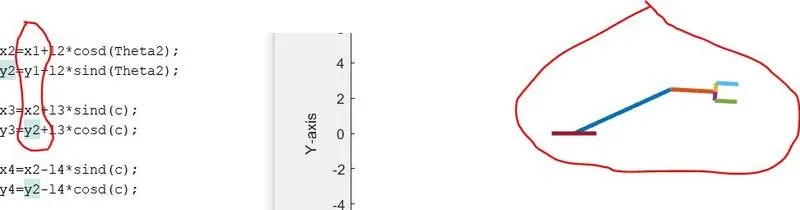
- When you calculate a New coordinate make sure that you take the correct reference coordinate point.
- correct way
THIS IS THE ANIMATION VIDEO LINK FOR KINEMATICS OF A 2R ROBOTIC ARM :-
https://drive.google.com/file/d/1F0GmRVcg2Vlt1XVGLZIygZSfvwNJVuq1/view?usp=sharing