Week 2- 2R Robotic Arm Challenge
program
forward kinematics of 2d robotic arm through this we can find workspace occupied by the arm so that we can use in different application in industry.
in this program, I considered 2 links with the following parameters
- length of first link l1
- length of the second link l2
- variable theta values as theta1 and theta2 with the x-axis
the starting point of the first link
(x0,y0)
end of the first link and starting point of the second link
(x1,y1)
the endpoint of the second link
(x2,y2)
logic
step1:- defines the starting point and theta values
step2:-opening for loop to run loop up to the length of theta1 by taking variable 'i' so that can run another for loop for all values of theta under one value of theta1.in the second for loop it self calculate remaining end and start points of links by using below formulas
- x1=l1cas(THETA1)
y1=l1sin(THETA1)
- x2=x1+l2cas(THETA2)
y2=y1+l2sin(THETA2)
step3:- connect all points that are calculated by using plot command, to display individual figures at individual angles of theta
define an increment and assign it in figure command and
ste4:-store all plots in one variable for the creation of the movie before incrementing by using getftame(gcf) command
step5:- end for loops
step6:- create a movie by using the movie(variable) command
- then create a folder and define its format
- next, open the folder load it with the figure that is stored in the variable.
- close it
%forword kinematics of robotic arm with varying theta values

close all   %closes all figures or plots if any
clear all   %clears workspace
clc      %cleans command window
%inputs
l1=10;  %length of first link
l2=6;   %length of the second link

 theta1=linspace(0,90,5);
 theta2=linspace(0,90,10);

 %starting base point of link 1
 x0=0;
 y0=0;
 ct=1;          %ct is varisble used for refernce and increment while exiguting figure command
 for i=1:length(theta1)
     THETA1=theta1(i);

    for j=1:length(theta2)  % for every value of theta1 for loop runs posiblr values of theta 2
        THETA2=theta2(j);
    %end point of link 1and also starting point link 2
    x1=l1*cosd(THETA1);
    y1=l1*sind(THETA1);
    %end point of lik 2
    x2=x1+l2*cosd(THETA2);
    y2=y1+l2*sind(THETA2);

    %plot
    figure(ct)  %displays each figure superately

    plot([x0,x1],[y0,y1],[x1,x2],[y1,y2],'linewidth',3);  %generstes plot between points with line width of 3

    axis([-17 20 0 18]);   %manages axis length as mentiond

    pause(0.6)          %pause the each plot or fig up to 0.6 sec

    S(ct)=getframe(gcf);   %getframe command collects all fig that exiguted inn grafic command figure
    ct=ct+1        % ct incremented by 1
    end

 end
 movie(S)     %creates movie with figures in S
 videofile=VideoWriter('forword_kinamatics.avi','uncompressed AVI') %setting path to store video with format to save
 open(videofile)   % opens the file to modification
 writeVideo(videofile,S)  %loading data into the file by using write video command
close(videofile) % after all modifications close fileErrors gon through
error1:-
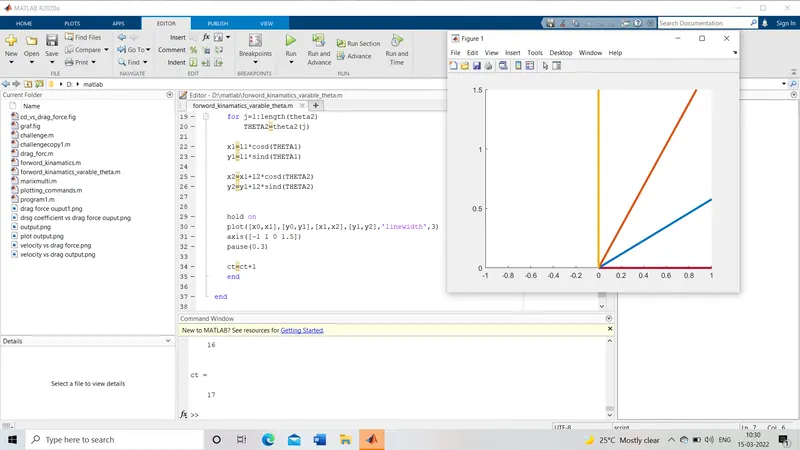
- getting plotted one link
* resolved by changing axis limits
error2:-
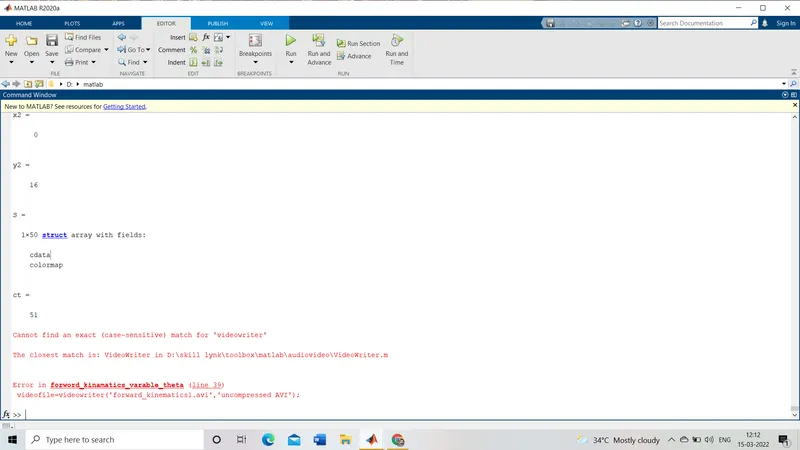
getting a case-sensitive error so that video is not created.
* get fix this by changing 'videowrite' to 'VideoWriter' where 'v' and 'w' should be capital