Week 2- 2R Robotic Arm Challenge
#1:Project
Forward kinematics of 2R robotic arm
#2:Introduction
We are going to type a program in octave to see the animation of robotic arm.here 2R represents the two rotationa links of robot .This types of robot are used in indusrtries for welding ,painting etc to do more work than human power. One link of robot is fixed and other is moving with respect to other
#3: figure
figure of 2R robotic arm is as shown in figure
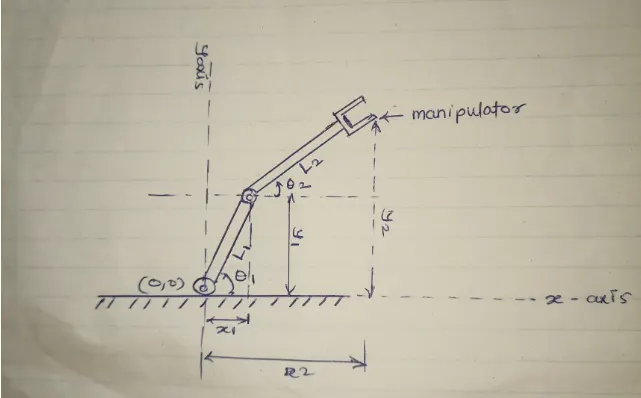
where,
l1=link1 of robot
l2=link2 of robot
theta1=angle made by link1 with x axis
theta2 =angle made by link2 with link 1
(x0,y0)=this are the starting point of robotic link1
x1=length of link1 from y axis=l1*cosd(theta1)
y1=length of link1 from x axis=l1*sind(theta1)
x2=length of link2 from y axis=x1+l2*cosd(theta2)
y2=legth of link2 from x axis =y1+l2*sind(theta2)
manipulator is tool or device
#4:Octave code for 2R robotic arm
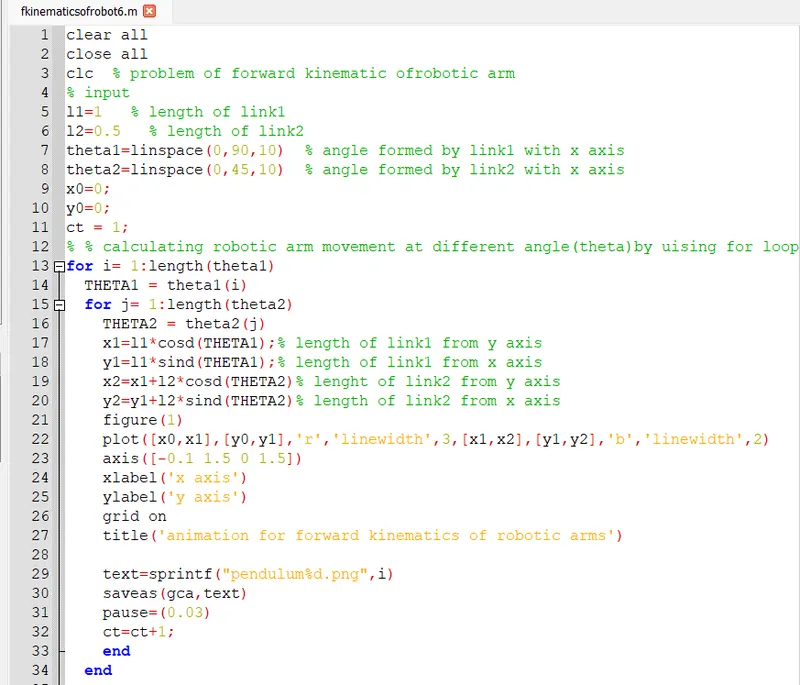
#5: code explainatiion
Always sratrt with clear all ,close all,clc
-clear all=it removes all the variables and functions from screen.
-close all=it delets the current figures.
-clc=It clears the command window.
next step is to provide inputs for further calculations
-inputs are (l1,l2,theta1,theta2)
then starting point values for link1
then define the legth of link 1 and link2
here theta values are written with the help of linspace command because of that we get 10 values theta 1 and theta2
For getting graph of robotic ar s at each value of theta1 and theta2 ,we have to use' for loop'.In which we have to define new variables i.e. THETA1 and THETA2
counter command is used to count the events in loop command
plot command is used for plot the graph between the x and y co-ordinates
from herevthe code for octave is diiferent than matlab
we have to save the program in project.png file
we get series of plots and we have to make the animation of all the graphs that got.
#5: Errors in code
fist time i write a program for matlab and trying to run in octave .But i get the animation of robotic arm.but dont get the animation file .
after that i get the proper code for octave with help of support engineers of skill lynk.
and also i got error in linspace command because i type the wrong spelling i.e.linespace
after thet i correct it own.
#:Animation
https://drive.google.com/file/d/1OX7zitFza2esv1RnWiLybvU34EfypUlR/view?usp=sharing