Week -2
#1 Simulink model of Doorbell using solenoid block
Aim
To design a simulink model of Doorbell using Solenoid Block which will work when the switch is closed for 2 seconds and then released.
Doorbell
Doorbell is a device consisting of electrical and mechanical components which is used to produce sound when operated.
When the circuit is closed using a switch, an electric current is passed through the solenoid. As a result the solenoid changes into an electromagnet which attracts the plunger or clapper attached to the solenoid moves, the bell is positioned in a way that the plunger hits the bell.
When the circuit is open the solenoid comes to its orginal position.
Design the Doorbell Model Using Solenoid Block
- A Pluse Generator Block is used to generate a sqaure wave pulse at regular intervals.
The Pulse genarator parameters are set: Amplitude =1, Period = 4Sec, Pulse Width = 50%, Phase Delay = 2Sec.
- The input sqaure wave is fed to a Simulink-PS Converted which coverts the input signal to physical signal.
- The physical signal is connected to a Switch.
- The switch is connected to a Battery to power the system.
- A Solenoid is connect to the circuit which act as an electromagnet.
- A Solver Confuguration is connected to this circuit inorder to act as a complete equation f(x)=0.
- An Electrical Reference is provided to this circuit.
- The solenoids mechanical part is connected to a Ideal Translational Motion Sensor which detects the position of the solenoid.
- This part is connected to the Mechanical Traslational Reference.
- The output of the Ideal Translational Motion Sensor is fed to a PS-Simulink Coverter to generate the output signal.
- The output signal is fed to a Scope.
The simulink model is designed.
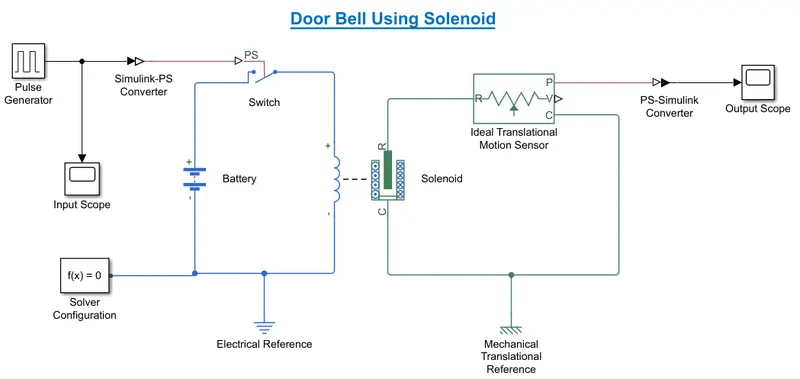
Fig 1: Simulink Model of Doorbell Using a Solenoid Block
Output
- The Input Signal of Pulse Genarator.

Fig 2: Output signal of Pulse Generator with Regular Intervals
- Output Signal of Doorbell model
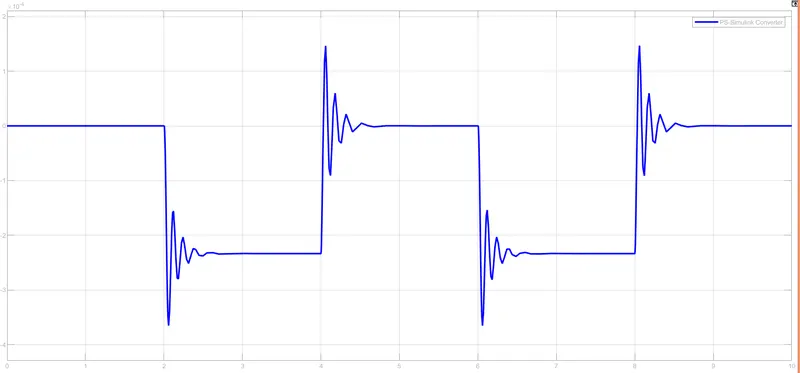
Fig 3: Ouput signal generated after turning the switch on and off for 10 sec
Result
The Doorbell using solenoid is succesfully created.
The solenoid in the model convert electrical energy to mechanical energy which is used to work the doorbell system.
#2 Design a Thermistor to sense the temperature of a heater & turn on or turn off the fan.
Aim
Use a thermistor to sense the temperature of a heater & turn on or turn off the fan as per given conditions.
Given Conditions
- Time = 0 - 10 Sec, Temperature Source= 20 °C (293 K)
- Time = 10 - 30 Sec, Temperature Source= 27 °C (300 K)
- Time = 30 - 50 Sec, Temperature Source= 23 °C (296 K)
- Fan is ON when Temperature > 25 °C (298.15 K) else Fan is OFF.
Design of the Thermistor System
- A Signal Builder block is set as input for the thermistor to set the desired values.
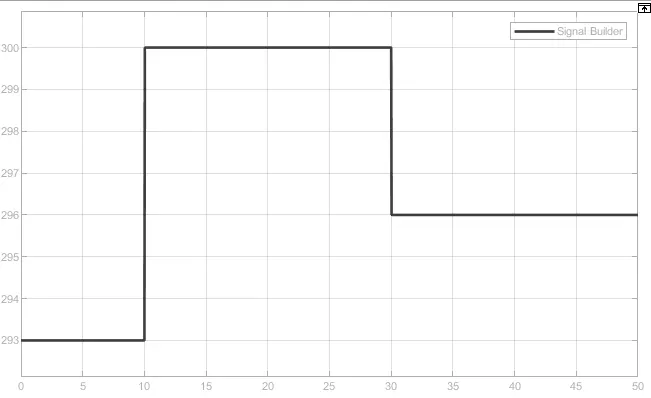
Fig 4: The signal generated by Signal builder Block by setting up the given condition values.
- This signal is fed to Simulink-PS Converter and then to Controlled Temperature Source which represents an ideal source of thermal energy to maintain temperature difference across the sources.
(Note: The Simulink-PS Converter Input handling Parameter is set as Filter input, derivative calculated)
- The out is fed to the Thermistor.
(Note: The Thermistor maximum temperature is set as 298.15 K or 25 °C.)
- A Voltage Sensor, Battery and a Resistor is connected to the thermistor as shown in the figure.
- The Voltage Sensor Block detects the Voltage and is fed to a Switch using a PS-Simulink Converter.
- The Switch ON and OFF the sysyem as per the conditions given above.
(Note: The Swich Threshold u2 > Display Value. Here it is 0.01099)
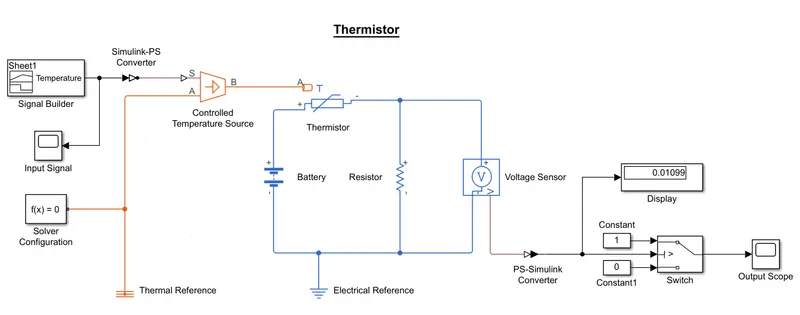
Fig 5: Simulink Model that detects temperature of a heater and Turn ON and OFF Fan acoordingly
Output
The output is observed such that the:
Fan is OFF for the time 0-10 where the themperature is less than 25 °C.
Fan is ON for the time 10-30 where the temperature is more than 25 °C.
Fan is OFF for the time 30-50 where the temperature is less than 25 °C.
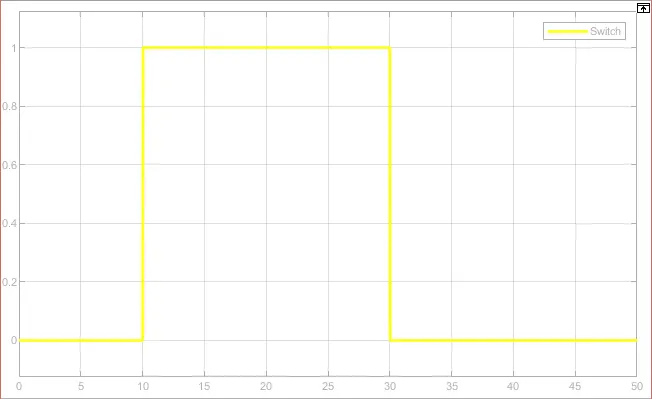
Fig 6: The Output Signal which shows the status of Fan
Result
The Thermistor model is succesfully developed.
The Fan is ON and OFF according to the given conditions.