Week -2
1. Door Bell using Solenoid
Objective: To create a Simulink model for a door bell using solenoid and to observe the physical movement of the plunger. The output of change in position of the solenoid need to be generated under the condition with ON time 2 seconds.
Simulink model
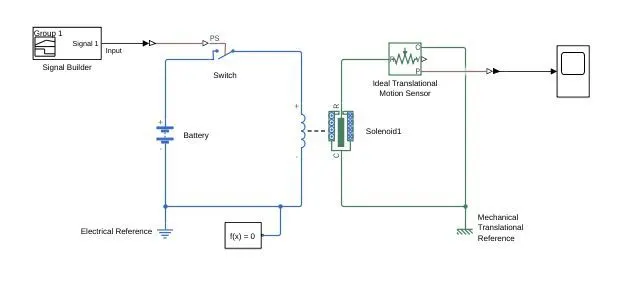
Model Description: In this simulation a Signal builder is used to create the given condition with turn ON time for 2 seconds. The signal builder is connected with a Simulink to physical signal converter which produces a physical signal. This physical signal is fed to the Electrical switch controlled by the physical signal. This electrical switch is connected between the Solenoid and a Battery. The mechanical part of the solenoid is connected to an Ideal Translational motion sensor to convert the physical movement of the plunger to a control signal. This control signal is fed to physical to Simulink converter to be connected with a scope. The Electrical reference is connected between the battery and the solenoid. The Mechanical Translational reference is connected between the case of solenoid and ideal translational motion sensor. A solver configuration block is included to define the solver setting for the simulation.
Signal Builder:
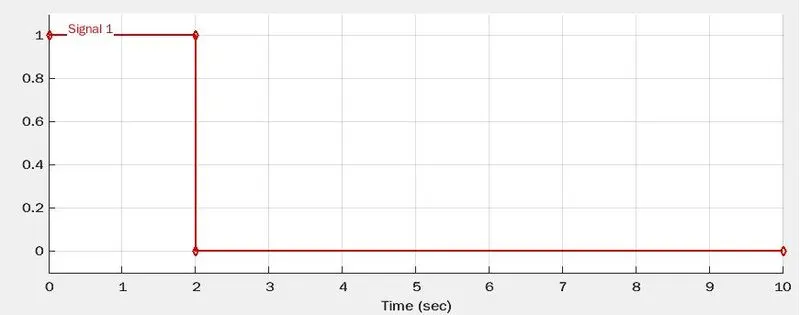
Minimum amplitude of 0 and a maximum amplitude of 1.
Minimum time period 0 seconds and a maximum time period of 10 seconds.
Turn ON Condition: Amplitude: 0 to 1 Time: 0 seconds to 2 seconds
Switch: The Switch is connected to open and close the circuit depending on the Threshold limit.
To satisfy the objective Threshold value can be given from (0.1 to 0.9) which depends on the amplitude of the signal.
Used Threshold Limit : 0.5
Battery: The DC source used to operate the solenoid.
Battery voltage : 50 V
Solenoid: The Solenoid is an Electro mechanical device that converts electrical energy to translational mechanical energy. The +ive and -ive terminals(coil terminals) of the solenoid are connected in parallel with the battery. The terminal R (Plunger) is connected to the Ideal Translational motion sensor. The terminal C(case) is connected to the mechanical translational reference.
Solenoid voltage : 50 V
Simulated Output of Plunger Movement
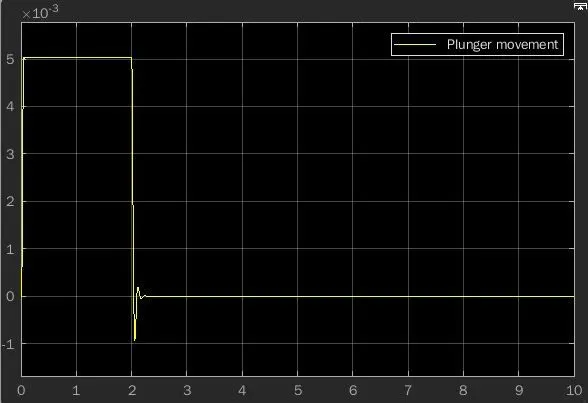
Observations: The simulated output shows the change in position of plunger from 0 second to 2 seconds.
A small curve is observed while the plunge achieves its maximum amplitude at 0 second and while the plunger moves to its original position from maximum amplitude at 2 seconds.
An oscillation observed while the plunger reaches its steady state during minimum amplitude at 2 seconds.
Conclusion: The Door Bell using solenoid with the condition for switch closed for 2 seconds and then released was simulated and the plunger positions are observed.
2. Thermistor Controlled Fan
Objective: To create a Simulink model to turn ON and OFF the fan depending on the temperature.
For 0 to 10 seconds the temperature should be 20°C,
For 10 to 30 seconds the temperature should be 27°C,
For 30 to 50 seconds the temperature should be 23°C.
The fan gets turn ON only if the temperature is greater than 25°C.
Simulink model 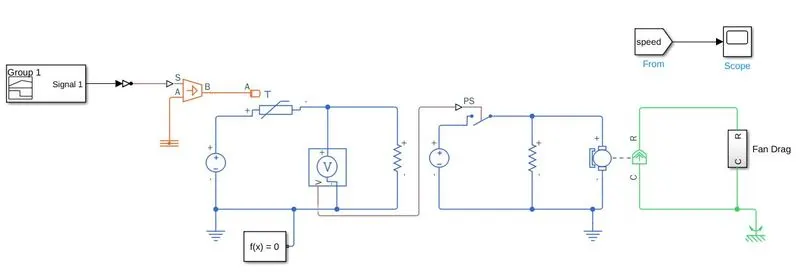
Fan Drag
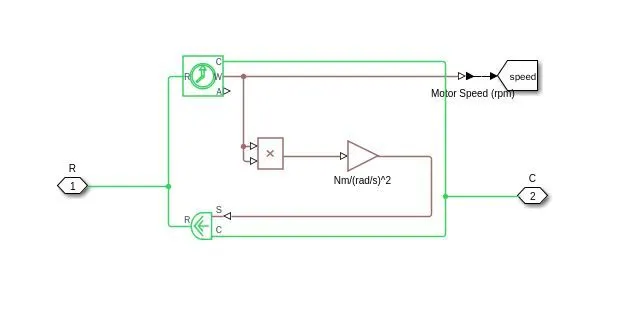
Description: The signal builder generates the given condition in the form of signal, which is fed to a controlled temperature source. The output from the temperature source is connected to a Thermistor which changes its resistance depending on the temperature. This change in resistance is measured using a voltage sensor with the help of DC source, resistor. The output from the voltage sensor is fed into a controlled switch which makes the DC motor ON and OFF. The Fan drag consists of an Ideal torque source which is controlled by the speed of the motor. An Ideal rotational motion sensor is used to convert the rotational motion of fan to a value which is used to observe ON and OFF time of the fan.
Signal Builder:
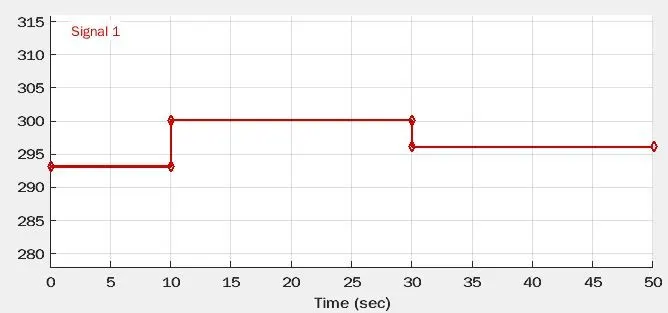
The given temperature values are converted into kelvin.
For 0 to 10 seconds the amplitude value is 293.15 k
For 10 to 30 seconds the amplitude value is 300.15 k
For 30 to 50 seconds the amplitude value is 296.15 k
The output from the signal builder is connected to Simulink to PS converter to provide the physical signal to the temperature source.
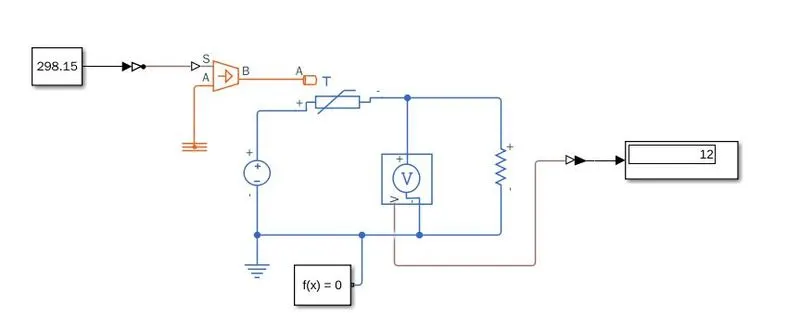
Thermistor: It changes its resistance with respect to change in temperature. The voltage sensor is used to measure the change in the resistance with the help of a DC source(24V) and a resistor(1000 ohm).
Switch: The output from the voltage sensor is fed into the switch. The threshold limit of the switch is calculated by providing the equivalent kelvin value of 25°C(298.15 k) as the input instead of signal builder. The output value 12 can be viewed with a display and the threshold value is entered in the switch.
DC motor with Fan Drag: A 24V DC source is connected through a controlled switch to a DC motor. The Fan drag is created using an Ideal torque source which is controlled by the speed of the motor. Ideal rotational motion sensor converts the rotational energy of the motor to speed which is converted into torque using the square law.
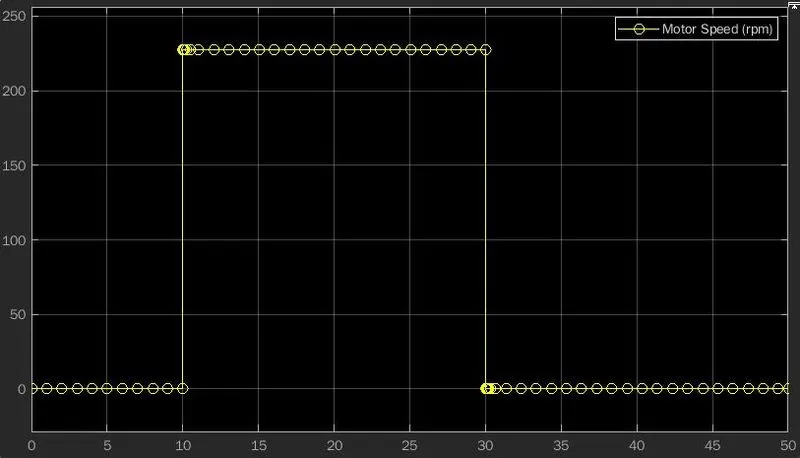
Observation: From the graph the,
Motor speed is 0 for the temperature less than 25°C (0 to 10 seconds and 30 to 50 seconds)
motor speed is 225 for the temperature greater than 25°C (10 to 30 seconds)
Conclusion: The Thermistor controlled fan model with the given condition was simulated and required output was obtained.