Week -2
Simulink model of doorbell using solenoid block
A mechanical doorbell is a simple electromagnetic device which uses to solenoid to strike a metal piece designed to produce a note. The solenoid is an electromagnet with a wire wound around it and has a small metal piston and a return spring connected to the moving part of the solenoid. Usually, this piston itself is the moving part of the solenoid. When the circuit is closed and electricity flows through the coils, due to EM field, the piston moves against the return spring to its activated position and strikes a metal piece (called a tone bar). Once the circuit is closed and EM field disappears, the piston is moved to its original position by the return spring.
The Simulink model for a doorbell with solenoid is as follows:
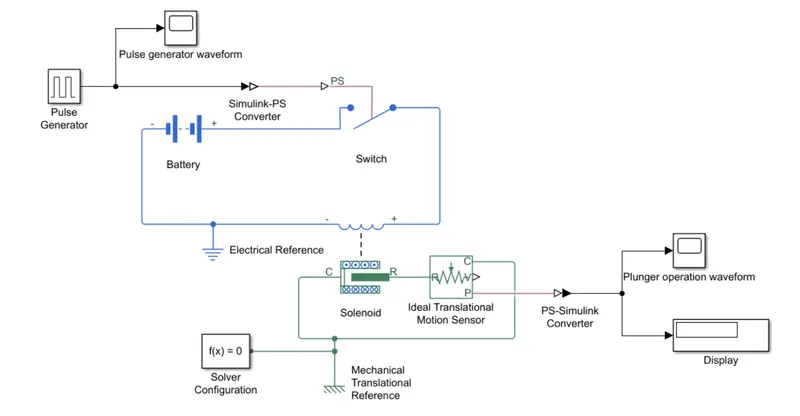
Explanation:
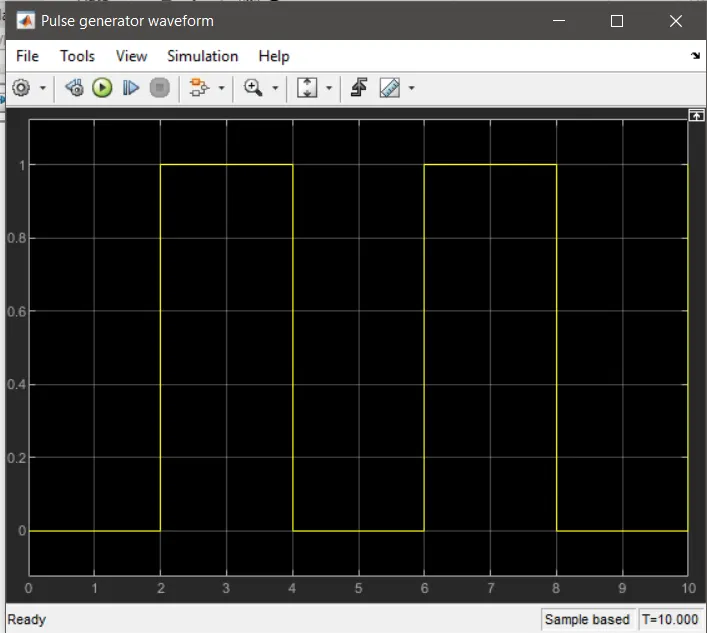
A Pulse Generator is used to create square wave pulse which signals the switch. According to the problem, the switch needs to be closed for 2 seconds before being released. Therefore Pulse Generator block parameters are defined in a way that the phase delay is 2 seconds and pulse width is 50% of period to obtain a uniform waveform. A Simulink-PS converter is used convert Simulink signal to physical signal.
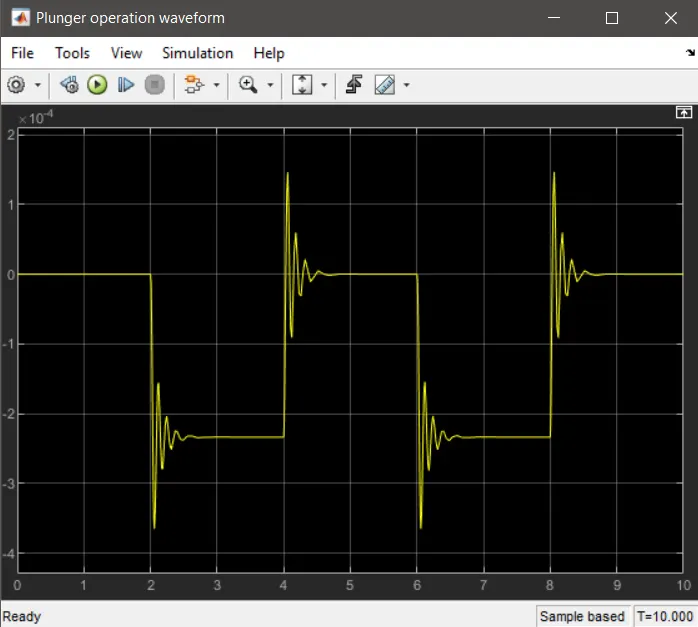
Next, a switch is connected to the output of the PS-Simulink converter. This switch is ON when the signal from the Pulse Generator exceeds its threshold value, otherwise the switch is OFF. Next, a Battery and a Solenoid block are connected and the circuit is grounded with an Electrical Reference. The ‘C’ port of the Solenoid is connected to a Mechanical Translational Reference and ‘R’ port is connected to an Ideal Translational Motion Sensor which detects when the solenoid is activated. Next, the ‘P’ port of the motion sensor is connected to a scope after passing through a PS-Simulink converter. The Solver Configuration block specifies the solver parameters that a model needs for simulation.
Results:
Pulse Generator waveform (input)
Plunger/piston operation (output)
Using a Thermistor as a switch to control a fan w.r.t. temperature change
A Thermistor is a thermo-electrical device in which change in temperature induces a change in internal electrical resistance. It is used for many sensor-based operations.
The Simulink model is as follows
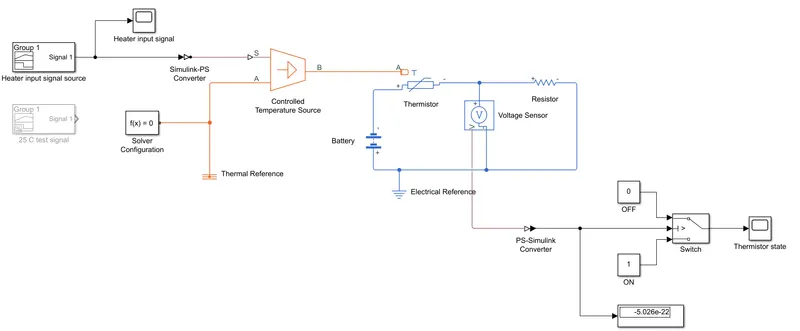
According to the given problem, the temperature of the heater (input to the thermistor) is 20°C (293K) from 0 to 10 seconds, 27°C (300K) from 10 to 30 seconds, 23°C (296K) from 30 to 50 seconds.
Explanation:
To create a signal source that can perfectly represent the given heater temperatures, a Signal Builder block is used. Next, the signal passes through a Simulink-PS converter before entering a Controlled Temperature Source which acts as the heater in this case. The output ‘S’ of the heat source block is connected to the Thermistor. To the thermistor, a battery and a resistor is connected along with an Electrical Reference as ground. The resistor is added to limit the current flow from the battery. Next, a Voltage Sensor is connected across the circuit. The output of the voltage sensor passes through a PS-Simulink converter and a numerical display before connecting to a Switch. Block parameter of the switch are defined according to the given problem; Fan conditions: ON if the temperature above 25°C, OFF otherwise. A test signal from the Signal Builder block (of 25 for 10 seconds) is first to obtain the voltage value at 25°C temperature. This value is displayed in the numerical display block, which is the threshold value for the final simulation. It is understood that the switch is controlling the fan.
Results:
Switch state
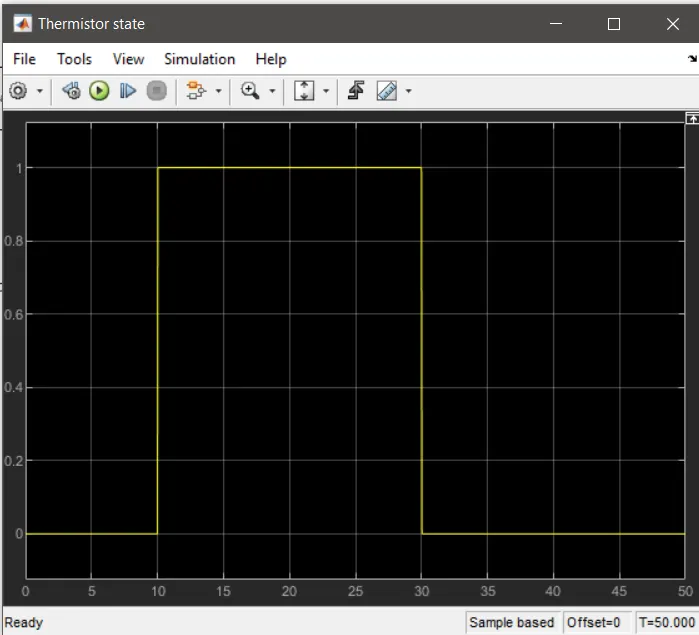
For 0 to 10 seconds, the switch is in OFF condition, since the temperature (20°C) is lower than the threshold of 25°C. Between 10 and 30 seconds, when the temperature is 27°C, the switch is ON. For 30 to 50 seconds, the temperature falls below 25°C, therefore the switch is OFF.