Week -2
Theory of door bell
A simple chime doorbell uses the magnetic field created by the electromagnet to move a magnetic piston to strike two tone bars.When the button is pressed, the circuit closes and the electromagnet moves a contact arm. When the contact arm moves, it interrupts the circuit and the electromagnet stops.
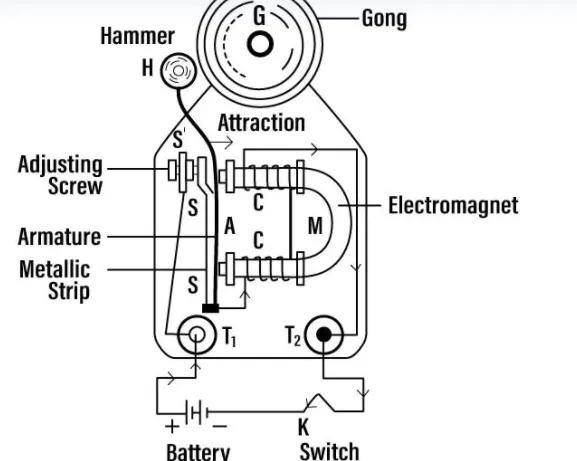
Working principle of door bell
A bell works with the principle of working of electromagnetism.
When the switch is pushed on, the circuit gets completed and the current starts flowing through the U-shaped electromagnet which creates a magnetic field in the core. This attracts the iron armature.
When the armature moves towards the electromagnet, the hammer strikes the gong and the bell rings.
As the armature moves towards the electromagnet, the contact with the adjustment screw breaks which breaks the closed circuit and stops the current. Now, when there is no current there is no electromagnetism and the armature returns to the original position. This making and breaking of the circuit of the electromagnet continue as long as the button remains pressed.
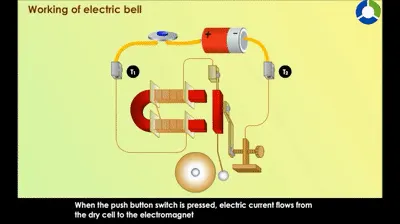
Simulink Model
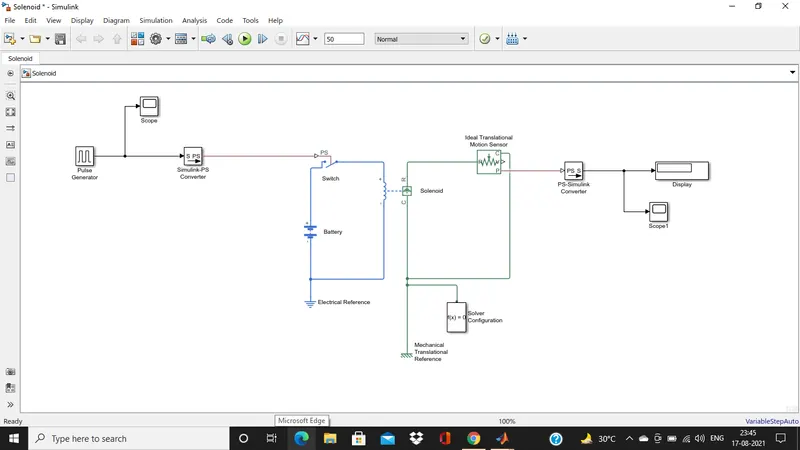
The above model is of the dooe bell using solenoidn in this model we used many blocks which are mentioned below with working.
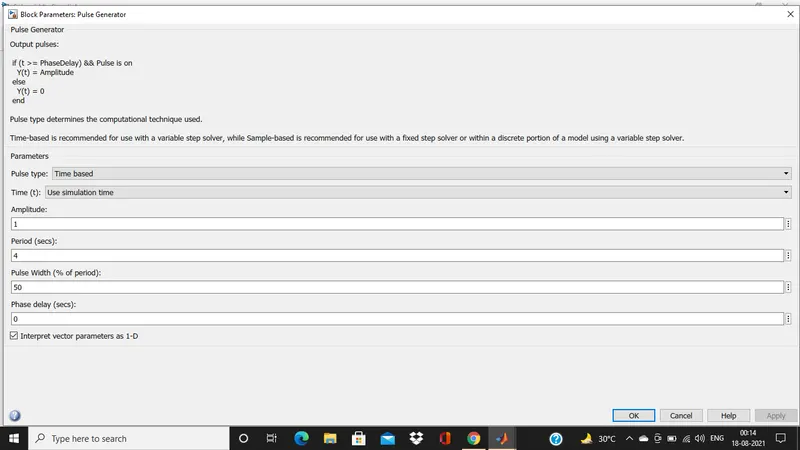
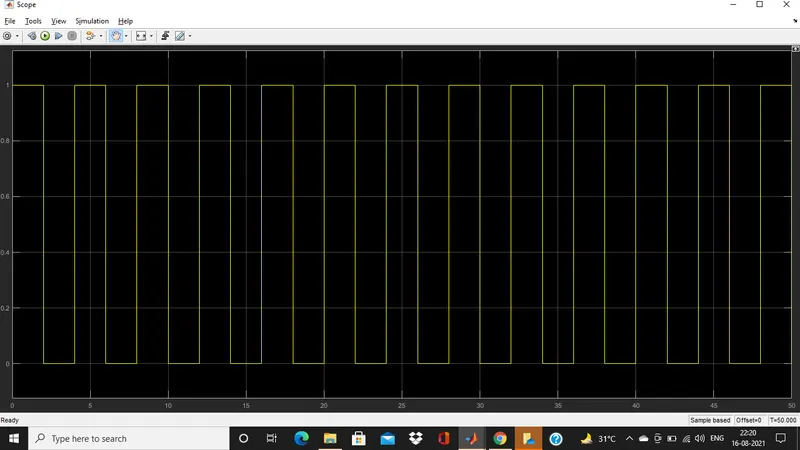
1. Pulse generator - The Pulse Generator block generates square wave pulses at regular intervals. The block waveform parameters, Amplitude, Pulse Width, Period, and Phase delay, determine the shape of the output waveform.
2. Scope - Scopes provide several methods for displaying simulation data and capturing the data for later analysis. Symbols on your block diagram represent the various data display and data capture methods.
-
Scope and Floating Scope blocks
-
Scope Viewer
-
Signal Logging
-
Signal Test Point
3. Simulink PS convertor - The Simulink-PS Converter block converts the input Simulink signal into a physical signal. Use this block to connect Simulink sources or other Simulink blocks to the inputs of a Physical Network diagram.
4. PS simulink convertor - The PS-Simulink Converter block converts a physical signal into a Simulink output signal. Use this block to connect outputs of a Physical Network diagram to Simulink scopes or other Simulink blocks.
5. Electrical and mechanical refrences - These are the refrence block for the ground source of the system.
In simulink it is represented by block.
7. Battery - Source of electric power which contain two terminal positive and negative through which we can connect in the circuit for power supply.
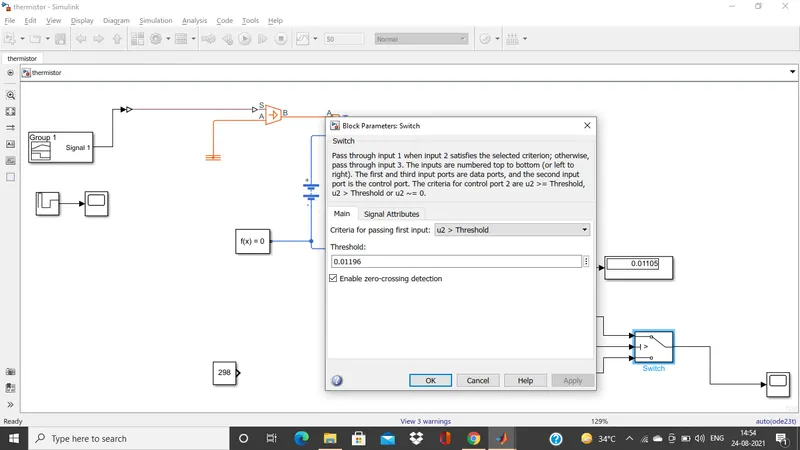
8. Switch - It is a device that completes the circuit which can operated manually or automatically.
9. Ideal translated motion sensor - The Ideal Translational Motion Sensor block represents a device that converts an across variable measured between two mechanical translational nodes into a control signal proportional to velocity or position.
10. Solver configuration - It basically used for completing the equation in which f(x) = 0. In which we find the value of x for output.
Configuration of pluse generator block
Output
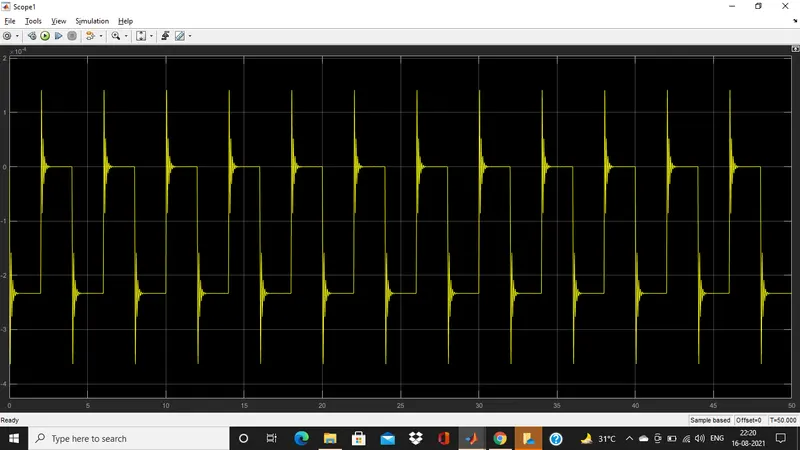
Input signal through pulse generator
Now,
Use a thermistor to sense the temperature of a heater & turn on or turn off the fan as per below conditions:
Temperature source: 20 °C from 0 to 10 seconds, 27 °C from 10 to 30 seconds, 23 °C from 30 to 50 seconds
Fan conditions: ON if the temperature above 25 °C, OFF otherwise
Model 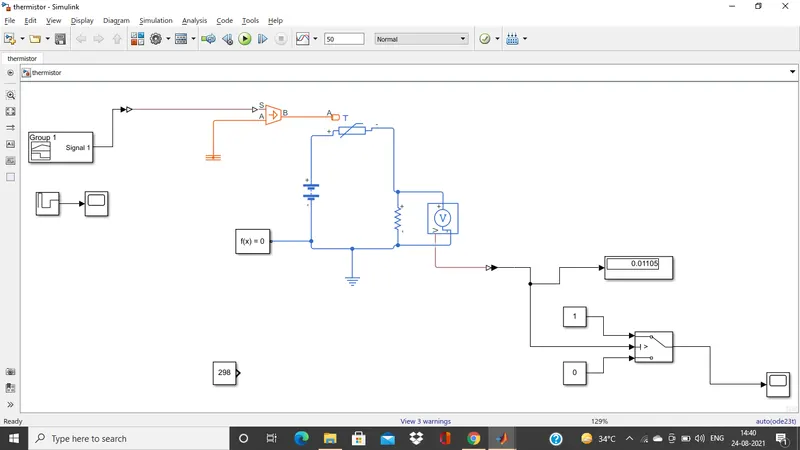
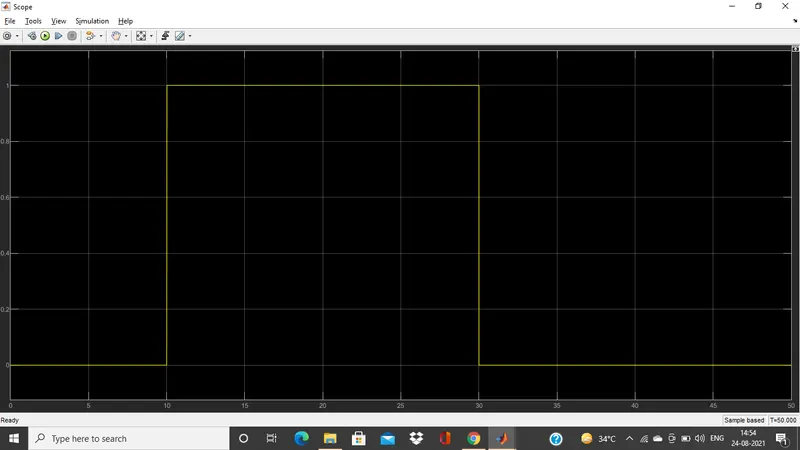
Temperature is 20 degree celsius from 0 to 10 second, 27 degree celsius from 10 to 30 seconds and 23 degree celsius from 30 to 50 seconds.
Fan should be operated if temperature goes above 25 degree celsius.
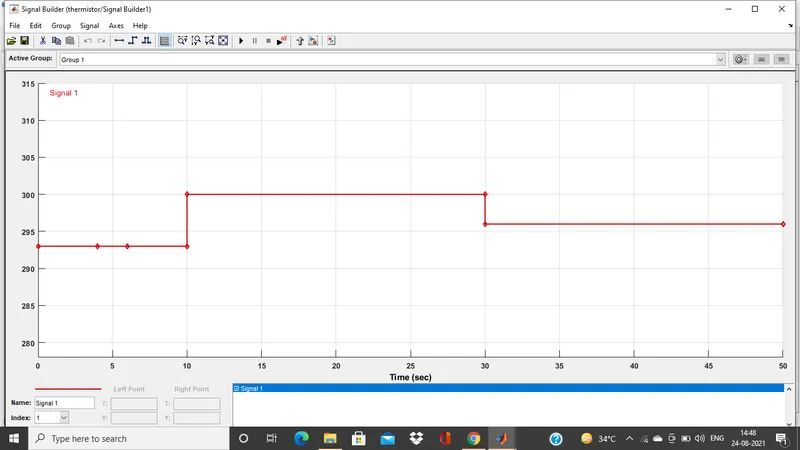
To generate temperature condition in this model we use a signal builder with a controlled temperature source. It basically generates the simulink signal which varies with time.
In the below signal builder plot the temperature is given in kelvin
20°C = 293K from 0 to 10 seconds
23°C = 296K from 10 to 30 seconds
27°C = 300K from 30 to 50 seconds
Switch Block Parameter
Result
Refrences
https://www.lidolearning.com/questions/ph-bb-selina7-ch7-exsa-q18/q18-draw-a-neat-and-labelled-d/
https://in.mathworks.com/help/simulink/slref/pulsegenerator.html
https://in.mathworks.com/help/physmod/simscape/ref/simulinkpsconverter.html
https://in.mathworks.com/help/physmod/simscape/ref/pssimulinkconverter.html
https://in.mathworks.com/help/simulink/ug/simulation-data-display-and-capture-using-scopes.html
https://www.tlxtech.com/articles/solenoid-101-what-is-a-solenoid
https://skill-lync.com/knowledgebase/thermistor-challenge
https://skill-lync.com/knowledgebase/how-to-use-lookup-table-in-simulink