Design and Development of an Automotive Side Door Trim Panel
"Final Project - Side Door Trim"
AIM & OBJECTIVES:
- Create the Door trim Panel Plastic component through the given Class-A surface. To begin with, the tooling axis for the given Class A Surface should be created meeting the requirements of the draft angle and at the end perform the Draft analysis on the model.
- To Create the Heat stakes and locators in the lower substrate considering the design rules.
- To Create the Dog house in the lower substrate and assemble the pushpin considering the design rules.
- To Create the Flanges to connect all the design features together considering the design rules.
INTRODUCTION OF AUTOMOTIVE PLASTIC DESIGN:
Automotive plastic design is the practice of designing and producing vehicle components using plastic materials. Over the past several decades, the use of plastic in the automotive industry has grown rapidly due to its many advantages over traditional materials such as metal and glass. Automotive plastic design allows for the creation of complex, lightweight, and cost-effective vehicle components that can meet the stringent performance, safety, and regulatory requirements of the automotive industry.
Plastics are versatile materials that can be formulated to meet specific requirements, such as resistance to impact, heat, chemicals, and UV radiation. They can be easily molded into intricate shapes and can be manufactured in large quantities with high precision and repeatability. Automotive plastic design encompasses a wide range of applications, from small interior components like switches and air vents to large exterior parts like bumpers and fenders, as well as engine components, fuel systems, and safety systems.
One of the main benefits of automotive plastic design is its ability to reduce weight, which can improve fuel efficiency, handling, and performance. Additionally, plastic parts can be produced more cost-effectively than metal components, particularly when they are mass-produced using injection molding. Plastic is also more resistant to corrosion than metal and can be engineered to withstand harsh weather conditions and other environmental factors.
Overall, automotive plastic design is a critical component of the modern automotive industry, allowing for the production of vehicles that are lighter, more efficient, and safer than ever before.
THEORY:
ROLE OF PLASTIC IN AUTOMOTIVE INDUSTRY:
Plastics have played an important role in the automotive industry for several decades. They are used in a wide variety of applications, from exterior body parts to interior components and electrical systems. Here are some of the key ways in which plastics are used in the automotive industry:
-
Lightweighting: Plastics are lightweight and can help reduce the weight of a vehicle, which can improve fuel efficiency and reduce emissions.
-
Design flexibility: Plastics can be molded into complex shapes, which allows automotive designers to create unique and aerodynamic designs that are difficult to achieve with other materials.
-
Durability: Plastics are durable and can withstand exposure to heat, cold, and chemicals, making them ideal for use in harsh automotive environments.
-
Cost-effectiveness: Plastics are often less expensive than other materials, which can help reduce the overall cost of producing a vehicle.
-
Noise reduction: Plastics can help reduce noise and vibration in a vehicle, improving overall comfort for passengers.
-
Safety: Plastics can be engineered to absorb impact and provide crash protection, which is crucial for vehicle safety.
Some specific applications of plastics in the automotive industry include:
- Exterior body parts such as bumpers, grilles, and body panels
- Interior components such as dashboards, door panels, and seat backs
- Electrical components such as wiring harnesses and connectors
- Engine components such as intake manifolds and valve covers
Overall, plastics have become a vital material in the automotive industry due to their versatility, durability, and cost-effectiveness. As the industry continues to focus on reducing weight and improving fuel efficiency, it is likely that the use of plastics in automotive applications will continue to grow.
Here are four reasons why plastic is used in car manufacturing:
- Plastics reduce the weight of cars
- Plastics and polymers contribute to the safety of cars
- Plastics help to lower car manufacturing costs
- Polymers advance the design of vehicles
ADVANTAGES OF AUTOMOTIVE PLASTIC DESIGN:
There are several advantages of using plastic in the design of automotive components:
-
Lightweight: Plastic parts are typically lighter than their metal counterparts, which can help improve fuel efficiency and overall vehicle performance.
-
Durability: Automotive plastics are engineered to be tough and durable, which means they can withstand harsh weather conditions, vibrations, and impacts better than some other materials.
-
Corrosion-resistant: Plastics do not rust, corrode, or rot, which can make them ideal for use in areas exposed to moisture or salt.
-
Design flexibility: Plastic can be molded into virtually any shape or size, giving designers and engineers greater flexibility in their designs. This can lead to more innovative and stylish automotive designs.
-
Reduced costs: Compared to traditional metal fabrication techniques, plastic injection molding can be a more cost-effective process for producing large quantities of parts. Additionally, plastic parts can be easier and cheaper to transport due to their lightweight nature.
-
Noise and vibration reduction: Some types of plastic can help reduce noise and vibration in the vehicle, leading to a quieter and more comfortable ride.
-
Eco-friendliness: Automotive plastics can be recycled and reused, making them a more environmentally-friendly choice than traditional metals. Additionally, some types of plastic can be manufactured from renewable resources.
APPLICATIONS OF AUTOMOTIVE PLASTIC DESIGN:
Automotive plastic design is used in a wide range of applications in the automotive industry, including:
-
Exterior parts: Plastic is commonly used to make exterior parts such as bumpers, grilles, and fenders, which can help reduce the overall weight of the vehicle and improve its aerodynamics.
-
Interior parts: Plastic is used for many interior components including dashboards, door panels, and center consoles, as well as smaller items like knobs, switches, and vents.
-
Electrical components: Plastics are ideal for use in electrical components such as connectors, housings, and circuit boards due to their non-conductive properties and durability.
-
Engine parts: Plastics are used for a variety of engine components including air intake manifolds, oil pans, and valve covers. These parts can help improve fuel efficiency, reduce noise and vibration, and resist high temperatures.
-
Fuel systems: Plastic is commonly used in fuel tanks, fuel lines, and fuel rails due to its excellent chemical resistance and ability to withstand the high pressures and temperatures associated with fuel systems.
-
Lighting systems: Plastics are used to make headlight and taillight lenses, as well as other lighting components. Plastic lenses are durable, lightweight, and can be molded into complex shapes.
-
Safety systems: Plastics are used in a variety of safety systems, such as airbag housings and seat belt components. Plastic can help reduce weight, absorb impact, and provide increased flexibility and energy absorption in the event of a collision.
Overall, automotive plastic design is a versatile and cost-effective solution that allows for the production of complex and innovative designs while meeting the strict safety and performance standards of the automotive industry.
MANUFACTURING PROCESS:
INJECTION MOULDING:
Injection molding is a manufacturing process used to produce plastic parts by injecting molten plastic material into a mold. The process is commonly used for mass production of plastic parts that have a consistent shape and size. The steps involved in injection molding are:
Designing the part: The first step in the injection molding process is to design the part that is to be manufactured using computer-aided design (CAD) software.
Creating the mold: A mold is then created based on the design of the part. The mold is typically made of metal and consists of two halves, a stationary half and a movable half, which can be opened and closed by a hydraulic or mechanical system.
Preparing the material: The plastic material used for injection molding is typically in the form of small pellets or granules. These are loaded into a hopper, which feeds the material into the injection molding machine.
Melting the material: The plastic material is melted in the injection molding machine using a heating element or a screw that melts the material and pushes it into the mold.
Injecting the material: Once the plastic material is melted, it is injected into the mold under high pressure. The mold is held closed by the machine's clamping unit to prevent the plastic from leaking out.
Cooling the part: After the plastic has been injected into the mold, it is allowed to cool and solidify. The cooling time depends on the thickness of the part and the specific plastic being used.
Ejecting the part: Once the part has cooled and solidified, the mold is opened and the part is ejected from the mold using ejection pins or a robotic arm.
Repeat: The process is then repeated to produce additional parts.
Injection molding is a versatile and efficient process that can produce parts with a high level of accuracy and consistency. The process is widely used in industries such as automotive, medical, consumer goods, and packaging.
TOOLING DIRECTION FOR PLASTIC PART:
Tooling direction is main consideration for plastic part and mold parts because it defines movement of mold part and possibility of plastic part to come-out from mold part (Core and Cavity).
- In Molding machine arrangement is given to open the mold along a direction which is known as Tooling Direction.
- In other words. The mold is built from two separate halves (Core and Cavity) and tooling direction basically define the direction of mold pulls apart.
- Tooling direction is known as primary direction.
- Core is the male part of the mould which holds the inner design of the component and the cavity is the female part which holds the outer shape of the component.
Tooling direction, also known as mold flow direction, refers to the direction in which the molten plastic material flows into a mold during the injection molding process. The direction of the flow can have an impact on the properties and appearance of the finished product, as well as the ease and efficiency of the molding process.
When designing a mold for injection molding, the tooling direction is an important consideration. The tooling direction can affect the strength, appearance, and function of the finished part. The tooling direction also impacts the flow of plastic material in the mold, which can affect the filling and packing of the part.
There are generally two types of tooling direction: a longitudinal tooling direction and a transverse tooling direction. A longitudinal tooling direction is parallel to the longest dimension of the part, while a transverse tooling direction is perpendicular to the longest dimension of the part. The choice of tooling direction depends on the specific requirements of the part being molded and the desired properties of the finished product.
The tooling direction can also affect the cost and complexity of the mold. A mold with a transverse tooling direction may require more complex and costly tooling, as the plastic material needs to flow through thinner sections of the mold. In contrast, a mold with a longitudinal tooling direction may require less complex tooling and can be more cost-effective.
In summary, tooling direction is an important consideration in the injection molding process, as it can impact the properties, appearance, and efficiency of the molding process. The choice of tooling direction depends on the specific requirements of the part being molded, the desired properties of the finished product, and the cost and complexity of the mold.
CAR DOOR PANEL:
Door panels serve as an interface between the interior of the car and the inner workings of the door, and between vehicle occupants and the door. They are expected to meet a variety of design specifications regarding safety, aesthetics, and functionality. In addition, they are expected to continue the material theme of the dashboard and pillars while concealing intricate electrical and mechanical components for operating locks, windows, and other features. The door panel has evolved from a simple two-part system of latch and simple winding mechanism to a more sophisticated enclosure. Doors currently have an inner full-width panel consisting of electronic windows, central locking system, and speakers. These panels typically consist of a foamed core covered with either textiles or plastics.
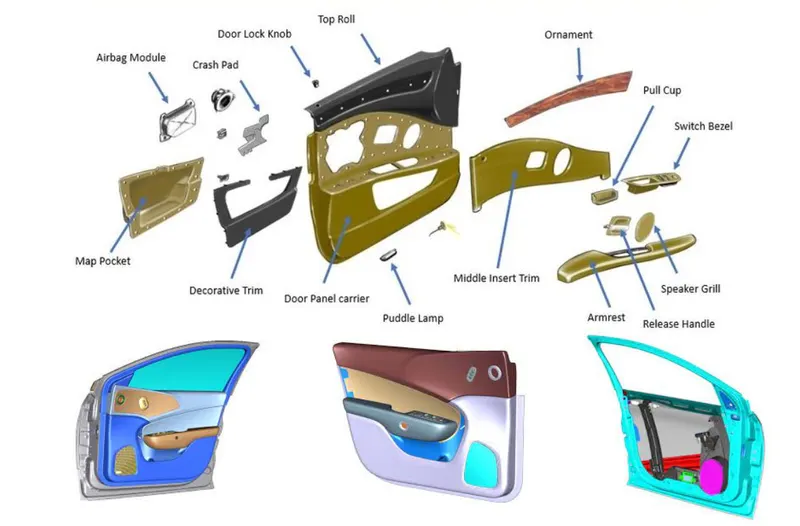
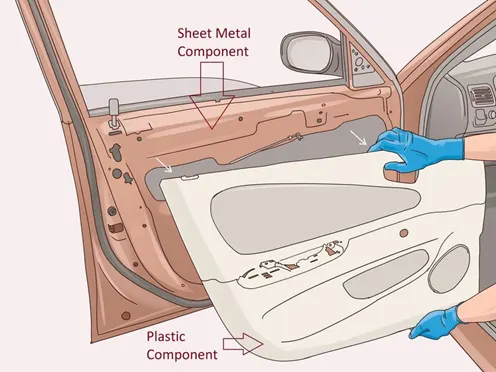
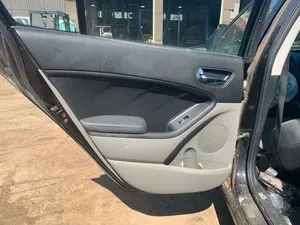
fig : conventional car door panel.
Door panels are expected to meet one of the toughest sets of requirements among interior car components. These panels should be designed to withstand and channel loads into the body of the car while being thin (<2 mm). These loads could be horizontal and vertical in nature, like the force applied on opening or closing doors while leaning/resting on them or when stepping on the armrest to access the roof . An additional consideration is their ability to protect occupants from injury during a side collision, where most injuries are inflicted on the chest and pelvis as a result of crushing force of the door .
Federal Motor Vehicle Safety Standard No.214 therefore sets forth directives to manufacturers in order to limit this injury. It states that the Thoracic Trauma Index (TTI) should not exceed 85 g for a four-door or 90 g for a two-door passenger car. This test is performed at impact velocity of 53 km/h, which accounts for 90% of side impacts in North America.
Conventionally, door panels consisted of polyvinyl chloride (PVC) or polyurethane foamed core with appropriate textile fabric coverings. Subsequently, there was a shift toward thin-wall moldings of ABS or PP backed by textiles in order to manufacture a contour-backed panel with recesses. This is primarily because integrated injection-molded door panel assemblies reduce the need for other energy-absorbing materials, resulting in cost reduction for manufacturers due to simplification of door construction.
Door currently have an inner full width panel consisting of electronic windows, central locking system and speakers.These panels typically consists of a foamed core covered with either textiles or plastics.
SEPARATING INPUT CLASS A SURFACE:
- With the help of assembly workbench, we divided our input into 5 parts
GIVEN CLASS A SURFACE:
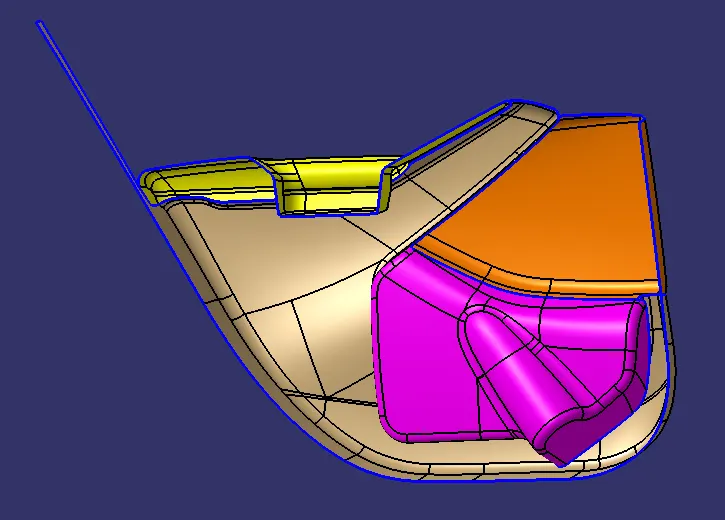
- Check the connectivity of the Class A Surface
- Ensure that there is no gap between the component, using join command.
- We can visually check it or by clicking boundary command.
- Therefore first check completed.
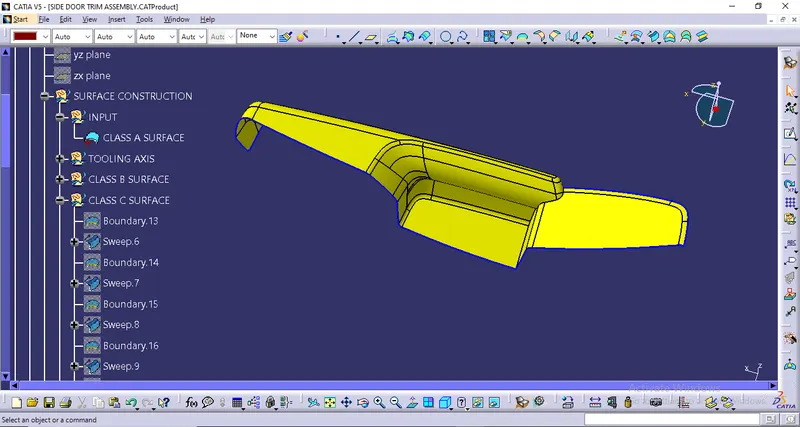
CLASS A SURFACE OF ARM REST:
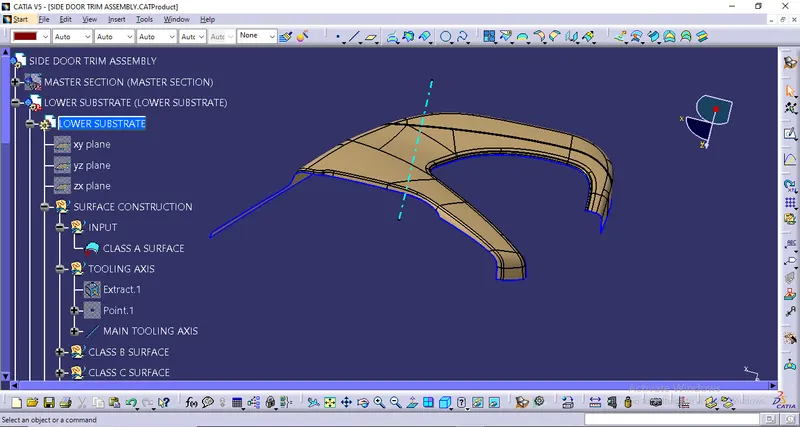
TOOLING AXIS CREATION IN ARM REST:
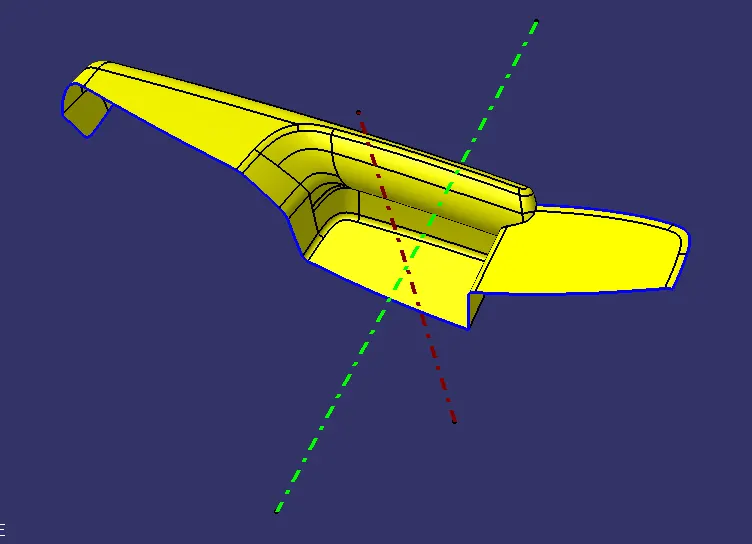
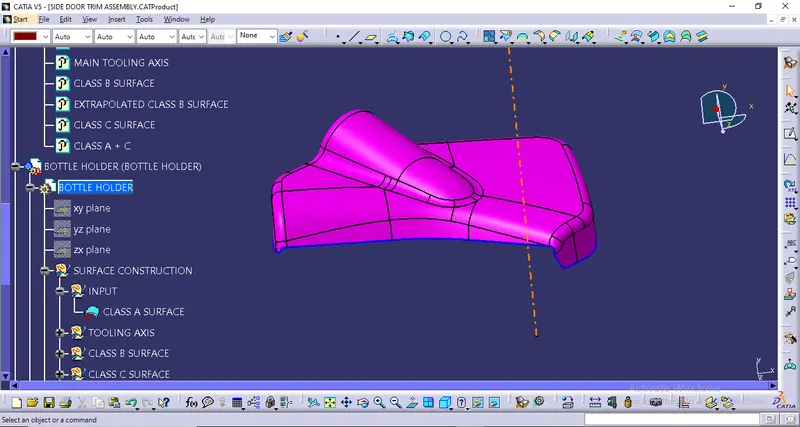
- Created Main tooling axis and Side core axis for Arm Rest.
- The tooling axis is nothing but the mould opens or the cavity opens.
- Check visaully which is the best possible tooling axis.
- Check all three axis.
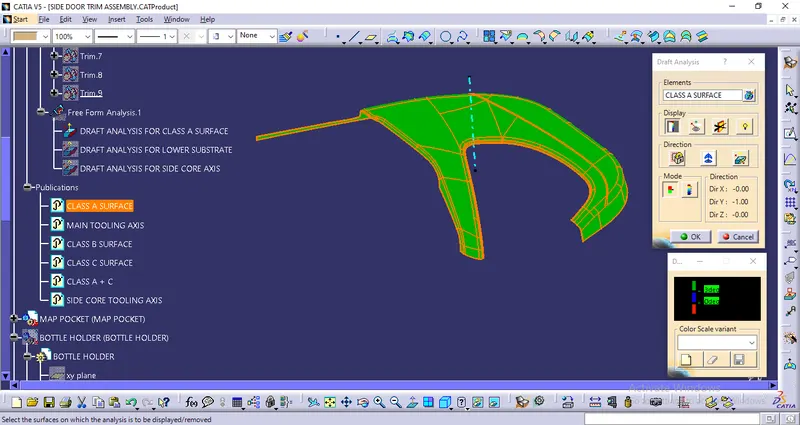
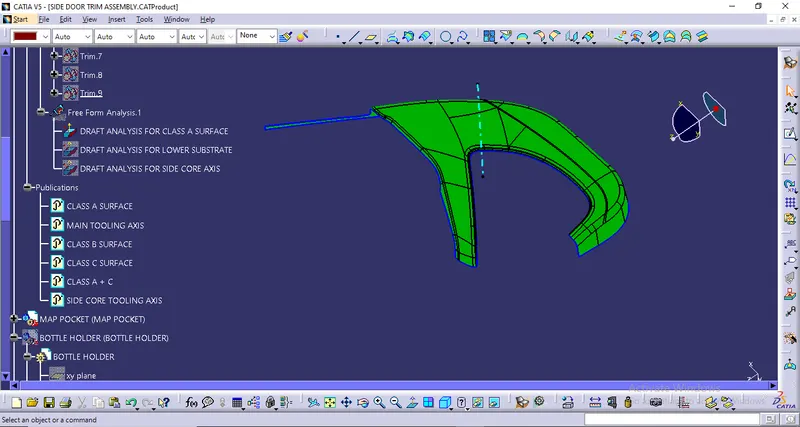
DRAFT ANALYSIS OF CLASS A SURFACE:
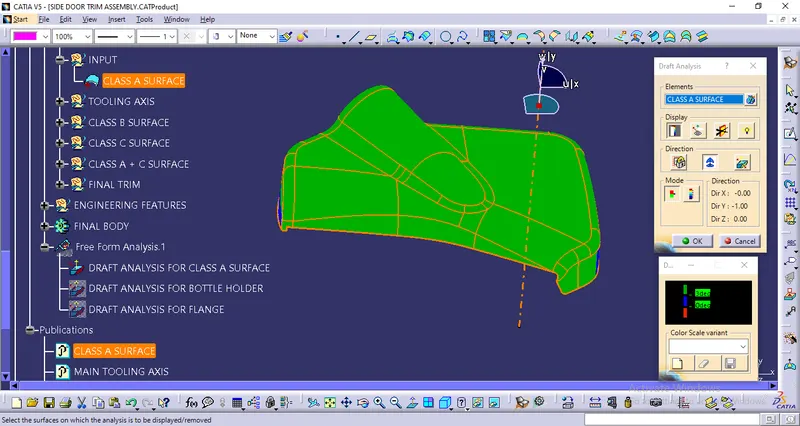
Now, We will perform a Draft Analysis on the Class A Surface.
Before starting with a Draft Analysis Operation, we will go to the 'Customize View Parameters' option under the 'View Toolbar'. Then we will enter the 'Customize View Mode' where we will go under the 'Mesh' option and select 'Material' and press 'OK'.
To start the Draft Analysis in the 'Generative Surface Design Workbench', we will go to 'Insert' and then look for the option called 'Analysis'. Once found, we will go under that and click on 'Feature Draft Analysis. This will open the 'Draft Analysis' Dialogue box. There, we will ensure that under 'Mode' we have selected 'Quick Analysis', under 'Display' we will select 'Show or Hide the Color Scale' and then select '3 Degrees' as the permissible draft angle. Then, under 'Direction' we will choose the icon with the symbol of the compass on it which stands for 'Use the Compass to define the new current draft direction'.
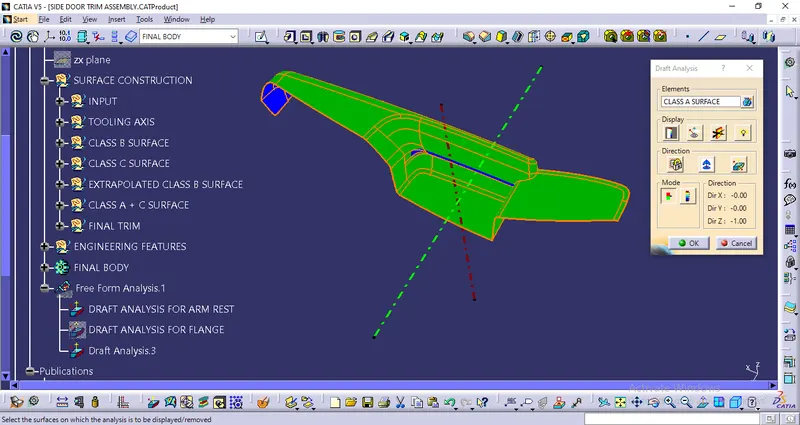
From the above image, we can see that we have successfully performed draft analysis in the class A surface.
PROCEDURE TO CREATE THE CLASS B SURFACE:
We'll start the procedure by creating an offset for the entire Class A Surface at a distance of 2.5mm as that is the desired thickness for our final plastic component.
As this is a complex surface hence the offset will fail to offset every element according to our necessity. It'll select some sub-elements that belong to the filleted regions by themselves that we have to remove to get the rest of the surface that is offsetted.
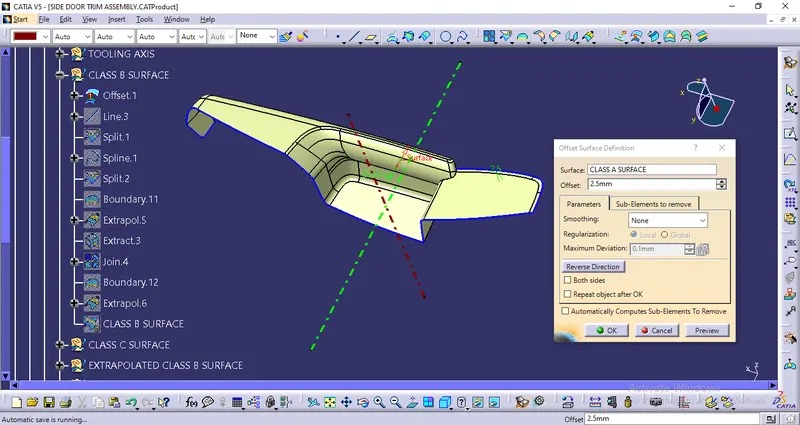
SOME PATCHES WILL FORM AFTER OFFSETTING
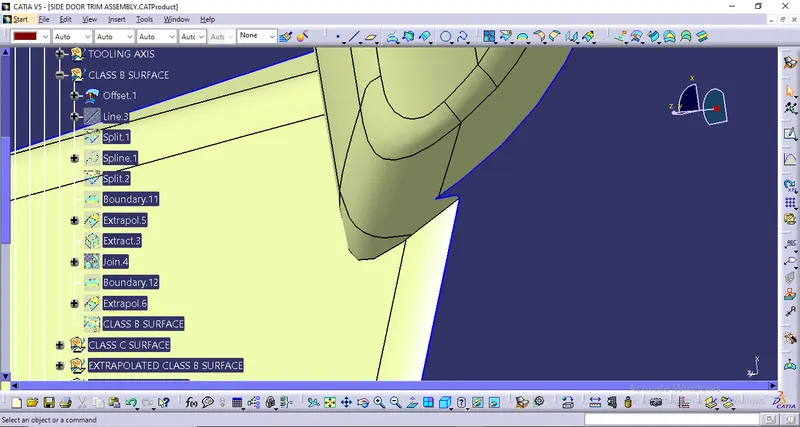
NOW WE WILL SPLIT THE ABOVE GAP REGION BY CREATING A LINE
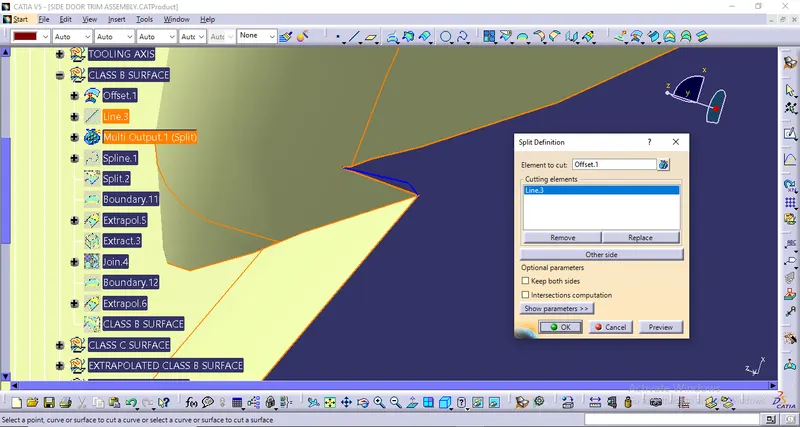
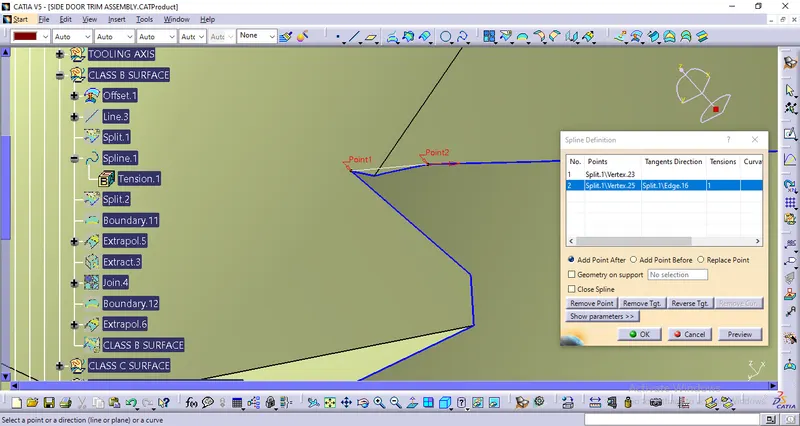
CREATE A SPLINE IN THE DESIRED LOCATION AND THEN SPLIT THE SURFACE TO GET THE DESIRED SURFACE
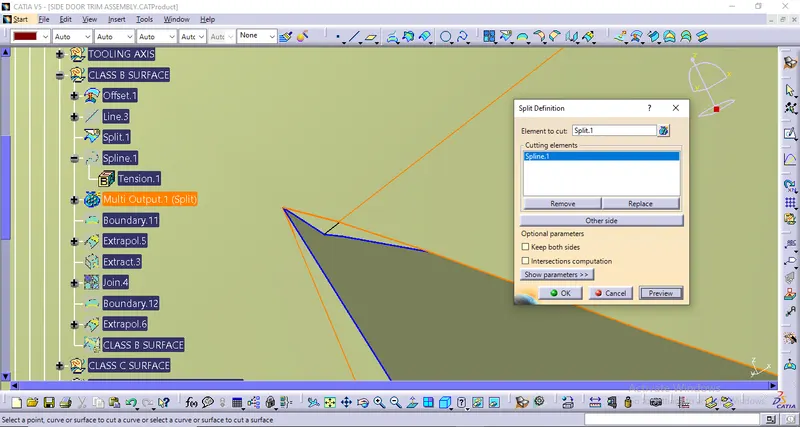
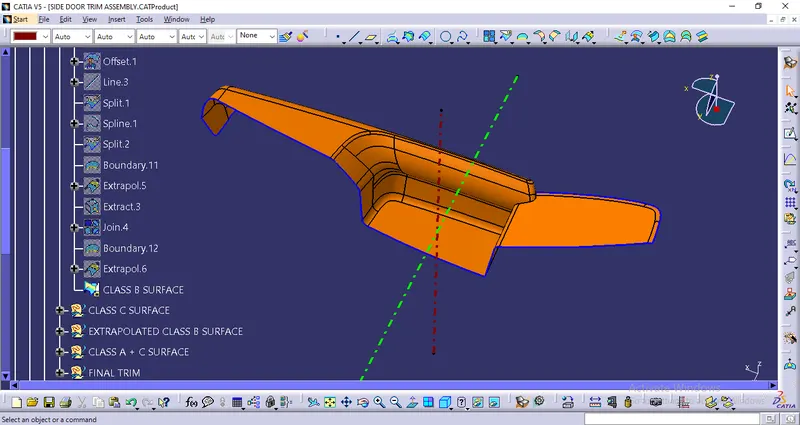
CREATING THE BOUNDARIES, EXTRAPOLATING THE SURFACE, AND THEN JOINING THE SURFACE TO GET THE DESIRED SHAPE OF THE SURFACE.
FINALLY, WE GOT THE B SURFACE BY DOING ALL THE ABOVE OPERATIONS
PROCEDURE TO CREATE THE CLASS C SURFACE:
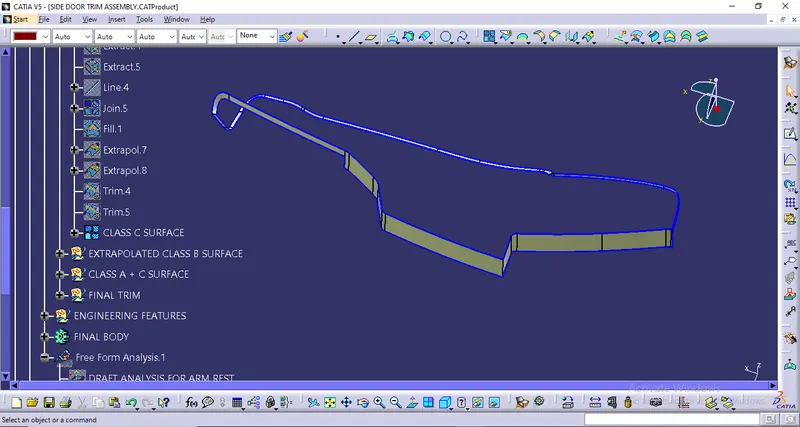
We'll create the Class C Surface with respect to the Class A Surface and provide draft angles to those surfaces that are parallel to the Main Tooling Axis. Surfaces at the bottom won't be needing any draft angle as they'll get cleared by the core itself. To create the Class C Surface we have to use various commands such as Sweep with Reference Surface and With Draft-Direction depending upon the necessity and at places where it'll be difficult for us to create a surface using Sweep, we'll use Multi-Sections Surface to create those surfaces.
Now, we're going to Join the Class A Surface with Class C Surfaces as shown below:
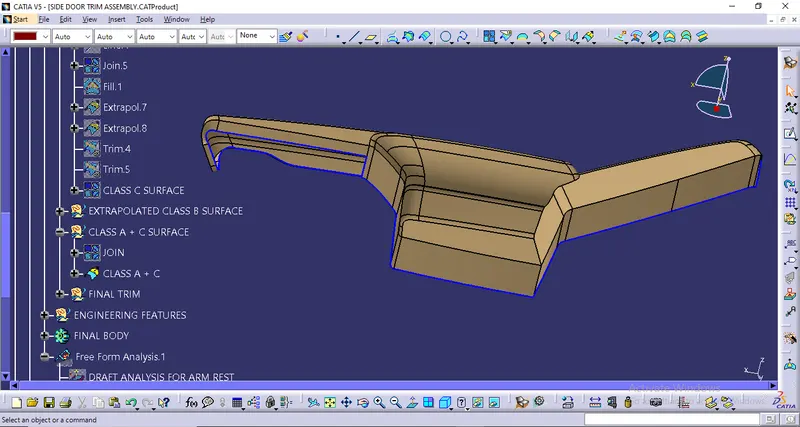
EXTRAPOLATED THE CLASS B SURFACE SO THAT IT CAN INTERSECT WITH CLASS A + C SURFACE AND THEN DID THE FINAL TRIM TO GET THE CLOSED BODY.
FINAL CLOSED SURFACE:
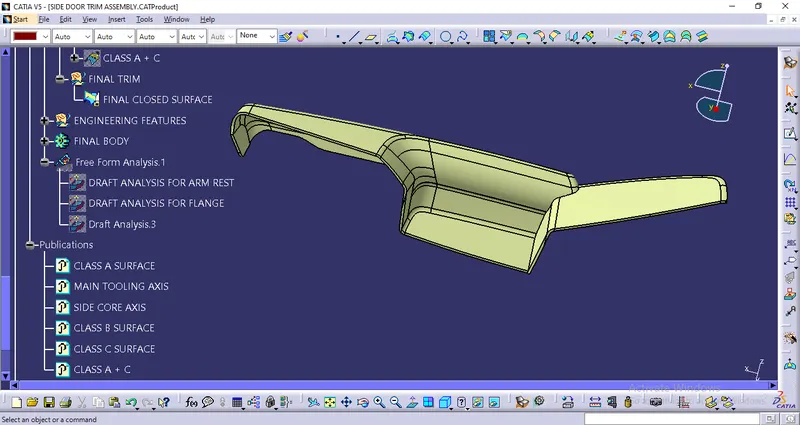
To check whether this body is closed or not we'll use the Boundary Command on it as shown below:
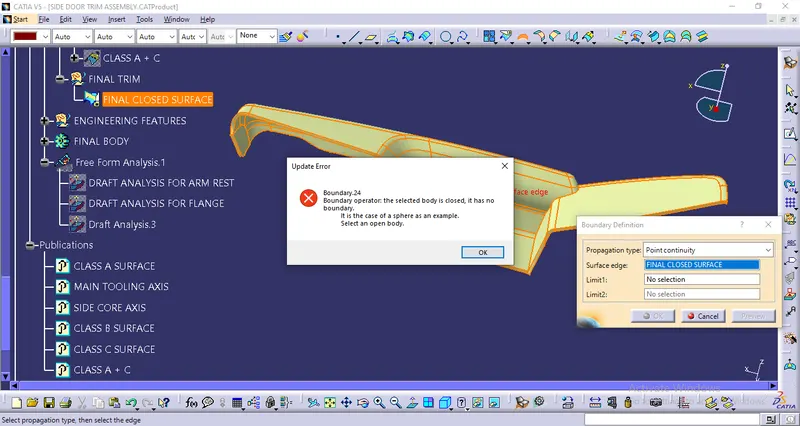
From the above image, we can see that the final closed body doesn't have any boundaries, and hence our final closed body is obtained successfully.
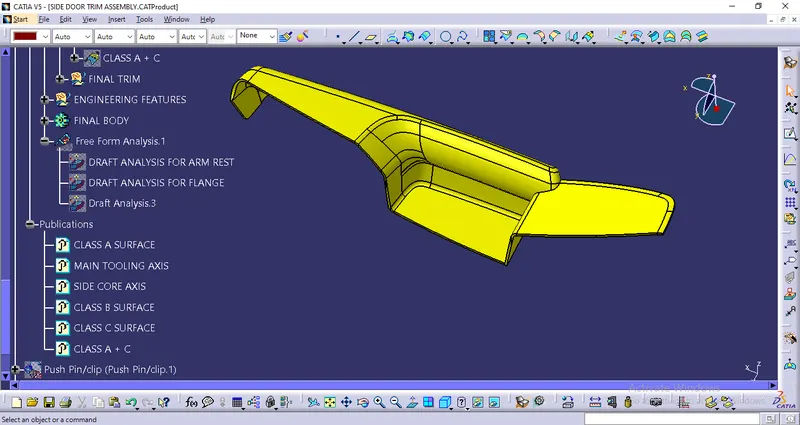
Finally, we'll go to the Part Workbench and use the option 'Closed Surface' from the 'Surface-based Features' toolbar to convert the final trimmed body into a solid body as shown below:
After that, we’ll perform a Draft Analysis on the Final Part in Part Workbench:
DRAFT ANALYSIS FOR THE FINAL PART USING THE MAIN TOOLING AXIS:
We'll click on the 'Draft Analysis' under the 'Analysis' Toolbar in the Part Workbench.
Then, we’ll click on the Compass Symbol under 'Direction' which stands for 'Use the Compass to define the new current draft direction'.
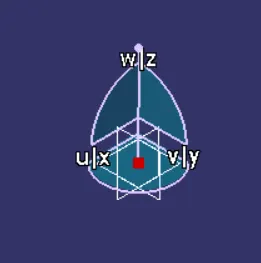
We'll drag the compass and place the compass on the Main Tooling-Axis.
Then, we'll select 'Show or Hide the Color Scale' under 'Display' and define our Draft-Angle as 3-Degrees.
As this component was made from a trimmed Class A Surface and hence we aren't required to provide a draft angle to every region. We have provided a draft angle of 2.7 degrees to all the required surfaces.
After that, we'll click the surface of the Final Part the results of which are shown below:
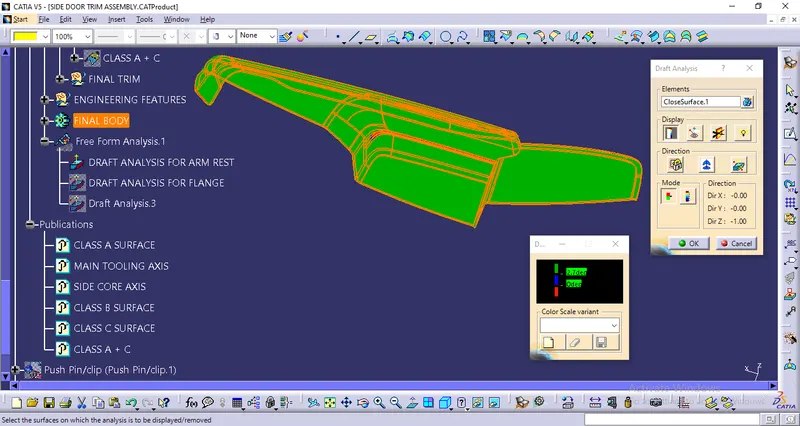
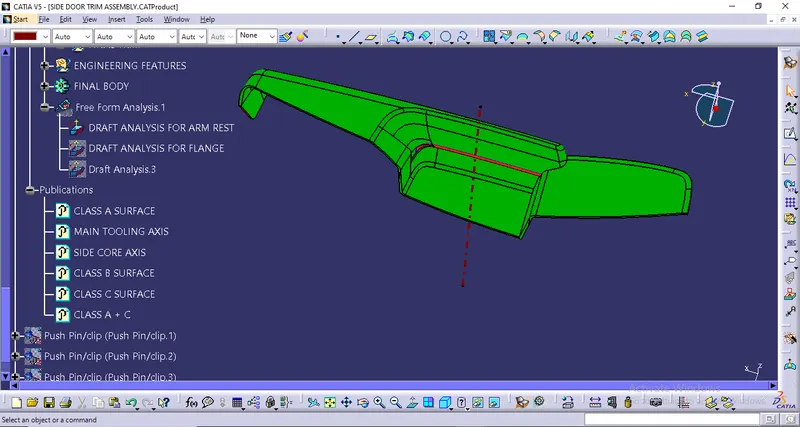
In the Draft-Analysis,
Green Colour stands for regions where the Draft Angle is 2.7 degrees,
Red Colour stands for regions where the Draft Angle is between 0-3 degrees, &
Blue Colour stands for regions where the Draft Angle is lower than 0 degrees
It is evident from the above images that the Draft Analysis is successful and the Final Solid Part is feasible to manufacture.
CLASS A SURFACE OF MAP POCKET:
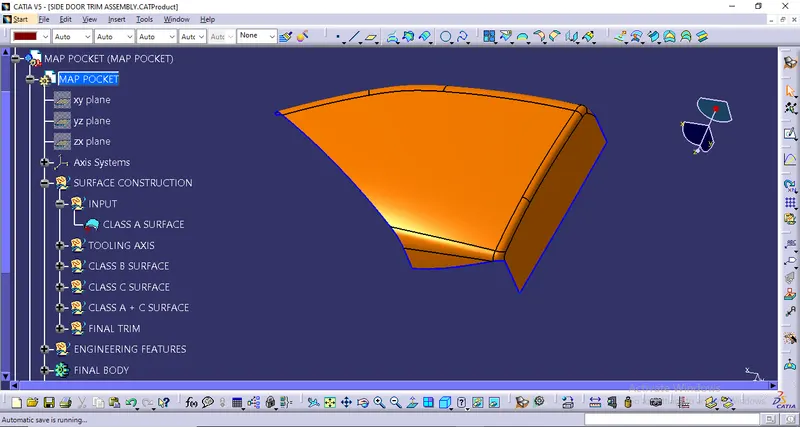
TOOLING AXIS CREATION:
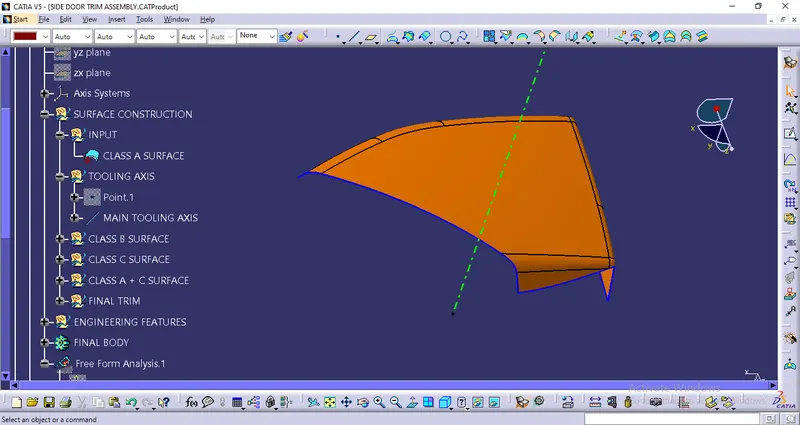
DRAFT ANALYSIS OF CLASS A SURFACE:
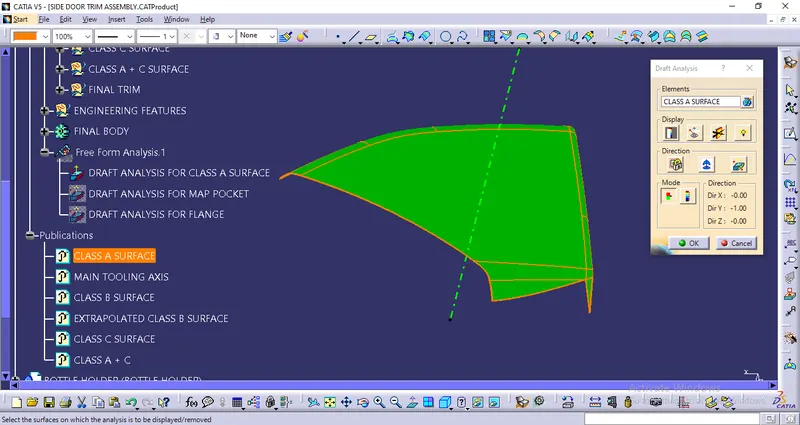
CLASS B SURFACE:
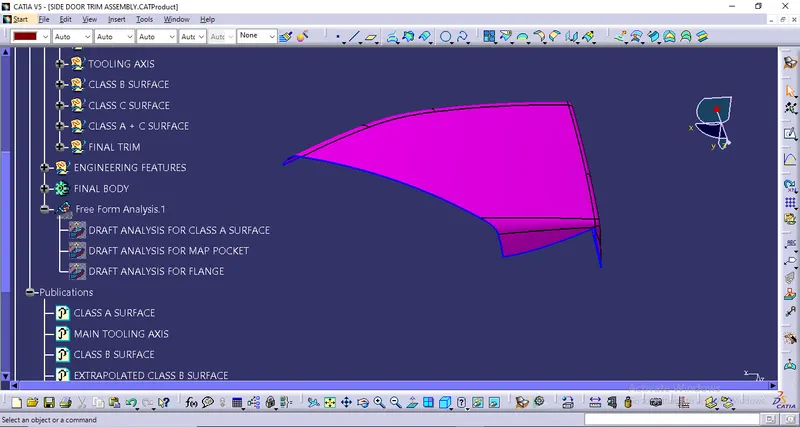
- Offset the class a surface 2.5mm direclty.
- Some patches will form after offsetting.
- By doing the Multisection we have got the desired shape of the surface.
- Define the boundary and extrapolate to required length.
- Finally, we got the class B surface.
PROCEDURE TO CREATE THE CLASS C SURFACE:
We'll create the Class C Surface with respect to the Class A Surface. To create the Class C Surface here we used Sweep with Reference Surface.
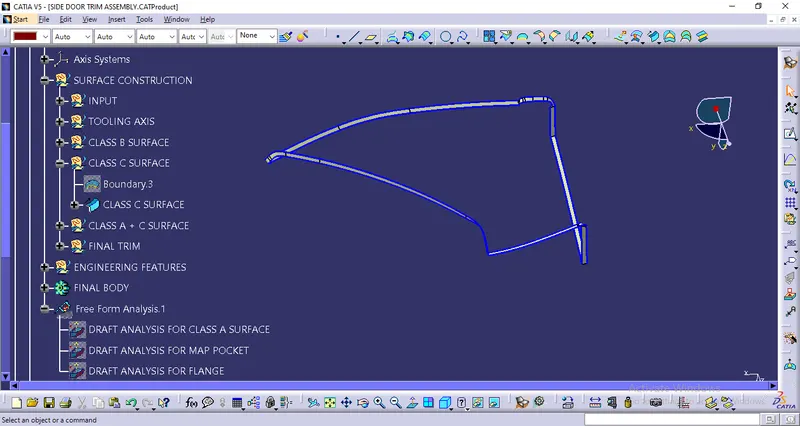
Now, we're going to Join the Class A Surface with Class C Surfaces as shown below:
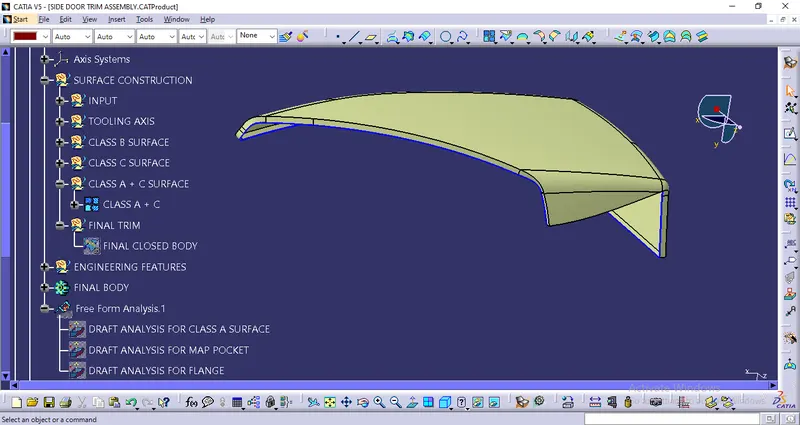
Trim the Class B Surface with the Class A + C then we got our final closed body.
FINAL CLOSED SURFACE:
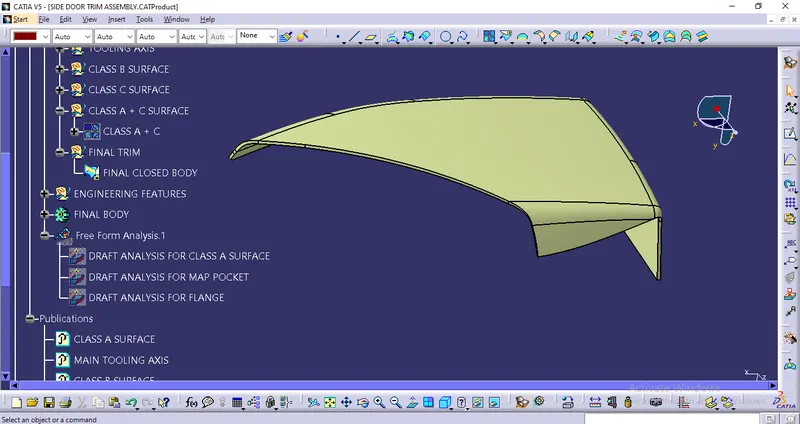
To check whether this body is closed or not we'll use the Boundary Command on it as shown below:
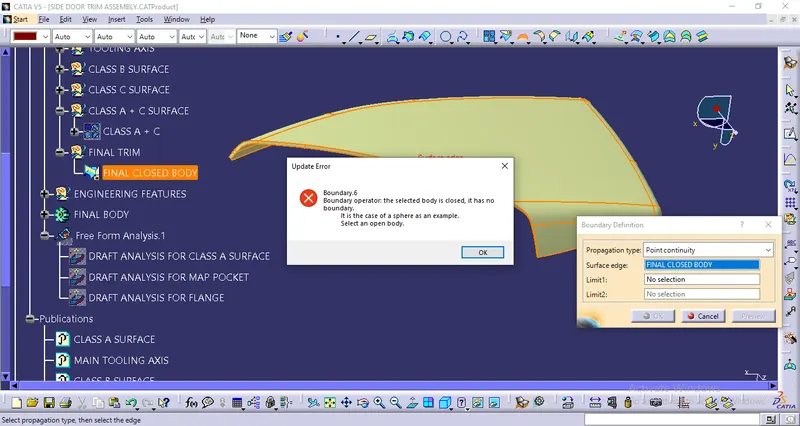
From the above image, we can see that the final closed body doesn't have any boundaries, and hence our final closed body is obtained successfully.
Finally, we'll go to the Part Workbench and use the option 'Closed Surface' from the 'Surface-based Features' toolbar to convert the final trimmed body into a solid body as shown below:
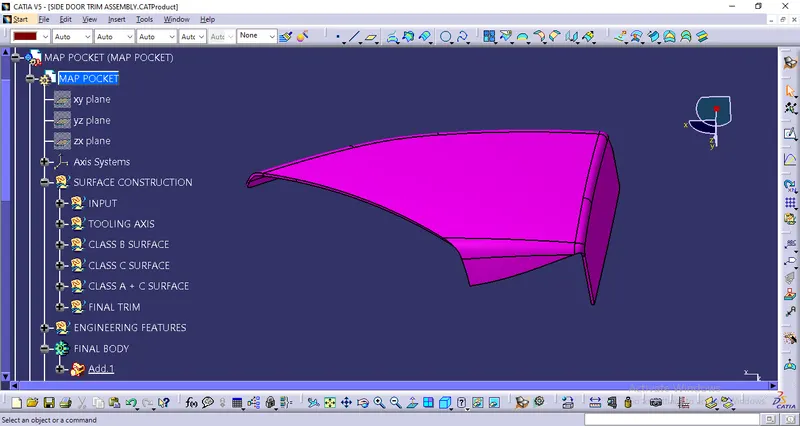
After that, we’ll perform a Draft Analysis on the Final Part in Part Workbench:
DRAFT ANALYSIS FOR THE FINAL PART USING THE MAIN TOOLING AXIS:
We'll click on the 'Draft Analysis' under the 'Analysis' Toolbar in the Part Workbench.
Then, we’ll click on the Compass Symbol under 'Direction' which stands for 'Use the Compass to define the new current draft direction'.
We'll drag the compass and place the compass on the Main Tooling-Axis.
Then, we'll select 'Show or Hide the Color Scale' under 'Display' and define our Draft-Angle as 3-Degrees.
As this component was made from a trimmed Class A Surface and hence we aren't required to provide a draft angle to every region. We have provided a draft angle of 3 degrees to all the required surfaces.
After that, we'll click the surface of the Final Part the results of which are shown below:
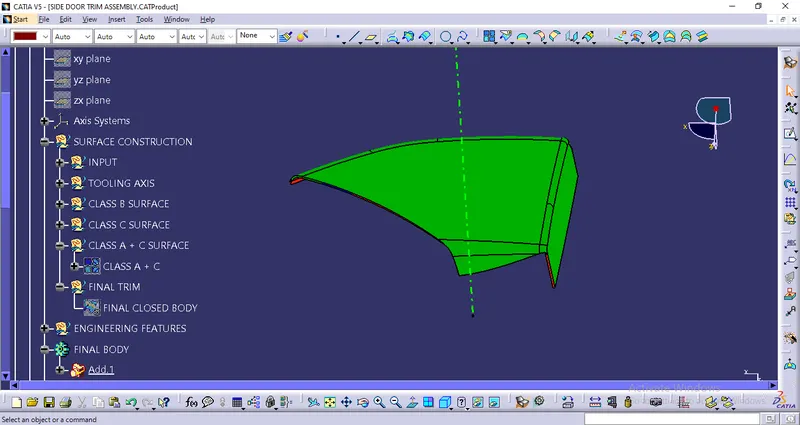
In the Draft-Analysis,
Green Colour stands for regions where the Draft Angle is 3 degrees,
Red Colour stands for regions where the Draft Angle is between 0-3 degrees, &
Blue Colour stands for regions where the Draft Angle is lower than 0 degrees
It is evident from the above images that the Draft Analysis is successful and the Final Solid Part is feasible to manufacture.
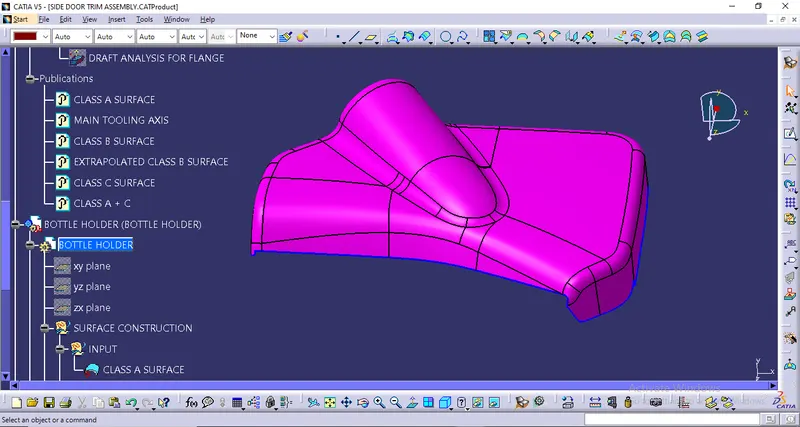
CLASS A SURFACE OF BOTTLE HOLDER:
TOOLING AXIS CREATION:
DRAFT ANALYSIS OF CLASS A SURFACE:
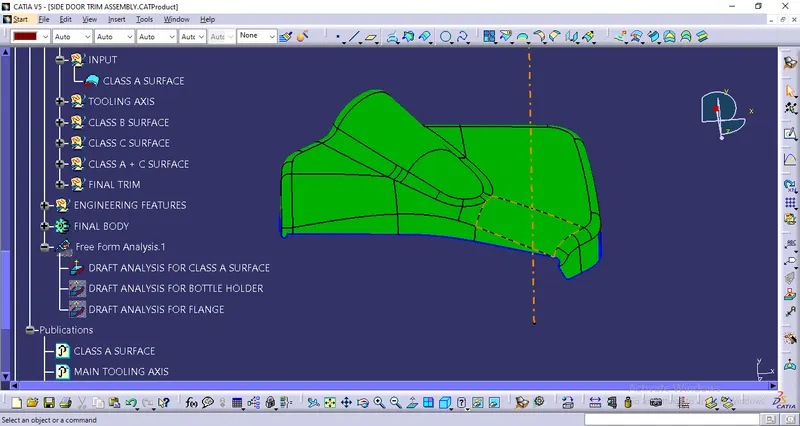
CLASS B SURFACE:
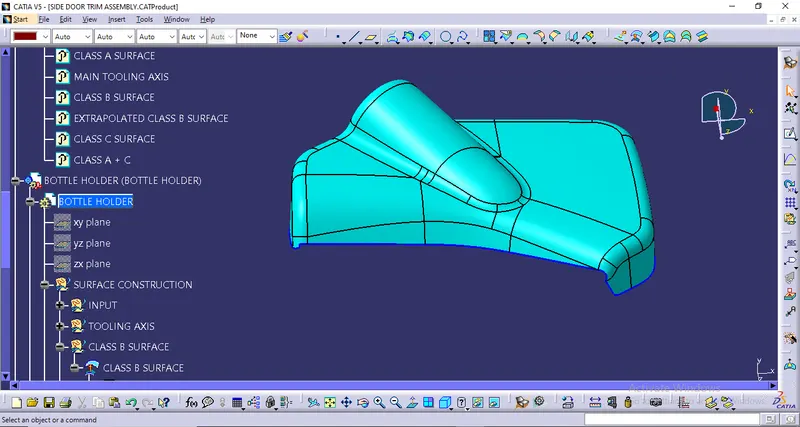
- Offset the class A surface 2.5mm directly and we got the class B surface.
PROCEDURE TO CREATE THE CLASS C SURFACE:
We'll create the Class C Surface with respect to the Class A Surface. To create the Class C Surface here we used Sweep with Reference Surface.
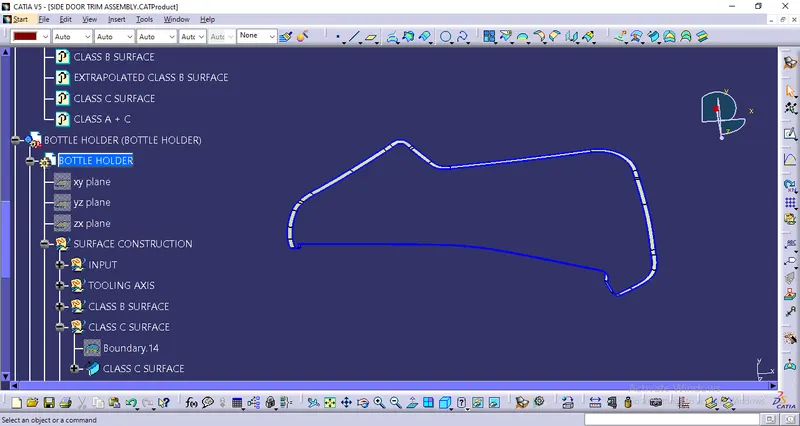
Now, we're going to Join the Class A Surface with Class C Surfaces as shown below:
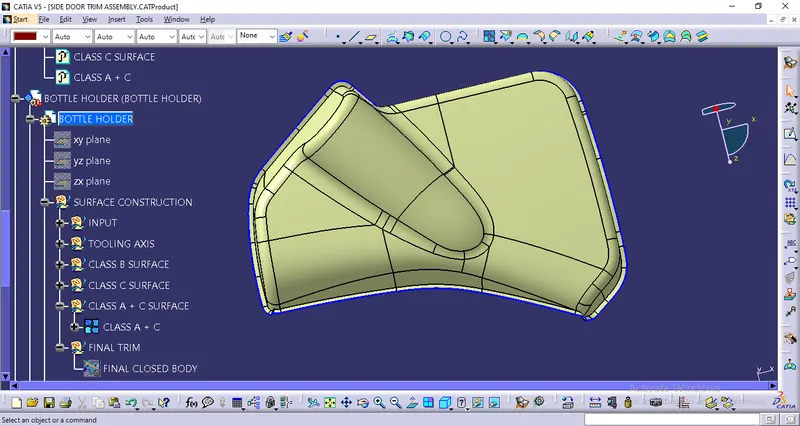
Trim the Class B Surface with the Class A + C then we got our final closed body.
FINAL CLOSED SURFACE:
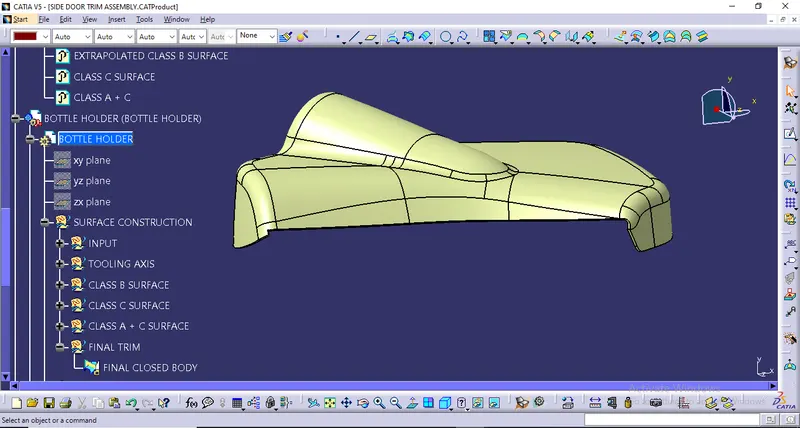
To check whether this body is closed or not we'll use the Boundary Command on it as shown below:
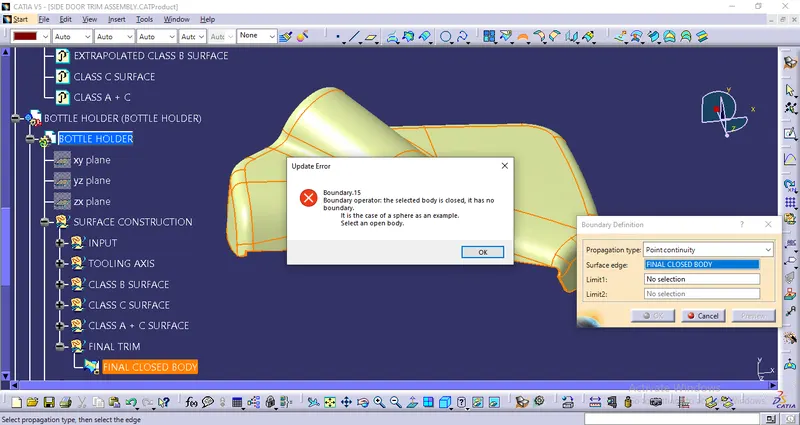
From the above image, we can see that the final closed body doesn't have any boundaries, and hence our final closed body is obtained successfully.
Finally, we'll go to the Part Workbench and use the option 'Closed Surface' from the 'Surface-based Features' toolbar to convert the final trimmed body into a solid body as shown below:
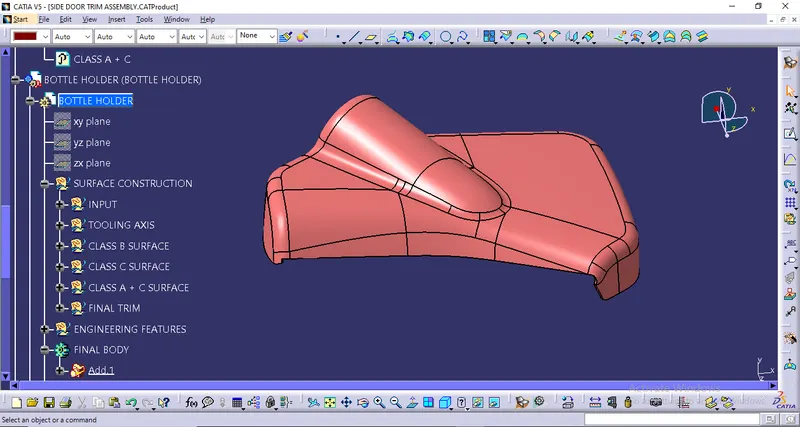
After that, we’ll perform a Draft Analysis on the Final Part in Part Workbench:
DRAFT ANALYSIS FOR THE FINAL PART USING THE MAIN TOOLING AXIS:
We'll click on the 'Draft Analysis' under the 'Analysis' Toolbar in the Part Workbench.
Then, we’ll click on the Compass Symbol under 'Direction' which stands for 'Use the Compass to define the new current draft direction'.
We'll drag the compass and place the compass on the Main Tooling-Axis.
Then, we'll select 'Show or Hide the Color Scale' under 'Display' and define our Draft-Angle as 3-Degrees.
As this component was made from a trimmed Class A Surface and hence we aren't required to provide a draft angle to every region. We have provided a draft angle of 3 degrees to all the required surfaces.
After that, we'll click the surface of the Final Part the results of which are shown below:
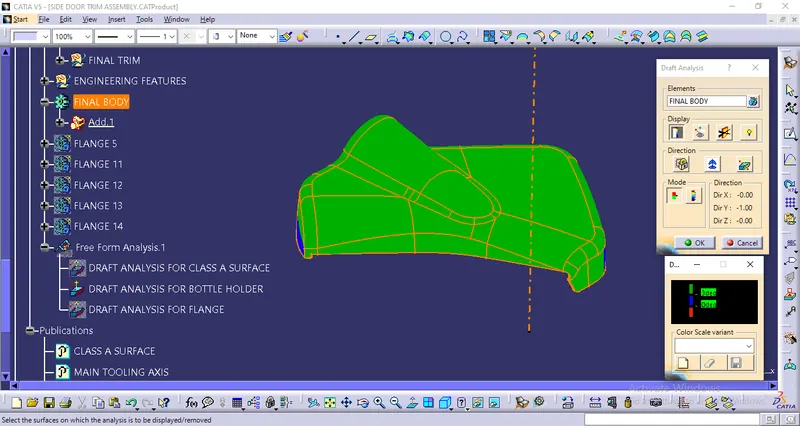
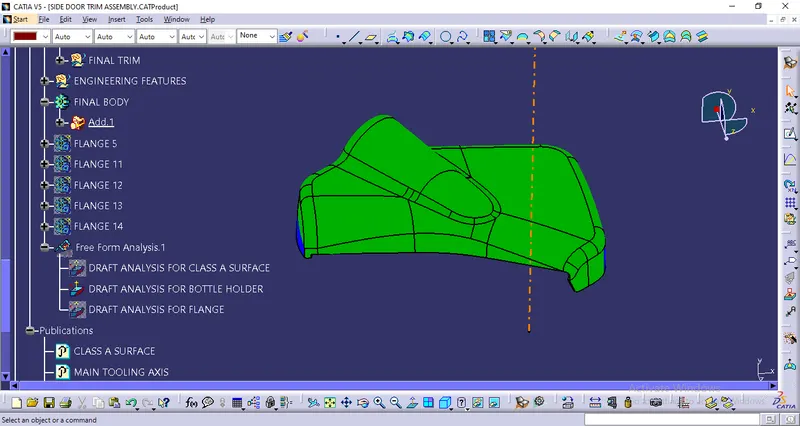
In the Draft-Analysis,
Green Colour stands for regions where the Draft Angle is 3 degrees,
Red Colour stands for regions where the Draft Angle is between 0-3 degrees, &
Blue Colour stands for regions where the Draft Angle is lower than 0 degrees
It is evident from the above images that the Draft Analysis is successful and the Final Solid Part is feasible to manufacture.
CLASS A SURFACE OF BOTTLE HOLDER:
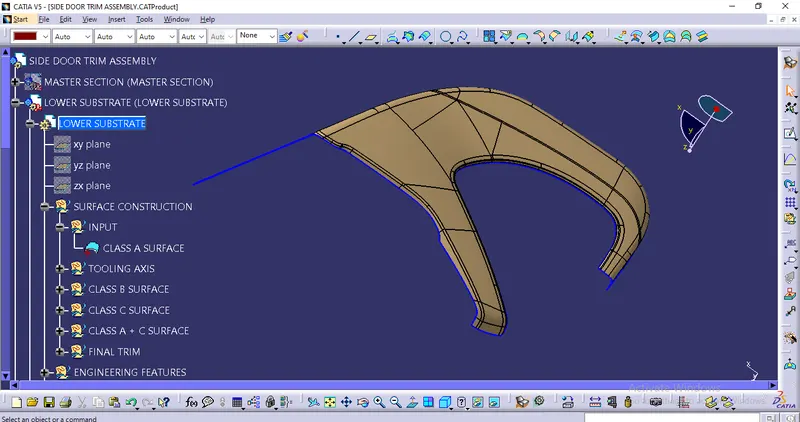
TOOLING AXIS CREATION:
DRAFT ANALYSIS OF CLASS A SURFACE:
CLASS B SURFACE:
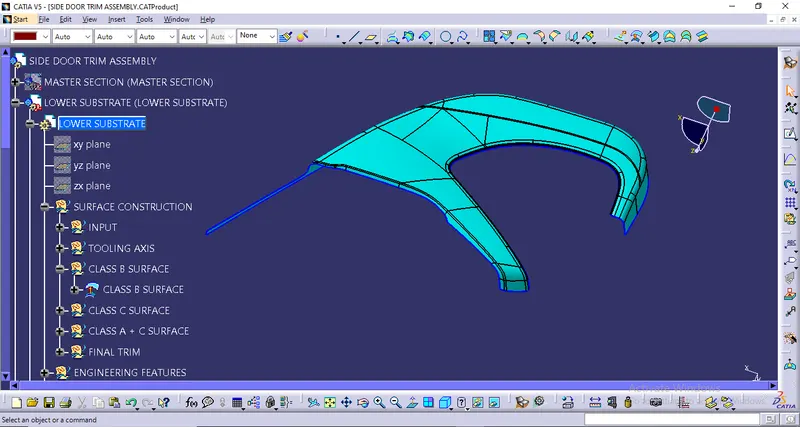
- Offset the class A surface 2.5mm directly and we got the class B surface.
PROCEDURE TO CREATE THE CLASS C SURFACE:
We'll create the Class C Surface with respect to the Class A Surface. To create the Class C Surface here we used Sweep with Reference Surface.
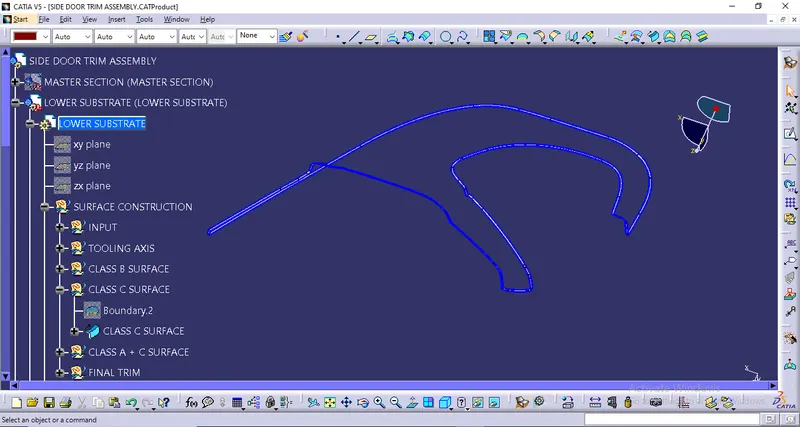
Now, we're going to Join the Class A Surface with Class C Surfaces as shown below:
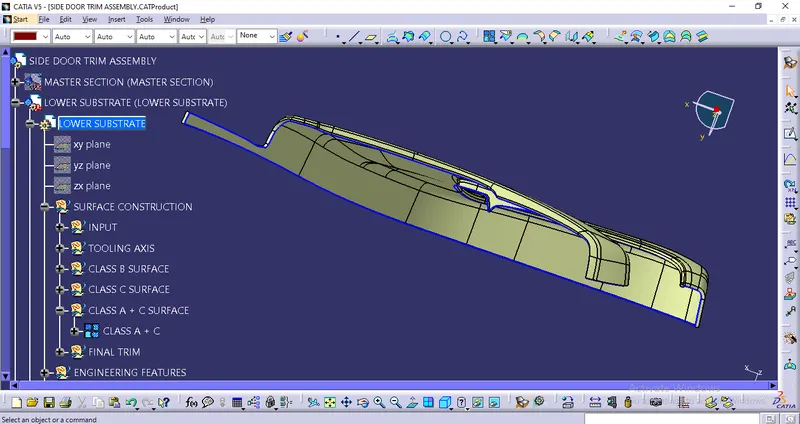
Trim the Class B Surface with the Class A + C then we got our final closed body.
FINAL CLOSED SURFACE:
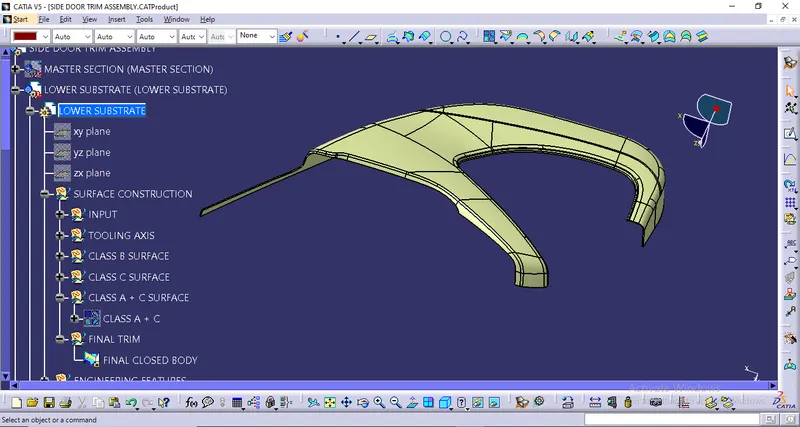
To check whether this body is closed or not we'll use the Boundary Command on it as shown below:
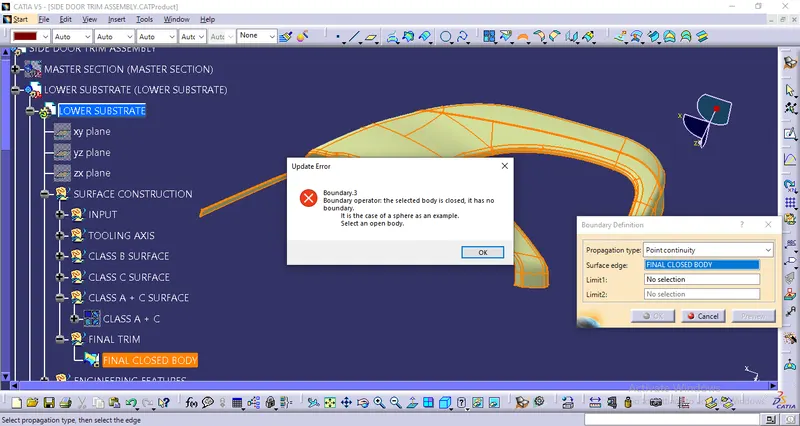
From the above image, we can see that the final closed body doesn't have any boundaries, and hence our final closed body is obtained successfully.
Finally, we'll go to the Part Workbench and use the option 'Closed Surface' from the 'Surface-based Features' toolbar to convert the final trimmed body into a solid body as shown below:
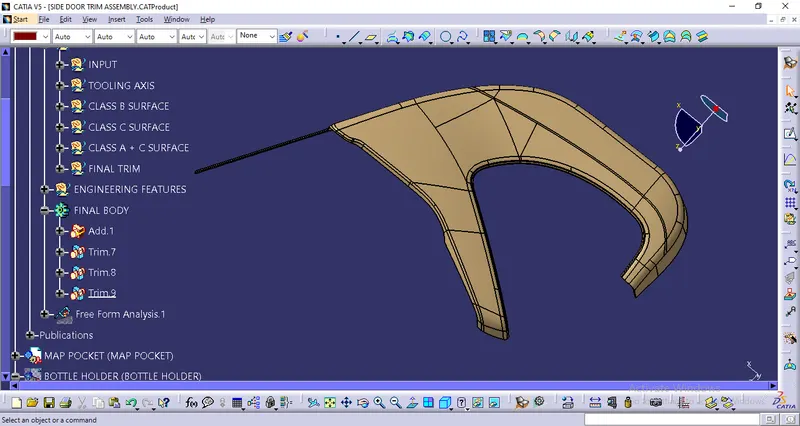
After that, we’ll perform a Draft Analysis on the Final Part in Part Workbench:
DRAFT ANALYSIS FOR THE FINAL PART USING THE MAIN TOOLING AXIS:
We'll click on the 'Draft Analysis' under the 'Analysis' Toolbar in the Part Workbench.
Then, we’ll click on the Compass Symbol under 'Direction' which stands for 'Use the Compass to define the new current draft direction'.
We'll drag the compass and place the compass on the Main Tooling-Axis.
Then, we'll select 'Show or Hide the Color Scale' under 'Display' and define our Draft-Angle as 3-Degrees.
As this component was made from a trimmed Class A Surface and hence we aren't required to provide a draft angle to every region. We have provided a draft angle of 3 degrees to all the required surfaces.
After that, we'll click the surface of the Final Part the results of which are shown below:
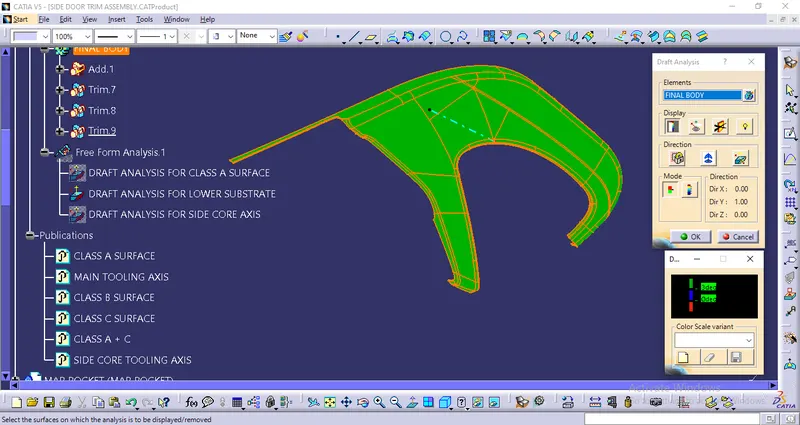
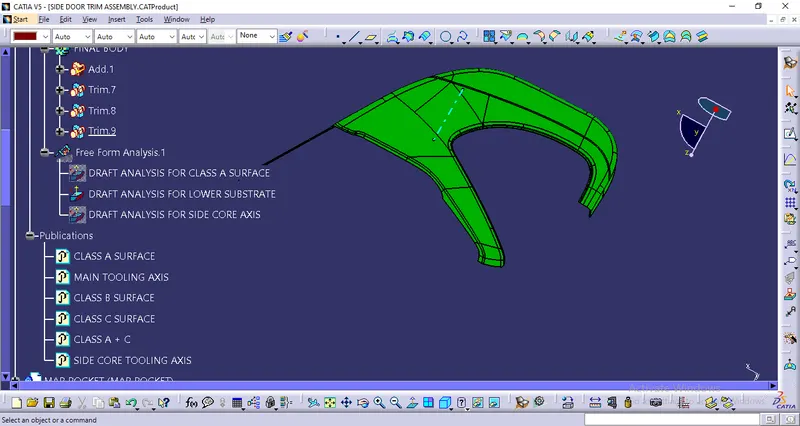
In the Draft-Analysis,
Green Colour stands for regions where the Draft Angle is 3 degrees,
Red Colour stands for regions where the Draft Angle is between 0-3 degrees, &
Blue Colour stands for regions where the Draft Angle is lower than 0 degrees
It is evident from the above images that the Draft Analysis is successful and the Final Solid Part is feasible to manufacture.
PROCEDURE TO ADD ENGINEERING FEATURES:
1. LOCATORS
2. HEAT STAKES
3. DOG HOUSE
4. FLANGES
1. LOCATORS:
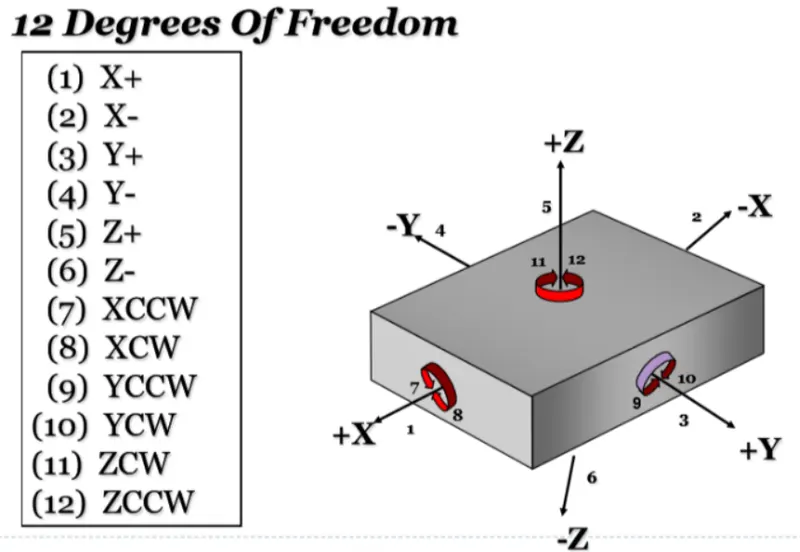
Any workpiece has 12 degrees of freedom for movement in space that consists of 6 Axial and 6 Radial Degrees of Freedom. All 12 degrees of freedom must be restricted to ensure proper referencing of a workpiece. These 6 Axial Degrees of Freedom permit Straight-Line Movement in both directions along the 3-principle axis shown as X, Y & Z. The Radial Degrees of Freedom permit Rotational Movement, in both Clockwise & Counterclockwise radial directions around the same three axes.
We have two objectives when assembling the child component with the parent component:
1. Accurately position the part at the desired coordinates.
2. Restrict all degrees of freedom except the one direction in which it'll fix so that the part cannot move.
PROCEDURE TO CREATE THE LOCATORS:
We'll create the locators wherever the point for locators is given to us.
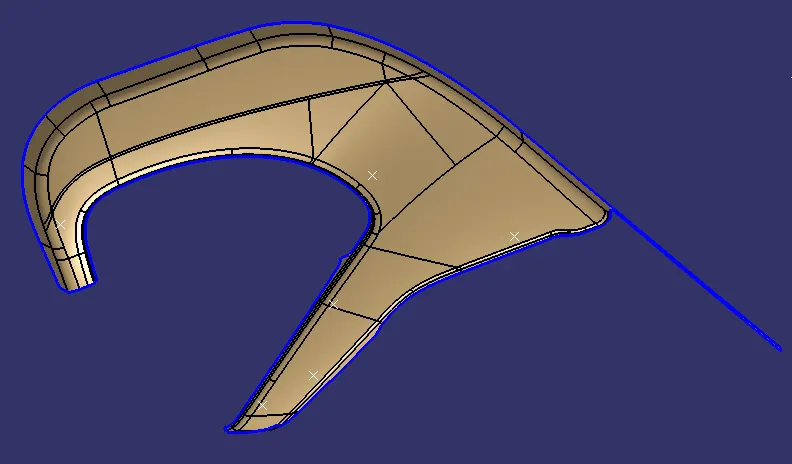
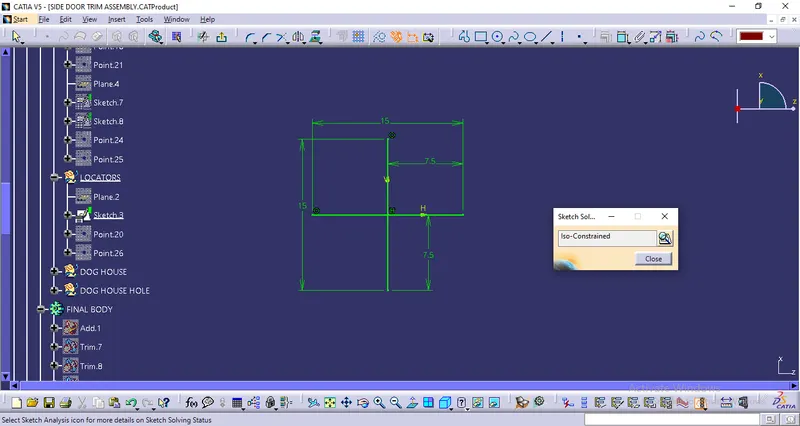
We'll create the necessary plane so that we can create a positioned sketch with a projection point for the locator as shown below:
SKETCH FOR THE LOCATOR:
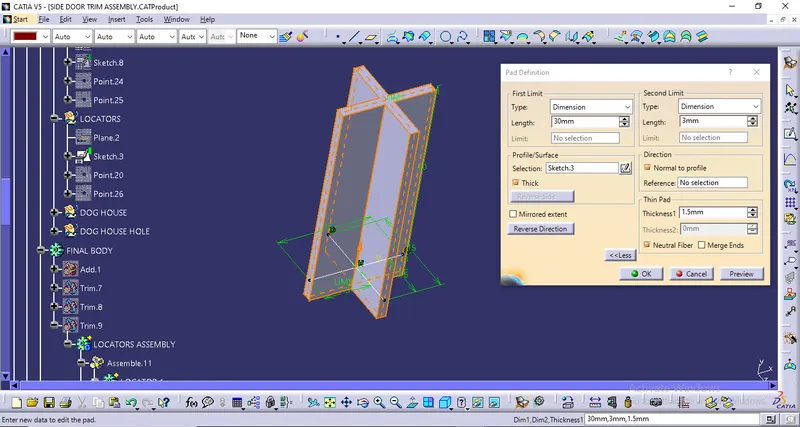
Then, we'll go to the Part Workbench and use the PAD Command to create a Thickened Body with Neutral Fiber as shown below:
1. PAD DEFINITION:

2. DRAFT DEFINITION:
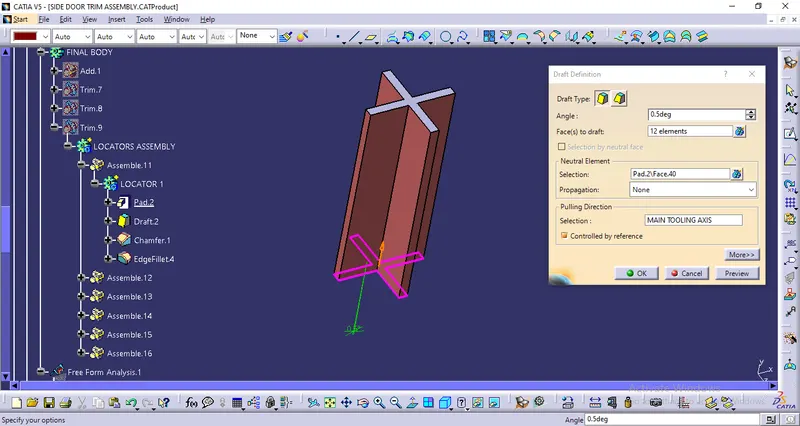
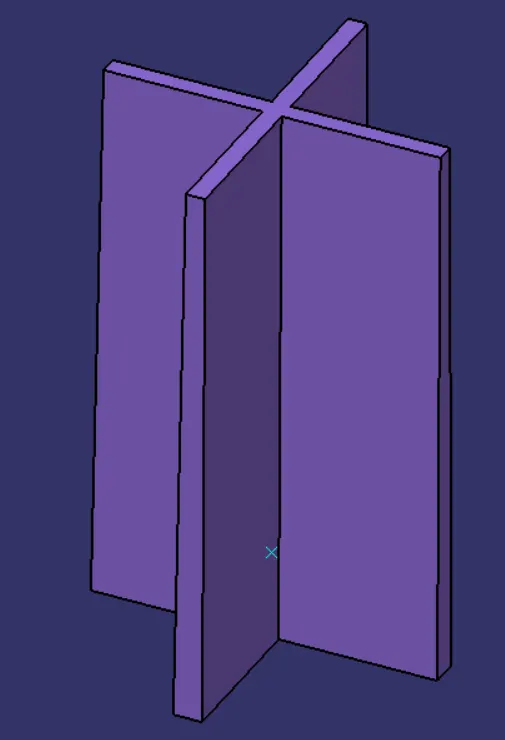
3. CHAMFER DEFINITION:
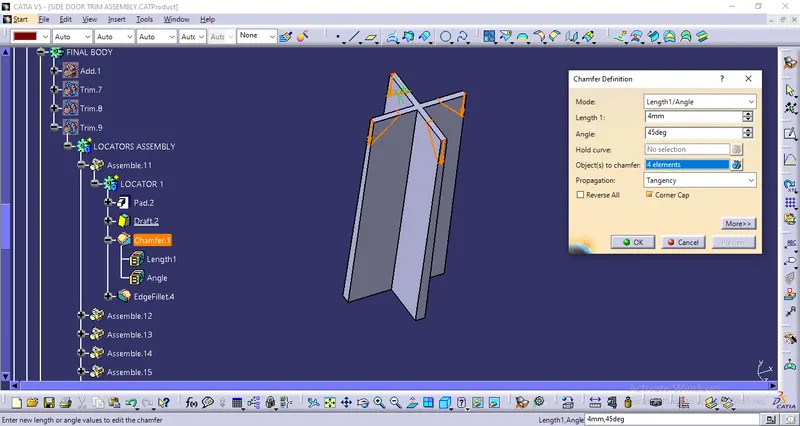
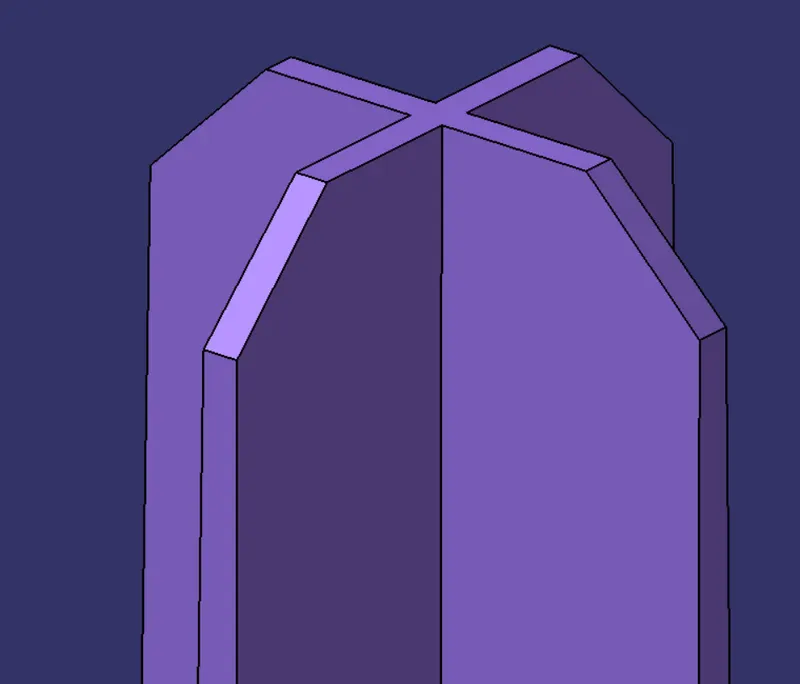
4. EDGE FILLET DEFINITION:
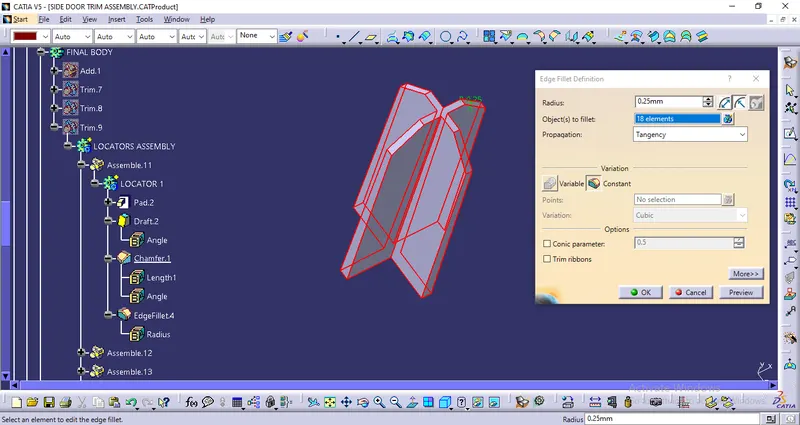
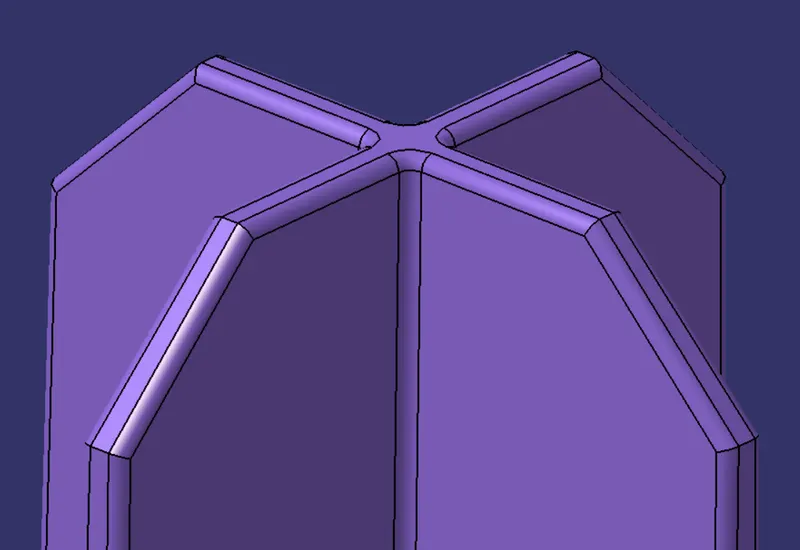
COMPLETE VIEW OF THE LOCATOR:
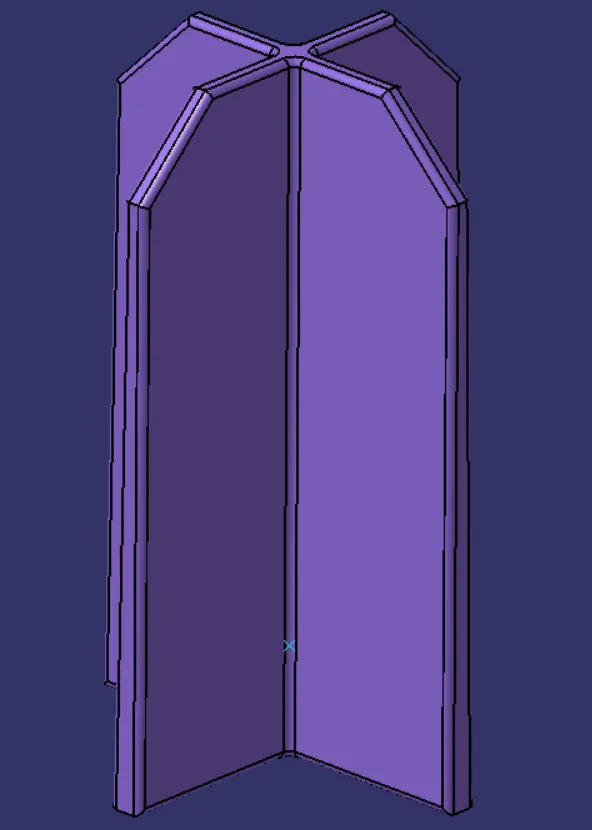
1ST LOCATOR:
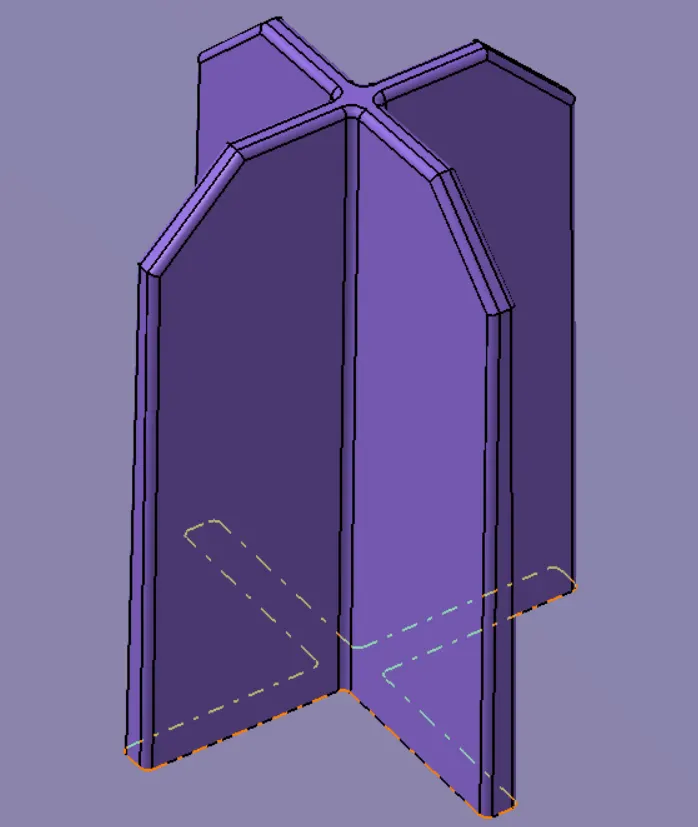
Next, I have just copied the 1st locator and pasted it as special, and then by using Point to point translation method I have transferred other locators to their respective position.
FINAL MODEL AFTER TRANSFERRING ALL THE LOCATORS TO THEIR RESPECTIVE POSITION:
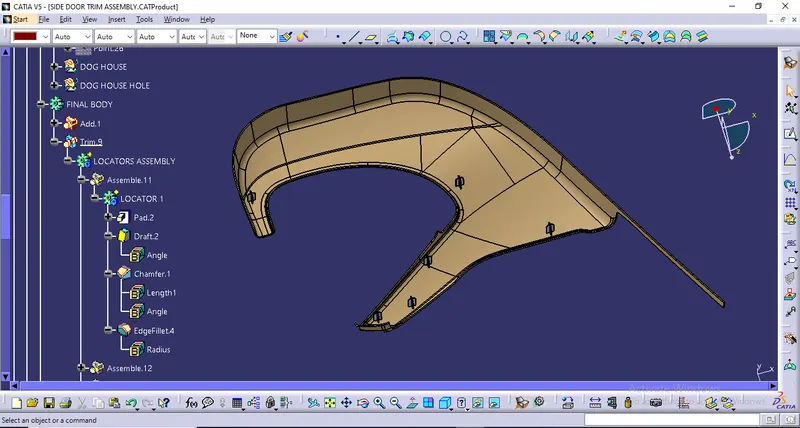
Next, I have assembled them with the Lower Substrate using "Union Trim" of Boolean Operation
HEAT STAKES:
- Heat Staking is a pulsed-heat process to join two or more parts out of which one at least is made of plastic.
- The process is to deform the plastic material using heat and force at a set process time.
- The bond is made by partially de-forming the plastic part in order to fix the other.
- Heat Staking makes it easy to bond metal to plastic and is commonly used in high volume/low cost applications such as automotive, IT and consumer appliances.
- Similar and dissimilar materials may be joined: metal to metal, plastic to plastic, metal to plastic
- Accurate control operating within a small process window
- Local heating resulting in no damage to surrounding materials
- Processing of glass-filled materials
- No mechanical vibration
- Many heat-stake shapes possible through custom designed tools
PROCEDURE TO CREATE THE HEAT STAKES:
We'll create Heat Stakes at points as shown below:
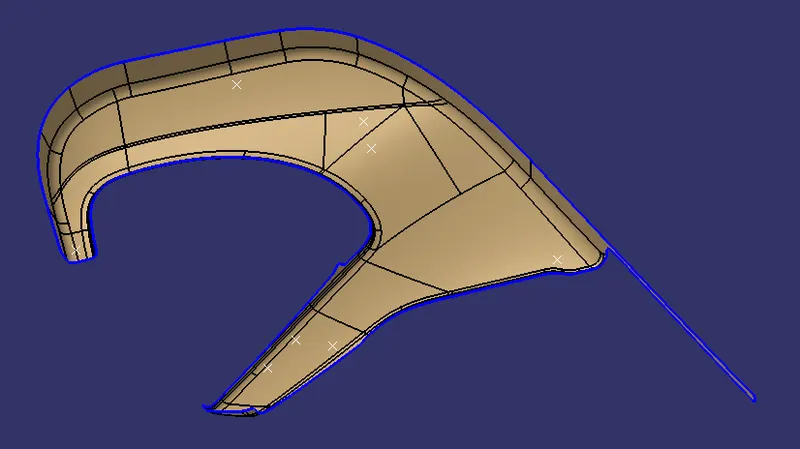
As the Master Section is given so we have used the Master Section and developed the Heat Stakes.
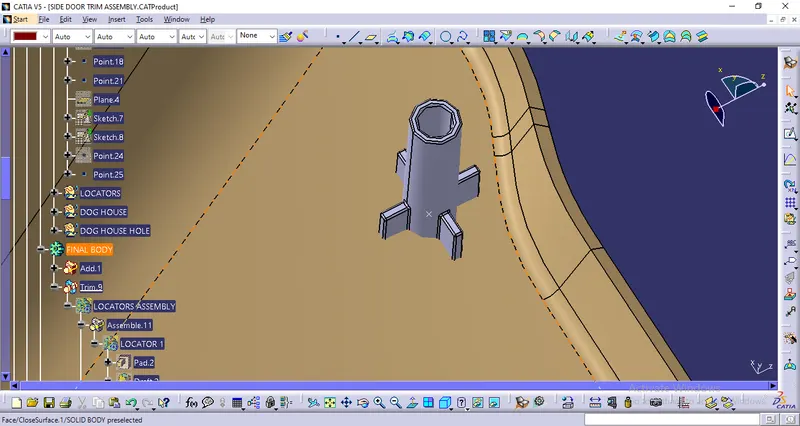
Next, I have just copied the 1st Heat Stakes and pasted it as special, and then by using Point to point translation method I have transferred other Heat Stakes to their respective position.
FINAL MODEL AFTER TRANSFERRING ALL THE HEAT STAKES TO THEIR RESPECTIVE POSITION:
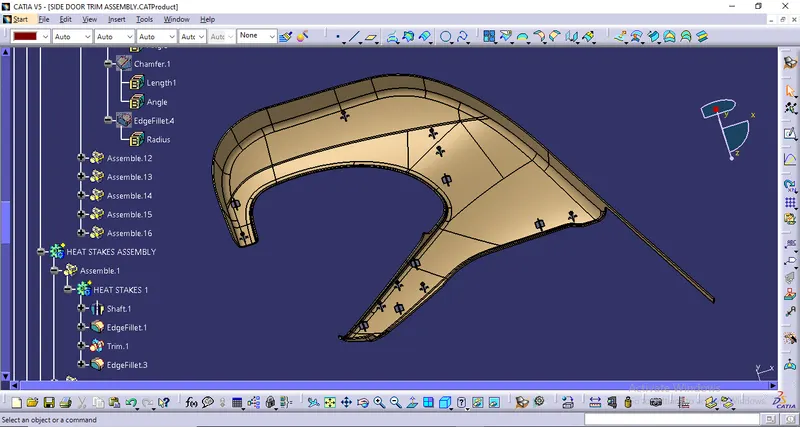
Next, I have assembled them with the Lower Substrate using "Union Trim" of Boolean Operation.
DOG HOUSE:
Use case of Dog-House in any Plastic Component: The dog-house is an engineering feature used in the plastic trim design that is used as a supporting feature. Sometimes other engineering features like snaps; locators etc. are mounted on them to increase their strength. Usually, this engineering component is built on the B-surface and is subjected to draft analysis to prevent breakage of the component during ejection from the mould cavity.
Wall Thickness: Thick sections waste material and are simply uneconomic. So solid shapes that would do the job well in wood or metal must be transformed to a 'shell' form in plastics. This is done by hollowing out or 'coring' thick parts so you are left with a component which regardless of complexity is composed essentially of relatively thin walls joined by curves, angles, corners, ribs, steps and offsets. As far as possible, all these walls should be the same thickness. The Wall thickness guide range is 0.75 mm to 3mm for reinforced materials and 0.5 mm to 5 mm for unreinforced materials.
Fillet Radius: Properly designed corners will make a big difference to the quality, strength and dimensional accuracy of a moulding. But there is another benefit too. Smooth curved corners help plastic flow in the mould by reducing pressure drops in the cavity and minimising flow-front break-up. Internal radii should be at least 0.5 and preferably 0.6 to 0.75 times the wall thickness.
Draft Angle: Tooling must be cleared for easy ejection of the component, from the core cavity. In order to clear tooling certain value of draft is given to the component. A minimum of 1-3deg is provided on all plastic components.
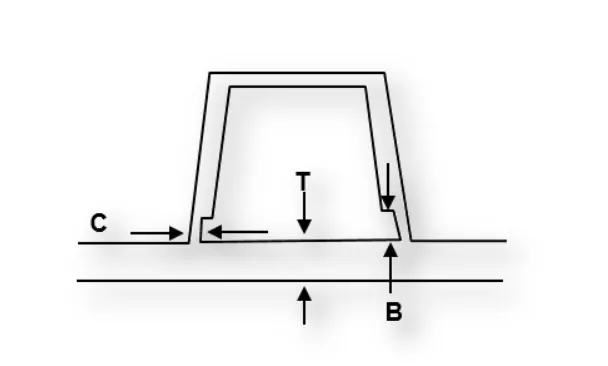
DESIGN GUIDELINES FOR DOGHOUSE IN THIS CHALLENGE:
-
Doghouse wall thickness at the intersection of the part wall ( C ) should be 40% or less than the main wall stock ( T ).
-
The height of ( B ) should be between 3.0 – 6.0 mm
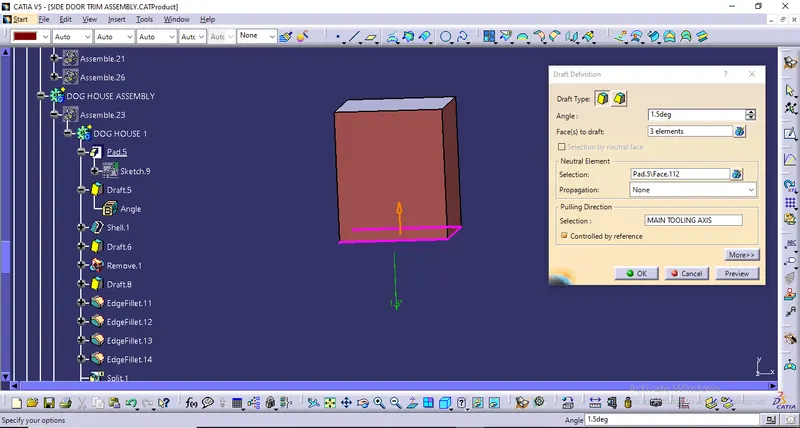
- The draft angle with respect to the Main Tooling Axis should be 3 degrees & the Side Core Axis should be 1.5 degrees.
PROCEDURE TO CREATE THE DOGHOUSE:
First, we'll begin by creating the sketch for the doghouse as shown below:
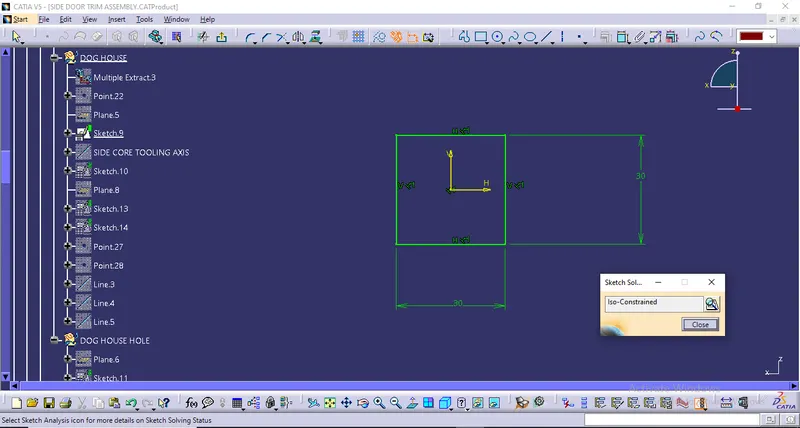
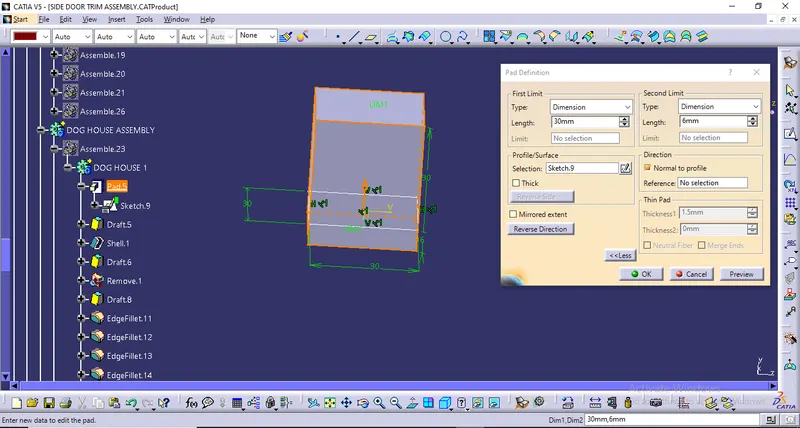
DOING PAD OPERATION:
PROVIDING DRAFT TO THE VERTICAL WALL EXCEPT FOR THE FRONT WALL:
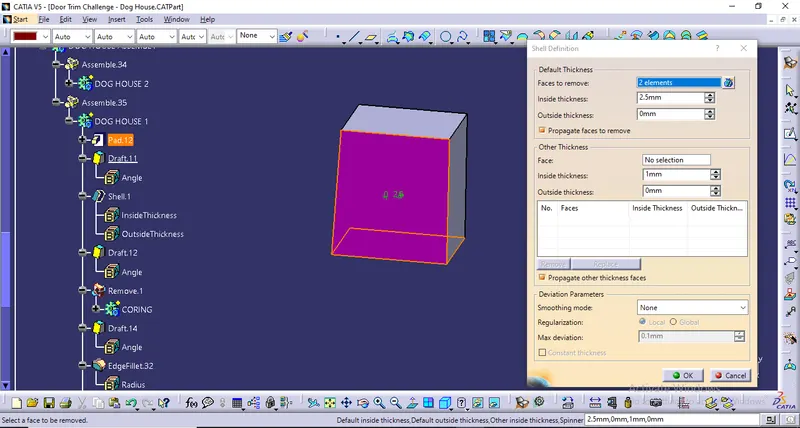
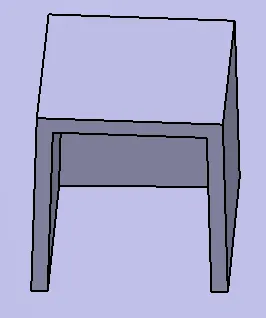
DOING SHELL OPERATION AND PROVIDING 2.5 MM SHELL THICKNESS:
DRAFT ANALYSIS OF THE OUTSIDE WALL:
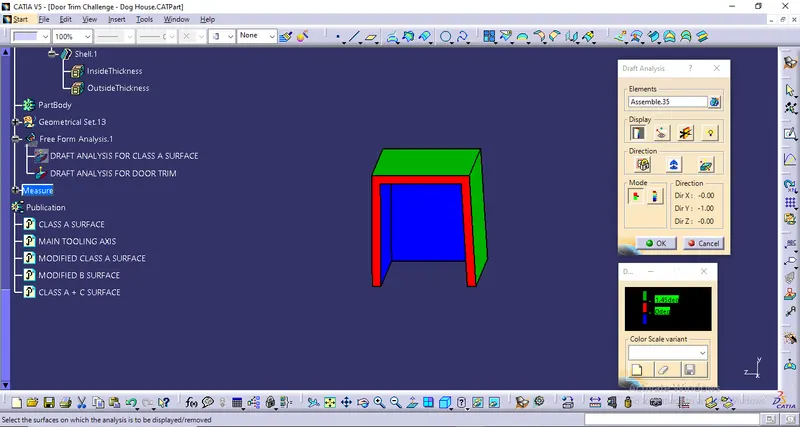
From the above image, we can see that the outside walls are completely clear with 1.45 degree draft angle so that means draft is applied properly.
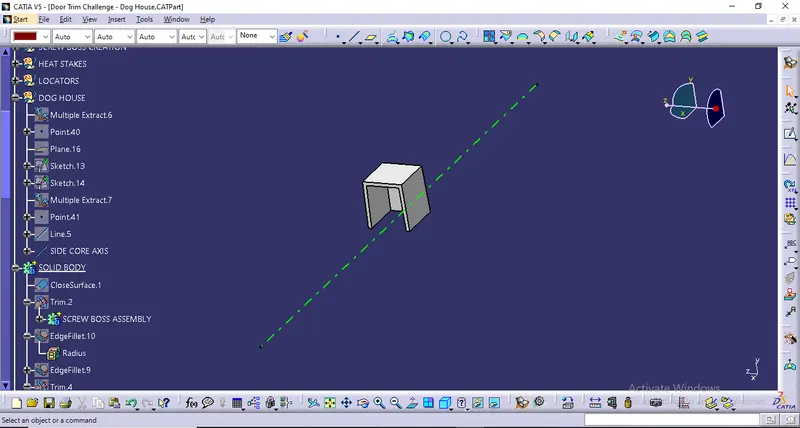
SIDE CORE AXIS CREATION FOR DOG HOUSE:
PROVIDING DRAFT TO THE INNER WALLS:
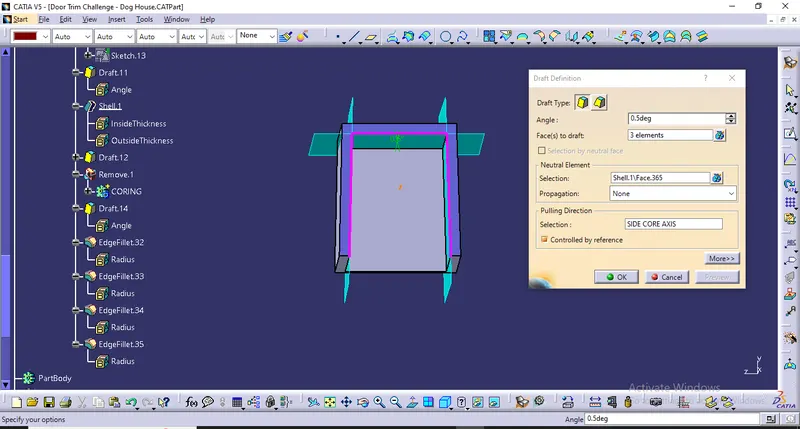
DRAFT ANALYSIS OF THE INNER WALL:
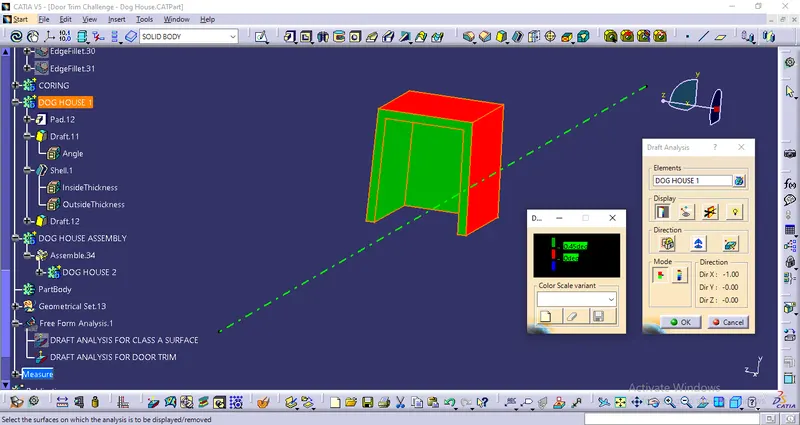
From the above image, we can see that the inner walls of the dog house are also clear with 0.45 degree draft so that means draft is applied properly.
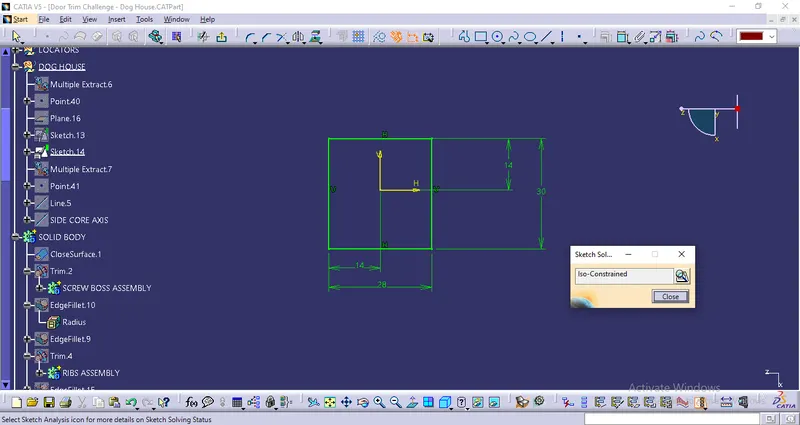
DOING SKETCH FOR CORING:
PAD DEFINITION FOR CORING:
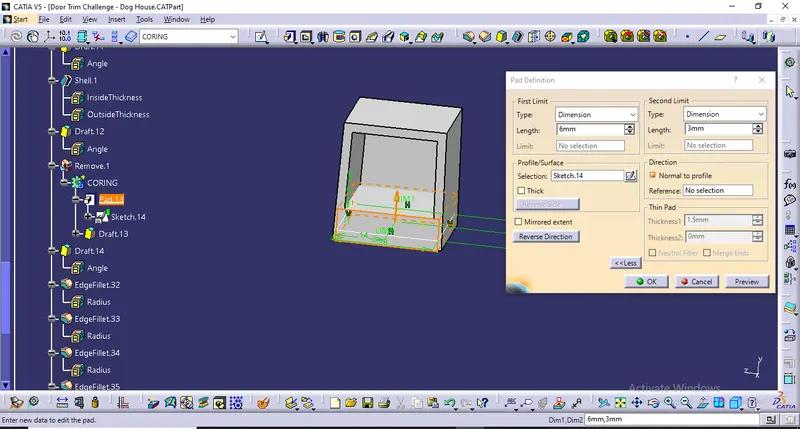
FINAL MODEL AFTER REMOVING THE CORING, PROVIDING DRAFT, AND ALSO PROVIDING THE EDGE FILLET:
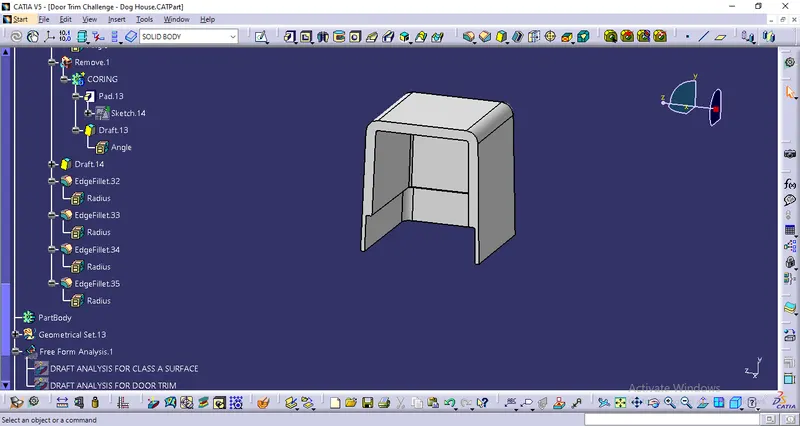
After that, we have created a key-hole type shape at the top of the dog house and also supporting ribs so that we can assemble the push pin at the top of the dog house.
FINAL DOG HOUSE AFTER DOING ALL THE OPERATIONS:
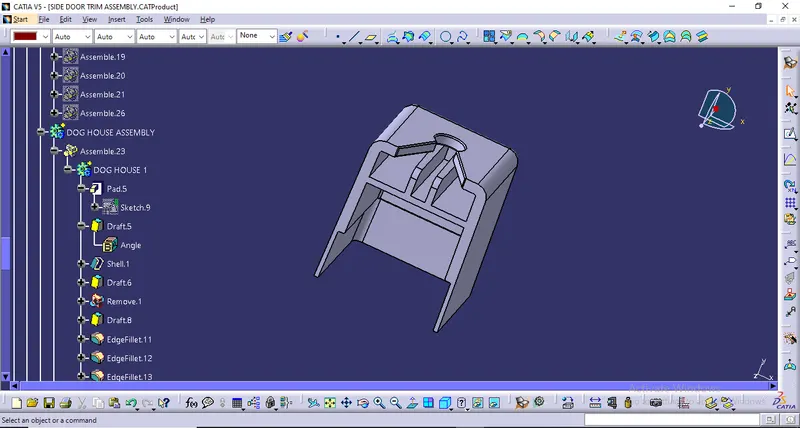
After that, I have used point to point Translation method to get the other Dog House to desired Place and also rotate the dog house face as per requirement.
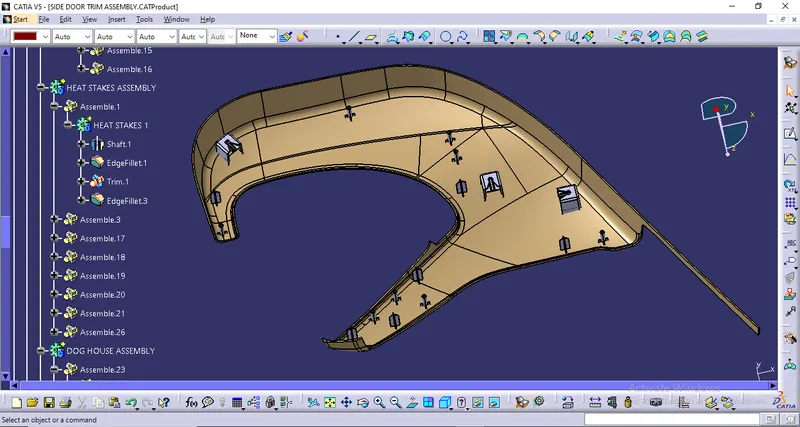
Next, I have assembled them with the Lower Substrate using "Union Trim" of Boolean Operation.
FINAL DRAFT ANALYSIS OF LOWER SUBSTRATE WITH ENGINEERING FEATURES:
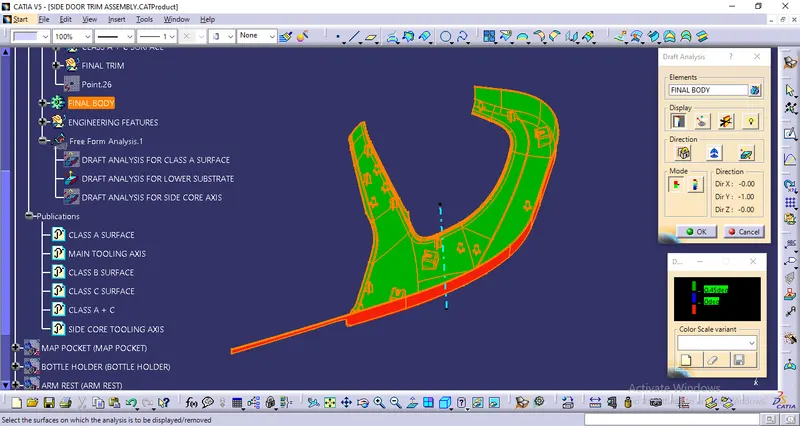
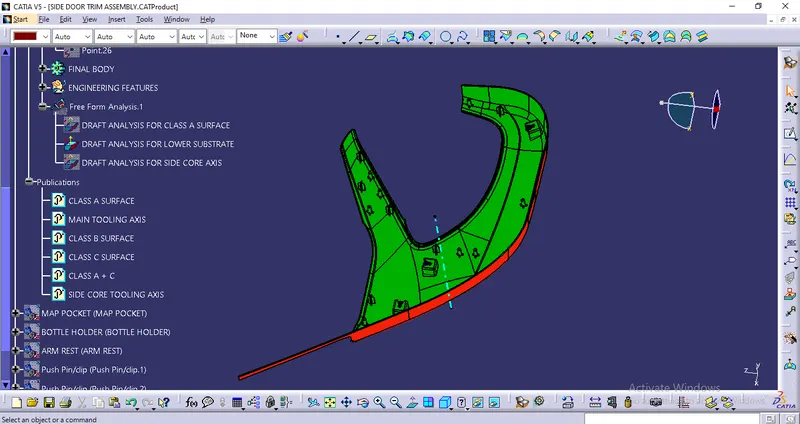
From the above images, we can see that the required draft angle is met and these features will clear themselves along the Main Tooling Axis for an angle of 0.45 degrees.
FLANGE CREATION IN ARM REST:
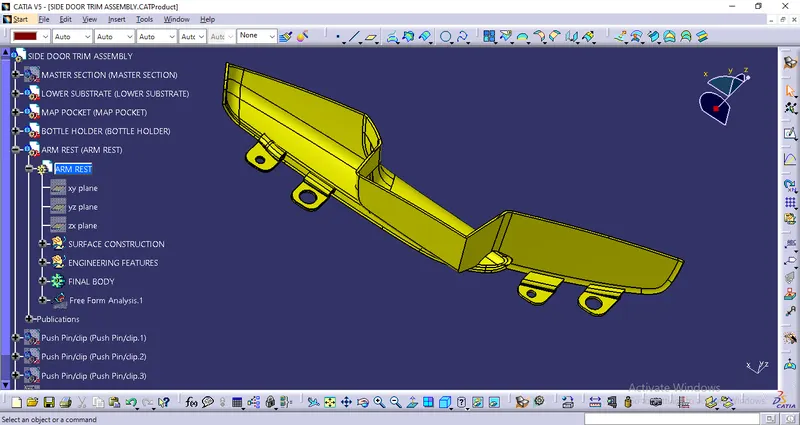
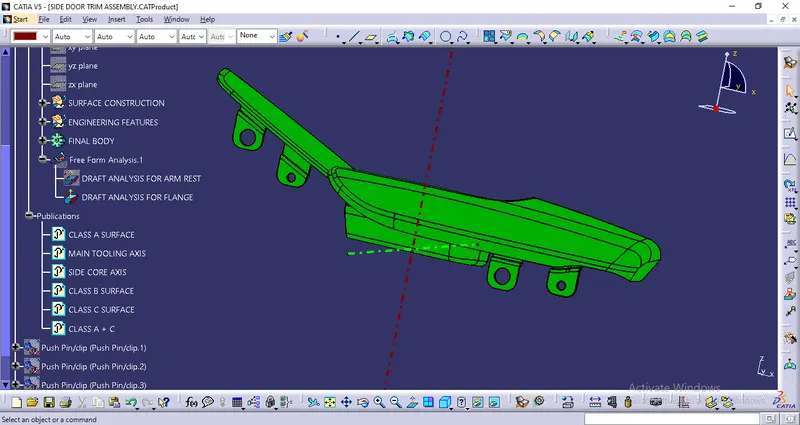
FINAL DRAFT ANALYSIS OF ARM REST WITH ENGINEERING FEATURES:
FLANGE CREATION IN BOTTLE HOLDER:
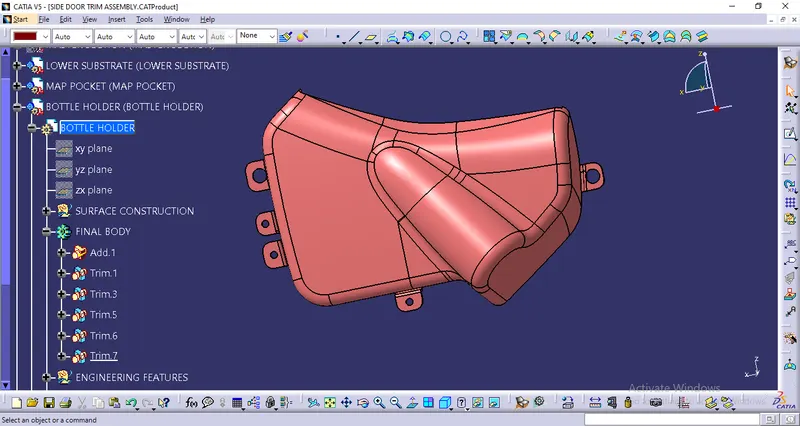
FINAL DRAFT ANALYSIS OF BOTTLE HOLDER WITH ENGINEERING FEATURES:
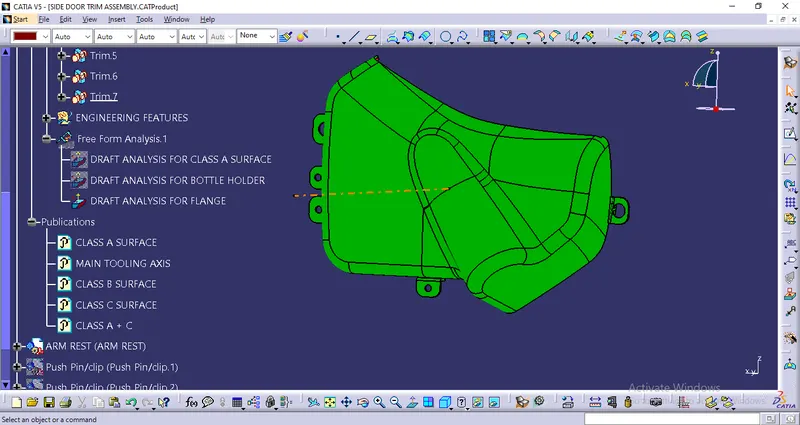
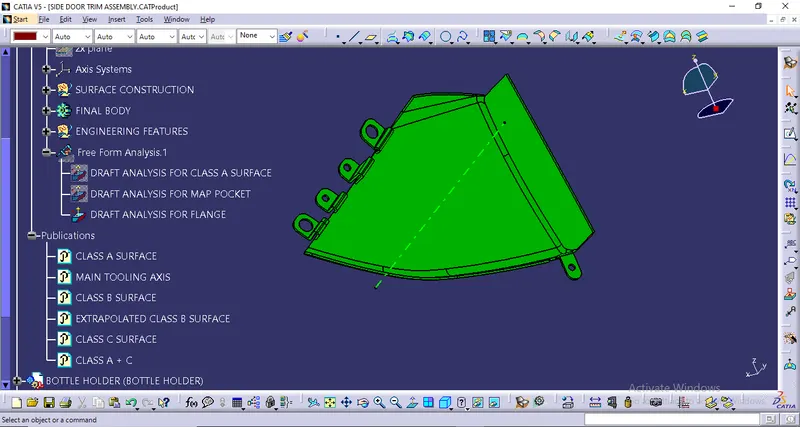
FLANGE CREATION IN MAP POCKET:
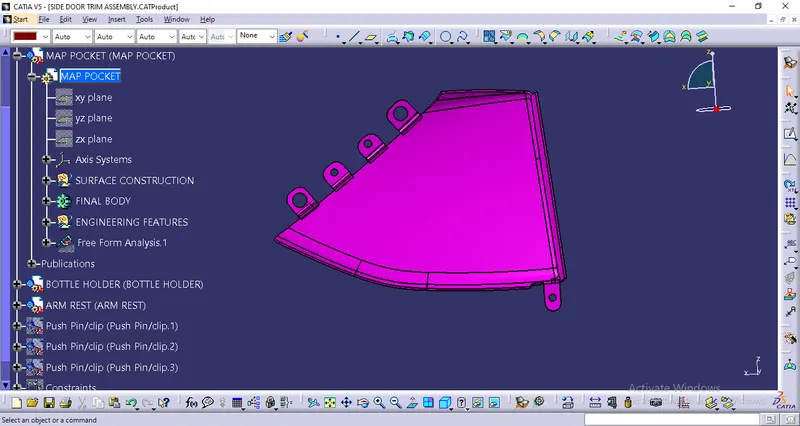
FINAL DRAFT ANALYSIS OF MAP POCKET WITH ENGINEERING FEATURES:
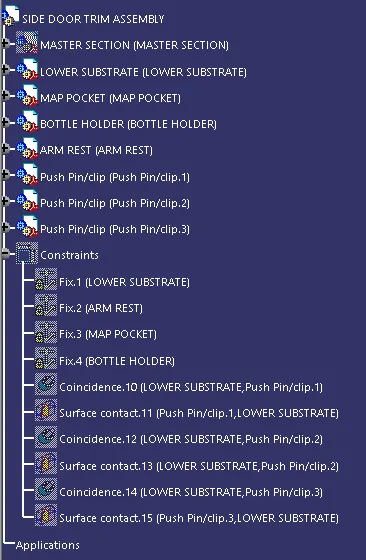
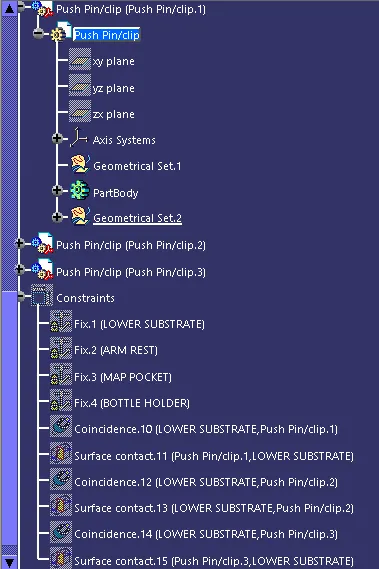
PROCEDURE TO ASSEMBLE THE PUSH PIN WITH DOG HOUSE:
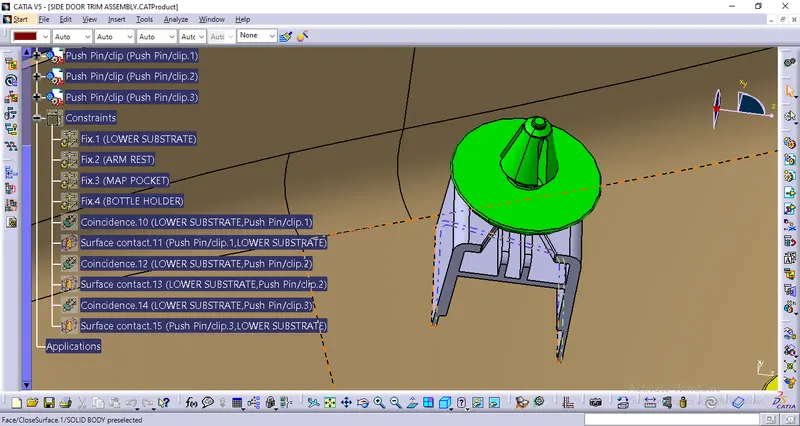
- Step 1: We first input 3 Push Pin Clip bodies.
- Step 2: We fixed the lower substrate, Map Pocket, Bottle Holder and Arm Rest.
- Step 3: We also create reference axes for Dog House.
- Step 4: We then use coincidence constraint to coincide the axes of Push Pin and the Dog House.
- Step 5: We also used contact constraints between Push Pin and the Dog House to get the fully assembled Push Pin into the Dog House.
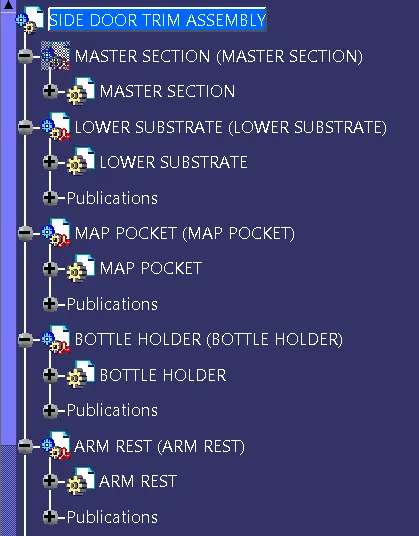
FINAL MODEL OF SIDE DOOR PANEL:
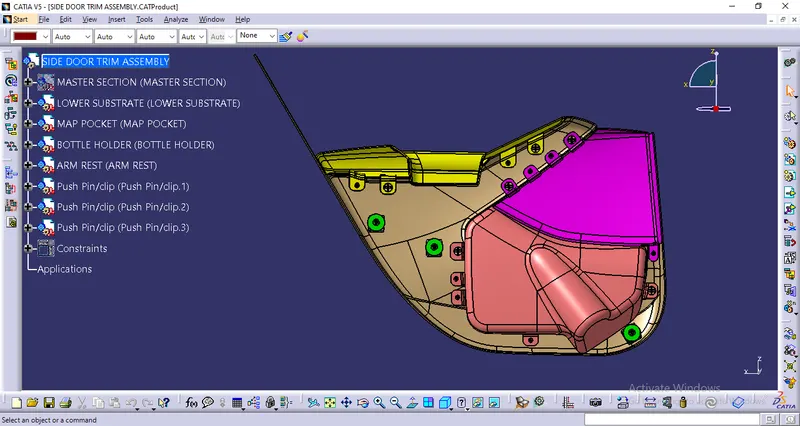
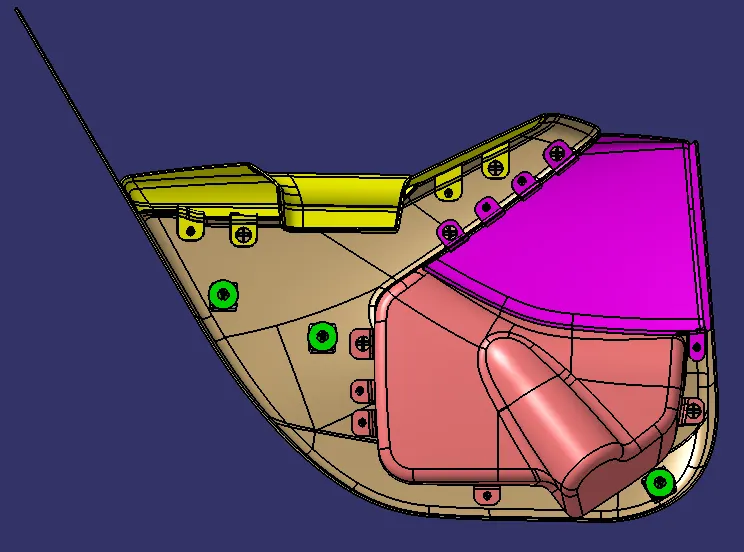
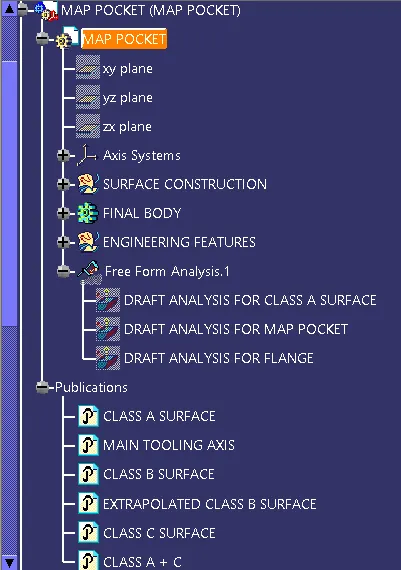
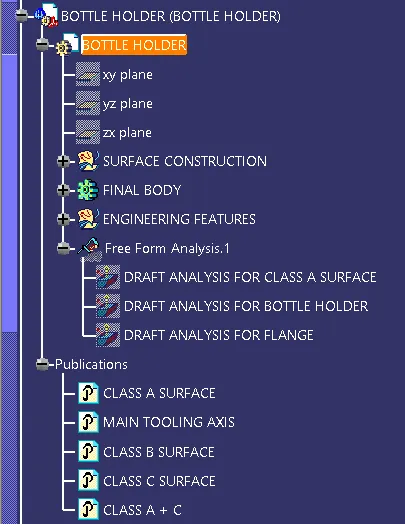
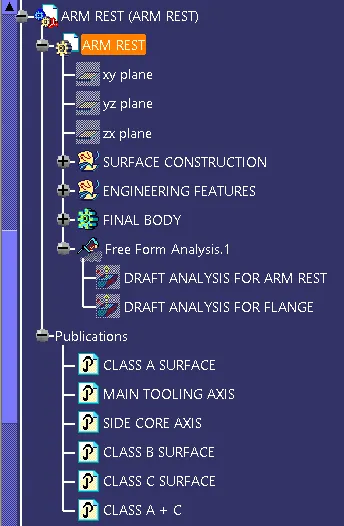
TREE STRUCTURE:
1. SIDE DOOR TRIM ASSEMBLY:
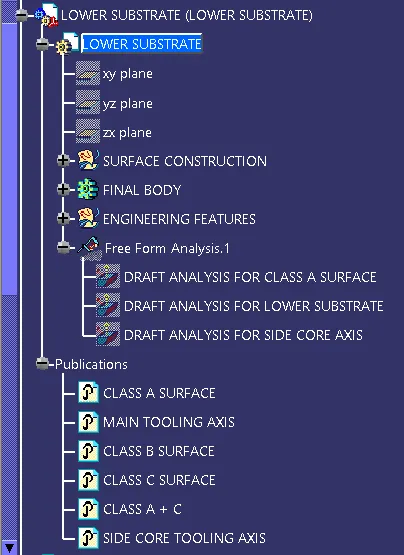
2. LOWER SUBSTRATE:
3. MAP POCKET:
4. BOTTLE HOLDER:
5. ARM REST:
6. PUSH-PIN CLIP:
CONCLUSIONS:
- Successfully created Side Door trim Panel plastic component.
- Successfully performed draft analysis for Class A surface and solid close surface.
- Successfully Extracted closed solid body from plastic surface.
- Created the Heat stakes and locators in the Door Trim Lower substrate considering the design rules.
- Created the Dog house in the Door Trim Lower substrate considering the design rules.
- Created flanges in Arm Rest, Map Pocket and Bottle Holder.
- Successfully performed final draft analysis for solid close surface with engineering features.