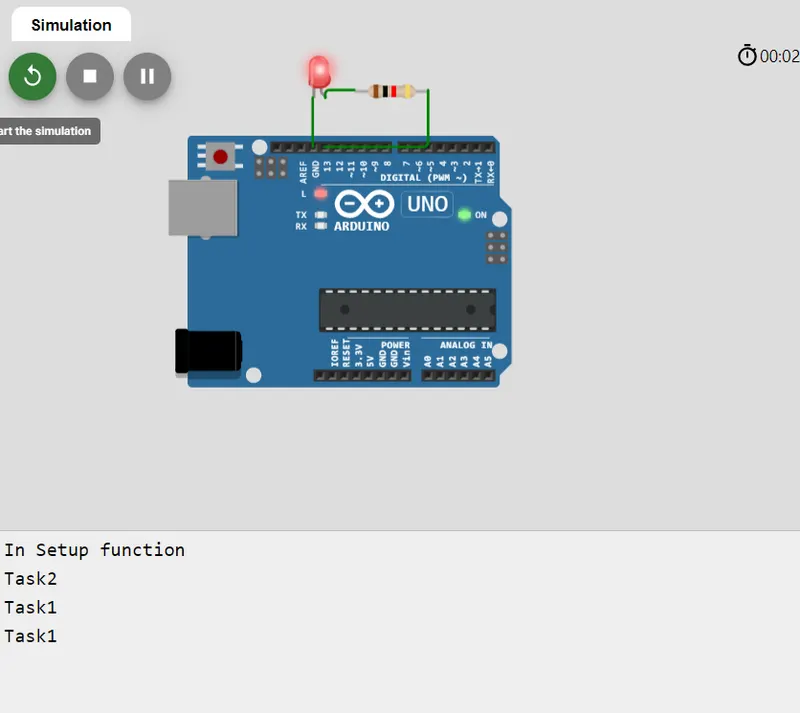
Turning LED ON and OFF using different tasks by Free RTOS api.
1)
#include
void setup()
//Initialize the Serial Monitor with 9600 baud rate
{
Serial.begin(9600);
Serial.println(F("In Setup function")); //use of F saves memory
pinMode(LED_BUILTIN, OUTPUT);
//Create two tasks with labels Task1, Task2 a
//We also create the fourth task labeled as IdelTask when there is no task in
//operation and it has the highest priority.
xTaskCreate(MyTask1, "Task1", 100, NULL, 1, NULL);
xTaskCreate(MyTask2, "Task2", 100, NULL, 2, NULL);
}
//We can change the priority of task according to our desire by changing the numeric’s //between NULL texts.
void loop()
{
//There is no instruction in the loop section of the code.
// Because each task executes on interrupt after specified time
}
//The following function is Task1. We display the task label on Serial monitor.
static void MyTask1(void* pvParameters)
{
while(1)
{
Serial.println(F("Task1"));
digitalWrite(LED_BUILTIN,HIGH);
vTaskDelay(2000/portTICK_PERIOD_MS);
}
}
static void MyTask2(void* pvParameters)
{
while(1)
{
Serial.println(F("Task2"));
digitalWrite(LED_BUILTIN, LOW); // turn the LED off by making the voltage LOW
vTaskDelay(2500/portTICK_PERIOD_MS);
}
}
Description:
Two tasks are created using xTaskcreate api. Inside task 1 command for turning LED ON is created and inisde task 2 command for turning LED
An Led is connected to the port and it will turn ON during task 1 and will be turned of during task 2.The task 2 is given higher priority so task 2 will run first.