Simulating a state flow model for washing machine and gear shift logic
Aim:
- To Simulate State flow model of a Washing Machine.
- To simulate a state flow model of a Gear Shift logic.
Theory:
A washing machine is an electronic system used to wash laundry. The term is mostly applied to machine that use water as opposed to dry cleaning. Washing machines are of two types:
- Semi-Automatic Washing Machine: It needs user’s assistance to complete the job of cleaning the clothes. The dry clothes need to be put in the washing tub of the machine and start the washing cycle. Then, after the washing is complete, the clothes need to be manually put into the drying tub for spinning process and the dirty water from the washing tub needs to be drained out manually.
- Automatic Washing machine: This type of washing machine needs no assistance from the user. Just put in the clothes in the common tub for washing and spinning, put detergent into the detergent box and start the water supply. The user can select any washing cycle from the pre-programmed options and get dry clothes at the end of the process without giving any further input to the washing machine.
State flow logic of Washing Machine:
State flow provides the graphical language to describe MATLAB algorithms and Simulink models should react to input signals, events and time based conditions. State flow enables us to design and develop control, task, scheduling, and user interface & hybrid systems.
Following are the conditions given to simulate a washing cycle:
- If power supply is available, the system gets activated.
- If water supply is not available, stop the process and indicate through LED.
- Soaking time should be 200 seconds, followed by washing time of 100 seconds.
- Rinse for next 20 seconds and dryer runs for 50 seconds.
The logic control is shown below:
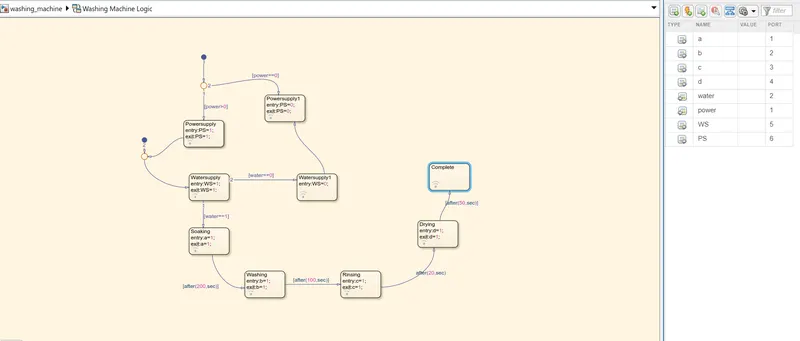
- In the logic control shown above, the 1st input taken is the power supply. A junction is used to compare the processes to follow, one is whether the power supply is ON or OFF, using (power>0) and (power==0) respectively. If the power supply is ON, then the machine will get activated and start the next process.
- If the power supply state is ON, then the logic checks for water supply to be ON or OFF, using (water>0) and (water==0) respectively and proceeds accordingly.
- If water supply is OFF, then the machine will stop. If water supply is ON, the machine proceed to complete the tasks. It starts with soaking process for 200s, followed by washing process for 100s.
- Next is rinsing process for 20s and drying takes place for 20s. After all the process are completed, the LED will show the status of the machine.
- After finishing all the processes, power supply is changed to PS=0, which shuts OFF the machine.
In the symbol pane in above logic control, ‘power’ and ‘water’ are two input ports, which tell the machine to continue the process or stop the process.
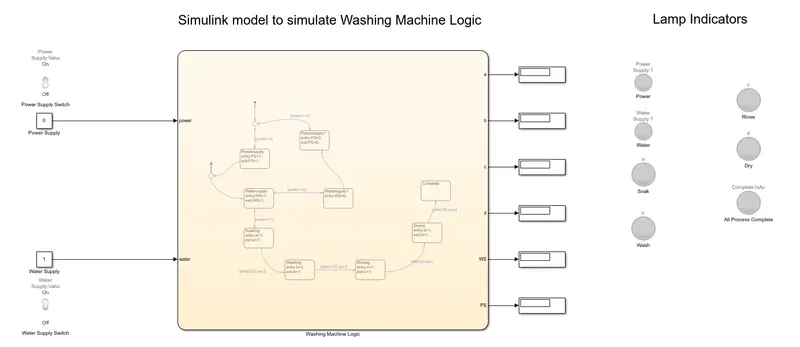
The final Simulink model is shown below:
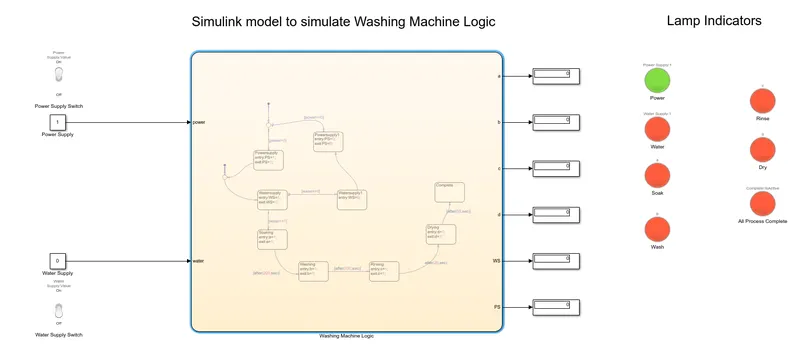
When Power supply is ON and Water Supply is OFF, the state of the washing machine is as shown below:
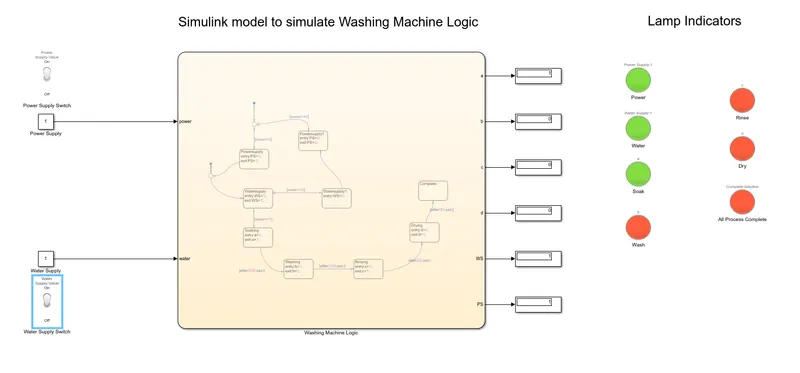
When power supply is ON and water supply is ON, cycle time = 200s, the soaking process is as shown below:
When power supply is ON and water supply is ON, cycle time = 300s, the washing process is as shown below:
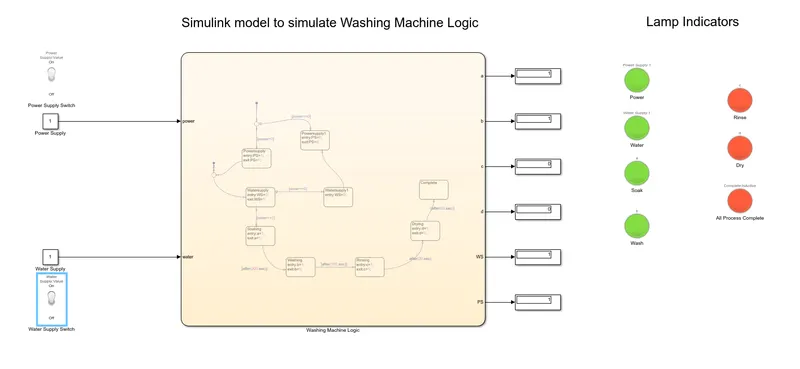
When power supply is ON and water supply is ON, cycle time = 320s, the Rinsing process is as shown below:
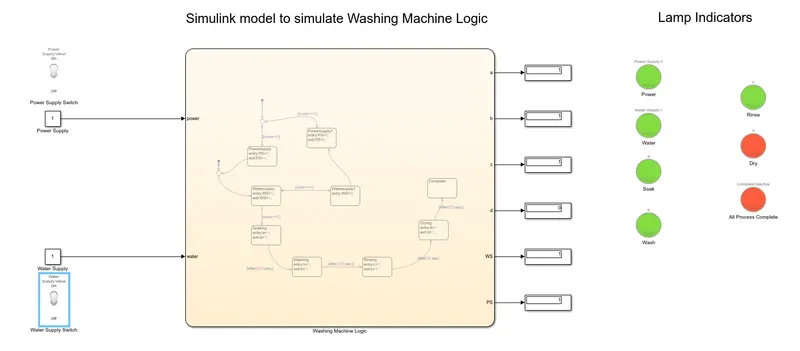
When power supply is ON and water supply is ON, cycle time = 370s, the drying process is as shown below:
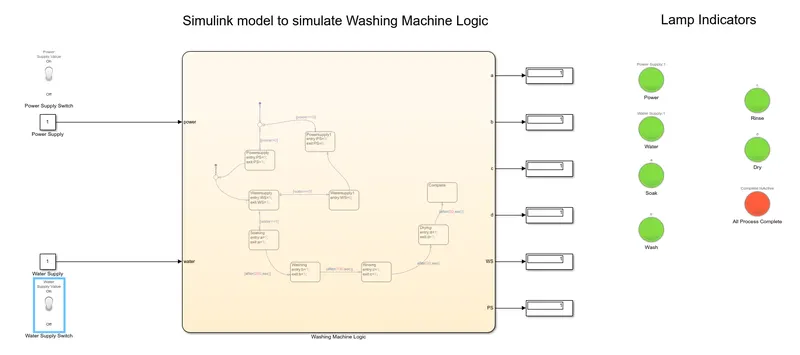
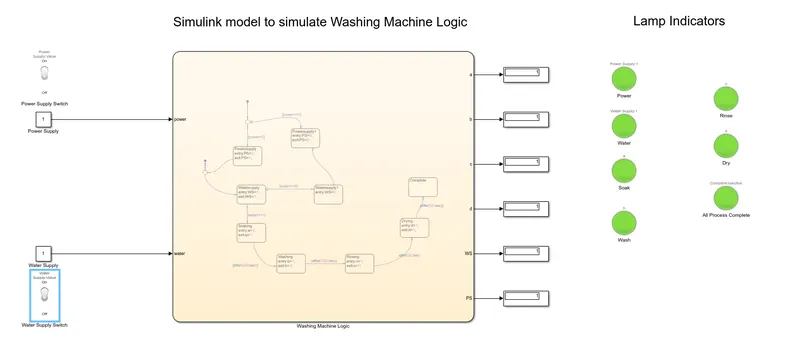
After all the processes are completed, the model is as shown below:
Click here to get the simulink model for state flow logic of washing machine.
Gear Shift Logic:
To use a state flow Simulink model to simulate the gear shift logic according to the given situation and display the gear number.
Speed (kmph) Gear
0-15 1
16-25 2
26-40 3
41-60 4
61 and above 5
Theory:
Manual transmission or a manually operated gearbox is a vital element of an automobile. This gearbox sits after the engine of the automobile and is responsible to regulate the speed and the torque supplied to the transmission shaft. This type of manual gearbox is generally operated by a foot pedal and is used to regulate the revolutions of the engine. The gearbox helps the automobile to move forward, move backward and shift into neutral before starting the engine.
Speed is a constant value, so we can use a constant block to input the value which is not dependent on the time variation. To change the value of the speed, we can use a slider gain, to change the value of the input speed that we give to the state flow logic and it should be displayed using a ‘Display’ block.
The state flow logic can be simulated using a ‘Chart’ block as shown below:
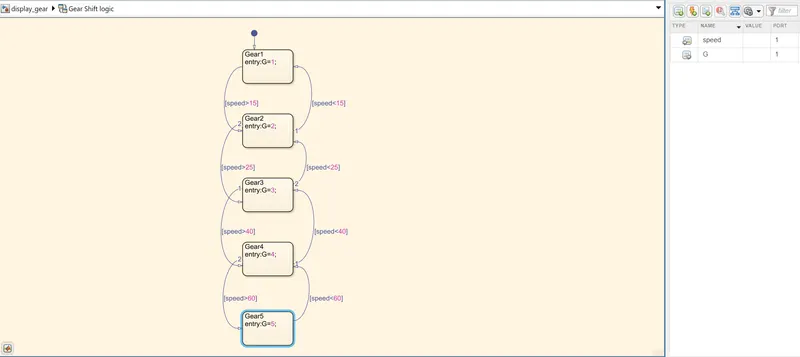
The defining point in the logic is the speed that is input from the slider gain. This value of speed is analysed and the corresponding gear shift is simulated and the gear number is displayed accordingly. In the chart above, the first block is represents that the input value is the speed and Gear 1 should be used of the speed value is in the range 0-15 kmph. ‘speed’ is the input data to the state flow chart. The levels of the state flow simulation act for different input values of the speed.
The chart block defines a state of the system and works as follows:
- If the speed is less than 15 kmph, the flow is terminated and Gear 1 is activated.
- If the speed is more than 15 kmph and less than 25 kmph, the flow is terminated and Gear 2 is activated.
- If the speed is more than 25 kmph and less than 40 kmph, the flow is terminated and Gear 3 is activated.
- If the speed is more than 40 kmph and less than 60 kmph, the flow is terminated and Gear 4 is activated.
- If the speed is more than 60 kmph, the flow is terminated and Gear 5 is activated.
- The current active gear is shown in the display block.
The first line in the state flow block is the ‘Name’ of the block and they are named accordingly from Gear1 to Gear5. ‘entry’ is the keyword used to tell the state flow block that the particular Gear number should be used. ‘G’ is the variable used to denote the output data. The arrows are used to switch from some gear number to the next or previous gear if the speed is increased or decreased respectively. The final state flow Simulink model is shown below:
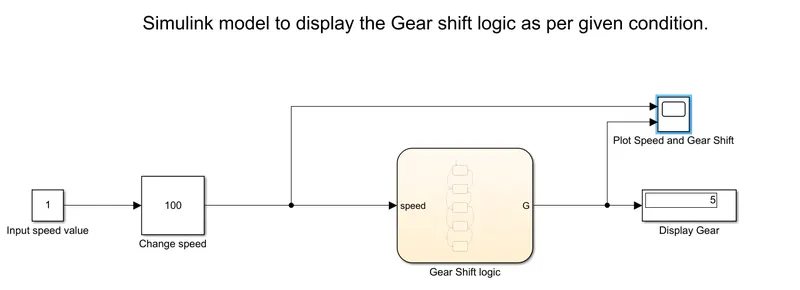
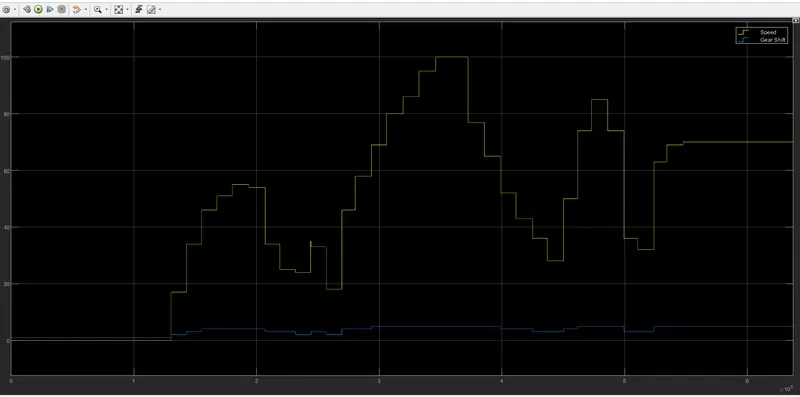
To observe the output of the simulation, run the simulation for infinite time by changing the simulation run time to ‘inf’, and try and change the value of the input speed using the slider gain block. Stop the simulation and observe the plot generated. A sample plot is attached below
Click here to get the simulink model for State flow logic of gear shifting.
Conclusion:
- The state flow model for the washing machine is simulated successfully.
- The state flow model for the gear shift logic is simulated successfully.