Curve Fitting of the given data.
Aim:
Write a MATLAB Code to fit a linear and cubic polynomial for the given Specific heat (Cp) data. Also, write a MATLAB Code to show split-wise method.
Curve Fitting:
Curve fitting is a process of constructing a curve that has a best fit to a series of data points, possibly subject to constraints. Curve fitting either involves interpolation, where an exact fit to the data is required, or ‘smoothing’, in which a smooth function is constructed that approximately fits the data. Generally, curve fit algorithms determine the best-fit parameters by minimizing a chosen merit function. In order to optimize the merit function, it is necessary to select a set of initial parameter estimates and then iteratively refine the merit parameters until the merit function does not change significantly between iterations.
Since the calculation of the curve is an iterative process, the calculation must stop somewhere. In some cases, the maximum number of iterations might be reached before the best possible curve has been calculated. Generally, curve fit algorithms determine the best-fit parameters by minimizing a chosen merit function. In some cases, for example if the data is widely scattered or too few data points are available, the iterative process might also result in a curve that converges on a false minimum.
Objectives:
- Write a code to fit a linear and cubic polynomial for the given data.
- Plot the linear and cubic fit curves along with the raw data points, including title, axes labels and legend.
- Write a code to show split-wise method.
- Explain the parameters used to measure the fitness characteristics for both the curves.
- Answer the questions:
- How to make a curve fit perfectly?
- Hoe to get the best fit?
- What could be done to improve the cubic fit?
Code structure in MATLAB:
MATLAB Code for linear curve fit along with raw –data
clear all
close all
clc

%%
%Loading the data file
cp_data= load('data');
temperature = cp_data(:,1);
cp = cp_data(:,2);


%%
%Curve fit
coeff_1 = polyfit(temperature,cp,1);
predicted_cp_1 = polyval(coeff_1,temperature);

%%
plot(temperature,cp,'linewidth',2)
hold on
plot(temperature,predicted_cp_1,'linewidth',2)
xlabel('Temperature [K]')
ylabel('Specific Heat [J/mol-K]')
legend('Raw data','Linear Curve fit','location','northwest')
title('Linear Curve Fitting')
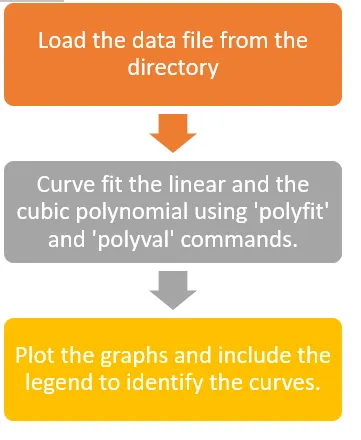
To get a linear curve fit, the raw data needs to be loaded into the MATLAB program. The command cp_data= load(‘data’); does this job. Before loading the data file make sure that the data file is present in the same directory as that of the MATLAB Code. To check this type-in ‘pwd’ in the command window to see the file location.
In this raw data, 1st column is the temperature and the 2nd column is the specific heat. So, the commands temperature = cp_data(:,1); & cp = cp_data(:,2); will assign the values in 1st column to temperature and the values in 2nd column to the specific heat.
Next, we need to find coefficients for the curve fit. Note the following points
- Number of coefficients = Degree of the required polynomial fit + 1
- Maximum degree of the required polynomial = number of data points -1
In this case, Number of coefficients = 1+1 = 2 and Maximum degree of the polynomial = 3200-1 =3199, but we won’t go that far.
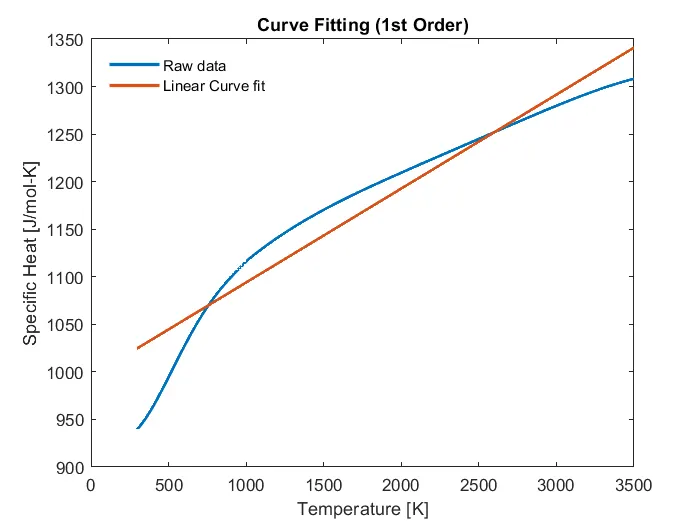
So, the command ‘polyfit(x,y,n)’ will generate coefficients for the nth order polynomial curve. The command ‘polyval’ will assign the value of the ‘polyfit’ command and generate an output of the predicted value according to the degree of the curve fitting polynomial .The last section of the code will plot the graph. The output is as shown below:
MATLAB Code for cubic polynomial curve fit along-with raw data:
clear all
close all
clc

%%
%Loading the data file
cp_data= load('data');
temperature = cp_data(:,1);
cp = cp_data(:,2);


%%
%Curve fit
coeff_1 = polyfit(temperature,cp,3);
predicted_cp_3 = polyval(coeff_1,temperature);

%%
plot(temperature,cp,'linewidth',2)
hold on
plot(temperature,predicted_cp_3,'linewidth',2)
xlabel('Temperature [K]')
ylabel('Specific Heat [J/mol-K]')
legend('Raw data','Cubic Curve fit','location','northwest')
title('Curve Fitting (3rd Order)')
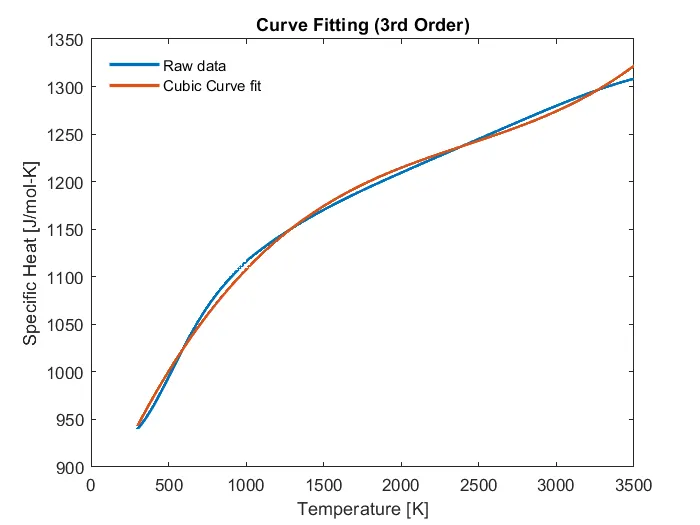
In this condition, the program is similar to the linear curve fit MATLAB program, only the change to note is in ‘polyfit’ command. Ensure that n=3 for cubic polynomial curve fitting. The output of this program is as follows:
Here, an error is generated in the command window as shown below:

To solve the error we use scaling and centering method so that the curve is not badly conditioned.
p = ‘polyfit(x,y,n)’ returns the coefficients for a polynomial p(x) of degree n that is a best fit (in a least-squares sense) for the data in y. The coefficients in p are in descending powers, and the length of p is n+1
[p,S] = polyfit(x,y,n) also returns a structure S that can be used as an input to 'polyval’ to obtain error estimates.
[p,S,mu] = polyfit(x,y,n) also returns ‘mu’, which is a two-element vector with centering and scaling values. mu(1) is mean(x), and mu(2) is std(x). Using these values, polyfit centers x at zero and scales it to have unit standard deviation,
This centering and scaling transformation improves the numerical properties of both the polynomial and the fitting algorithm.
The program to improve numerical properties of the polynomial and fitting algorithm is as follows:
MATLAB Code for cubic polynomial curve fit with scaling and centering:
clear all
close all
clc

%%
%Loading the data file
cp_data= load('data');
temperature = cp_data(:,1);
cp = cp_data(:,2);


%%
%Curve fit
[coeff_3,s,mu] = polyfit(temperature,cp,3);
predicted_cp_3 = polyval(coeff_3,temperature,s,mu);

%%
plot(temperature,cp,'linewidth',2)
hold on
plot(temperature,predicted_cp_3,'linewidth',2)
xlabel('Temperature [K]')
ylabel('Specific Heat [J/mol-K]')
legend('Raw data','Cubic Curve fit','location','northwest')
title('Curve Fitting (3rd Order)')
The output of the cubic polynomial curve fitting is as shown above and the error of bad conditioning is solved due to improved numerical properties.
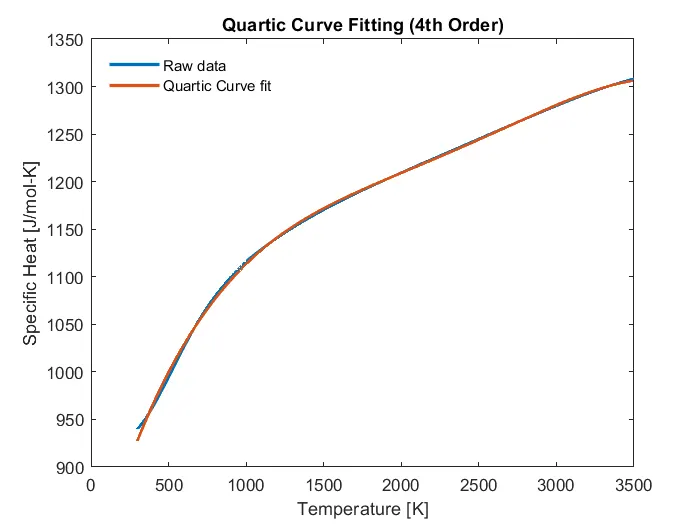
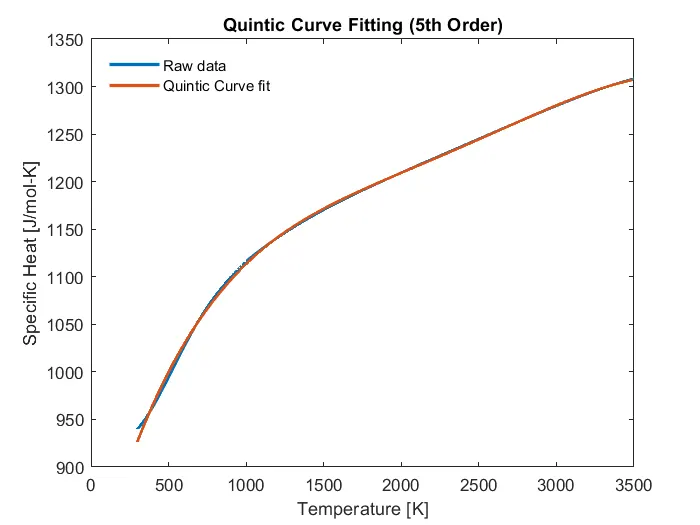
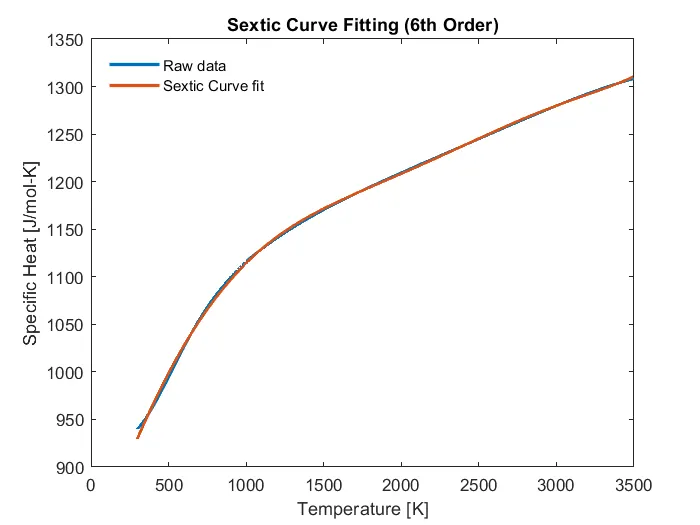
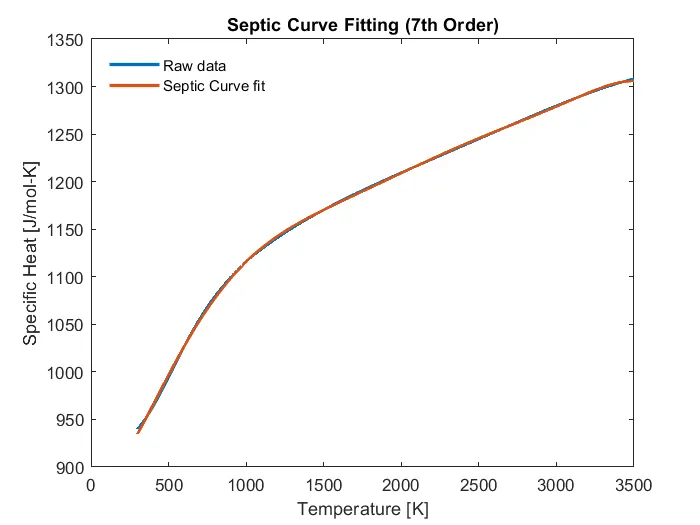
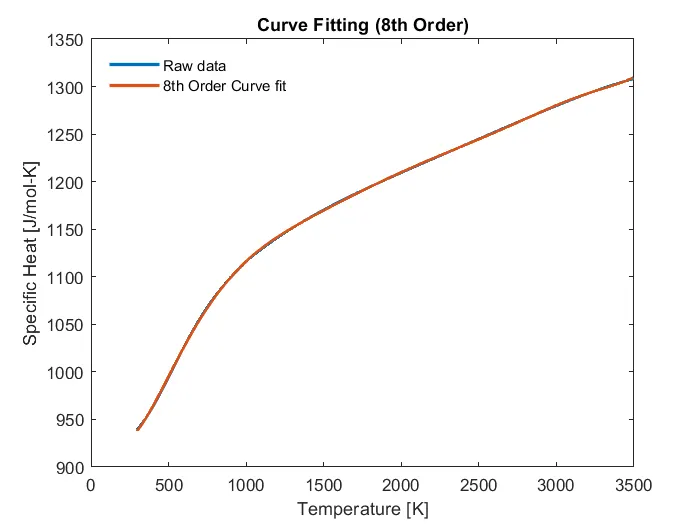
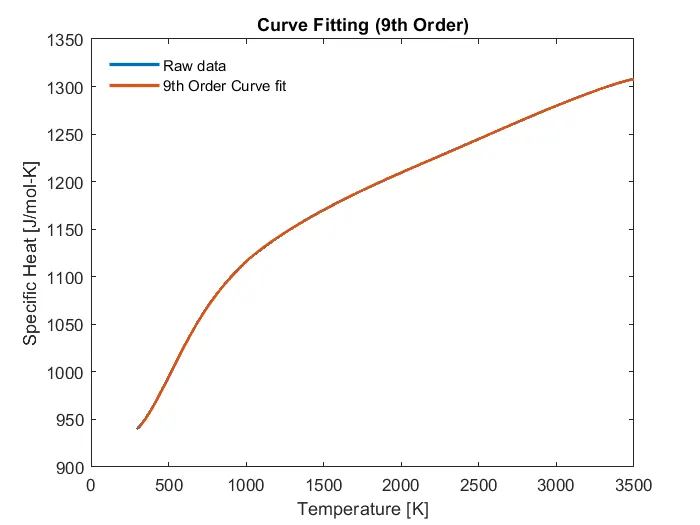
Similarly, we can have multiple curve fitting polynomials to try and get best curve fit for a particular degree of the polynomial. Just change the value of ‘n’ in the ‘polyfit’ command to get the best fit curve for the given data set. Some of them are shown below:
What is a perfect curve fit?
In order to get a perfect curve fit, the curve fitting polynomial should match all the data points of the raw data. It means that is the curve fitting polynomial is exact like the curve formed by the raw data, it is called as perfect fit. To get a perfect curve fit, there should be no errors in the particular polynomial curve. If there are any errors, those can be solved by using ‘Linear Regression with error estimates’ as shown above. So, the 3rd order polynomial without error is a perfect curve fit.
What is a best curve fit?
Simple linear regression gives us a best curve fit for our data and a particular degree of polynomial, and it is a unique curve for that polynomial. No other polynomial have its best fit similar to some other polynomial. To get a perfect fit out of the best fit of a polynomial, we need to use split-wise curve fitting for the given degree of the polynomial, or else change the degree of the polynomial and check whether some polynomial has its best fit equal to the perfect fit of the data set.
In this case, the best fit curve is the 9th order polynomial as compared to other curves shown above.
Also, a split wise method can be followed to get a perfect curve fit for a lower degree of a polynomial.
Perfect fit is a best fit, but a best fit is not always a perfect fit.
In the next part of this is project, an attempt was made to convert a 4th order polynomial best fit into a perfect fit.
MATLAB Code for split-wise curve fitting:
clear all
close all
clc

%Loading the data file
cp_data= load('data');
temp = cp_data(:,1);
cp = cp_data(:,2);

temp1 = cp_data([1:500],1);
cp1 = cp_data([1:500],2);
[coeff_1,s1,mu1] = polyfit(temp1,cp1,4);
predicted_cp_1 = polyval(coeff_1,temp1,s1,mu1);

temp2 = cp_data([500:2000],1);
cp2 = cp_data([500:2000],2);
[coeff_2,s2,mu2] = polyfit(temp2,cp2,4);
predicted_cp_2 = polyval(coeff_2,temp2,s2,mu2);

temp3 = cp_data([2000:3200],1);
cp3 = cp_data([2000:3200],2);
[coeff_3,s3,mu3] = polyfit(temp3,cp3,4);
predicted_cp_3 = polyval(coeff_3,temp3,s3,mu3);

%Plotting the graph
plot(temp, cp, 'linewidth',2,'color', 'b')
hold on
plot(temp1,predicted_cp_1,'linewidth',2,'color','r')
hold on
plot(temp2, predicted_cp_2,'linewidth',2,'color','y')
hold on
plot(temp3, predicted_cp_3,'linewidth',2,'color','g')
xlabel('Temperature [K]')
ylabel('Specific Heat [J/mol-K]')
legend('Raw data','1st Split Curve fit','2nd Split Curve fit','3rd Split Curve fit','location','northwest')
title('Split-wise Curve fit')
The program is similar to that of the best curve fit for 4th order polynomial, only change being that the total data set is divided into three parts and three different curves are plotted to get a perfect fit. The data is divided as follows;
1st Split- Data set for the first 500 values of temperature and specific heat.
2nd Split - Data set for the next 1501 values of temperature and specific heat.
3rd Split- Data set for the last 1201 values of temperature and specific heat.
The output plot of the program is shown below:
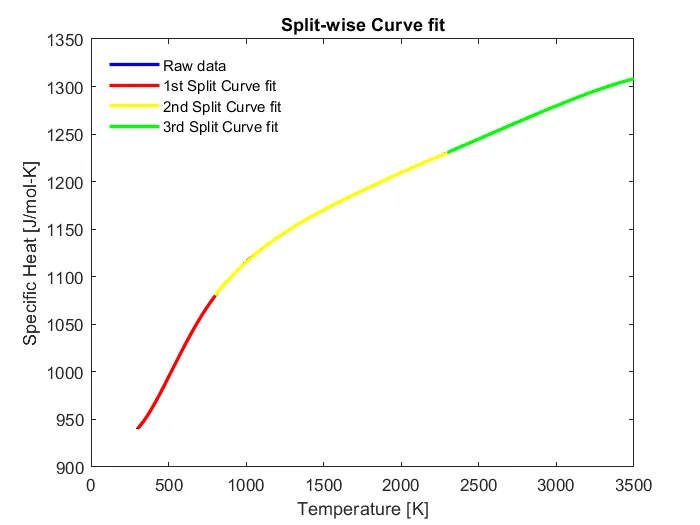
By using this method, one can get a perfect fit from the best fit of lower degree polynomial. The best fit of 4th order polynomial is shown in the project. We can compare the best fit and the split-wise perfect fit of the 4th order polynomial.
Note: If the total dataset is split into multiple parts, a different polynomial will give the perfect fit. It is not necessary that only the 4th order polynomial gives a split-wise perfect fit.
References:
https://in.mathworks.com/help/matlab/ref/polyfit.html?searchHighlight=polyfit&s_tid=srchtitle
https://en.wikipedia.org/wiki/Curve_fitting
Conclusion:
- The MATLAB Code for linear and cubic curve fitting of the given data set was executed successfully.