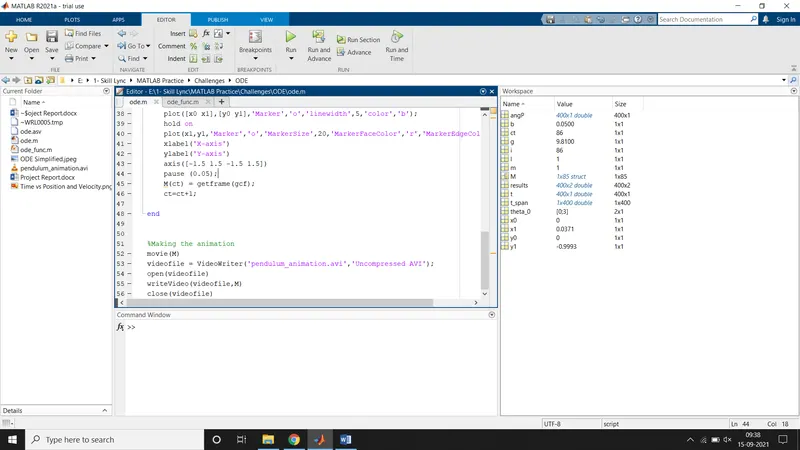
Solving ODE to create an animation of pendulum movement.
Aim:
Write a MATLAB Program to solve the given Ordinary Differential Equation. The equation describes the position of the pendulum ball with respect to time.
`(d^2 θ)/dt^2 +b/m (dθ)/dt+g/L sinθ=0`
Governing Equation:
The given equation is a 2nd Differential Equation. In the given equation,
- b= damping coefficient
- m= mass of the ball
- g= acceleration due to gravity
- L= Length of the pendulum rod
- Θ= Angular position of the ball
- t= time
The above equation needs to be simplified to be written in the MATLAB code. It is simplified as shown below:
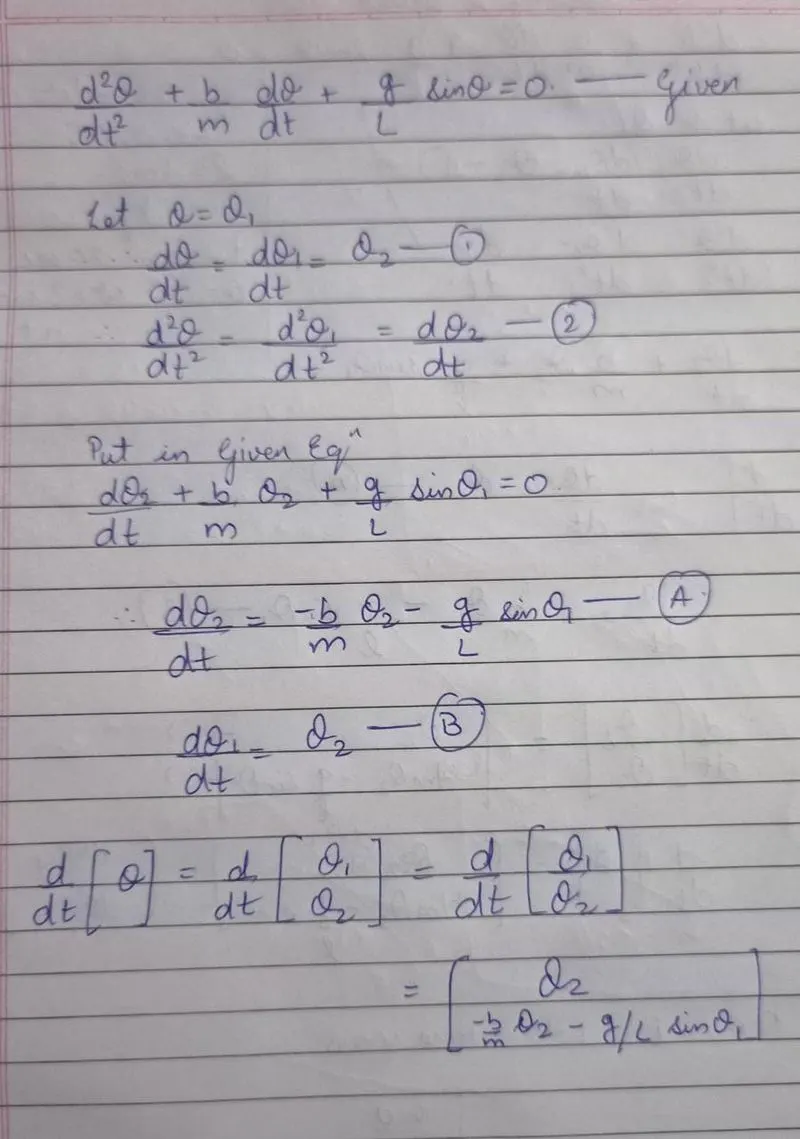
In the above simplification, the equations ‘A’ and ‘B’ are in the simplified form which can be input into the MATLAB Code. It is explained further in the project report.
Objectives:
- Write a program in MATLAB to simulate the pendulum motion for the given conditions:
- L= 1 meter
- m= 1 kg
- b= 0.05
- g= 9.81 m/s2
- To simulate the motion between 0-20 sec, for angular displacement = 0 and angular velocity = 3 rad/sec at t=0 sec.
- Plot a graph of Position and Velocity vs Time to verify the damping characteristics.
- Create an animation to verify the motion of the pendulum.
Code Structure in MATLAB:
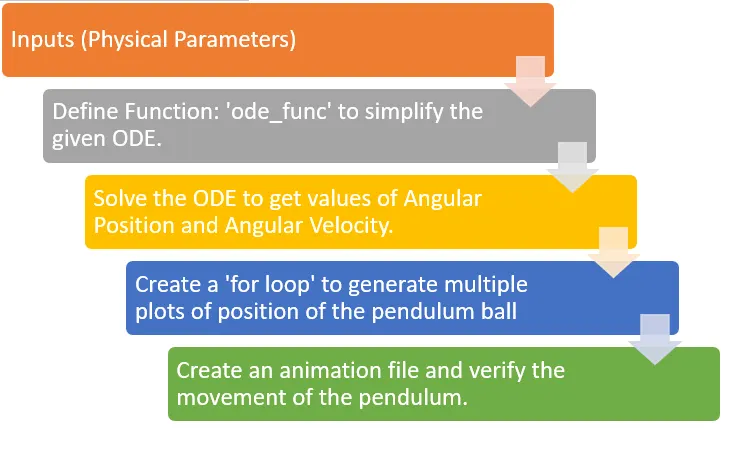
MATLAB Code to plot Position & Velocity vs Time and create an animation:
clear all
close all
clc

%Inputs
b = 0.05;
g = 9.81;
l = 1;
m = 1;

%Intital condition
theta_0 =[0;3]; %At time=0, Position=0, Velocity=3

%Time points
t_span = linspace(0,20,400);

%Solving ODE
[t, results]= ode45(@(t,theta) ode_func(t,theta,b,g,l,m), t_span, theta_0);

figure(1)
plot(t, results(:,1),'linewidth',2,'color','b')
hold on
plot(t,results (:,2),'linewidth',2,'color','r')
xlabel('Time')
ylabel('Plot')
ct= 1;

for i= 1:length(results(:,1))
    [angP]= results(:,1);
    figure(2)
    x0=0;
    y0=0;

    x1 = l*sin(angP(i));
    y1 = -l*cos(angP(i));

    hold off
    plot([x0 x1],[y0 y1],'Marker','o','linewidth',5,'color','b');
    hold on
    plot(x1,y1,'Marker','o','MarkerSize',20,'MarkerFaceColor','r','MarkerEdgeColor','y');
    xlabel('X-axis')
    ylabel('Y-axis')
    axis([-1.5 1.5 -1.5 1.5])
    pause (0.05);
    M(ct) = getframe(gcf);
    ct=ct+1;

end


%Making the animation
movie(M)
videofile = VideoWriter('pendulum_animation.avi','Uncompressed AVI');
open(videofile)
writeVideo(videofile,M)
close(videofile)
The above program plots the Angular Position and Angular Velocity vs Time and also create an animation to verify the movement of the pendulum according to the given ODE.
Initially, we start by giving the inputs required to solve the ODE.
- L= 1 meter
- m= 1 kg
- b= 0.05
- g= 9.81 m/s2
After that, define the initial condition. The function is theta (Angular position), and angular velocity determined in terms of time and based on the characteristics of the ODE.
theta_0= [0 ; 3], is a column matrix, which tell the compiler the maximum values of the parameters. When the plot will be generated, note that the plot does not exceed these initial values. Also, these conditions were given at the start of the problem specifications.
Then, define the time points, i.e. the number of points on which the angular position and angular velocity are to be determined. The command is t_span = linspace(0,20,400); Thus, the time frame of 0-20 seconds is divide into 400 points.
When the ODE is solved, the output is needed as an array, a 400 x 2 matrix, having angular position and angular velocity as results. The command [t, results]= ode45(@(t,theta) ode_func(t,theta,b,g,l,m), t_span, theta_0); does the job easily.
The command means, we need a matrix, which can be solved by using a predefined solver ode45.
The variable ‘t’ is independent and the variable ‘theta’ is dependent. These variables can be solved using a function ‘ode_func(t,theta,b,g,l,m)’. (The code for this function is explained further in the report.) This function needs to be integrated for the time period ‘t_span’ with the initial conditions defined by ‘theta_0’. The ode45 solver uses this type of syntax to get input and solve it to give output.
When the solver has completed its process, the commands for plotting the graph are as follows:
figure(1)
plot(t, results(:,1),'linewidth',2,'color','b')
hold on
plot(t,results (:,2),'linewidth',2,'color','r')
xlabel('Time')
ylabel('Plot')
MATLAB will open a figure(1) and plot time on x-axis and first column of the result matrix with a blue colour line that has linewidth of 2mm. Then the MATLAB compiler will hold this graph and plot another graph with the second column of the result matrix with red colour in the same plot. The commands xlabel and ylabel give names to the X-axis and Y-axis respectively. The blue colour line represents the position of the pendulum with respect to time, and the red colour line represents the angular velocity of the pendulum with respect to time. The plot generated is shown below:
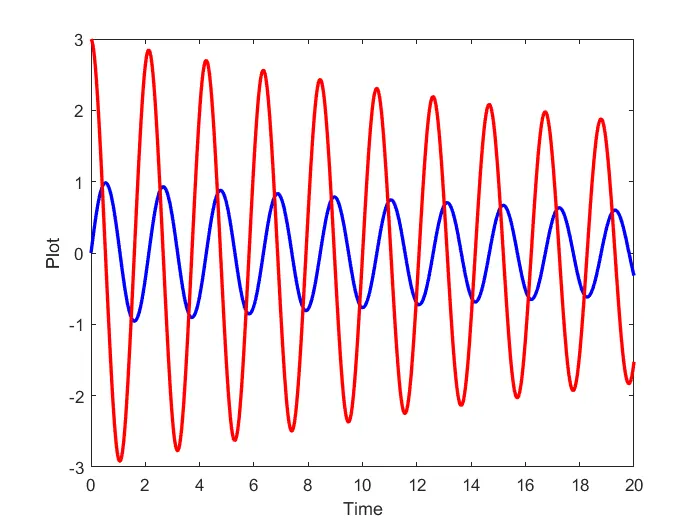
Note that, the blue colour line represents the position of the pendulum and the red line represents the angular velocity variation.
To create an animation of movement of the pendulum, multiple frames are required to be generated over the time period. The ‘for loop’ does this work.
The command ‘for i= 1: length(results(:,1)) [angP] = results(:,1)’ start the for loop. For a variable ‘i’ from 1 to length of first column of the result matrix i.e. 400, and for every value of ‘i’, ‘angP’ will form an array that consists of values from the first column of the result matrix.
Next, the initial position of the link is given by x0=0 & y0=0. The final position of the link is given by ‘x1= l*sin(angP(i)) & y1= -l*cos(angP(i))’ Here, the minus sign will ensure that the pendulum ball is on the downward side as expected.
The command plot([x0 x1],[y0 y1],'Marker','o','linewidth',5,'color','b'); will plot a line from (x0,y0) to (x1,y1) and will hold this graph.
The command plot(x1,y1,'Marker','o','MarkerSize',20,'MarkerFaceColor','r','MarkerEdgeColor','y');
Will plot a marker having ‘O’ shape with marker size of 20, marker face of red colour and marker edge of yellow colour. This circular marker represents the pendulum ball and is present at the far end (x1,y1) of the link and will move according the solution of the ODE.
Before the ‘for loop’ was started, the counter was set to ct=1 and to get multiple values in our solution, the counter is incremented by ct=ct+1.
Finally, movie(M)
videofile = VideoWriter('pendulum_animation.avi','Uncompressed AVI');
open(videofile)
writeVideo(videofile,M)
close(videofile)
These commands will create an animation file. Follow the link to see the animation:
https://drive.google.com/file/d/1dCziBY9sQvwN5SGJzKkzaPpyeDq-cztN/view?usp=sharing
MATLAB Code to define the function:
function [dtheta_dt] = ode_func(t, theta, b, g, l, m)

theta1=theta(1);
theta2=theta(2);
dtheta1_dt = theta2;
dtheta2_dt = (-b/m)*theta2 - (g/l)*sin(theta1);
dtheta_dt = [dtheta1_dt; dtheta2_dt];

end
As per the requirement, ode_func(t,theta,b,g,l,m) will work to get the angular position and angular velocity of the pendulum. The commands to define the function are based on the simplified format of the ODE as shown in the Governing Equation part in this report.
The differential equation in MATLAB are written using an underscore.
dtheta1_dt = theta2 & dtheta2_dt = (-b/m)*theta2 - (g/l)*sin(theta1); are the two equations that will solve the ODE for us. The output of this function is called in the main program to generate the results matrix.
Finally, the output of this function is stored as a matrix named dtheta_dt.
Conclusions:
The output of the above MATLAB Code is as follows: