Otto Cycle in MATLAB using Engine Kinematics
Aim:
The aim of the project is to write a MATLAB program for an Otto Cycle, plot the PV diagrams and compute the thermal efficiency of the cycle.
Otto Cycle:
Otto Cycle is the ideal thermodynamic cycle that describes the basic functionality of the Spark-Ignition (SI) engine. The following figure shows the ideal processes of the Otto Cycle.
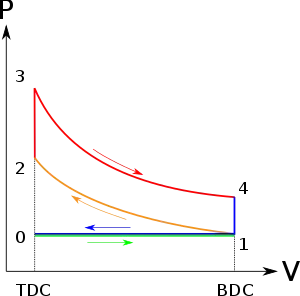
The processes are described by
- Process 0–1: Air-fuel mixture is drawn into the cylinder at constant pressure.
- Process 1–2: Adiabatic (Isentropic) Compression of the charge from BDC to TDC (Compression Stroke)
- Process 2–3: Constant Volume heat addition.
- Process 3–4: Adiabatic (isentropic) expansion (power stroke) from TDC to BDC.
- Process 4–1: Constant Volume heat Rejection.
- Process 1–0: Exhaust is released into the atmosphere.
Source: https://en.wikipedia.org/wiki/Otto_cycle
Governing Equations:
Engine Kinematics state that during the compression process (1-2) and the expansion process (3-4), the change in the pressure and volume inside the cylinder is governed by the equation
`V/V_c =1+1/2(r-1)(R+1-cosθ- √(R^2-〖sin〗^2 θ))`
Where,
V = Volume at a particular crank angle.
VC = Clearance volume of the cylinder. It is given by `V_C=(Swept Volume)/(r-1)`
r = Compression ratio
VS = Swept Volume
R = (Length of Connecting Rod)/(Crank Pin radius) Crank Pin Radius = (Stroke Length)/2
Θ = Instantaneous Crank Angle
Thermal Efficiency= (Work Done by the system)/(Heat Added to the system)= `1-{ 1/r^(γ-1) },` γ = `C_P/C_V` = 1.4 for air.
Objectives:
- To calculate the state variable values of the states of air-fuel mixture during the cycle.
- To plot the PV diagram for the Otto Cycle.
- To compute the thermal efficiency of the cycle.
Code Structure in MATLAB:
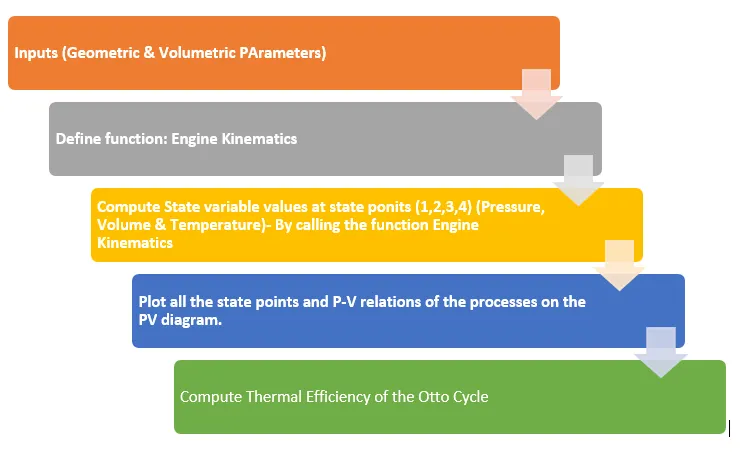
MATLAB Code to plot Otto Cycle on a P-V diagram:
clear all
close all
clc

%Inputs
bore = 0.1;
stroke = 0.1;
con_rod= 0.25;
cr=14;
gamma =1.4;
t3= 2500;

%State Variables for state 1
%Pressure in Pa
%Temperature in K
%Length &  Diameter in m
%Volume in m^3

p1=101325;
t1=500;

%Calculate swept volume and clearance volume
v_swept= (pi/4)*bore^2*stroke;
v_clearance = v_swept/(cr-1);

v1 = v_swept + v_clearance;
v2= v_clearance;

%State Variables 2
%p1v1^gamma= p2v2^gamma
%p2= p1*(v1/v2)^gamma
p2= p1*cr^gamma;

%p1v1/t1=p2v2/t2 | t2=p2v2t1/p1v1
t2= p2*v2*t1/(p1*v1);

constant_c = p1*v1^gamma;
V_compression = engine_kinematics(bore,stroke,con_rod,cr,180,0);
P_compression = constant_c./V_compression.^gamma;


%State Variable for state 3
v3=v2;
p3 = p2*t3/t2;

%State Variable for state 4
v4=v1;
p4=p3*(v3/v4)^gamma;

constant_c = p3*v3^gamma;
V_expansion = engine_kinematics(bore,stroke,con_rod,cr,0,180);
P_expansion = constant_c./V_expansion.^gamma;

figure(1)
xlabel('Volume, m^3')
ylabel('Pressure, Pa')
hold on
plot(v1,p1,'*','color','r')
plot(v2,p2,'*','color','r')
plot(v3,p3,'*','color','r')
plot(v4,p4,'*','color','r')
plot(V_compression,P_compression,'linewidth',2,'color','[0.3 0.3 0.3]')
plot(V_expansion,P_expansion,'linewidth',2,'color','y')
plot([v2 v3],[p2 p3],'linewidth',2,'color','r')
plot([v4 v1],[p4 p1],'linewidth',2,'color','b')

%Calculating Thermal Efficiency
%Efficiency = 1-(1/cr^(gamma-1))
eff = (1-(1/(cr^(gamma-1))))*100
The above program plots the Otto Cycle on a P-V diagram and computes the thermal efficiency of the cycle.
Initially, we start by giving the input data required to plot a P-V diagram of the Otto Cycle. We give in the data as follows:
- Bore diameter = 0.1m
- Stroke Length= 0.1m
- Connecting rod length= 0.25m
- Compression ratio= 14
- γ=1.4 for air
- Pressure at BDC before compression (P1) = 101325 Pa
- Temperature of air-fuel mixture before compression (T1) = 500K
- Temperature after constant volume heat addition (T3) = 2500K
From the given inputs, calculate the swept volume and the clearance volume of the cylinder.
Swept volume = Volume of cylinder with diameter equal to bore and length equal to stroke of the cylinder.
- Swept volume = `(π/4*d^2*l)`
- Clearance volume = `((Swept Volume)/(r-1))`
We have total volume = swept volume + clearance volume = V1 and
V2 = Clearance volume.
We know that: `: P_1 〖V_1〗^γ=P_2 〖V_2〗^γ` = constant and . `(P_1 V_1)/T_1 = (P_2 V_2)/T_2 .`
By using the above equations we get pressure and temperature at state point 2.
To determine the shape of the curve that represents the compression and the expansion processes, we call the function engine kinematics to compute the volume at state 2 and state 4. We use the function to tell the compiler to follow a certain relation instead of a linear relation. The MATLAB code for the function is explained later in this report.
The code to call the function is as follows:
constant_c = p1*v1^gamma;
V_compression = engine_kinematics(bore,stroke,con_rod,cr,180,0);
P_compression = constant_c./V_compression.^gamma;
Since, during the compression process, the volume decreases, the crank moves from 180⁰ to 0⁰.
constant_c = p3*v3^gamma;
V_expansion = engine_kinematics(bore,stroke,con_rod,cr,0,180);
P_expansion = constant_c./V_expansion.^gamma;
Since, during the expansion process, the volume increases, the crank moves from 0⁰ to180⁰.
After we get state variable values of all the state points, first we plot the points on the P-V diagram
figure(1)
xlabel('Volume')
ylabel('Pressure')
hold on
plot(v1,p1,'*','color','r')
plot(v2,p2,'*','color','r')
plot(v3,p3,'*','color','r')
plot(v4,p4,'*','color','r')
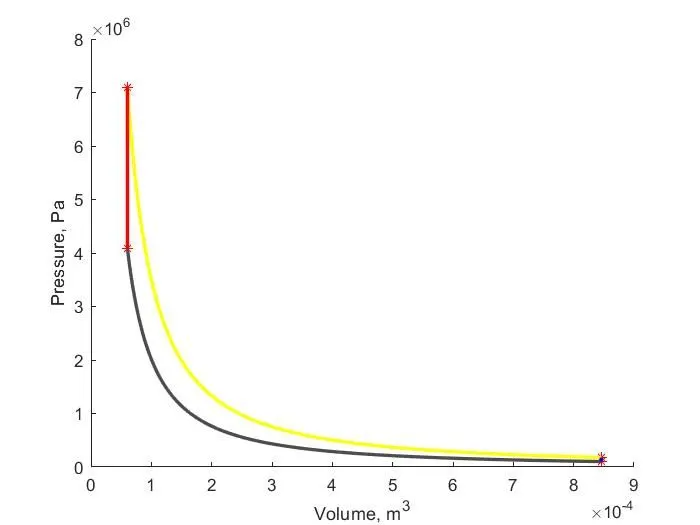
The above commands will generate a figure with Volume on X-axis and Pressure on Y-axis, and plot the points on the graph. The points are represented by the ‘*’ mark on the plot.
Next, the processes are plotted on the graph.
plot(V_compression,P_compression,'linewidth',2,'color','[0.3 0.3 0.3]')
plot(V_expansion,P_expansion,'linewidth',2,'color','y')
These commands will plot the compression and the expansion process as per the piston kinematics and the following commands will plot constant volume heat addition and constant volume heat rejection processes respectively.
plot([v2 v3],[p2 p3],'linewidth',2,'color','r')
plot([v4 v1],[p4 p1],'linewidth',2,'color','b')
All the plots will have linewidth of 2 mm and different colours are used to distinguish the processes on the plot.
- A colour formed by combination of red, green, and blue colours with 30% intensity of each colour represents the compression process.
- Yellow colour represents the expansion process.
- Red colour represents the constant volume heat addition process.
- Blue colour represents the constant volume heat rejection process.
The efficiency of the Otto Cycle is computed by the following code in MATLAB:
eff = 1-(1/(cr^(gamma-1)))
MATLAB Code to define a function: Engine Kinematics
function [V] = engine_kinematics(bore,stroke,con_rod,cr,start_crank,end_crank)
%Engine Parameters

a= stroke/2;
R= con_rod/a;

%Calculate volume
v_s = (pi/4)*bore^2*stroke;
v_c = v_s/(cr-1);

theta = linspace(start_crank,end_crank,100);
term1= 0.5*(cr-1);
term2= R+1-cosd(theta);
term3= (R^2- sind(theta).^2).^0.5;

V=(1+term1*(term2-term3)).*v_c;

end
In a supplementary program, we define a function in MATLAB, Instantaneous volume equal to engine_kinematics of bore, stroke, connecting rod, start crank angle and end crank angle.
A term theta is required as multiple values of crank angle and is written as theta = linspace(start_crank,end_crank,100). This will create an array of all the crank angle values and will compute terms defined as below for every position of the crank in the array.
term1= 0.5*(cr-1);
term2= R+1-cosd(theta);
term3= (R^2- sind(theta).^2).^0.5;
The above terms are put into the formula defined by the engine kinematics to compute the value of instantaneous volume during the compression and the expansion processes.
V=(1+term1*(term2-term3)).*v_c; is the engine kinematic equation.
This function is used to calculate state variables of state 2 and state 4, and to plot the isentropic compression and the isentropic expansion processes on the P-V diagram.
Conclusions:
The output of the above MATLAB code is generated as shown below:
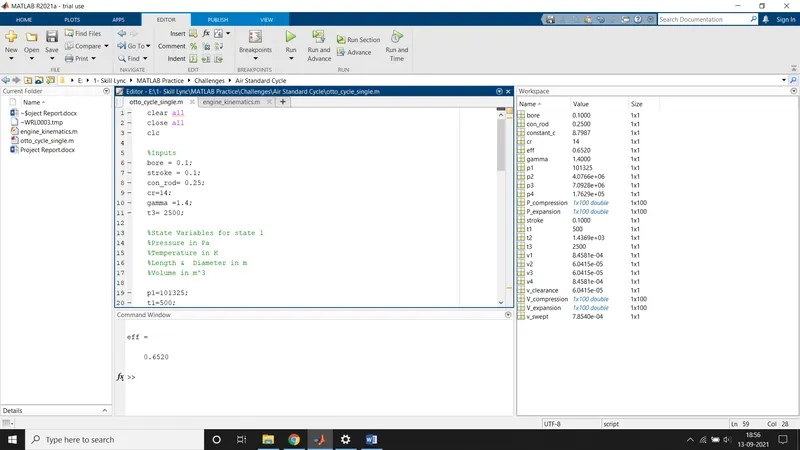
Note that, an array of 100 values is formed as per the engine kinematics equation which governs the nature of the curve represented in the following plot:
The efficiency of the Otto Cycle for the particular inputs given in the MATLAB code is computed equal to 65.2024%.
Note: In the P-V Diagram, the curve joining the state 4 and state 1 is a line. Please zoom onto the plot to get a clear view in MATLAB.