Parsing NASA Thermodynamic Data
Aim:
Write a MATLAB Code to extract 14 coefficients for each species from the given data file and calculate enthalpy, entropy and specific heats for all the species in the data file.
Governing Equations:
The governing equations are as follows:

Cp = Specific Heat of the specimen (J/kg K).
H = Enthalpy of the specimen (J/kg).
S = Entropy of the specimen (J/K).
R = Universal Gas Constant.
T = Temperature (K).
Specific Heat: It is the amount of heat that must be added to one unit of mass of the substance in order to cause an increase of one unit in temperature. The SI unit of specific heat capacity is Joule per Kelvin per kilogram, (J/K kg). For example, the heat required to raise the temperature of 1 kg of water by 1 K is 4184 Joules so the specific heat capacity of water is 4184 J/kg K.
According to the data given: `C_P=R(a_1+a_2 T+a_3 T^2+a_4 T^3+a_5 T^4).`
Enthalpy: It is the property of the thermodynamic system, defined as the sum of the internal energy of the system and the product of its pressure and volume. The total enthalpy of a system cannot be measured directly because the internal energy contains components that are unknown, not easily accessible, or are not of interest in thermodynamics. In practice, a change in enthalpy is the preferred expression for measurements at constant pressure, because it simplifies the description of energy transfer.
The SI unit of enthalpy is Joule per kilogram and mathematically, where, p is pressure in Pa and V is volume m3.
According to the data given: `H=RT(a_1+a_2/2 T+ a_3/3 T^2+ a_4/4 T^3+ a_5/5 T^4+ a_6/T )`
Entropy: Entropy is the measure of a system's thermal energy per unit temperature that is unavailable for doing useful work. Because work is obtained from ordered molecular motion, the amount of entropy is also a measure of the molecular disorder, or randomness, of a system.
The SI unit of entropy is joule per Kelvin.
According to the given data: `S= R(a_1 lnT+ a_2 T+ a_3/2 T^2+ a_4/3 T^3+a_5/4 T^4+ a_7)`
Objectives:
- Write a function that extracts the 14 coefficients and calculates the enthalpy, entropy and specific heats for all the species in the data fil
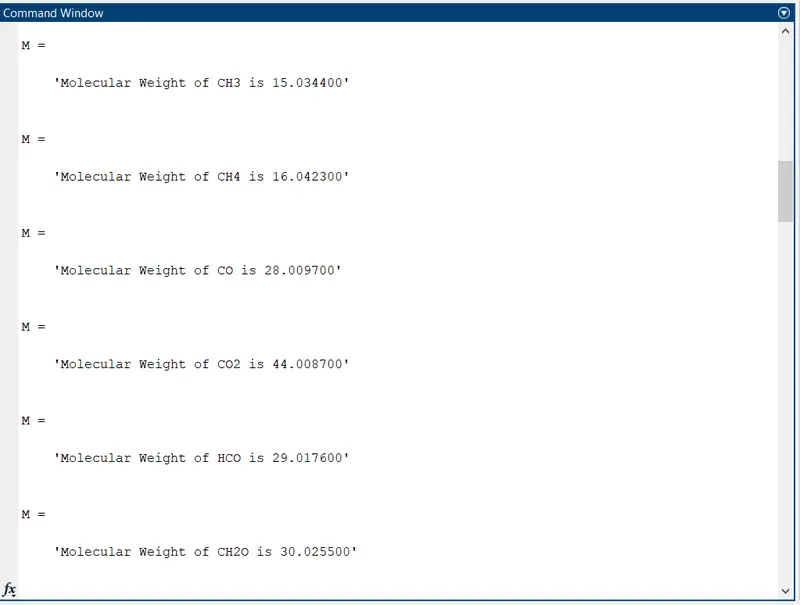
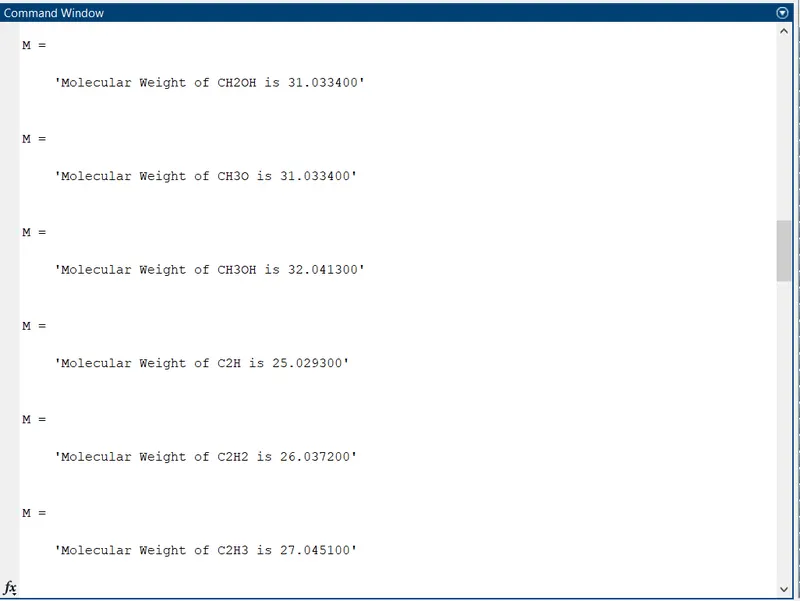
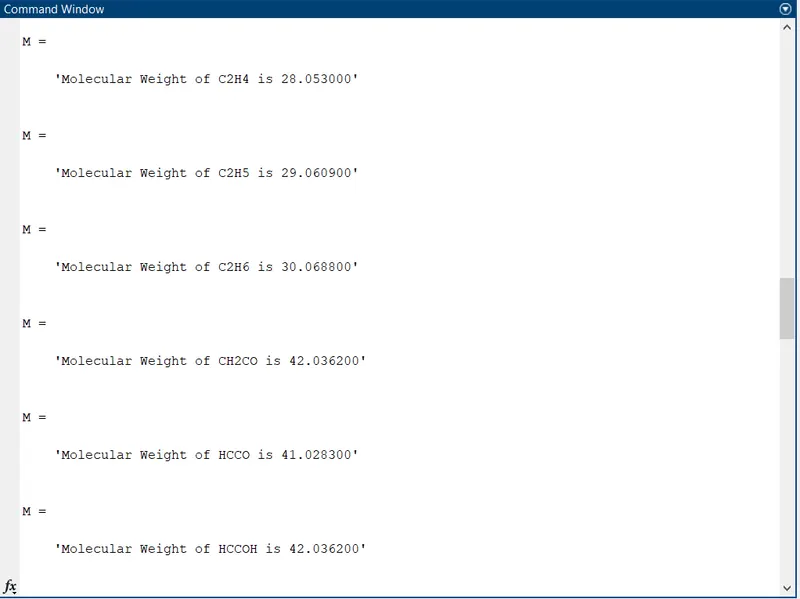
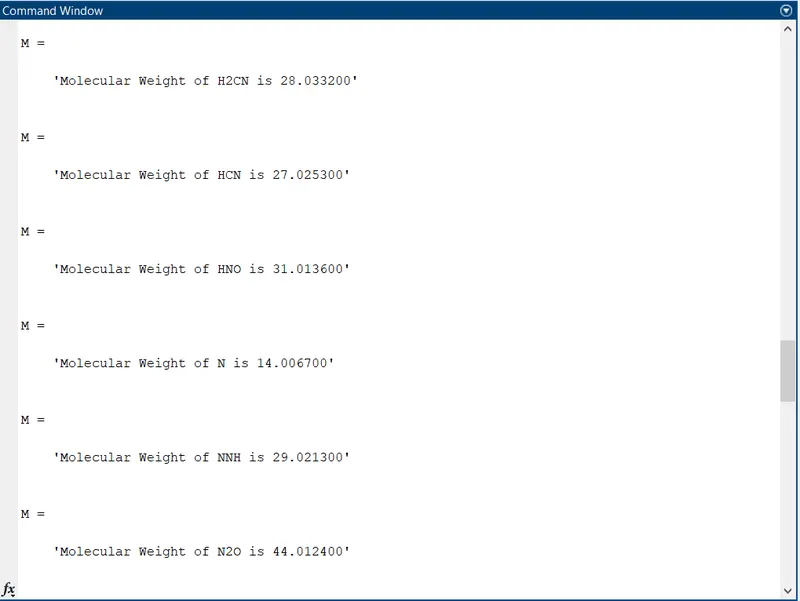
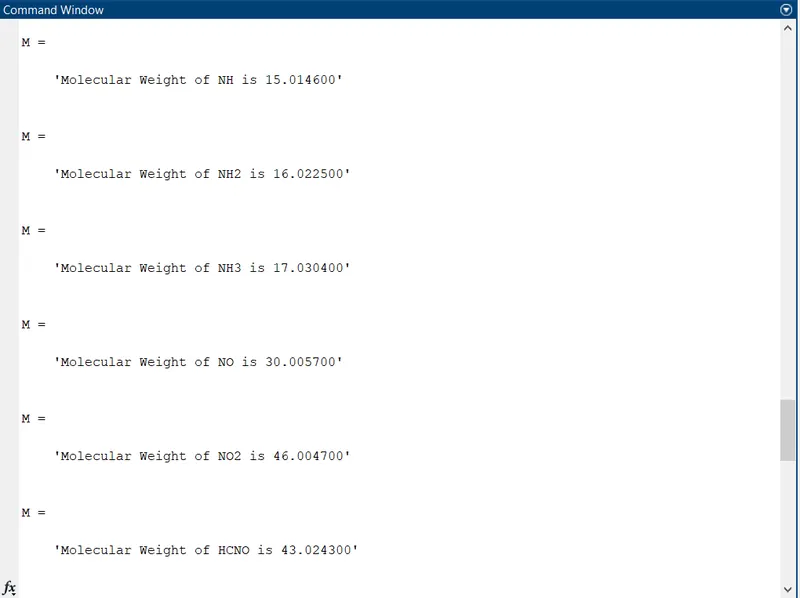
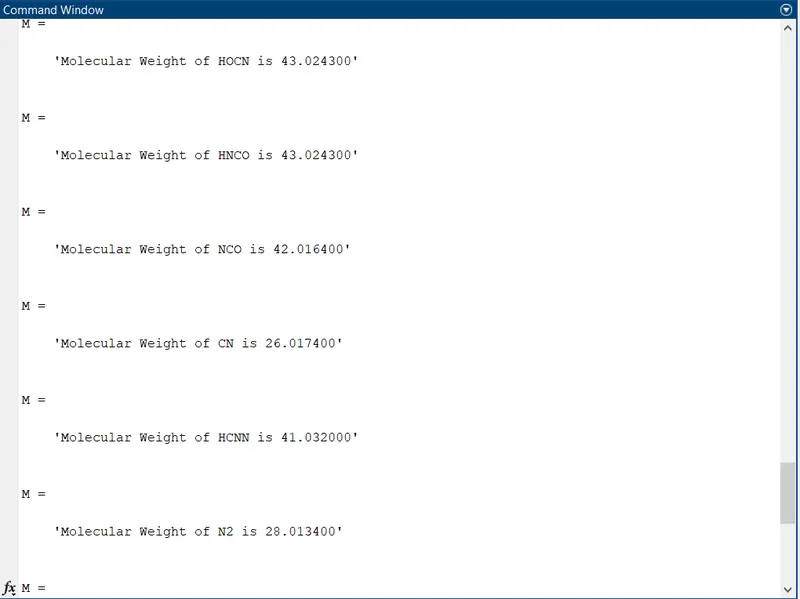
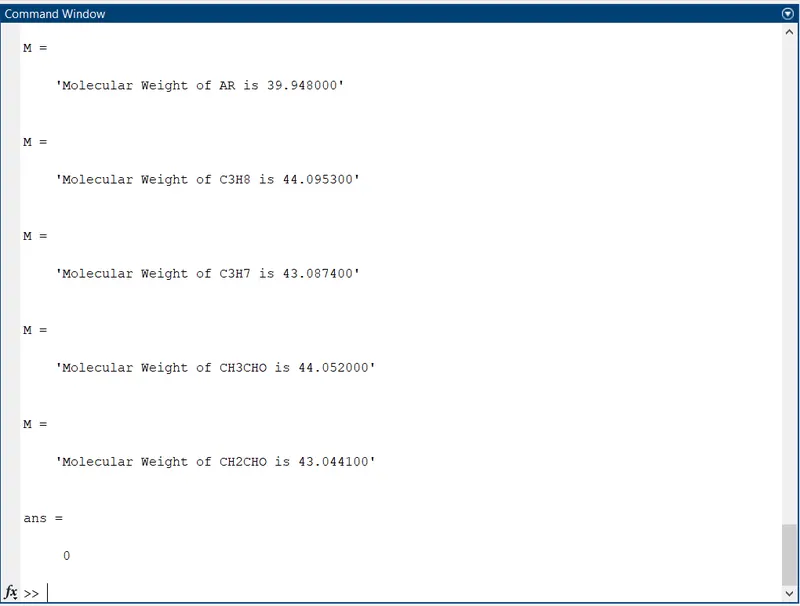
- Calculate the molecular weight of each species and display in the command window.
- Plot the Cp, Enthalpy and Entropy for the local temperature range specific for each species.
- Save the plots as images with appropriate names and dump them in separate folders for each species with suitable names. All this should be generated automatically.
Code Structure in MATLAB:
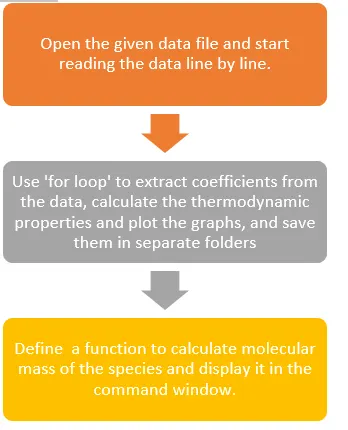
The program in MATLAB is as follows:
clear all
close all
clc

f1 = fopen('THERMO.dat','r');

line1 = fgetl(f1);
line2 = fgetl(f1);

comment_1 = fgetl(f1);
comment_2 = fgetl(f1);
comment_3 = fgetl(f1);

temp_range = strsplit(line2,' ');

global_low_temp = str2num(temp_range{2});
global_mid_temp = str2num(temp_range{3});
global_high_temp = str2num(temp_range{4});

for i = 1:53
    A = fgetl(f1);
    species_name = strtok(A);

    B = fgetl(f1);
    b = findstr(B,'E');
    %Let the coefficients be a1, a2,a3,......a13, a14
    a1 = str2num(B(1:b(1)+3));
    a2 = str2num(B(b(1)+4:b(2)+3));
    a3 = str2num(B(b(2)+4:b(3)+3));
    a4 = str2num(B(b(3)+4:b(4)+3));
    a5 = str2num(B(b(4)+4:b(5)+3));

    %Reading the next line of coefficients
    C = fgetl(f1);
    c = findstr(C,'E');
    a6 = str2num(C(1:c(1)+3));
    a7 = str2num(C(c(1)+4:c(2)+3));
    a8 = str2num(C(c(2)+4:c(3)+3));
    a9 = str2num(C(c(3)+4:c(4)+3));
    a10 = str2num(C(c(4)+4:c(5)+3));

    %Reading the next line of coefficients
    D = fgetl(f1);
    d = findstr(D,'E');
    a11 = str2num(D(1:d(1)+3));
    a12 = str2num(D(d(1)+4:d(2)+3));
    a13 = str2num(D(d(2)+4:d(3)+3));
    a14 = str2num(D(d(3)+4:d(4)+3));

    %Calculate Cp, H and S

    t1 = 200;
    t2 = 3500;
    t3 = 1000;
    T = linspace(t1,t2,400);
    R = 8.314; %Gas Constant

    for i = 1:length(T)
        if T(i)>t3
            Cp(i) = R*(a1+a2.*T(i)+a3.*T(i).^2+a4.*T(i).^3+a5.*T(i).^4);
            H(i) = R.*T(i)*(a1 + a2.*T(i)./2+ (a3.*T(i).^2)./3+ (a4.*T(i).^3)./4+ (a5.*T(i).^4)./5 + a6.*T(i));
            S(i) = R*((a1.*log(T(i))+ a2.*T(i) + (a3.*T(i).^2)./2 + (a4.*T(i).^3)./3 + (a5.*T(i).^4)./4 + a7));
        else
            Cp(i) = R*(a8+a9.*T(i)+a10.*T(i).^2+a11.*T(i).^3+a12.*T(i).^4);
            H(i) = R.*T(i)*(a8 + a9.*T(i)./2+ (a10.*T(i).^2)./3+ (a11.*T(i).^3)./4+ (a12.*T(i).^4)./5 + a13.*T(i));
            S(i) = R*((a8.*log(T(i))+ a9.*T(i) + (a10.*T(i).^2)./2 + (a11.*T(i).^3)./3 + (a12.*T(i).^4)./4 + a14));
        end
    end


     mkdir(species_name);
     cd(species_name);

    %Plotting specific heat vs temperature
    figure(1)
    plot(T,Cp,'linewidth',2.5,'color','r');
    xlabel('Temperature (K)');
    ylabel('Specific heat (J/kg K)');
    title(['Specific Heat vs Temperature of ',species_name]);
    grid on

    %Plotting Enthalpy vs Temperature
    figure(2)
    plot(T,H,'linewidth',2.5,'color','b');
    xlabel('Temperature (K)');
    ylabel('Enthalpy (J/kg)');
    title(['Enthalpy vs Temperature of ',species_name]);
    grid on

    %Plotting Entropy vs Temperature
    figure(3)
    plot(T,S,'linewidth',2.5,'color','g');
    xlabel('Temperature (K)');
    ylabel('Entropy (J/K)');
    title(['Entropy vs Temperature of ',species_name]);
    grid on


    saveas(figure(1), 'Cp vs Temperature.jpg');
    saveas(figure(2), 'Enthalpy vs Temperature.jpg');
    saveas(figure(3), 'Entropy vs Temperature.jpg');

    cd ..


    %Molecular Weight
    element = ['H','C','N','O','Ar'];
    atomic_wt = [1.0079 12.0107 14.0067 15.999 39.948];
    mol_wt = 0;

    for k= 1:length(species_name)
        for m =1 : length(element)
            if strcmp(species_name(k),element(m))
                mol_wt = mol_wt + atomic_wt(m);
                position = m;
            end
        end
            n = str2double(species_name(k));

            if n>1
                mol_wt = mol_wt + atomic_wt(position)*(n-1);
            end
    end
     %Printing molecular weight in command window
     M = sprintf('Molecular Weight of %s is %f',species_name,mol_wt)


end

fclose(f1)
Starting on a clean sheet, the initial part of the code will open the THERMO.dat file and give the permission to read data from the file. Some part of the file does not contain the coefficients, so MATLAB only needs to read this this data and store in some variables. This process is followed until line 5 in the data. The following commands do this job. For every new ‘fgetl’ command the compiler will read new line in sequence.
clear all
close all
clc
f1 = fopen('THERMO.dat','r');
line1 = fgetl(f1);
line2 = fgetl(f1);
comment_1 = fgetl(f1);
comment_2 = fgetl(f1);
comment_3 = fgetl(f1);
temp_range = strsplit(line2,' ');
global_low_temp = str2num(temp_range{2});
global_mid_temp = str2num(temp_range{3});
global_high_temp = str2num(temp_range{4});
The coefficient data starts from line 6 and data for each species is put into 4 lines sequentially. So, a ‘for loop’ will generate all the required data for each species one by one. The commands shown below will start the ‘for loop’ and extract the coefficients.
for i = 1:53
A = fgetl(f1);
species_name = strtok(A);
B = fgetl(f1);
b = findstr(B,'E');
%Let the coefficients be a1, a2,a3,......a13, a14
a1 = str2num(B(1:b(1)+3));
a2 = str2num(B(b(1)+4:b(2)+3));
a3 = str2num(B(b(2)+4:b(3)+3));
a4 = str2num(B(b(3)+4:b(4)+3));
a5 = str2num(B(b(4)+4:b(5)+3));
%Reading the next line of coefficients
C = fgetl(f1);
c = findstr(C,'E');
a6 = str2num(C(1:c(1)+3));
a7 = str2num(C(c(1)+4:c(2)+3));
a8 = str2num(C(c(2)+4:c(3)+3));
a9 = str2num(C(c(3)+4:c(4)+3));
a10 = str2num(C(c(4)+4:c(5)+3));
%Reading the next line of coefficients
D = fgetl(f1);
d = findstr(D,'E');
a11 = str2num(D(1:d(1)+3));
a12 = str2num(D(d(1)+4:d(2)+3));
a13 = str2num(D(d(2)+4:d(3)+3));
a14 = str2num(D(d(3)+4:d(4)+3));
By taking a close look at the given data, we can figure out the specific manner in which the coefficients are arranged line by line. This will help us to identify a character, with respect to which we can specify MATLAB, how many characters before and after the identified character form a single coefficient. ‘A = fgetl(f1);’ will read the 6th line from the data file and ‘species_name = strtok(A)’ will generate the species name for us. ‘strtok(A)’ will read characters from left to right and stop at a delimiter on its own. This will give us our name of the species for which the data is given in the next 3 lines.
‘B=fgetl(f1)’ will read the next line and ‘b=findstr(B,’E’);’ will find the positions of the character ‘E’ in the line.
In this line we get an array of 5 values of positions of the character ‘E’, i.e. this line contains 5 coefficients.
The command ‘str2num’ will convert the string data to number. For the first coefficient, ‘a1=str2num(B(1:b(1)+3));’ will extract the string from character number 1 to character number b(1) [first position of ‘E’ in the string] + 3 characters to the right of this ‘E’. For the second coefficient, the string starts at the next position where the previous string stopped. So, ‘a2=str2num(B(b(1)+4:b(2)+3));’ will get us the second coefficient from character number ‘b(1)+4’ to character number ‘b(2)+3’. The pattern is followed until the 5th coefficient and they are stored in variables a1,a2,a3,a4,and a5.
Similarly, we have 2 more lines which contain 5 and 4 coefficients respectively. So we command the compiler accordingly to read a new line and extract coefficients and save in the variables a6,a7,a8……..a13,a14.
The next part of the code will calculate the values of the Thermodynamic properties for each value of the temperature, whether it is in low temperature region or high temperature region. It is given that a1 to a7 are coefficients for low temperature range and a8 to a14 are coefficients for high temperature range.
%Calculate Cp, H and S
t1 = 200;
t2 = 3500;
t3 = 1000;
T = linspace(t1,t2,400);
R = 8.314; %Gas Constant
for i = 1:length(T)
if T(i)>t3
Cp(i) = R*(a1+a2.*T(i)+a3.*T(i).^2+a4.*T(i).^3+a5.*T(i).^4);
H(i) = R.*T(i)*(a1 + a2.*T(i)./2+ (a3.*T(i).^2)./3+ (a4.*T(i).^3)./4+ (a5.*T(i).^4)./5 + a6.*T(i));
S(i) = R*((a1.*log(T(i))+ a2.*T(i) + (a3.*T(i).^2)./2 + (a4.*T(i).^3)./3 + (a5.*T(i).^4)./4 + a7));
else
Cp(i) = R*(a8+a9.*T(i)+a10.*T(i).^2+a11.*T(i).^3+a12.*T(i).^4);
H(i) = R.*T(i)*(a8 + a9.*T(i)./2+ (a10.*T(i).^2)./3+ (a11.*T(i).^3)./4+ (a12.*T(i).^4)./5 + a13.*T(i));
S(i) = R*((a8.*log(T(i))+ a9.*T(i) + (a10.*T(i).^2)./2 + (a11.*T(i).^3)./3 + (a12.*T(i).^4)./4 + a14));
end
end
We define an array T, which contains 400 values of temperature equally spaced between 200 K and 3500 K, with the intermediate level being 1000 K. Here also, a ‘for loop’ will generate values of the thermodynamic properties for each value of the temperature according to the formula for low temperature range or high temperature range by using ‘If-else’ command. The loop is shown above.
Next, we need to plot the graphs and save them into separate folder for each species. The commands ‘mkdir(species_name)’ & ‘cd(species_name)’ will create a new folder in the name of the specimen in the current directory and change the current folder to the specimen folder respectively, where we can save the plots by using the commands shown below.
mkdir(species_name);
cd(species_name);
%Plotting specific heat vs temperature
figure(1)
plot(T,Cp,'linewidth',2.5,'color','r');
xlabel('Temperature (K)');
ylabel('Specific heat (J/kg K)');
title(['Specific Heat vs Temperature of ',species_name]);
grid on
%Plotting Enthalpy vs Temperature
figure(2)
plot(T,H,'linewidth',2.5,'color','b');
xlabel('Temperature (K)');
ylabel('Enthalpy (J/kg)');
title(['Enthalpy vs Temperature of ',species_name]);
grid on
%Plotting Entropy vs Temperature
figure(3)
plot(T,S,'linewidth',2.5,'color','g');
xlabel('Temperature (K)');
ylabel('Entropy (J/K)');
title(['Entropy vs Temperature of ',species_name]);
grid on
saveas(figure(1), 'Cp vs Temperature.jpg');
saveas(figure(2), 'Enthalpy vs Temperature.jpg');
saveas(figure(3), 'Entropy vs Temperature.jpg');
cd ..
After the plots are saved in the specimen folder, ‘cd ..’ command will change the current folder to the previous folder (Our directory), so that when the ‘for loop’ is compiled again for the new specimen, a new folder in its name can be created. If we do not come back to the main folder, a new folder will be created inside the previous specimen folder only.
The function to calculate the molecular mass of the specimen is given below:
%Molecular Weight
element = ['H','C','N','O','Ar'];
atomic_wt = [1.0079 12.0107 14.0067 15.999 39.948];
mol_wt = 0;
for k= 1:length(species_name)
for m =1 : length(element)
if strcmp(species_name(k),element(m))
mol_wt = mol_wt + atomic_wt(m);
position = m;
end
end
n = str2double(species_name(k));
if n>1
mol_wt = mol_wt + atomic_wt(position)*(n-1);
end
end
%Printing molecular weight in command window
M = sprintf('Molecular Weight of %s is %f',species_name,mol_wt)
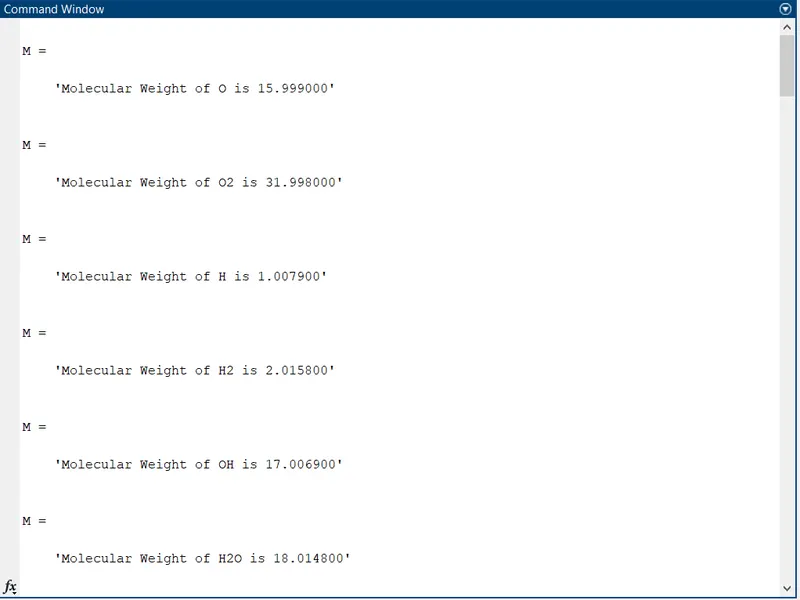
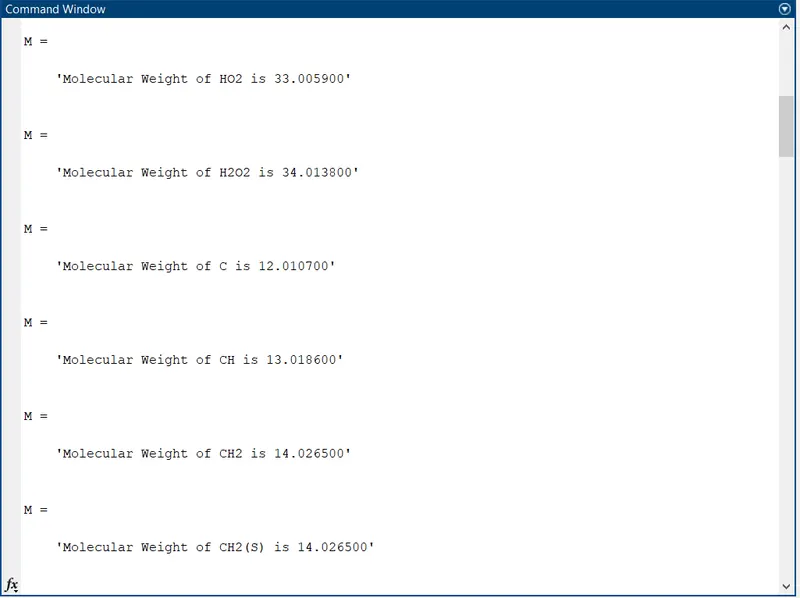
Again, we can employ a ‘for loop’ over the length of total ‘species_name’ compiled by MATLAB and find the molecular weight. Since, the species name is a string, we need to compare the string characters to identify the number of atoms of a particular specimen in the identified element. Finally, we can print the Molecular weight in the command window and end the initial ‘for loop’. The MATLAB compiler will do this process for 53 times to get data for the individual specimen.
Finally, 'fclose(f1)' will close the data file and the compiler will stop.
Observations:
The plots of thermodynamic properties for O2 ,N2 and CO2 are as follows:
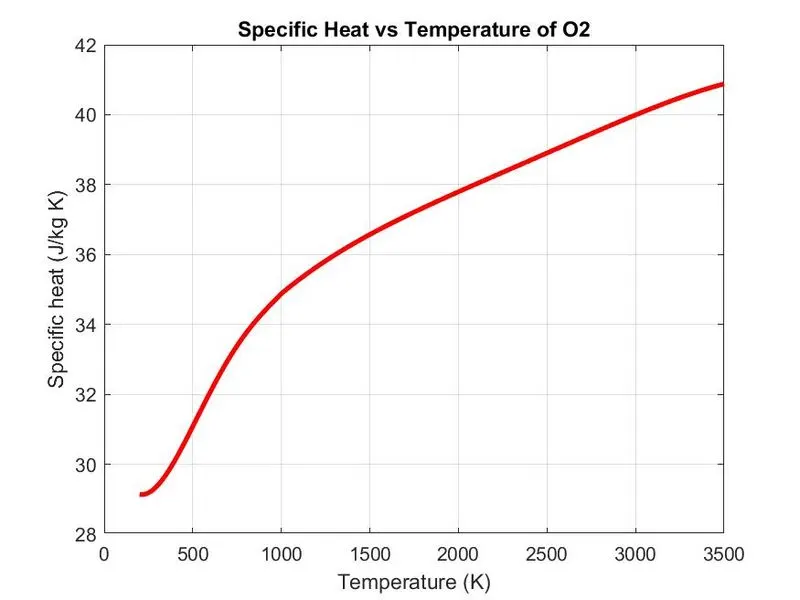
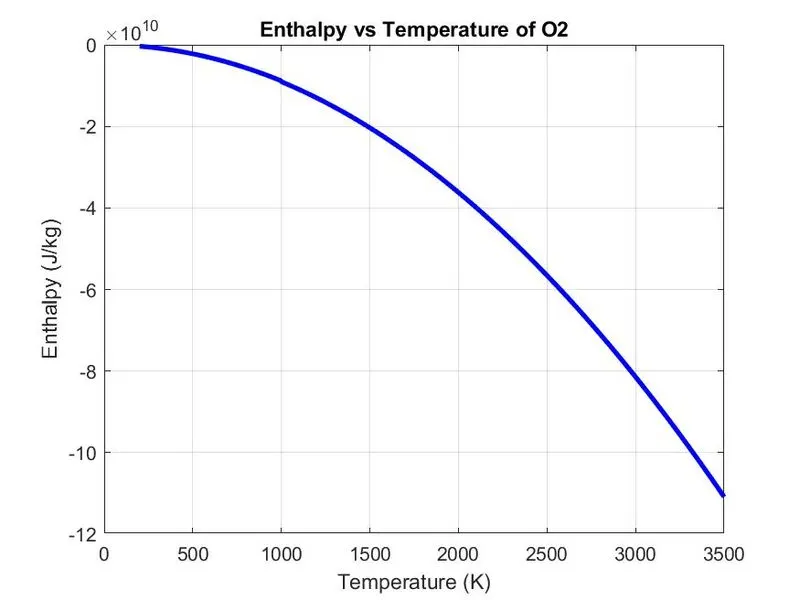
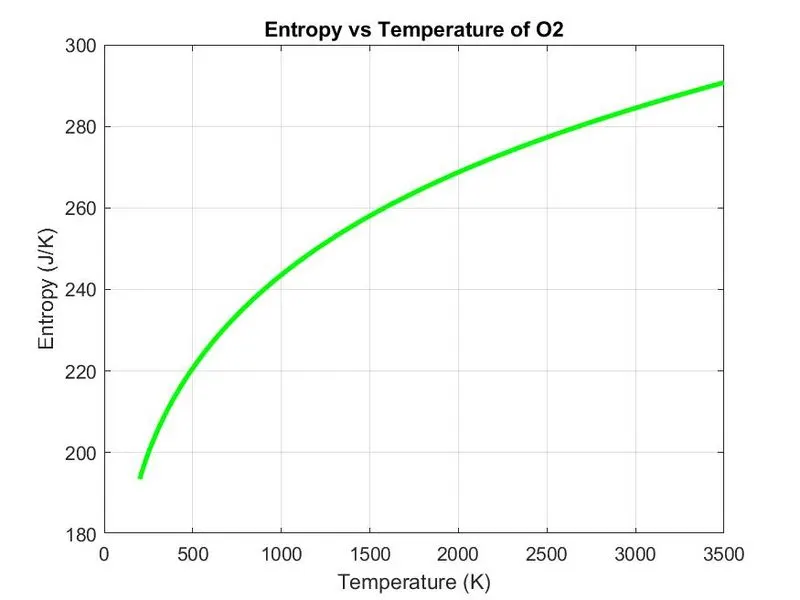
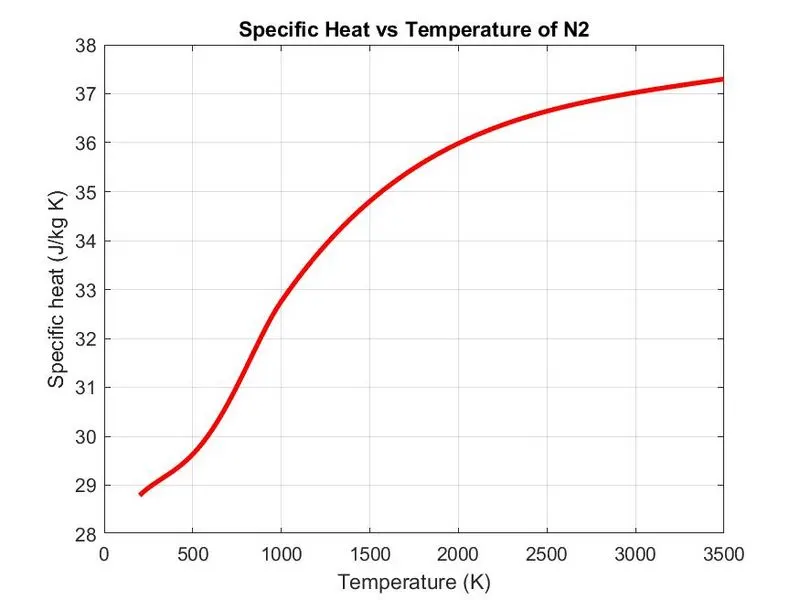
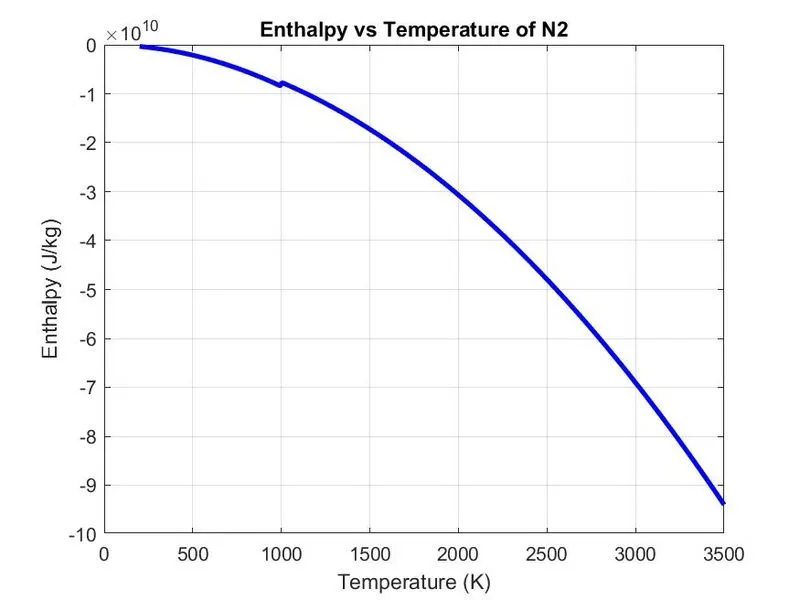
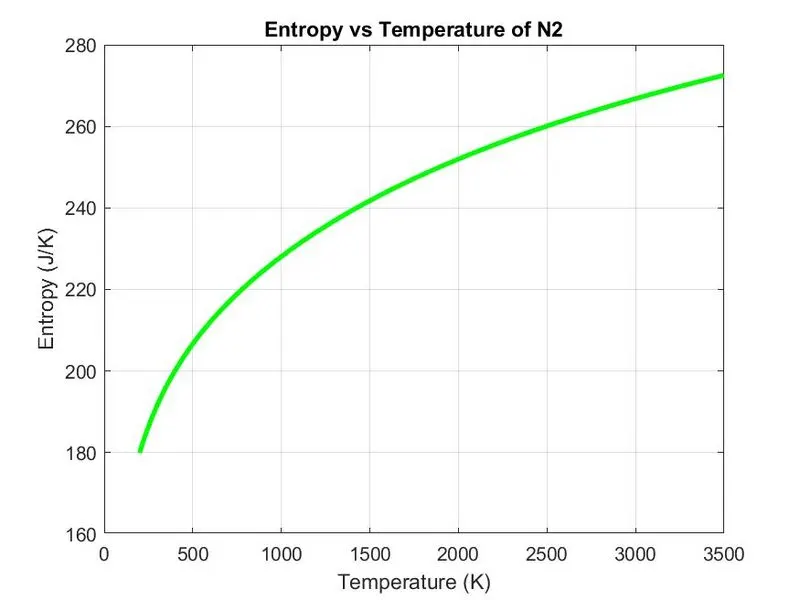
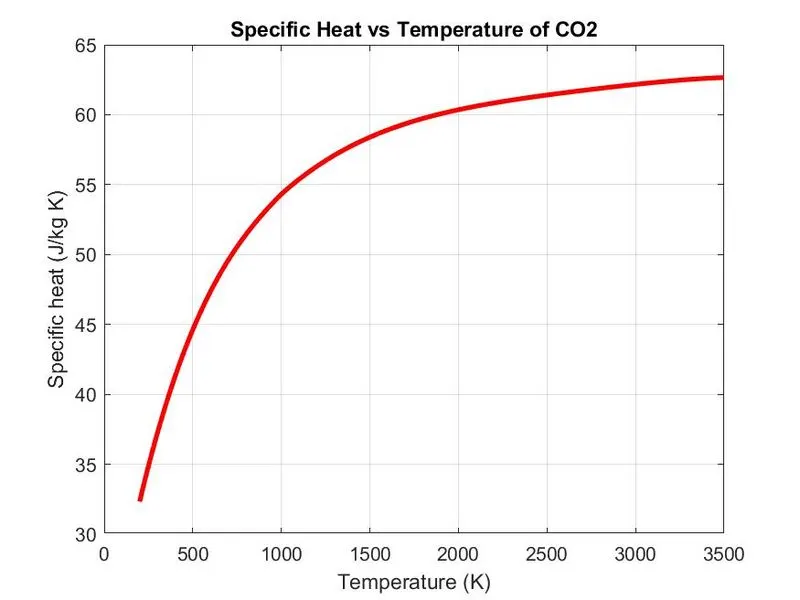
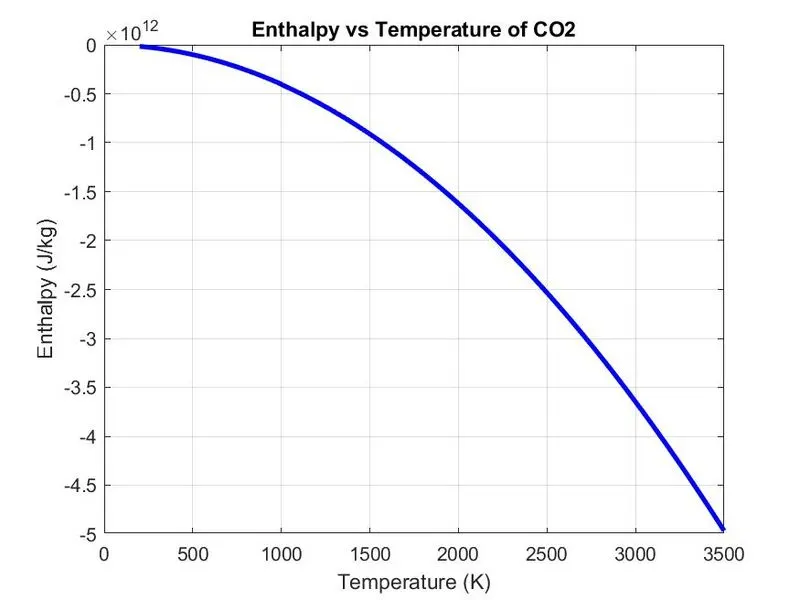
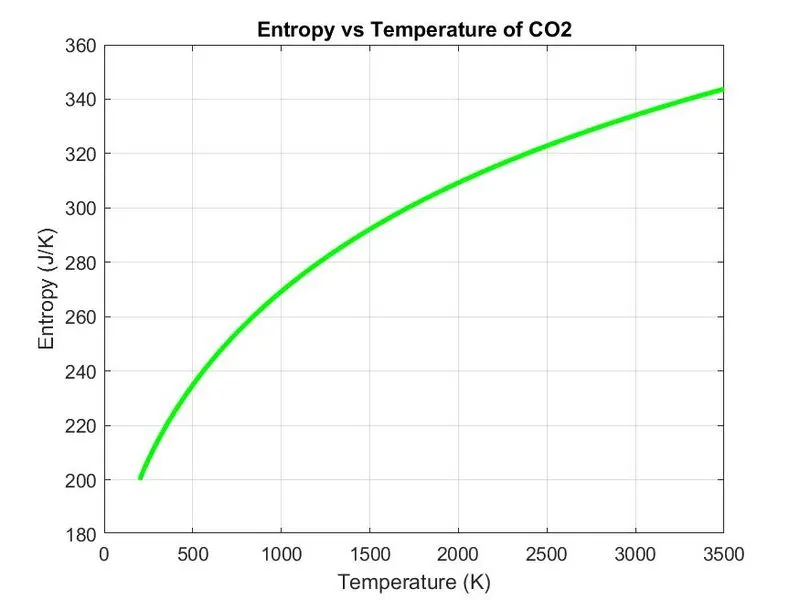
The screenshot showing all the folders of the species is as follows:

The Screenshot of the command window that displays the molecular weights of the species are as follows:
Conclusion:
A MATLAB program to extract data from the given file was executed successfully.
References:
https://in.mathworks.com/help/matlab/ref/mkdir.html?s_tid=doc_ta
https://in.mathworks.com/help/matlab/ref/cd.html?searchHighlight=cd&s_tid=srchtitle
https://in.mathworks.com/help/matlab/ref/strtok.html?searchHighlight=strtok&s_tid=srchtitle
https://in.mathworks.com/help/matlab/ref/strcmp.html?s_tid=doc_ta