Genetic Algorithm
Aim:
Write a code in MATLAB to optimize the stalagmite function and find the global maxima of the function.
Genetic Algorithm:
The main goal of using a Genetic Algorithm is to find minimum values of the function. Genetic Algorithms are widely used in mathematical optimizations. GA’s are a search based algorithms based on the concepts of natural selection. We have a set of potential number of solutions, which undergo recombination and mutation, to produce new set of solutions (children). Each solution is assigned a fitness value, and the best fit people have a greater chance of mating and producing more fit people. This is in line with Darwinian Theory of ‘Survival of the Fittest’.
Advantages of Genetic Algorithm:
- Does not require any derivative information.
- Has very good parallel capabilities, i.e. can be easily parallelised.
- Optimizes continuous and discrete functions as well as multi-objective functions.
- Provides a list of multiple solutions instead of a single solution.
- Always gets a response to the problem, and improves over time.
- Useful when search space is large and multiple parameters are involved.
Limitations of Genetic Algorithm:
- Genetic Algorithms are not suited to simple problems, and problems for which derivative info is provided.
- The fitness value is calculated multiple times, which can be expensive in certain cases.
- GA’s are stochastic, meaning there is no guarantee on quality of the solutions.
- If not implemented properly, GA’s may not converge to optimum solution.
Application of Genetic Algorithm:
- Optimization
- Economics
- Neural Networks
- Machine Learning
- DNA Analysis
- Image Processing
- Parallelization
A typical genetic algorithm requires
- A genetic representation of the solution domain.
- A fitness function to evaluate the solution domain.
An algorithm terminates when either a maximum number of generations are produced, or a satisfactory fitness level for the population is reached.
Syntax of ga in MATLAB:
The built-in Genetic Algorithm in MATLAB has a lot of possible configurations. An overview of all the possible configurations is shown below:
Source: MATLAB Help Documentation.
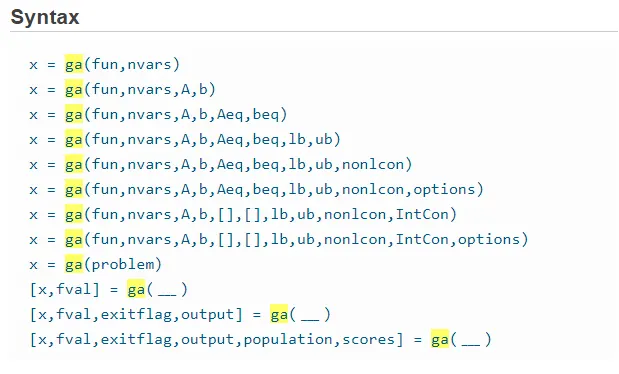
I will explain those configurations which are needed in this particular project.
The program is calling the ‘ga’ command in our first attempt to find the minimum value of the stalagmite function defined earlier. This is the simplest way to use the command. Here, 2 inputs need to be given, namely, ‘func’ and ‘nvars’, which in our case are ‘stalagmite’ and ‘2’ (for x and y). We are optimizing the function for minimum value. To get the output use the following command:
[inputs_0,fval_0] = ga(@stalagmite,2)
The variable ‘fval_0’ is the minimum value of the function that the ‘ga’ command will give us. The variable ‘inputs’ represents the ‘x’ and ‘y’ values at which the minimum value of the function is obtained. On RHS is the target function defined by ‘stalagmite’ and the number of variables ‘2’.
x = ga(fun,nvars,A,b,Aeq,beq,lb,ub) defines a set of lower and upper bounds on the design variables, x, so that a solution is found in the range lb =< x =< ub. (Set Aeq= [] and beq= [] if no linear equalities exist.)
In Case-2 of this project, we specify the additional arguments when the input data is bounded between (0,0) and (0.6,0.6). This will make the algorithm more focussed and save processing time and power.
In Case-3 of this project, additional argument ‘options’ is specified. There are multiple possible options that could be specified, but our concern is regarding the population size.
X = ga(fun,nvars,A,b,Aeq,beq,lb,ub,nonlcon,Intcon,options) is the syntax used to specify the population size as ‘options’.
MATLAB Code for the GA is shown below:
clear all
close all
clc

x = linspace(0,0.6,150);
y = linspace(0,0.6,150);
num_cases = 50;
[xx yy] = meshgrid(x,y);

for i = 1:length(xx);
    for j = 1:length(yy);
        vector(1)=xx(i,j);
        vector(2)=yy(i,j);
        f(i,j)= stalagmite(vector);
    end
end
figure(1)
surf(x,y,f)
shading interp
[inputs_0,fval_0] = ga(@stalagmite,2);
xlabel('X-values')
ylabel('Y-values')


%Case -1: Unbound Calclulations
tic
for i = 1:num_cases
   [inputs,fopt(i)]=ga (@stalagmite,2);
   xopt(i) = inputs(1);
   yopt(i) = inputs(2);
end
study1_time = toc;
figure(2)
subplot(2,1,1)
hold on
surf(x,y,f)
xlabel('X- value')
ylabel('Y- value')
zlabel('Minimum value of the function')
shading interp
[inputs_1,fval_1] = ga(@stalagmite,2);
plot3(xopt,yopt,fopt,'marker','o','markersize',5,'markerfacecolor','r')
title('Unbounded Inputs')
subplot(2,1,2)
plot(fopt)
xlabel('No. of iteration')
ylabel('Minimum value of function')


%Case -2: Bound Calclulations
tic
for i = 1:num_cases
   [inputs,fopt(i)]=ga (@stalagmite,2,[],[],[],[],[0;0],[0.6;0.6]);
   xopt(i) = inputs(1);
   yopt(i) = inputs(2);

end
study2_time = toc;
figure(3)
subplot(2,1,1)
hold on
surf(x,y,f)
shading interp
xlabel('X- value')
ylabel('Y- value')
zlabel('Minimum value of the function')
[inputs_2,fval_2] = ga(@stalagmite,2);
plot3(xopt,yopt,fopt,'marker','o','markersize',5,'markerfacecolor','r')
title('Bounded Inputs')
subplot(2,1,2)
plot(fopt)
xlabel('No. of iteration')
ylabel('Minimum value of function')


%Case -3: Bound Calclulations with population size 200
tic
options = optimoptions('ga');
options = optimoptions(options,'PopulationSize',200);
for i = 1:num_cases
   [inputs,fopt(i)]=ga (@stalagmite,2,[],[],[],[],[0;0],[0.6;0.6],[],[],options);
   xopt(i) = inputs(1);
   yopt(i) = inputs(2);
end
study3_time = toc;
figure(4)
subplot(2,1,1)
hold on
surf(x,y,f)
shading interp
xlabel('X- value')
ylabel('Y- value')
zlabel('Minimum value of the function')
[inputs_3,fval_3] = ga(@stalagmite,2);
plot3(xopt,yopt,fopt,'marker','o','markersize',5,'markerfacecolor','r')
title('Bounded Inputs with population size 200')
subplot(2,1,2)
plot(fopt)
xlabel('No. of iteration')
ylabel('Minimum value of function')
Starting on a clean note, initially we need to prepare data. The search space of the input values is given by ’x = linspace(0,0.6,150) & y = linspace(0,0.6,150)’ The range is 0 to 0.6 with 150 values equally spaced between them. We define the number of times a genetic algorithm need to repeat by ‘num_cases=50’ i.e. the algorithm will perform 50 iterations to get the minimum value of the function.
[xx yy] = meshgrid(x,y) will create a 2D mesh for values of x and y.
Plotting the data without optimization:
At first we need to evaluate the stalagmite function for all possible values of x and y. It is running as a double ‘for loop’ for a large array of 150 X 150.
for i = 1:length(xx);
for j = 1:length(yy);
vector(1)=xx(i,j);
vector(2)=yy(i,j);
f(i,j)= stalagmite(vector);
end
end
The above ‘for loop’ will evaluate the stalagmite function which can be plotted as shown ahead:
figure(1)
surf(x,y,f)
shading interp
xlabel(‘X-values)
ylabel(‘Y-values)
[inputs_0,fval_0] = ga(@stalagmite,2);
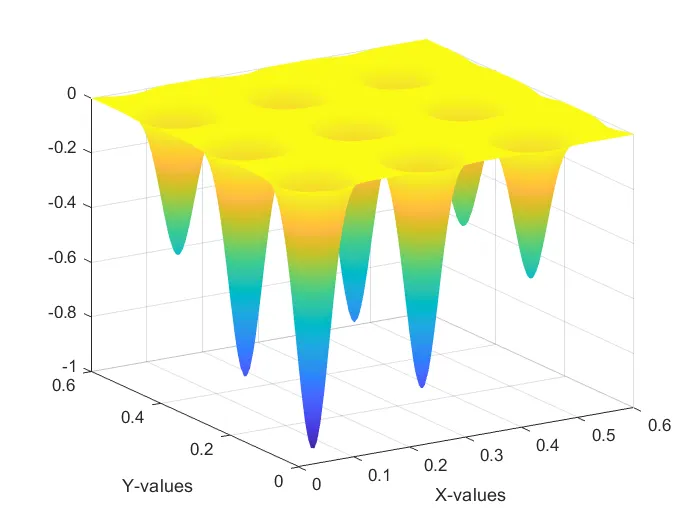
As a final step, we are applying the genetic algorithm to get the minimum value of the function. The last command in the above set, will store the minimum value in ‘fval_0’ and the corresponding input values of x and y are stored in ‘inputs’. The 3D plot is as shown below:
Case -1 for Optimization study:
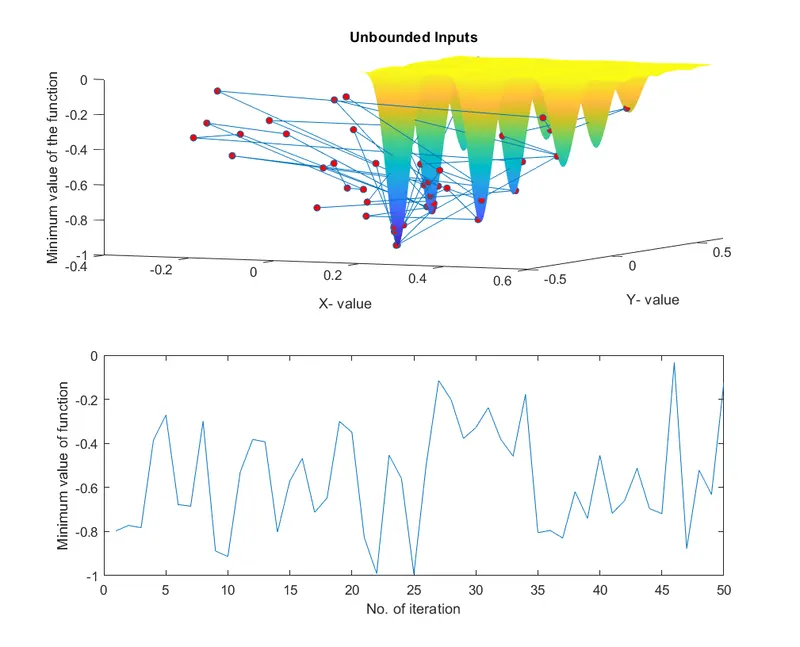
In this case, we are evaluating the genetic algorithm in a more complex plot. It is observed that results for some values are outside the range and we cannot predict the actual nature of the output for these values. Even though the range for values of x and y is 0 to 0.6, the random effect of the genetic algorithm ends giving us values all over the place. The commands ‘tic’ and ‘toe’ are used to calculate the time taken to execute the code and stored in ‘study1_time’.
%Case -1: Unbound Calclulations
tic
for i = 1:num_cases
[inputs,fopt(i)]=ga (@stalagmite,2);
xopt(i) = inputs(1);
yopt(i) = inputs(2);
end
study1_time = toc;
figure(2)
subplot(2,1,1)
hold on
surf(x,y,f)
shading interp
[inputs_1,fval_1] = ga(@stalagmite,2);
plot3(xopt,yopt,fopt,'marker','o','markersize',5,'markerfacecolor','r')
title('Unbounded Inputs')
subplot(2,1,2)
plot(fopt)
xlabel('No. of iteration')
ylabel('Minimum value of function')
The output plot is shown below:
Case – 2 Optimization study within a specified range:
In this case, we will use some additional arguments in the ‘ga’ function which will specify the range. The values of x and y are between 0 and 0.6.
%Case -2: Bound Calclulations
tic
for i = 1:num_cases
[inputs,fopt(i)]=ga (@stalagmite,2,[],[],[],[],[0;0],[0.6;0.6]);
xopt(i) = inputs(1);
yopt(i) = inputs(2);
end
study2_time = toc;
figure(3)
subplot(2,1,1)
hold on
surf(x,y,f)
shading interp
[inputs_2,fval_2] = ga(@stalagmite,2);
plot3(xopt,yopt,fopt,'marker','o','markersize',5,'markerfacecolor','r')
title('Bounded Inputs')
subplot(2,1,2)
plot(fopt)
xlabel('No. of iteration')
ylabel('Minimum value of function')
The output plot is shown below:
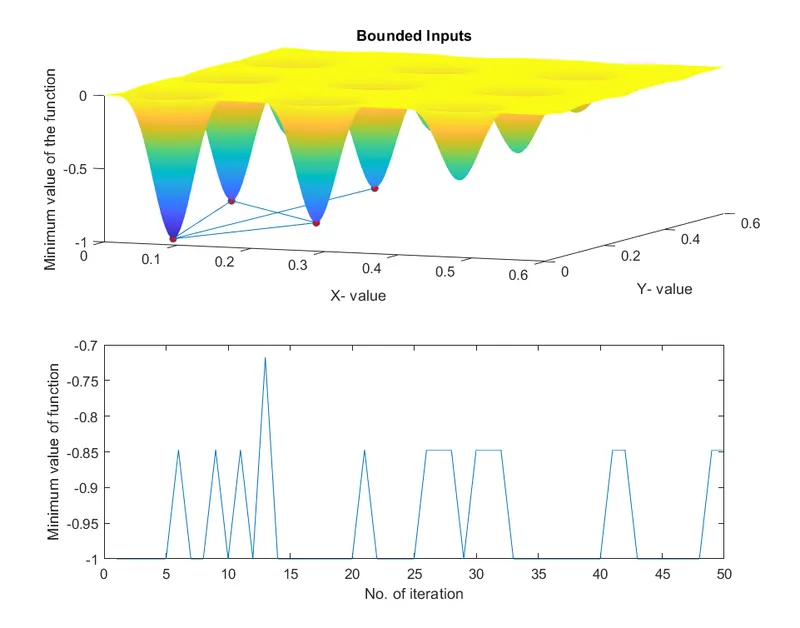
Observe that the range of the minimum value of the function is narrowed to between -0.7 and -1 as compared to 0 and -1 in the previous case.
Case -3 Optimization study within a specified range along with initial population size:
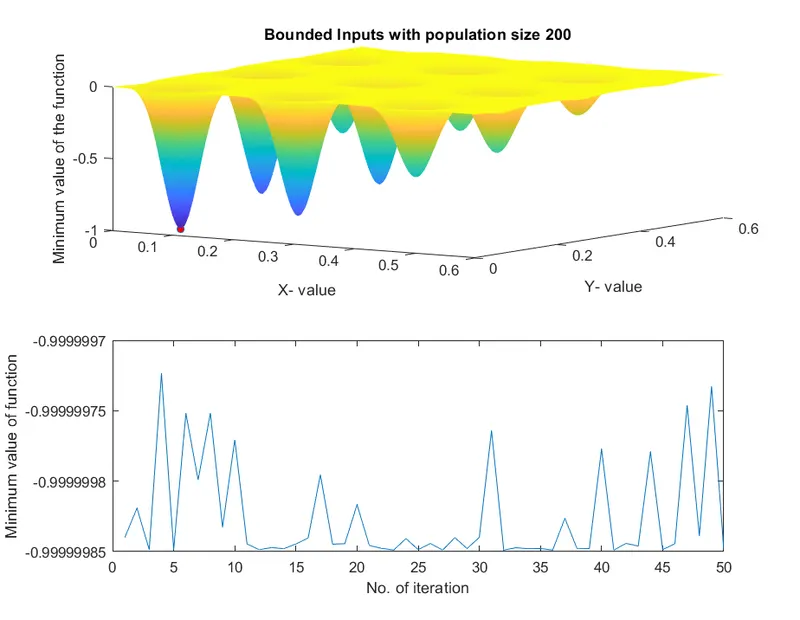
In this case, some additional arguments to that in previous case, are used to define the ‘ga’ function. This additional argument is the initial population size, fixed at 200. This population size is more than that in the previous case. It is so because, a larger population size is expected to give the minimum value of the function in the smaller range than in the previous case.
%Case -3: Bound Calclulations with population size 200
tic
options = optimoptions('ga');
options = optimoptions(options,'PopulationSize',200);
for i = 1:num_cases
[inputs,fopt(i)]=ga (@stalagmite,2,[],[],[],[],[0;0],[0.6;0.6],[],[],options);
xopt(i) = inputs(1);
yopt(i) = inputs(2);
end
study3_time = toc;
figure(4)
subplot(2,1,1)
hold on
surf(x,y,f)
shading interp
[inputs_3,fval_3] = ga(@stalagmite,2);
plot3(xopt,yopt,fopt,'marker','o','markersize',5,'markerfacecolor','r')
title('Bounded Inputs with population size 200')
subplot(2,1,2)
plot(fopt)
xlabel('No. of iteration')
ylabel('Minimum value of function')
The output plot is shown below:
Define function ‘stalagmite’:
The function equations are shown below:
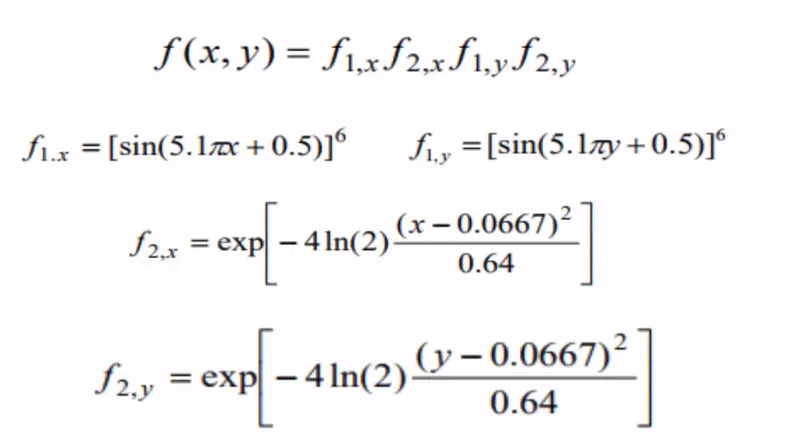
We have to find the maximum value of the function, bur genetic algorithm gives us only the minimum value of the function. So, to get the maximum value, we need to invert the plot generated for the given function. It is done by reversing the given function. Hence, the given function is ‘f=f1x*f2x*f1y*f2y’, but to get to our conclusion we have multiplied the function by (-1), as shown in the code below:
function f = stalagmite(vector)
x = vector(1);
y = vector(2);

f1x = (sin(5.1*pi*x+0.5))^6;
f2x = exp((-4)* log(2)*((x-0.0667)^2/0.64));
f1y = (sin(5.1*pi*y+0.5))^6;
f2y = exp((-4)* log(2)*((y-0.0667)^2/0.64));
f = -(f1x*f2x*f1y*f2y);
end
Conclusion:
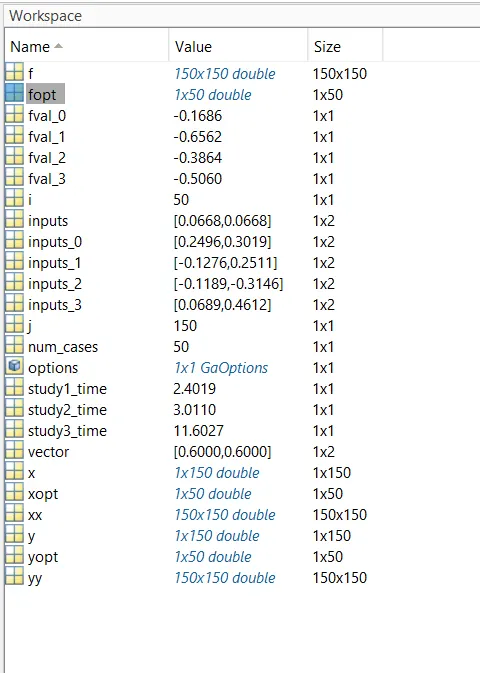
The genetic algorithm is executed successfully for the given function and plotted on the graph. The output values are as shown below:
References:
https://electricalvoice.com/genetic-algorithm-advantages-disadvantages/
https://in.mathworks.com/help/gads/ga.html?searchHighlight=ga%20syntax&s_tid=srchtitle