Simulating a Doorbell model using solenoid and Fan Model using a thermistor in Simulink.
Aim:
- To make a Simulink model of a doorbell using a solenoid block.
- To make a Simulink model to turn ON and OFF a ceiling fan by using a thermistor.
Objectives:
- To create a situation in which the switch of the doorbell is closed for 2 seconds and then released.
- To create a situation in which the fan is switched ON when the temperature is above 25⁰C, else it should be switched OFF.
Doorbell:
The doorbell works on the principle of magnetic field where the iron armature gets attracted to the magnetic field generated by the Electromagnet, when a current is passed through the circuit.
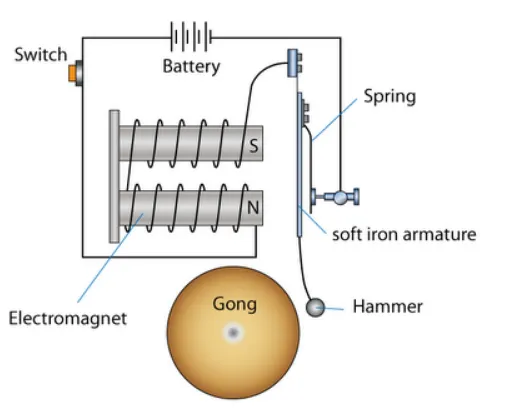
Doorbell:
The doorbell works on the principle of magnetic field where the iron armature gets attracted to the magnetic field generated by the Electromagnet, when a current is passed through the circuit.
The Simulink model for the working of a doorbell is shown below:
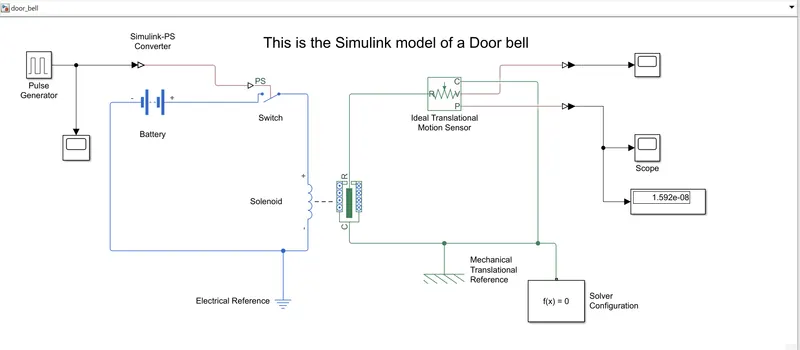
This particular setup of the Doorbell simulation is made up of the following blocks from the Simulink library.
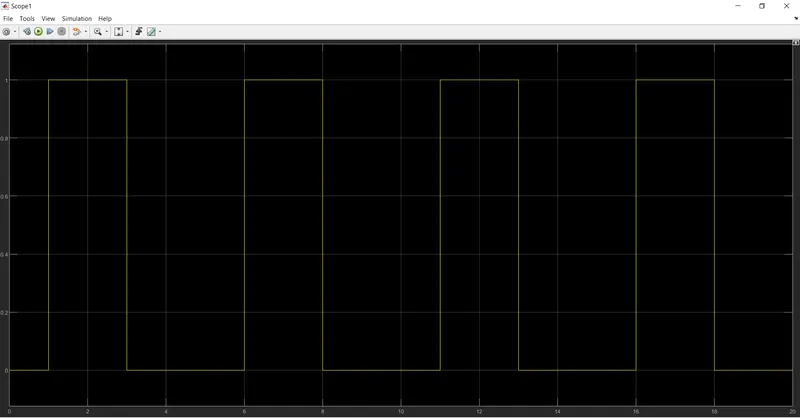
- Pulse Generator: A pulse generator is used to generate a pulse (disturbance) in the Simulink database. Since the doorbell switch needs to ON for 2 seconds and the switched OFF. The pulse generator will do this job. It will create a pulse for 2 seconds in a time period of 5 seconds, with a phase delay of 1 second. It means, for a time period of 5 seconds, the pulse will be generated after 1 second and will keep propagating for the next 2 seconds and dies for the next 2 seconds. This cycle will keep on repeating until the simulation is completed. In this case, the simulation is run for 20 seconds, so the pulse will be generated 4 times during the simulation.
- Simulink-PS Converter: This particular block helps to convert the signal generated by the Simulink block into physical signal that will be understood by the block placed just ahead in the system.
- Switch: This is a simple ON/OFF switch. When the pulse is generated the switch turn ON and when the pulse is dead the switch turns OFF.
- Battery: It powers the basic Solenoid circuit that will generate a magnetic field for the electromagnet to operate.
- Solenoid: This solenoid block is the backbone of the doorbell circuit. The ‘+’ of the solenoid is connected to the ‘+’ of the battery and ‘–‘is connected to the ‘–‘of the battery. This circuit is grounded using an Electrical Reference block.
- Ideal Translational Motion Sensor: This sensor block will sense any translational motion if generated in the circuit.
- Display: This block will display the output of the circuit at the last instant of the simulation.
- Scope: This block will generate a plot of the output for total simulation time.
- PS-Simulink Convertor: This block will convert any physical signal into Simulink signal so that it can be used to check the output using various Simulink blocks.
When the pulse is generated in the pulse generator, the switch will turn ON and complete the primary circuit consisting the battery and the solenoid. When the current is passed through the solenoid a magnetic field is generated and the solenoid rod will move from port C to port R and the Translational motion sensor will sense this movement to generate a plot.
The pulse generator generates the pulse as shown below:
The position output of the translational motion sensor is plotted as below:
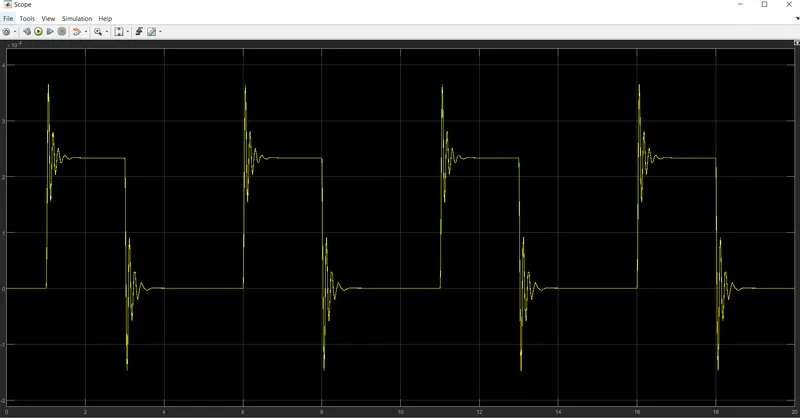
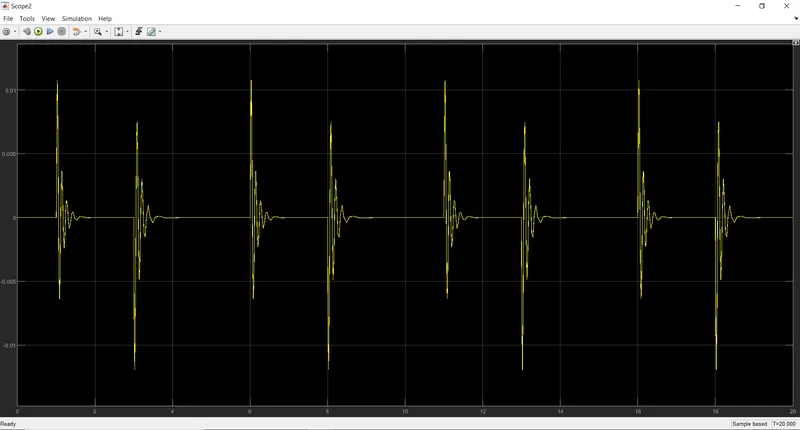
The velocity output of the doorbell gong is as follows:
Click here to get the Simulink model of the doorbell using solenoid.
Result: The pulse is generated for 2 seconds and the switch is turned ON, and the linear motion of the hammer is observed to ring the doorbell.
Using a Thermistor to turn a fan ON or OFF:
A thermistor works on the principle of change in resistance of a resistor due to change in temperature of the resistor. A threshold temperature determines for a particular thermistor above which the thermistor will activate the circuit and pass the current to turn ON the fan and turn OFF the fan if the temperature drops below the threshold temperature. The Simulink model of the circuit is shown below.
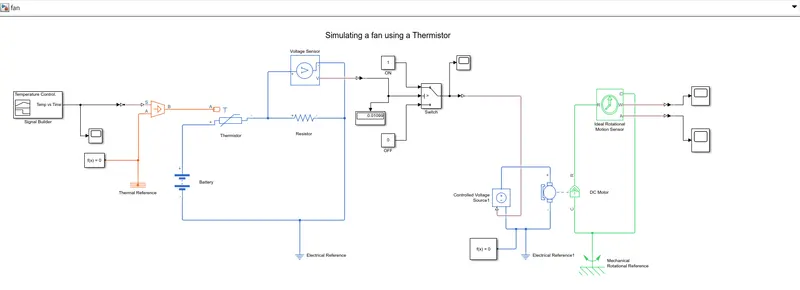
Blocks used to simulate the model are
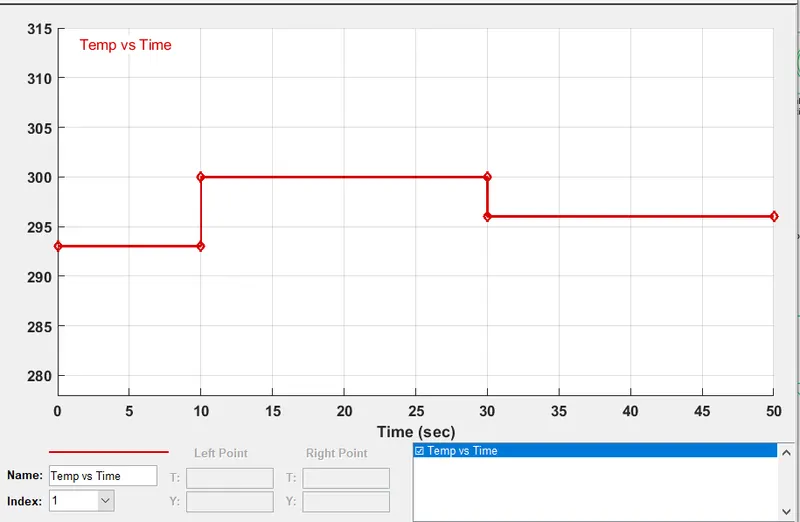
- Signal Builder; This Simulink block is used to generate the signal pulse of the required setup. It is given that the temperature for the first 10 seconds has to be 20⁰C, temperature for the next 20 seconds should be 27⁰C, and temperature for the last 20 seconds should be 23⁰C. So the signals are built accordingly which would be then passed through a Simulink-PS convertor to the controlled temperature source.
- Controlled Temperature Source: This block is used to generate the controlled temperature to be supplied to the further elements of the circuit. The job of this block is to intake the pulse value generated by the pulse builder and pass it to the circuit as temperature. The signal builder gives only the value of the signal w.r.t time and the source converts the mathematical value into a physical quantity, such as temperature.
- Thermistor: The thermistor will take the value from the signal builder and the controlled temperature source and vary the resistance according to the B-parameter equation.
- Voltage Sensor: this block senses the voltage generated in the circuit, if any, and passes on to the next element in the model i.e. the switch.
- Switch: This block is responsible to turn the fan ON or OFF. If the voltage is greater than the threshold value of the switch, the switch will close the circuit and the current will flow, else the switch will be OFF and the current will not flow.
- DC Motor: This block represents the electrical and torque characteristics of a DC motor. The block assumes that no electromagnetic energy is lost, and hence the back-emf and torque constants have the same numerical value when in SI units. When a positive current flows from the electrical + to - ports, a positive torque acts from the mechanical C to R ports
- Ideal Rotational Motion Sensor: This block measures angular velocity or angle in a mechanical rotational network. The sensor is ideal since it does not account for inertia, friction, delays, energy consumption, and so on.
- Display: This block will display the output of the circuit at the last instant of the simulation.
- Scope: This block will generate a plot of the output for total simulation time.
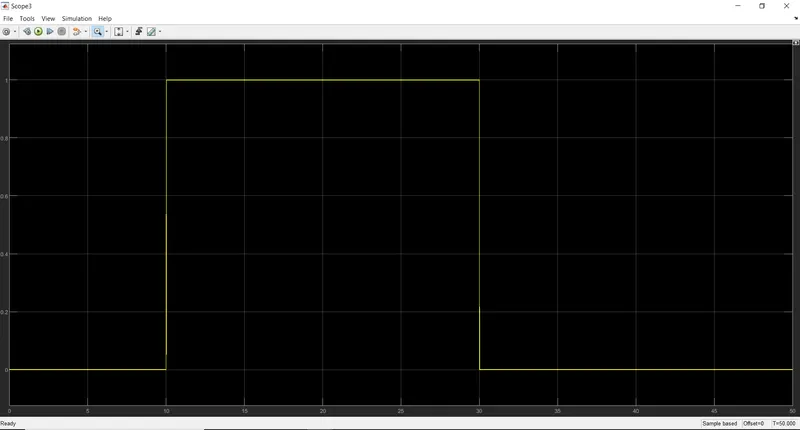
According to given situation, the fan should turn ON if the temperature is above 25⁰C, else it should be OFF. The threshold voltage value is determined at this temperature and fed into the switch. So, whenever the voltage is greater than the threshold voltage, the fan will turn ON. Threshold voltage = 0.01189 V.
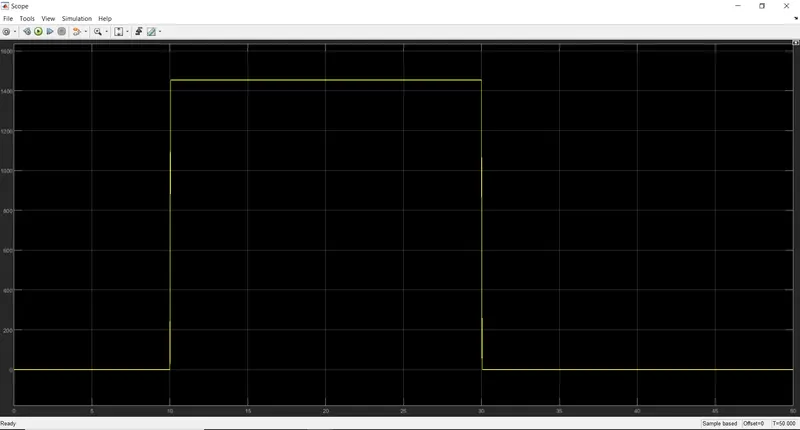
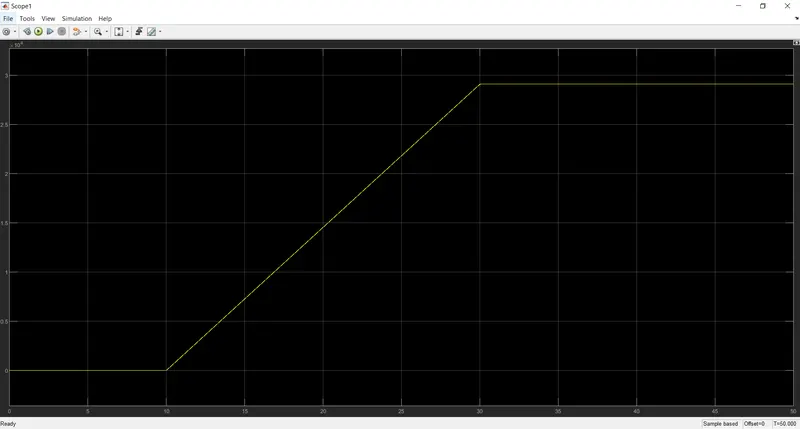
When the signal generator generates a signal, a value 293 for time period 0-10, a value 300 for time period 10-30 and a value 296 for 30-50 seconds, the controlled temperature source converts this value into temperature and feeds to the Thermistor. The resistance of the thermistor changes and a voltage is induced in the circuit which is sensed by the voltage sensor. The value of threshold voltage is defined as described above and the switch is programed accordingly. If the voltage sensed by the voltage sensor is greater than the threshold voltage, the switch will power ON and pass the signal through a Simulink-PS converter to the controlled voltage source of the DC Motor circuit. The motion here is sensed by the ideal rotational motion sensor and the output is plotted.
The signal builder generates a signal as shown below:
The output of the switch is as shown below. Observe that when the voltage is greater than the threshold voltage the output of the switch is ON, else it is OFF.
The angular velocity (rad/sec) and angular position (rad) of the motor is respectively shown below:
Click here to get the simulink model of fan.
Result: A Simulink model to turn ON and OFF a fan w.r.t temperature has ran successfully. The fan turned ON when the temperature was more than 25⁰C, else it was OFF.