Radar Mast & Final Assembly of Yacht
DESIGNING A SUNSEEKER PREDATOR YACHT
Aim: To design parts of a Sunseeker Predator Yacht, assemble the parts and create rendered images of the assembly in SOLIDWORKS 2020.
Objective:
- Learn all the commands of part modelling as well as surface modelling
- Learn assembling the parts and complete the modelling of the Yacht.
- Learn rendering using SOLIDWORKS Visualize to get the real appearance of the Yacht.
Theory: The Sunseeker Predator Yacht to be modelled in SOLIDWORKS 2020 requires both the part modelling as well surface modelling. The composite shapes of the Hull and the Superstructure mostly comprise of surface modelling and parts such as radar and garage door require part modelling. The modelling of the Yacht is based on the blueprints sketched earlier and placed accordingly in the Part modelling window of SOLIDWORKS. The blueprints are arranged as follows:
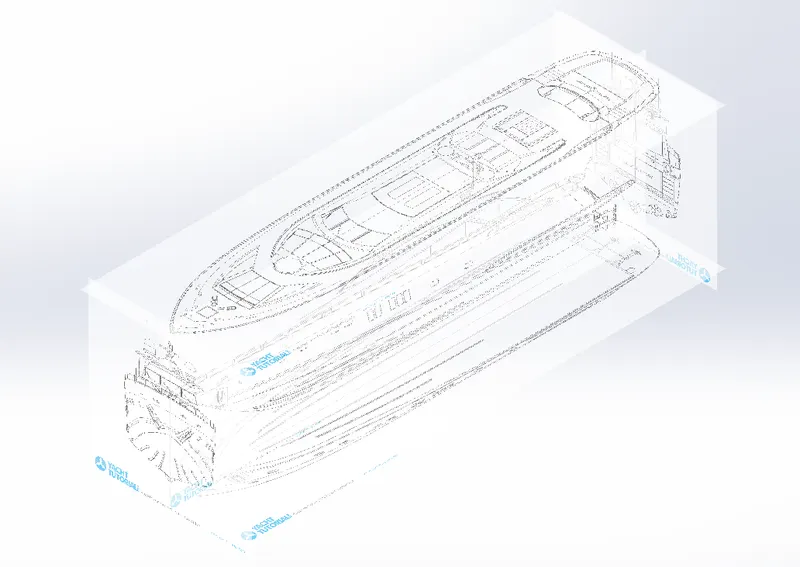
Fig. A: Yacht Blueprints
These blueprints are used to create surface and solid models of parts of the Yacht and assembled together. The modelling of this yacht mainly consists of the surface modelling. The design approach is Bottom-Up, it means that individual parts would be modelled separately and then assembled together to get the final model of the Yacht.
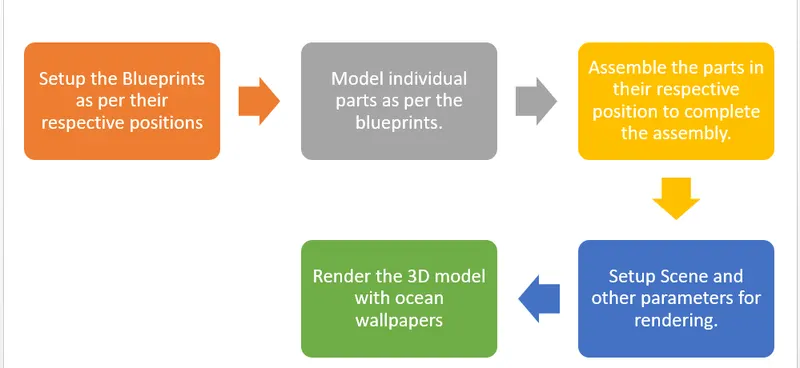
Fig. B: Workflow to model the Sunseeker Predator Yacht
During this process, I got to learn all the commands for 3D modelling and surface design, modelling a part using a sketch, assembling the parts and finally applying decals, scenes and rendering the assembly to take a good look how it marks its presence in the real-life surroundings.
Following are the parts of the Sunseeker Predator Yacht modelled in SOLIDWORKS:
- Hull
- Superstructure
- Front Seat
- Middle Seat
- Rear Seat
- Garage Door
- Propeller
- Radar mast
- Radar
All these parts were modelled using commands provided in the Part and Assembly environments in SOLIDWORKS 2020.
Sketch: In the sketch environment, there are all the basic sketching tools available which can be used to make a sketch of the basic section of the part. This sketch then can be used under ‘Feature Tools’ to apply material. The sketch tools consists of line, rectangle, circle, spline, arc, fillet, mirror, pattern, etc. All these tools have multiple option under them which can be used to draw sketch as per requirement. For example if a centreline is required in a sketch, then the ‘Line’ tool consists an option ‘For Construction’ which can be used to draw the centreline. The sketch environment also provides option to reduce the repetitive work needed to do if some sketch consists of similar geometries. These similar geometries can be transferred inside of a sketch from one place to another using tools such as mirror, linear pattern, circular pattern, etc. The most important tool here is the ‘Trim Entities’ and ‘Extend Entities’. I am stressing these tools because, a sketch needs to be a closed contour in order to use features such as Extrude Boss or Extrude Cut, which are explained later on. The trim entities give the designer a chance to cut the extra length of sketch geometry and make a closed contour. The fillets can be used to turn sharp corner into smooth edges and improve the geometry. The ‘Convert Entities’ is used to convert pre-existing lines and curves into a fresh sketch which form some part of the new sketch. This feature helps mimic the underlying curves exactly in the current sketch and remove the need to draw the previous sketch again in the current sketch if needed.
Following are the features of surface modelling that are frequently used in the modelling of the Yacht.
- Extruded Surface: It creates an extruded surface similar to Extrude Boss/Base based on a sketch, with an added advantage that it does not necessarily need the sketch contour to be closed. Surface extrude works even with an open sketch contour. Also, we can control from where the extrude starts and the extent of the surface extrude.
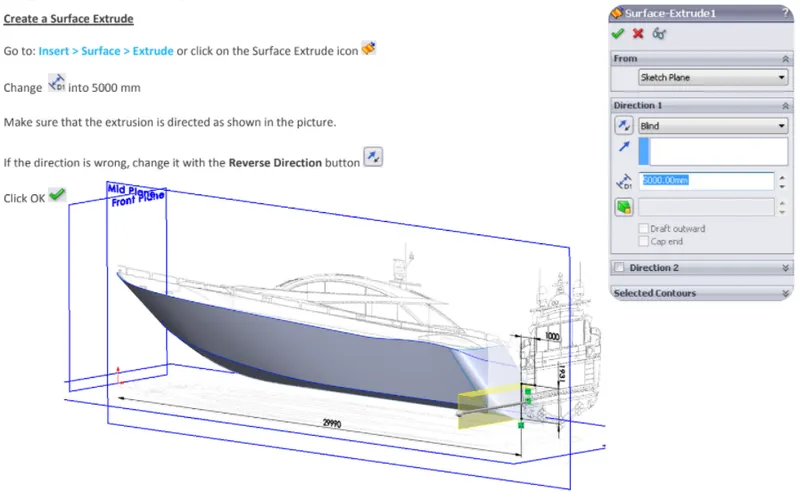
Fig. 1: Surface Extrude
- Revolved Surface: It creates a revolved surface similar to the Revolved Boss/Base based on sketch. We can define the sketch contour and the extent of revolving the sketch.
- Swept Surface: It sweeps a closed contour along a path to create a surface feature. We can use guide curves, profile orientation and angle twists to create different shapes.
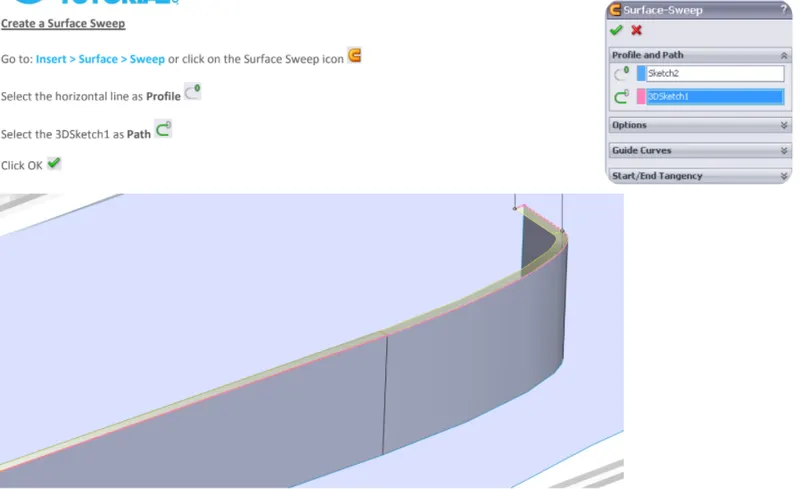
Fig. 2: Surface Sweep
- Lofted Surface: It creates a lofted surface between two or more profiles or sketches. We need to specify start and end constraints and add guide curves to control the path shape.
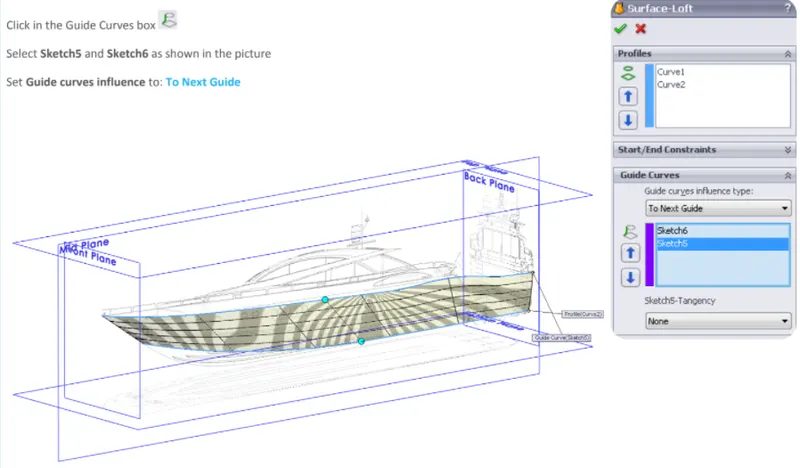
Fig. 3: Surface Loft
- Boundary Surface: Creates surface between profiles that can be tangent or curvature continuous in all directions. In the graphics area, we can use drag handles to control the shape of the surface.
- Filled Surface: It patches the surfaces defined between boundaries by sketches, edges or curves. Use constraint curves to fill surfaces and adjust resolution control to improve surface finish.
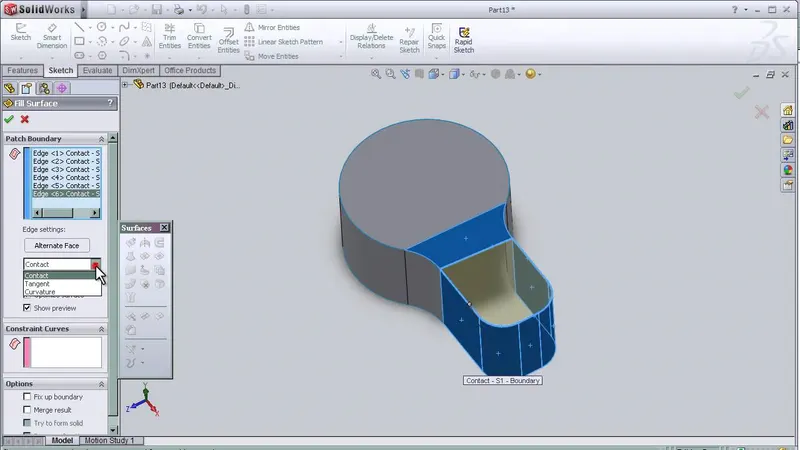
Fig. 4: Fill Surface
- Planar Surface: It creates a planar surface using non-intersecting sketch or a set of closed edges. All edges must be on the same plane.
- Offset Surface: The tool creates an offset surface with gaps.
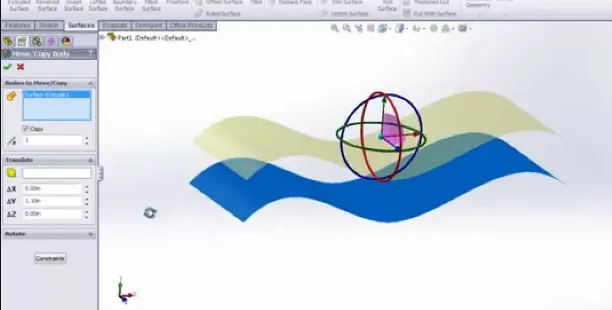
Fig. 5: Offset Surface
- Ruled Surface: It inserts ruled surface in a specified direction from edges. Select tangent to surface, normal to surface, tapered to vector, perpendicular to vector or sweep. You can also trim or knit the surfaces.
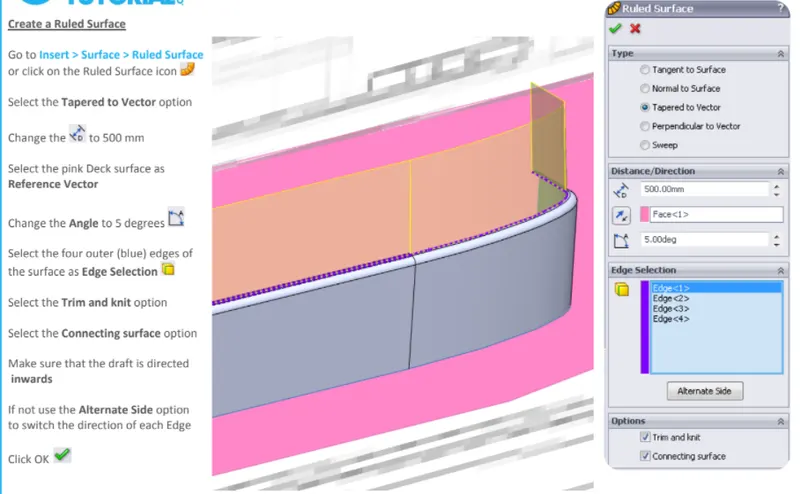
Fig. 6: Ruled Surface
- Fillet: It creates rounded face along one or more edges on a solid or a surface feature. Fillets can be of constant size or variable size. Use the fillet property manager to give appropriate fillet to the solid or surface.
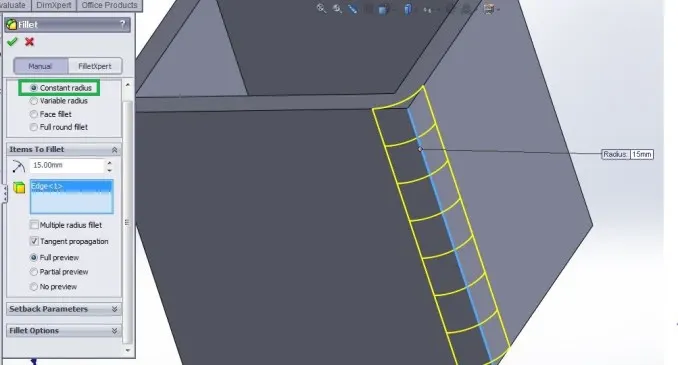
Fig. 7: Fillet
- Delete Face: Deletes face from a solid body to create a surface body or deletes a face from the surface body. We can delete and patch the face or delete and fill to replace faces with a single face.
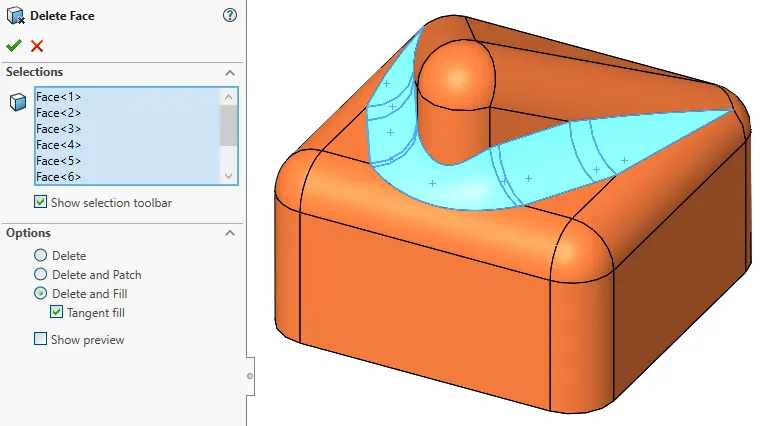
Fig. 8: Delete Face
- Extend Surface: Extends one or more edges or a face on a surface based on end conditions and extension type.
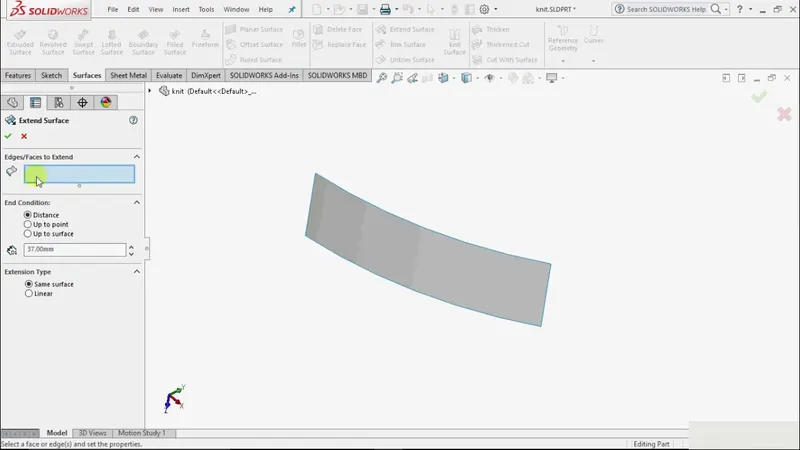
Fig. 9: Extend Surface
- Trim Surface: It trims where a surface intersects with another surface, a plane or a sketch. We need to select trim type, trim tool and the surfaces to keep or remove. We can change how the trim boundaries extend from the end points of the trim tool.
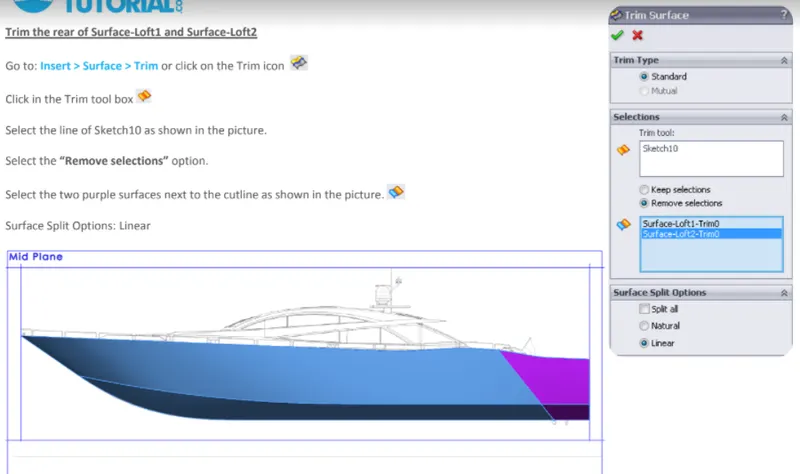
Fig. 10: Trim Surface
- Untrim Surface: It patches holes and external edges by extending an existing surface along its natural boundaries. We can also untrim faces by defining a percentage value.
- Knit Surface: It combines two or more adjacent, non-intersecting surfaces into a single surface body. The surfaces must join at an edge. If the surfaces form a volume, we can create a solid body from the feature manager.
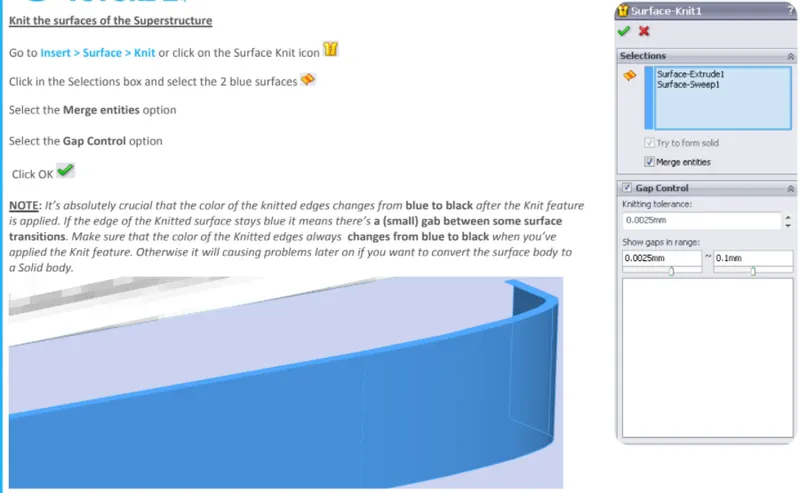
Fig. 11: Surface Knit
- Reference Geometries: While creating a part, certain geometries can be used as reference geometries such as an axis, a coordinate system or a plane with respect to which the further design of the part will be easier to do. These reference geometries can be used to create features like patterns and mirror as required.
- Projected Curve: It is a handy tool to make a 3D curve in SOLIDWORKS. Initially, draw 2 different curves in two perpendicular planes such that the curves are the views of the 3D curve in either of the plane. Then, just use Projected Curve feature and select the two 2D curves, SOLIDWORKS will create a 3D curve as required. Similar to this, when two projected curves are needed to be clubbed, use Composite Curve
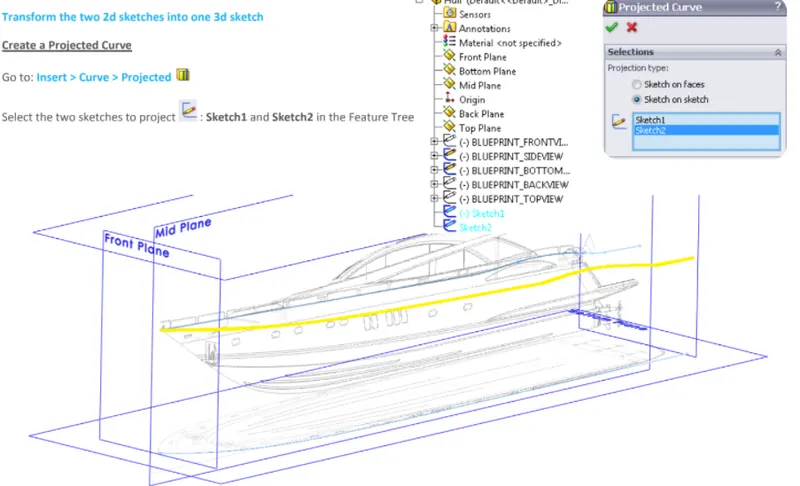
Fig. 12: Projected Curve
When the parts are created in the ‘Part’ workbench of SOLIDWORKS, the need to be assembled using the ‘Assembly’ Workbench. There are certain Mate features that can be used to relate multiple bodies in an assembly and put each and every body in its place.
- Fix: This mating feature is used to fix a body in the assembly. This is generally done when other parts are going to be assembled over this particular part. In case of the chopper bike, the Chassis of the bike is fixed and all other components assembled on this chassis using one or more mates described below.
- Coincident: This mating feature is used to join two bodies together. This feature can be applied to a combination of faces, planes, edges, etc. and bodies can be clubbed together in an assembly.
- Concentric: This mate is used to align two circular faces on a single axis. These faces or bodies can then move along this common mating axis.
- Tangent: This mate is used to make circular face tangent with a plane or a planar face.
- Angle: This mate is used to constrain planes or axis at an angle between them.
- Parallel and Perpendicular: These mates can be used to fix the position of a body w.r.t. another body.
This was some introduction about features available in SOLIDWORKS and these features were used to design the components of the Sunseeker Predator Yacht and assemble them together.
- Hull: A hullis the watertight body of a ship, boat, or flying boat. The hull may open at the top (such as a dinghy), or it may be fully or partially covered with a deck. Atop the deck may be a deckhouse and other superstructures, such as a funnel, derrick, or The line where the hull meets the water surface is called the waterline.
Following Surface features of SOLIDWORKS were used to model the Hull:
- Sketch tools- Line, Spline, Circle, Straight Slot, Polygon, Sketch Fillet, Corner Rectangle, Convert Entities, Extend Entities, Trim Entities, Offset Entities,
- 3D Sketch
- Projected Curve
- Surface Loft
- Surface Extrude
- Surface Trim
- Surface Fill
- Surface Knit
- Extrude Boss
- Extrude Cut
- Fillet
- Chamfer
- Sweep Boss
- Reference Plane
- Dome
- Helix/Spiral
- Linear Pattern
- Delete Face
- Revolved Boss
- Split
- Mirror
- Delete/Keep- Body
- Appearance
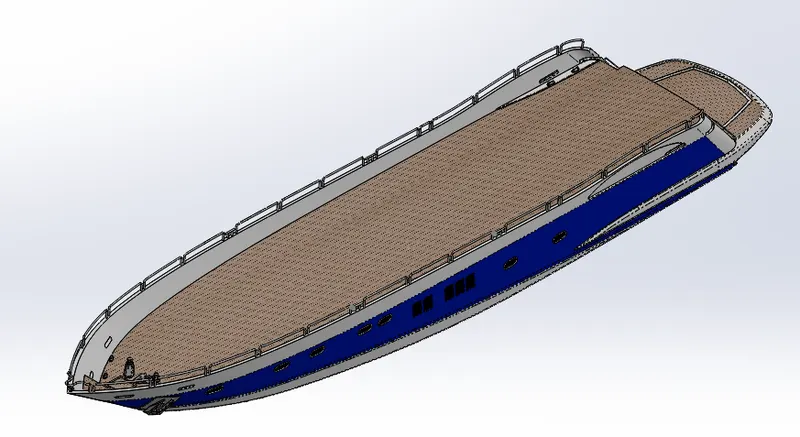
Fig. 13: Hull
- Superstructure: A superstructure is an extended construction of any building or platform that rises above the rest of the building or platform in a distinct manner. The word comes from a combination of two Latin words, the Latin prefix ‘super’ means in addition or above or in excess of, whereas the stem word ‘structure’ means to build or to heap up. Thus, superstructure means to add a construction to an already existing structure. In ships this is the name given to the part of the ship that emerges from the deck. However any mast, sails, any armaments or arsenal are not included in this category. The size of the superstructure has a great influence on the mobility of the vessels. They are designed in a manner, so that, they add value and hinder the speed and mobility in the least. The superstructure is mostly designed in fashion as well. This is because it is the most easily visible part of the ship, in fact it is the identification of the ship, and so the designers try to provide it with the identity that is unique.
Following Surface features of SOLIDWORKS were used to model the Superstructure:
- Sketch Tools- Line, Spline, Circle, Straight Slot, Polygon, Sketch Fillet, Corner Rectangle, Convert Entities, Extend Entities, Trim Entities, Offset Entities,
- 3D Sketch
- Projected Curve
- Reference Plane
- Surface Extrude
- Ruled Surface
- Surface Trim
- Surface Sweep
- Surface Knit
- Extrude Cut
- Loft Surface
- Split Line
- Delete Face
- Extrude Thin
- Chamfer
- Fillet
- Mirror
- Combine
- Sweep
- Thicken Surface
- Dome
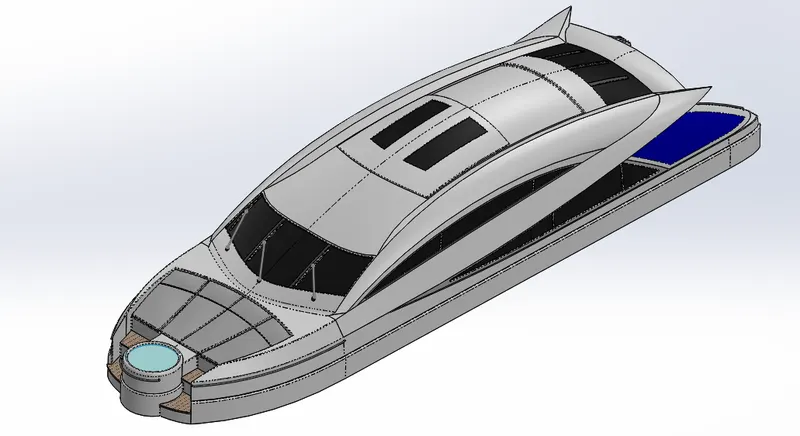
Fig. 14: Superstructure
- Front Seat: There is an arrangement to sit at the front of the Yacht, near the Jacuzzi. This is modelled as front seat and has a bit of unique shape.
Following Surface features of SOLIDWORKS were used to model the front seat:
- Sketch Tools: Line, Spline, Circle, Convert Entities
- Surface Sweep
- Surface Extrude
- Dome
- Surface Trim
- Surface Knit
- Revolve Boss
- Cut Extrude
- Chamfer
- Fillet
- Mirror
- Reference Plane
- Appearance
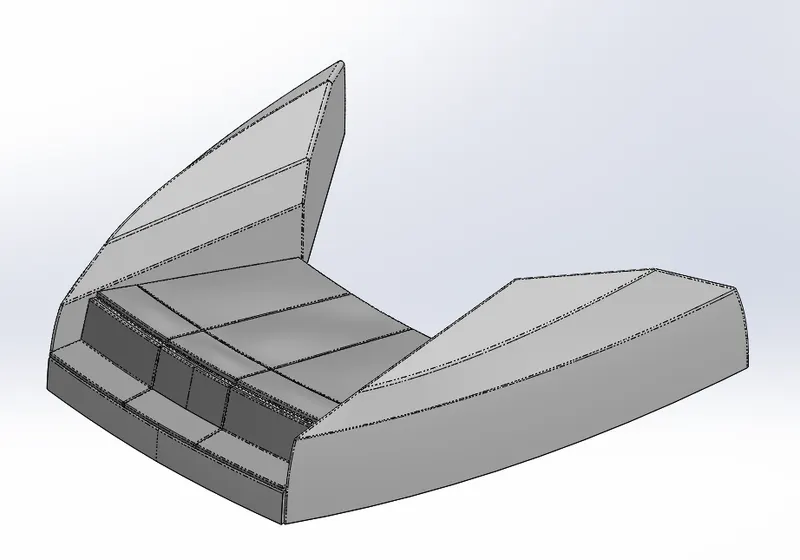
Fig. 15: Front Seat
- Middle Seat: There is an arrangement to sit roughly in the middle of the Yacht, just behind the superstructure. This is modelled as Middle seat and has a table to enjoy food and drinks on the cruise.
Following Surface features of SOLIDWORKS were used to model the middle seat:
- Sketch Tools: Line, Rectangle, Convert Entities
- Boss Extrude
- Cut Extrude
- Fillet
- Chamfer
- Reference Plane
- Appearance
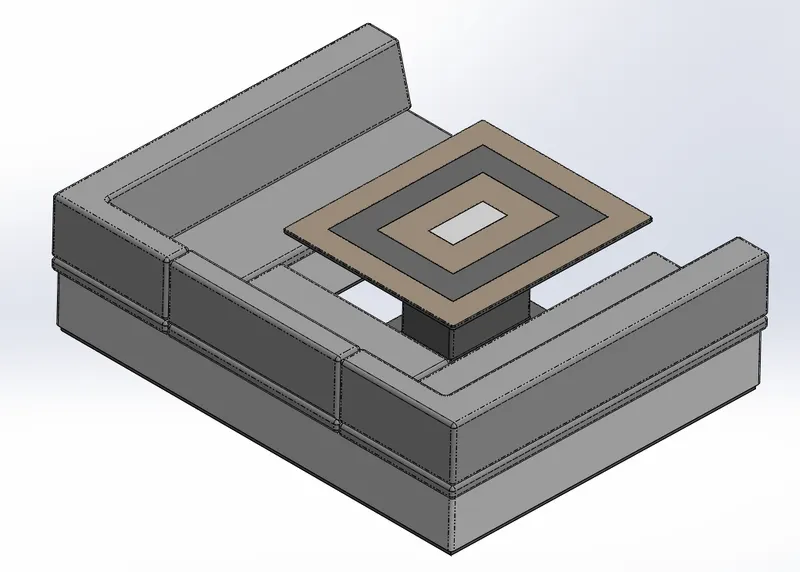
Fig. 16: Middle Seat
- Rear Seat: There is an arrangement to sit at the rear end of the Yacht, just above the garage. This is modelled as rear seat and has a Flag post on it!
Following Surface features of SOLIDWORKS were used to model the rear seat:
- Sketch Tools – Line, Spline, 3-Point Arc, Circle
- 3D Sketch- Spline
- Surface Sweep
- Surface Offset
- Surface Trim
- Ruled Surface
- Surface Knit
- Surface Extend
- Reference Plane
- Surface Loft
- Boss Extrude
- Cut Extrude
- Chamfer
- Fillet
- Mirror
- Revolve Boss
- Appearance
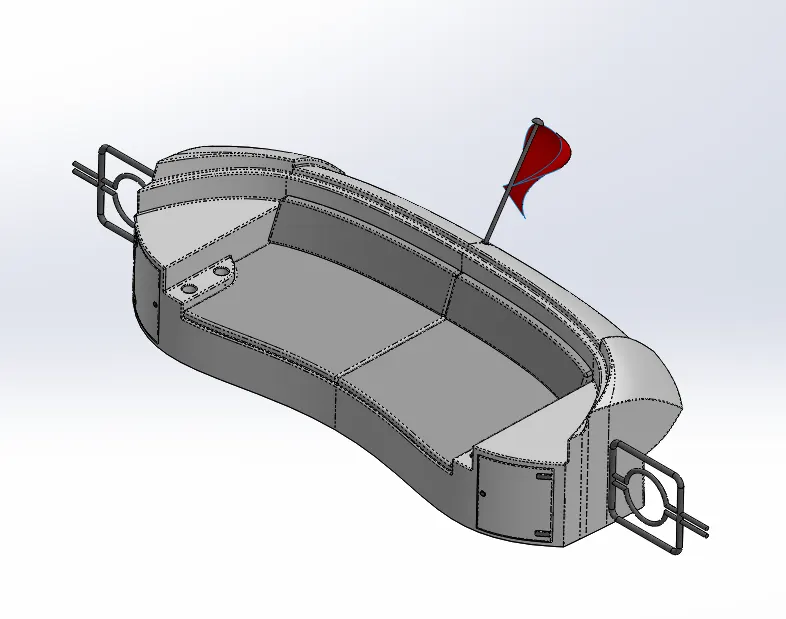
Fig. 17: Rear Seat
- Garage Door: Garage is just beneath the deck of the Yacht and the contents of the garage are safely kept behind the garage door.
Following Surface features of SOLIDWORKS were used to model the garage door:
- Sketch- Line, Circle
- Cut Extrude
- Shell
- Fillet
- Mirror
- Reference Plane
- Text
- Appearance
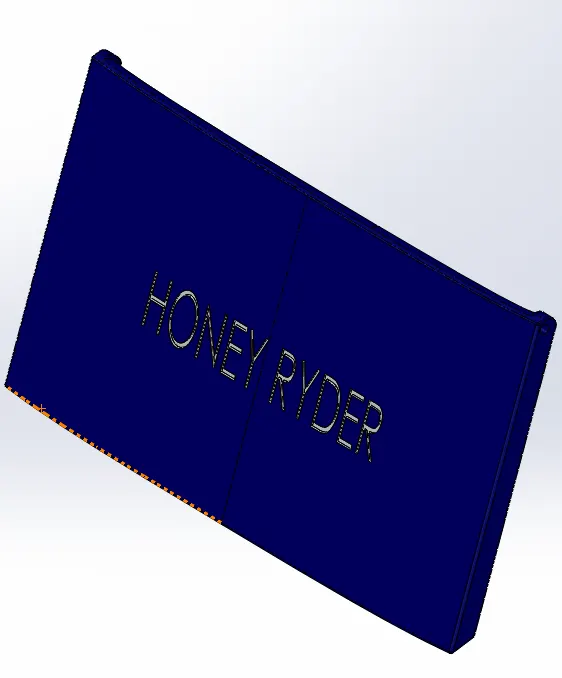
Fig. 18: Garage Door
- Radar mast: They are electronic navigation instruments that use a rotating antenna to sweep a narrow beam of microwaves around the water surface surrounding the ship to the horizon, detecting targets by microwaves reflected from them, generating a picture of the ship's surroundings on a display screen.
Following Surface features of SOLIDWORKS were used to model the radar mast:
- Sketch Tools- Line, Spline, 3-point arc, Circle
- Boss Extrude
- Revolve Boss
- Sweep Boss
- Fillet
- Chamfer
- Reference Plane
- Mirror
- Shell
- Combine
- Appearance
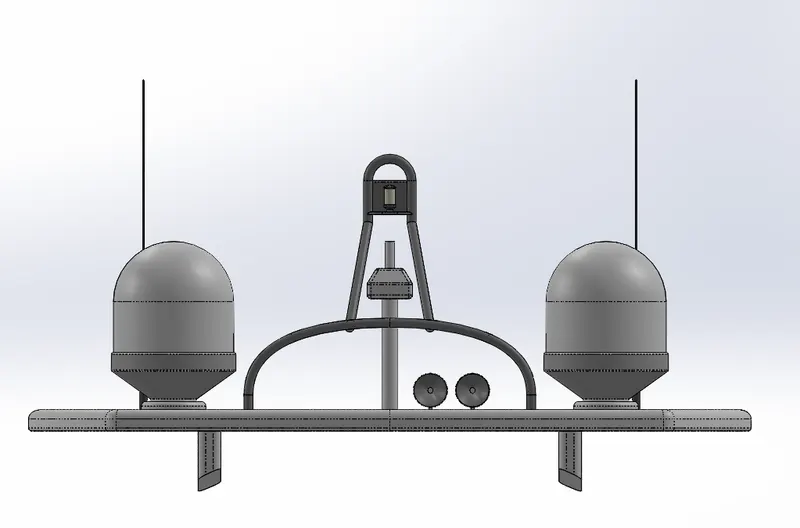
Fig. 19.1: Radar mast Front View
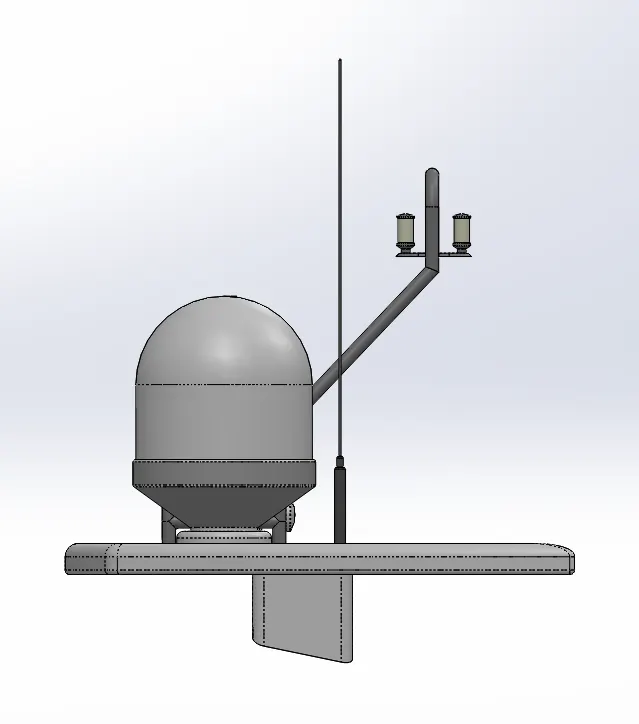
Fig. 19.2: Radar mast Right View
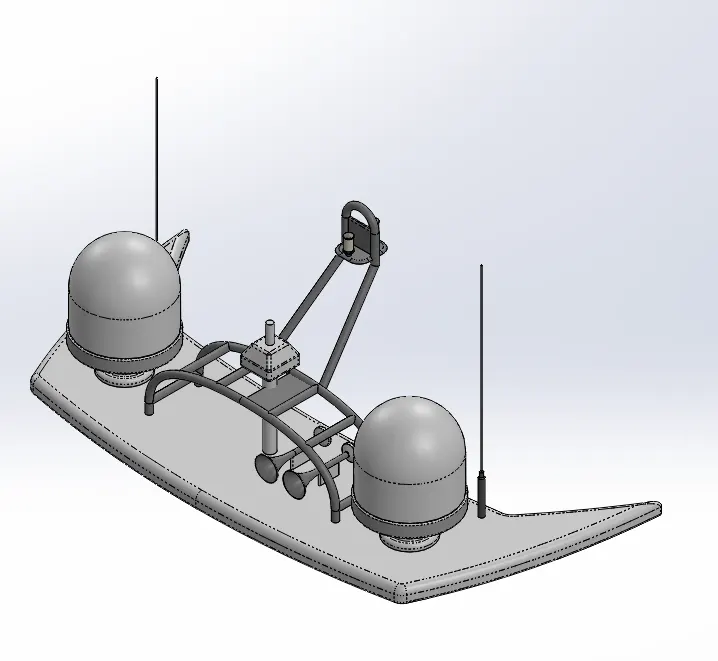
Fig. 19.3: Radar mast Isometric View
Following is the feature tree of model of Radar Mast:
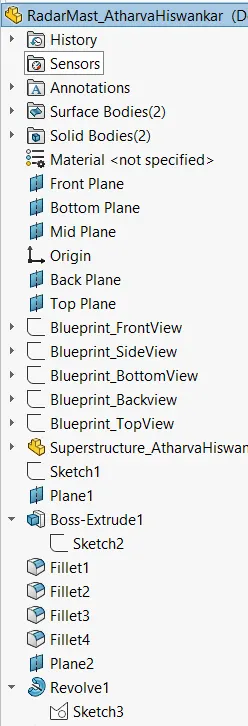
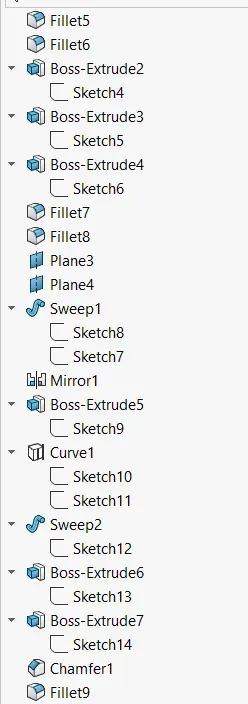
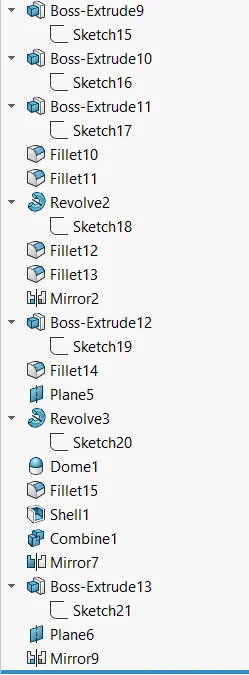
Fig. 19.4: Radar Mast feature tree
Radar: Marine Radar - Radio Detection and Ranging, is used to detect objects and their position relative to your current location. It works by sending out a radio signal. When the signal hits an object, it gets reflected back to the radar, which can then calculate a rough estimate of the object. It does so by detecting other ships and land obstacles, to give bearing and distance for collision avoidance and navigation while on water. A marine radar device acts as a major navigation aid for boaters. It helps in detecting boats, birds, landmasses, and weather systems - even if the visibility is less than usual.
Following Surface features of SOLIDWORKS were used to model the radar:
- Sketch Tools- Line, Circle, Polygon
- Boss Extrude
- Cut Extrude
- Fillet
- Sketch Pattern
- Mirror
- Split line
- Appearance
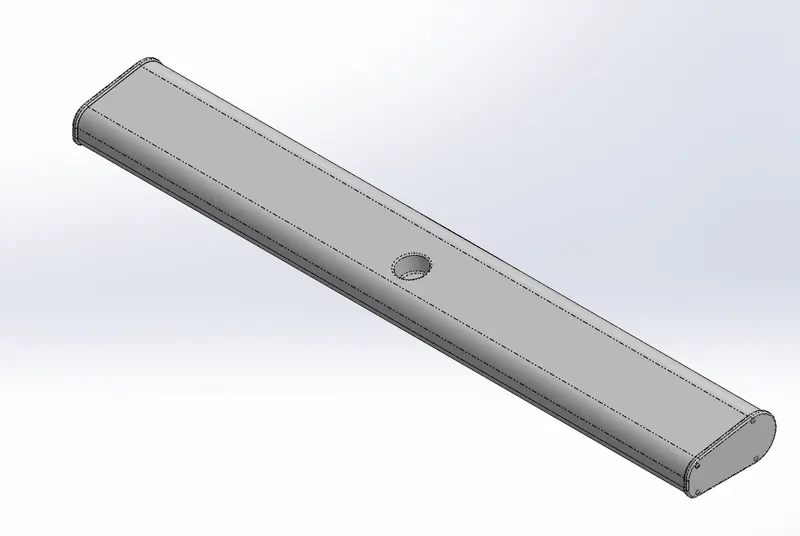
Fig. 20: Radar
- Propeller: A propelleris a device with a rotating hub and radiating blades that are set at a pitch to form a helical spiral, that, when rotated, exerts linear thrust upon a working fluid, such as water or air. Propellers are used to pump fluid through a pipe or duct, or to create thrust to propel a boat through water or an aircraft through air. The blades are specially shaped so that their rotational motion through the fluid causes a pressure difference between the two surfaces of the blade by Bernoulli's principle which exerts force on the fluid. Most marine propellers are screw propellers with helical blades rotating on a propeller shaft with an approximately horizontal axis.
Following Surface features of SOLIDWORKS were used to model the Propeller:
- Sketch Tools- Line, Spline, Corner Rectangle
- Revolve Boss
- Lofted Boss
- Fillet
- Cut Extrude
- Reference Plane
- Circular Pattern
- Appearance
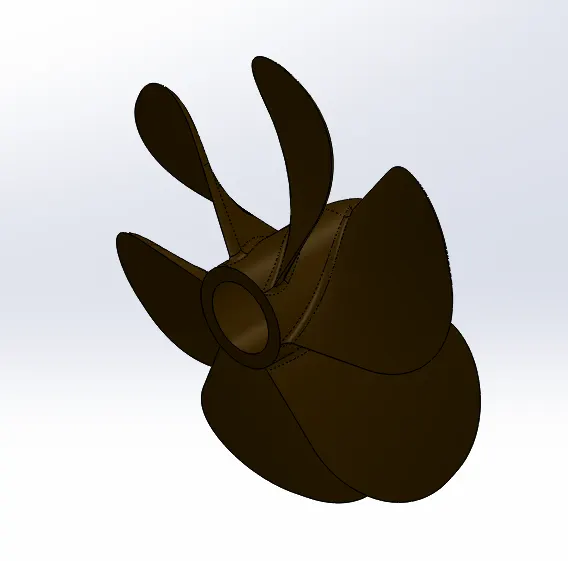
Fig. 21: Propeller
Assembly of the Yacht:
- Import the Hull and fix it in the assembly environment. Since, I used the blueprints to model large parts of the yacht, they were modelled as if they are placed at their position. This will ease out the process of assembling them and constraint them.
- Import the Superstructure and fix it in the assembly environment.
- Import the Radar mast and fix it in the assembly environment.
- Import the Front Seat and fix it in the assembly environment.
- Import the Middle Seat and fix it in the assembly environment.
- Import the Rear seat and coincide the base of the seat with the deck surface. Then make the center point of the seat and the deck at a distance of 50 mm. Also, make the mid plane seat and mid plane hull coincident.
- Import the garage door and make mid planes coincident with the mid plane of the hull. Give concentric mate between the hole in the garage door and the circular projection just below the deck surface.
- Import the propeller and make it concentric with the propeller shaft. Make the flat face on the propeller and the propeller shaft coincident to place it correct position.
- Import the radar and make midplane coincident with mid plane of the radar mast. Give concentric mate to mount the radar in its place.
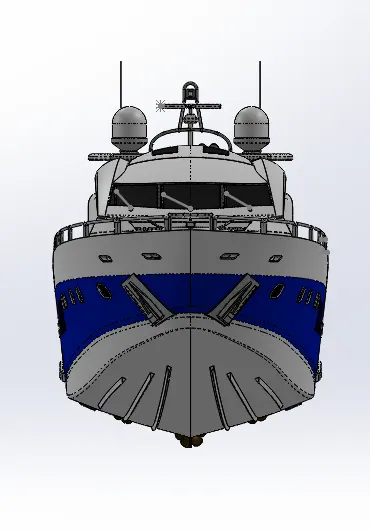
Fig. 22: Front View of the Yacht Assembly
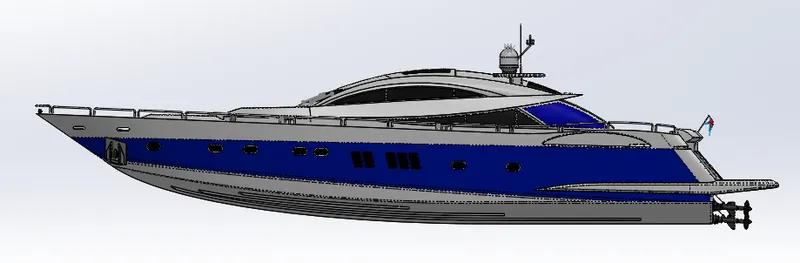
Fig. 23: Right View of the Yacht Assembly
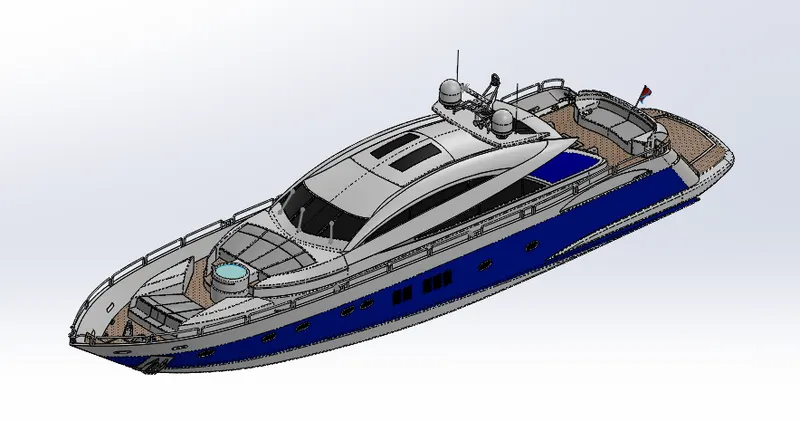
Fig. 24: Isometric View of the Yacht Assembly
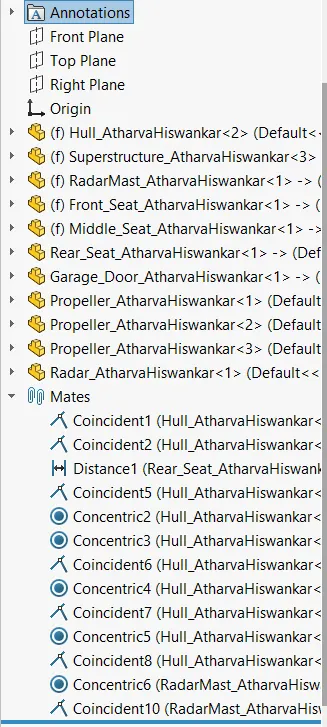
Feature tree of the assembly:
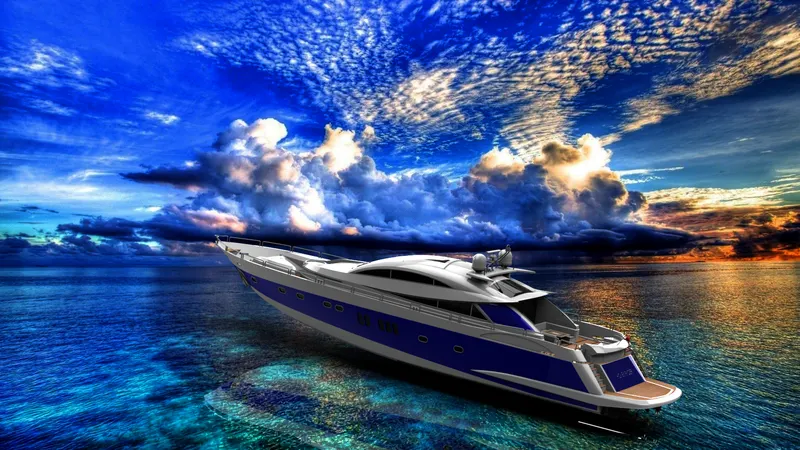
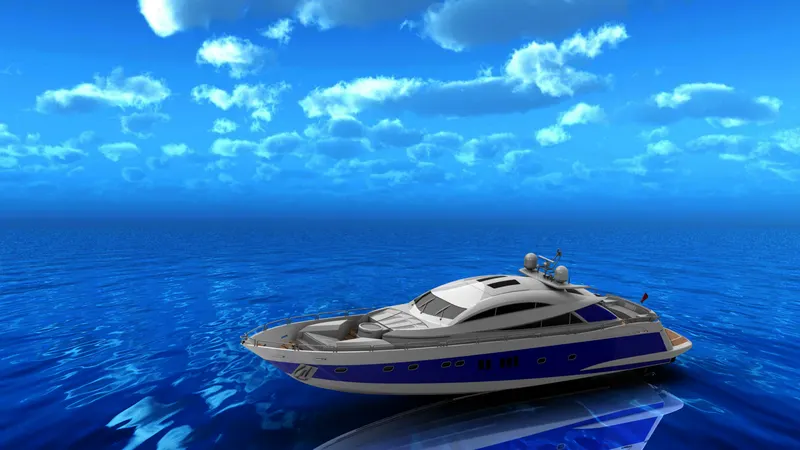
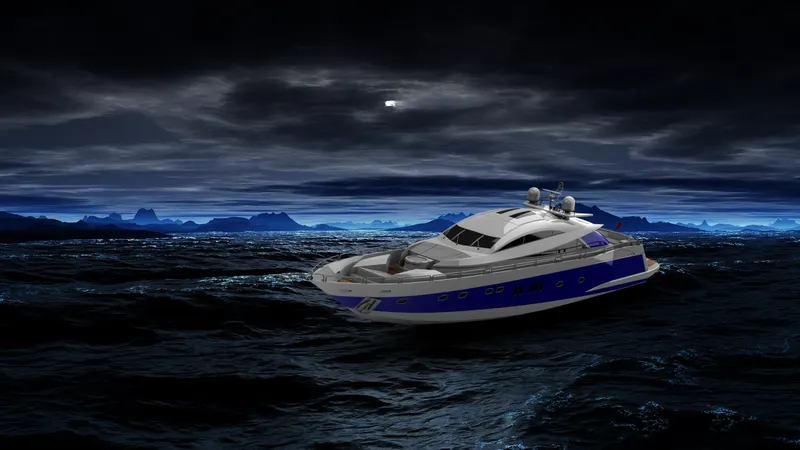
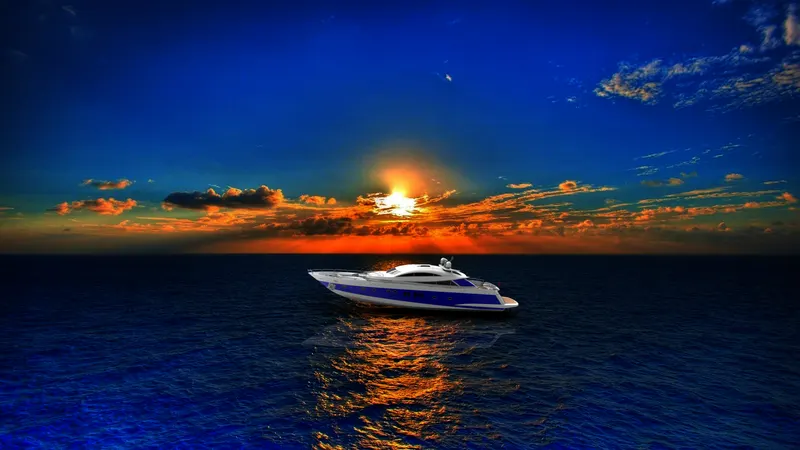
Photorealistic Rendering: Since I did not have HDR environments with an ocean scene, I used back plates in SOLIDWORKS Visualize and imported Ocean Wallpapers and placed the Yacht to get an idea of how it will look in real situation. Some of the images are as shown below:

Conclusion: The design of the Sunseeker Predator Yacht using a Sketch Blueprints was completed successfully along with photo realistic renderings.