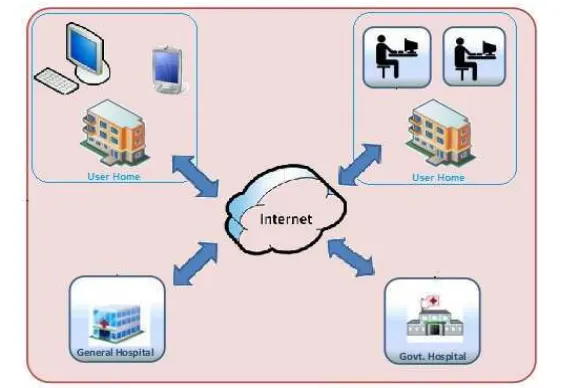
Project - Design a Hospital Management system
A hospital management information system (HMIS) is an element of health informatics that focuses mainly on the administration needs of hospitals. In many implementations, this is a comprehensive, integrated information system designed to manage all the aspects of a hospital. One of the most important issues is health care services. Hospital management information system (HMIS) is a province-wide initiative designed to improve access to patient information through a central electronic information system. HIS goal is to streamline patient information flow and its accessibility for doctors and other health care providers. These changes in service will improve patient care quality and patient safety over time. The patient carries system record patient information, patient laboratory test results, and patient doctor information. Doctors can access easily person information, test results, and previous prescriptions. Patient schedule organization and early warning systems can be provided by related systems.
In the present era of globalization and advanced technology efficient record keeping cannot be overemphasized. Imagine the scenario when the manual processes and manual modes of instruction get replaced with electronic systems. One of such replacement can be done in the area of patient’s database management system within a hospital. Developing patient database management system software would benefit the hospital management who can have effortless access to the data securely and more easily. Hospitals are not excluded in record keeping. The records kept include patient data, which help to maintain patient’s medical records. The medical records must have correctly all of the patient medical history. Physicians must maintain flawless records, because this document serves a number of purposes. It serves as a communication tool. As an important source of patient information. Well-kept records usually reflect the level of care given to a patient by the physician. Therefore medical records can be used as an evaluation tool. The more complete the record, the better they will serve the physician and the patient in the event of any action. Patient’s identity which includes the patient’s first name, last name, sex, age, address, etc.
Types of Hospital Management Systems
To put it simply, the hospital management system software is software that automates routine management processes and stores all information required to run a medical establishment.
If you want to unite and provide easy access to information about personnel, patients, suppliers, billing, and statistics, you should design a hospital system software. In addition, the management system can have integrated telemedicine solutions.
Basically, with such a management system, a hospital’s employees have a multi-purpose digital tool that helps them to handle daily tasks with minimal effort.
Clinic management software varies in its complexity, scale, and functionality depending on a medical establishment’s requirements, size, and budget. Even though the functionality of hospital software can vary significantly from one establishment to another, the four basic types of clinic management systems can be defined.
They include
– Operational and tactical systems for easy classification and management of information
– Patient administrative systems for managing interaction with patients on an administrative level
– Subject-based systems, such as Electronic Medical Records (EMRs) or Electronic Health Records (EHRs)
– Task-based systems, which are associated with certain tasks, such as admissions/discharge systems.
– Billing systems for monitoring and managing finances
Of course, the hospital management system can combine different types of software or bits of functionality. There are no strict cannons regarding the creation of hospital software. A digital product for a clinic can be designed to be a perfect match for a specific company’s requirements and needs.
Hospital Management Software Features
As we established earlier, software for medical establishments can vary in types and functionality depending on the context. However, regardless of any given hospital’s needs, requirements, and approach to work, there are some universal features without which hospital management software would be pretty much useless.
The most prevalent must-have features that should be included if you are to build a hospital information management system are
1. Patient Registration and EHR/EMRs
First and foremost, management software should have hospital registration software to provide the possibility to register patients into the hospital’s system and file in all relevant information. Establishing a proper patient registration system software is the foundation upon which the rest of the patient-interaction system logic is built.
Electronic health records should contain all necessary patient information and be easily accessible and constantly updated with minimum effort.
2. Appointment and Scheduling
Patients should be able to book a visit. In addition, physicians and patients should have access to patients’ accounts in order to view and change appointment informationб if required. Finally, the system should notify about approaching appointments with alerts, emails, or SMS.
Such a system
1) Allows for scheduling and managing appointments
2) Provides a convenient feedback mechanism
3) Provides the possibility to notify patients via phone or mail
4) Automates patient check-in system
3. Billing and Financial Management
A hospital management system should have a hospital billing system that provides the possibility to manage and monitor finances and different financial operations including taxes, revenues, costs, and patient bills.
The medical software should also be able to automatically calculate the total costs for services a patient was provided with as well as track the patient’s financial history. Ideally, the prices are predetermined, so as soon as a patient books an appointment, he or she can view the final price for the service the patient requires.
In addition to the decreased workload and mitigation of human-factor errors, the automation of the financial and billing management grants also helps to better analyze the financial position of a medical establishment and make necessary corrections to the strategic course in order to increase efficiency.
4. Doctors Information
Ideally, medical software should have a section with information about physicians that provide their service at the establishment. The section should contain a list of the available doctors and their schedules as well as the experience, achievements, and expertise of the medical professionals.
People want to know as much as possible before visiting a hospital, so the more information there is about a medical establishment, the more likely people will visit it.
5. Inventory Management
In order to ensure that the supply of medical materials is steady and there are no sudden shortages of critical materials, proper inventory management is required. Well-crafted software can be an irreplaceable helper in this regard.
With the help of such software, employees can monitor the supply and calculate how many items are available and when the next restocking is required. In addition, inventory management can help monitor the expiration dates of the drugs.
6. Laboratory Management
Laboratory management is quite an essential part of every hospital management system because it allows for the faster retrieval of the laboratory analysis results. Proper software can quickly notify physicians and patients about the results of the analysis as well as provide easy access to all the lab information in one place.
The speed with which the doctors and patients receive the results of the analysis is often vital to the efficiency of the treatment and overall customer satisfaction.
7. Statistics and reports
Statistics and reports are not an essential and yet extremely helpful feature the hospital management system can have. Extensive statistics on finance, patients, and doctors’ information can be a source of invaluable insights that help the medical establishment develop. With well-tuned software, it is possible to create statistics and reports with just a few clicks of a mouse.
8. Support
If a healthcare establishment’s management software is complex, has a lot of different modules that should work in unison, and serves a lot of users, a support/helpdesk solution is pretty much mandatory. The support section of the healthcare management system should have all the tools necessary to help the support personnel handle different issues and requests from users as well as facilitate the proper functioning of the system and the integrity of the data.
9. Telemedicine solution
Telemedicine solution is a modern approach to healthcare that allows conducting virtual remote meetings with a physician via teleconferencing. It’s not suitable for all establishments, but some of them, which do not necessarily require a face-to-face meeting, could seriously benefit from this software. A bright example of an efficient telemedicine solution is a Full Circle Telepsychiatry KindGeek developed.
10. Mobile App for Customers and Employees
The absence of a mobile app that complements healthcare establishment software can be a severe competitive disadvantage as well as strategic misstep as mobile applications becoming a major point of connection between consumers and companies. A basic mobile app for hospital management could contain personal treatment calendars, schedules with dates available, information about doctors, the ability to book appointments, and
In addition, a mobile app can be used by employees to interact with a clinic management system in a more convenient way. With such an app, they will always have access to the software as far as their smartphones are with them.
Advantages of Implementing a Clinic Management Software
Even if a medical establishment has the best doctors, medical equipment, and resources, but its management processes are poorly optimized; the personnel is drowning in tons of paperwork, and employees are overworked and stressed due to bureaucracy and absence of smooth workflow; the healthcare facility would not function well and its patients would often be dissatisfied. This is where a well-crafted, relevant, and reliable clinic management software can make a huge difference.
There are a lot of advantages of implementing healthcare management software even with basic functionality.
They include:
1. Decreased Workload and Burn-Out Rates
Medical workers are prone to burn out considering the specifics of their work. Add to this previously reported, “time pressure, lack of control over work processes, role conflict, and poor relationships between groups and with leadership, and emotional intensity of clinical work.” No wonder, such a stressful environment detrimental to medical personnel’s well-being.
Furthermore, reports indicate that healthcare employees spend up to half of their working time dealing with paperwork. It’s a counterproductive and taxing process that could be made less straining by implementing relevant software.
In addition, another study claimed that nurses spend approximately 7% of their time searching for necessary supplies. It occurs because often there is not a sure way to inform nurses about the fact that the drug or equipment has arrived or has finished. Therefore, they have to check everything manually walking to another section of the establishment. Relevant software that automates inventory management can significantly lower this amount of time.
Developing healthcare management can target a lot of the issues mentioned above as the primary aim of the software is to automate processes and decrease unnecessary workload.
2. Decreased Costs
Hospital administrative costs, “including costs for submitting and processing claims,” can sum up to 25% of total spending. Add to this insurance claims costs, and you have a significant amount of spending induced by bureaucracy.
The process of claims procession requires a lot of repetitive manual work, A proper healthcare management system can significantly decrease the costs of this bureaucratic process by automating it. In addition, management software can streamline workflow and optimize other areas of managing a medical facility as well.
For instance, patient registration, inventory, and laboratory management can be quite taxing procedures if not automated. As a result of proper digitization, a clinic needs fewer working hours to do the same amount of work.
3. Increased Customer Satisfaction
Streamlined patient registration, ability to book appointments, monitor schedules, quickly receive lab analysis results in a convenient format, chose doctors — a patient can do it all using a computer or a mobile device if a hospital has a software system.
Moreover, the billing process is transparent and intuitive while all information about the patient’s journey is conveniently stored in one place and can be reviewed. In addition, all processes take less time to perform than in the medical facilities that did not implement software solutions. As a result, customer interaction with a hospital is a smooth and positive experience.
Finally, patients will interact with less stressed and more positive employees. As a result, the patients will lead to better service, have better impressions have about the clinic, and will be more willing to use the hospital’s services again.
4. Clearer Strategic Development
With a decent hospital management system in place, it is much easier to see the full picture and has full control over the internal processes. As a result, the management has all the tools necessary to make and implement strategic decisions to further the productivity and efficiency of the healthcare establishment. Otherwise, it is difficult to navigate in the haze of bureaucratic fuss and quickly implement necessary strategic corrections.
Custom Healthcare Solution
However, there is quite a significant difference between implementing a one-for-everyone management software, and healthcare systems that were developed for a particular establishment with all its needs in mind.
There are ready-to-use healthcare software solutions for sale, and clinics that don’t use any management software can seriously benefit from it. However, those universal healthcare systems would not be as beneficial for the company as custom software would. An average solution that was created for a mass-market may have basic features, but it did not consider the specifics of a particular hospital.
There is always a certain compromise with for-sale healthcare management software. You can find the most suitable candidate but it still will lack in certain areas. Besides, with typical subscription models, software management systems propose you have to pay more as your establishment grows. With a custom solution developed specifically for your establishment, you have to pay only once and have a healthcare management system that is just perfect.
It’s like buying a suit in a shop or ordering a suit tailored specifically for you. The difference in price can be quite tangible but the final results are not even comparable. A custom-tailored suit sits just perfectly and does not strain your motions.
How Much Does It Cost to Develop a Hospital Management Software?
The cost of creating medical software depends on a variety of different factors, which include
– The complexity of the system
– The number of the required modules
– The platform the system will run on
– Time of development
– A software development company’s rates
– The necessity to use Business Analysis expertise
Therefore, it is difficult to overline even the average price for designing an average clinic management software. However, if there is an accurate description of a hospital management system’s functionality, experienced developers can provide you with estimates of the costs after thorough analysis. Overall, estimation is a meticulous process, and its accuracy depends on the extensiveness of the provided information.
The most certain way of figuring out how much will development of hospital management software cost is to conduct a discovery phase. The discovery phase will not only provide you with the most accurate estimates of future costs but will deliver you, depending on the chosen package,
– product concept from Product Manager
– prototypes from Business Analyst
– a visual concept from UI/UX Designer
– architecture concept from System Architect
– estimates of development costs
As a result, you will know the price and have accurate blueprints required to create hospital management system software, which could be used to build a custom software solution for a medical facility.
The purpose of the Design phase is to plan a solution for the problem specified by
the requirements. System design aims to identify the modules that should be in the
system, the specification of those modules and how they interact with each other to
produce the results. The goal of the design process is to produce a model that can be
used later to build that system. The produced model is called design of the system.
System design is the process of defining the architecture, components, modules,
interfaces and data for a system to satisfy specified requirements. Normally, the
design proceeds in two stages:
• Physical design
• Database design
Physical Design
The physical design is a graphical representation of a system showing the system’s
internal and external entities and the flow of data into and out of these entities. An
internal entity is an entity within the system that transforms data.To represent the
physical design of the system, we use diagrams like data flow diagrams, use case
diagrams, etc.
Depending on the results of the initial investigation, the survey is now expanded to
a more detailed feasibility study. “FEASIBILITY STUDY” is a test of system
proposal according to its workability, impact of the organization, ability to meet
needs and effective use of the resources. It focuses on these major questions:
1. What are the user’s demonstrable needs and how does a candidate system meet
them?
2. What resources are available for given candidate system?
3. What are the likely impacts of the candidate system on the organization?
4. Whether it is worth to solve the problem?
During feasibility analysis for this project, following primary areas of interest are to
be considered. Investigation and generating ideas about a new system does this.
Steps in feasibility analysis
Eight steps involved in the feasibility analysis are:
• Form a project team and appoint a project leader.
• Prepare system flowcharts.
• Enumerate potential proposed system.
• Define and identify characteristics of proposed system.
• Determine and evaluate performance and cost effective of each proposed
system.
• Weight system performance and cost data.
• Select the best-proposed system.
• Prepare and report final project directive to management.
Technical feasibility
A study of resource availability that may affect the ability to achieve an acceptable system. This evaluation determines whether the technology needed for the proposed system is available or not.
• Can the work for the project be done with current equipment existing software technology & available personal?
• Can the system be upgraded if developed?
• If new technology is needed then what can be developed?
This is concerned with specifying equipment and software that will successfully satisfy the user requirement. The technical needs of the system may include:
Front-end and back-end selection
An important issue for the development of a project is the selection of suitable frontend and back-end. When we decided to develop the project, we went through an
extensive study to determine the most suitable platform that suits the needs of the
organization as well as helps in development of the project. The aspects of our study
included the following factors.
Front-end selection:
1. It must have a graphical user interface that assists employees that are not from IT background.
2. Scalability and extensibility
3. Flexibility.
4. Robustness.
5. According to the organization requirement and the culture.
6. Must provide excellent reporting features with good printing support.
7. Platform independent.
8. Easy to debug and maintain.
9. Event driven programming facility.
10. Front end must support some popular back end like MS SQL server.
According to the above stated features we selected C sharp as the front-end for developing our project.
Back-end Selection:
1. Multiple user support.
2. Efficient data handling.
3. Provide inherent features for security.
4. Efficient data retrieval and maintenance.
5. Stored procedures.
6. Popularity.
7. Operating System compatible.
8. Easy to install.
9. Various drivers must be available.
10. Easy to implant with the Front-end.
According to above stated features, we selected MS SQL server as the backend. The technical feasibility is frequently the most difficult area encountered at this stage. It is essential that the process of analysis and definition be conducted in parallel with an assessment to technical feasibility. It centers on the existing computer system (hardware, software etc.) and to what extent it can support the proposed system.
Economic feasibility
Economic justification is generally the “Bottom Line” consideration for most
systems. Economic justification includes a broad range of concerns that includes
cost benefit analysis. In this we weight the cost and the benefits associated with the
candidate system and if it suits the basic purpose of the organization i.e. profit
making, the project is making to the analysis and design phase.
The financial and the economic questions during the preliminary investigation are
verified to estimate the following:
The cost to conduct a full system investigation.
The cost of hardware and software for the class of application being
considered.
The benefits in the form of reduced cost.
The proposed system will give the minute information, as a result the
performance is improved which in turn may be expected to provide increased
profits.
This feasibility checks whether the system can be developed with the available
funds. The Hospital Management System does not require enormous
amount of money to be developed. This can be done economically if planned
judicially, so it is economically feasible. The cost of project depends upon the
number of man hours required.
Operational Feasibility
It is mainly related to human organizations and political aspects. The points to be considered are:
What changes will be brought with the system?
What organization structures are disturbed?
What new skills will be required? Do the existing staff members have these skills? If not, can they be trained in due course of time?
The system is operationally feasible as it very easy for the End users to operate it. It only needs basic information about Windows platform.
Schedule feasibility
Time evaluation is the most important consideration in the development of project. The time schedule required for the developed of this project is very important since more development time effect machine time, cost and cause delay in the
development of other systems. A reliable Hospital Management System can be developed in the considerable amount of time.
UML Diagram
Actor:
A coherent set of roles that users of use cases play when interacting with the use
'cases'.

Use case:
A description of sequence of actions, including variants, that a system performs
that yields an observable result or value of an actor. 
UML stands for Unified Modeling Language. UML is a language for specifying,
visualizing and documenting the system. This is the step while developing any
product after analysis. The goal from this is to produce a model of the entities
involved in the project which later need to be built. The representation of the
entities that are to be used in the product being developed need to be designed.
There are various kinds of methods in software design:
Use case Diagram.
Sequence Diagram.
Collaboration Diagram.
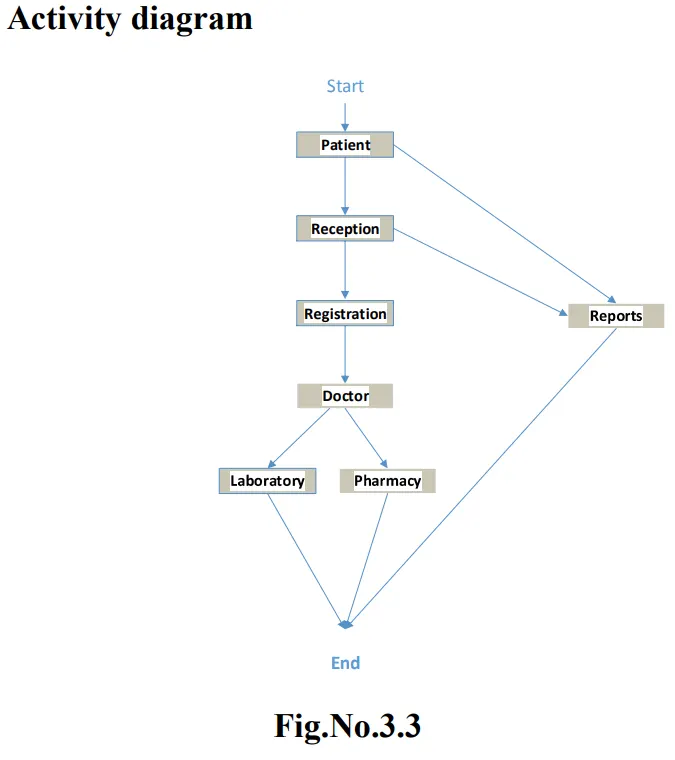
Activity Diagram.
State chat Diagram.
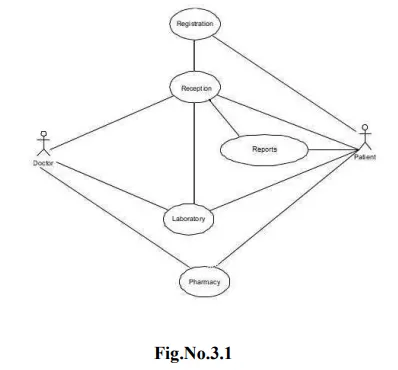
Use case Diagram
Use case diagram models behavior within a system and helps the developers understand what the user require. The stick man represents what's called an actor. Use case diagram can be useful for getting an overall view of the system and clarifying who can do and more importantly what they can't do. Use case diagram consists of use cases and actors and shows the interaction between the use cases and actors.
• To represent the system requirements from user's perspective.
• An actor could be the end-user of the system.
A Use case is a description a set of sequence of actions graphically it is rendered as
an ellipse with solid line including only its name. Use case diagram is a behavioral
diagram that shows a set of use cases and actors and their relationship. It is an
association between the use cases and actors. An actor represents a real-world
object.
SEQUENCE DIAGRAM
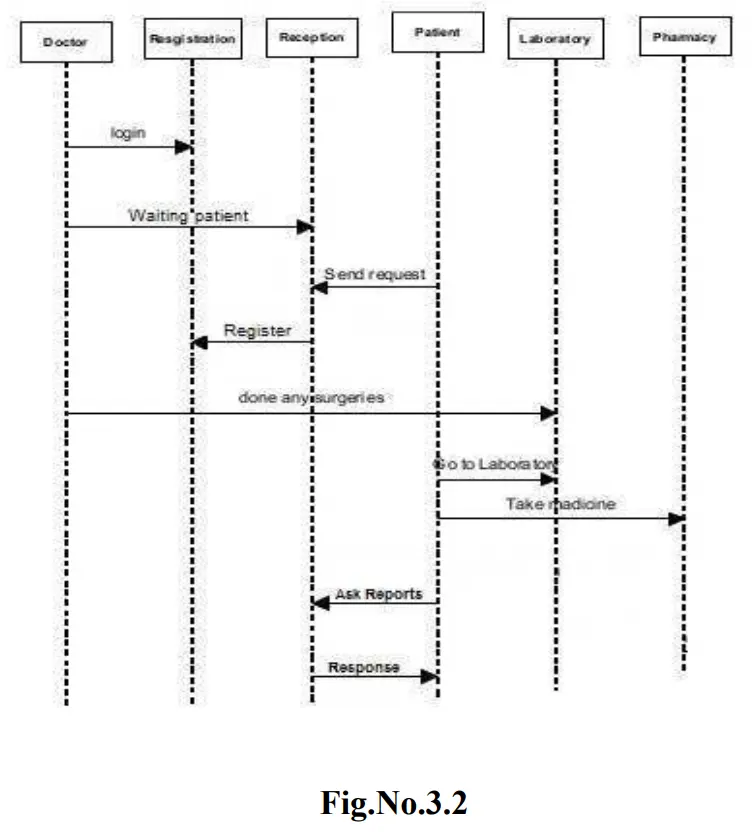
Sequence diagram and collaboration diagram are called INTERACTION DIAGRAMS. And interaction diagram shows an interaction, consisting of set of objects and their relationship including the messages that may be dispatched among them
A sequence diagram is an introduction that empathizes the time ordering of messages. Graphically a sequence diagram is a table that shows objects arranged along the X-axis and messages ordered in increasing time along the Y-axis.
COLLABORATION DIAGRAM
A collaboration diagram is an introduction diagram that emphasizes the structural organization of the objects that send and receive messages. Graphically a collaboration diagram is a collection of vertices and arcs.
CLASS DIAGRAM
Class is nothing but a structure that contains both variables and methods. The Class
Diagram shows a set of classes, interfaces, and collaborations and their
relationships. There is most common diagram in modeling the object oriented
systems and are used to give the static view of a system. It shows the dependency
between the classes that can be used in our system. The interactions between the
modules or classes of our projects are shown below. Each block contains Class
Name, Variables and Methods.
Data Flow Diagrams
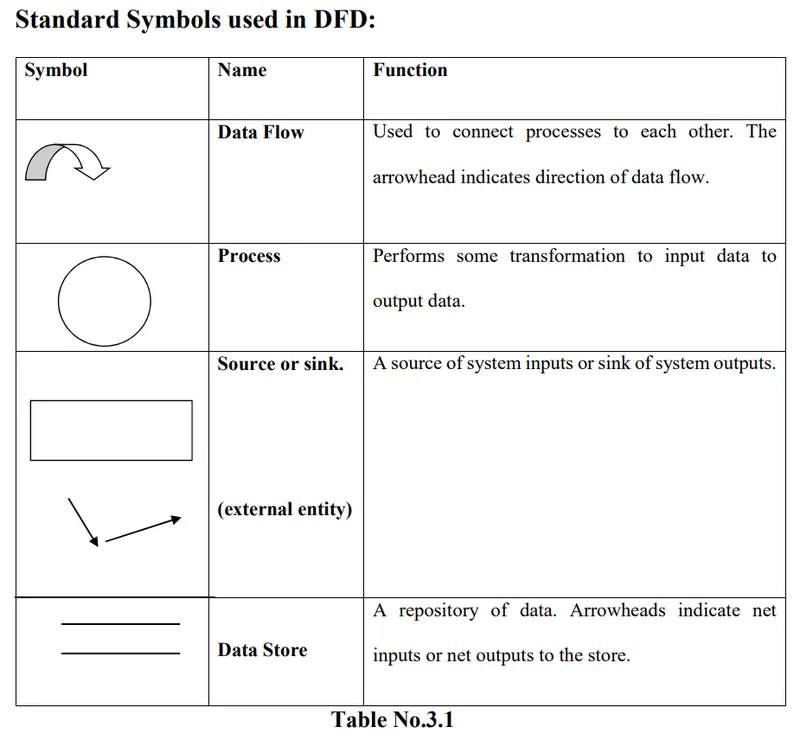
The Data Flow Diagram (DFD) is a graphical representation of the flow of data through an information system. Data flow diagrams are used by systems analysts to design information-processing systems but also as a way to model whole
organizations. The main merit of DFD is that it can provide an overview of what data a system would processes, what transformations of data are done, what data are stored and which stored data is used.
Level 0 DFD
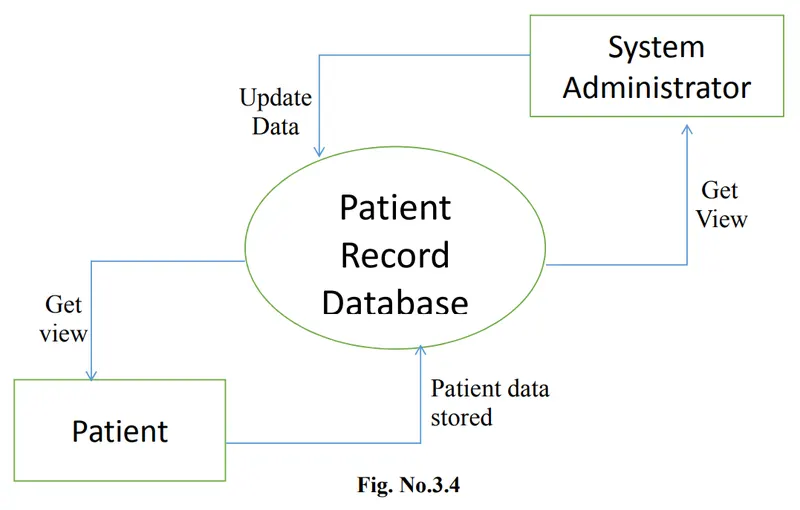
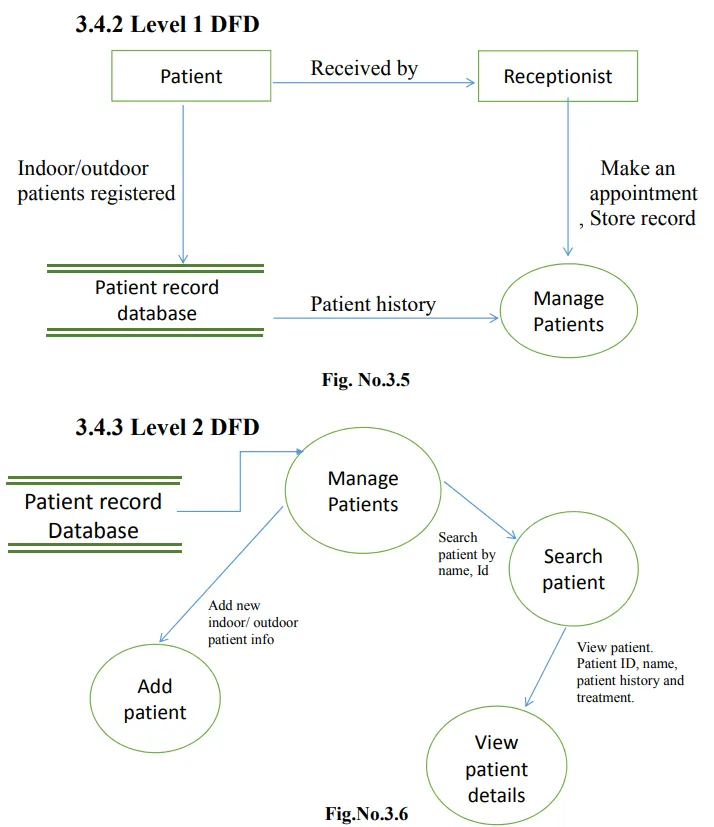
A context diagram is a top level (also known as Level 0) data flow diagram. It only contains one process node (process 0) that generalizes the function of the entire system in relationship to external entities. In level 0 DFD, system is shown as one
process. The Level 0 DFD shows how the system is divided into 'sub-systems' (processes), each of which deals with one or more of the data flows to or from an external agent, and which together provide all of the functionality of the whole system and shows the flow of data between the various parts of the system.
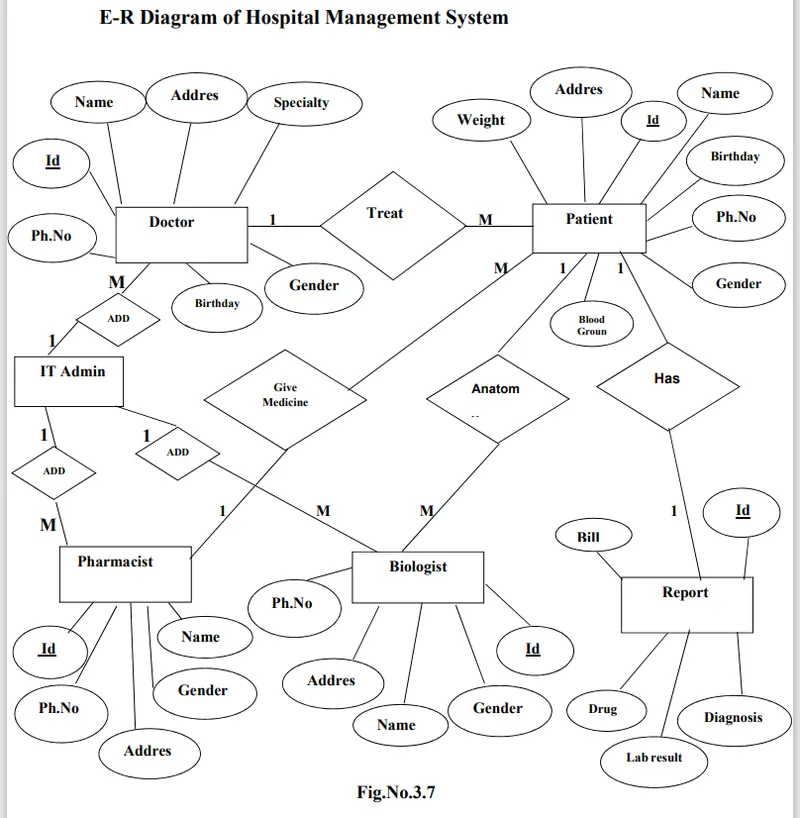
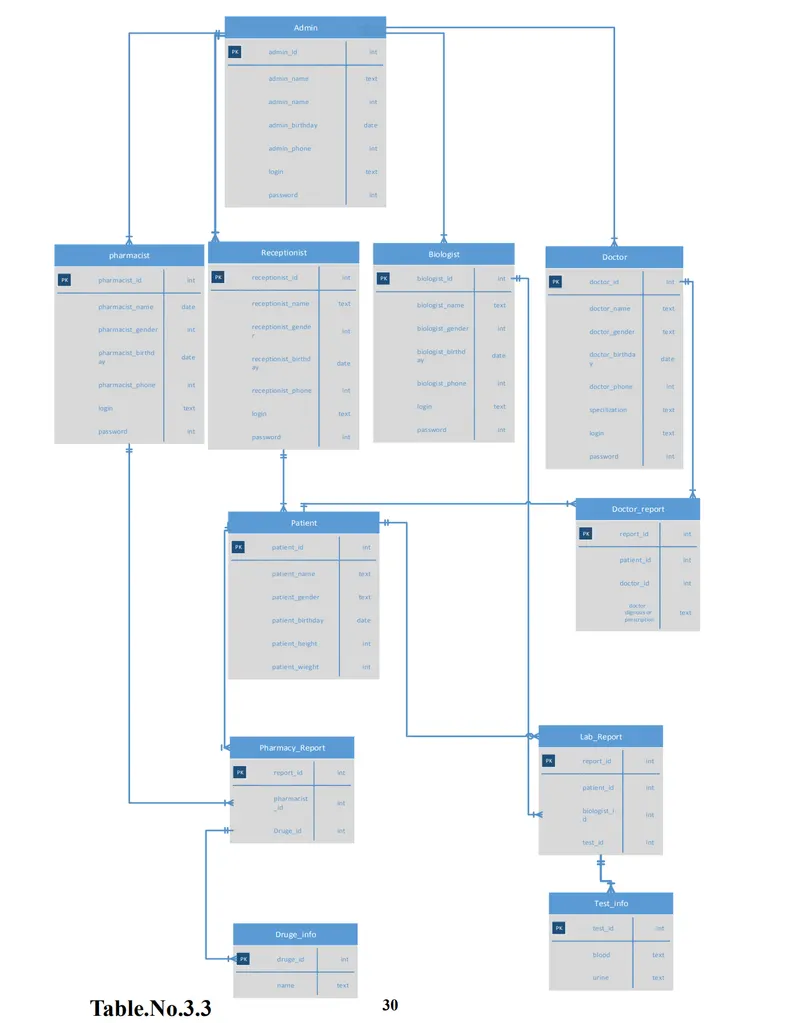
Entity-Relationship Diagram (E-R)
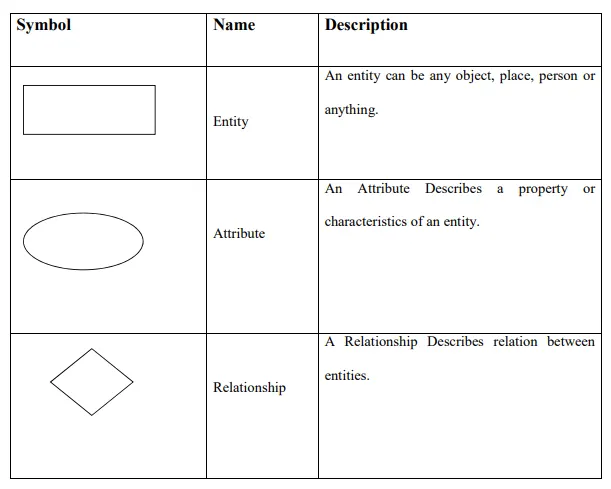
Entity-Relationship Diagram is a graphical representation of entities and their relationship to each others. It describes how data is related to each other. An entity is a piece of data- an object or a concept about which data is stored. A relationship
is how the data is shared between entities.
In E-R Diagram, there are 3 main Components:
Data Dictionary
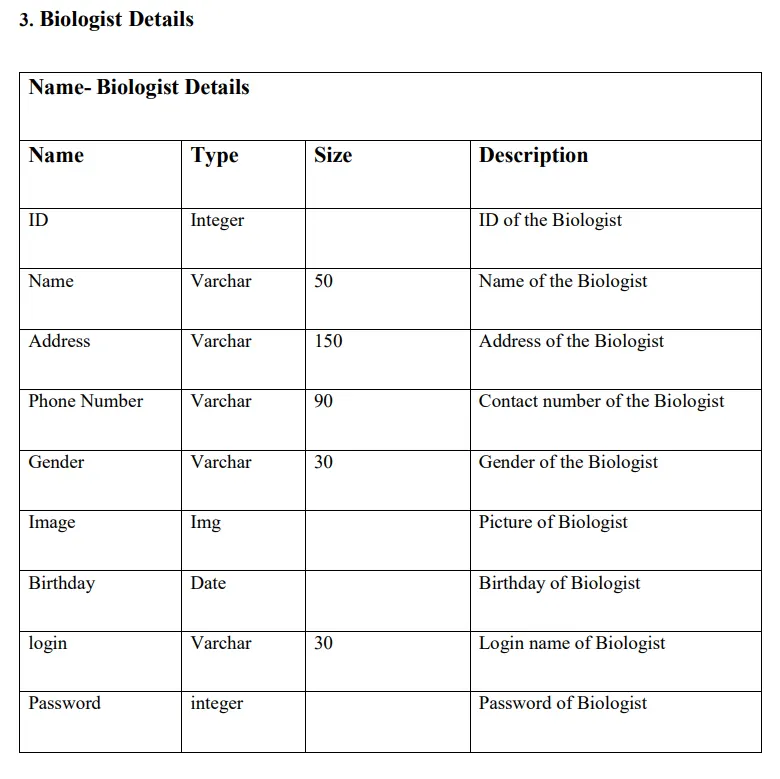
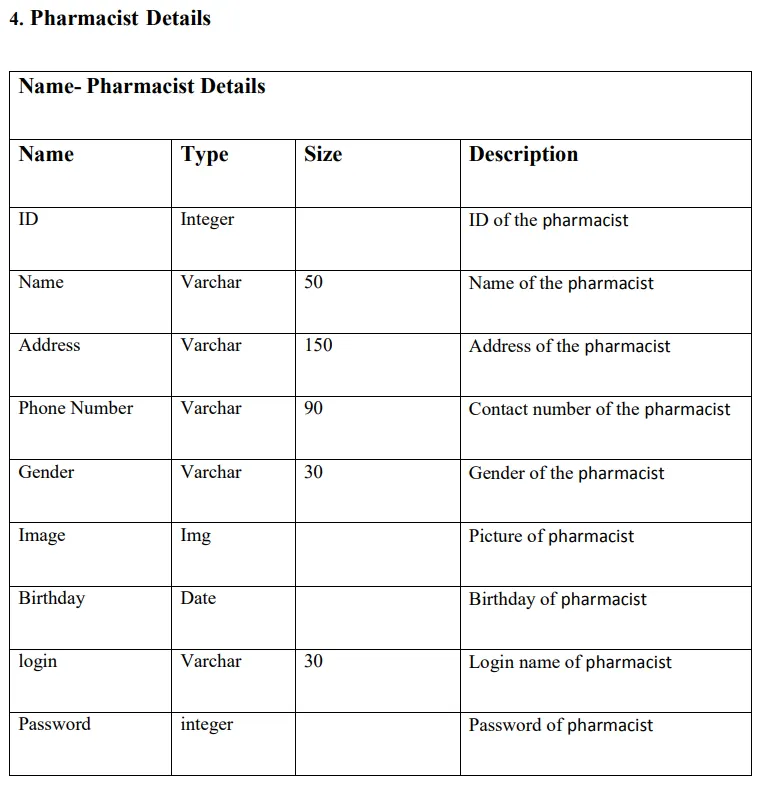
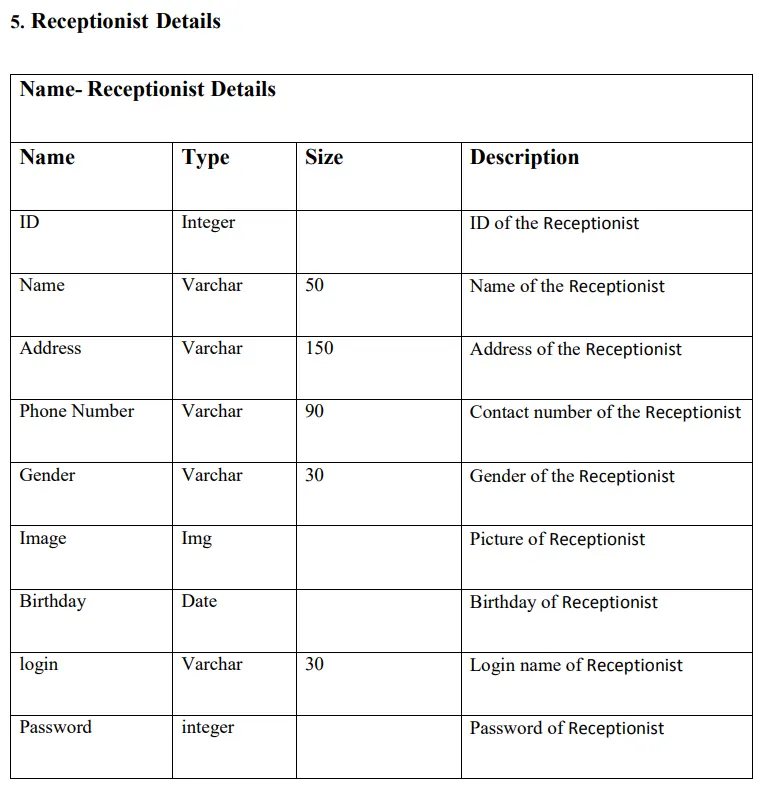
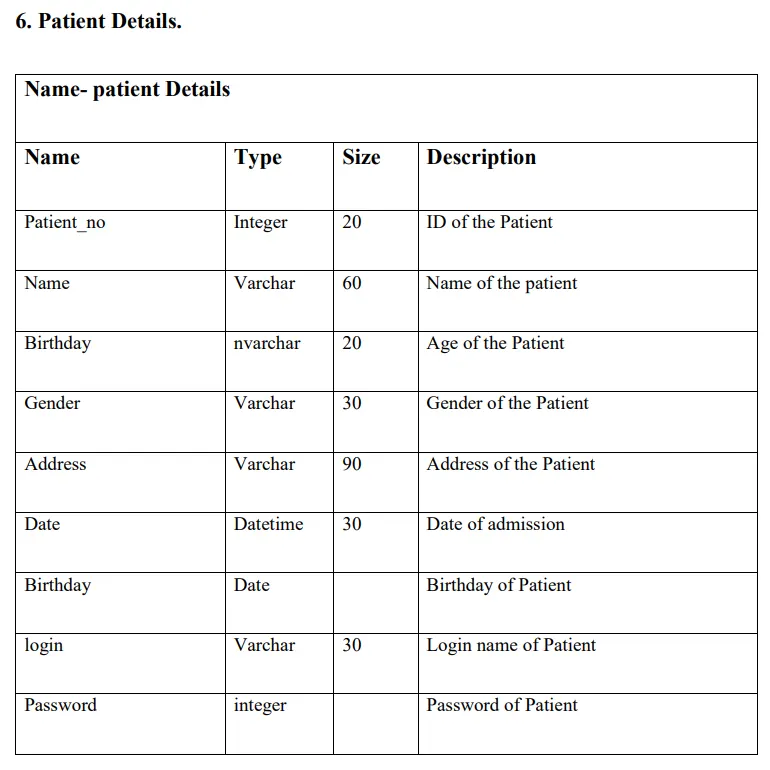
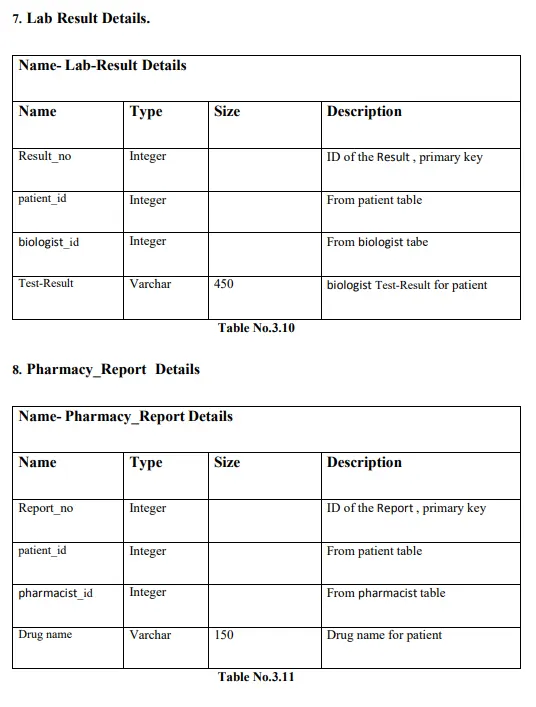
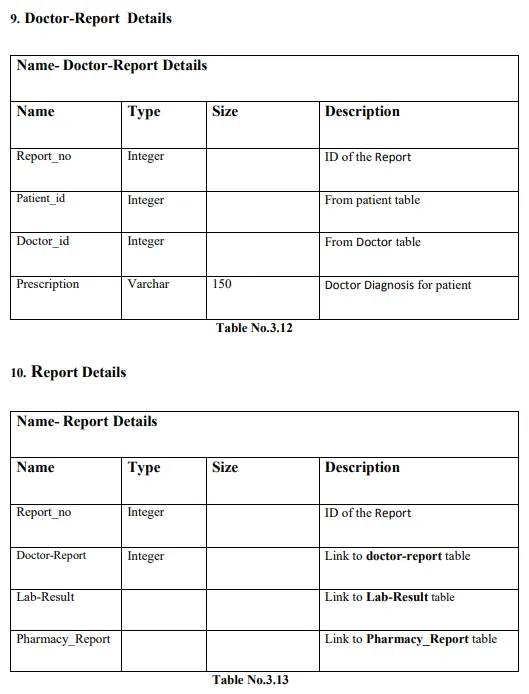
System Implementation
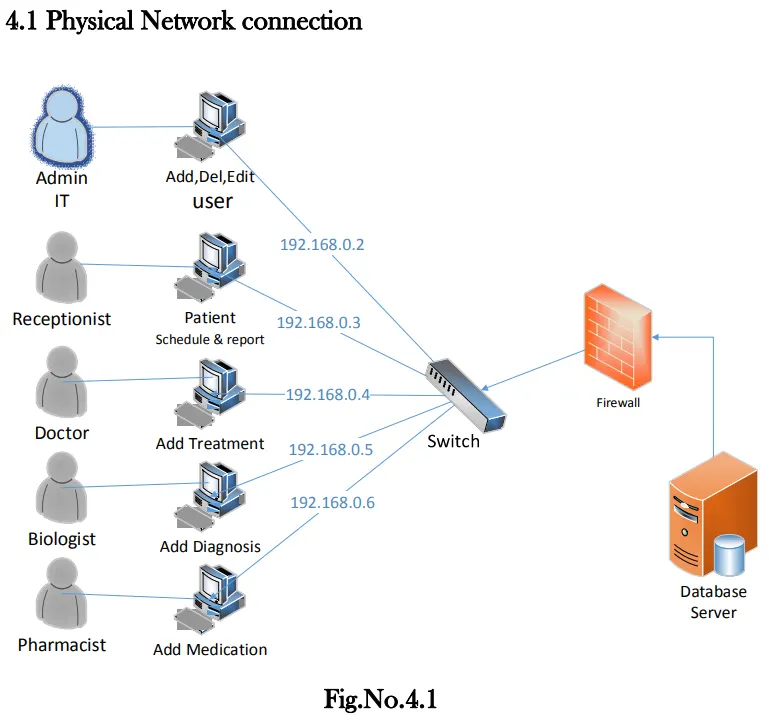
The system will be applied in a LAN as in the fig above. In a Client-Server scenario, we will have the SQL Server installed on a server machine. Clients will be the computers accessing that server using the developed software (which we programmed using C sharp). Each of the clients will provide a way of making a connection to the server instance running on the server. From the server, we will need IP address or server name along with SQL server instance name. They both
combined form the host name.
Data Source = ServerName\InstanceName
Once we add a user to SQL Server Instance, we should attach the user to databases we want the user to access and provide the appropriate role(s). For each computer that will run our application, we should install the executable version on each computer.
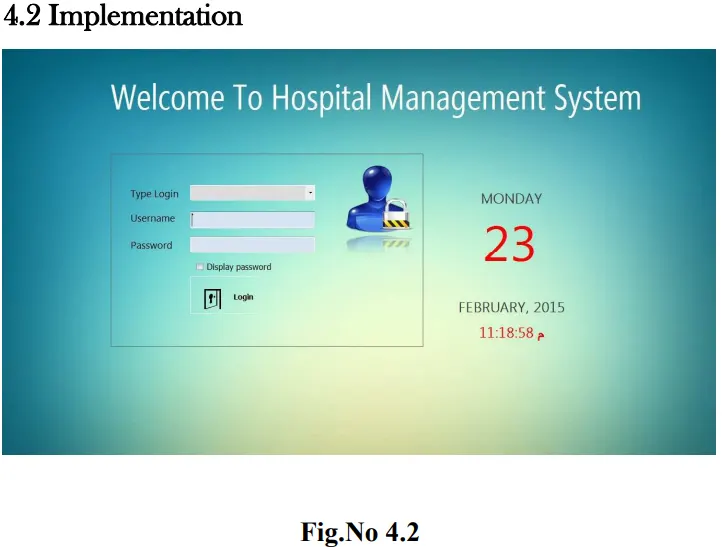
In the main window shown above, when the user wants to login to the system, he/she should choose his/her role in the system and type the user name and password to enter the system.
The system maintains four levels of users:
1. Administrator
2. Doctor
3. Receptionist
4. Pharmacist
5. Biologist
Our application performs the following:-
• Maintaining Patient details.
• Managing patient’s appointment with the specified doctor. .
• Providing and maintaining different kinds of tests for a patient.
• Billing and Report generation.
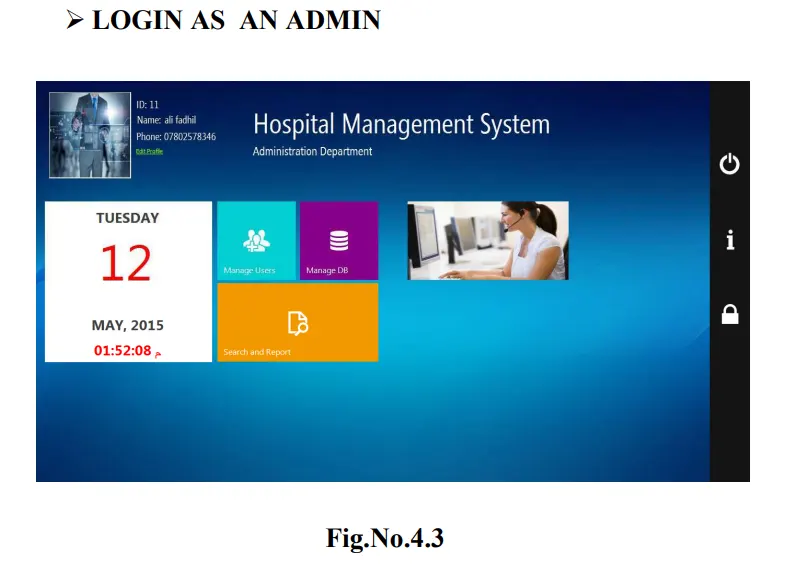
When the user logs in as an admin, the window above will be displayed. The admin adds the user of the system and can backup the database and restore it. The panel on the right side of the screen used to turn of the system, display information about the system designer and logout and back login to the system.
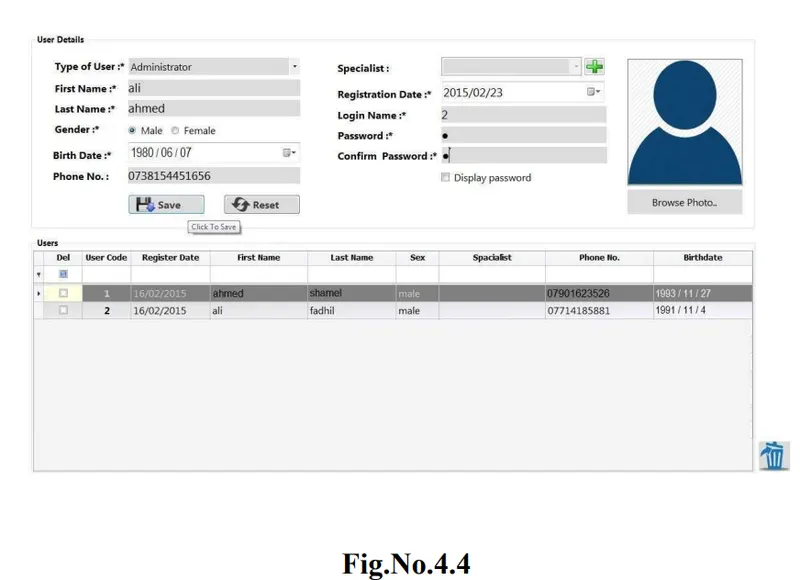
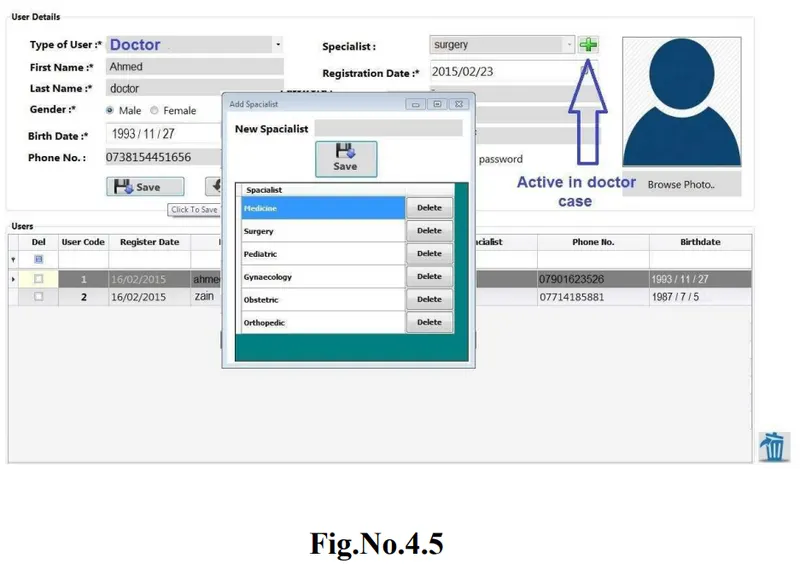
When the admin chooses Manage users button, the window above will be displayed and he will be able to add a new user (a new admin, doctor, receptionist, pharmacist or biologist) by entering the basic information about the user like first name, last
name, age, his personal Picture ...etc.
When the admin chooses the type of user, the table in the 2nd half of the window will automatically display all the users in the system according to the chosen type.
The admin can select the user he needs to edit his information form this table or he
may remove him entirely from the system by checking the check box resided in front of his name. The panel on the right side used to turn of the system, display general information about the system, back to the main admin window and finally logout user (back to the login window).
Note:
The specialist combo box will be available only if the type of user selected by the admin is doctor.
If the admin add a new doctor with a new specialist not included in the system, he can add this new specialty by clicking on the add button next to the specialist combo box.
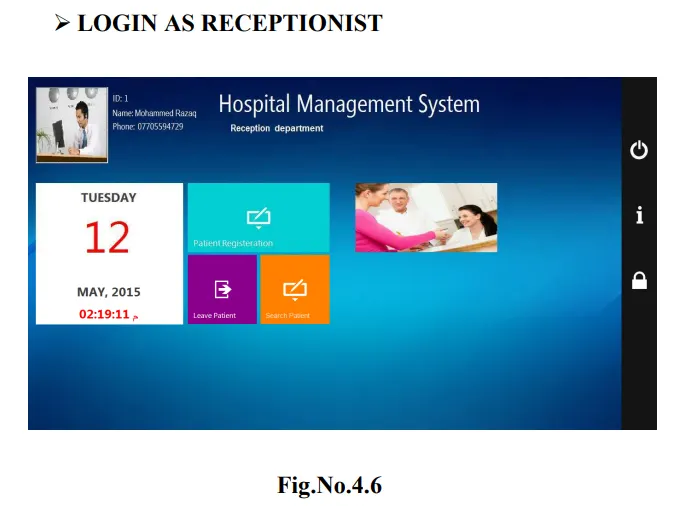
When the user login as a receptionist, a window like the above will appear, the window contains:
Patient Registration: to add a new patient
Leave Patient: to generate report about the leaving patient
Search: to search the patients registered in the system.
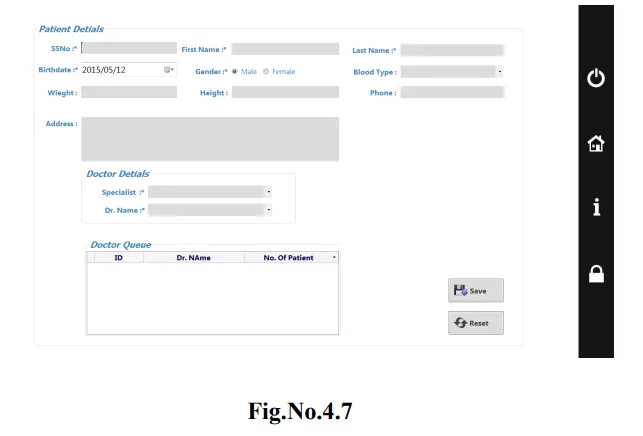
In the Patient Registration form, the receptionist can fill fields with basic information about the patient.
In the Doctor Details section, the receptionist ask the patient general questions so he can choose which doctor (currently available in the hospital) to meet according to the patient case. After that, the receptionist makes an appointment for the patient and asks him/her to wait in the selected doctor's queue until his turn come.
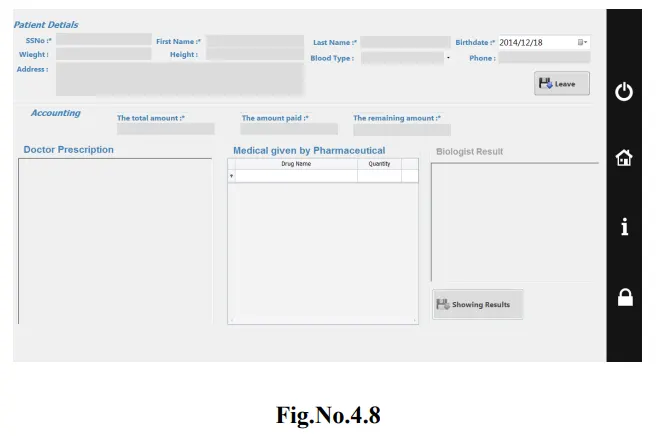
When patient need to leave receptionist will open the form of Leaving Patient to save the history of patient in this visit, window like this one will appear, form contain basic information about patient , Doctor Prescription and medical that given by the pharisaical ,If the patient have a test the result will appear in the field of biologist result and finally the total bill of the patient. When the receptionist click on the leave button, the details will save in system and another copy will print for the patient.
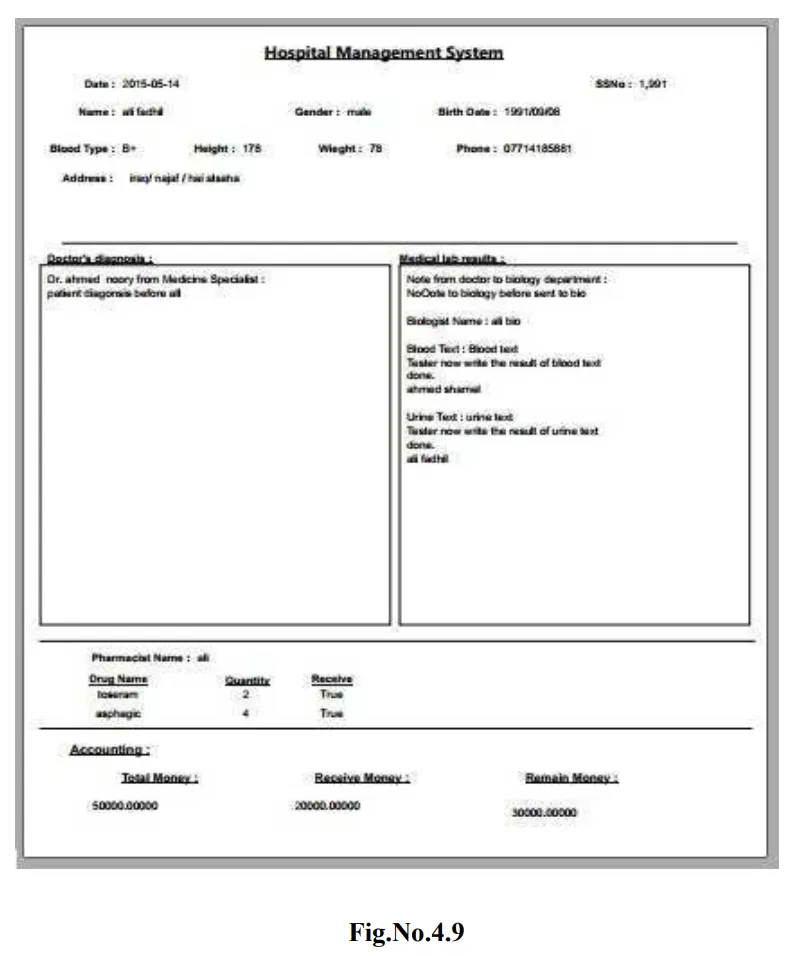
Receptionist will print the report for patient which ask for report that contain the same details of the leave patient form as it is shown above.
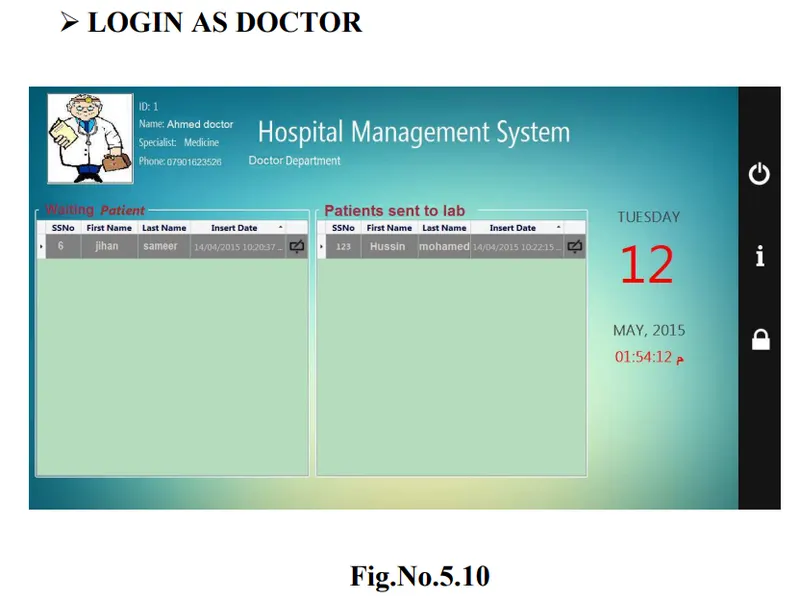
When the user login as a doctor a window as the above will appear, In the left section, a table of the waiting patients is presented and on the right section, the patient(s) that the doctor sends to the lab to do the required test and their results will appear in this table.
To write the patient diagnoses and the appropriate prescription, the doctor clicks on this button  reside beside the patient information in the table.
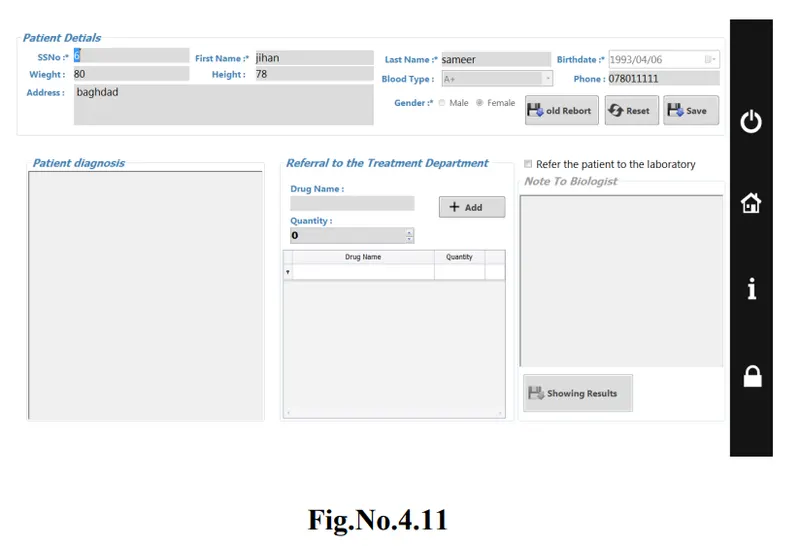
After the doctor click on the button to write the diagnosis, a window like this will appear which contain the patient information so that the doctor will be able to see the patient history (if he have a one). After the doctor diagnosis the patient, he will write prescription and add the drug(s) the patient need and send a copy of this prescription to pharmacist to prepare it to the patient. If the patient's condition needs lab test, doctor should check the (Refer the to the laboratory) check box and write required test type to send them to laboratory.
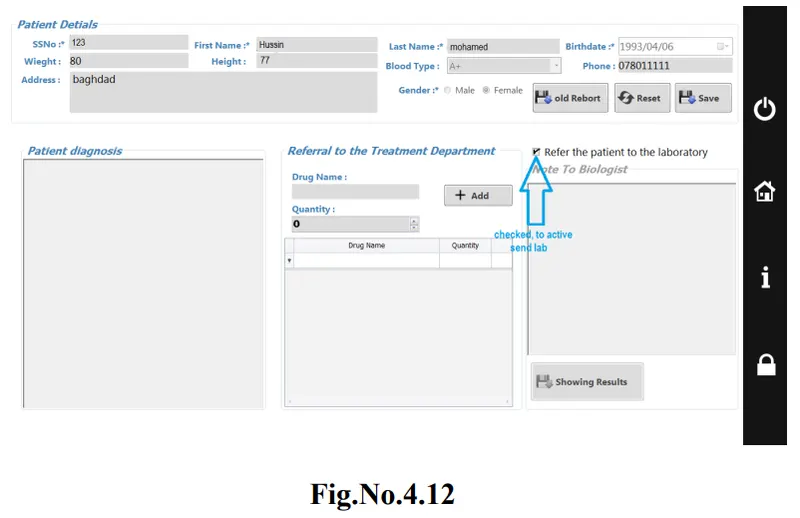
If the Result sent back from the lab, it will appear to the doctor on undiagnosed patient table. The doctor opens it to read the result of lab. The doctor will find the button of show result active and by clicking on it, the result of test will appear. According to test result, doctor can write prescription and give the appropriate drugs.
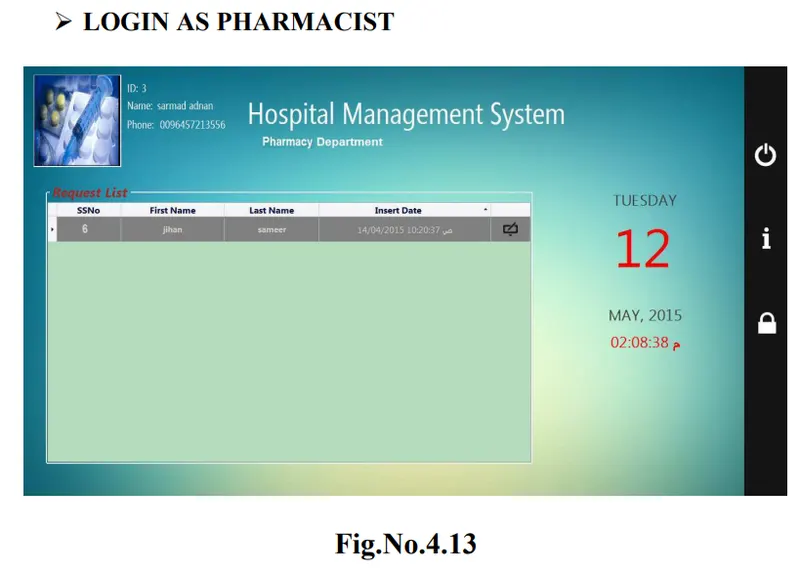
If user login as pharmacist, the window like the above will appear. The form contains basic patient information. The pharmacist clicks the button beside the patient information to see the drugs that the doctor writes to the patient.
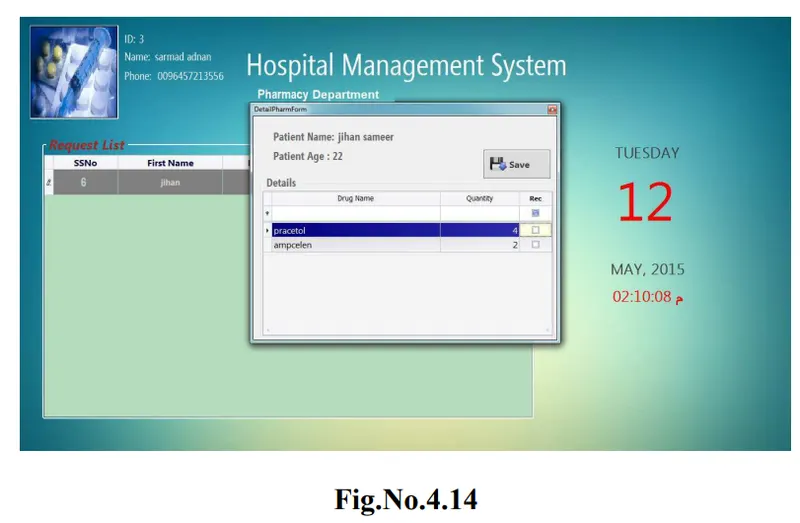
After the pharmacist open the drug information, he will check every drug that he will give to patient with a specific quantity written by the doctor to insert the given drug in the patient report.
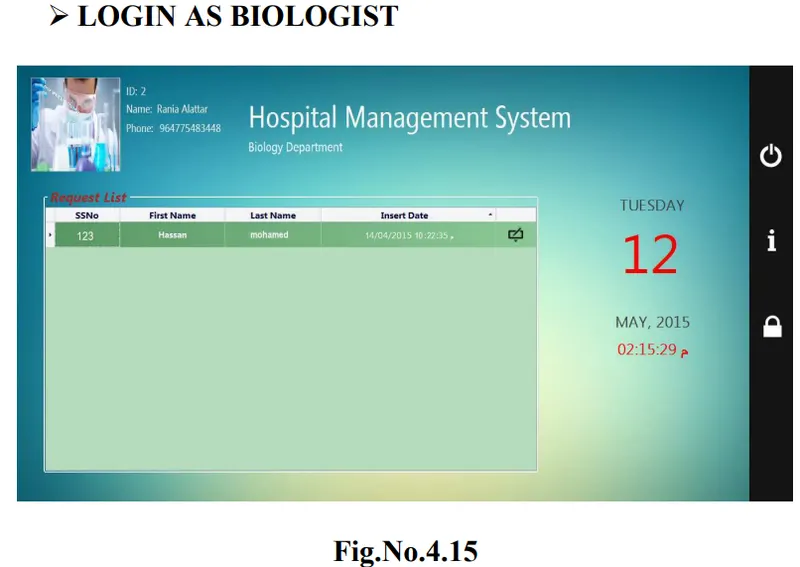
when the user enter the system as a biologist, a window like this one will appear, the form contain the basic information about the patient , the biologist should click the button beside the patient information to see the test that the doctor ask to do for patient.
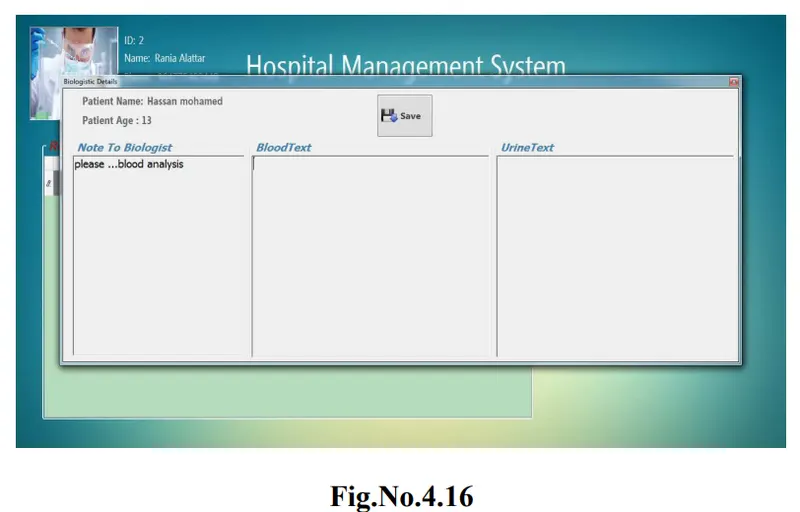
After the biologist open the test detail, he will see the test that the doctor need which write in the Note To Biologist and after he make the test he will write the result of test in the field allocated to the type of test and save it to send back to the doctor to help him in diagnosis.
The main objective was to design a system that enables faster and more efficient storage, retrieval and updating of hospital records. As far as this is concerned, the system met this expectation by giving direct benefit to the clinic such as fast records retrieval.
In Conclusion, from a proper analysis and assessment of the designed system, it can be safely conclude that the system is an efficient, usable and reliable records management system. It is working properly and adequately meets the minimum
expectations that were set for it initially. The new system is expected to give benefits increased overall productivity, performance and efficient records management.
Future Enhancement
This application avoids the manual work and the problems concerned with it. It is an easy way to obtain the information regarding the various travel services that are present in our System.
We intend to develop the project by make it comprehensive all the aspect of the hospital management like the add birth and death records, make the system ask patient for payment (bill) when a patient resolve to departure after treatment and other aspects of hospital.
The next enhancement is, we will develop online services. That mean, if patient have any problems he can send his problem to the doctor through internet from his home then doctor will send reply to him In this patients have some login name and password. The doctor can ask opinion of a doctor in another hospital or elsewhere the case of certain.