Project 2 - Measuring distance of an object using ultrasonic sensor (HC-SR04)
--------------------------------------------------LIVE-BATCH------------------------------------------------
AIM:-Measuring distance of an object using ultrasonic sensor (HC-SR04).
- CODE:-
#include <avr/io.h>
#define F_CPU 16000000L
#include <util/delay.h>
#define rs_high PORTD |=(1<<0);//DEFINE BIT FOR RS_HIGH
#define rs_low PORTD &=~(1<<0);//DEFINE BIT FOR RS_LOW
#define en_high PORTD |= (1<<2);//DEFINE BIT FOR EN_HIGH
#define en_low PORTD &=~(1<<2);//DEFINE BIT FOR EN_LOW
#define rw_high PORTD |= (1<<1);
#define rw_low PORTD &= ~(1<<1);
#define US_ERROR -1 // we're defining two more variables two know if the ultrasonic sensor is working or not
#define US_NO_OBSTACLE -2
int distance, previous_distance;
void lcd_cmd(unsigned char cmd)//LCD_COMMAND FUNCTION
{
PORTB = cmd;
rs_low;
rw_high;
en_high;
_delay_ms(1);
en_low;
}
void lcd_data(unsigned char data)//LCD DATA FUNCTION
{
PORTB = data;
rw_low;
rs_high;
en_high;
_delay_ms(1);
en_low;
}
void lcd_init()//LCD INITILIAZATION
{
rw_high;
rs_high;
en_high;
PORTB = 0xff;
lcd_cmd(0x38);
_delay_ms(5);
lcd_cmd(0x02);
_delay_ms(5);
lcd_cmd(0x01);
_delay_ms(5);
lcd_cmd(0x0c);
_delay_ms(5);
lcd_cmd(0x06);
_delay_ms(5);
lcd_cmd(0x80);
_delay_ms(5);
}
void cursorpos(char x,char y)//CURSOR POSITION FUNCTION
{
if((x<1 || x>2)||(y<1 || y>16))
{
x=1;
y=1;
}
if (x==1)
{
lcd_cmd(0x7F+y);
}
else
{
lcd_cmd(0xBF+y);
}
}
void lcd_out(char a, char b,char *str)//LCD OUT FUNCTION
{
cursorpos(a,b);
while(*str)
{
lcd_data(*str);
str++;
}
}
void lcd_clear()
{
lcd_cmd (0x01); // this line clears the LCD screen
_delay_ms(2); // waits for two milliseconds
lcd_cmd (0x80); // this line sets the cursor to the row 1 column 1
}
void HCSR04Init()
{
// we're setting the trigger pin as output as it will generate ultrasonic sound wave
DDRC |=(1<<0);
}
void HCSR04Trigger()
{ // this function will generate ultrasonic sound wave for 15 microseconds
//Send a 10uS pulse on trigger line
PORTC |=(1<<0); //high
_delay_us(15); //wait 15uS
PORTC&=~(1<<0); //low
}
uint16_t GetPulseWidth()
{
// this function will be used to measure the pulse duration. When the ultra sound echo back after hitting an object
// the microcontroller will read the pulse using the echo pin of the ultrasonic sensor connected to it.
uint32_t i,result;
// Section - 1: the following lines of code before the section - 2 is checking if the ultrasonic is working or not
// it check the echo pin for a certain amount of time. If there is no signal it means the sensor is not working or not connect properly
for(i=0;i<600000;i++)
{
if(!(PINC & (1<<1)))
continue; //Line is still low, so wait
else
break; //High edge detected, so break.
}
if(i==600000)
return US_ERROR; //Indicates time out
//High Edge Found
// Section -2 : This section is all about preparing the timer for counting the time of the pulse. Timers in microcontrllers is used for timimg operation
//Setup Timer1
TCCR1A=0X00;
TCCR1B=(1<<CS11); // This line sets the resolution of the timer. Maximum of how much value it should count.
TCNT1=0x00; // This line start the counter to start counting time
// Section -3 : This section checks weather the there is any object or not
for(i=0;i<600000;i++) // the 600000 value is used randomly to denote a very small amount of time, almost 40 miliseconds
{
if(PINC & (1<<1))
{
if(TCNT1 > 60000)
break;
else
continue; // if the TCNT1 value gets higher than 60000 it means there is not object in the range of the sensor
}
else
break;
}
if(i==600000)
return US_NO_OBSTACLE; //Indicates time out
//Falling edge found
result=TCNT1; // microcontroller stores the the value of the counted pulse time in the TCNT1 register. So, we're returning this value to the
// main function for utilizing it later
//Stop Timer
TCCR1B=0x00;
if(result > 60000)
return US_NO_OBSTACLE; //No obstacle
else
return (result>>1);
}
int main()
{
lcd_init(); // we're initializing the LCD
char numberString[4]; // we re defining an array of character. It will be utilized later to store integer to be displayed on the LCD screen
while(1)
{
uint16_t r;
_delay_ms(100); //Let the LCD Module start
//Set io port direction of sensor
HCSR04Init();
while(1)
{
//Send a trigger pulse
HCSR04Trigger(); // calling the ultrasonic sound wave generator function
//Measure the width of pulse
r=GetPulseWidth(); // getting the duration of the ultrasound took to echo back after hitting the object
//Handle Errors
if(r==US_ERROR) // if microcontroller doesn't get any pulse then it will set the US_ERROR variable to -1
// the following code will check if there is error then it will be displayed on the LCD screen
{
cursorpos(1, 1); //lcd_setCursor(column, row)
lcd_out(1,1,"Error!");
}
else
{
distance=(r*0.034/2.0); // This will give the distance in centimeters
lcd_out(1,0,"Distance");
itoa(distance, numberString, 10); // distance is an integer number, we can not display integer directly on the LCD. this line converts integer into array of character
lcd_out(2,4,numberString);
lcd_out(2,10,"cm");
previous_distance = distance;
_delay_ms(30);
}
}
}
}
- RESULT:-
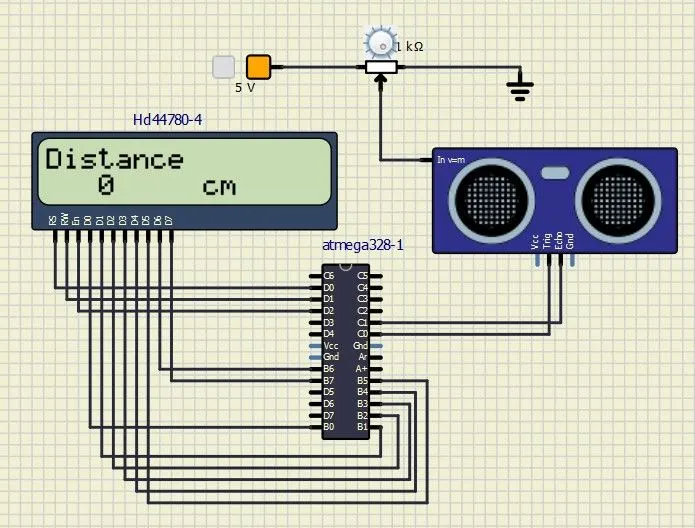
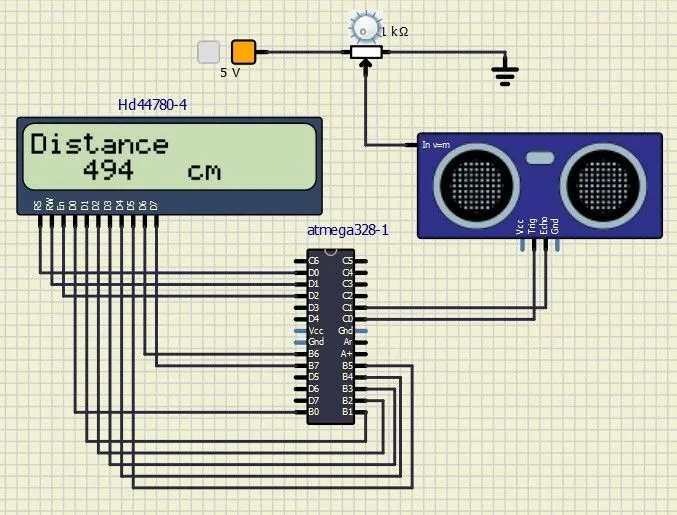
- As shown in above,distance is increasing by varying the Potentiometer from minimum position to maximum position.
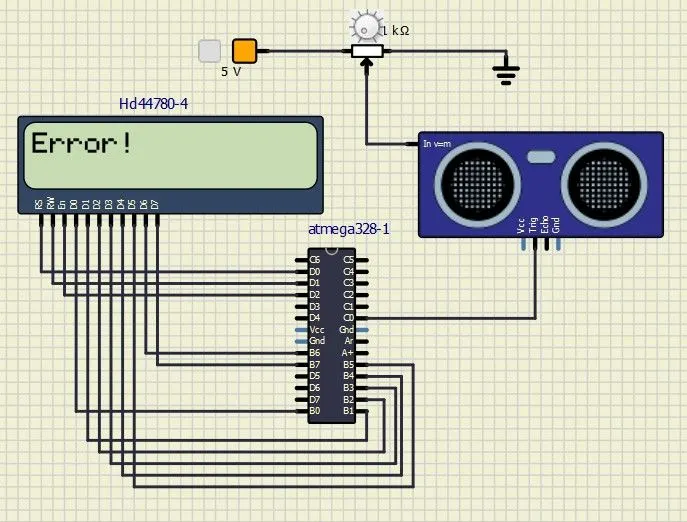
- So, by deleting the echo connection the display shows "Error!" because the ultrasonic sensor is not properly conncted with tthe microcontroller.