Project 2-Highway Assistant-Lane Changing Assistant
Aim:
To develop one specific requirement of Highway Assistant – Lane Changing Assistant algorithm as per given requirement.
Basic Working Principle:
Highway Assistant is a partially automated driving function for a speed range of up to 180 km/h (112 mph) on highways. It combines the radar-based longitudinal guidance of Adaptive Cruise Control (ACC) with the video-based lateral guidance of lane-keeping support in one system. Highway Assistant can be supplemented by an automatic lane change initiated and monitored by the driver in a speed range of 60 – 130 km/h (35 – 80 mph).
The Lane Change Assistant works by using two mid-range radar sensors that are concealed in the rear bumper – one on the left, one on the right. These two sensors monitor the area alongside and behind the car. Powerful control software collates the sensor information to create a complete picture of all traffic in the area behind the vehicle. Whenever another vehicle approaches at speed from behind or is already present in the blind spot, a signal such as a warning light in the side mirror alerts the driver to the hazard. Should the driver still activate the turn signal with the intention of changing lanes, the system issues an additional acoustic and/or haptic warning.
Model:
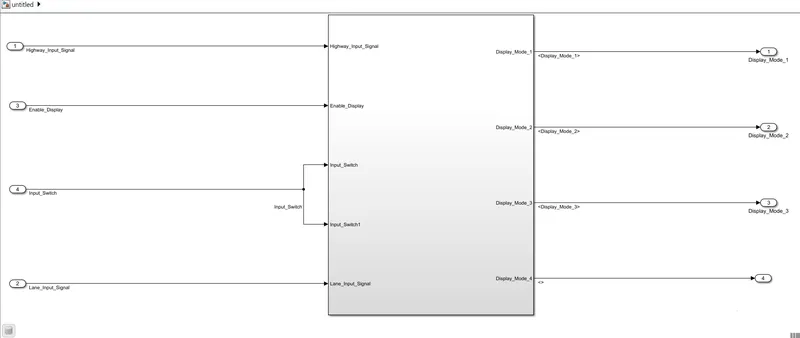
Explanation:
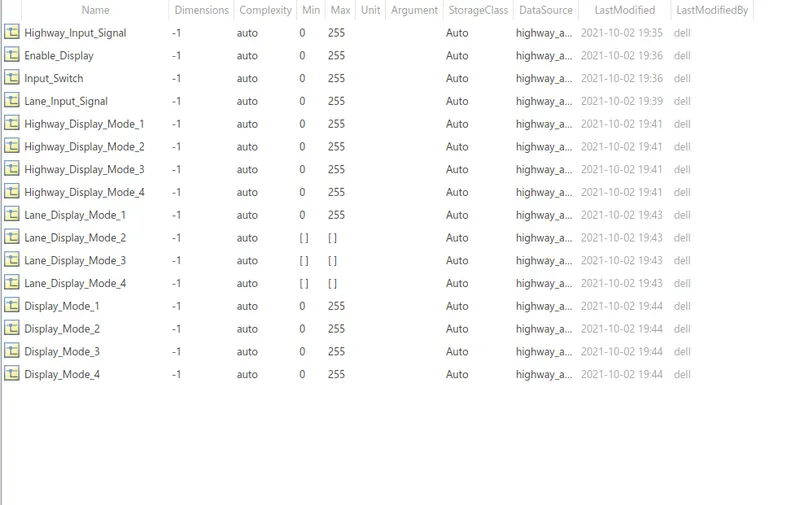
To create a data dictionary for the given input/output signal and calibration signals.
Modelling Tab -> Link to Data Dictionary and choose ADD option to add the signal and modify the parameters.
Requirement 1:
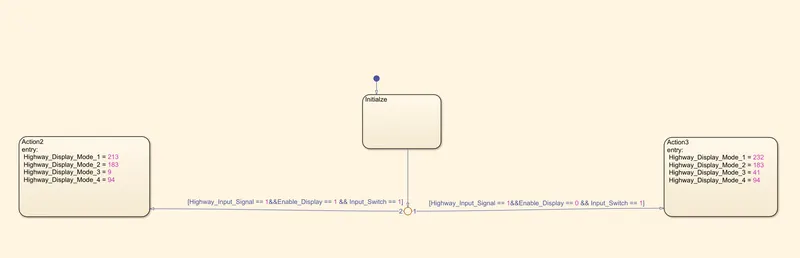
The input to Stateflow logic are Lane input signal, Enable signal and Input Switch. Depending on the input condition the particular Action block is executed. This can be achieved with help of State flow logic.
|
Condition |
Action |
|
Highway_Input_Signal = 1 Enable_Display = off Input_Switch = on |
Highway_Display_Mode_1 = 232 Highway_Display_Mode_2 = 183 Highway_Display_Mode_3 = 41 Highway_Display_Mode_4 = 94 |
|
Highway_Input_Signal = 1 Enable_Display = on Input_Switch = on |
Highway_Display_Mode_1 = 213 Highway_Display_Mode_2 = 183 Highway_Display_Mode_3 = 9 Highway_Display_Mode_4 = 94 |
Requirement 2:
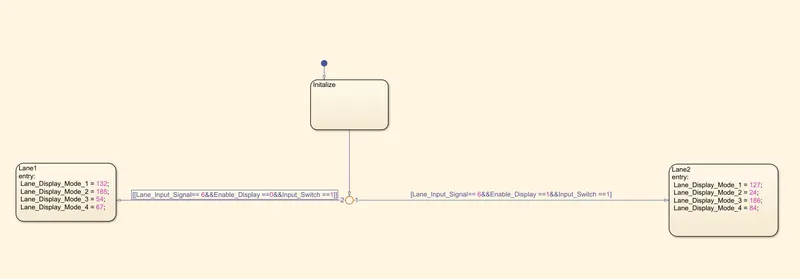
The input to Stateflow logic are Highway input signal, Enable signal and Input Switch. Depending on the input condition the particular Action block is executed. This can be achieved with help of State flow logic.
|
Condition |
Action |
|
Lane_Input_Signal= 6 Enable_Display = off Input_Switch = on |
Lane_Display_Mode_1 = 132 Lane_Display_Mode_2 = 185 Lane_Display_Mode_3 = 54 Lane_Display_Mode_4 = 67 |
|
Lane_Input_Signal= 6 Enable_Display = on Input_Switch = on |
Lane_Display_Mode_1 = 127 Lane_Display_Mode_2 = 248 Lane_Display_Mode_3 = 186 Lane_Display_Mode_4 = 84 |
Requirement 3:
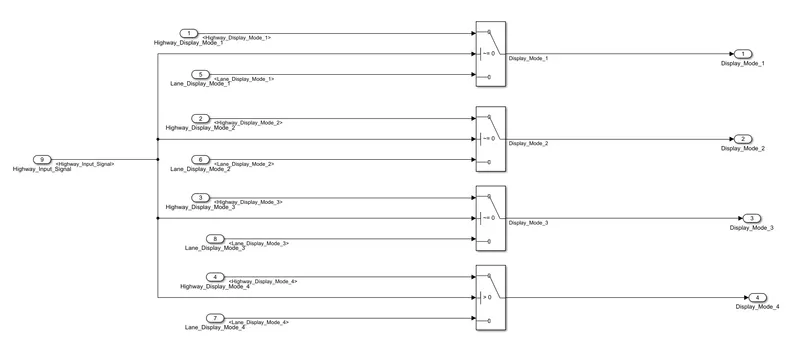
The signal coming from Highway display mode 1 and lane display mode 1 connect to input 1nd 3 of the switch block. Input 2 of the switch block is given to the Highway input signal and the output of the switch block is Display Mode 1. Similarly, the signal of 2,3,4 from highway display mode and lane display mode is connected.
Autosar Port Mapping:
Specification:
Input Runnable: Rp_
Output Runnable: Pp_
Interfaces: SRIf_
Explanation:
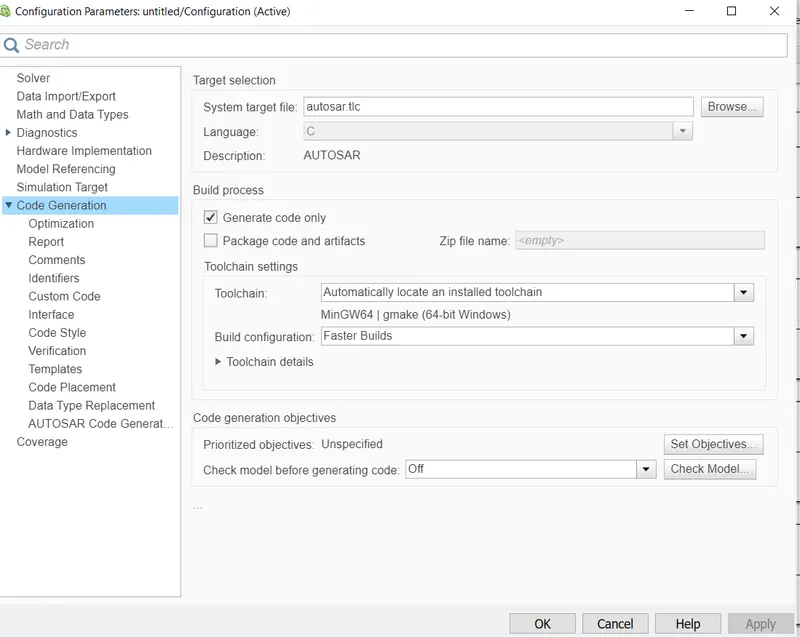
Click on Model Properties and change the system target file to autosar.tlc
Click on Apps -> Autosar Components and click on Finish in the dialog box.
Click on the Configure icon in the Code Mapping-Autosar SW Component and dialog box as shown below
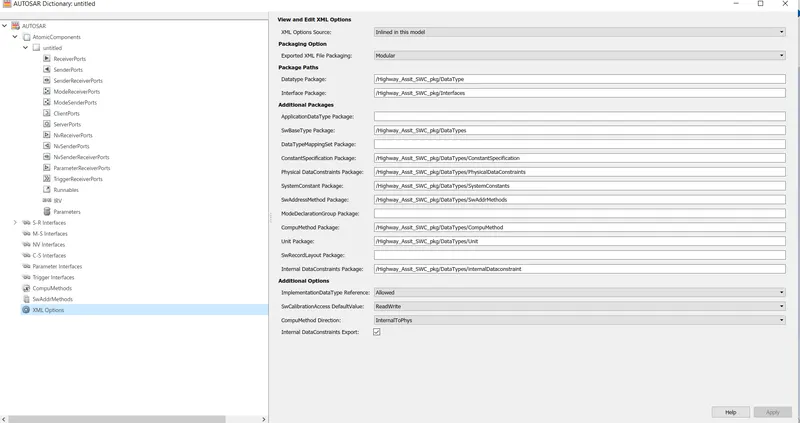
Click on the XML option and modify the Packages Names as shown below.
To add the SR Interfaces, Click on the S_R Interface tab and click on the + icon.
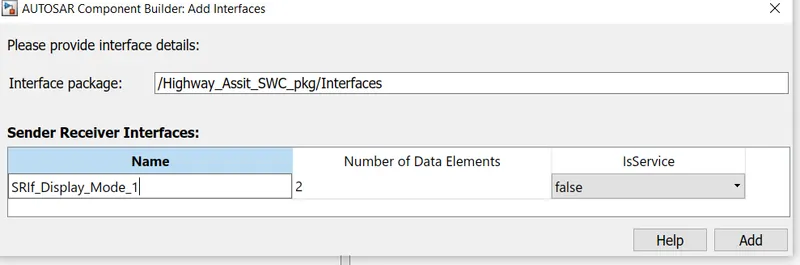
Change the name according to the given Condition and click on the Add icon. Similarly, the SR interfaces were added for the input and output signal.
Click on the Receiver Ports to add the input runnable and Click on the + button.
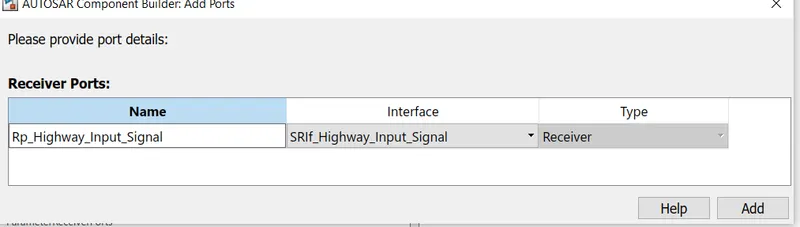
Change Name as per given condition and choose the corresponding Interfaces and click on the ADD button. Similarly, Input runnable are add for input from A to T.
Click on the Sender Ports to add the input runnable and Click on the + button.
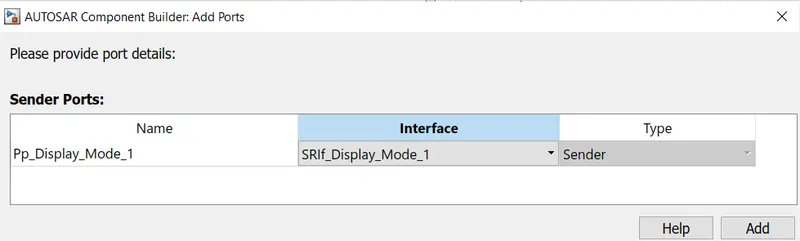
Change Name as per given condition and choose the corresponding Interfaces and click on the ADD button. Similarly, Output runnable are add for input from A to T.
After adding the interface and input/output runnable, click on the refresh icon in Code Mapping-Autosar SW Component
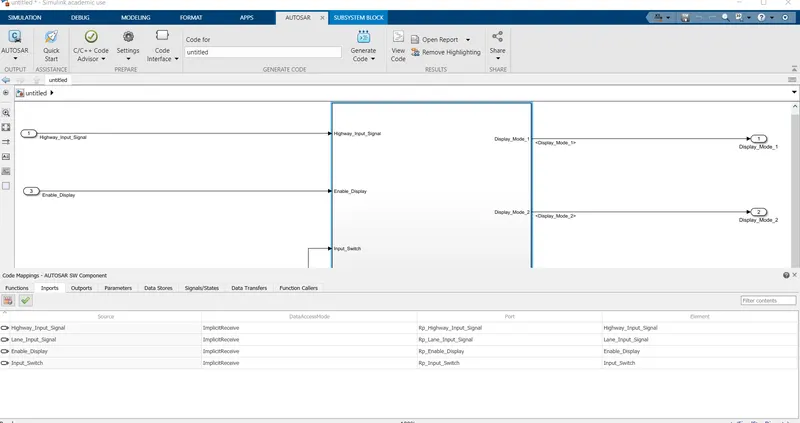
Thus Port Mapping is done for The Input Runnable.

Thus Port Mapping is done for The Output Runnable.
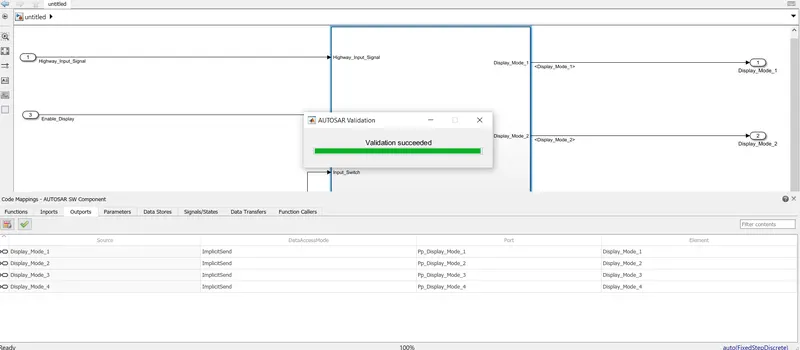
Click on the green tick to verify whether the model is validated or not. Once it is validated and show as validation succeeded
Model Advisor Check:
In Modelling TAb, Click on Model Advisor and select the system and click on Modelling Standard on MAB in BY task and click on Run.

Code Generation:
/*
 * Academic License - for use in teaching, academic research, and meeting
 * course requirements at degree granting institutions only.  Not for
 * government, commercial, or other organizational use.
 *
 * File: untitled.c
 *
 * Code generated for Simulink model 'untitled'.
 *
 * Model version                  : 1.24
 * Simulink Coder version         : 9.5 (R2021a) 14-Nov-2020
 * C/C++ source code generated on : Sun Oct  3 13:19:11 2021
 *
 * Target selection: autosar.tlc
 * Embedded hardware selection: Intel->x86-64 (Windows64)
 * Code generation objectives: Unspecified
 * Validation result: Not run
 */

#include "untitled.h"
#include "untitled_private.h"

/* Named constants for Chart: '/Chart' */
#define untitled_IN_Action2            ((uint8)1U)
#define untitled_IN_Action3            ((uint8)2U)
#define untitled_IN_Initialze          ((uint8)3U)

/* Named constants for Chart: '/Chart1' */
#define untitled_IN_Initalize          ((uint8)1U)
#define untitled_IN_Lane1              ((uint8)2U)
#define untitled_IN_Lane2              ((uint8)3U)

/* Block signals (default storage) */
B_untitled_T untitled_B;

/* Block states (default storage) */
DW_untitled_T untitled_DW;

/* Model step function */
void untitled_Step(void)
{
  float64 tmp;
  float64 tmp_0;
  float64 tmp_1;

  /* Chart: '/Chart' incorporates:
   *  Inport: '/Enable_Display'
   *  Inport: '/Highway_Input_Signal'
   *  Inport: '/Input_Switch'
   */
  if (untitled_DW.is_active_c3_untitled == 0U) {
    untitled_DW.is_active_c3_untitled = 1U;
    untitled_DW.is_c3_untitled = untitled_IN_Initialze;
  } else {
    switch (untitled_DW.is_c3_untitled) {
     case untitled_IN_Action2:
      untitled_B.Highway_Display_Mode_1 = 213.0;
      untitled_B.Highway_Display_Mode_2 = 183.0;
      untitled_B.Highway_Display_Mode_3 = 9.0;
      untitled_B.Highway_Display_Mode_4 = 94.0;
      break;

     case untitled_IN_Action3:
      untitled_B.Highway_Display_Mode_1 = 232.0;
      untitled_B.Highway_Display_Mode_2 = 183.0;
      untitled_B.Highway_Display_Mode_3 = 41.0;
      untitled_B.Highway_Display_Mode_4 = 94.0;
      break;

     default:
      /* case IN_Initialze: */
      tmp = Rte_IRead_untitled_Step_Rp_Highway_Input_Signal_Highway_Input_Signal
        ();
      tmp_0 = Rte_IRead_untitled_Step_Rp_Enable_Display_Enable_Display();
      tmp_1 = Rte_IRead_untitled_Step_Rp_Input_Switch_Input_Switch();
      if ((tmp == 1.0) && (tmp_0 == 0.0) && (tmp_1 == 1.0)) {
        untitled_DW.is_c3_untitled = untitled_IN_Action3;
        untitled_B.Highway_Display_Mode_1 = 232.0;
        untitled_B.Highway_Display_Mode_2 = 183.0;
        untitled_B.Highway_Display_Mode_3 = 41.0;
        untitled_B.Highway_Display_Mode_4 = 94.0;
      } else if ((tmp == 1.0) && (tmp_0 == 1.0) && (tmp_1 == 1.0)) {
        untitled_DW.is_c3_untitled = untitled_IN_Action2;
        untitled_B.Highway_Display_Mode_1 = 213.0;
        untitled_B.Highway_Display_Mode_2 = 183.0;
        untitled_B.Highway_Display_Mode_3 = 9.0;
        untitled_B.Highway_Display_Mode_4 = 94.0;
      }
      break;
    }
  }

  /* End of Chart: '/Chart' */

  /* Chart: '/Chart1' incorporates:
   *  Inport: '/Enable_Display'
   *  Inport: '/Input_Switch'
   *  Inport: '/Lane_Input_Signal'
   */
  if (untitled_DW.is_active_c1_untitled == 0U) {
    untitled_DW.is_active_c1_untitled = 1U;
    untitled_DW.is_c1_untitled = untitled_IN_Initalize;
  } else {
    switch (untitled_DW.is_c1_untitled) {
     case untitled_IN_Initalize:
      tmp = Rte_IRead_untitled_Step_Rp_Lane_Input_Signal_Lane_Input_Signal();
      tmp_0 = Rte_IRead_untitled_Step_Rp_Enable_Display_Enable_Display();
      tmp_1 = Rte_IRead_untitled_Step_Rp_Input_Switch_Input_Switch();
      if ((tmp == 6.0) && (tmp_0 == 1.0) && (tmp_1 == 1.0)) {
        untitled_DW.is_c1_untitled = untitled_IN_Lane2;
        untitled_B.Lane_Display_Mode_1 = 127.0;
        untitled_B.Lane_Display_Mode_2 = 24.0;
        untitled_B.Lane_Display_Mode_3 = 186.0;
        untitled_B.Lane_Display_Mode_4 = 84.0;
      } else if ((tmp == 6.0) && (tmp_0 == 0.0) && (tmp_1 == 1.0)) {
        untitled_DW.is_c1_untitled = untitled_IN_Lane1;
        untitled_B.Lane_Display_Mode_1 = 132.0;
        untitled_B.Lane_Display_Mode_2 = 185.0;
        untitled_B.Lane_Display_Mode_3 = 54.0;
        untitled_B.Lane_Display_Mode_4 = 67.0;
      }
      break;

     case untitled_IN_Lane1:
      untitled_B.Lane_Display_Mode_1 = 132.0;
      untitled_B.Lane_Display_Mode_2 = 185.0;
      untitled_B.Lane_Display_Mode_3 = 54.0;
      untitled_B.Lane_Display_Mode_4 = 67.0;
      break;

     default:
      /* case IN_Lane2: */
      untitled_B.Lane_Display_Mode_1 = 127.0;
      untitled_B.Lane_Display_Mode_2 = 24.0;
      untitled_B.Lane_Display_Mode_3 = 186.0;
      untitled_B.Lane_Display_Mode_4 = 84.0;
      break;
    }
  }

  /* End of Chart: '/Chart1' */

  /* Switch: '/Switch' incorporates:
   *  Inport: '/Highway_Input_Signal'
   *  Switch: '/Switch1'
   *  Switch: '/Switch2'
   */
  if (Rte_IRead_untitled_Step_Rp_Highway_Input_Signal_Highway_Input_Signal() !=
      0.0) {
    /* Outport: '/Display_Mode_1' */
    Rte_IWrite_untitled_Step_Pp_Display_Mode_1_Display_Mode_1
      (untitled_B.Highway_Display_Mode_1);

    /* Outport: '/Display_Mode_2' */
    Rte_IWrite_untitled_Step_Pp_Display_Mode_2_Display_Mode_2
      (untitled_B.Highway_Display_Mode_2);

    /* Outport: '/Display_Mode_3' */
    Rte_IWrite_untitled_Step_Pp_Display_Mode_3_Display_Mode_3
      (untitled_B.Highway_Display_Mode_3);
  } else {
    /* Outport: '/Display_Mode_1' */
    Rte_IWrite_untitled_Step_Pp_Display_Mode_1_Display_Mode_1
      (untitled_B.Lane_Display_Mode_1);

    /* Outport: '/Display_Mode_2' */
    Rte_IWrite_untitled_Step_Pp_Display_Mode_2_Display_Mode_2
      (untitled_B.Lane_Display_Mode_2);

    /* Outport: '/Display_Mode_3' */
    Rte_IWrite_untitled_Step_Pp_Display_Mode_3_Display_Mode_3
      (untitled_B.Lane_Display_Mode_3);
  }

  /* End of Switch: '/Switch' */

  /* Switch: '/Switch3' incorporates:
   *  Inport: '/Highway_Input_Signal'
   */
  if (Rte_IRead_untitled_Step_Rp_Highway_Input_Signal_Highway_Input_Signal() >
      0.0) {
Result:
Thus the specific requirement of Highway Assistant – Lane Changing Assistant algorithm is developed and Port Mapping, Model advisor check, Code generation is performed.