System-level simulation of an all-terrain vehicle and prepare a technical report of the model under different conditions.
Aim:
To carry out a system-level simulation of an all-terrain vehicle and prepare a technical report of the model under different conditions.
Conditions:
- Study the Baja ATV model using CVT
- Study the Baja ATV model using CVT and dashboard
- Study the Baja ATV model using a Lookup table and CVT
- Study the Baja ATV model using a Lookup table along with CVT and Dashboard.
Condition 1: Study the Baja ATV model using CVT
Continuously Variable Transmission-CVT:
A continuously variable transmission (CVT) is an automatic transmission that can change seamlessly through a continuous range of gear ratios. This contrasts with other transmissions that provide a limited number of gear ratios in fixed steps. The flexibility of a CVT with suitable control may allow the engine to operate at a constant RPM while the vehicle moves at varying speeds.
Components:
- Signal Builder.
- Solver configuration.
- Simulink-PS Converter.
- Generic Engine
- Mechanical Rotational Reference
- Engine Sensor
- Continuously variable transmission CVT subsystem
- Simple gear
- Vehicle body Subsystem
- PS-Simulink Converter.
- Scope
- Goto & from the block.
Model:
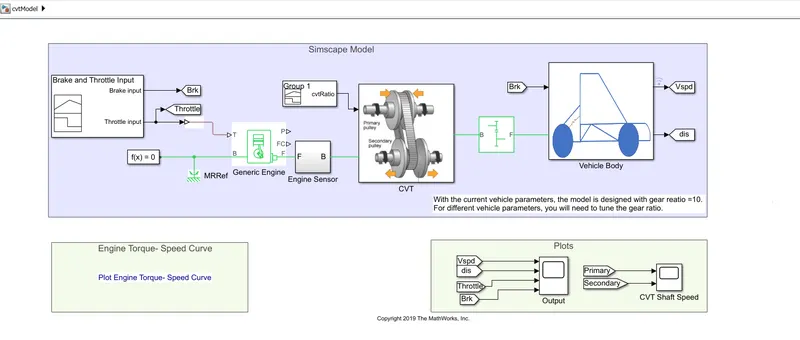
Explanation:
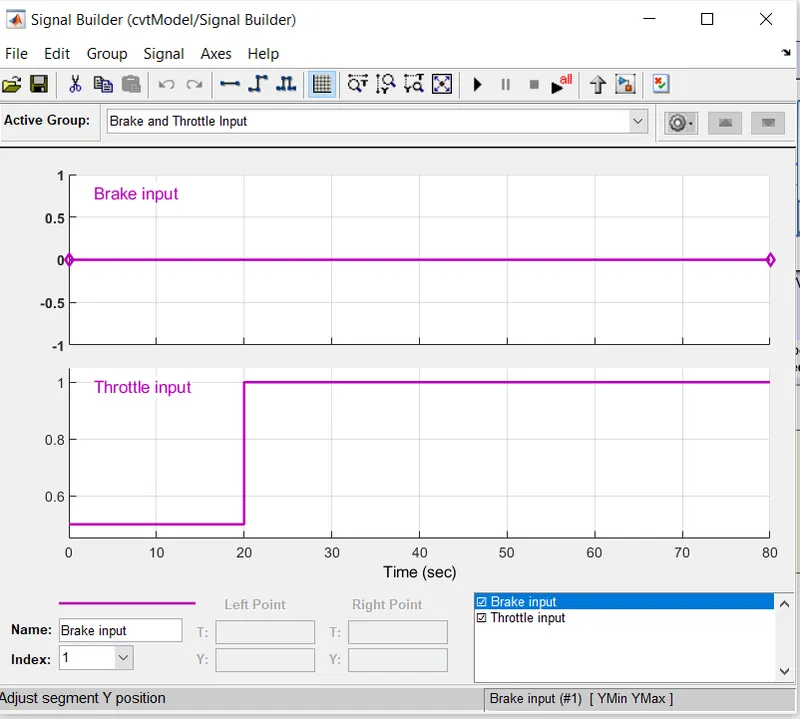
The brake and Throttle input has given to the Generic engine block using Signal Builder. The Signal Builder block allows you to create interchangeable groups of piecewise linear signal sources and use them in a model. It can quickly switch the signal groups into and out of a model to facilitate testing.
The throttle input using the signal builder is made 0.5 for 20 sec and 1 for the entire simulation. While the brake input made zero throughout the entire simulation.
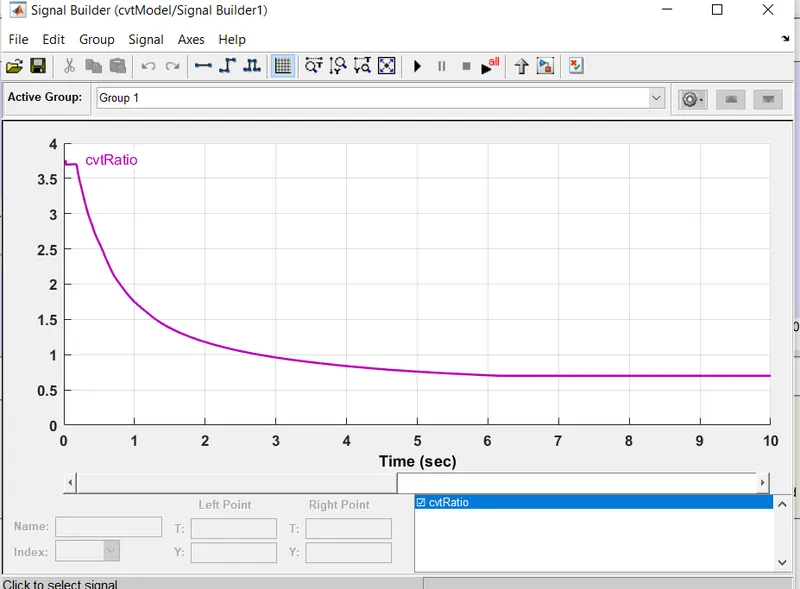
The Signal Builder also used to feed the input CVT Gear Ratio to the CVT subsystem. The value is 3.75 while starting then made to decrease and becomes to 0.7 at 10 sec.
CVT Ratio Input:
The Continuously Variable Transmission Subsystem consists of Input Shaft inertia, Ideal Rotational Motion sensors, Variable Gear Ratio, output shaft inertia.
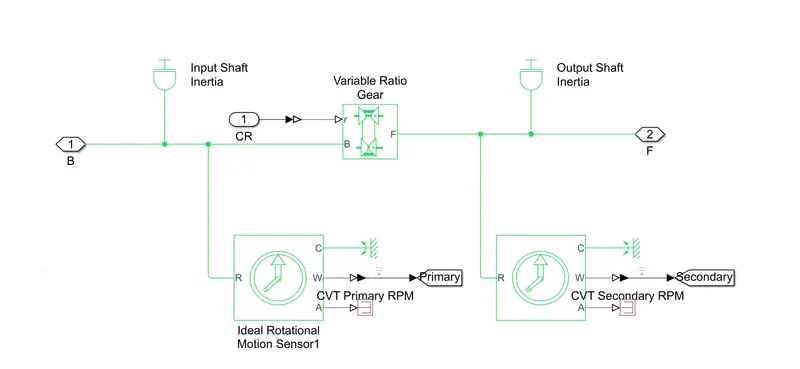
The input shaft Inertia is Modeled with the inertia using the equation m1*(((18.6e-2)/2)^2+((2.5e-2)/2)^2)/2.While the output Shaft Inertia is provided with equation m2*(((19.8e-2)/2)^2+((1.9e-2)/2)^2)/2 to get required inertia.The m1 and m2 values are loaded from the base workspace and are stored in a CVT ratio Matlab data file. The Variable Gear ratio represents a gearbox that dynamically transfers motion and torque between the two connected driveshaft axes, base, and follower. It modeled as the output shaft rotates in a direction the same as the input shaft.
The Simple Gear block is used to connect the CVT and vehicle subsystem. The gear ratio is 10 and rotates the same as the input shaft rotates.
The Vehicle Body Subsystem consists of Vehicle body block.double shoe brake block and tyres.
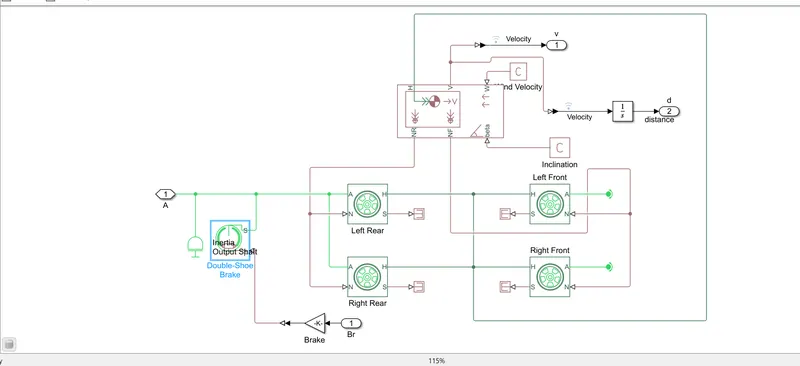
The mass of the vehicle is 250 Kg and the axle is 2 which helps to connect to 4 wheels.
Result:
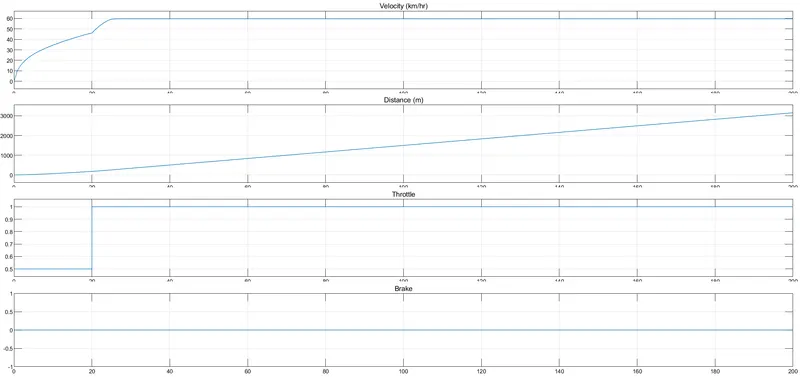
In the above figure, brake made constant zero and throttle increases from 0.5 to 1 which increases the velocity.From the above as throttle increases,flow of fuel inturn it lead increases the power of the engine.By changing the gear ratio the velocity also changes.
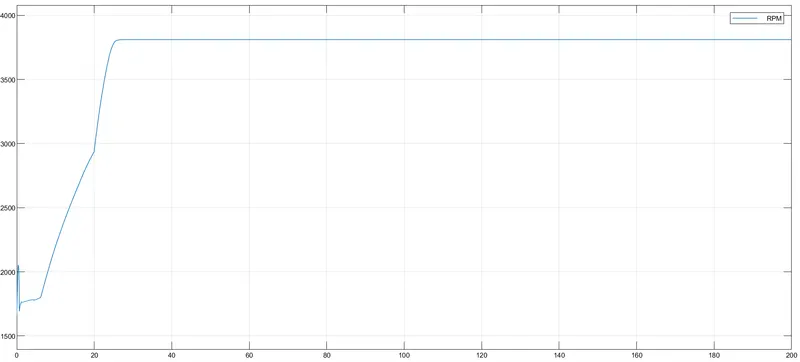
The above graph plotted using engine sensor subsystem which helps to monitor the engine RPM. As throttle becomes constant for 20 sec the engine rpm also becomes constant after 20 sec.
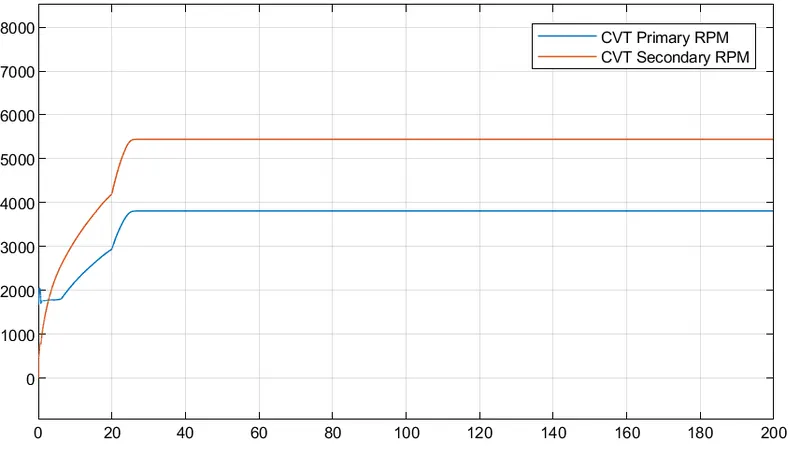
In the above Figure, the CVT primary, and secondary RPM is plotted. In the above Figure, the primary shaft reaches high speed and the secondary shaft reaches low due to the radius of the primary shaft greater than the secondary shaft. These values differ by changing the gear ratio.
Condition 2: Study the Baja ATV model using CVT and Dashboard
The model similar to the previous one but the dashboard used to control the input of brake and throttle position. The Dashboard consists of two-knob for controlling the input of brake and throttle position and a custom gauge used to display the Engine RPM and velocity corresponding to input values. The rest of the block of the Baja ATV Model is similar to the previous one. The previous model using Signal builder which does not allow changes in the input during simulation. But using Dashboard, values can be changed during runtime and keeping Stop time as infinite.
Model:
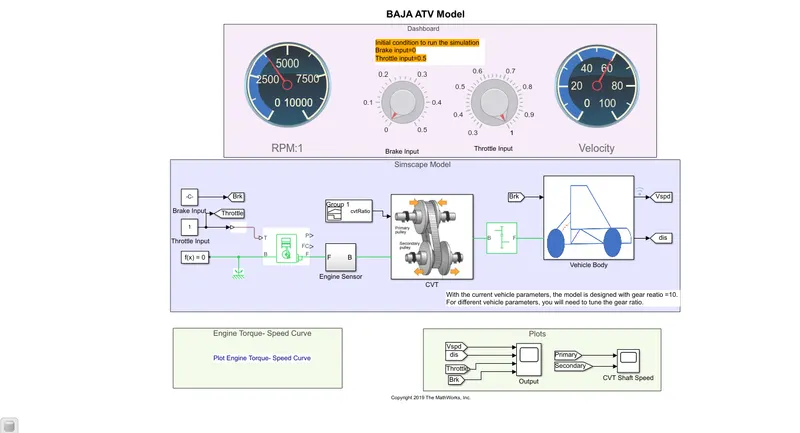
Result:
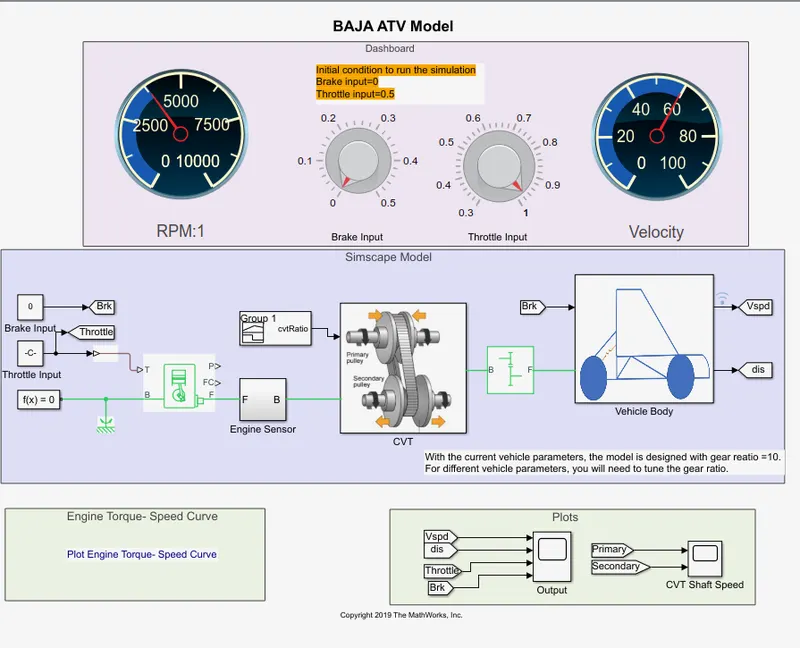
The throttle knob set to 1 and the brake knob set to value 0. The corresponding Velocity and Engine Rpm are viewed through custom gauge as well scope block.
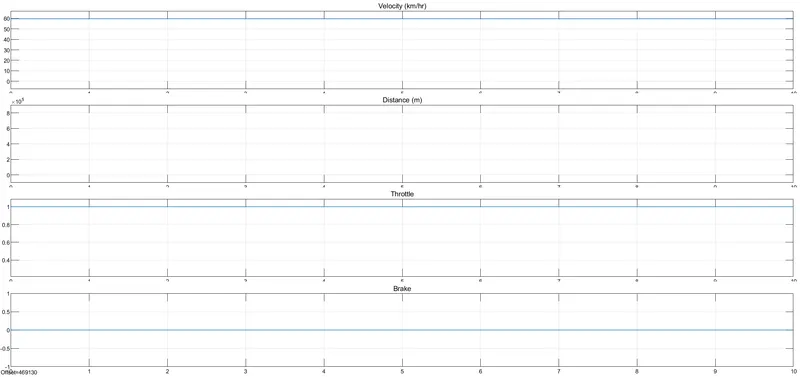
From the above two figures, we observe the velocity is 60 for the corresponding inputs. The throttle and brake input also viewed with help of a scope block.
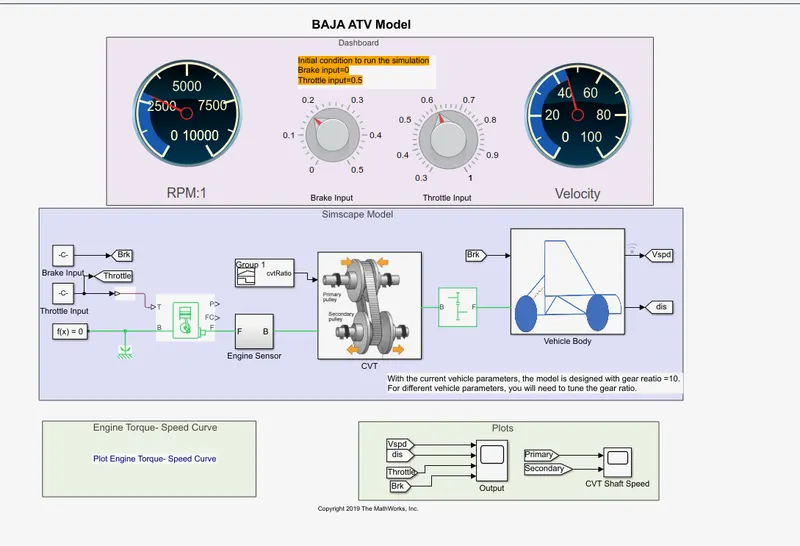
In The above figure, the Throttle knob to set 0.6 and brake knob is varied. Therefore velocity reduces as throttle position reduced compared to previous input to 40and Engine RPM also reduced.
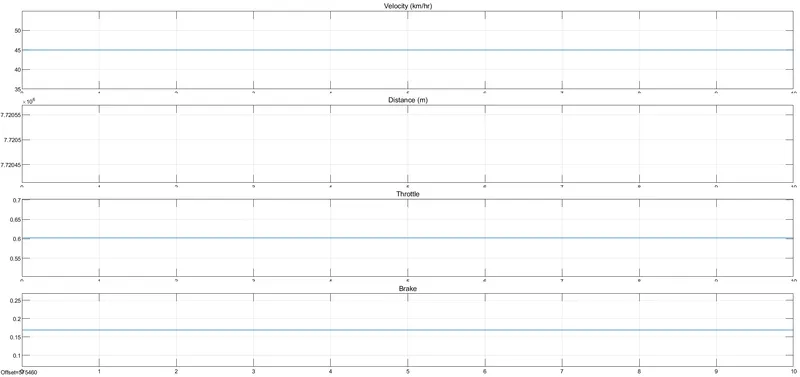
The variation in input also plotted and viewed using scope block. As variation in the Throttle and brake input, velocity and engine RPM varies.
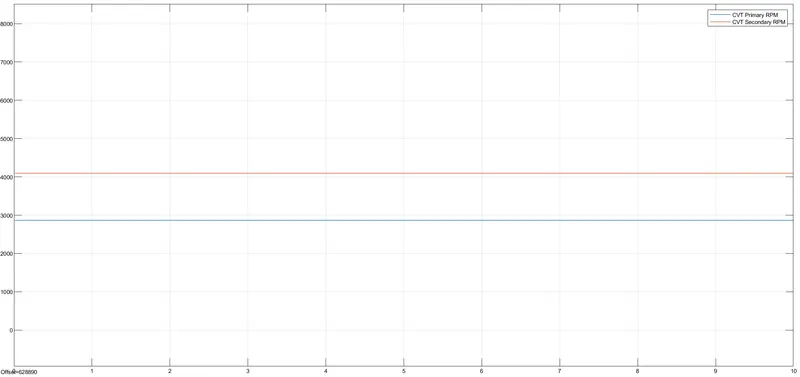
The radius of the primary Shaft is more than the secondary shaft. The speed of the engine depends on the radius of the shaft. As the radius increases the speed of the shaft also increases.
Condition 3:Study the Baja ATV model using a Lookup table and CVT
Look-up Table:
A lookup table is an array of data that maps input values to output values, thereby approximating a mathematical function. Given a set of input values, a lookup operation retrieves the corresponding output values from the table. If the lookup table does not explicitly define the input values, Simulink can estimate an output value using interpolation, extrapolation, or rounding, where:
-
Interpolation is a process for estimating values that lie between known data points.
-
Extrapolation is a process for estimating values that lie beyond the range of known data points.
-
Rounding is a process for approximating a value by altering its digits according to a known rule.
A lookup table block uses an array of data to map input values to output values, approximating a mathematical function. Given input values, Simulink performs a “lookup” operation to retrieve the corresponding output values from the table. If the lookup table does not define the input values, the block estimates the output values based on nearby table values.
Model:
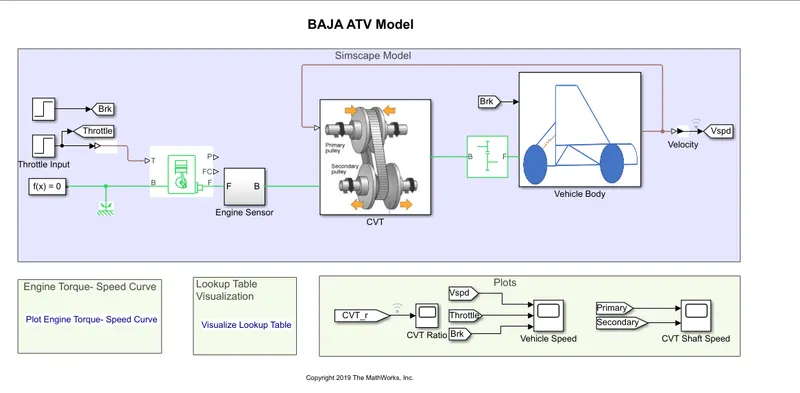
The difference between the with and without Look-up table is gear ratio input to CVT Subsystem is provided with help of Look-up table and input of Throttle and brake is provided with help of step block.The rest of the block of the Baja ATV Model is similar to the first model.
The throttle input initialized to 0.3 for 20 sec later made constant 1 for the entire simulation. The brake input made zero for the entire Simulation.
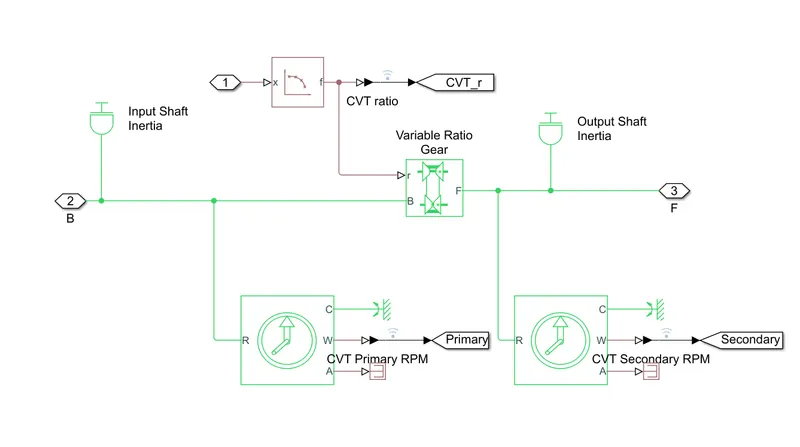
The gear ratio input feed through lookup Table which takes as input to CVT and works as closed-loop when input is given to lookup table.
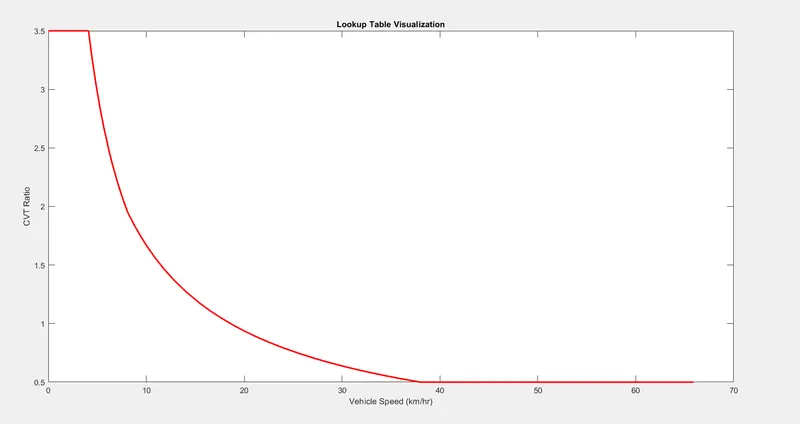
The Simulink gets input from the look-up table and obtains the result according to the gear ratio. The gear ratio varies from 3.5 to 0.5 which taken as input.
Result:
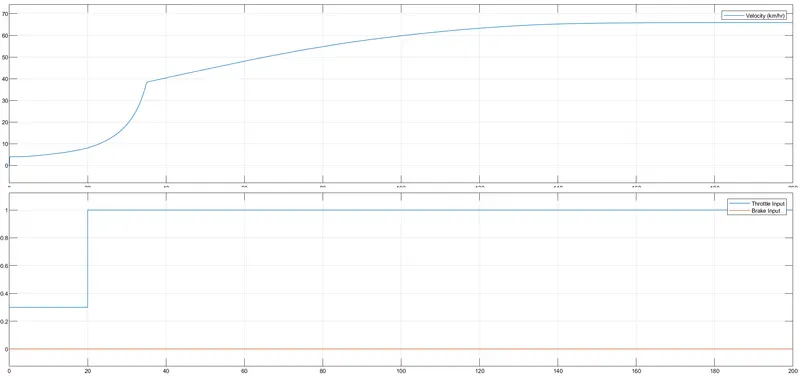
In the above Figure, The brake is made constant and the Throttle is increasing, which shows increases in velocity. As the Throttle increases, the Flow of fuel increases in turn power of the engine also increases. The gear ratio inputted via a look-up table.
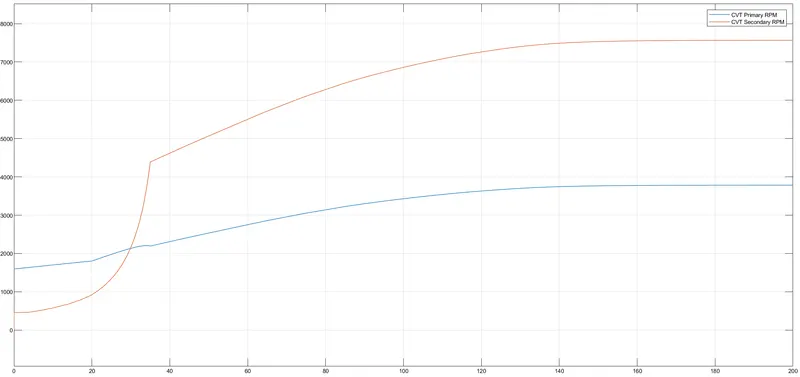
In The above Figure, the Throttle value increases the flow of fuel increases which increases the power of the engine. The radius of the primary Shaft is more than the secondary shaft. The speed of the engine depends on the radius of the shaft. As the radius increases the speed of the shaft also increases.
Condition 4:Study the Baja ATV model using a Lookup table along with CVT and Dashboard.
Model:
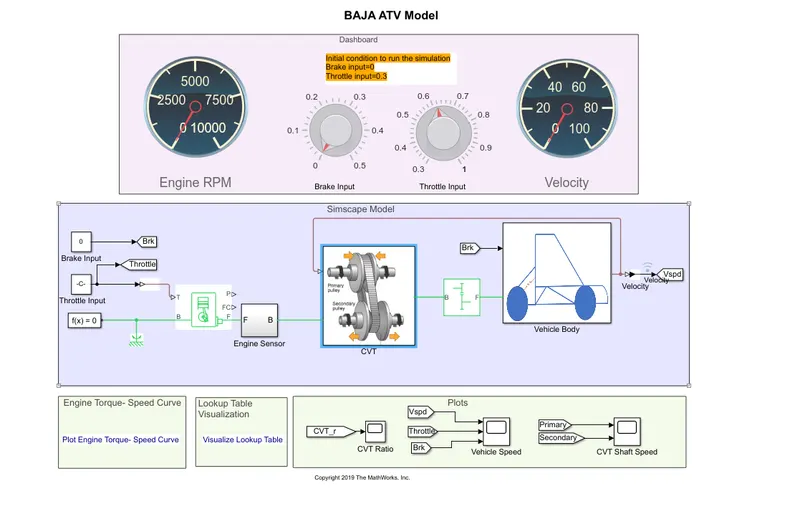
The above model using a lookup table that consists of throttle and brake input in the dashboard and indicated as constant. The rest of the model is the same as Baja ATV using CVT. The concept of using this model to vary the input during the simulation and view the output such as velocity and Engine RPM. The input to gear ratio is given through a lookup table during simulation. As the brake input varies from 0 to 0.5 and throttle input varies from 0.3 to 1. It helps to increases or decreases the velocity and engine RPM depending on the input conditions and gear ratio.
Result:
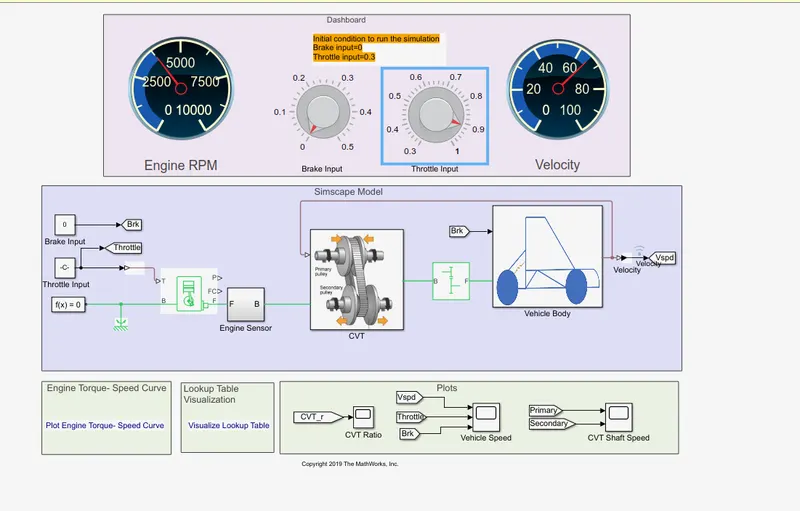
The Throttle input set to 0.9 and brake input set to 0 and the output velocity and engine RPM viewed through a custom gauge in the Dashboard. For the given input the velocity is nearly 65 and Engine RPM is nearly 3800 and it can be plotted and viewed with help of the scope block.
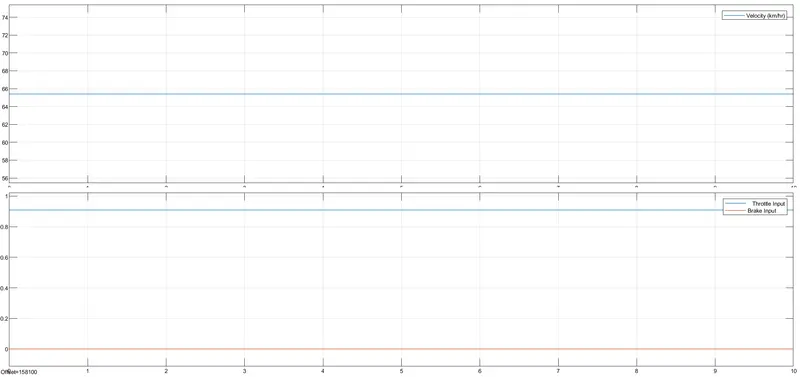
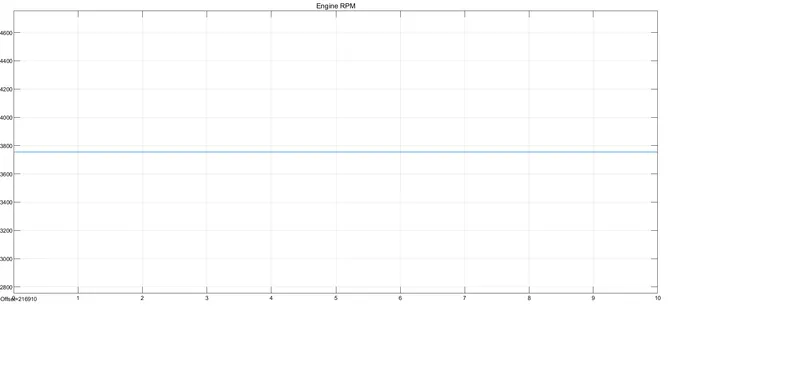
The Engine RPM also Plotted using the Scope block which is present in the Engine Sensor subsystem and also viewed through the Dashboard feature.
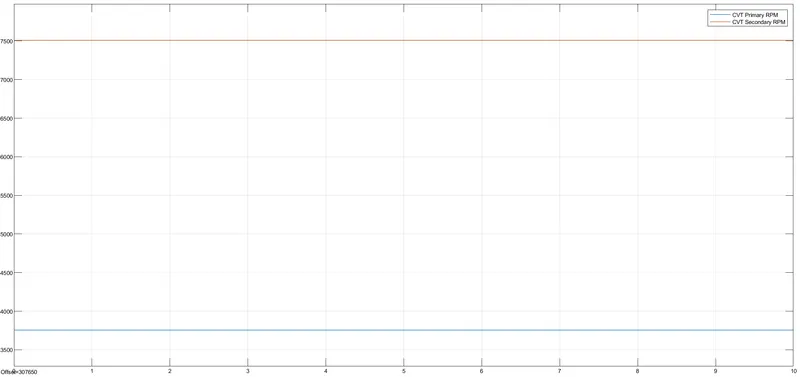
In the above Figure, the CVT primary, and secondary RPM is plotted. In the above Figure, the primary shaft reaches high speed and the secondary shaft reaches low due to the radius of the primary shaft greater than the secondary shaft. These values differ by changing the gear ratio.
Conclusion:
From the above condition, we can understand as the Throttle increases, the flow of fuel increases in turn increases Engine RPM and velocity. Similarly when the brake input and gear ratio increases there decreases in velocity and Engine RPM. With help of the dashboard and look-up table helps vary the input and get the corresponding output values. Thus BAJA ATV VEHICLE is analyzed and explained