Project 1- Traffic Jam Assistant Feature
Aim:
To develop a model for Traffic Jam Assistant algorithm as per given requirement and perform Code generation, Model Advisor Check.
Model:
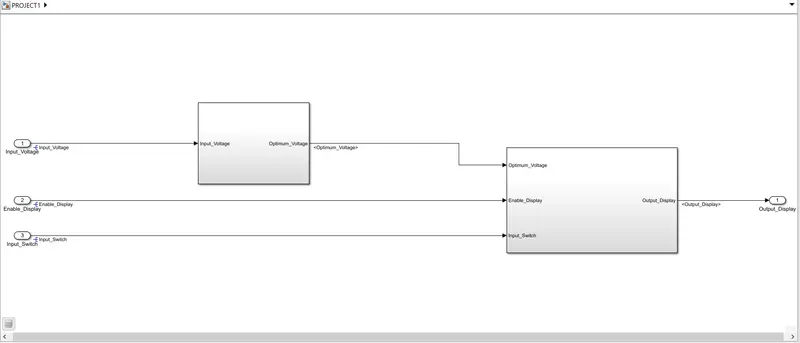
Explanation:
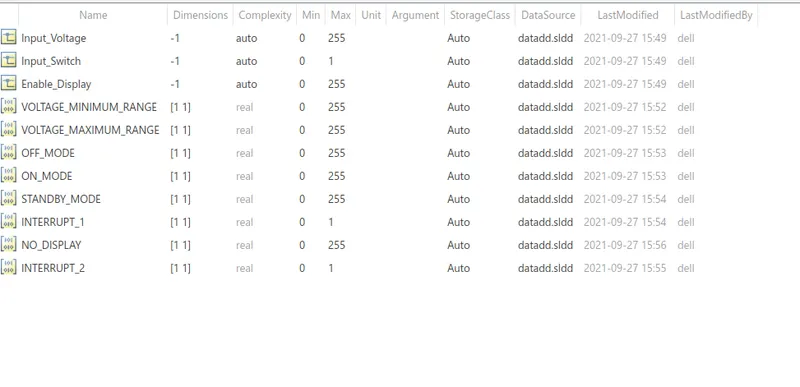
To create a data dictionary for the given input/output signal and calibration signals.
Modelling Tab -> Link to Data Dictionary and choose ADD option to add the signal and modify the parameters.
Requirement 1:
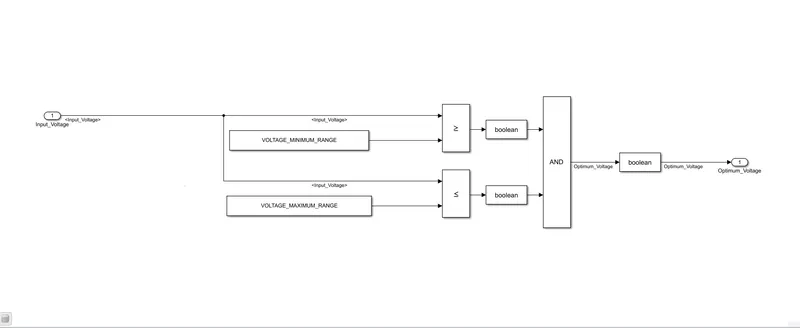
The input signal(input_voltage) is compared against the Maximum voltage range and minimum voltage range. The output signal of the relation operator is given to the AND Block ( optimum_voltage) and it is taken input to the next subsystem.
Requirement 2:
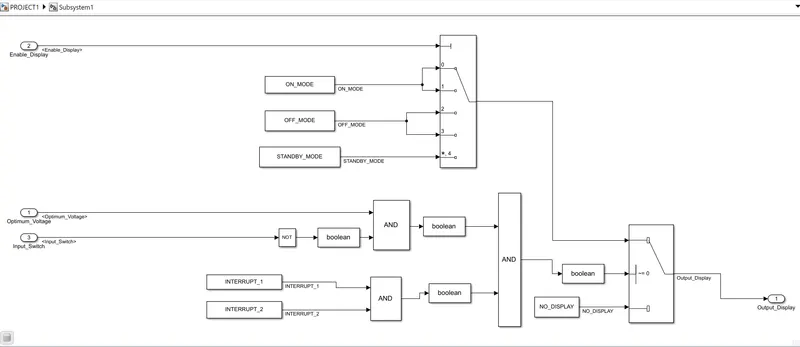
The Enable_Display signal is given as input to the control port of Multiport Switch. Depending upon the enable signal On mode /OFF mode / STANDBY Mode is chosen and fed to 1st input of the switch block. The 3rd input of the switch block is No display.
The NOT value of input signal “Input_Switch” is compared in an AND gate against input signal “Optimum_Voltage” and the output from comparing if calibration signals “INTERRUPT_1” & “INTERRUPT_2” are equal. The output of the AND gate is the second input of the switch block. Depending upon the value the first input or third input is chosen and given as output of the subsystem.
Code Generation:
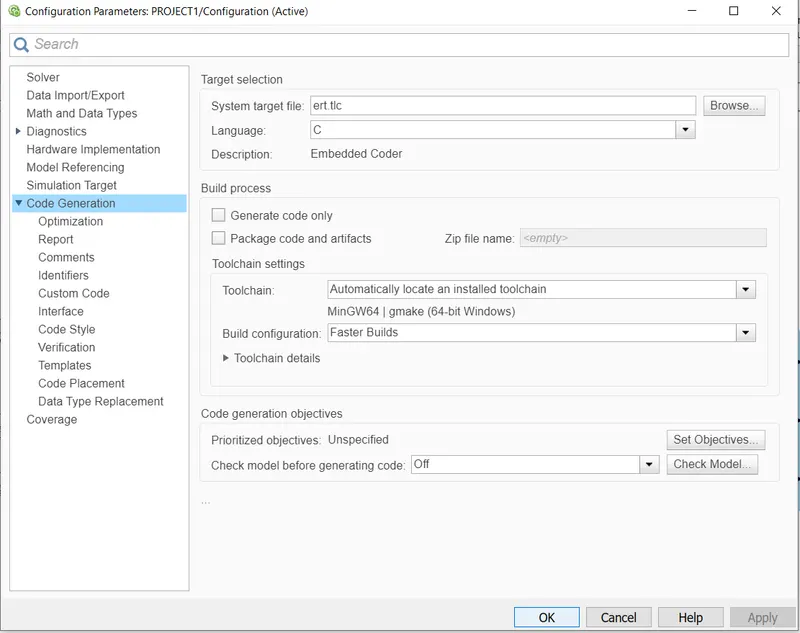
In Configuration parameters, chose solver as fixed-step and in Code Generation Tab, System Target file is ert.tlc
/*
 * Academic License - for use in teaching, academic research, and meeting
 * course requirements at degree granting institutions only.  Not for
 * government, commercial, or other organizational use.
 *
 * File: PROJECT1.c
 *
 * Code generated for Simulink model 'PROJECT1'.
 *
 * Model version                  : 1.12
 * Simulink Coder version         : 9.5 (R2021a) 14-Nov-2020
 * C/C++ source code generated on : Tue Sep 28 19:03:49 2021
 *
 * Target selection: ert.tlc
 * Embedded hardware selection: Intel->x86-64 (Windows64)
 * Code generation objectives: Unspecified
 * Validation result: Not run
 */

#include "PROJECT1.h"
#include "PROJECT1_private.h"

/* External inputs (root inport signals with default storage) */
ExtU_PROJECT1_T PROJECT1_U;

/* External outputs (root outports fed by signals with default storage) */
ExtY_PROJECT1_T PROJECT1_Y;

/* Real-time model */
static RT_MODEL_PROJECT1_T PROJECT1_M_;
RT_MODEL_PROJECT1_T *const PROJECT1_M = &PROJECT1_M_;

/* Model step function */
void PROJECT1_step(void)
{
  /* Switch: '/Switch' incorporates:
   *  Constant: '/Constant'
   *  Constant: '/Constant1'
   *  Inport: '/Input_Switch'
   *  Inport: '/Input_Voltage'
   *  Logic: '/AND'
   *  Logic: '/AND'
   *  Logic: '/AND1'
   *  Logic: '/NOT'
   *  RelationalOperator: '/Relational Operator'
   *  RelationalOperator: '/Relational Operator1'
   */
  if ((PROJECT1_U.Input_Voltage >= 30) && (PROJECT1_U.Input_Voltage <= 50) &&
      (!PROJECT1_U.Input_Switch) && PROJECT1_ConstB.AND2) {
    /* MultiPortSwitch: '/Multiport Switch' incorporates:
     *  Inport: '/Enable_Display'
     */
    switch (PROJECT1_U.Enable_Display) {
     case 0:
      /* Outport: '/Output_Display' incorporates:
       *  Constant: '/Constant'
       */
      PROJECT1_Y.Output_Display = 1U;
      break;

     case 1:
      /* Outport: '/Output_Display' incorporates:
       *  Constant: '/Constant'
       */
      PROJECT1_Y.Output_Display = 1U;
      break;

     case 2:
      /* Outport: '/Output_Display' incorporates:
       *  Constant: '/Constant1'
       */
      PROJECT1_Y.Output_Display = 2U;
      break;

     case 3:
      /* Outport: '/Output_Display' incorporates:
       *  Constant: '/Constant1'
       */
      PROJECT1_Y.Output_Display = 2U;
      break;

     default:
      /* Outport: '/Output_Display' incorporates:
       *  Constant: '/Constant2'
       */
      PROJECT1_Y.Output_Display = 3U;
      break;
    }

    /* End of MultiPortSwitch: '/Multiport Switch' */
  } else {
    /* Outport: '/Output_Display' incorporates:
     *  Constant: '/Constant3'
     */
    PROJECT1_Y.Output_Display = 0U;
  }

  /* End of Switch: '/Switch' */
}

/* Model initialize function */
void PROJECT1_initialize(void)
{
  /* (no initialization code required) */
}

/* Model terminate function */
void PROJECT1_terminate(void)
{
  /* (no terminate code required) */
}

/*
 * File trailer for generated code.
 *
 * [EOF]
 */
Model Advisor Check:
In Modelling TAb, Click on Model Advisor and select the system and click on Modelling Standard on MAB in BY task and click on Run.

Result:
Thus model for Traffic Jam Assistant algorithm as per the given requirement is developed and Code generation, Model Advisor Check is performed