Project 1 - Parsing NASA thermodynamic data
FILE_PARSING _NASA_THERMODYNAMIC DATA FILE
Introduction:
Parsing ,Syntax Analyzing or Syntactic Analying : is a proceses of syntax analysis
string symbols,Natural language,Computer language or data structures is conforming into
its rules of a rules grammar.
Parsing in computer to refers syntactic analysis,to input code into its components parts order
faliciatate to write compiler or interpreter. It can be used to described to split or seperation.
Parsing file means a reading in a data stream some sort and building in a content of syntactic
code .This aim to that faliciateting work on transformation in data.
AIM:
To parse themodynamic data file of NASA and to extract coefficients and parameters of the each
species and calculate the specific heat ,enthalpy and entronpy,plot the cp,H and s .
Calculate the Molecular weight each species in Matlab.
Logic extract data from 'THERMO.dat' file:
1. It can be 1st line is the title, and next 3 llines are the just commands lines ,which
is not scope in our parsing (they posesses data in not valueable in our calculation).
2. If the 2nd line 3 teperatures are the global temperatures it just valueable in variable ,
not significant in our calcualtion iintended local temperatures of each species in particular
plots used in calculation.
3. From 6th line species to data start s and goes upto to end of data set easily calculated
to our significant pattern data distribution set.
That is 'Species contain 4 lines '.
1. From 1st line has local temperatures of the low temperatures midtmepretures
and high temperatures respectively.
2. From 2nd to 4th 14 coefficients of the low temperature and high temperature.
3. If first 7 coefficients are the low temperatures is used to mid temperature
calculate the cp ,H and s.
4. If second 7coefficients are high temperatures is used to mid temperature
calculate the cp ,H and s.
PROCEDURE : CODE EXPLAINATION
1.The first line 'fopen' is used open for data file in 'THERMO.dat',and 'r' is used for the
reading the data file.
2. If the 'fgetl' command is using first line data is taken and stored in variable line_1.
3. If again 'fgetl' command is using for consecutive line is 5 which are (title,global temperature
and comments) for our understading.
4.If the extract global temperature is used command is 'strsplit'
4.If the extract global temperature is used command is 'strsplit' ,(If the extracted numbers to be
stored as strings).If the spacing between the global temperature is used indicator.
5. If the number of species are the 53,
total lines =218
irrelevant species =6(five are explained above and last is the 'END')
total species relevant lines=218-6=212
each species as 4 lines data which is,
If the numbwer of species is =212/6=53 species.
6. If the 'for' loop is used for the 53 species to read a multiple times 'fgetl' lines of the species
of the coefficients vlues of a1 to a14.
7. The coefficients of values can be foound by using indicator 'E' and strfind.
8. The nested 'for' loop is used for the calculated cp,H and s explained above.
9. Now the extracted data can be saved in directory name species is the used 'mkdir' commands.
10. The plots and images of the species are plotted is store in the used command is saveas .
11. To calculate the Molecular weight seperate function to be created as 'molecular_weight'.
12. The universal gas constant is the 'R' is 8.314 j/mol-K
% ERRORS IS FACED IN THE CODES:
% ERRORS IS OVERCOME :
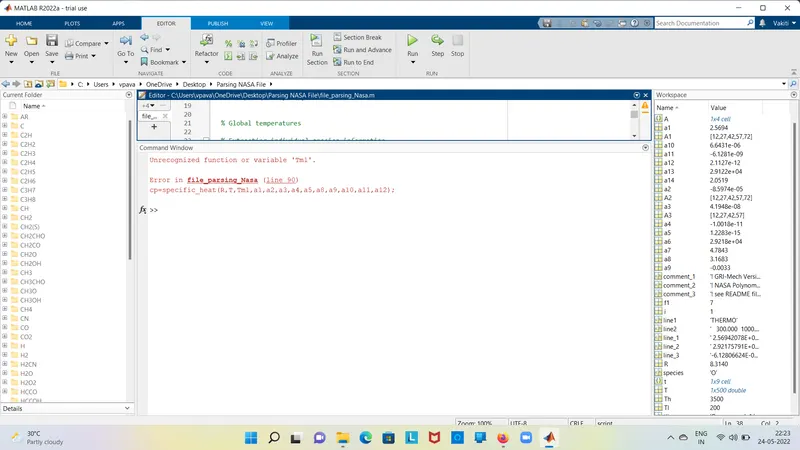
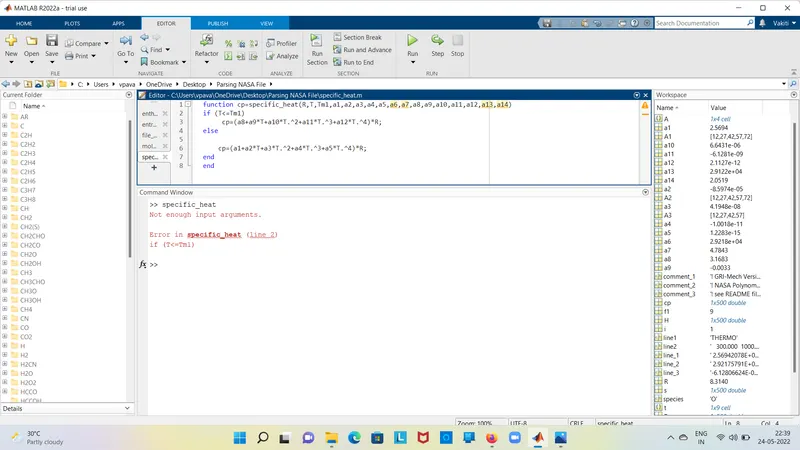
1. tm1=str2double(t{end-1});
The above written lline through an error , because of case sensivity .
Tm1=str2double(t{end-1})
The above one should be correct , case sensivity is importants, lower and upper cases is different meaning.
2. In function cp=specific_heat (R,Tm1,a1, to a14)
It will throough an error ,because of species is a1 to a14 is not required in specific_heat.
function cp =specific_heat(R,Tm1,a1,a2,a3,a4,a5,a8,a9,a10,a11,a12)
The above given species are required for given formulae, not required for a1 to a14.
CODES FOR ALL :
MAIN PROGRAM:
close all
clear all
clc
% Reading data file
% open file and reading thermo.dat file
f1=fopen('THERMO.dat','r');
% Getting the reading iin the file
line1=fgetl(f1);
% Global temperature values
line2=fgetl(f1);

% Comments which have no significance in our parsing
comment_1=fgetl(f1);
comment_2=fgetl(f1);
comment_3=fgetl(f1);

% Splitting the individual global temperatures
A=strsplit(line2,' ');


% Global temperatures

% Extracting individual species information
% Total 53 species
for i=1:53


tline=fgetl(f1);

t=strsplit(tline, ' ');
species=t{1};
%local temperatures for each

Tl=str2double(t{end-3});

Th=str2double(t{end-2});

Tm1=str2double(t{end-1});

T=linspace(Tl,Th,500);
% Extracting the constants a1 to a5 from 1st species line using "E" as indicator
line_1=fgetl(f1);
A1=strfind(line_1,'E');
a1=str2double(line_1(1:A1(1)+3));

a2=str2double(line_1(A1(1)+4:A1(2)+3));

a3=str2double(line_1(A1(2)+4:A1(3)+3));

a4=str2double(line_1(A1(3)+4:A1(4)+3));

a5=str2double(line_1(A1(4)+4:A1(5)+3));


% Extracting the constants a6 to a10 from 2nd species line using "E" as indicator
line_2=fgetl(f1);
A2=strfind(line_2,'E');

a6=str2double(line_2(1:A2(1)+3));

a7=str2double(line_2(A2(1)+4:A2(2)+3));

a8=str2double(line_2(A2(2)+4:A2(3)+3));

a9=str2double(line_2(A2(3)+4:A2(4)+3));

a10=str2double(line_2(A2(4)+4:A2(5)+3));


% Extracting the constants a11 to a14 from 3rd species line using "E" as indicator
line_3=fgetl(f1);
A3=strfind(line_3,'E');

a11=str2double(line_3(1:A3(1)+3));

a12=str2double(line_3(A3(1)+4:A3(2)+3));

a13=str2double(line_3(A3(2)+4:A3(3)+3));

a14=str2double(line_3(A3(3)+4:A3(4)+3));


% PLotting of the specific heat ,Enthalpy and Entropy

% Universal gas constant
R=8.314;
cp=specific_heat(R,T,Tm1,a1,a2,a3,a4,a5,a8,a9,a10,a11,a12);
H=enthalpy(R,T,Tm1,a1,a2,a3,a4,a5,a6,a8,a9,a10,a11,a12,a13);
s=entropy(R,T,Tm1,a1,a2,a3,a4,a5,a7,a8,a9,a10,a11,a12,a14);

% Creating directory for each species
mkdir(species)
cd(species)
% Plotting
figure(1)
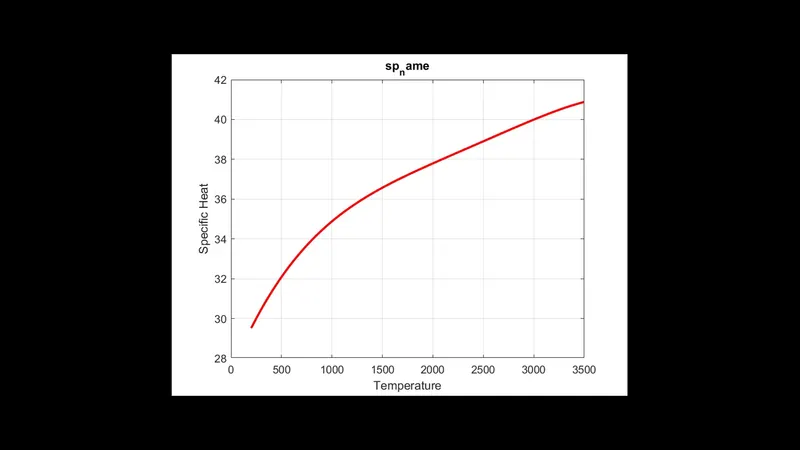
plot(T,cp,'linewidth',2,'color','r')
grid on
title('sp_name')
xlabel('Temperature')
ylabel('Specific Heat')

figure(2)
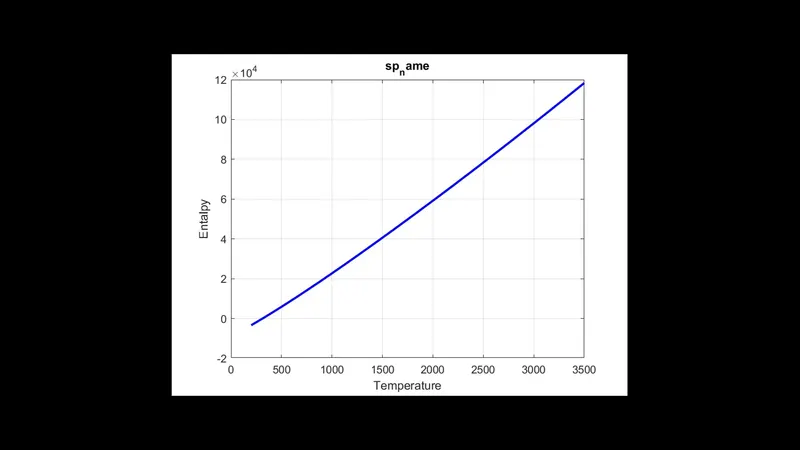
plot(T,H,'linewidth',2,'color','b')
grid on
title('sp_name')
xlabel('Temperature')
ylabel('Entalpy')

figure(3)
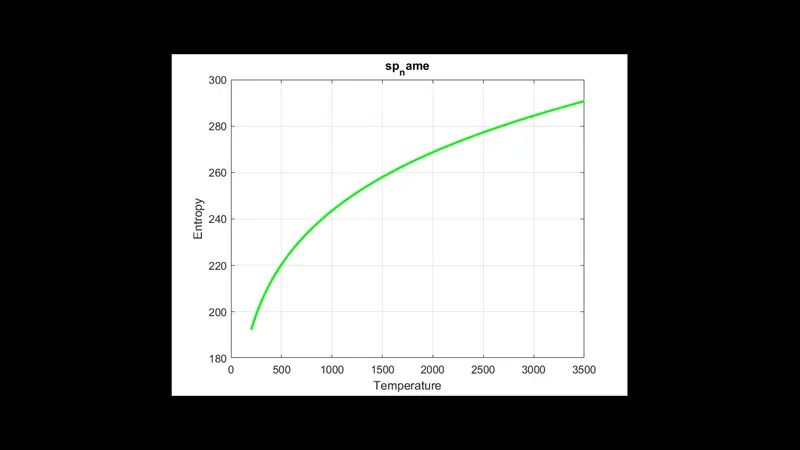
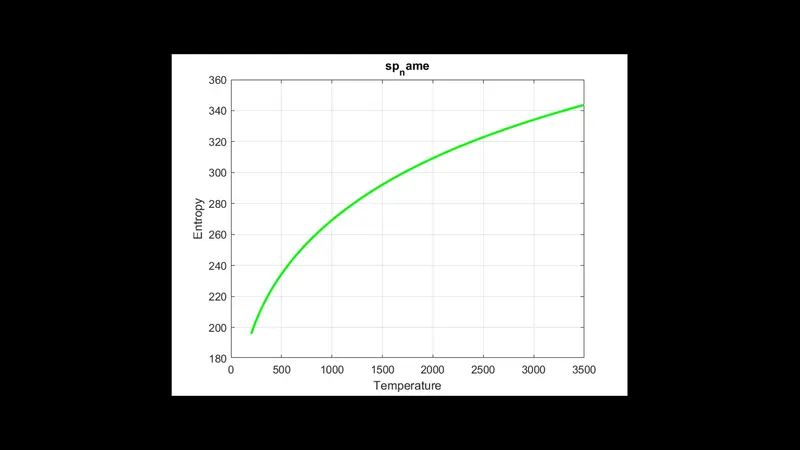
plot(T,s,'linewidth',2,'color','g')
grid on
title('sp_name')
xlabel('Temperature')
ylabel('Entropy')

% Savings the plots in directory
saveas(1,'Specific Heat.jpg');
saveas(2,'Enthalpy.jpg');
saveas(3,'Entropy.jpg');

cd ..
molecular_W=molecular_weight(t{1});

end


FUNCTION OF THE SPECIFIC HEAT

function cp=specific_heat(R,T,Tm1,a1,a2,a3,a4,a5,a8,a9,a10,a11,a12)
if (T<=Tm1)
     cp=(a8+a9*T+a10*T.^2+a11*T.^3+a12*T.^4)*R;
else

    cp=(a1+a2*T+a3*T.^2+a4*T.^3+a5*T.^4)*R;
end
end


FUNCTION OF THE ENTHALPY

function H=enthalpy(R,T,Tm1,a1,a2,a3,a4,a5,a6,a8,a9,a10,a11,a12,a13)
if (T<=Tm1)
    H=(a8+(a9*T)/2+(a10*T.^2)/3+(a11*T.^3)/4+(a12*T.^4)/5+a13./T).*T.*R;
else

    H=(a1+(a2*T)/2+(a3*T.^2)/3+(a4*T.^3)/4+(a5*T.^4)/5+a6./T).*T.*R;
end
end

FUNCTION OF THE ENTROPY

function S=entropy(R,T,Tm1,a1,a2,a3,a4,a5,a7,a8,a9,a10,a11,a12,a14)
if(T<=Tm1)
    S=(a8*log(T)+a9*T+(a10*T.^2)/2+(a11*T.^3)/3+(a12*T.^4)/4+a14)*R;
else

    S=(a1*log(T)+a2*T+(a3*T.^2)/2+(a4*T.^3)./3+(a5*T.^4)/4+a7)*R;
end
end


FUNCTION OF THE MOLRCULAR WEIGHT CODE

function W=molecular_weight(species)
% atomic names of the elements
atomic_name=['H','C','N','O','A'];
% atomic weights of the elements
atomic_weight=[1.00784,12.011,14.0067,15.99,39.948];
W=0;
for i=1:length(species)
    for j=1:length(atomic_name)
        if strcmp(species(i),atomic_name(j))
        W=W+atomic_weight(j);

        a=j;
    end
end
n=str2double(species);
if n>1
    W=W+atomic_weight(a)*(n-1);
end
end
fprintf('molecular weight %s',species)
fprintf('%f',W);
disp(' ')
end
RESULTS:
O2 PLOTS
SPECIFIC HEAT
ENTHALPY
ENTROPY
N2 PLOTS
SPECIFIC HEAT
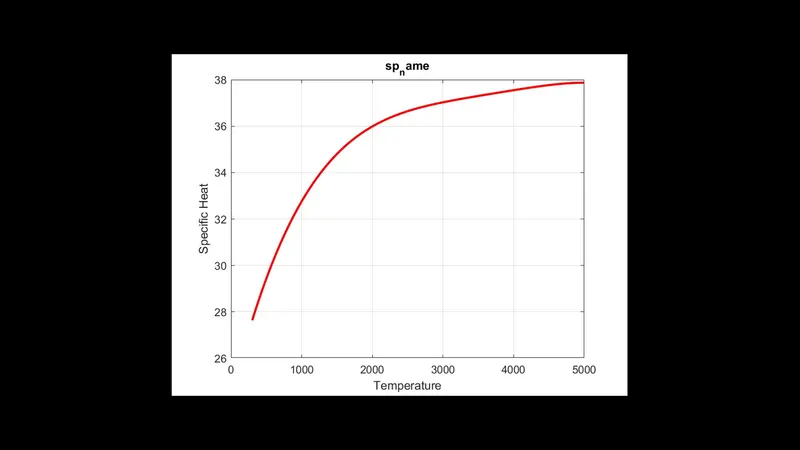
ENTHALPY
ENTROPY
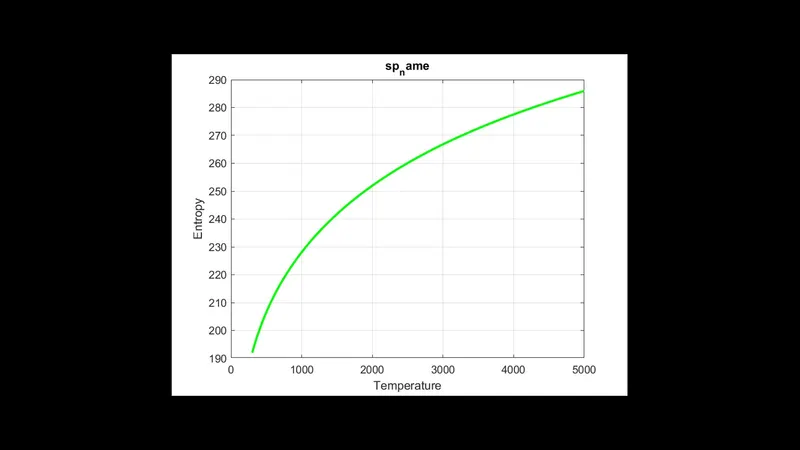
CO2 PLOT
SPECIFIC HEAT
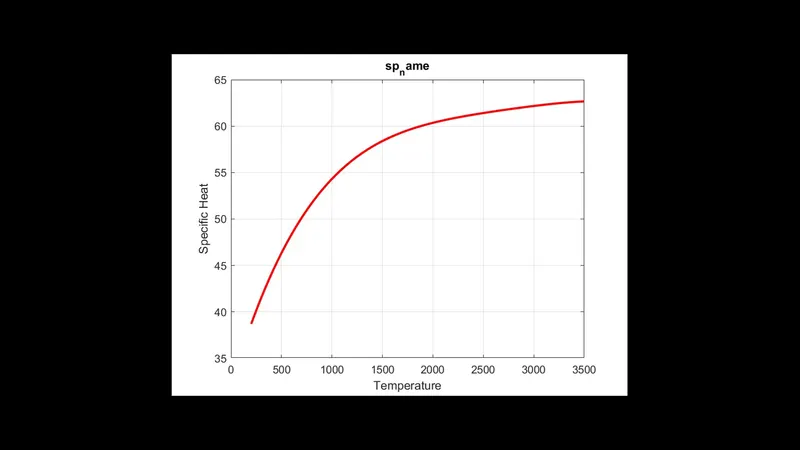
ENTROPY
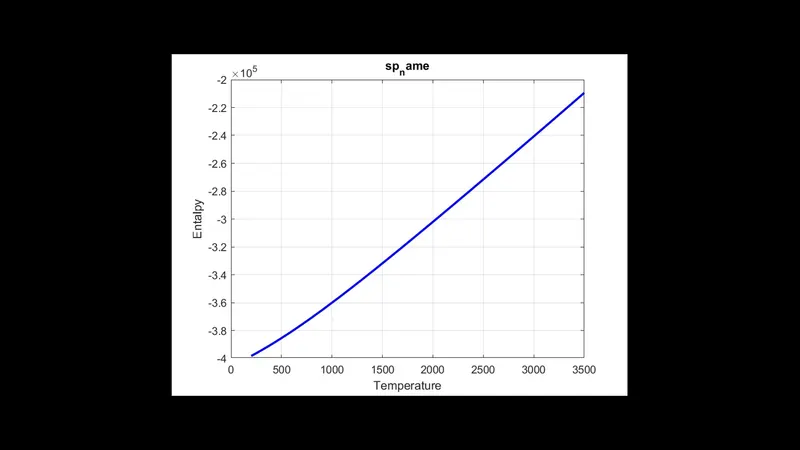
ENTROPY
SAVED FOLDERS

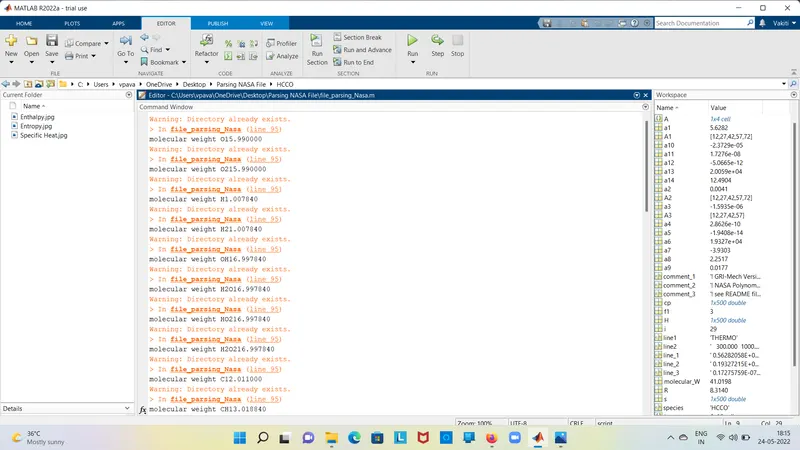
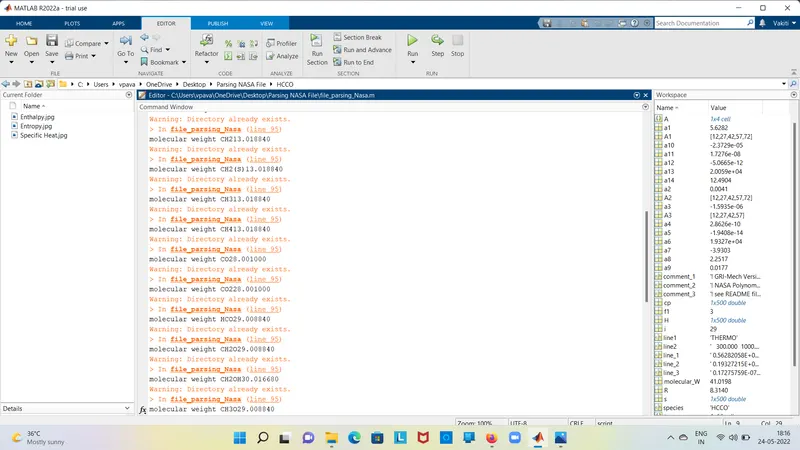
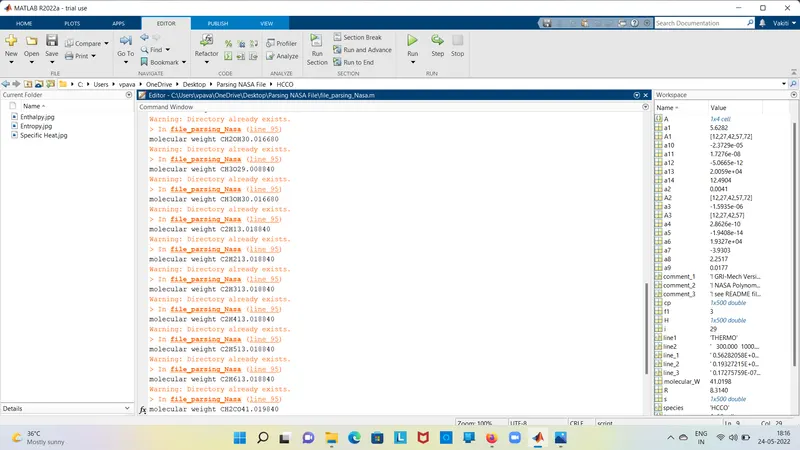
MOLECULAR WEIGHTS :