Project 1 (Mini Project on Vehicle Direction Detection
Aim:
To determine the direction of the vehicle by Camera input.
Objective:
- Development of MATLAB Simulink model as per requirement.
- Tag the requirements to the Simulink model; tagging requirements 1 & requirement 2 to their corresponding subsystems is fine.
- MBD compliant changes, Data Dictionary creation & code generation is added advantage, and that is not the scope of this project.
- If choosing code generation, Storage class for Input signals: ImportedExtern; Storage class for Output signal: Export to File; Storage class for local signals: localizable; Storage class for calibration signals: Const.
- Choose sample time for all signals as 0.01s
MATLAB Simulink model:
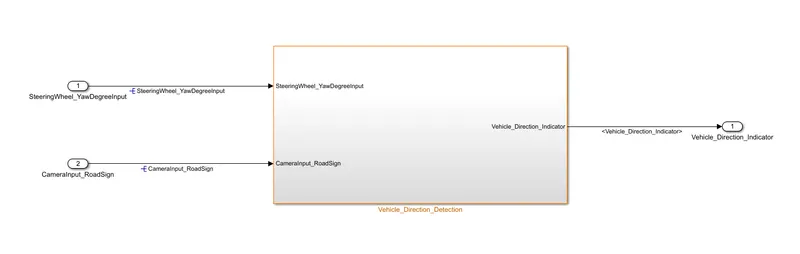
Step1:
The model has two inputs and one output which are named as SteeringWheel_YawDegreeInput, CameraInput_RoadSign, and Vehicle_Direction_Indicator respectively.
Step2: The plant model is divided into two sub-models(as per requirements 1 and 2), which are named as Vehicle_Turn_Status and Vehicle_Direction_Indication as per the requirements.
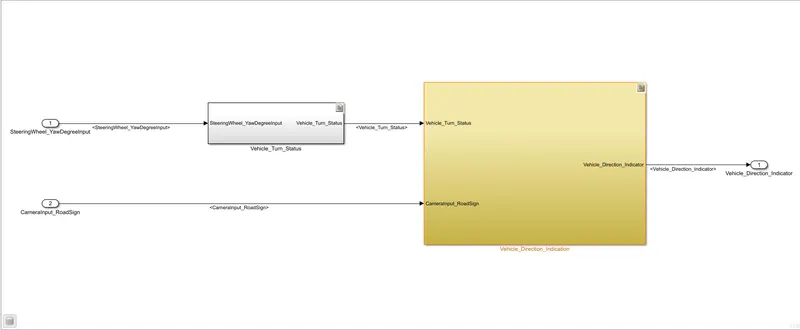
Step3 : Create a logic for Requirement-1 (Vehicle_Turn_Status)
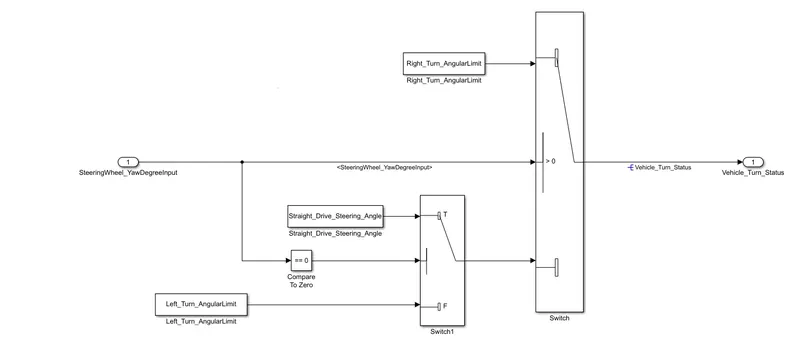
- Input is SteeringWheel_YawDegreeInput,
- Calibrating Parameters are Right_Turn_AngularLimit = 30 degree, Straight_Drive_Steering_Angle = 0 degree, Left_Turn_AngularLimit = -120 degree(Data are defined in SLDD ),
- Output is Vehicle_Turn_Status.
The Steering wheel is sensed by the yaw sensor, If the sensed value is 30 degrees then the vehicle is turning on the right side, or if the angle is -120 degrees then the vehicle is turning on the left side, or If the angle is 0 Degrees then the vehicle is traveling towards straight.
Two switches are used to compare, if the steering wheel input value is greater than zero then the Main switch (switch1) gives an output(Vehicle turning towards the right), or else a false case Aux switch(Switch2) compares the steering wheel is equal to zero, if true then switch2 gives an output (vehicle traveling in Straight) or false then switch2 gives an output(False case output i.e., Vehicle turning towards left).
Step4 :Create a logic for Requirement-2(Vehicle_Direction_Indicator)
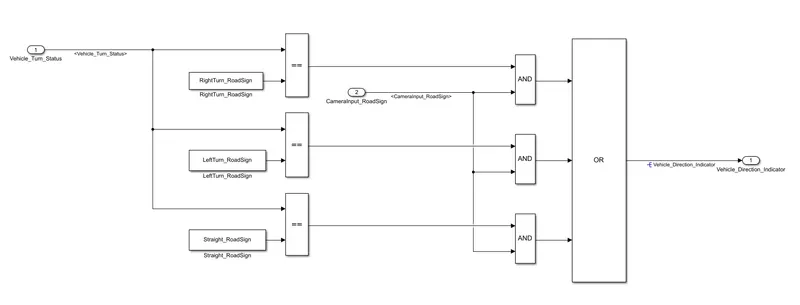
- Input is Vehicle_Turn_Status which is the output from the requirement-1 block,
- Calibrating Parameters are RightTurn_RoadSign = 30 degree, Straight_Drive_RoadSign = 0 degree, LeftTurn_RoadSign = -120 degree(Data are defined in SLDD ),
- Output is Vehicle_Direction_Indicator.
Input Vehicle_Turn_Status is compared with Right, Left, and Straight roadsign separately, The output will compare with the camera input if both the signal is 1 then give output as 1, then these signals are given Output after the Or operator.
Step 5. Resolving signal to Simulink signal object
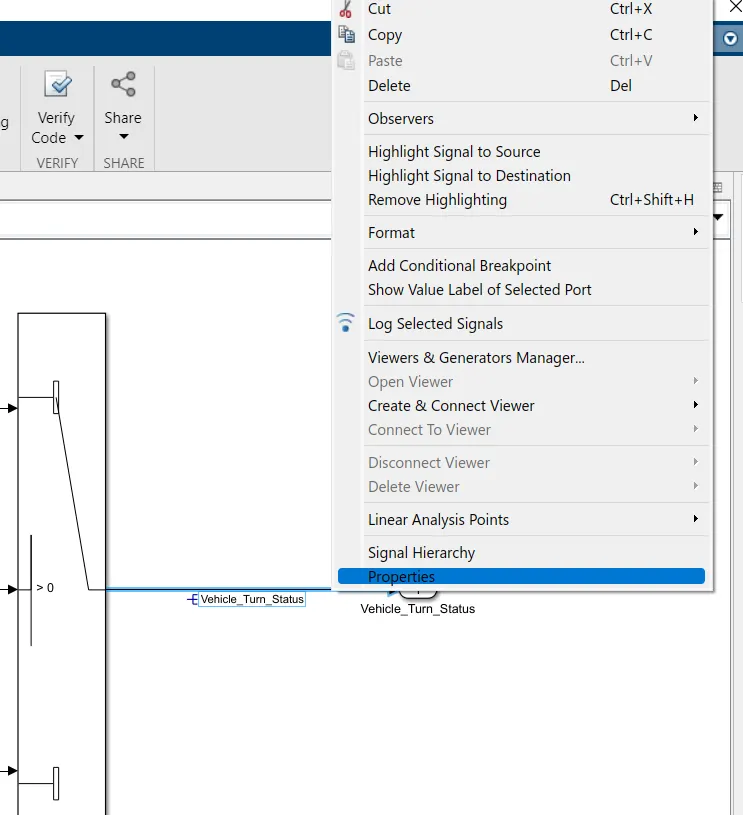
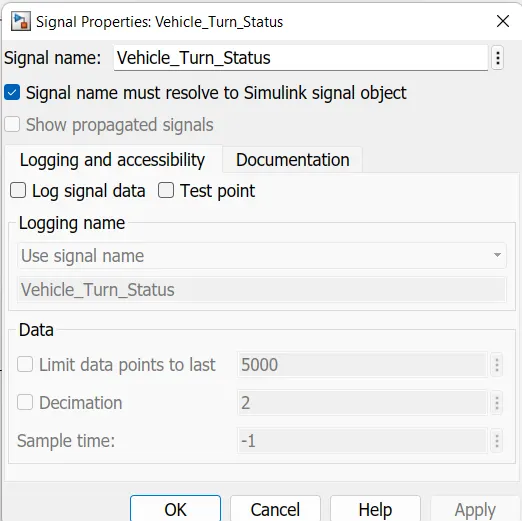
Right-click on the line which needs to be resolved signal, then clicks properties. A pop window will open named as signal properties, Type a signal name and check signal name must resolve to Simulink signal objects then apply and click ok.
Step 6: Tagging requirements
Write on the Ms-Word what are all Data going to be tagged. Here Vehicle_Turn_Status and Vehicle_Direction_Indicator are going to tag. (Word should be opened) and Select both the Sentence
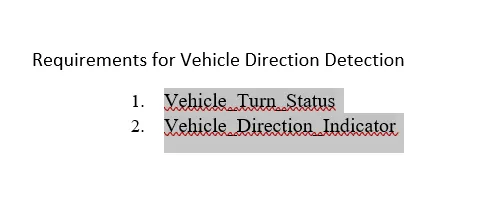
Right-click on the block which needs to be Tagged, Then click Requirements and Link to Selection in word.
Again right click on the block, then click requirements, now you will find out the selected sentence.
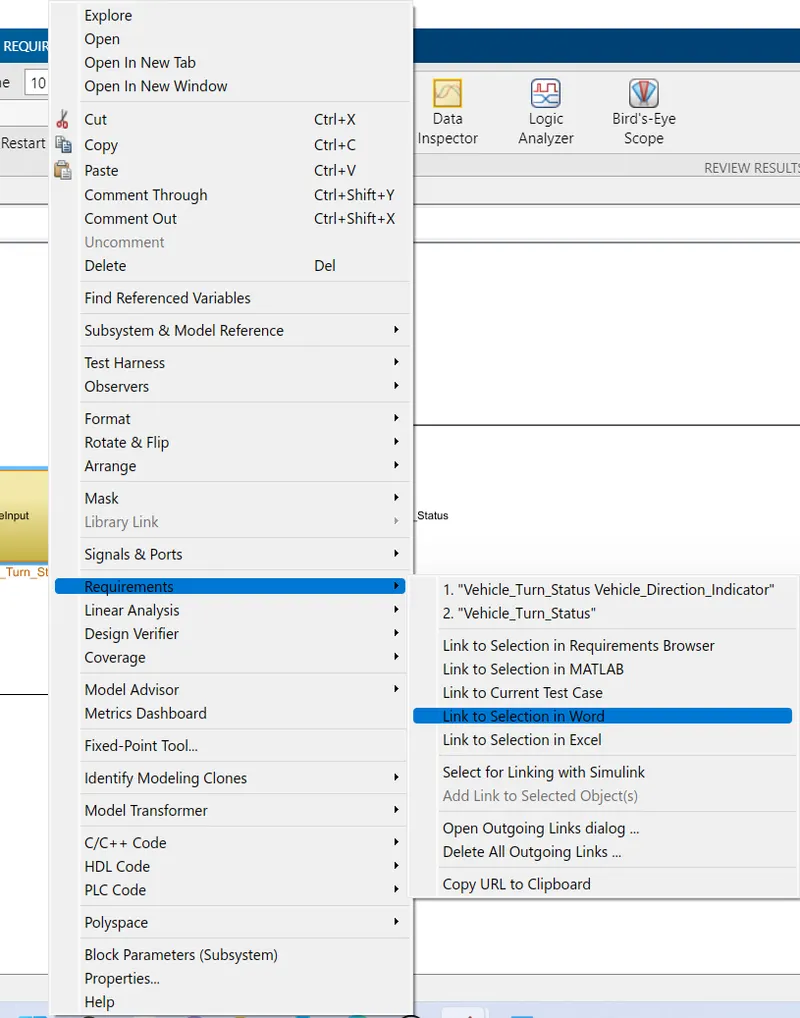
Subsystems are tagged with requirements when the subsystem is selected then the background of the subsystem changed to yellow. Requirement document attached named Requirement Document.docx
Step 7: Creation of SLDD
Signal and calibration data is fed into the SLDD file(Vehicle_Dr_deter.sldd).
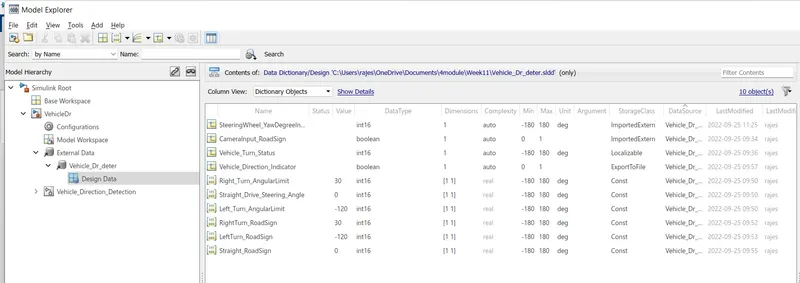
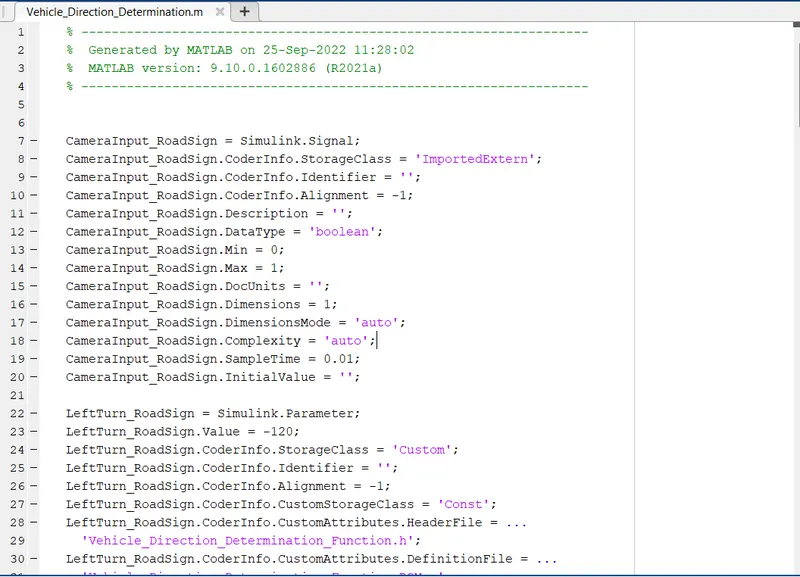
Step 8: Import SLDD into int file.
M-script file is attached, named Vehicle_Direction_Determination.m
Step 9:
Click Ctrl+D to check the static error
Step 10:
Run the program
Code Generation:
Generate code
In a Simulink model, click on the C Code, then generate code.
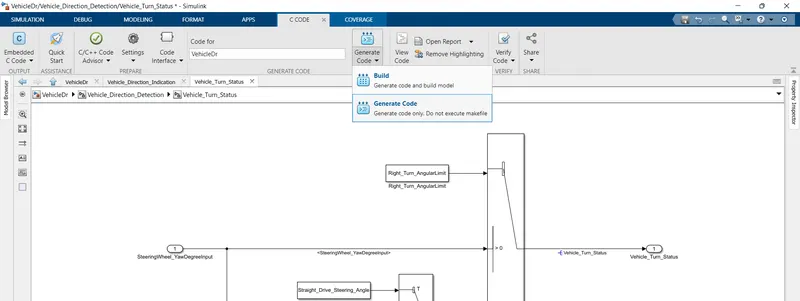
Code Will Generate
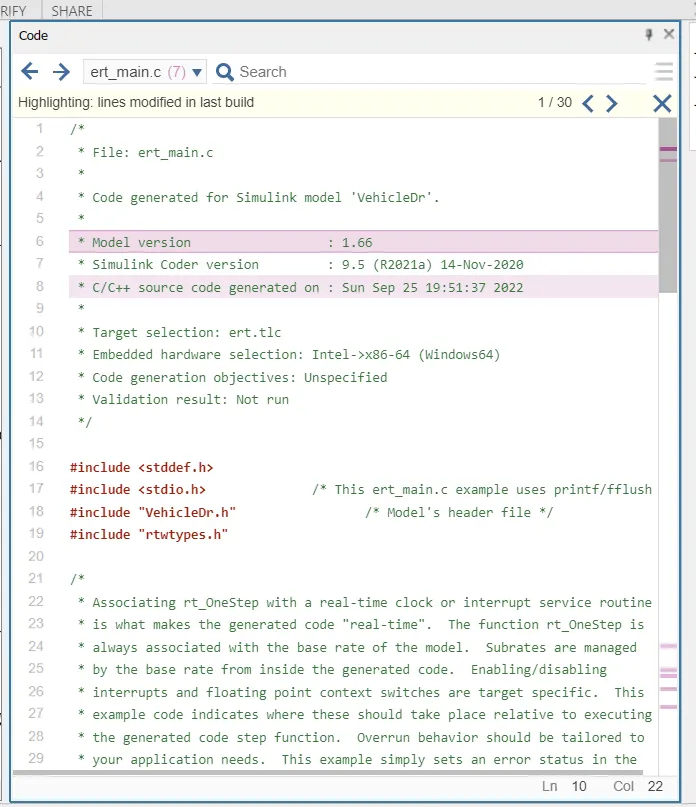
ert_main.c
/*
 * File: ert_main.c
 *
 * Code generated for Simulink model 'VehicleDr'.
 *
 * Model version                  : 1.65
 * Simulink Coder version         : 9.5 (R2021a) 14-Nov-2020
 * C/C++ source code generated on : Sun Sep 25 18:28:53 2022
 *
 * Target selection: ert.tlc
 * Embedded hardware selection: Intel->x86-64 (Windows64)
 * Code generation objectives: Unspecified
 * Validation result: Not run
 */

#include
#include               /* This ert_main.c example uses printf/fflush */
#include "VehicleDr.h"                 /* Model's header file */
#include "rtwtypes.h"

/*
 * Associating rt_OneStep with a real-time clock or interrupt service routine
 * is what makes the generated code "real-time".  The function rt_OneStep is
 * always associated with the base rate of the model.  Subrates are managed
 * by the base rate from inside the generated code.  Enabling/disabling
 * interrupts and floating point context switches are target specific.  This
 * example code indicates where these should take place relative to executing
 * the generated code step function.  Overrun behavior should be tailored to
 * your application needs.  This example simply sets an error status in the
 * real-time model and returns from rt_OneStep.
 */
void rt_OneStep(void);
void rt_OneStep(void)
{
  static boolean_T OverrunFlag = false;

  /* Disable interrupts here */

  /* Check for overrun */
  if (OverrunFlag) {
    rtmSetErrorStatus(VehicleDr_M, "Overrun");
    return;
  }

  OverrunFlag = true;

  /* Save FPU context here (if necessary) */
  /* Re-enable timer or interrupt here */
  /* Set model inputs here */

  /* Step the model */
  VehicleDr_step();

  /* Get model outputs here */

  /* Indicate task complete */
  OverrunFlag = false;

  /* Disable interrupts here */
  /* Restore FPU context here (if necessary) */
  /* Enable interrupts here */
}

/*
 * The example "main" function illustrates what is required by your
 * application code to initialize, execute, and terminate the generated code.
 * Attaching rt_OneStep to a real-time clock is target specific.  This example
 * illustrates how you do this relative to initializing the model.
 */
int_T main(int_T argc, const char *argv[])
{
  /* Unused arguments */
  (void)(argc);
  (void)(argv);

  /* Initialize model */
  VehicleDr_initialize();

  /* Attach rt_OneStep to a timer or interrupt service routine with
   * period 0.01 seconds (the model's base sample time) here.  The
   * call syntax for rt_OneStep is
   *
   *  rt_OneStep();
   */
  printf("Warning: The simulation will run forever. "
         "Generated ERT main won't simulate model step behavior. "
         "To change this behavior select the 'MAT-file logging' option.\n");
  fflush((NULL));
  while (rtmGetErrorStatus(VehicleDr_M) == (NULL)) {
    /*  Perform other application tasks here */
  }

  /* Disable rt_OneStep() here */

  /* Terminate model */
  VehicleDr_terminate();
  return 0;
}

/*
 * File trailer for generated code.
 *
 * [EOF]
 */
VehicleDr.c
/*
 * File: VehicleDr.c
 *
 * Code generated for Simulink model 'VehicleDr'.
 *
 * Model version                  : 1.65
 * Simulink Coder version         : 9.5 (R2021a) 14-Nov-2020
 * C/C++ source code generated on : Sun Sep 25 18:28:53 2022
 *
 * Target selection: ert.tlc
 * Embedded hardware selection: Intel->x86-64 (Windows64)
 * Code generation objectives: Unspecified
 * Validation result: Not run
 */

#include "VehicleDr.h"
#include "VehicleDr_private.h"

/* Real-time model */
static RT_MODEL_VehicleDr_T VehicleDr_M_;
RT_MODEL_VehicleDr_T *const VehicleDr_M = &VehicleDr_M_;

/* Model step function */
void VehicleDr_step(void)
{
  /* local block i/o variables */
  int16_T Vehicle_Turn_Status;

  /* Switch: '/Switch1' incorporates:
   *  Constant: '/Constant'
   *  Inport: '/SteeringWheel_YawDegreeInput'
   *  RelationalOperator: '/Compare'
   *  Switch: '/Switch2'
   */
  if (SteeringWheel_YawDegreeInput > 0) {
    /* Switch: '/Switch1' incorporates:
     *  Constant: '/Right_Turn_AngularLimit'
     */
    Vehicle_Turn_Status = Right_Turn_AngularLimit;
  } else if (SteeringWheel_YawDegreeInput == 0) {
    /* Switch: '/Switch2' incorporates:
     *  Constant: '/Straight_Drive_Steering_Angle'
     *  Switch: '/Switch1'
     */
    Vehicle_Turn_Status = Straight_Drive_Steering_Angle;
  } else {
    /* Switch: '/Switch1' incorporates:
     *  Constant: '/Left_Turn_AngularLimit'
     *  Switch: '/Switch2'
     */
    Vehicle_Turn_Status = Left_Turn_AngularLimit;
  }

  /* End of Switch: '/Switch1' */

  /* Logic: '/OR' incorporates:
   *  Constant: '/LeftTurn_RoadSign'
   *  Constant: '/RightTurn_RoadSign'
   *  Constant: '/Straight_RoadSign'
   *  Inport: '/CameraInput_RoadSign'
   *  Logic: '/AND'
   *  Logic: '/AND1'
   *  Logic: '/AND2'
   *  RelationalOperator: '/Relational Operator'
   *  RelationalOperator: '/Relational Operator1'
   *  RelationalOperator: '/Relational Operator2'
   */
  Vehicle_Direction_Indicator = ((((Vehicle_Turn_Status == RightTurn_RoadSign) &&
    CameraInput_RoadSign) || ((Vehicle_Turn_Status == LeftTurn_RoadSign) &&
    CameraInput_RoadSign)) || ((Vehicle_Turn_Status == Straight_RoadSign) &&
    CameraInput_RoadSign));
}

/* Model initialize function */
void VehicleDr_initialize(void)
{
  /* (no initialization code required) */
}

/* Model terminate function */
void VehicleDr_terminate(void)
{
  /* (no terminate code required) */
}

/*
 * File trailer for generated code.
 *
 * [EOF]
 */
VehicleDr.h
/*
 * File: VehicleDr.h
 *
 * Code generated for Simulink model 'VehicleDr'.
 *
 * Model version                  : 1.65
 * Simulink Coder version         : 9.5 (R2021a) 14-Nov-2020
 * C/C++ source code generated on : Sun Sep 25 18:28:53 2022
 *
 * Target selection: ert.tlc
 * Embedded hardware selection: Intel->x86-64 (Windows64)
 * Code generation objectives: Unspecified
 * Validation result: Not run
 */

#ifndef RTW_HEADER_VehicleDr_h_
#define RTW_HEADER_VehicleDr_h_
#ifndef VehicleDr_COMMON_INCLUDES_
#define VehicleDr_COMMON_INCLUDES_
#include "rtwtypes.h"
#endif                                 /* VehicleDr_COMMON_INCLUDES_ */

#include "VehicleDr_types.h"

/* Includes for objects with custom storage classes. */
#include "Vehicle_Direction_Determination_Function.h"

/* Macros for accessing real-time model data structure */
#ifndef rtmGetErrorStatus
#define rtmGetErrorStatus(rtm)         ((rtm)->errorStatus)
#endif

#ifndef rtmSetErrorStatus
#define rtmSetErrorStatus(rtm, val)    ((rtm)->errorStatus = (val))
#endif

/* Real-time Model Data Structure */
struct tag_RTM_VehicleDr_T {
  const char_T * volatile errorStatus;
};

/* Model entry point functions */
extern void VehicleDr_initialize(void);
extern void VehicleDr_step(void);
extern void VehicleDr_terminate(void);

/* Real-time Model object */
extern RT_MODEL_VehicleDr_T *const VehicleDr_M;

/*-
 * The generated code includes comments that allow you to trace directly
 * back to the appropriate location in the model.  The basic format
 * is /block_name, where system is the system number (uniquely
 * assigned by Simulink) and block_name is the name of the block.
 *
 * Use the MATLAB hilite_system command to trace the generated code back
 * to the model.  For example,
 *
 * hilite_system('')    - opens system 3
 * hilite_system('/Kp') - opens and selects block Kp which resides in S3
 *
 * Here is the system hierarchy for this model
 *
 * '' : 'VehicleDr'
 * ''   : 'VehicleDr/Vehicle_Direction_Detection'
 * ''   : 'VehicleDr/Vehicle_Direction_Detection/Vehicle_Direction_Indication'
 * ''   : 'VehicleDr/Vehicle_Direction_Detection/Vehicle_Turn_Status'
 * ''   : 'VehicleDr/Vehicle_Direction_Detection/Vehicle_Turn_Status/Compare To Zero'
 */
#endif                                 /* RTW_HEADER_VehicleDr_h_ */

/*
 * File trailer for generated code.
 *
 * [EOF]
 */
VehicleDr_private.h
/*
 * File: VehicleDr_private.h
 *
 * Code generated for Simulink model 'VehicleDr'.
 *
 * Model version                  : 1.65
 * Simulink Coder version         : 9.5 (R2021a) 14-Nov-2020
 * C/C++ source code generated on : Sun Sep 25 18:28:53 2022
 *
 * Target selection: ert.tlc
 * Embedded hardware selection: Intel->x86-64 (Windows64)
 * Code generation objectives: Unspecified
 * Validation result: Not run
 */

#ifndef RTW_HEADER_VehicleDr_private_h_
#define RTW_HEADER_VehicleDr_private_h_
#include "rtwtypes.h"

/* Imported (extern) block signals */
extern int16_T SteeringWheel_YawDegreeInput;
                                     /* '/SteeringWheel_YawDegreeInput' */
extern boolean_T CameraInput_RoadSign; /* '/CameraInput_RoadSign' */

#endif                                 /* RTW_HEADER_VehicleDr_private_h_ */

/*
 * File trailer for generated code.
 *
 * [EOF]
 */
VehicleDr_types.h
/*
 * File: VehicleDr_types.h
 *
 * Code generated for Simulink model 'VehicleDr'.
 *
 * Model version                  : 1.65
 * Simulink Coder version         : 9.5 (R2021a) 14-Nov-2020
 * C/C++ source code generated on : Sun Sep 25 18:28:53 2022
 *
 * Target selection: ert.tlc
 * Embedded hardware selection: Intel->x86-64 (Windows64)
 * Code generation objectives: Unspecified
 * Validation result: Not run
 */

#ifndef RTW_HEADER_VehicleDr_types_h_
#define RTW_HEADER_VehicleDr_types_h_

/* Model Code Variants */

/* Forward declaration for rtModel */
typedef struct tag_RTM_VehicleDr_T RT_MODEL_VehicleDr_T;

#endif                                 /* RTW_HEADER_VehicleDr_types_h_ */

/*
 * File trailer for generated code.
 *
 * [EOF]
 */
Vehicle_Direction_Determination_Function_ROM.c
/*
 * File: Vehicle_Direction_Determination_Function_ROM.c
 *
 * Code generated for Simulink model 'VehicleDr'.
 *
 * Model version                  : 1.65
 * Simulink Coder version         : 9.5 (R2021a) 14-Nov-2020
 * C/C++ source code generated on : Sun Sep 25 18:28:53 2022
 *
 * Target selection: ert.tlc
 * Embedded hardware selection: Intel->x86-64 (Windows64)
 * Code generation objectives: Unspecified
 * Validation result: Not run
 */

#include "rtwtypes.h"
#include "VehicleDr_types.h"

/* Exported data definition */

/* Definition for custom storage class: ExportToFile */
boolean_T Vehicle_Direction_Indicator;

/* Const memory section */
/* Definition for custom storage class: Const */
const int16_T LeftTurn_RoadSign = -120;
const int16_T Left_Turn_AngularLimit = -120;
const int16_T RightTurn_RoadSign = 30;
const int16_T Right_Turn_AngularLimit = 30;
const int16_T Straight_Drive_Steering_Angle = 0;
const int16_T Straight_RoadSign = 0;

/*
 * File trailer for generated code.
 *
 * [EOF]
 */
Model Advisor:
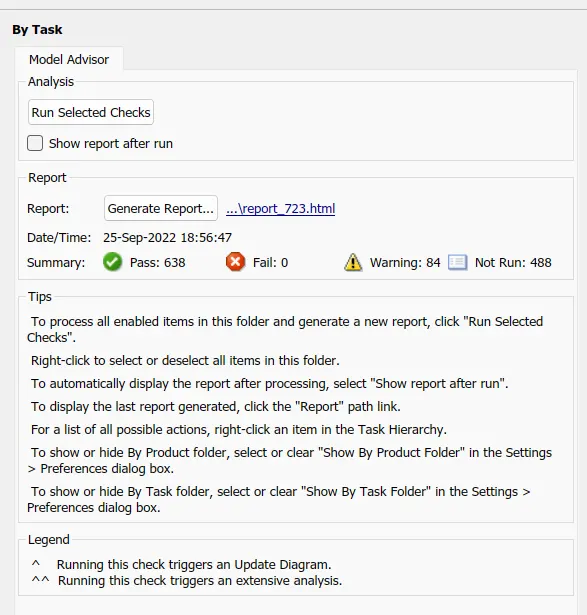
168 Warning
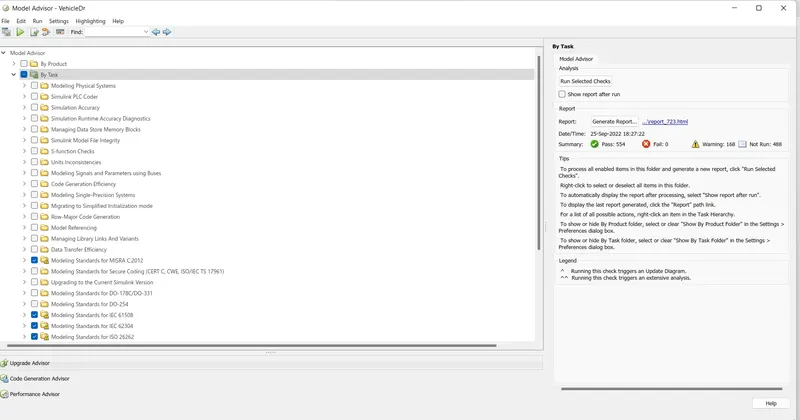
Warning is reduced to 84, Report is attached, named report_723.html