Project 1 - Interfacing a 16*2 LCD with Arduino using I2C protocol
Overview of the Project:
In this project implementing the Code for “Interfacing a 16*2 LCD with two Arduino’s (one for Master and one for Slave) using Inter-Integrated Circuit (I2C) communication protocol” by sending the message to LCD using I2C communication protocol and display the message on LCD screen.
Goals:
Communication between Arduino and 16*2 LCD using I2C protocol.
Displaying the message sent by Master and received by slave i.e. LCD display.
Key Highlights of the Project:
Using the inter-integrated circuit communication protocol, transferring the data i.e. the message we want to display is sent to the LCD.
Two Arduino’s connected to the LCD display and the communication is executed using I2C protocol between Arduino and the LDC display.
Deliverables of this project:
Communication between the Arduino’s and LCD using I2C.
The message passed from master to slave and displayed on the 16*2 LCD.
Expected Outcomes:
Students will get the Knowledge of I2C communication Protocol and the Arduino.
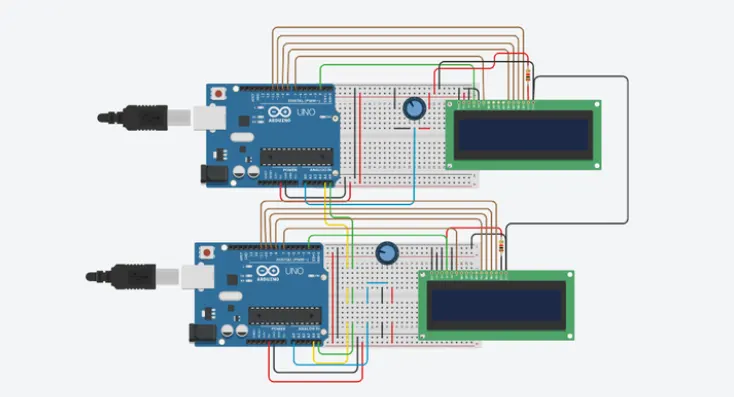
The Hardware connection of all components used in this project.
Displaying the message sent by master (Arduino) and received by the slave (16*2 LCD display).
THEORY:
1) Arduino:
Arduino is electronic platform used to make projects, prototypes, etc.
The platform contains ATmega328 micro controller on board with ADC, 14 I/O digital pins, 6 analog pins.
Arduino is an open-source electronics platform based on easy-to-use hardware and software.
Different inputs to arduino can include - light sensor, a button - and turn it into an output, a motor, a LED. You can tell your board what to do by sending a set of instructions to the Arduino board.
2) I2C PROTOCOL:
I2C combination of SPI and UARTs. With I2C, you can connect multiple slaves to a single master (like SPI) and you can have multiple masters controlling single, or multiple slaves.
With I2C, data is transferred in 'messages'.
Messages are broken up into frames of data. Each message has an address frame that contains the address
of the slave, data frames that contain the data. The message includes start and stop conditions, read/write bits, and ACK/NACK bits between each message.
PROGRAM:
MASTER CODE:
#include<wire.h> /*I2C PROTOCOL LIBRARY*/
#include <LiquidCrystal.h> /*LCD DISPLAY LIBRARY*/
LiquidCrystal lcd(2, 7, 8, 9, 10, 11); /*LCD PINS DEFINED*/
void setup() /*MAIN FUNCTION*/
{
lcd.begin(16,2); /*LCD INITIALIZATION*/
lcd.setCursor(0,0); /*CURSOR POSI*/
lcd.print("CYIENT"); /*PRINT*/
lcd.setCursor(0,1); /CURSOR POSI*/
lcd.print("I2C MASTER ARDUINO"); /*PRINT*/
delay(5000); /*5MSEC DELAY*/
lcd.clear(); /*CLEAR -> SCREEN */
Serial.begin(9600); /*BAUD RATE-> 9600 BPS*/
Wire.begin(); /*BEGINS COMMU*/
}
void loop() /*LOOP FUNCTION*/
{
Wire.requestFrom(8,1); /*READ -> BIT8*/
byte MasterReceive = Wire.read(); /*READ-> SLAVE*/
int potvalue = analogRead(A0); /*READ VALUE ANALOG*/
byte MasterSend = map(potvalue,0,1023,0,127); /*CONVERSION*/
Wire.beginTransmission(8); /*BEGIN TRANSMISSION*/
Wire.write(MasterSend);
Wire.endTransmission(); /*TRANSMISSION STOP*/
lcd.setCursor(0,0); /CURSOR POSI*/
lcd.print(">> Master <<"); /*PRINT-> MASTER ON LCD DISPLAY*/
lcd.setCursor(0,1); /CURSOR POSI*/
lcd.print("SlaveVal:"); /*PRINT-> LCD DISPLAY*/
lcd.print(MasterReceive); /*PRINT-> LCD DISPLAY*/
Serial.println("Master Received From Slave");
Serial.println(MasterReceive);
delay(500);
lcd.clear(); /*CLEAR-> LCD SCREEN*/
delay(500);
}
SLAVE CODE:
#include <wire.h> /*I2C PROTOCOL LIBRARY*/
#include<LiquidCrystal.h> /*LCD DISPLAY LIBRARY*/
LiquidCrystal lcd(2, 7, 8, 9, 10, 11); /*LCD PINS DEFINED*/
byte SlaveReceived = 0; /*VARIABLE DECLARED*/
void setup()
{
lcd.begin(16,2);
lcd.setCursor(0,0);
lcd.print("CYIENT");
lcd.setCursor(0,1); /CURSOR POSI*/
lcd.print("I2C SLAVE ARDUINO");
delay(5000);
lcd.clear();
Serial.begin(9600);
Wire.begin(8);
Wire.onReceive(receiveEvent);
}
void loop(void)
{
lcd.setCursor(0,0); /CURSOR POSI*/
lcd.print(">> Slave <<"); /*PRINT-> SLAVE ON LCD DISPLAY*/
lcd.setCursor(0,1); /CURSOR POSI*/
lcd.print("MasterVal:"); /*PRINT-> LCD DISPLAY*/
lcd.print(SlaveReceived); /*PRINT-> LCD DISPLAY*/
Serial.println("Slave Received From Master:"); /*PRINT-> LCD DISPLAY*/
Serial.println(SlaveReceived);
delay(500); /*DELAY-> 500MSEC*/
lcd.clear();
}
void receiveEvent (int howMany) /*RECEIVE VALUE FROM MASTER*/
{
SlaveReceived = Wire.read(); /*RECEIVE VALUE FROM MASTER AND STORE*/
}
CIRCUIT DIAGRAM:
OUTPUT:
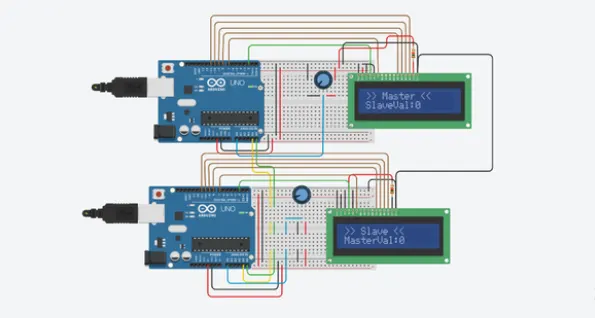
CONCLUSION:
We studied and built required programs and also observed output.