Project 1 - Interfacing a 16*2 LCD with Arduino using I2C protocol
Master code
#include <Wire.h>
#include <LiquidCrystal_I2C.h>
LiquidCrystal_I2C lcd(32,16,2);
void setup()
{
lcd.init();
lcd.backlight();
Wire.begin();
}
void loop()
{
Wire.requestFrom(8,1);
byte MasterReceive = Wire.read();
lcd.setCursor(2,0); //Sets Cursor at line one of LCD
lcd.print(">> Master <<"); //Prints >> Master << at LCD
lcd.setCursor(0,1);
lcd.print("SlaveData:");
lcd.print(MasterReceive);
delay(500);
byte MasterSend = 150;
Wire.beginTransmission(8);
Wire.write(MasterSend);
Wire.endTransmission();
delay(500);
}
Slave code
#include <Wire.h>
#include <LiquidCrystal_I2C.h>
LiquidCrystal_I2C lcd(33,16,2);
byte SlaveReceived = 0;
void setup()
{
lcd.init();
lcd.backlight();
Wire.begin(8);
Wire.onReceive(receiveEvent);
Wire.onRequest(requestEvent);
}
void loop()
{
lcd.setCursor(2,0); //Sets Cursor at line one of LCD
lcd.print(">> Slave <<"); //Prints >> Slave << at LCD
lcd.setCursor(0,1);
lcd.print("MasterData:");
lcd.print(SlaveReceived);
delay(1000);
lcd.clear();
}
void receiveEvent(int howmany)
{
SlaveReceived = Wire.read();
}
void requestEvent()
{
byte SlaveSend = 100;
Wire.write(SlaveSend);
}
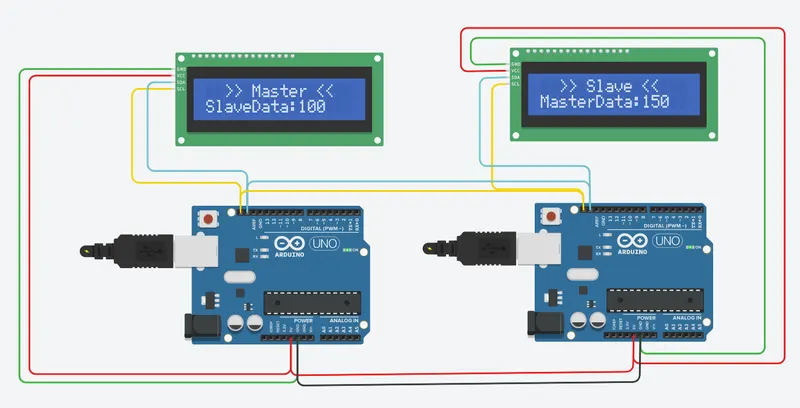
Circuit build is as shown below:
LCD 16*2 I2C is used for display and the communication is successful.