Photo Realistic Rendering
DESIGNING AN AMERICAN CHOPPER IN SOLIDWORKS
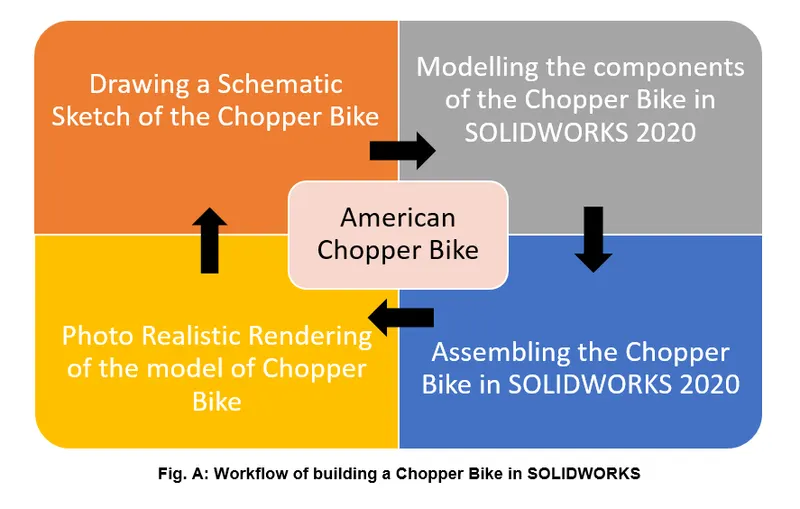
Aim: To design the components of an American Chopper Bike, Assemble the components and create rendered images of the assembly.
Objectives:
- Learn all the commands needed to design a component in SOLIDWORKS.
- Learn assembling the components and complete the modelling of the bike.
- Learn rendering using SOLIDWORKS Visualize to get the real appearance of the bike.
Theory: The designing of any component before manufacturing is important and SOLIDWORKS offers great deal of 3D modelling environments to design parts. In this case, all the components are designed using SOLIDWORKS 2020 Premium.
What is SOLIDWORKS 2020?
SOLIDWORKS 2020 is a CAD package offered by Dassault Systemes that can be used to design components, assemble them as per requirement and create 2D drawings of the component to be sent for manufacturing. SOLIDWORKS also offers Add-ins which can be used to get post processing data of the CAD model.
Following are the components designed in SOLIDWORKS 2020 for the Chopper Bike:
- Chassis
- Engine
- Pedal
- Oil Tank and Gas Tank
- Front and Rear Fender
- Seat
- Kickstand
- Front and Rear Wheel, with Sprocket, Calipers and Discs.
- Chain and Transmission Belt
All these parts were modelled using commands provided in the Part and Assembly environments in SOLIDWORKS 2020.
Sketch: In the sketch environment, there are all the basic sketching tools available which can be used to make a sketch of the basic section of the part. This sketch then can be used under ‘Feature Tools’ to apply material. The sketch tools consists of line, rectangle, circle, spline, arc, fillet, mirror, pattern, etc. All these tools have multiple option under them which can be used to draw sketch as per requirement. For example if a centreline is required in a sketch, then the ‘Line’ tool consists an option ‘For Construction’ which can be used to draw the centreline. The sketch environment also provides option to reduce the repetitive work needed to do if some sketch consists of similar geometries. These similar geometries can be transferred inside of a sketch from one place to another using tools such as mirror, linear pattern, circular pattern, etc. The most important tool here is the ‘Trim Entities’ and ‘Extend Entities’. I am stressing these tools because, a sketch needs to be a closed contour in order to use features such as Extrude Boss or Extrude Cut, which are explained later on. The trim entities give the designer a chance to cut the extra length of sketch geometry and make a closed contour. The fillets can be used to turn sharp corner into smooth edges and improve the geometry. The ‘Convert Entities’ is used to convert pre-existing lines and curves into a fresh sketch which form some part of the new sketch. This feature helps mimic the underlying curves exactly in the current sketch and remove the need to draw the previous sketch again in the current sketch if needed.
Sketch Picture is an image imported into SOLIDWORKS 2020 that can be used as a blueprint to develop the components around an idea. Following sketch picture is used to develop components of the Chopper Bike.
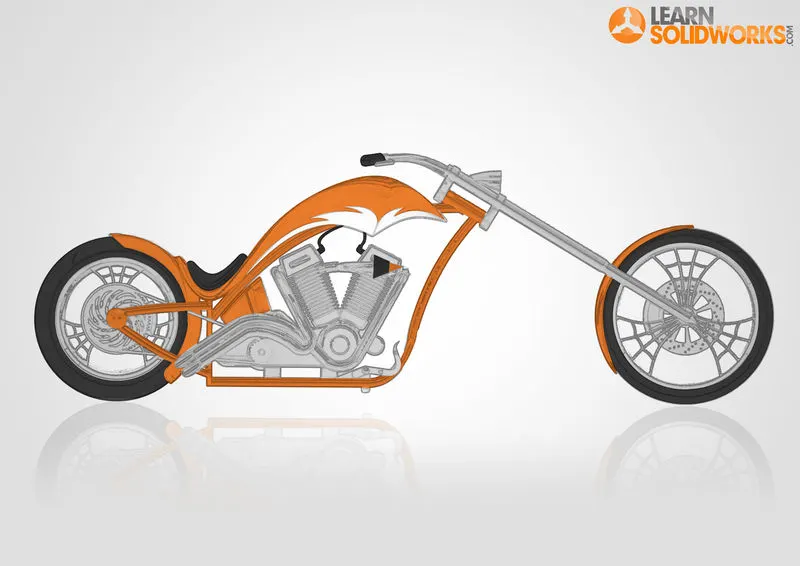
Fig. B: Chopper Sketch
Following are some of the Features provided in SOLIDWORKS 2020 that can be used to convert the 2D sketches into 3D parts.
- Extrude Boss/Base: As the name suggests, this feature extrudes any 2D sketch that has closed contours perpendicular to the plane of the sketch. Inside the extrude feature, there are multiple options available as to from where the sketch should be extruded, which include ‘From Sketch Plane’ ‘ From Surface’ etc., to options up to where the sketch should be extruded, which contain options such as ‘Up to vertex’, ’Up to next’, ‘up to surface’, ‘midplane’, ‘offset from surface’, etc. The options are named suitably to understand what kind of extrusion is possible using a particular extrude option. A sample is shown below.
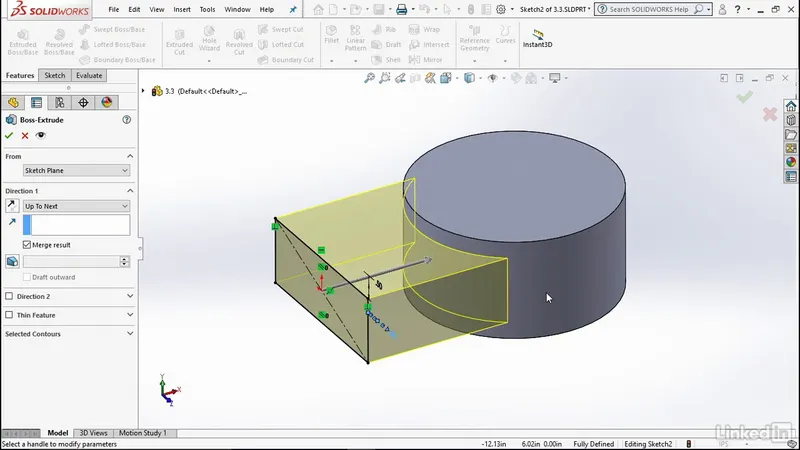
Fig.1: Extrude Boss
- Revolve Boss/Base: Some parts require to have circular profile or any other kind of profile which cannot be easily made using the Extrude feature. So, a Revolve feature helps to solve this problem. The process is similar to an Extrude Boss/Base, but revolve has its own advantages. The most important advantage being that, the revolve feature can be used even if the sketch contour is not closed, which is a mandatory requirement to use an extrude feature. A sample is shown below. A particular section can also be made using Revolve Boss as shown in case of Front Fork later in the report.
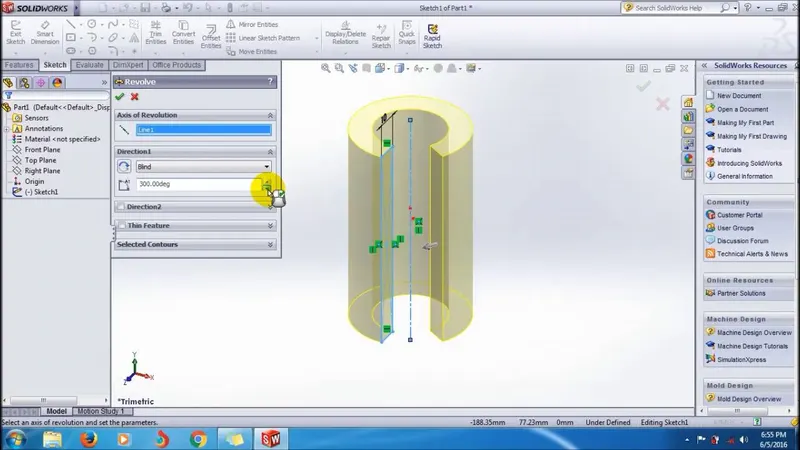
Fig.2: Revolve Boss
- Fillet and Chamfer: They are the most common and preferred feature to reduce sharp edges into curved features. As per design principles, a sharp edge or sudden change in section of a part is not feasible, fillet or chamfer should be provided. There are multiple options by which a fillet can be given to an object and sharp edges converted into smooth curved feature.
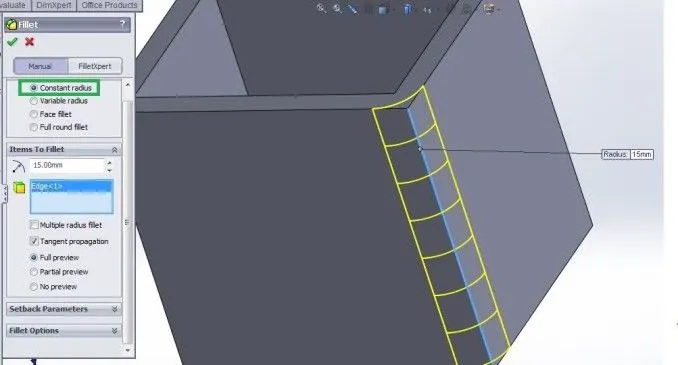
Fig.3:Fillet
- Swept Boss: This feature sweeps a closed path around a closed contour or an open contour. The important thing to ensure is that the sweep profile should be a closed contour, and the path profile can be a closed contour or not. A sample is shown below.
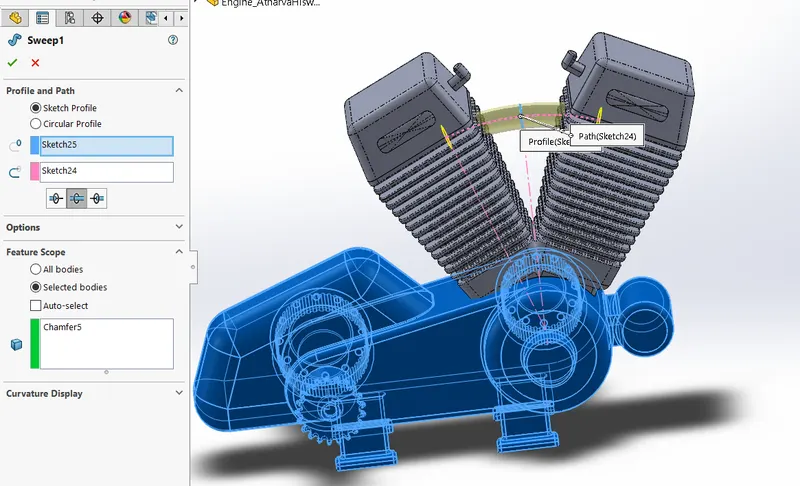
Fig.4: Swept Boss
- Extruded Cut: This is similar to an Extrude Boss/Base, but only difference is that this feature removes material as opposed to function of Extrude Boss. The conditions are similar to that of an Extrude Boss and is used to remove material from a part.
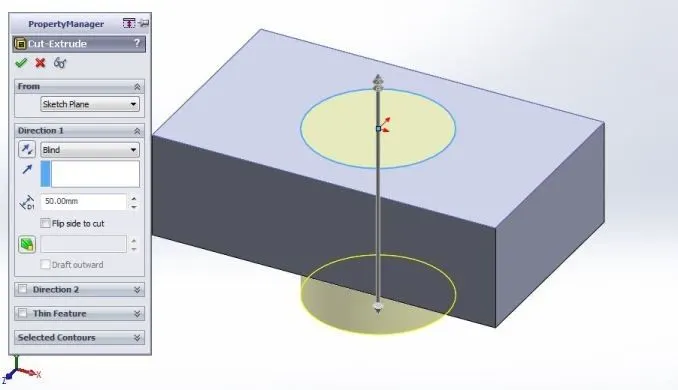
Fig.5: Extrude Cut
- Shell: This feature is used to give inside thickness to a solid body instantly. If none of the faces of the body is selected during Shell feature, the body is made hollow from the inside, just like what we expect to make a fuel tank. A sample is shown below.
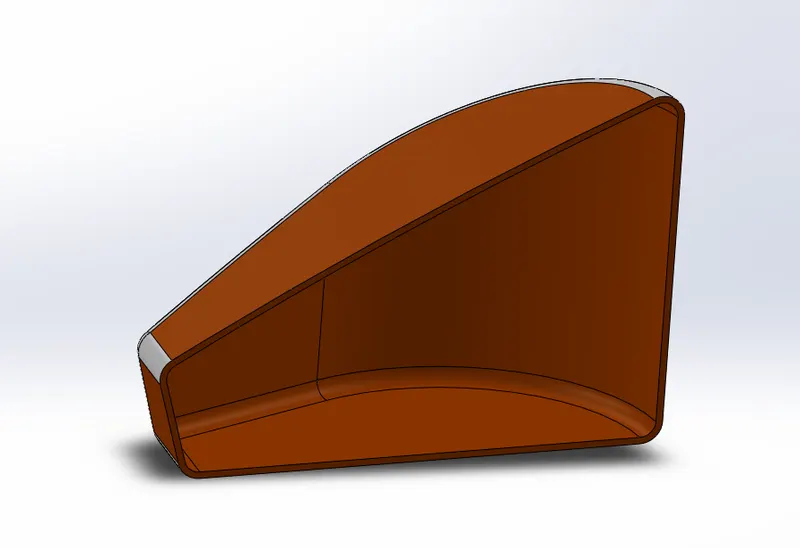
Fig.6 :Shell
- Revolved Cut and Swept Cut: These features are used to remove material from a solid body and operate similar to that of Revolved Boss and Swept Boss respectively.
- Linear Pattern: When a certain geometry is needed to be replicated over a certain straight path, the linear pattern feature is the go-to feature in SOLIDWORKS. The spacing, angle, and path can be given in this feature to create a pattern. It is same as that linear pattern in the Sketch Tools, where a sketch entity could be pattern and here a Feature can be patterned easily. Circular pattern is also similar to a linear pattern and can be used to make circular features.
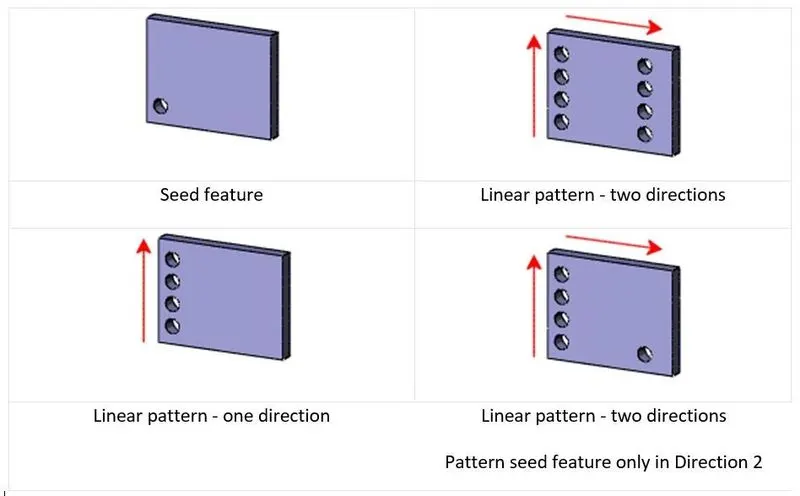
Fig.8: Linear Pattern
- Dome: This feature in SOLIDWORKS reduces the extra work needed to do to create a Dome shaped feature on a circular contour. This feature directly creates a Dome on the selected face of a body.
- Mirror: This feature creates a copy of a solid part with respect to a face or axis or a plane. It also gives option whether to mirror a solid body or a surface body or only certain faces and features in a body.
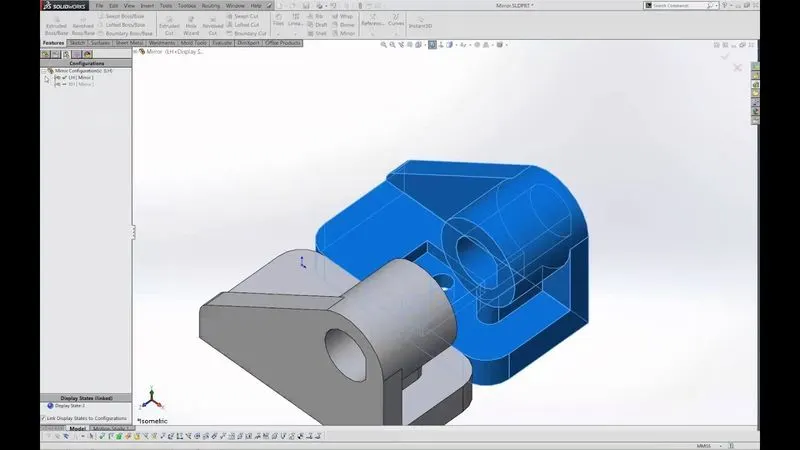
Fig.9: Mirror Bodies
- Reference Geometries: While creating a part, certain geometries can be used as reference geometries such as an axis, a coordinate system or a plane with respect to which the further design of the part will be easier to do. These reference geometries can be used to create features like patterns and mirror as required.
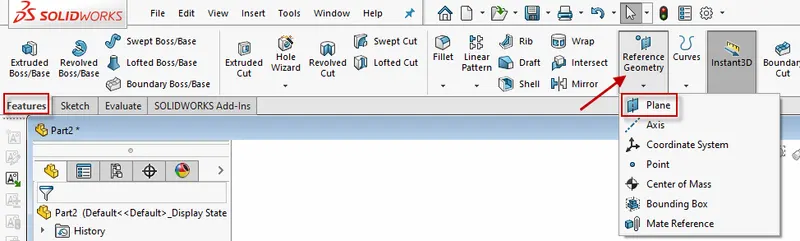
Fig.10: Reference Geometries
- Projected Curve: It is a handy tool to make a 3D curve in SOLIDWORKS. Initially, draw 2 different curves in two perpendicular planes such that the curves are the views of the 3D curve in either of the plane. Then, just use Projected Curve feature and select the two 2D curves, SOLIDWORKS will create a 3D curve as required. Similar to this, when two projected curves are needed to be clubbed, use Composite Curve
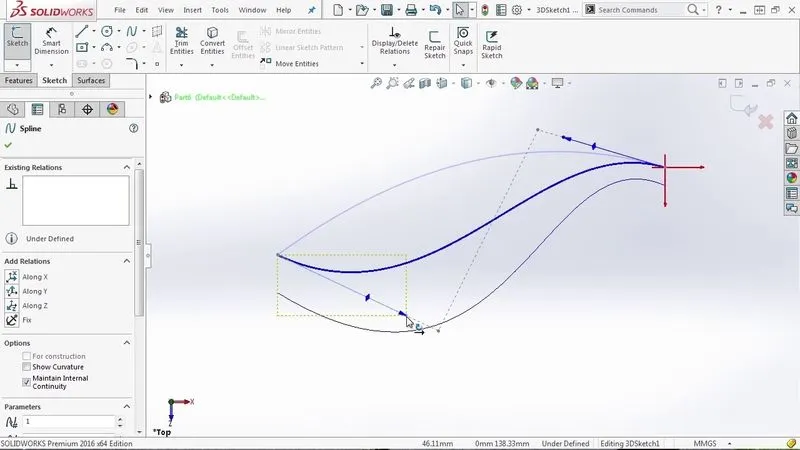
Fig.11: Projected Curve
- Knit: This feature is used commonly where a body is symmetric about a plane or a face. A single half of the body is designed and mirrored to the other part. To make these to different bodies, a single body, Knit Surface feature is used. This will create a solid body of closed volume or join surfaces of the body to form a one surface body.
When the parts are created in the ‘Part’ workbench of SOLIDWORKS, the need to be assembled using the ‘Assembly’ Workbench. There are certain Mate features that can be used to relate multiple bodies in an assembly and put each and every body in its place.
- Fix: This mating feature is used to fix a body in the assembly. This is generally done when other parts are going to be assembled over this particular part. In case of the chopper bike, the Chassis of the bike is fixed and all other components assembled on this chassis using one or more mates described below.
- Coincident: This mating feature is used to join two bodies together. This feature can be applied to a combination of faces, planes, edges, etc. and bodies can be clubbed together in an assembly.
- Concentric: This mate is used to align two circular faces on a single axis. These faces or bodies can then move along this common mating axis.
- Tangent: This mate is used to make circular face tangent with a plane or a planar face.
- Angle: This mate is used to constrain planes or axis at an angle between them.
- Parallel and Perpendicular: These mates can be used to fix the position of a body w.r.t. another body.
This was some introduction about features available in SOLIDWORKS and these features were used to design the components of the Chopper Bike and assemble them together.
- Chassis: The chassis forms the base of the bike on which all the other components are assembled. This chassis forms the rigid base of the bike and holds together the Engine, Front Fork, Rear Wheel and all other parts at their respective positions. The design of the chassis started by using a side view of the bike in the form of a Blueprint Sketch to get an idea of the shape of the chassis. Following features of SOLIDWORKS were used to design the chassis:
- Sketch- Line, Spline, Arc, Circle.
- Projected Curve
- Sweep Boss
- Mirror
- Boss Extrude
- Cut Extrude
- Chamfer
- Fillet
- Dome
- Split
- Reference Plane
- Combine
- Appearance
The chassis is formed as shown below:
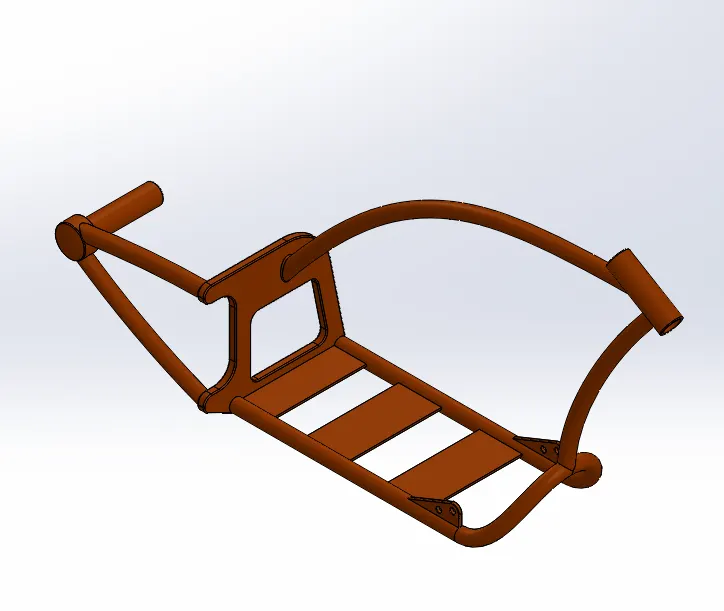
Fig.12: Chassis of Chopper Bike
- Engine: Engine is the power house of the Chopper Bike. It consists of two cylinders arranged in ‘V’ type arrangement, an air filter, 2 spark plugs, transmission pulleys, sprocket for chain drive and air cooling fins on the engine block. It is mounted on the chassis at 4 mounting points. Following features of SOLIDWORKS were used to design the Engine:
- Sketch- Sketch Picture, Line, Spline, Circle, Center Point Rectangle, 3-point Center Rectangle, Circular Sketch Pattern and Trim.
- Extrude Boss
- Extrude Cut
- Revolve Boss
- Dome
- Projected Curve
- Composite Curve
- Split
- Sweep
- Reference Plane
- Circular Pattern
- Linear Pattern
- Mirror
- Combine
- Fillet
- Chamfer
- Appearance
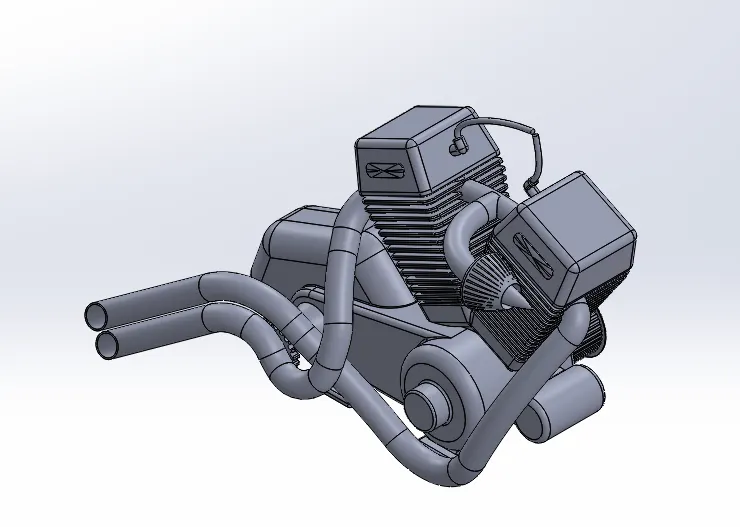
Fig.13: Engine of Chopper Bike
- Pedal: Pedal on the Chopper Bike is mounted such that the rider is comfortable by stretching the legs far and also able to operate the Gear Shifting and the Braking of the bike. Following features of SOLIDWORKS were used to design the Pedal:
- Sketch- 3-point arc, Circle, Spline, Line, Sketch Fillet
- Extrude Boss
- Revolve
- Fillet
- Dome
- Chamfer
- Linear Pattern
- Appearance
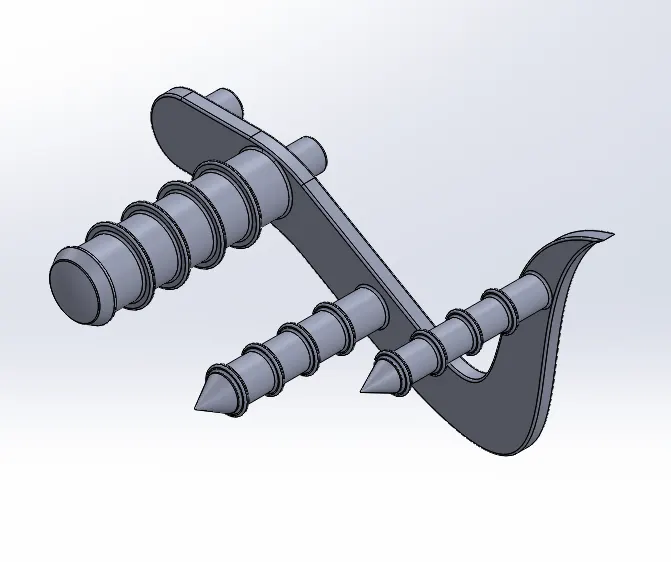
Fig.14: Pedal of Chopper Bike
- Kickstand: Kickstand is used to rest the bike and park it in a place. All the weight of the bike gets shifted on the kick stand and the bike slightly tilts over and can be parked easily without any haste. Following features of SOLIDWORKS were used to design the Kickstand:
- Sketch Tools- Ellipse, Spline, Pierce
- Loft Sweep
- Split
- Dome
- Extrude Boss
- Extrude Cut
- Fillet
- Appearance
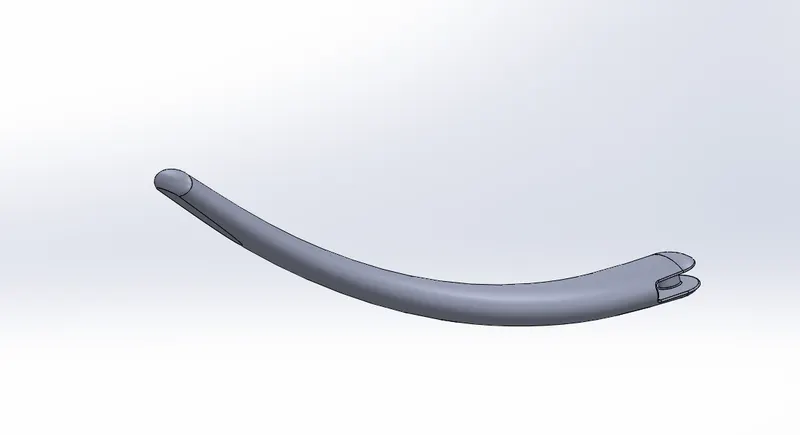
Fig.15: Kickstand of Chopper Bike
- Transmission Belt: The function of the transmission belt is to transmit power from the output shaft of the engine to the input shaft of the transmission system. In case of the Chopper Bike, the transmission belt is mounted on the transmission pulleys. Following features of SOLIDWORKS were used to design the Transmission Belt:
- Sketch Tools- 3-Point Arc, Line, Sketch Offset
- Extrude Boss
- Fillet
- Appearance
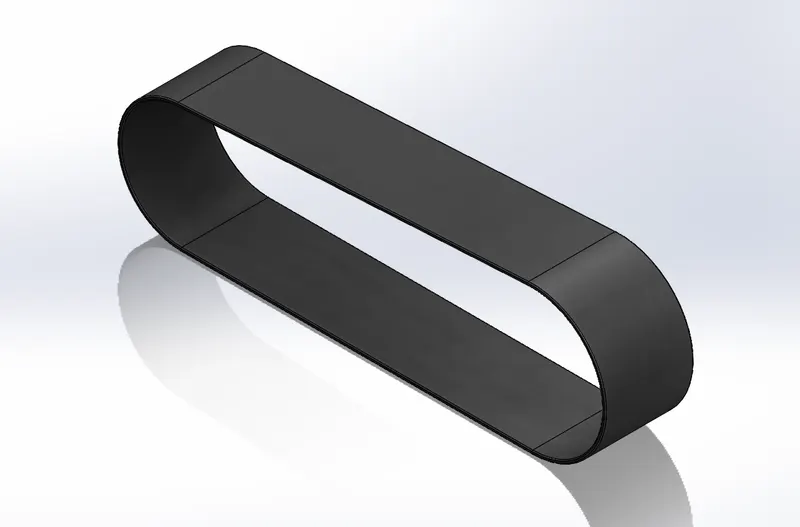
Fig.16: Transmission Belt of Chopper Bike
- Oil Tank: Oil Tank contains oil for lubrication and cooling purpose of the engine. In the Chopper Bike, the oil tank is placed right below the driver’s seat. Following features of SOLIDWORKS were used to design the Oil tank:
- Sketch Tools- 3-Point Arc, Line
- Extrude Boss
- Fillet
- Combine
- Shell
- Appearance
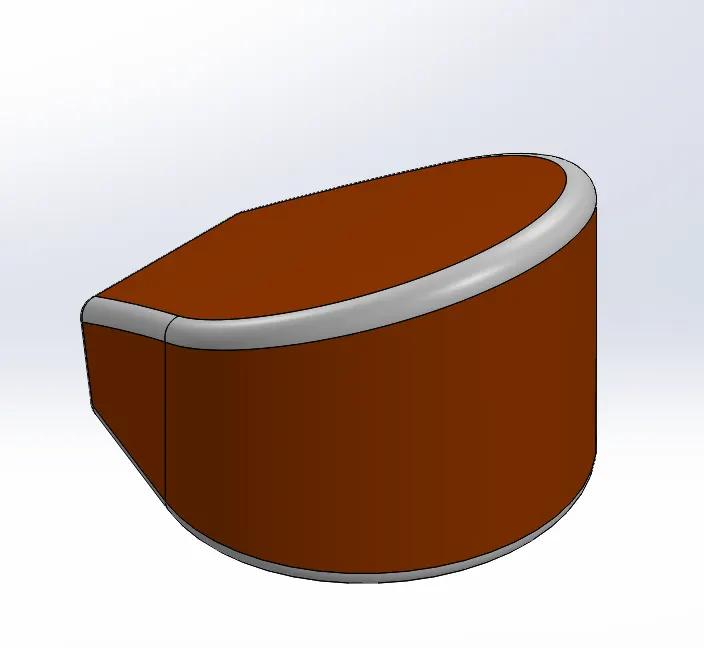
Fig.17: Oil Tank of Chopper Bike
- Rear Wheel: Wheel consists of the rim and the tyre, and is the only point of contact between the bike and the ground. The Rear wheel of the chopper bike is broad because it has to carry the load of the bike and the rider and also provide the necessary grip to move the bike. Treads on the rubber tyre are provided to give this grip. Also, this rear wheel model consists of Chain Sprocket, Disc and the Brake caliper mounted on the disc. Following features of SOLIDWORKS were used to design the Rear Wheel:
- Sketch Tools- 3-Point Arc, Line, Spline, Circle, Sketch Fillet, Trim, Extend, 3-point center rectangle
- Revolved Boss
- Extrude Boss
- Extrude Cut
- Revolved Cut
- Circular Pattern
- Combine
- Fillet
- Appearance
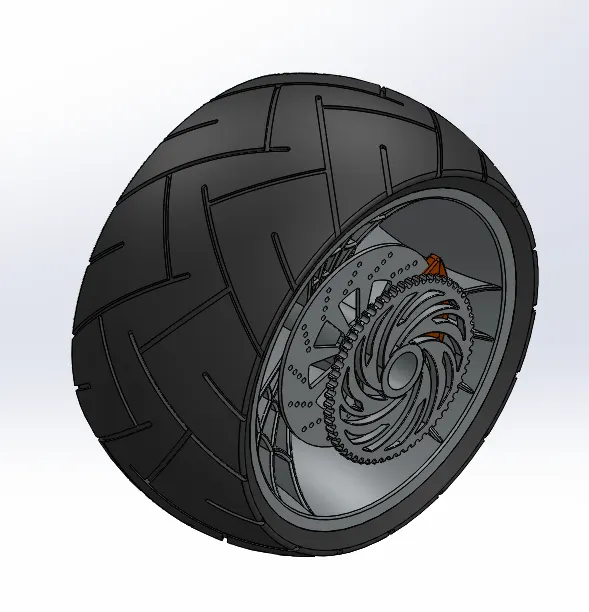
Fig.18: Rear Wheel of Chopper Bike
- Rear Fender: The function of the fender is to cover some part of the wheel and protect the rider from coming in contact of the wheel. The fender also acts as a protective shield and protects the rider from the dirt and dust that can be splashed in the air while the bike moves along the road. Following features of SOLIDWORKS were used to design the Rear Fender:
- Sketch Tools- 3-Point Arc, Line, Spline, Sketch Offset
- Revolve Boss
- Split
- Shell
- Dynamic Mirror Entity
- Fillet
- Appearance
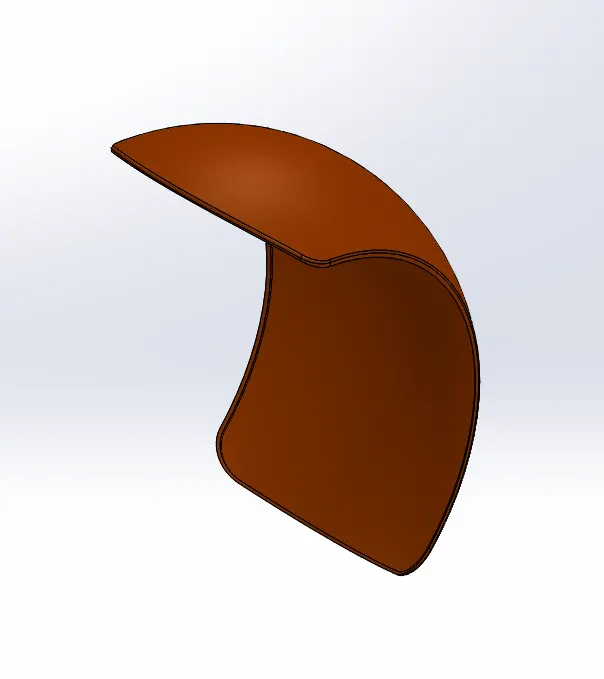
Fig.19: Rear Fender of Chopper Bike
- Chain: Chain is a set of links connected in a loop to makeup a power transmission system called chain drive. A chain is mounted on sprockets and the power is transmitted from one shaft to another shaft on which the sprockets are mounted. Chain has high power transmission capacity and hence is a suitable choice for the Chopper Bike. Following features of SOLIDWORKS were used to design the Chain:
- Sketch Tools- 3-Point Arc, Straight Slot, Circle
- Extrude Boss
- Make and Save Block
- Fillet
- Curve Driven Pattern
- Mirror
- Appearance
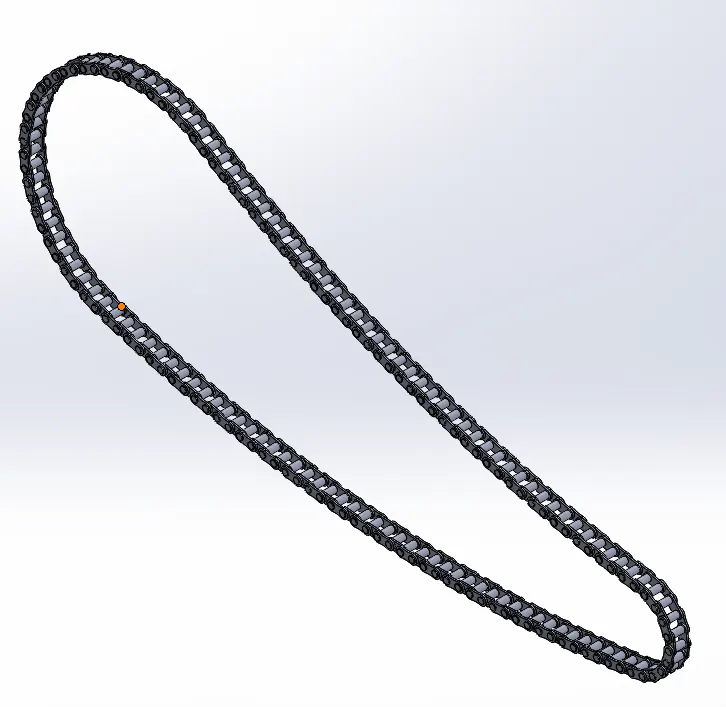
Fig.20: Chain of Chopper Bike
- Gas Tank: Gas Tank stores the fuel required to run the Chopper Bike and is mounted on the top of the Engine. The gas tank of the bike is made up of surfaces and these surfaces are joined to make a Solid Body and Shelled from inside to store fuel. The Seat of the bike is modelled along with the Gas tank and sits in the middle of the bike. Following features of SOLIDWORKS were used to design the Gas Tank:
- Sketch Tools- Sketch Picture, lone, Spline, Construction Line, Trim
- Surface Sweep
- Surface Loft
- Surface Trim
- Boundary Surface
- Surface Knit
- Surface Extrude
- Curve
- Projected Curve
- Split Line
- Sweep Cut
- Reference Plane
- Mirror
- Shell
- Fillet
- Appearance
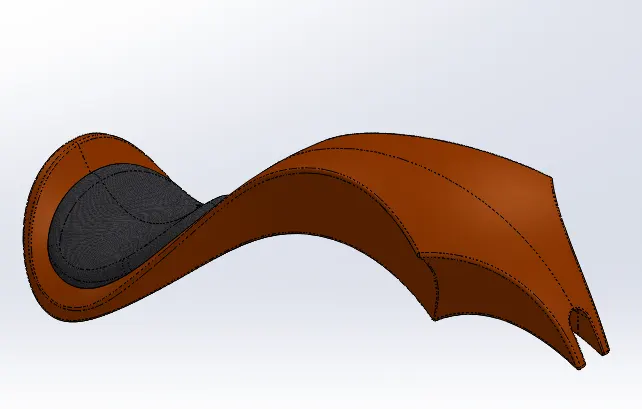
Fig.21: Gas Tank of Chopper Bike
- Front Fork: Front Fork is the component of the bike that connects the front wheel and the chassis together. Front fork enables the rider to control the manoeuvring of the bike and also absorbs the shock loads from the road. The top part of the fork house the brake lever, clutch lever, the accelerator and cables, whereas the lower part of the fork houses the axle of the bike. Following features of SOLIDWORKS were used to design the Front fork:
- Sketch Tools- 3-Point arc, Line, Spline, Circle, Trim
- Revolve Boss
- Extrude Boss
- Linear Pattern
- Extrude Cut
- Revolve Cut
- Dome
- Body Move/Copy
- Projected Curve
- Sweep
- Reference Plane
- Mirror
- Combine
- Fillet
- Chamfer
- Appearance
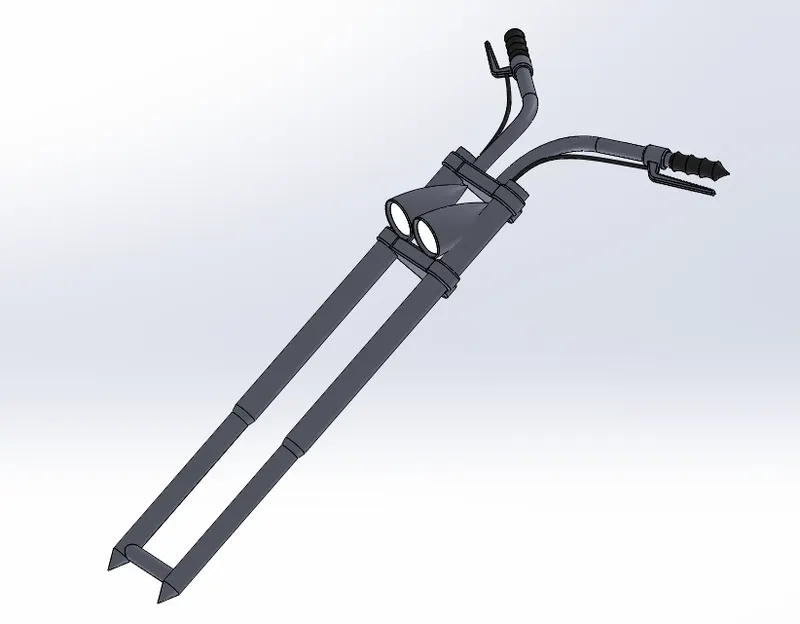
Fig.22: Front Fork of Chopper Bike
- Front Wheel: Wheel consists of the rim and the tyre, and is the only point of contact between the bike and the ground. The Rear wheel of the chopper bike is broad because it has to carry the load of the bike and the rider and also provide the necessary grip to move the bike. Treads on the rubber tyre are provided to give this grip. Also, this rear wheel model consists of Chain Sprocket, Disc and the Brake caliper mounted on the disc. Following features of SOLIDWORKS were used to design the Front Wheel:
- Sketch Tools- 3-Point Arc, Line, Spline, Mid-Point line, Circle, Sketch Fillet, Trim, Extend, 3-Point Center Rectangle
- Revolve Boss
- Extrude Boss
- Revolve Cut
- Extrude Cut
- Circular Pattern
- Combine
- Fillet
- Appearance
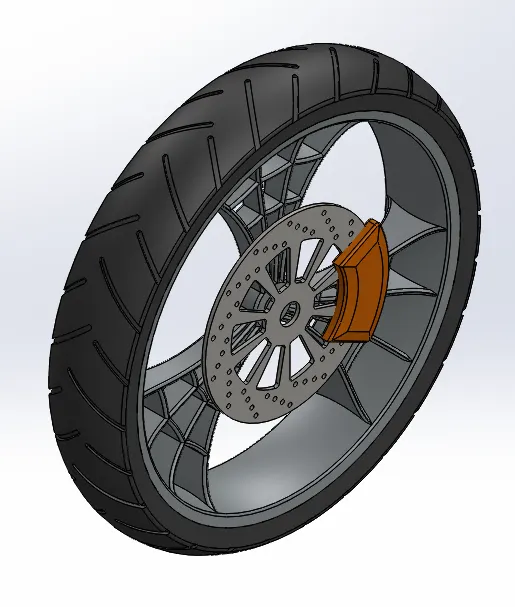
Fig.23: Front Wheel of Chopper Bike
- Front Fender: The function of the fender is to cover some part of the wheel and protect the rider from coming in contact of the wheel. The fender also acts as a protective shield and protects the rider from the dirt and dust that can be splashed in the air while the bike moves along the road. Following features of SOLIDWORKS were used to design the Front Fender:
- Sketch Tools- 3-Point Arc, Line, Spline, Sketch Offset
- Revolve Boss
- Split
- Dynamic Mirror Entity
- Fillet
- Appearance
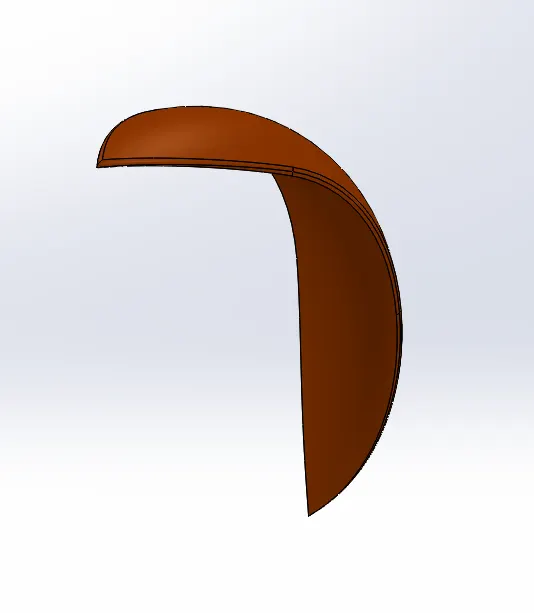
Fig.24: Front Fender of Chopper Bike
Since all the components are modelled according to the sketch picture used, it is time to assemble these together and create the Chopper Bike Model as per the sketch.
Procedure for Assembly:
- Import the Chassis in the assembly environment and fix the chassis so that all other components can be assembled w.r.t. the chassis. This helps further if for some reason the chassis is moved, all other components move along, and do not remain fix in their place. So, to get this advantage, the components are assembled with mating constraints to the chassis and not the assembly environment.
- Import the Engine and mate the Mid-plane chassis and front plane engine. Make the base of the engine mount coincident with the base plate of the chassis. Finally, place the engine 20mm behind the front face of the base plate of the chassis.
- Import the pedal and make it concentric and coincident with the mounting plate. Use mirror feature to appropriately mirror the pedal to left hand.
- Import Kickstand and make it coincident, concentric and limit angle mate with the mounting point.
- Import the Rear wheel, make mid plane chassis and Right Plane Rear Wheel coincident along with a concentric mate between the axle on the chassis and the axle hole on the rear wheel. Make right plane chassis and front plane rear wheel parallel.
- Import the Rear fender and make it concentric with the rear wheel. Make Vertical Plane rear fender and Right plane chassis parallel to each other. At last, make Mid plane chassis and Mid plane rear fender coincident
- Import the Transmission Belt and give Width mates, concentric and angle mate on the pulley.
- Import Oil tank and coincide mid plane oil tank and mid plane chassis. Also give coincident mate between the top face of gearbox and bottom face of the oil tank. Make the Back edge of the oil tank coincident with the edge of the gearbox.
- Import the front fork and make concentric with the stem on the chassis. Give Width mates on the chassis and limit angular movement to 30 degrees in both direction. Make a Central Position mate and suppress it.
- Import the chain and make concentric with the rear wheel. Give Width mate between internal face of the chain and external faces of the sprocket. Finally, give parallel relation between mid-plane chain and mid plane chassis, and bottom plane chassis and center plane chain.
- Import Gas Tank and make bottom plane coincident to the plane created in the chassis. Also, make midplane of gas tank and chassis coincident to each other. Give a distance mate of 5mm between Plane 1 in chassis and Front plane of Gas tank.
- Import front wheel and coincide the mid plane fork and right plane of the wheel. Make the axle concentric with the axle hole in the wheel.
- Import the front fender and give coincident mate between mid-plane fender and mid plane fork. Give angle mate accordingly so that the fender sits at its place.
- Float the Chassis and give tangent mate between top plane of the assembly environment and Kickstand, Front and Rear tyre.
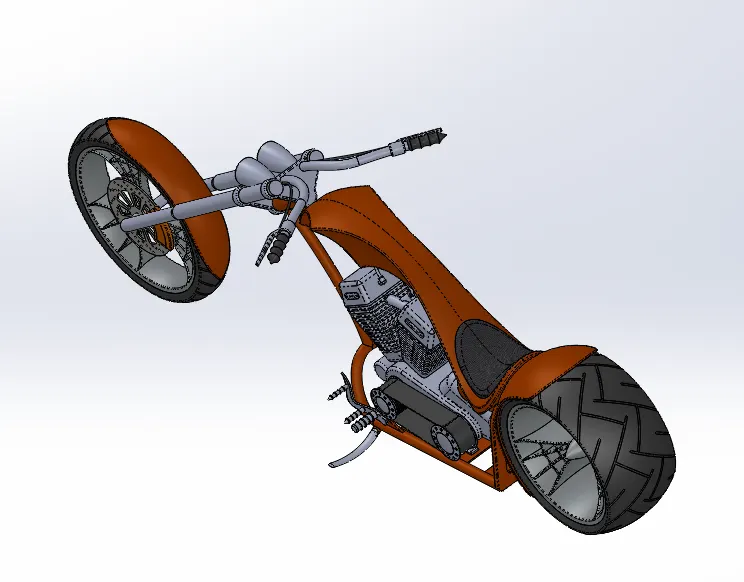
Fig.25: Isometric View of Assembly of Chopper Bike
Photo Realistic Rendering: Rendering of the assembly is done to get an idea of how the product would look like in different backgrounds. It also helps in promotion of the product as well as generate funds from potential investors. For this chopper bike one of the SOILDWORKS Add-in called Photoview360 does this job. It allows to add decals to the bike and edit the scene where we would like to see the bike in various surroundings.
SOLIDWORKS Visualize also helps to perform Photo Realistic Renderings and give some more features that can be edited and renderings can be made to our liking. Some of the Renders are shown below:
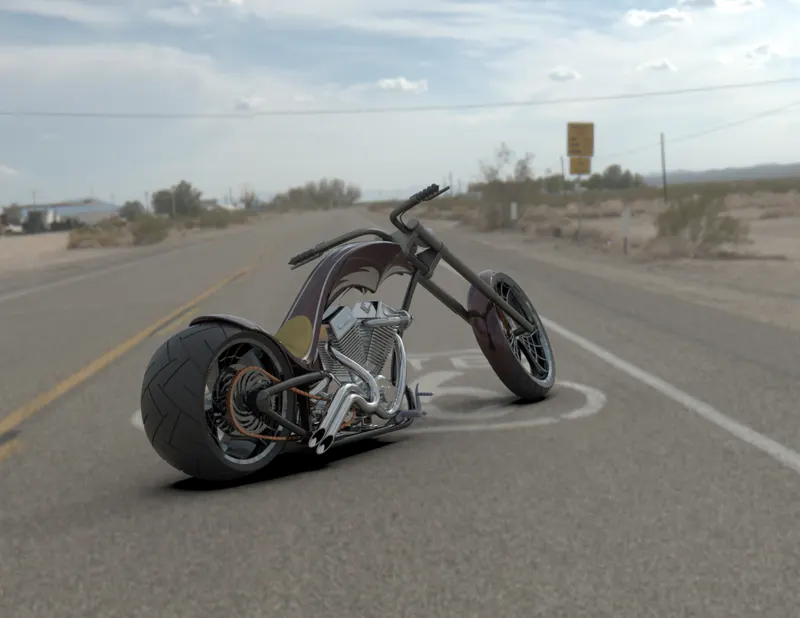
Fig.26: Dark coloured Chopper Bike on Route 66
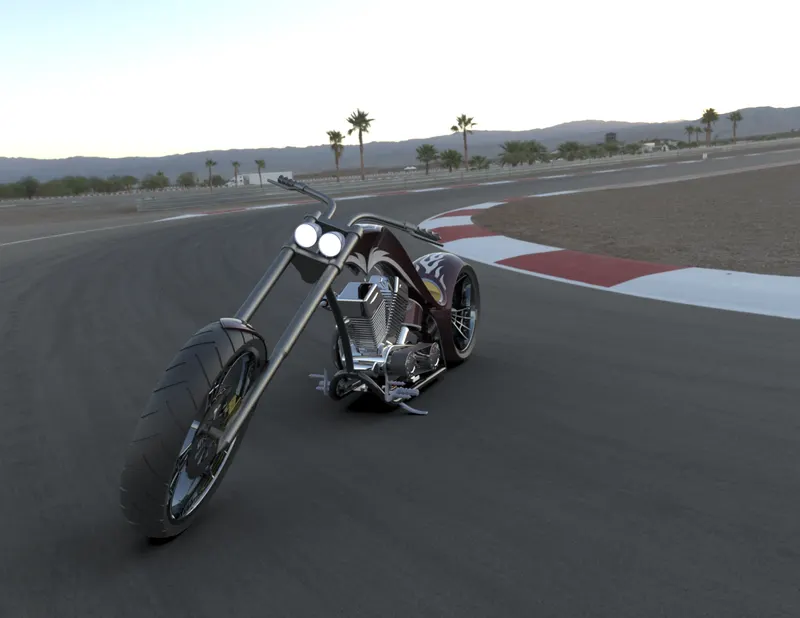
Fig.27: Dark coloured Chopper bike on a Race track with sunset backdrop
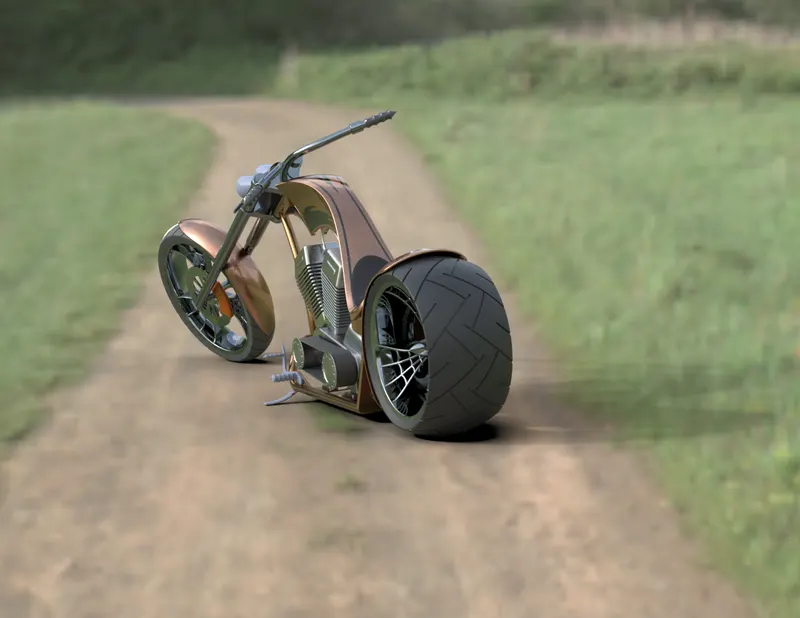
Fig.28: Chopper Bike on a Dirt road on a sunny day. Notice some shade of the dust on the interface of rear tyre and rim.
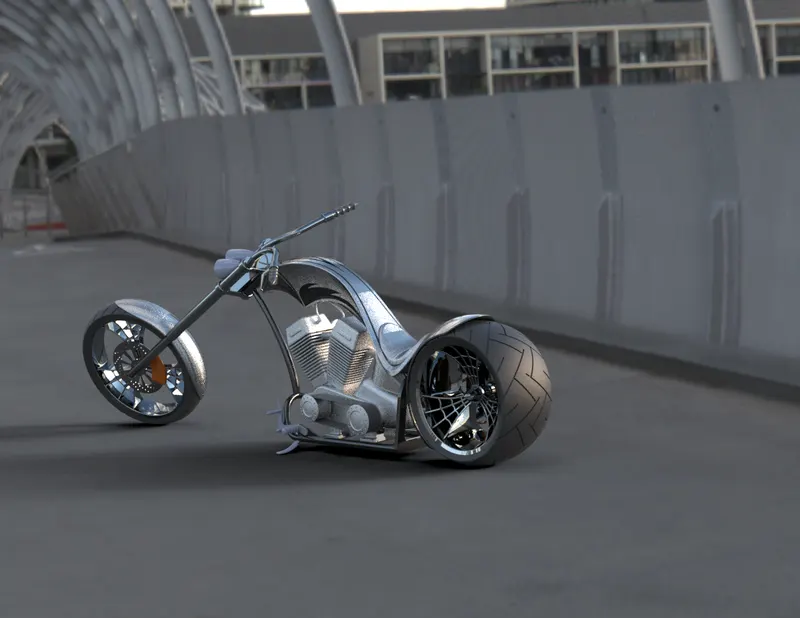
Fig.29: Chrome plated bike reflecting the sunlight on the Dockyard Bridge
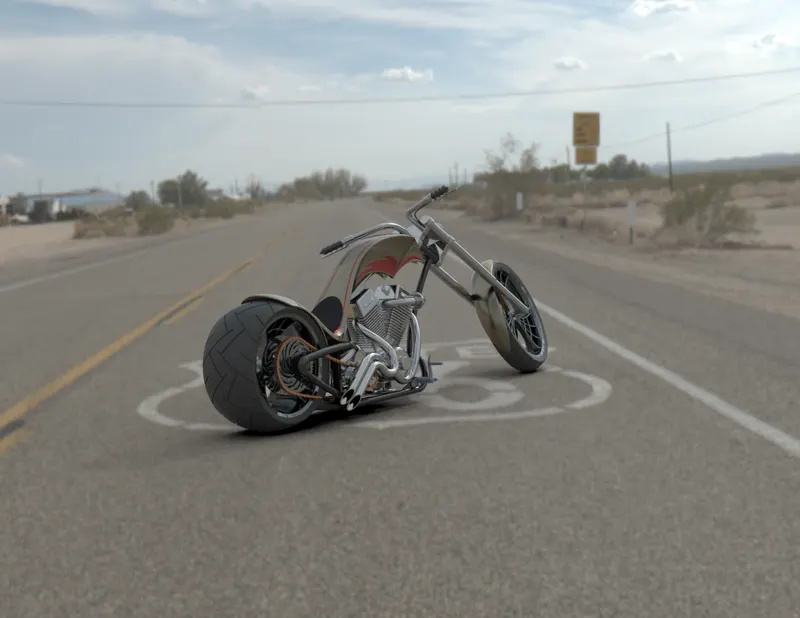
Fig.30: Chopper Bike on Route 66
Conclusion: The design of the American Chopper Bike using a Sketch Picture was completed successfully along with photo realistic renderings.