Rankine Cycle Simulator
Aim:
Write a MATLAB Code to run a Rankine Cycle Simulator and plot the T-s and h-s diagrams for the given data.
Also, print the values of the state point variables in the command window.
Rankine Cycle:
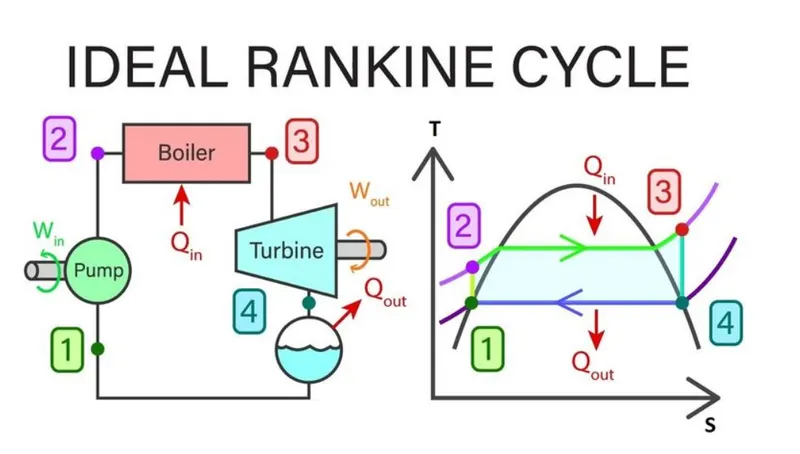
The Rankine cycle is an idealized thermodynamic cycle describing the process by which certain heat engines allow mechanical work to be extracted from a fluid as it moves between a heat source and a heat sink. Heat energy is supplied to the system via a boiler where the working fluid (typically water) is converted to a high pressure gaseous state (steam) in order to turn a turbine. After passing over the turbine the fluid is allowed to condense back into a liquid state as waste heat energy is rejected before being returned to boiler, completing the cycle. Friction losses throughout the system are often neglected for the purpose of simplifying calculations as such losses are usually much less significant than thermodynamic losses, especially in larger systems.
The processes of Rankine Cycle are as follows:
Process 1-2: Isentropic Compression in a pump
The working fluid, in this case water, enters a pump at saturated state at the condenser pressure, to be compressed to the boiler pressure by using a pump. This pump works by means of a prime mover, which is the work input for the cycle. Since water is incompressible fluid, the rise in temperature and enthalpy during compression is negligible.
Process 2-3: Isobaric Heat Addition in a boiler
Water in the boiler at boiler pressure is heated from state 2 to state 3. Boiler is a large heat exchanger in which heat is supplied from a source, typically combustion gases, at constant pressure to the high pressure water to convert it into steam. The heat is added into the system during this process.
Process 3-4: Isentropic Expansion in a turbine
This superheated steam is then passed through a turbine, where it expands and produces work output for the cycle by rotating the shaft of the turbine, which is connected to an electric generator. The steam expands to drop the pressure and temperature such that the steam can enter the condenser at low pressure and temperature. The work is done by the system in this process.
Process 4-1: Isobaric heat rejection in condenser
At state 4, the low pressure steam enter the condenser, where the heat is rejected to the sink and water vapour is converted to liquid water at condenser pressure. This condenser pressure is very low as compared to the boiler pressure, and plays an important role in the amount of work output of the cycle.
A typical Rankine cycle is shown below:
Governing Equations:
`Efficiency= ((h_3-h_4 )-(h_2-h_1))/(h_4-h_1 )`
Objectives:
- Create an Ideal Rankine Cycle Simulator in MATLAB.
- Calculate the state variables according to the user input.
- Plot the corresponding T-s and h-s diagrams
Code Structure in MATLAB:
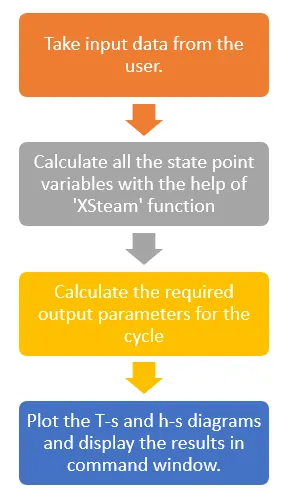
The MATLAB Code for Rankine Cycle Simulator is as below:
clear all
close all
clc

disp('---Rankine Cycle Simulator---')

disp('Process 1-2 is Isentropic Compression')
disp('Process 2-3 is Constant pressure heat addition');
disp('Process 3-4 is Isentropic Expansion');
disp('Process 4-1 is Constant Pressure Heat Rejection');

%Taking Input from the user
disp('---Inputs required to simulate the Rankine Cycle---');
p3 = input('Pressure at Turbine Inlet (bar) (p3) = ');
t3 = input('Temperature at Turbine inlet (celsius) (t3) = ');
p4 = input('Pressure at Turbine Outlet = Temperature at Condensor Inlet (p4) = ');


%State properties at State 1
p1 = p4;
t1 = XSteam('Tsat_p',p1);
v1 = XSteam('vL_p',p1);
h1 = XSteam('hL_p',p1);
s1 = XSteam('sL_p',p1);
sf1 = XSteam('sL_p',p1);

%State Properties at State 2
p2 = p3;
s2 = s1;
t2 = XSteam('T_ps',p2,s2);
h2 = XSteam('h_ps',p2,s2);
v2 = XSteam('v_ps',p2,s2);

tsat_2 = XSteam('Tsat_p',p2);
sf2 = XSteam('sL_T',tsat_2);
hf2 = XSteam('hL_T',tsat_2);
sg2 = XSteam('sV_T',tsat_2);
hg2 = XSteam('hV_T',tsat_2);
cp = XSteam('Cp_ps',p2,s2);
cv = XSteam('Cv_ps',p2,s2);
gamma = cp/cv;

%Pump Work
w_in = h2-h1;

%State 3 Properties
p3;
t3;
h3 = XSteam('h_pT',p3,t3);
s3 = XSteam('s_pT',p3,t3);
v3 = XSteam('v_pT',p3,t3);
x3 = XSteam('vx_ph',p3,h3);

%State 4 properties
p4 = p1;
s4 = s3;
h4 = XSteam('h_ps',p4,s4);
x4 = XSteam('x_ps',p4,s4);
t4 = XSteam('T_ph',p4,h4);
sg4 = XSteam('sV_p',p4);

q_in = h3-h2; %Heat addition in boiler

q_out = h4-h1; %Heat rejected in condensor

w_out = h3-h4; %Work output of turbine

w_net = w_out-w_in; %Net work done

n_th = (w_net/q_in)*100;  %Thermal efficiency of the cycle

bwr = w_in/w_out;  %Back work ratio

%Saturated curve points
s_t = linspace(5,400,100);
for i = 1:length(s_t)
    s(i) = XSteam('sL_T',s_t(i));
    S(i) = XSteam('sV_T',s_t(i));
    h(i) = XSteam('hL_T',s_t(i));
    H(i) = XSteam('hV_T',s_t(i));
end

%T-s diagram
figure(1)
hold on
plot([s1 s2],[t1 t2],'color','r','linewidth',2,'Marker','o','MarkerFaceColor','r')
plot([s2 sf2],[t2 tsat_2],'color','b','linewidth',2,'Marker','o','MarkerFaceColor','b')
plot([s3 s4],[t3 t4],'color','y','linewidth',2,'Marker','o','MarkerFaceColor','y')
plot([s4 s1],[t4 t1],'color','g','linewidth',2,'Marker','o','MarkerFaceColor','g')
plot([sf2 sg2],[tsat_2 tsat_2],'color','b','linewidth',2,'Marker','o','MarkerFaceColor','b')
plot([sg2 s3],[tsat_2 t3],'color','b','linewidth',2,'Marker','o','MarkerFaceColor','b')
plot(s,s_t,'color','black')
plot(S,s_t,'color','black')
xlabel('Entropy (kJ/kg)')
ylabel('Temperature (degree- C)')
title('T-s diagram of Rankine Cycle')
legend('Isentropic Compression','Constant Pressure Heat Addition','Isentropic Expansion','Constant Pressure Heat Rejection','Location','northwest')

%h-s diagram
figure(2)
hold on
plot([s1 s2],[h1 h2],'color','r','linewidth',2,'Marker','o','MarkerFaceColor','r')
plot([s2 sf2],[h2 hf2],'color','b','linewidth',2,'Marker','o','MarkerFaceColor','b')
plot([s3 s4],[h3 h4],'color','y','linewidth',2,'Marker','o','MarkerFaceColor','y')
plot([s4 s1],[h4 h1],'color','g','linewidth',2,'Marker','o','MarkerFaceColor','g')
plot([sf2 sg2],[hf2 hg2],'color','b','linewidth',2,'Marker','o','MarkerFaceColor','b')
plot([sg2 s3],[hg2 h3],'color','b','linewidth',2,'Marker','o','MarkerFaceColor','b')
plot(s,h,'color','black')
plot(S,H,'color','black')
xlabel('Entropy (kJ/kg)')
ylabel('Enthalpy (kJ/kg)')
title('h-s diagram of Rankine Cycle')
legend('Isentropic Compression','Constant Pressure Heat Addition','Isentropic Expansion','Constant Pressure Heat Rejection','Location','northwest')

%Printing the output
fprintf('\nRESULTS\n')
fprintf('\nAt State point 1:')
fprintf('\nP1 = %f bar',p1)
fprintf('\nT1 = %f degree Celsius',t1)
fprintf('\nh1 = %f kJ/kg',h1)
fprintf('\ns1 = %f kJ/kg K\n',s1)

fprintf('\nAt State point 2:')
fprintf('\nP2 = %f bar',p2)
fprintf('\nT2 = %f degree Celsius',t2)
fprintf('\nh2 = %f kJ/kg',h2)
fprintf('\ns2 = %f kJ/kg K\n',s2)

fprintf('\nAt State point 3:')
fprintf('\nP1 = %f bar',p3)
fprintf('\nT1 = %f degree Celsius',t3)
fprintf('\nh1 = %f kJ/kg',h3)
fprintf('\ns1 = %f kJ/kg K\n',s3)

fprintf('\nAt State point 4:')
fprintf('\nP1 = %f bar',p4)
fprintf('\nT1 = %f degree Celsius',t4)
fprintf('\nh1 = %f kJ/kg',h4)
fprintf('\ns1 = %f kJ/kg K',s4)
fprintf('\nx4 = %f \n',x4)

fprintf('\nCycle Results')
fprintf('\nNet Work Ouput = %f kJ/kg',w_net)
fprintf('\nBack Work Ratio = %f',bwr)
fprintf('\nThermal Efficiency = %f%%',n_th)

%The END
Starting on a clean note, display the title of the simulator system and let the user know the sequence of the processes for which the simulator has been programmed. Then, take the required input from the user as per following part of the code in MATLAB:
clear all
close all
clc
disp('---Rankine Cycle Simulator---')
disp('Process 1-2 is Isentropic Compression')
disp('Process 2-3 is Constant pressure heat addition');
disp('Process 3-4 is Isentropic Expansion');
disp('Process 4-1 is Constant Pressure Heat Rejection');
%Taking Input from the user
disp('---Inputs required to simulate the Rankine Cycle---');
p3 = input('Pressure at Turbine Inlet (bar) (p3) = ');
t3 = input('Temperature at Turbine inlet (celsius) (t3) = ');
p4 = input('Pressure at Turbine Outlet = Temperature at Condensor Inlet (p4) = ');
To calculate the state point variables, use the ‘XSteam’ function in the given data and assign variable names accordingly so that the properties are not confused with. To calculate efficiency and back work ratio, as well as to plot the graphs, we need pressure, temperature, specific volume, enthalpy and entropy at least for every state point. Also, calculate the dryness fraction at state 4.
%State properties at State 1
p1 = p4;
t1 = XSteam('Tsat_p',p1);
v1 = XSteam('vL_p',p1);
h1 = XSteam('hL_p',p1);
s1 = XSteam('sL_p',p1);
sf1 = XSteam('sL_p',p1);
%State Properties at State 2
p2 = p3;
s2 = s1;
t2 = XSteam('T_ps',p2,s2);
h2 = XSteam('h_ps',p2,s2);
v2 = XSteam('v_ps',p2,s2);
tsat_2 = XSteam('Tsat_p',p2);
sf2 = XSteam('sL_T',tsat_2);
hf2 = XSteam('hL_T',tsat_2);
sg2 = XSteam('sV_T',tsat_2);
hg2 = XSteam('hV_T',tsat_2);
cp = XSteam('Cp_ps',p2,s2);
cv = XSteam('Cv_ps',p2,s2);
gamma = cp/cv;
%Pump Work
w_in = h2-h1;
%State 3 Properties
p3;
t3;
h3 = XSteam('h_pT',p3,t3);
s3 = XSteam('s_pT',p3,t3);
v3 = XSteam('v_pT',p3,t3);
x3 = XSteam('vx_ph',p3,h3);
%State 4 properties
p4 = p1;
s4 = s3;
h4 = XSteam('h_ps',p4,s4);
x4 = XSteam('x_ps',p4,s4);
t4 = XSteam('T_ph',p4,h4);
sg4 = XSteam('sV_p',p4);
Input work for the cycle is the work required to run the compressor/pump. Hence, Input work = h2-h1.
Next step is to find the points required to plot the saturated liquid curve and saturated vapour curve. Use a ‘for loop’ to find these points. We need to use different variable set to calculate the points for saturated fluid points and saturated vapour points. We create and array of 100 points between 5⁰C and 400⁰C to calculate these points. The code for the ‘for loop’ is shown below:
%Saturated curve points
s_t = linspace(5,400,100);
for i = 1:length(s_t)
s(i) = XSteam('sL_T',s_t(i));
S(i) = XSteam('sV_T',s_t(i));
h(i) = XSteam('hL_T',s_t(i));
H(i) = XSteam('hV_T',s_t(i));
end
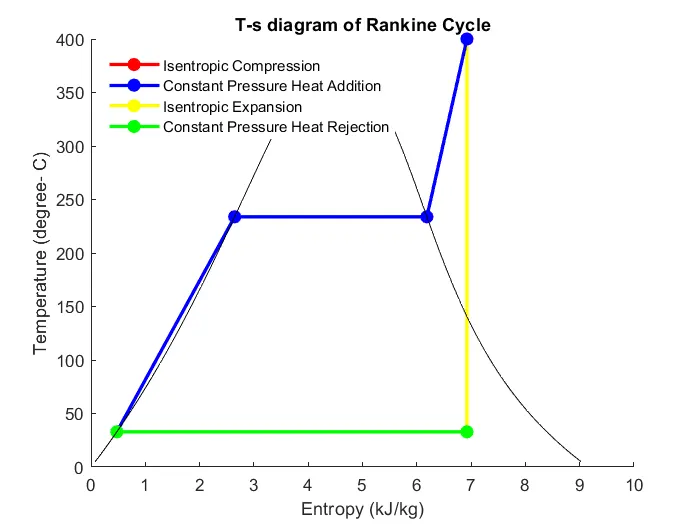
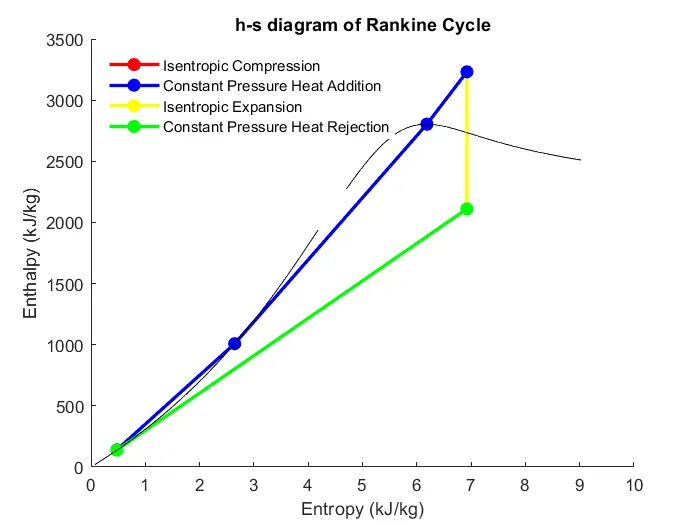
Plot the T-s diagram and h-s diagram by plotting the lines step by step from one state point to other state point. For the ease of creating a legend, I have plotted some part of the Isobaric Heat Addition process after all the processes were plotted. After the cycle is plotted, plot the graph for saturated fluid line and saturated vapour line and finally, label the graphs accordingly. The code is as follows:
%T-s diagram
figure(1)
hold on
plot([s1 s2],[t1 t2],'color','r','linewidth',2,'Marker','o','MarkerFaceColor','r')
plot([s2 sf2],[t2 tsat_2],'color','b','linewidth',2,'Marker','o','MarkerFaceColor','b')
plot([s3 s4],[t3 t4],'color','y','linewidth',2,'Marker','o','MarkerFaceColor','y')
plot([s4 s1],[t4 t1],'color','g','linewidth',2,'Marker','o','MarkerFaceColor','g')
plot([sf2 sg2],[tsat_2 tsat_2],'color','b','linewidth',2,'Marker','o','MarkerFaceColor','b')
plot([sg2 s3],[tsat_2 t3],'color','b','linewidth',2,'Marker','o','MarkerFaceColor','b')
plot(s,s_t,'color','black')
plot(S,s_t,'color','black')
xlabel('Entropy (kJ/kg)')
ylabel('Temperature (degree- C)')
title('T-s diagram of Rankine Cycle')
legend('Isentropic Compression','Constant Pressure Heat Addition','Isentropic Expansion','Constant Pressure Heat Rejection','Location','northwest')
%h-s diagram
figure(2)
hold on
plot([s1 s2],[h1 h2],'color','r','linewidth',2,'Marker','o','MarkerFaceColor','r')
plot([s2 sf2],[h2 hf2],'color','b','linewidth',2,'Marker','o','MarkerFaceColor','b')
plot([s3 s4],[h3 h4],'color','y','linewidth',2,'Marker','o','MarkerFaceColor','y')
plot([s4 s1],[h4 h1],'color','g','linewidth',2,'Marker','o','MarkerFaceColor','g')
plot([sf2 sg2],[hf2 hg2],'color','b','linewidth',2,'Marker','o','MarkerFaceColor','b')
plot([sg2 s3],[hg2 h3],'color','b','linewidth',2,'Marker','o','MarkerFaceColor','b')
plot(s,h,'color','black')
plot(S,H,'color','black')
xlabel('Entropy (kJ/kg)')
ylabel('Enthalpy (kJ/kg)')
title('h-s diagram of Rankine Cycle')
legend('Isentropic Compression','Constant Pressure Heat Addition','Isentropic Expansion','Constant Pressure Heat Rejection','Location','northwest')
Finally, the following code will help display the state variable points in the command window. Use the command '\n' to write the next data on a new line.
%Printing the output
fprintf('\nRESULTS\n')
fprintf('\nAt State point 1:')
fprintf('\nP1 = %f bar',p1)
fprintf('\nT1 = %f degree Celsius',t1)
fprintf('\nh1 = %f kJ/kg',h1)
fprintf('\ns1 = %f kJ/kg K\n',s1)
fprintf('\nAt State point 2:')
fprintf('\nP2 = %f bar',p2)
fprintf('\nT2 = %f degree Celsius',t2)
fprintf('\nh2 = %f kJ/kg',h2)
fprintf('\ns2 = %f kJ/kg K\n',s2)
fprintf('\nAt State point 3:')
fprintf('\nP1 = %f bar',p3)
fprintf('\nT1 = %f degree Celsius',t3)
fprintf('\nh1 = %f kJ/kg',h3)
fprintf('\ns1 = %f kJ/kg K\n',s3)
fprintf('\nAt State point 4:')
fprintf('\nP1 = %f bar',p4)
fprintf('\nT1 = %f degree Celsius',t4)
fprintf('\nh1 = %f kJ/kg',h4)
fprintf('\ns1 = %f kJ/kg K',s4)
fprintf('\nx4 = %f \n',x4)
fprintf('\nCycle Results')
fprintf('\nNet Work Ouput = %f kJ/kg',w_net)
fprintf('\nBack Work Ratio = %f',bwr)
fprintf('\nThermal Efficiency = %f%%',n_th)
Observations:
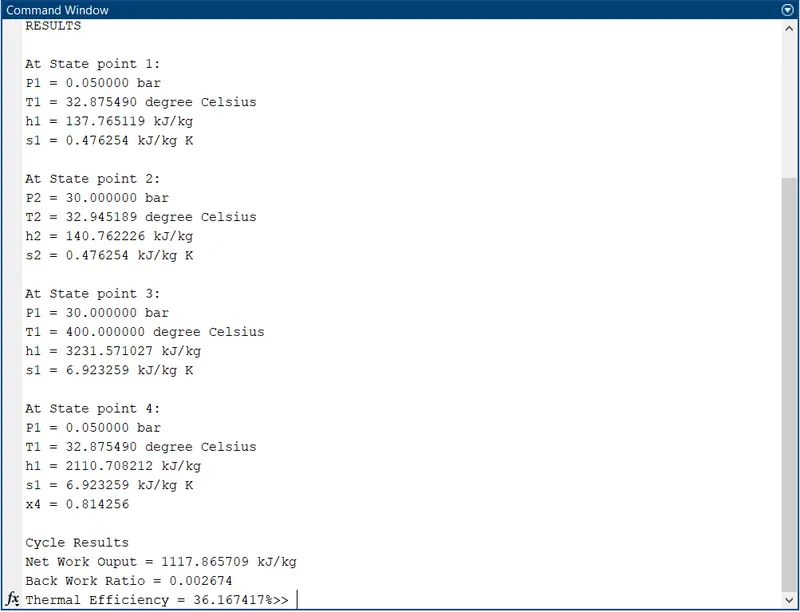
The thermal efficiency of the cycle for the given input is calculated as 36.1674%.
The back work ratio for the cycle is calculated as 0.0026.
The T-s and h-s diagram are as follows:
The state point data is shown in the command window as follows:
Conclusion:
The MATLAB programmed code for an Ideal Rankine Cycle Simulator is executed successfully.