Drafting of various geometries using Chamfer, Fillet tool in AutoCad
dear madam,
each and every point i am not explained here because i am not engaged sufficient time for this explanation if any doubt on my work then i will send autocad files to your mail id.
1.
Aim:
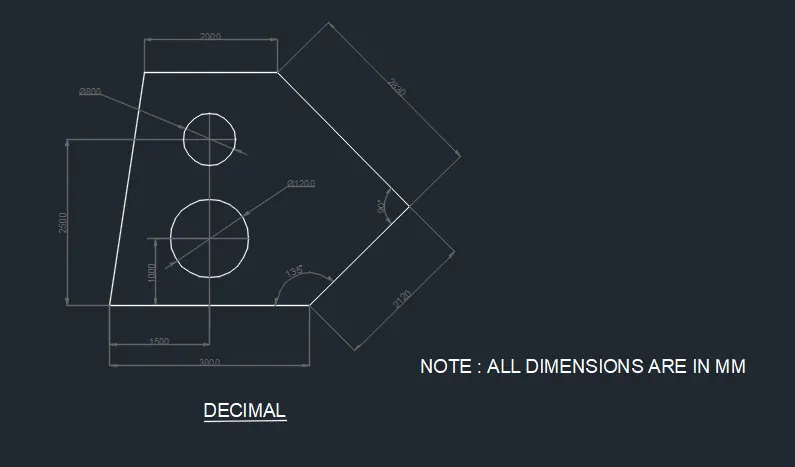
This problem I have solved with the Relative line and circle Coordinate method
Procedure:
first i selected units and limits, dimension style as per given question format.
in the Command prompt write L enter
Specify the first point as (0,0) have taken this as my first point
1. in the command prompt write (@3000,0)
2.
3. in the command prompt write 2120 with @45 degree
4. in the command prompt write 2830 with@315 degree
5. and connected with start and end points with line command.
6. after i taken circle command for to drtaw the dia 800 and 1200 circles
7 and i used dim linear , aligned,angular,dia commands to measure the all dimensions in the drawing
8. and i used multi line text to write notes or titles on drawing.
Result :
2.
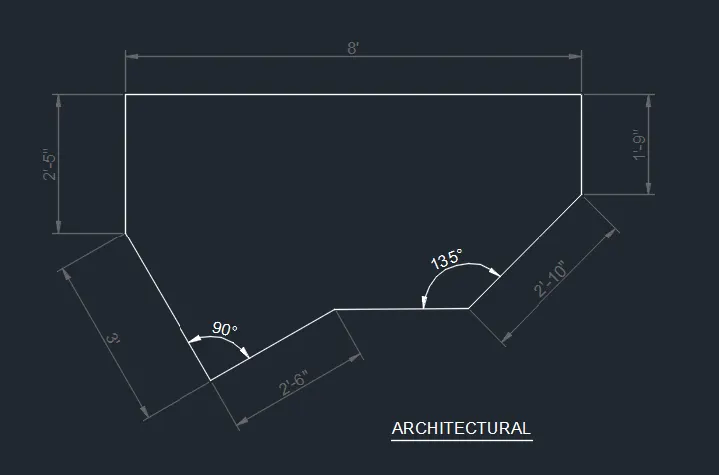
Aim:
This problem I have solved with the Relative line and Coordinate circle method to caliculate the opposite angles
Procedure:
first i selected units and limits, dimension style as per given question format.
in the Command prompt write L enter
Specify the first point as (0,0) have taken this as my first point
1.and i drawn all lines with xy cordinates dimensions like this (x,y)
2.and i used chamfer to connect the various lines or i drawn that inclined lines with measuring given angles.
3. in the command prompt write all dimensions for to draw this drawings like above cordinates enter.
4. and i caliculated opposite angles to draw the angular lines with accurate angles.
5. and connected with start and end points with line command.
6. and i changed the dimensions text colour for to clear visible of drawing.
7 and i used dim linear , aligned,angular commands to measure the all dimensions in the drawing
8. and i used multi line text to write titles on drawing.
Result :
3.
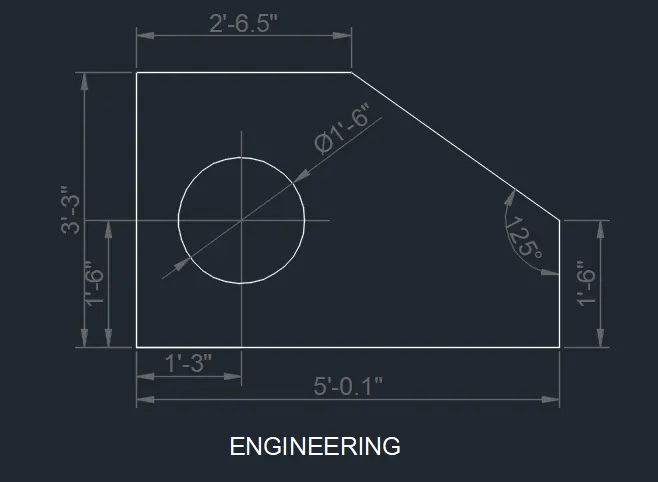
Aim:
This problem I have solved with the Relative rectangular and Coordinate circle method to caliculate the opposite angles
Procedure:
first i selected units and limits, dimension style as per given question format.
in the Command prompt write L enter
Specify the first point as (0,0) have taken this as my first point
1.and i drawn all lines with xy cordinates dimensions like this (x,y)
1a. i changed the dim style for inches feet format, i selected the engineering dimensions.
2.and i used chamfer to connect the various lines or i drawn that inclined lines with measuring given angles.
3. in the command prompt write all dimensions for to draw this drawings like above cordinates enter.
4. and i caliculated opposite angles to draw the angular lines with accurate angles.
4a.i used circle command to draw the circle and i drawn center point of circle with given dimensions.
5. and connected with start and end points with line command.
6. and i changed the dimensions lines ,text colours for to clear visible of drawing.
7 and i used dim linear , aligned,angular commands to measure the all dimensions in the drawing
8. and i used multi line text to write titles on drawing.
Result :
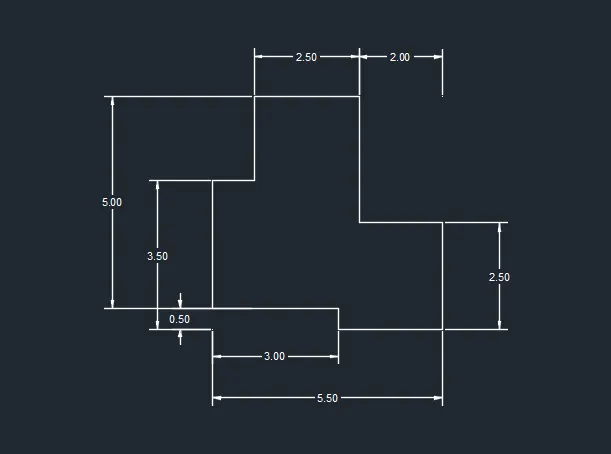
4.
Aim:
This problem I have solved with the Relative line and Coordinate circle method to caliculate the opposite angles
Procedure:
first i selected units and limits, dimension style as per given question format.
in the Command prompt write L enter
Specify the first point as (0,0) have taken this as my first point
1.and i drawn all lines with xy cordinates dimensions like this (x,y)
2. decimal dimension used in the format of 0.00
3. in the command prompt write all dimensions for to draw this drawings like above cordinates enter..
5. and connected with start and end points with line command.
6. and i changed the dimensions text colour for to clear visible of drawing.
7 and i used dim linear , aligned,angular commands to measure the all dimensions in the drawing
8. and i used multi line text to write titles on drawing.
Result :
5.
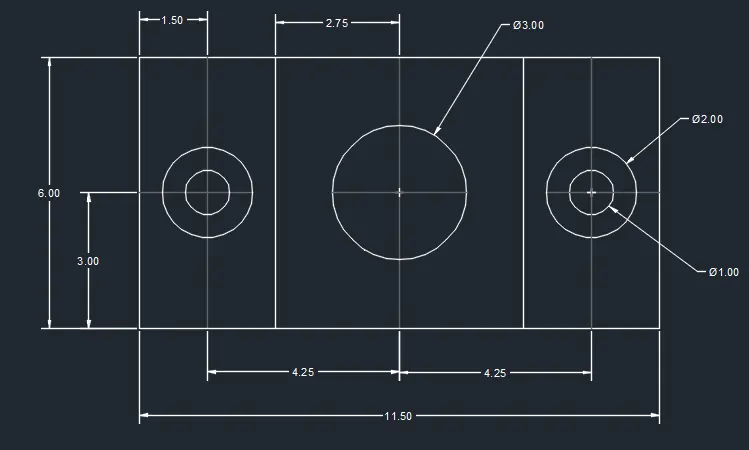
Aim:
This problem I have solved with the Relative line and Coordinate circle method to caliculate the opposite angles
Procedure:
first i selected units and limits, dimension style as per given question format.
in the Command prompt write L enter
Specify the first point as (0,0) have taken this as my first point
1.and i drawn all lines with xy cordinates dimensions like this (x,y)
2.first i mentioned the point of centre of the circles with given dimensions.
3. in the command prompt write all dimensions for to draw this drawings like above cordinates enter.
4.and i drawn circles with commands as per given dimensions in the drawing.
5. and connected with start and end points with line command with given dimensions.
6. and i changed the dimensions text colour for to clear visible of drawing.
7 and i used dim linear , aligned,angular commands to measure the all dimensions in the drawing
8. and i used multi line text to write titles on drawing.
Result :
6.
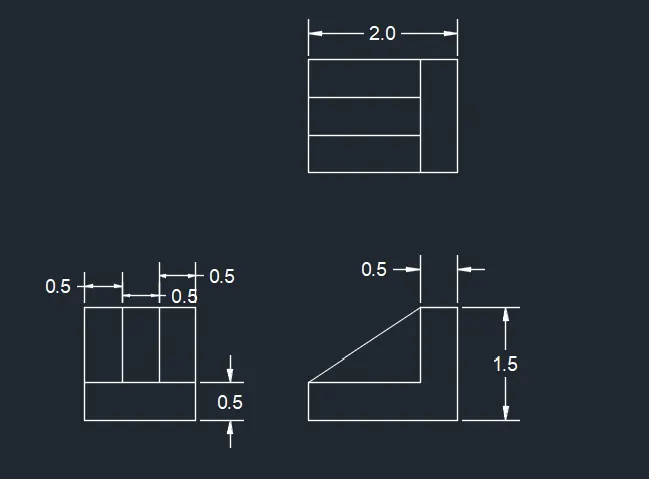
Aim:
This problem I have solved with the Relative line and Coordinate circle method to caliculate the opposite angles
Procedure:
first i selected units and limits, dimension style as per given question format.
in the Command prompt write L enter
Specify the first point as (0,0) have taken this as my first point
1.and i drawn all lines with xy cordinates dimensions like this (x,y)
2.and i used offset command for steps drawn with equal distances.
3. in the command prompt write all dimensions for to draw this drawings like above cordinates enter.
4. and i used trim for to cut the line inbetween the two various lines.
5. and connected with start and end points with line command.
6. and i changed the dimensions text colour for to clear visible of drawing.
7 and i used dim linear , aligned,angular commands to measure the all dimensions in the drawing
8. and i used multi line text to write titles on drawing.
Result :
7.
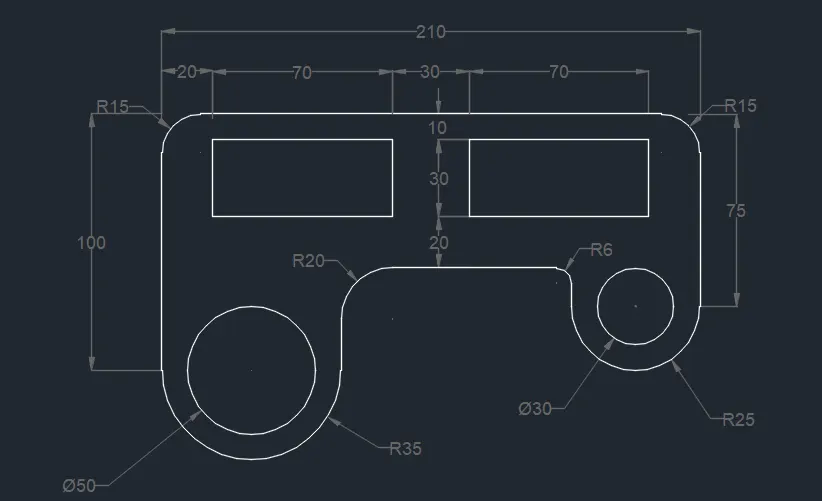
Aim:
This problem I have solved with the Relative line and rectangulars and Coordinate circle method to caliculate the opposite angles
Procedure:
first i selected units and limits, dimension style as per given question format.
in the Command prompt write L enter
Specify the first point as (0,0) have taken this as my first point
1.and i drawn all lines with xy cordinates dimensions like this (x,y)
2.and first i draw the center points of each circle and arc with geometry caliculations with various radious as per given dimensions.
3. in the command prompt write all dimensions for to draw this drawings like above cordinates enter.
4. and i used 3 points arc commands like start,end,angles and start,end,radius to draw the all arcs.
5. and connected with start and end points of arcs with line command.
6. and i changed the dimensions text colour for to clear visible of drawing.
7 and i used dim linear , aligned,angular radius commands to measure the all dimensions in the drawing
8. and i used multi line text to write titles on drawing.
Result :
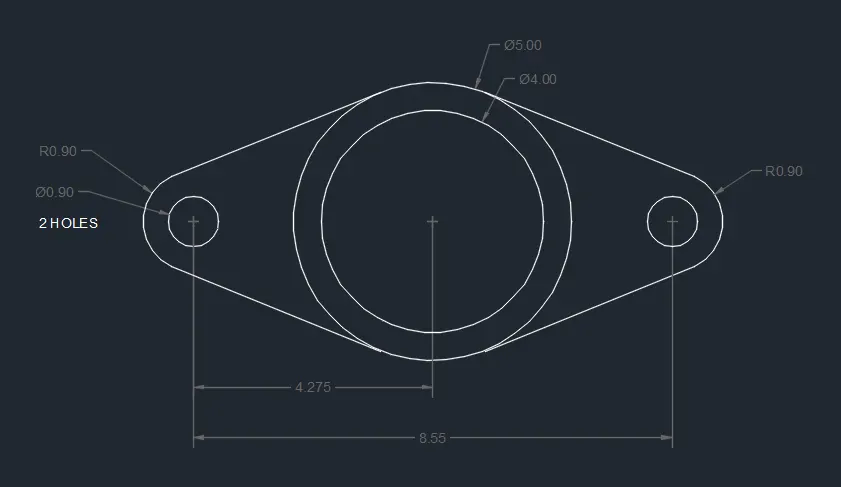
8.
Aim:
This problem I have solved with the Relative line and Coordinate circle method to caliculate the opposite angles
Procedure:
first i selected units and limits, dimension style as per given question format.
in the Command prompt write L enter
Specify the first point as (0,0) have taken this as my first point
1.first i drawn center points of all circles with given inbetween the distances
2. after i used circle command for dia and radius formats with given dimensions.
3. and i used 3 points arc commands like start,end,angles and start,end,radius to draw the all arcs.
5. and connected with start and end points with circle tangents to arc end points with line command.
6. and i changed the dimensions text colour for to clear visible of drawing.
7 and i used dim linear , aligned,angular commands to measure the all dimensions in the drawing
8. and i used multi line text to write titles on drawing.
Result :
9.
Aim:
This problem I have solved with the Relative line and Coordinate circle method to caliculate the opposite angles
Procedure:
first i selected units and limits, dimension style as per given question format.
in the Command prompt write L enter
Specify the first point as (0,0) have taken this as my first point
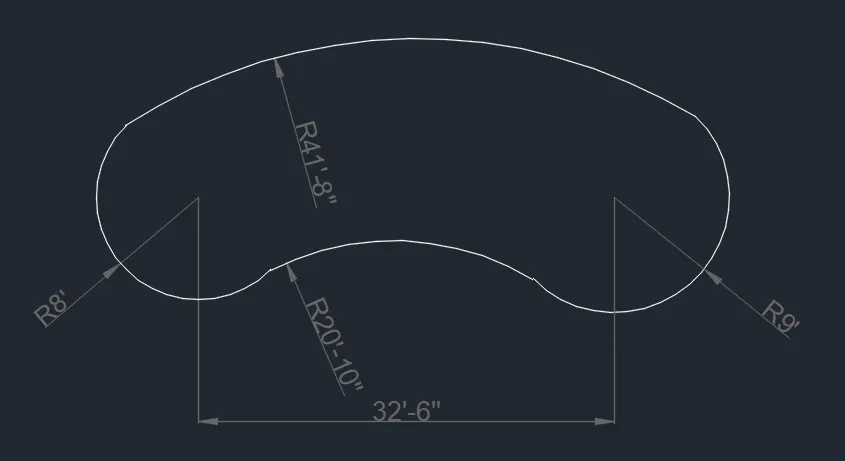
1.first i drawn center points of all half circles with given inbetween the distances
2. and i drawn the start and end points with 8' radius with 135 degree and 315 degree
3. and i used 3 points arc commands like start,end,angles and start,end,radius to draw the all arcs.
4.for to draw the arcs inbetween the both side arcs 8' and 9', for this i used start,end,radius 3 points arc command..
6. and i changed the dimensions text colour for to clear visible of drawing.
7 and i used dim linear , aligned,angular commands to measure the all dimensions in the drawing
8. and i used multi line text to write titles on drawing.
Result :
10.
Aim:
This problem I have solved with the Relative line and rectangular Coordinate methods
Procedure:
first i selected units and limits, dimension style as per given question format.
in the Command prompt write L enter
Specify the first point as (0,0) have taken this as my first point
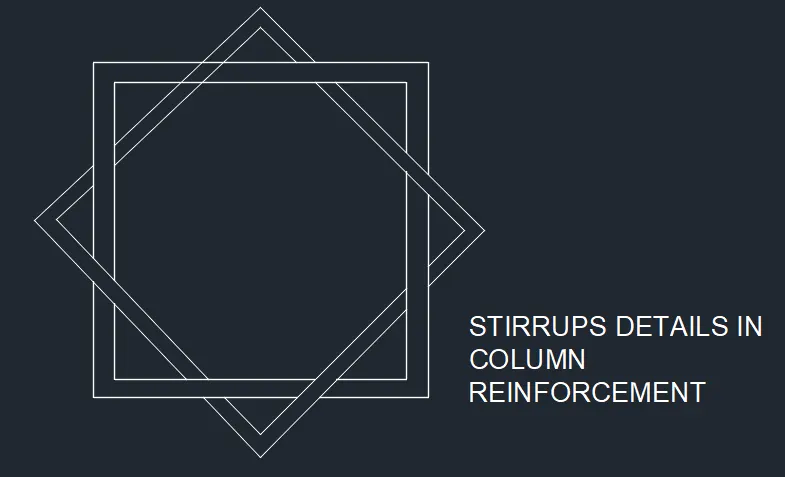
1. i drawn this squares with line command with my own dimensions because dimensions are not given in the challenge.
2.and i used offset to drawn this squares.
3.and i used trim to cut the line inbetween the various lines as per given drawings.
4. i know this is a column reinforcement related thats why i mentioned in title.
5. and connected with start and end points with line command with given dimensions.
if you are give the dimensions for this drawing then i will used below all commands to make the good drawing.
6. and i changed the dimensions text colour for to clear visible of drawing.
7 and i used dim linear , aligned,angular commands to measure the all dimensions in the drawing
8. and i used multi line text to write titles on drawing.
Result :
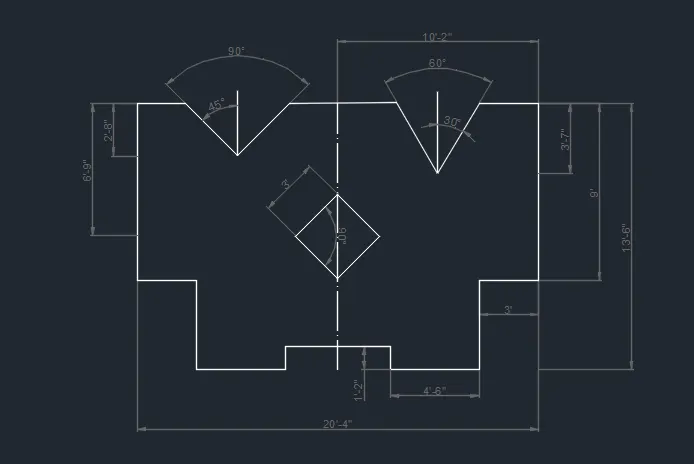
11.
Aim:
This problem I have solved with the Relative line, rectangular and Coordinate circle method
Procedure:
first i selected units and limits, dimension style as per given question format.
in the Command prompt write L enter
Specify the first point as (0,0) have taken this as my first point
1.and i drawn all lines with xy cordinates dimensions like this (x,y)
2.and first i drawn the v shape bottom point with given dimensions
2a. after i connected the inclined line to rectangle line with 45 degree and 30 degrees on both side of centre point of v
2b.and i drawn inside square with diagonal formula, then i drawn the top point of square from the center point of squarea after i drawn all sides with 3' @45 degrees.
3. in the command prompt write all dimensions for to draw this drawings like above cordinates
5. and connected with start and end points with line command.
6. and i changed the dimensions text colour for to clear visible of drawing.
7 and i used dim linear , aligned,angular commands to measure the all dimensions in the drawing.
8. and i used multi line text to write titles on drawing.
Result :