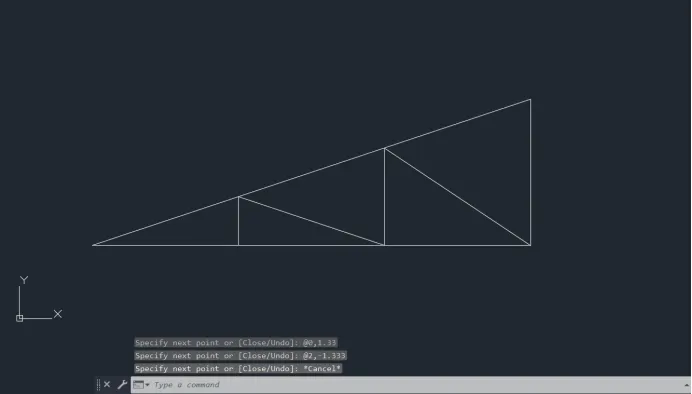
Creation of geometries by Coordinate system methods using AutoCad
AIM- Create the geometry of given pictures in AutoCAD using all the coordinates system methods.
Introduction to Coordinate System :-
There are Four AutoCAD coordinates system :-
- Absolute Coordinate System
- Relative Rectangular Coordinate System
- Relative Polar Coordinate System
- Direct Distance Entry
Absolute Coordinates :-
- In Absolute Coordinate System, all input points specify in the drawing are with respect to origin (0,0).
- Absolute coordinates refers to a Cartesian System that uses x-axis, y-axis, and sometimes a z-axis to establish a point some distance from a common origin. As an example, in a CAD program you could draw a line using absolute coordinates. To do this start by entering the (x,y) value of your origin point
Relative Coordinates :-
- In Relative Rectangular Coordinate System, First point is entered with respect to origin (0,0) and all next points can be entered by specifying the next coordinate with respect to the first point.
- The Relative Coordinate started with symbol “@”. In Relative Rectangular Coordinate System, points entered by typing"@x,y" and press Enter.
Polar Coordinates :-
- Polar coordinates used when we need to draw the next points at a specify angle.
- Polar coordinates system in AutoCAD specifies distance length at an angle.
- In Relative Polar Coordinate System, points entered by typing "@distance<angle" and press Enter.
Direct Distance Entry :-
- It is the simple method of drawing.
- Direct distance entry enables to draw an object by pointing in a particular direction with the cursor and entering a distance at the Command Box.
- First points is entered with respect to origin (0,0) and then the cursor is move in the particular direction and distance is entered at Command Box.
DRAW THE FIRST DIAGRAM
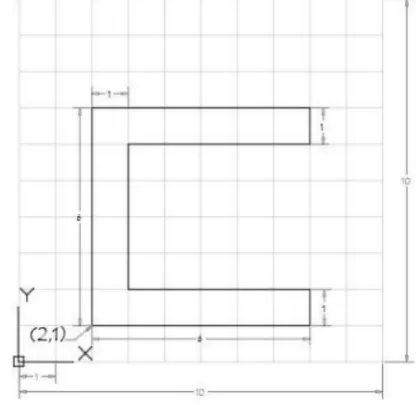 P1
P1
AIM:- Draw the diagram using Absolute Coordinates System.
PROCEDURE :
- Select line or enter L in command box - give coordinates (2,1)-press enter(in command box)
- Give coordinates in this format -(2,7) -press enter
- (8,7)-press enter
- (8,6) -press enter
- (3,6) -press enter
- (3,2) -press enter
- (8,2) -press enter
- (8,1) -press enter
- last to enter C (close) -press enter
NOTE :- All coordinates give in command box step by step.
RESULT:-
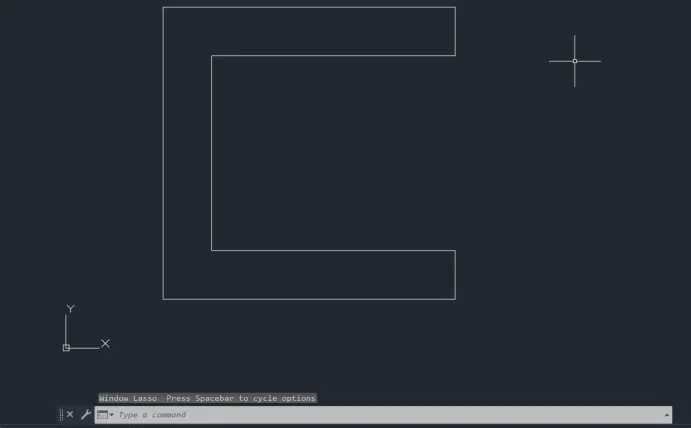
AIM:- Draw the diagram using Relative Coordinates System.
PROCEDURE :
- Enter L in command box enter-give first coordinates -(2,1)-press enter
- Give coordinates in this format in command box -(@0,6) -press enter
- (@6,0) -press enter
- (@0,-1) -press enter
- (@-5,0) -press enter
- (@0,-4) -press enter
- (@5,0) -press enter
- (@0,-1) -press enter
- Select C (close) diagram will close/ join the line using coordinates(@-6,0) -press enter
NOTE :- All coordinates give in command box step by step.
RESULT:-
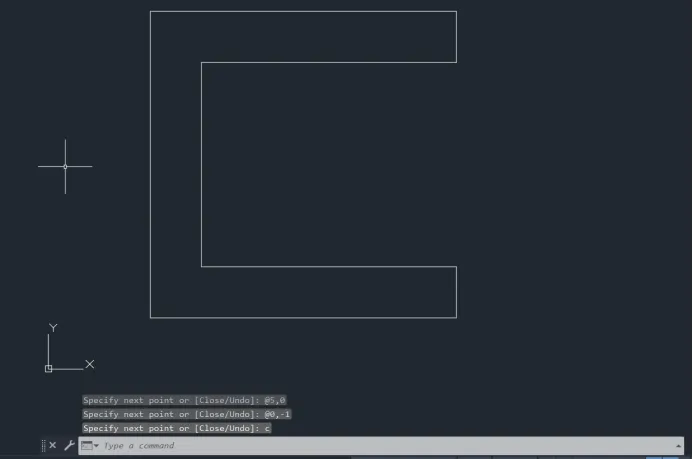
AIM:- Draw the diagram using polar Coordinates System.
PROCEDURE :-
- Enter L in command box -give first coordinates -(2,1)
- Enter the distance with angle -(@6<90)- enter this steps in all steps.
- (@6<0) -press enter
- (@1<270) -press enter
- (@5<180) -press enter
- (@4<270) -press enter
- (@5<180) -press enter
- (@1<270) -press enter
- (@6<180/enter C(close)) -press enter
NOTE :- All coordinates give in command box step by step.
RESULT:-
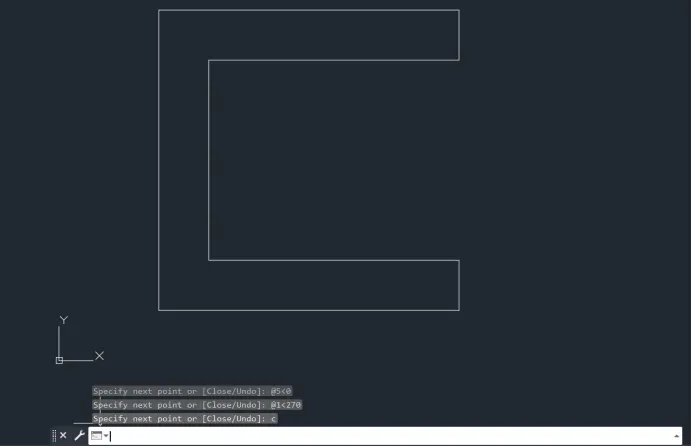
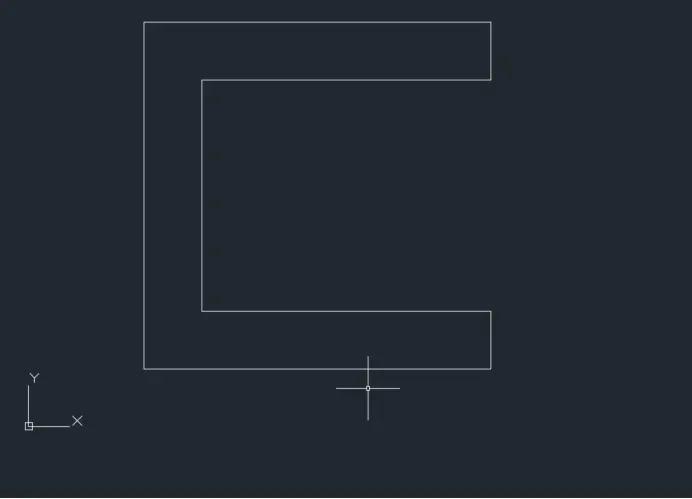
AIM:- Draw the diagram using Direct distance Entry.
PROCEDURE :-
- Choose the line tool.
- Line specify the first point : Start point (2,1)
- Specify the next point: Position the cursor and then 6.
- Specify the next point: Position the cursor and then 1.
- Specify the next point: Position the cursor and then 5.
- Specify the next point: Position the cursor and then 4.
- Specify the next point: Position the cursor and then 5.
- Specify the next point: Position the cursor and then 1.
- Specify the next point: Position the cursor and then 6.
- Specify the next point: C
NOTE :- All distance give in command box step by step.
RESULT:-
DRAW THE SECOND DIAGRAM
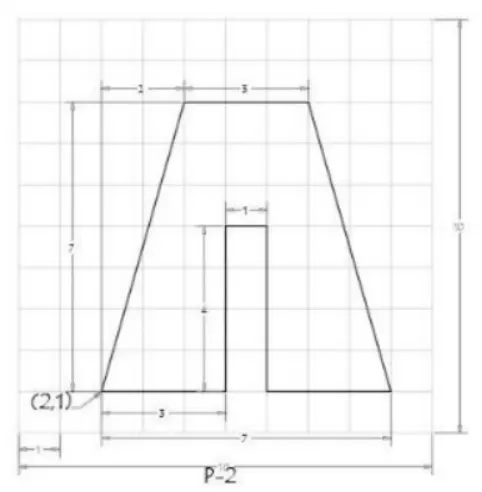 P2
P2
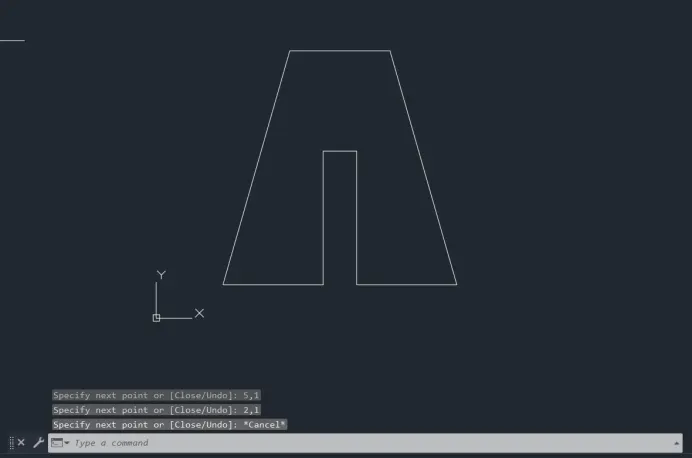
AIM:- Draw the diagram using Absolute Coordinates System.
PROCEDURE :-
- Enter L in command box -give first coordinates -(2,1)- press enter
- Give coordinates in this format -(4,8) -press enter
- (7,8)-press enter
- (9,1) -press enter
- (6,1) -press enter
- (6,5) -press enter
- (5,5) -press enter
- (5,1) -press enter
- last to enter C (close)/ (2,1) -press enter
NOTE :- All coordinates give in command box step by step.
RESULT:-
AIM:- Draw the diagram using Relative Coordinates System.
PROCEDURE :-
- Enter L in command box enter-give first coordinates -(2,1)-press enter
- Give coordinates in this format in command box -(@2,7) -press enter
- (@3,0) -press enter
- (@2,-7) -press enter
- (@-3,0) -press enter
- (@0,4) -press enter
- (@-1,0) -press enter
- (@0,-4) -press enter
- Select C (close) diagram will close/ join the line using coordinates(@-3,0) -press enter
NOTE :- All coordinates give in command box step by step.
RESULT:-
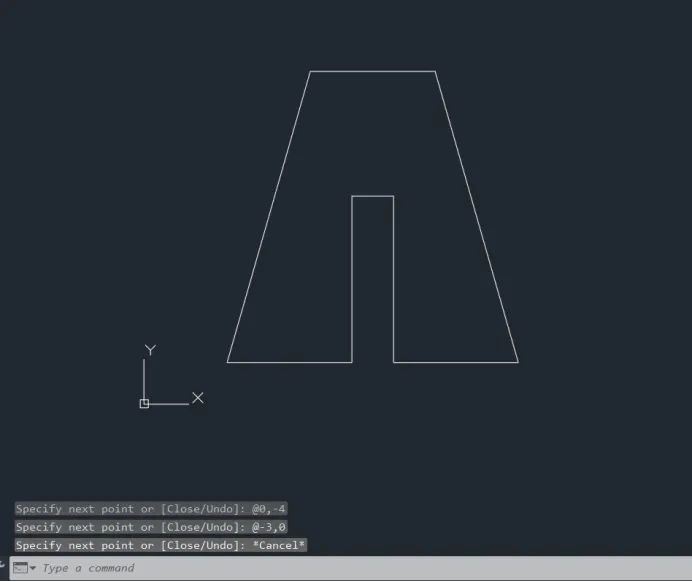
AIM:- Draw the diagram using polar Coordinates System.
PROCEDURE :-
- Enter L in command box -give first coordinates -(2,1)
- Enter the distance with angle -(@3<0)- enter this steps in all steps.
- (@4<90) -press enter
- (@1<0) -press enter
- (@4<270) -press enter
- (@3<0) -press enter
- (@7.280<105.9454) -press enter
- (@3<180) -press enter
- enter C(close) -press enter
NOTE :- All coordinates give in command box step by step.
RESULT:-
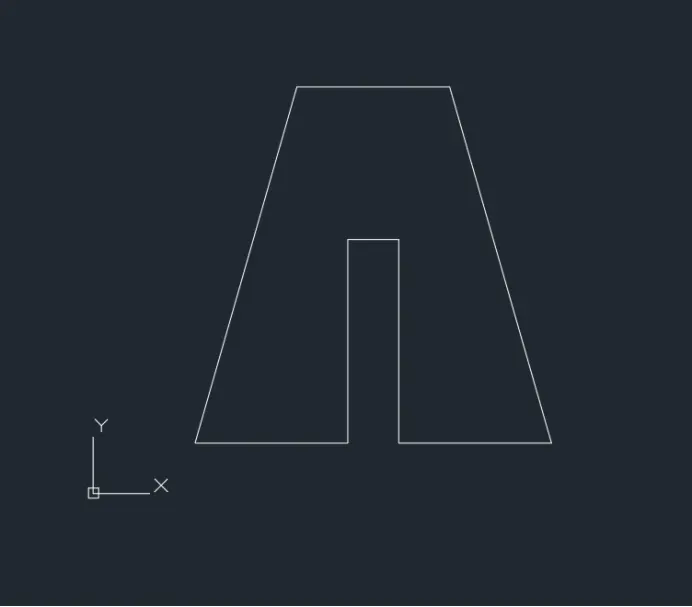
AIM:- Draw the diagram using Direct distance Entry.
PROCEDURE :-
- Choose the line tool.
- Line specify the first point : Start point (2,1)
- Specify the next point: Position the cursor and then 3.
- Specify the next point: Position the cursor and then 4.
- Specify the next point: Position the cursor and then 1.
- Specify the next point: Position the cursor and then 4.
- Specify the next point: Position the cursor and then 3.
- Specify the next point: Position the cursor and then 7.28.
- Specify the next point: Position the cursor and then 3.
- Specify the next point: C
NOTE :- All distance give in command box step by step.
RESULT:-
DRAW THE THIRD DIAGRAM
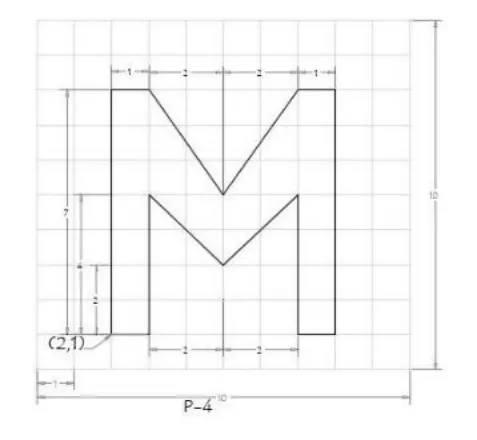
AIM:- Draw the diagram using Relative Coordinates System.
 P3
P3
PROCEDURE :-
- Enter L in command box enter-give first coordinates -(2,1)-press enter
- Give coordinates in this format in command box -(@0,7) -press enter
- (@1,0) -press enter
- (@2,-3) -press enter
- (@2,3) -press enter
- (@1,0) -press enter
- (@0,-7) -press enter
- (@-1,0) -press enter
- (@0,4)-press enter
- (@-2,-2)-press enter
- (@-2,2)-press enter
- (@0,-4)-press enter
- (@-1,0)-press enter
NOTE :- All coordinates give in command box step by step.
RESULT:-
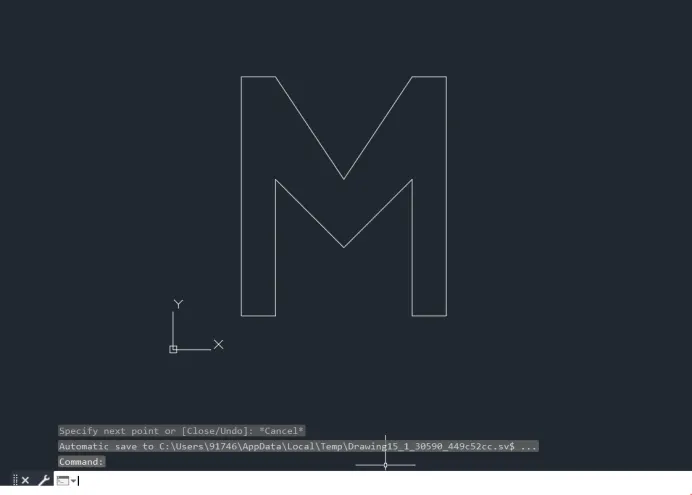
DRAW THE FORTH DIAGRAM
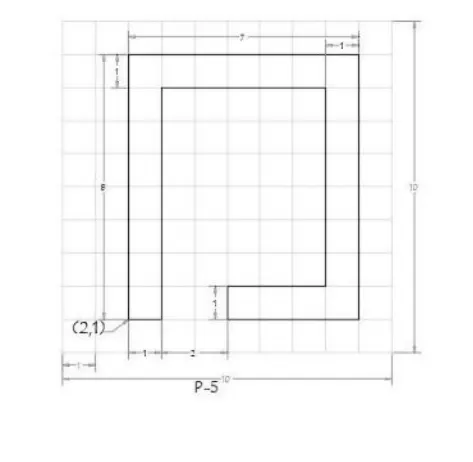
AIM:- Draw the diagram using Relative Coordinates System.
 P4
P4
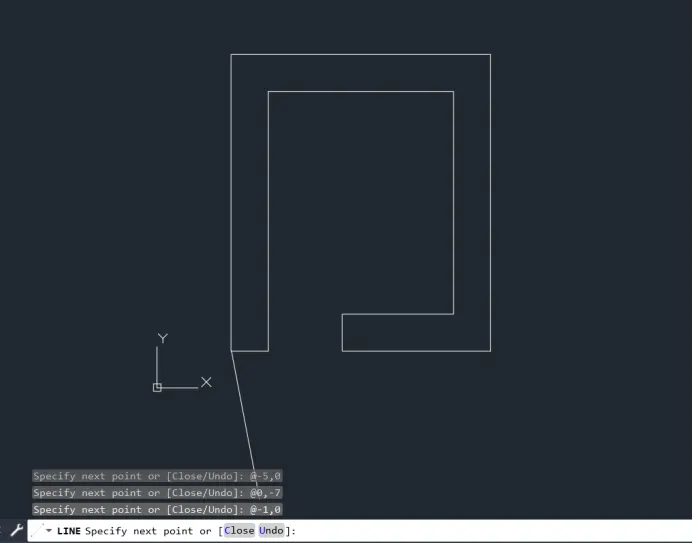
PROCEDURE :-
- Enter L in command box enter-give first coordinates -(2,1)-press enter
- Give coordinates in this format in command box -(@0,8) -press enter
- (@7,0) -press enter
- (@0,-8) -press enter
- (@-4,0) -press enter
- (@0,1) -press enter
- (@3,0) -press enter
- (@0,6) -press enter
- (@-5,0)-press enter
- (@0,-7)-press enter
- (@-1,0)-press enter
NOTE :- All coordinates give in command box step by step.
RESULT:-
DRAW THE FIFTH DIAGRAM
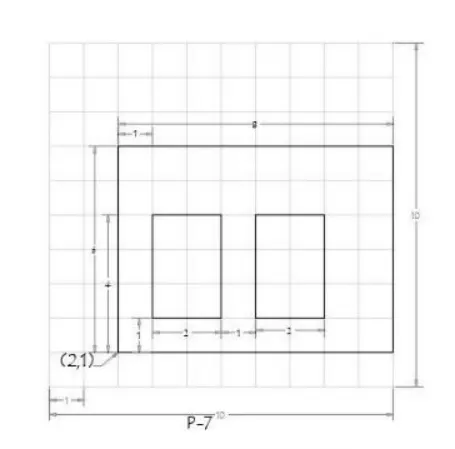
AIM:- Draw the diagram using Relative Coordinates System.
 P5
P5
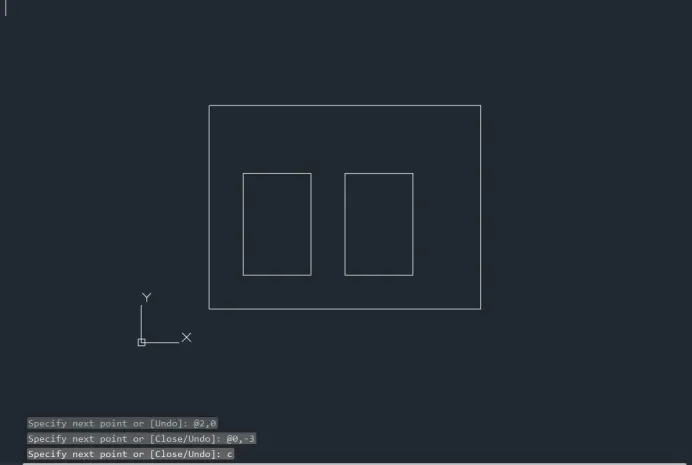
PROCEDURE :-
- Enter L in command box enter-give first coordinates -(2,1)-press enter
- Give coordinates in this format in command box -(@0,6) -press enter
- (@8,0) -press enter
- (@0,-6) -press enter
- Enter c (close) -press enter-exit the line command(press Esc)
- Enter L in command box enter-give first coordinates of internal first diagram -(3,2)-press enter
- (@0,3)
- (@2,0)
- (@0,-3)
- Enter C (close) -press enter-exit the line command(press Esc)
- Enter L in command box enter-give first coordinates of internal second diagram -(6,2)-press enter
- (@0,3)
- (@2,0)
- (@0,-3)
- Enter C (close) -press enter-exit the line command(press Esc)
NOTE :- All coordinates give in command box step by step.
RESULT:-
DRAW THE SIXTH DIAGRAM
AIM:- Draw the diagram using Relative Coordinates System.
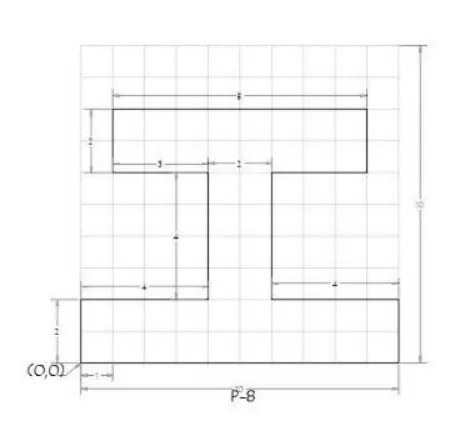 P6
P6
PROCEDURE :-
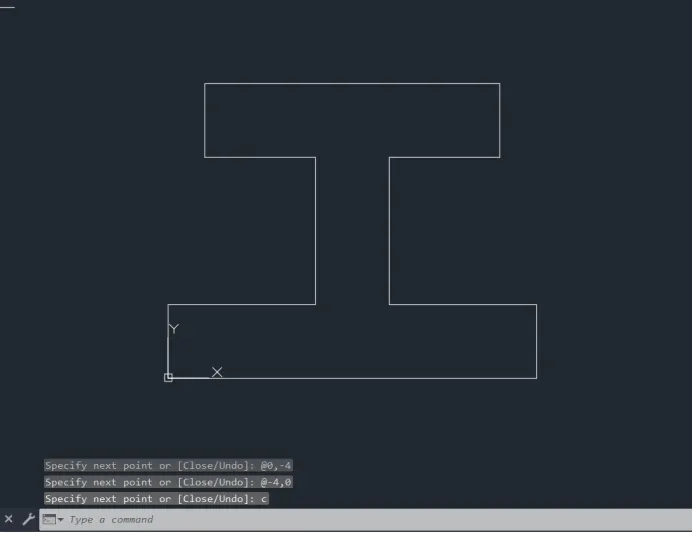
- Enter L in command box enter-give first coordinates -(0,0)-press enter
- Give coordinates in this format in command box -(@10,0) -press enter
- (@0,2) -press enter
- (@-4,0) -press enter
- (@0,4) -press enter
- (@3,0) -press enter
- (@0,2) -press enter
- (@-8,0) -press enter
- (@0,-2)-press enter
- (@3,0)-press enter
- (@0,-4)-press enter
- (@-4,0)-press enter
- Enter C (close) -press enter-exit the line command(press Esc)
NOTE :- All coordinates give in command box step by step.
RESULT:-
DRAW THE SEVENTH DIAGRAM
AIM:- Draw the diagram using Relative Coordinates System.
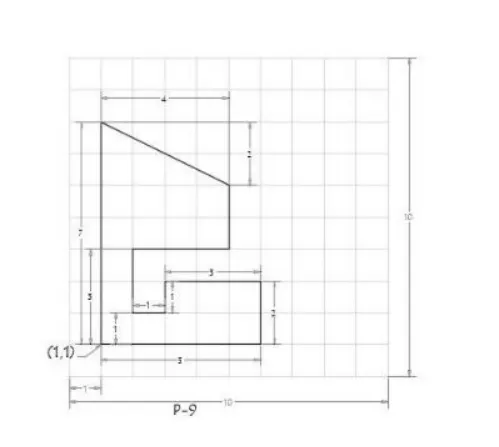 P7
P7
PROCEDURE :-
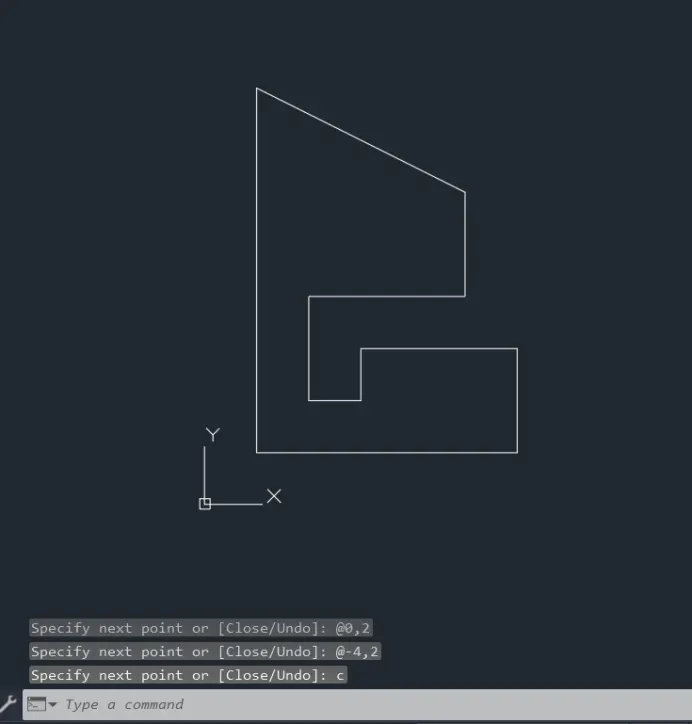
- Enter L in command box enter-give first coordinates -(1,1)-press enter
- Give coordinates in this format in command box -(@5,0) -press enter
- (@0,2) -press enter
- (@-3,0) -press enter
- (@0,-1) -press enter
- (@-1,0) -press enter
- (@0,2) -press enter
- (@3,0) -press enter
- (@0,2)-press enter
- (@-4,2)-press enter
- Enter C (close) -press enter-exit the line command(press Esc)
NOTE :- All coordinates give in command box step by step.
RESULT:-
DRAW THE EIGHT DIAGRAM
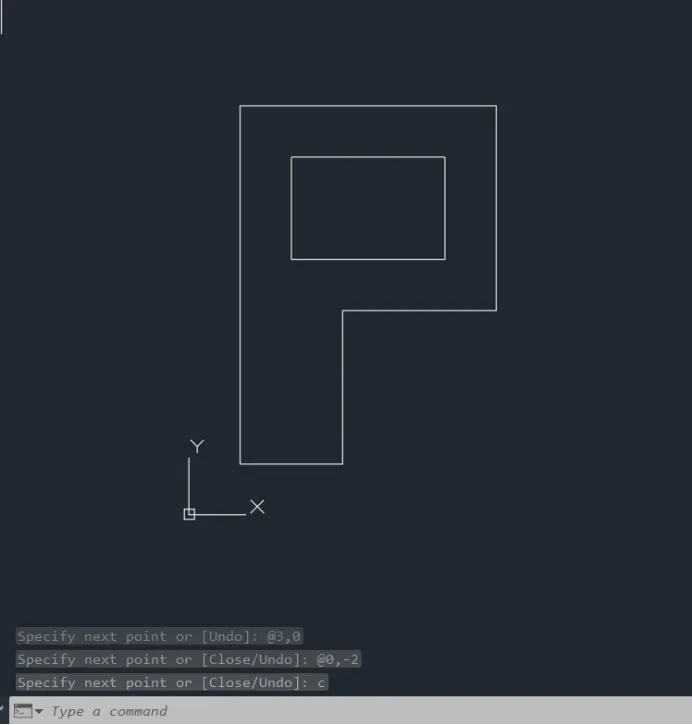
AIM:- Draw the diagram using Relative Coordinates System.
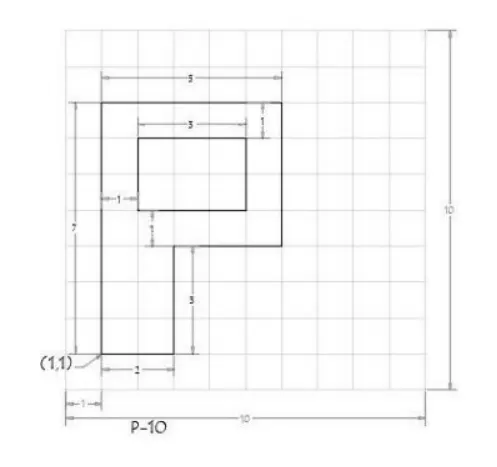 P8
P8
PROCEDURE :-
- Enter L in command box enter-give first coordinates -(1,1)-press enter
- Give coordinates in this format in command box -(@2,0) -press enter
- (@0,3) -press enter
- (@3,0) -press enter
- (@0,4) -press enter
- (@-5,0) -press enter
- Enter C (close) -press enter-exit the line command(press Esc)
- Enter L in command box enter-give first coordinates of internal diagram -(2,5)-press enter
- (@0,2) -press enter
- (@3,0) -press enter
- (@0,-2)-press enter
- Enter C (close) -press enter-exit the line command(press Esc)
NOTE :- All coordinates give in command box step by step.
RESULT:-
DRAW THE NINTH DIAGRAM
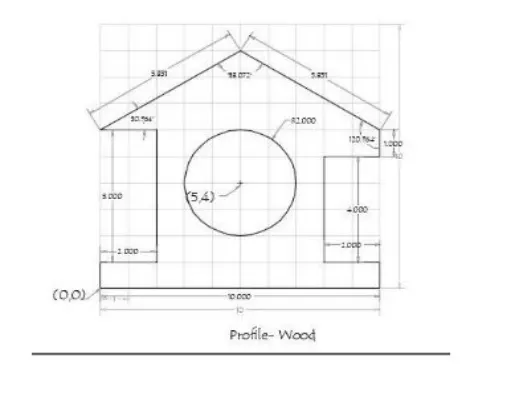
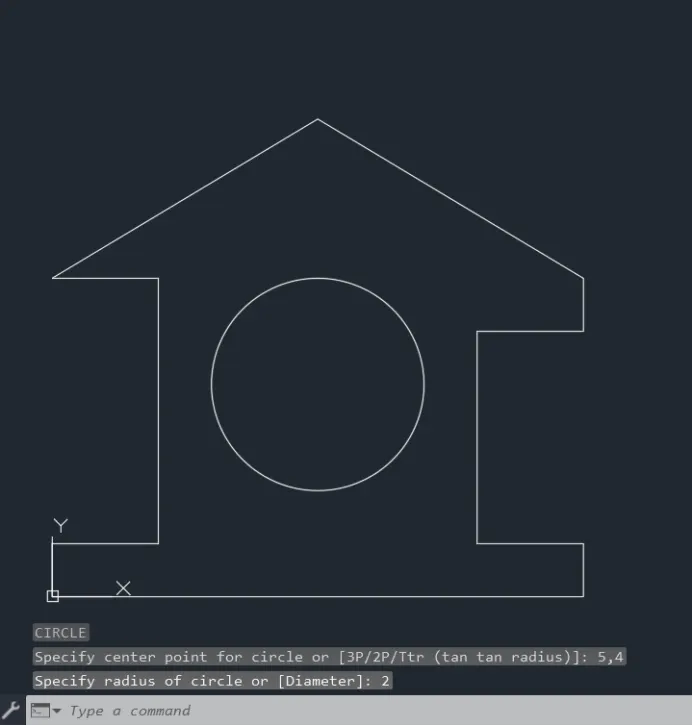
AIM:- Draw the diagram using Relative Coordinates System.
 P9
P9
PROCEDURE :-
- Enter L in command box enter-give first coordinates -(0,0)-press enter
- Give coordinates in this format in command box -(@10,0) -press enter
- (@0,1) -press enter
- (@-2,0) -press enter
- (@0,4) -press enter
- (@2,0) -press enter
- (@0,1) -press enter
- (@-5,3) -press enter
- (@-5,-3) -press enter
- (@2,0) -press enter
- (@0,-5)-press enter
- (@-2,0)-press enter
- Enter C (close) -press enter-exit the line command(press Esc)
- Enter C(for circle)- give center of the circle in coordinate form -(5,4)- press enter
- Give the diameter of the circle (2) - press enter - press esc (to exit the command)
NOTE :- All coordinates give in command box step by step.
RESULT:-
DRAW THE TENTH DIAGRAM
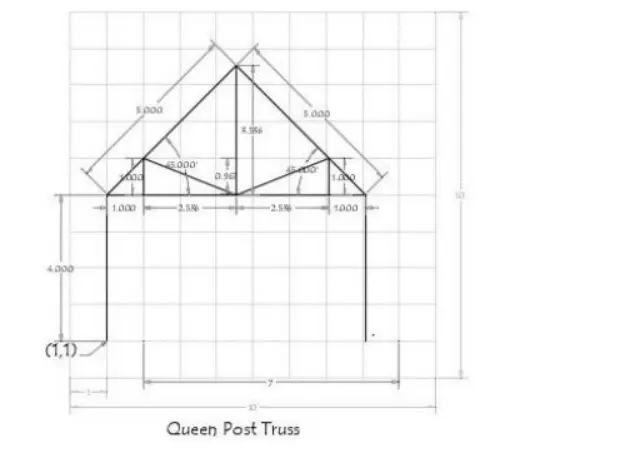
AIM:- Draw the diagram using Relative Coordinates System.
 P10
P10
PROCEDURE :-
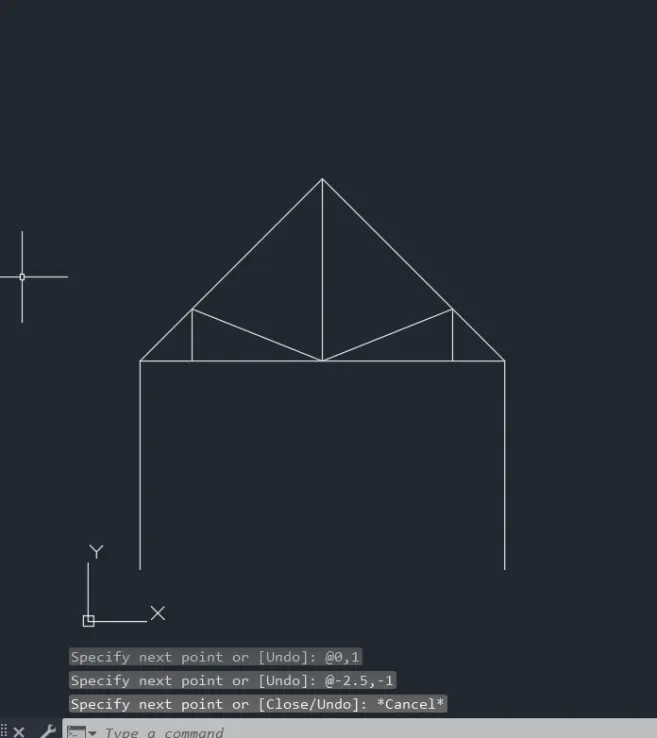
- Enter L in command box enter-give first coordinates -(1,1)-press enter
- Give coordinates in this format in command box -(@0,4) -press enter
- (@3.5,3.57) -press enter
- (@3.5,-3.57) -press enter
- (@0,-4) -press enter
- Enter C (close) -press enter-exit the line command(press Esc)
- Again Enter L in command box enter-give first coordinates -(1,5)-press enter
- (@7,0) -press enter
- Enter C (close) -press enter-exit the line command(press Esc)
- Again Enter L in command box enter-give first coordinates -(2,5)-press enter
- (@0,1) -press enter
- (@2.5,-1) -press enter
- (@0,3.57) -press enter
- Enter C (close) -press enter-exit the line command(press Esc)
- Again Enter L in command box enter-give first coordinates -(7,5)-press enter
- (@0,1)-press enter
- (@-2.5,-1)-press enter
- Enter C (close) -press enter-exit the line command(press Esc)
NOTE :- All coordinates give in command box step by step.
RESULT:-
DRAW THE ELEVENTH DIAGRAM
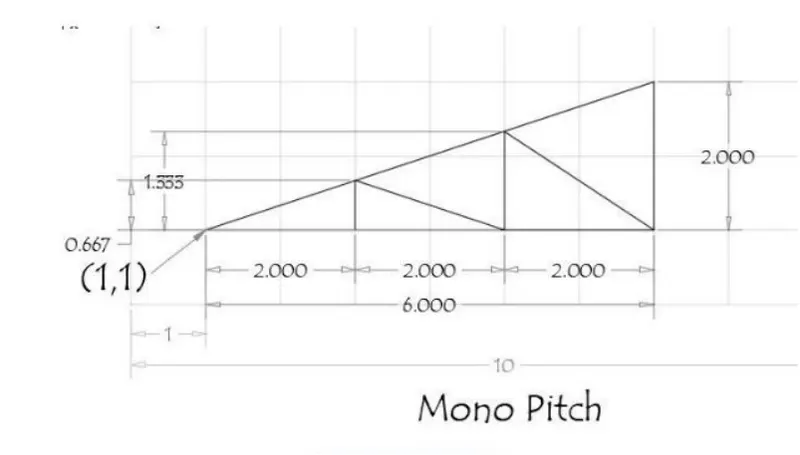
AIM:- Draw the diagram using Relative Coordinates System.
 P11
P11
PROCEDURE :-
- Enter L in command box enter-give first coordinates -(1,1)-press enter
- Give coordinates in this format in command box -(@6,0) -press enter
- (@0,2) -press enter
- Enter C (close) -press enter-exit the line command(press Esc)
- Again Enter L in command box enter-give first coordinates -(3,1)-press enter
- (@0,.667)-press enter
- (@2,-667)-press enter
- (@0,1.333)-press enter
- (@2,-1.333)-press enter
- Exit the line command(press Esc)
NOTE :- All coordinates give in command box step by step.
RESULT:-