Creation of geometries by Coordinate system methods using AutoCad
AIM: To create geometries P1 – P2 using all the Co-ordinate system and remaing by any of the following methods.
- Absolute co-ordinate system
- Relative rectangular co-ordinate system
- Relative polar co-ordinate system
INTRODUCTION
AutoCAD uses a standard XY Cartesian coordinate notation with a horizontal x-axis and a vertical y-axis. AutoCAD shows the positive X and Y range of coordinates with the 0,0 coordinate (origin), placed in the lower-left corner of the drawing area. The origin is an important coordinate location because you can use it as a reference for multiple drawings.
- Absolute coordinates are based on the WCS origin (0,0)
- Relative rectangular co-ordinates are based on co-ordinates of last point entered
- Relative polar co-ordinate system is based on length at which angle
PROCEDURE:
Open the AUTOCAD application
Create new drawing using the Imperial template and the Decimal Units
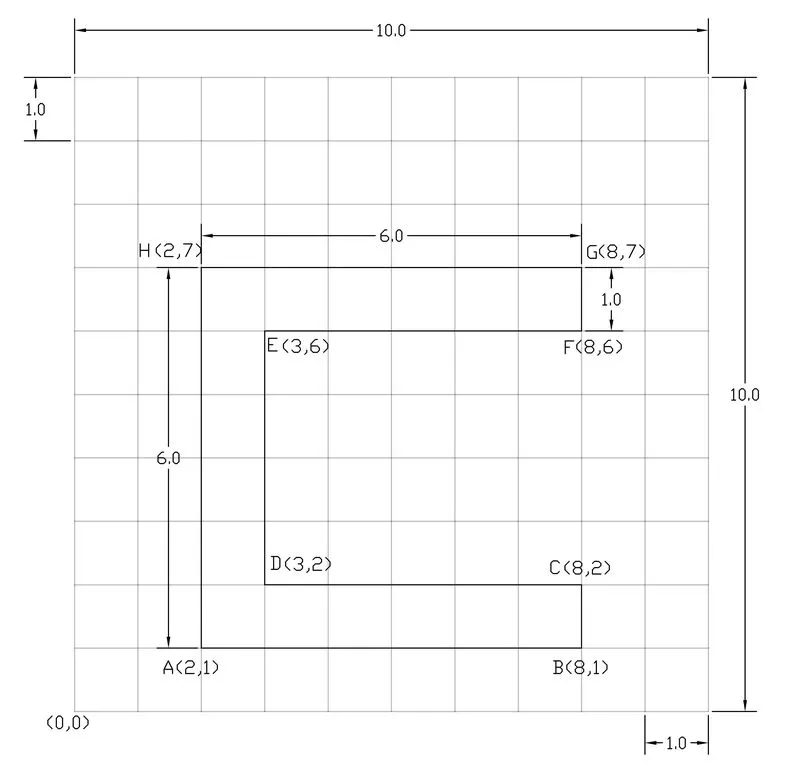
ABSOLUTE CO-ORDINATE SYSTEM
Chose line tool by typing L in command box or select line tool from any methods
Specify the coordinates of first point (2,1) in the command line, press enter or space
Specify next point (8,1) in the command line then press enter
Specify next point (8,2) in the command line then press enter
Specify next point (3,2) in the command line then press enter
Specify next point (3,6) in the command line then press enter
Specify next point (8,6) in the command line then press enter
Specify next point (8,7) in the command line then press enter
Specify next point (2,7) in the command line then press enter
Then close line
RELATIVE RECTANGULAR CO-ORDINATE SYSTEM
Chose line tool by typing L in command box or select line tool from any methods
Specify the coordinates of first point (2,1) in the command line, press enter or space
Specify next point (@6,0) in the command line then press enter
Specify next point (@0,1) in the command line then press enter
Specify next point (@-5,0) in the command line then press enter
Specify next point (@0,4) in the command line then press enter
Specify next point (@5,0) in the command line then press enter
Specify next point (@0,1) in the command line then press enter
Specify next point (@-6,0) in the command line then press enter
Then close line
RELATIVE POLAR CO-ORDINATE SYSTEM
Chose line tool by typing L in command box or select line tool from any methods
Specify the coordinates of first point (2,1) in the command line, press enter or space
Specify next point (@6<0) in the command line then press enter
Specify next point (@1<90) in the command line then press enter
Specify next point (@5<180) in the command line then press enter
Specify next point (@4<90) in the command line then press enter
Specify next point (@5<0) in the command line then press enter
Specify next point (@1<90) in the command line then press enter
Specify next point (@6<180) in the command line then press enter
Then close line
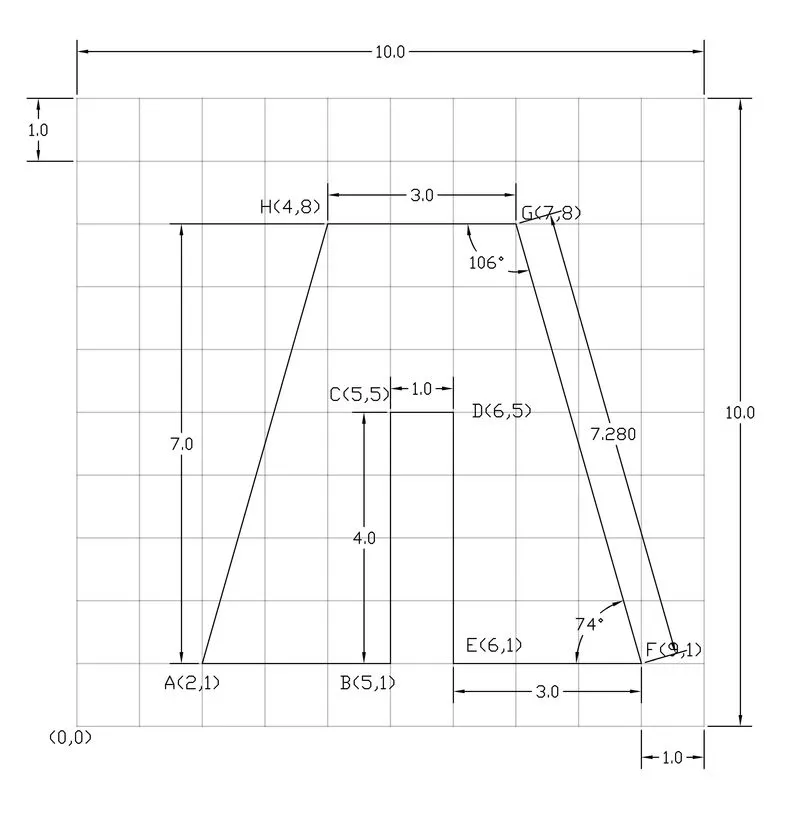
ABSOLUTE CO-ORDINATE SYSTEM
Chose line tool by typing L in command box or select line tool from any methods
Specify the coordinates of first point (2,1) in the command line, press enter or space
Specify next point (5,1) in the command line then press enter
Specify next point (5,5) in the command line then press enter
Specify next point (6,5) in the command line then press enter
Specify next point (6,1) in the command line then press enter
Specify next point (9,1) in the command line then press enter
Specify next point (7,8) in the command line then press enter
Specify next point (4,8) in the command line then press enter
Then close line
RELATIVE RECTANGULAR CO-ORDINATE SYSTEM
Chose line tool by typing L in command box or select line tool from any methods
Specify the coordinates of first point (2,1) in the command line, press enter or space
Specify next point (@3,0) in the command line then press enter
Specify next point (@0,4) in the command line then press enter
Specify next point (@1,0) in the command line then press enter
Specify next point (@0,-4) in the command line then press enter
Specify next point (@3,0) in the command line then press enter
Specify next point (@-2,7) in the command line then press enter
Specify next point (@-3,0) in the command line then press enter
Then close line
RELATIVE POLAR CO-ORDINATE SYSTEM
Chose line tool by typing L in command box or select line tool from any methods
Specify the coordinates of first point (2,1) in the command line, press enter or space
Specify next point (@3<0) in the command line then press enter
Specify next point (@4<90) in the command line then press enter
Specify next point (@1<0) in the command line then press enter
Specify next point (@4<270) in the command line then press enter
Specify next point (@3<0) in the command line then press enter
Specify next point (@7.28<106) in the command line then press enter
Specify next point (@3<180) in the command line then press enter
Then close line
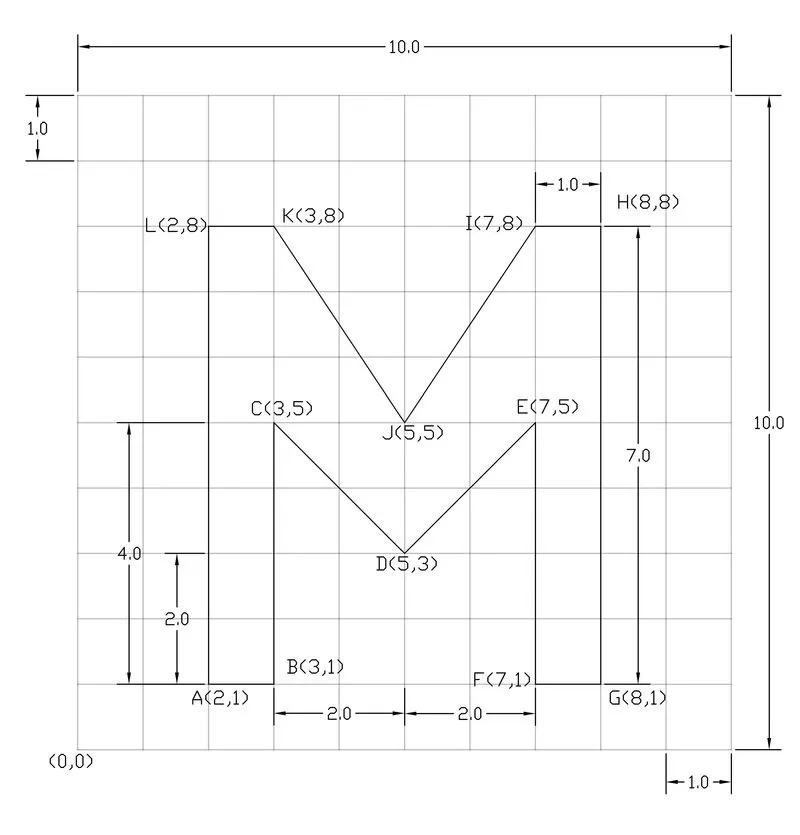
ABSOLUTE CO-ORDINATE SYSTEM
Chose line tool by typing L in command box or select line tool from any methods
Specify the coordinates of first point (2,1) in the command line, press enter or space
Specify next point (3,1) in the command line then press enter
Specify next point (3,5) in the command line then press enter
Specify next point (5,3) in the command line then press enter
Specify next point (7,5) in the command line then press enter
Specify next point (7,1) in the command line then press enter
Specify next point (8,1) in the command line then press enter
Specify next point (8,8) in the command line then press enter
Specify next point (7,8) in the command line then press enter
Specify next point (5,5) in the command line then press enter
Specify next point (3,8) in the command line then press enter
Specify next point (2,8) in the command line then press enter
Then close line
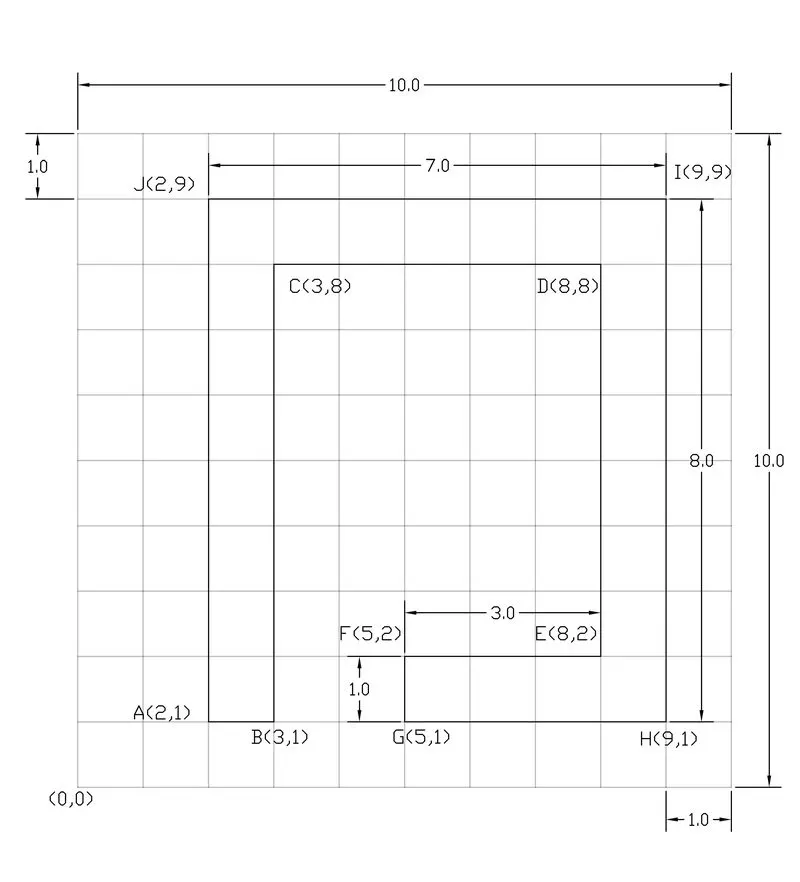
RELATIVE RECTANGULAR CO-ORDINATE SYSTEM
Chose line tool by typing L in command box or select line tool from any methods
Specify the coordinates of first point (2,1) in the command line, press enter or space
Specify next point (@1,0) in the command line then press enter
Specify next point (@0,7) in the command line then press enter
Specify next point (@5,0) in the command line then press enter
Specify next point (@0,-6) in the command line then press enter
Specify next point (@-3,0) in the command line then press enter
Specify next point (@0,-1) in the command line then press enter
Specify next point (@4,0) in the command line then press enter
Specify next point (@0,8) in the command line then press enter
Specify next point (@-7,0) in the command line then press enter
Then close line
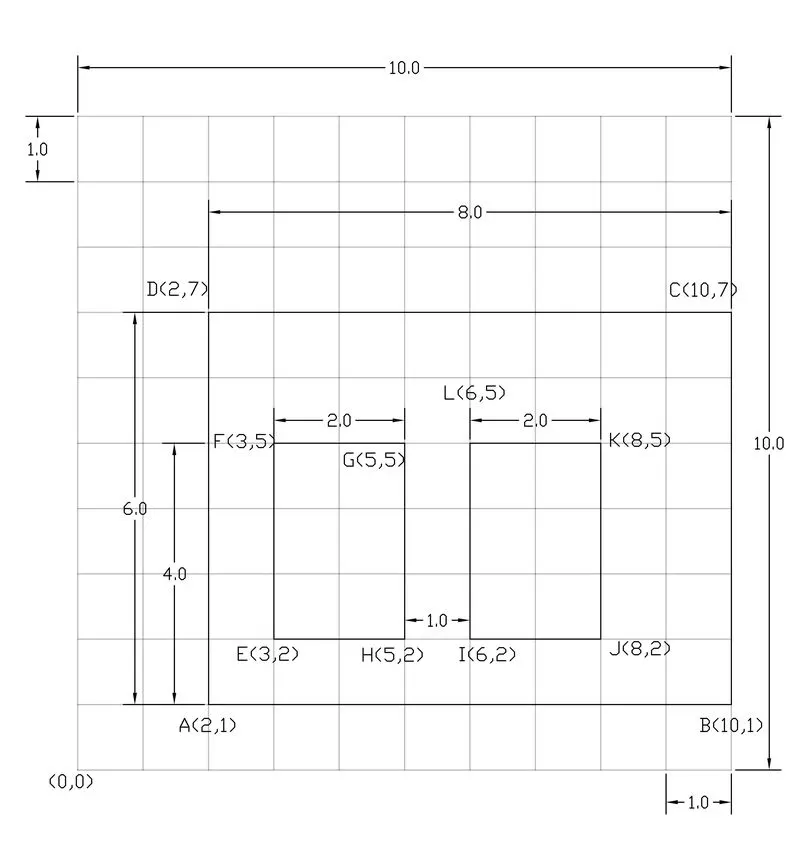
RELATIVE POLAR CO-ORDINATE SYSTEM
Chose line tool by typing L in command box or select line tool from any methods
Specify the coordinates of first point (2,1) in the command line, press enter or space
Specify next point (@8<0) in the command line then press enter
Specify next point (@6<90) in the command line then press enter
Specify next point (@8<180) in the command line then press enter
Then close line
Chose line tool by typing L in command box or select line tool from any methods
Specify the coordinates of first point (3,2) in the command line, press enter or space
Specify next point (@3<90) in the command line then press enter
Specify next point (@2<0) in the command line then press enter
Specify next point (@3<270) in the command line then press enter
Then close line
Chose line tool by typing L in command box or select line tool from any methods
Specify the coordinates of first point (6,2) in the command line, press enter or space
Specify next point (@2<0) in the command line then press enter
Specify next point (@3<90) in the command line then press enter
Specify next point (@2<180) in the command line then press enter
Then close line
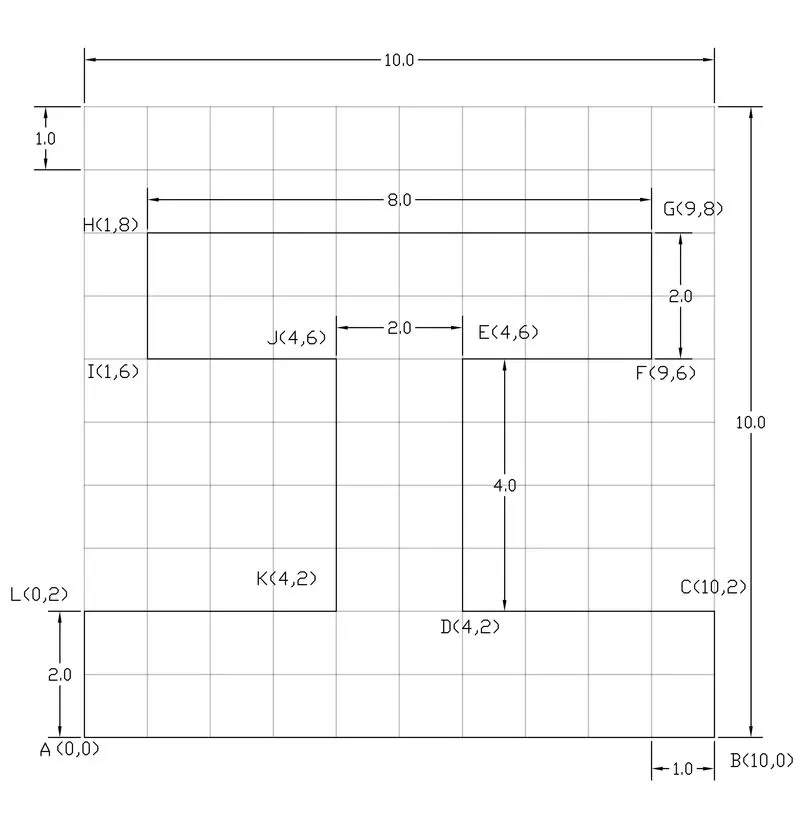
RELATIVE RECTANGULAR CO-ORDINATE SYSTEM
Chose line tool by typing L in command box or select line tool from any methods
Specify the coordinates of first point (0,0) in the command line, press enter or space
Specify next point (@10,0) in the command line then press enter
Specify next point (@0,2) in the command line then press enter
Specify next point (@-4,0) in the command line then press enter
Specify next point (@0,4) in the command line then press enter
Specify next point (@3,0) in the command line then press enter
Specify next point (@0,2) in the command line then press enter
Specify next point (@-8,0) in the command line then press enter
Specify next point (@0,-2) in the command line then press enter
Specify next point (@-3,0) in the command line then press enter
Specify next point (@0,-4) in the command line then press enter
Specify next point (@-4,0) in the command line then press enter
Then close line
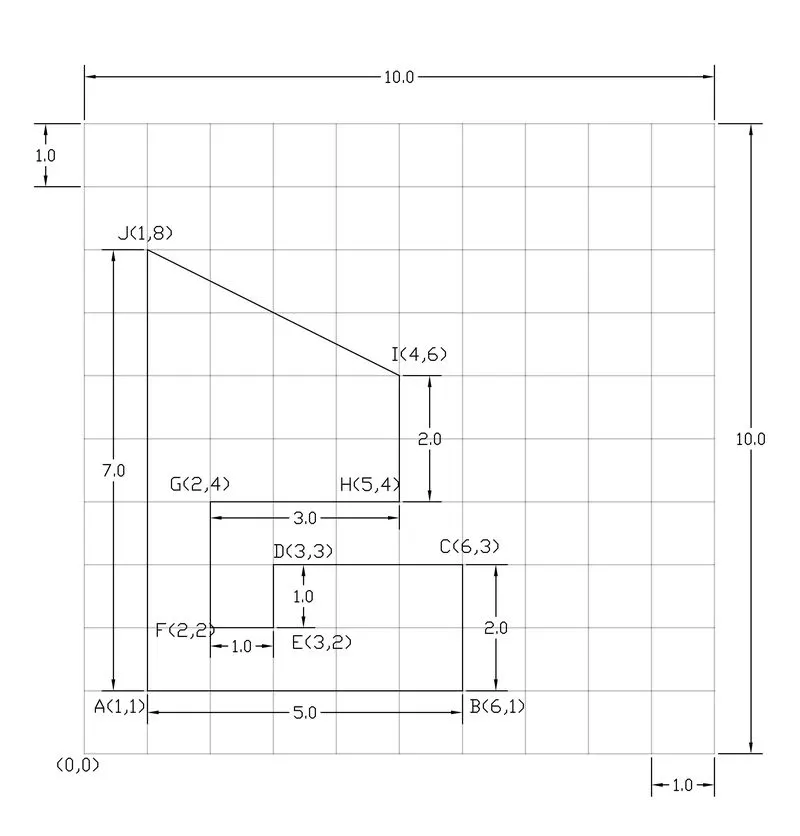
ABSOLUTE CO-ORDINATE SYSTEM
Chose line tool by typing L in command box or select line tool from any methods
Specify the coordinates of first point (1,1) in the command line, press enter or space
Specify next point (6,1) in the command line then press enter
Specify next point (6,3) in the command line then press enter
Specify next point (3,3) in the command line then press enter
Specify next point (3,2) in the command line then press enter
Specify next point (2,2) in the command line then press enter
Specify next point (2,4) in the command line then press enter
Specify next point (5,4) in the command line then press enter
Specify next point (4,6) in the command line then press enter
Specify next point (1,8) in the command line then press enter
Then close line
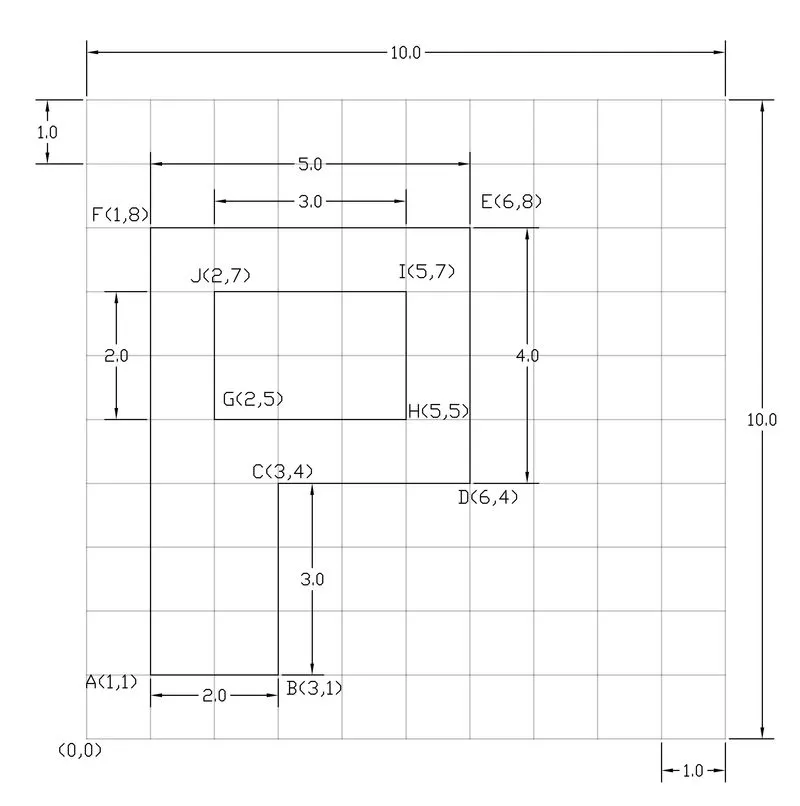
RELATIVE RECTANGULAR CO-ORDINATE SYSTEM
Chose line tool by typing L in command box or select line tool from any methods
Specify the coordinates of first point (1,1) in the command line, press enter or space
Specify next point (@2,0) in the command line then press enter
Specify next point (@0,3) in the command line then press enter
Specify next point (@3,0) in the command line then press enter
Specify next point (@0,4) in the command line then press enter
Specify next point (@-5,0) in the command line then press enter
Then close line
Chose line tool by typing L in command box or select line tool from any methods
Specify the coordinates of first point (2,5) in the command line, press enter or space
Specify next point (@3,0) in the command line then press enter
Specify next point (@0,2) in the command line then press enter
Specify next point (@-3,0) in the command line then press enter
Then close line
RELATIVE POLAR CO-ORDINATE SYSTEM
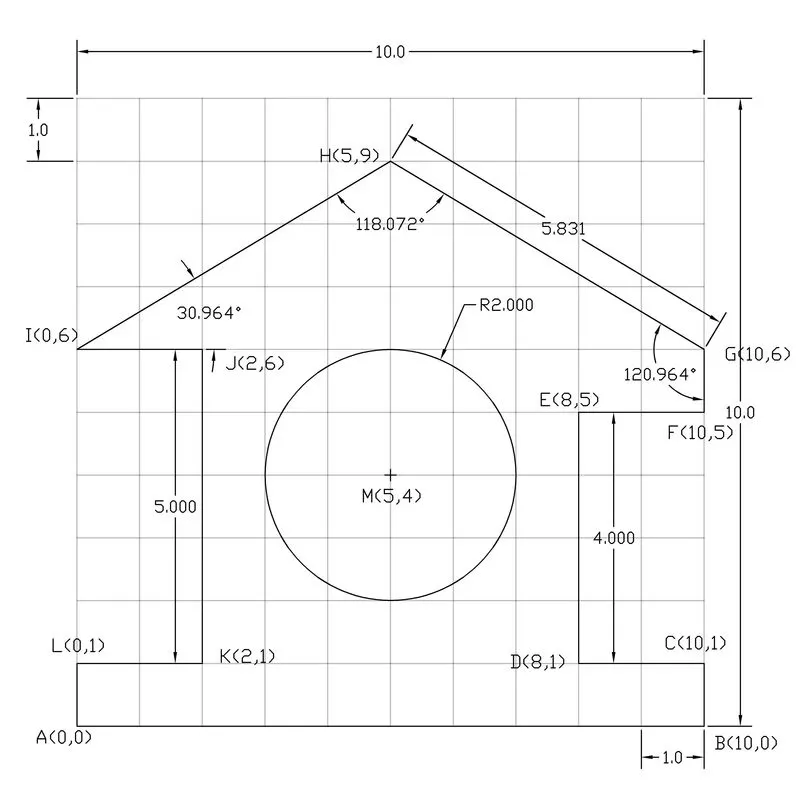
Chose line tool by typing L in command box or select line tool from any methods
Specify the coordinates of first point (0,0) in the command line, press enter or space
Specify next point (@10<0) in the command line then press enter
Specify next point (@1<90) in the command line then press enter
Specify next point (@2<180) in the command line then press enter
Specify next point (@4<90) in the command line then press enter
Specify next point (@2<0) in the command line then press enter
Specify next point (@1<90) in the command line then press enter
Specify next point (@5.831<149.036) in the command line then press enter
Specify next point (@5.831<210.964) in the command line then press enter
Specify next point (@2<0) in the command line then press enter
Specify next point (@5<270) in the command line then press enter
Specify next point (@2<180) in the command line then press enter
Then close line
Chose circle by radius tool by typing c in command box or select line tool from any methods
Specify the coordinates of center point (5,4) in the command line, press enter
Specify the radius 2 then press enter
ABSOLUTE CO-ORDINATE SYSTEM
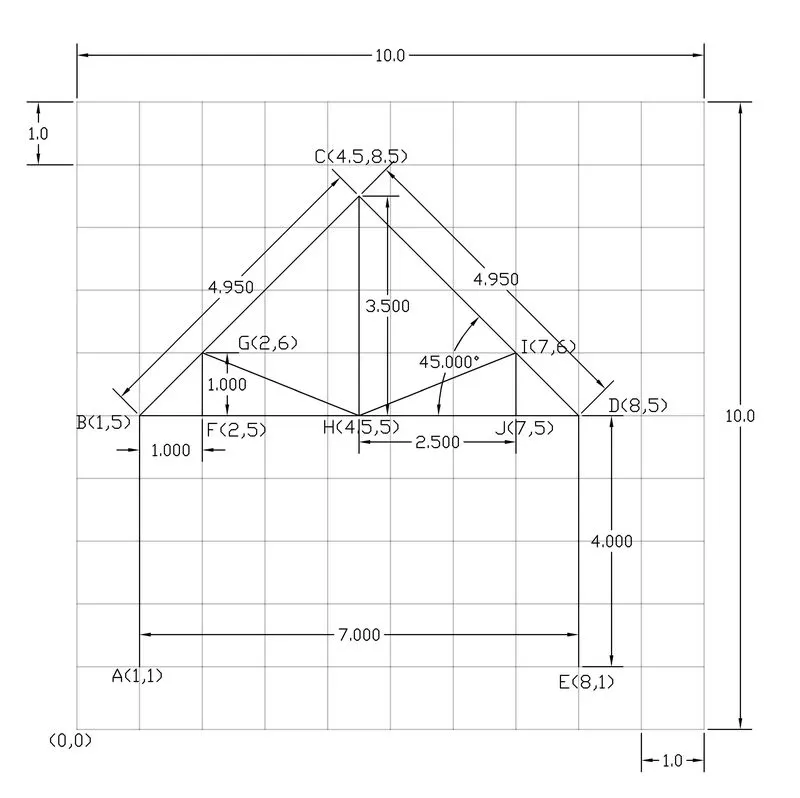
Chose line tool by typing L in command box or select line tool from any methods
Specify the coordinates of first point (1,1) in the command line, press enter or space
Specify next point (1,5) in the command line then press enter
Specify next point (4.5,8.5) in the command line then press enter
Specify next point (8,5) in the command line then press enter
Specify next point (8,1) in the command line then press enter
Press Esc key
Chose line tool by typing L in command box or select line tool from any methods
Specify the coordinates of first point (4.5,5) in the command line, press enter or space
Specify next point (4.5,8.5) in the command line then press enter
Press Esc key
Chose line tool by typing L in command box or select line tool from any methods
Specify the coordinates of first point (1,5) in the command line, press enter or space
Specify next point (8,5) in the command line then press enter
Press Esc key
Chose line tool by typing L in command box or select line tool from any methods
Specify the coordinates of first point (2,5) in the command line, press enter or space
Specify next point (2,6) in the command line then press enter
Specify next point (4.5,5) in the command line then press enter
Specify next point (7,6) in the command line then press enter
Specify next point (7,5) in the command line then press enter
Then close line
RELATIVE RECTANGULAR CO-ORDINATE SYSTEM
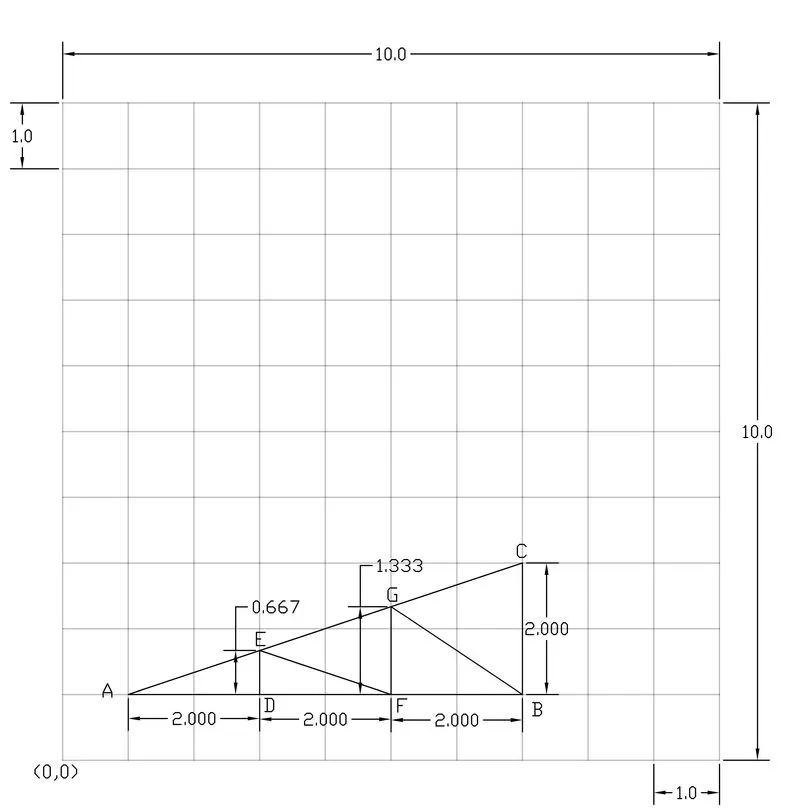
Chose line tool by typing L in command box or select line tool from any methods
Specify the coordinates of first point (1,1) in the command line, press enter or space
Specify next point (@6,0) in the command line then press enter
Then close line
Chose line tool by typing L in command box or select line tool from any methods
Specify the coordinates of first point (3,1) in the command line, press enter or space
Specify next point (@0,0.667) in the command line then press enter
Specify next point (@5,-0.667) in the command line then press enter
Specify next point (@5,1.337) in the command line then press enter
Specify next point (@7,-1.337) in the command line then press enter
Then close line
RELATIVE POLAR CO-ORDINATE SYSTEM
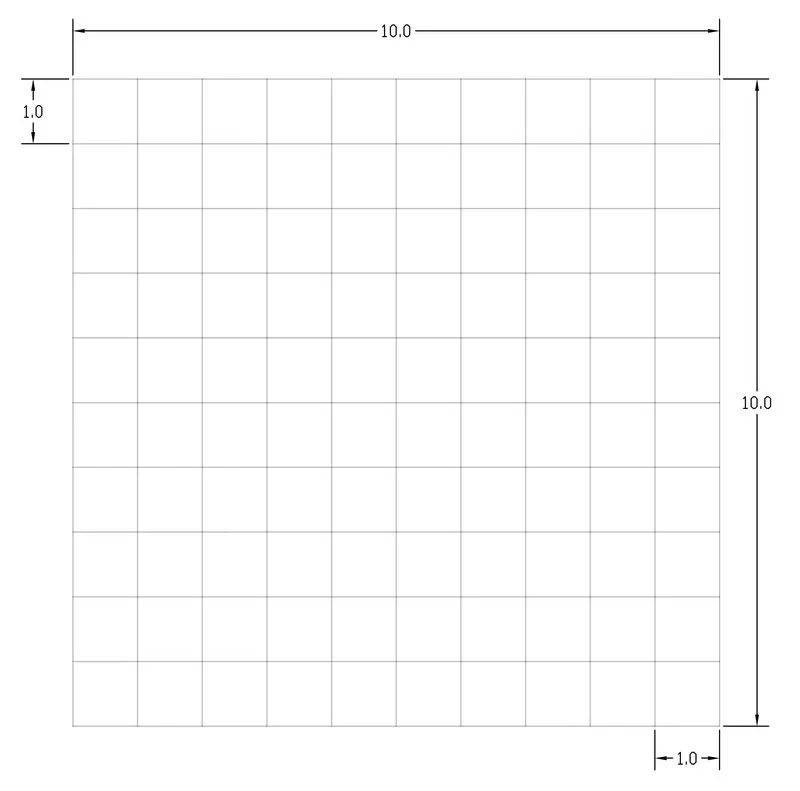
Chose line tool by typing L in command box or select line tool from any methods
Specify the coordinates of first point (0,0) in the command line, press enter or space
Specify next point (@10<0) in the command line then press enter
Press Esc key
Chose line tool by typing L in command box or select line tool from any methods
Specify the coordinates of first point (0,1) in the command line, press enter or space
Specify next point (@10<0) in the command line then press enter
Press Esc key
Specify the coordinates of first point (0,2) in the command line, press enter or space
Specify next point (@10<0) in the command line then press enter
Press Esc key
Specify the coordinates of first point (0,3) in the command line, press enter or space
Specify next point (@10<0) in the command line then press enter
Press Esc key
Specify the coordinates of first point (0,4) in the command line, press enter or space
Specify next point (@10<0) in the command line then press enter
Press Esc key
Specify the coordinates of first point (0,5) in the command line, press enter or space
Specify next point (@10<0) in the command line then press enter
Press Esc key
Specify the coordinates of first point (0,6) in the command line, press enter or space
Specify next point (@10<0) in the command line then press enter
Press Esc key
Specify the coordinates of first point (0,7) in the command line, press enter or space
Specify next point (@10<0) in the command line then press enter
Press Esc key
Specify the coordinates of first point (0,8) in the command line, press enter or space
Specify next point (@10<0) in the command line then press enter
Press Esc key
Specify the coordinates of first point (0,9) in the command line, press enter or space
Specify next point (@10<0) in the command line then press enter
Press Esc key
Specify the coordinates of first point (0,10) in the command line, press enter or space
Specify next point (@10<0) in the command line then press enter
Press Esc key
Chose line tool by typing L in command box or select line tool from any methods
Specify the coordinates of first point (0,0) in the command line, press enter or space
Specify next point (@10<90) in the command line then press enter
Press Esc key
Chose line tool by typing L in command box or select line tool from any methods
Specify the coordinates of first point (0,1) in the command line, press enter or space
Specify next point (@10<90) in the command line then press enter
Press Esc key
Specify the coordinates of first point (0,2) in the command line, press enter or space
Specify next point (@10<90) in the command line then press enter
Press Esc key
Specify the coordinates of first point (0,3) in the command line, press enter or space
Specify next point (@10<90) in the command line then press enter
Press Esc key
Specify the coordinates of first point (0,4) in the command line, press enter or space
Specify next point (@10<90) in the command line then press enter
Press Esc key
Specify the coordinates of first point (0,5) in the command line, press enter or space
Specify next point (@10<90) in the command line then press enter
Press Esc key
Specify the coordinates of first point (0,6) in the command line, press enter or space
Specify next point (@10<90) in the command line then press enter
Press Esc key
Specify the coordinates of first point (0,7) in the command line, press enter or space
Specify next point (@10<90) in the command line then press enter
Press Esc key
Specify the coordinates of first point (0,8) in the command line, press enter or space
Specify next point (@10<90) in the command line then press enter
Press Esc key
Specify the coordinates of first point (0,9) in the command line, press enter or space
Specify next point (@10<90) in the command line then press enter
Press Esc key
Specify the coordinates of first point (0,10) in the command line, press enter or space
Specify next point (@10<90) in the command line then press enter
Press Esc key