Menu

Executive Programs

Workshops

Projects

Blogs

Careers

Student Reviews


More

Academic Training

Informative Articles

Find Jobs

We are Hiring!


All Courses

Choose a category

Loading...

All Courses

All Courses

logo

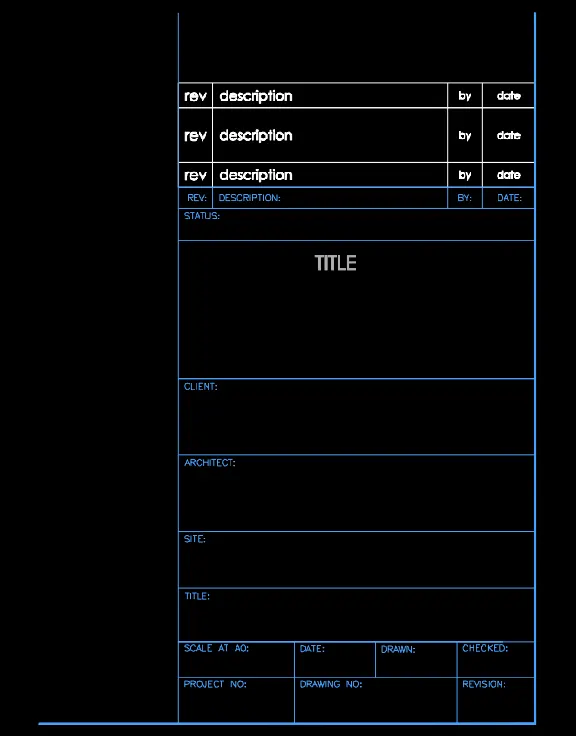
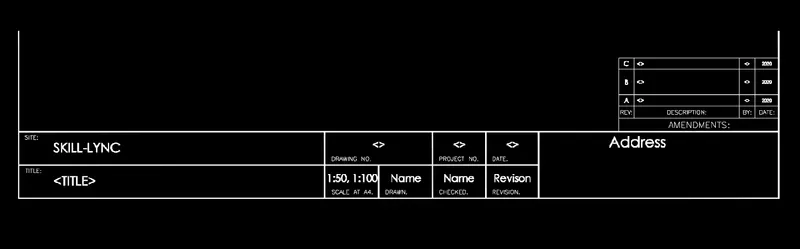
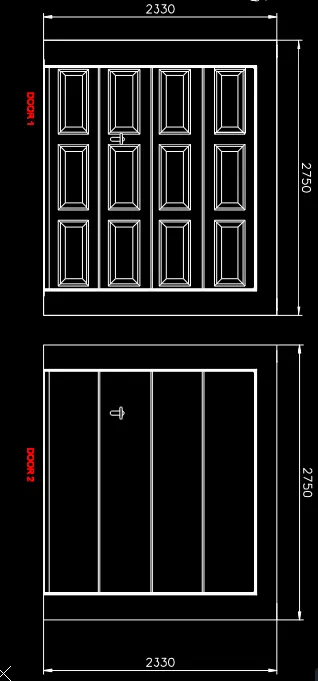
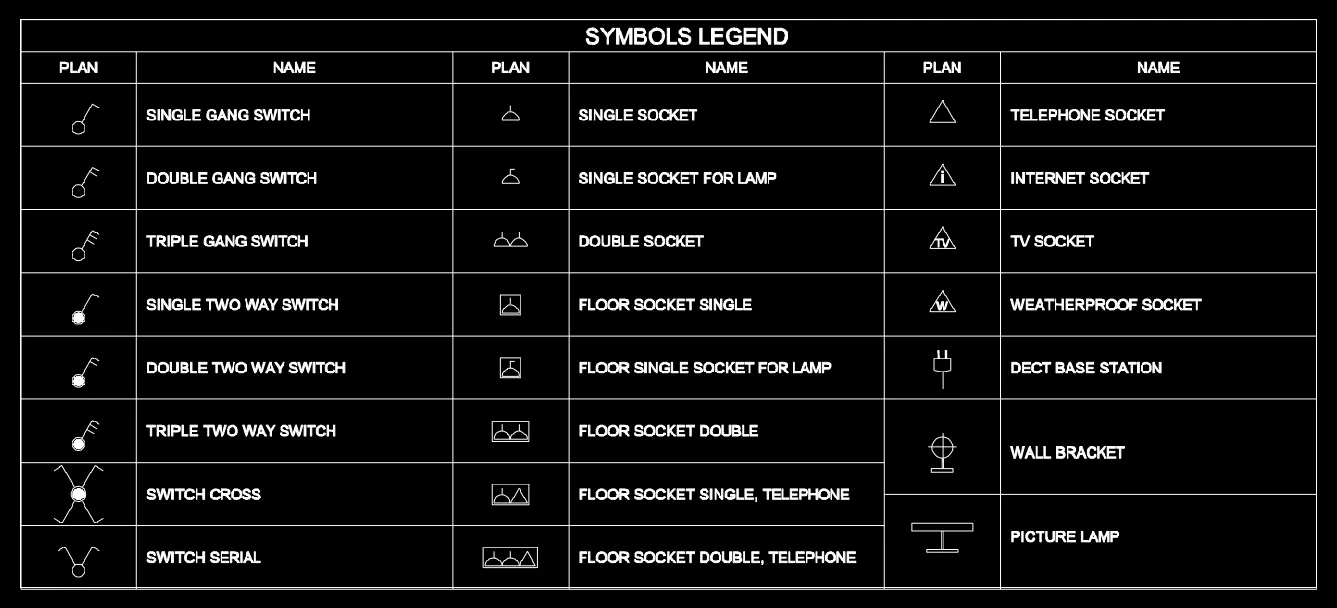
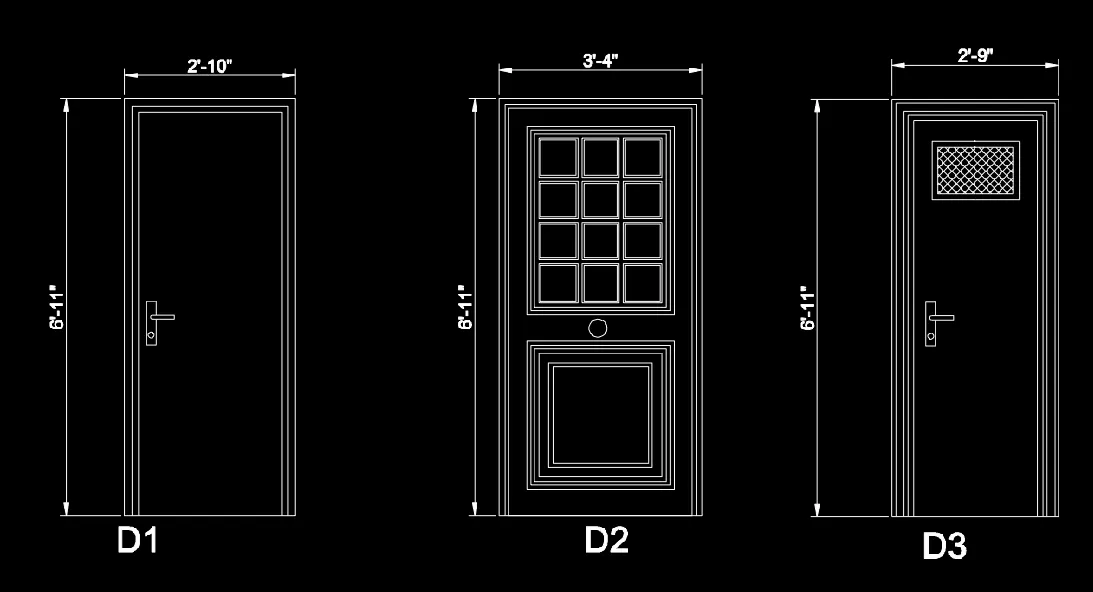
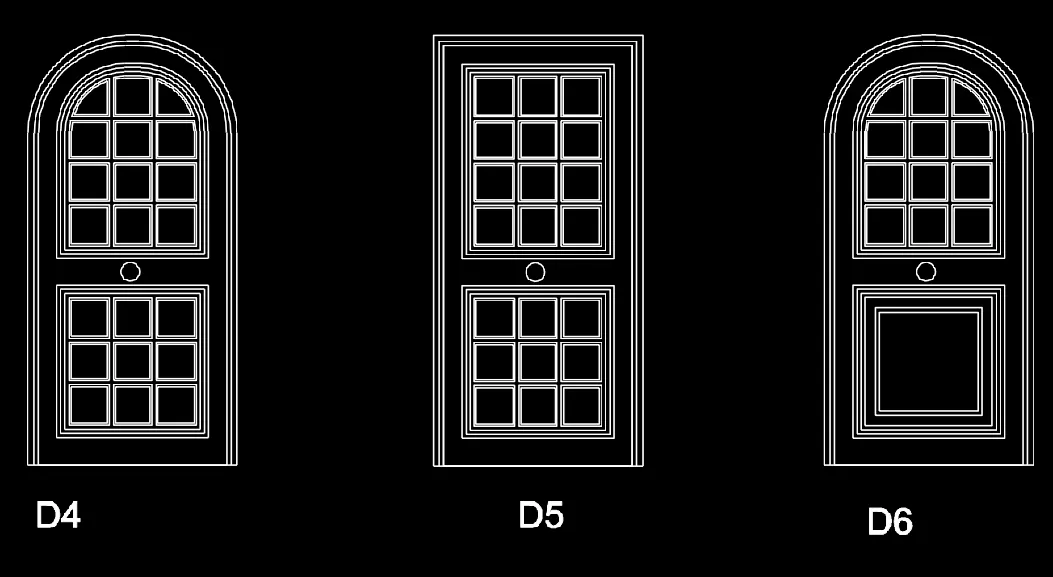
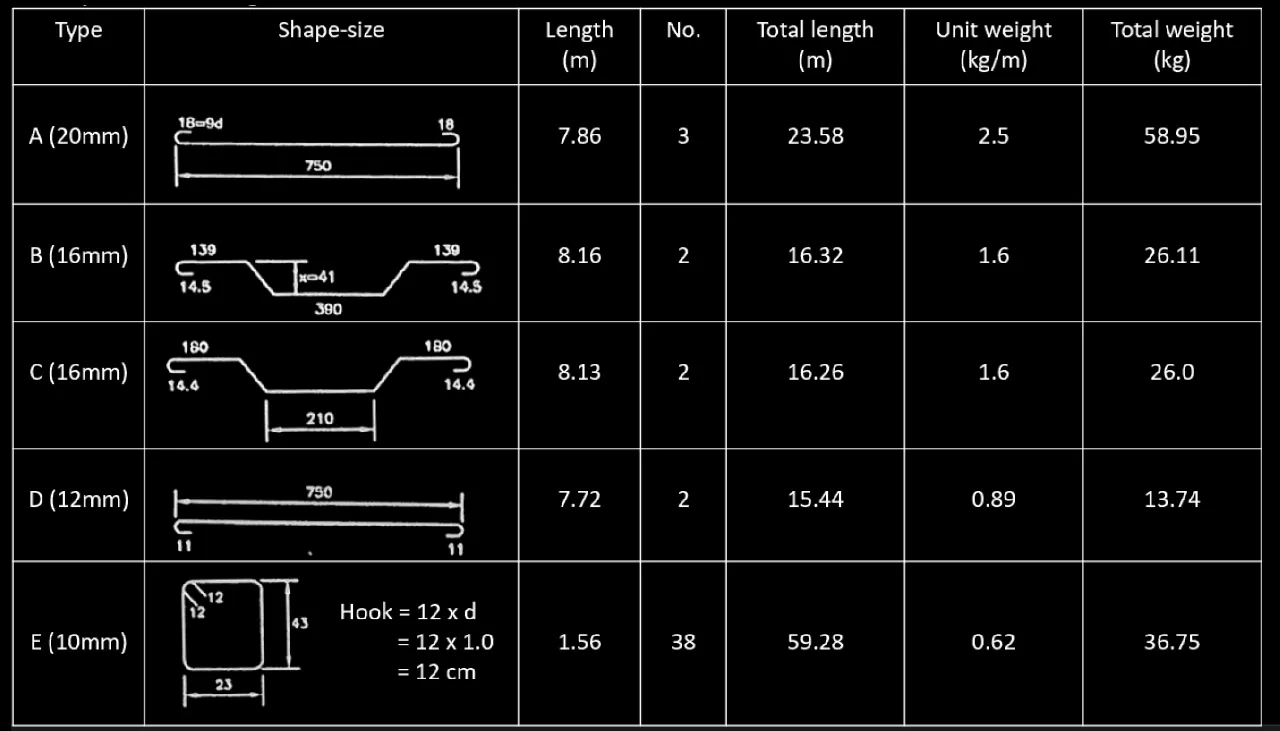
Creating Bar Bending schedule, Different Door types, and Creation of standard drawing templates using AutoCad

1) AIM- Create the templates as shown in Figures also create a block of this template name as Custom1_titleblock and Custom2_ PROCEDURE SELECT the line command  using line command create the template as shown in fig select single line text from annotate and mention the text as shown select block command using command window …

Project Details

Loading...

Leave a comment

Thanks for choosing to leave a comment. Please keep in mind that all the comments are moderated as per our comment policy, and your email will not be published for privacy reasons. Please leave a personal & meaningful conversation.

Please  login to add a comment

Other comments...

No comments yet!
Be the first to add a comment

Read more Projects by AyushAnand Shrivastava (21)

Introduction to National Building Code and Steps in a Construction project

Objective:

ANS1 A set of standards that are uniform to all structures. It protects the construction safety Modern construction methods Provides building standards ANS2 Group A: Residential buildings Group B: Educational buildings Group F: Business buildings Group G: Storage buildings Group C: Assembly buildings Group H:Industrial…

calendar

10 Feb 2022 07:24 AM IST

  • Buildings
Read more

3D Creation of Celing, Roof, Architectural plan, Structural plan, Sectional view, Elevation view and Camera specific view for a house plan using REVIT

Objective:

ANS1) AIM- Based on the project saved from Week 3, proceed from the First Floor Level. Model a Ceiling from the architecture tab above the walls at the first-floor level PROCEDURE Go to aritectural -> celling-> automatic celling revit automatically place the cellings above the rooms RESULT ANS2) AIM-Model a…

calendar

04 Feb 2022 09:51 AM IST

    Read more

    Creating Walls, Partition walls and Floors for a residential layout using REVIT

    Objective:

    Ans1 AIM-Use the project file created from Week 2. Use it for this assignment. Based on your layout from week 2, using floor tool under architecture tab and select the floor with appropriate material and thickness using the property browser create a layout in the Ground floor Level. Align the floor plan with grids created…

    calendar

    01 Feb 2022 01:06 PM IST

    Read more

    Creating Levels, Grids, Layout and model elements for a residential unit using REVIT

    Objective:

    Ans1) Revit buildings are of three types    a)view elements   b)model elements   c)annote elements annotation elements datum elements BIM is a visual representation of the physical and fuctional characterstics of a facility from inception onwards as such it serves as a shared information respository…

    calendar

    26 Jan 2022 02:59 PM IST

    Read more

    Introduction to REVIT concepts

    Objective:

    1) AIM- create a new project From the file menu and name the project appropriately PROCEDURE- open the revit software  below models click on option new select architecture press ok go to file  go to save  select the path and give the name to save the file RESULT Saved file can been seen in…

    calendar

    20 Jan 2022 01:19 PM IST

      Read more

      Project 2_Creating a 3D rendered model for a Residential Building in AutoCad

      Objective:

      PROJECT AIM- To Create a 3 dimensional model of the residential building with a rendered view INTRODUCTION- In planning of residential building floor plans , elevation and section elevation along with the center line diagram are made in order to figure out the exact positions of the rooms and footings in order to avoid…

      calendar

      18 Jan 2022 01:01 PM IST

        Read more

        Creating 3D Isometric view of various structural elements in AutoCAD

        Objective:

        1) AIM-Create a 3D Isometric View of the building with plan and elevation given PROCEDURE select 3d modeling from the settings create the 2d figure as per the given dimension use join command or union command to create 2d polygen create 3d solid fig of 2d polygen using region command use extrude and give the heght as per…

        calendar

        14 Jan 2022 02:09 PM IST

          Read more

          Creating various 3D Models like Furniture, Footing, Girder, Column drop with panel and Gable Wall in AutoCad

          Objective:

          1) AIM-Create a 3D Furniture element as shown in the Figure. Assume dimensions which are missing PROCEDURE select 3d modeling from the settings create the 2d figure as per the given dimension use join command or union command to create 2d polygen create 3d solid fig of 2d polygen using region command use extrude and give…

          calendar

          05 Jan 2022 01:59 PM IST

            Read more

            Creation of Multiple viewports, Scaling the drawing and setting in Template in AutoCad

            Objective:

            1) AIM-Create a layout of the Plan and Section A also using the template Tutorial-mArch.dwt in a scale as given in the Figure. Use the MV command to create the viewport of the size as shown in Figure. Also, use ATTEDIT command to edit the information in the title block. Use A1 size for the layout PROCEDURE open file of…

            calendar

            31 Dec 2021 11:52 AM IST

              Read more

              Creating Kitchen layout, Hatching of Architectural elements and sectional view of an Industrial Building in AutoCad

              Objective:

              1) AIM-Create the layouts of the Kitchen and provide hatches pattern as shown and also use blocks and appropriate dimensions  PROCEDURE  SELECT the line command  using line command create the kitchen layout as shown in fig select single line text from annotate and mention the text as shown select dimension  tool mention…

              calendar

              29 Dec 2021 07:03 AM IST

                Read more

                Creating Bar Bending schedule, Different Door types, and Creation of standard drawing templates using AutoCad

                Objective:

                1) AIM- Create the templates as shown in Figures also create a block of this template name as Custom1_titleblock and Custom2_ PROCEDURE SELECT the line command  using line command create the template as shown in fig select single line text from annotate and mention the text as shown select block command using command window …

                calendar

                24 Dec 2021 07:52 AM IST

                Read more

                Project 1 _Creating an Architectural plan for the provided plot size and develop relevant basic structural drawings

                Objective:

                AIM- To Design and Draft a layout of a residential building INTRODUCTION- floor plan- or house plan is a simple two-dimensional (2D) line drawing showing a structure's walls and rooms as though seen from above elevation- refers to an orthographic projection of the exterior (or sometimes the interior) faces of a building…

                calendar

                10 Nov 2021 12:34 PM IST

                  Read more

                  Creating a Layout, Section and Elevation with dimensions using AutoCad

                  Objective:

                  1) AIM- TO Create the Plan and Sections as shown PROCEDURE- SELECT the line command draw the LAYOUT as per the dimension given select the DIMENSION tool give the dimension  select the TEXT tool alot the specified position to the text in the figure RESULT 2) AIM- TO Create the Plan and Sections as shown PROCEDURE-…

                  calendar

                  07 Nov 2021 07:43 PM IST

                    Read more

                    Creating a Wardrobe detailed drawing, Floor Plan, Kitchen Layout and Column Detail using AutoCad

                    Objective:

                    A) AIM- TO Draw the elevation and details of a wardrobe as shown in the Figure PROCEDURE- SELECT the line command draw the elevation as per the dimension given select the DIMENSION tool give the dimension  select the TEXT tool alot the specified position to the text in the figure RESULT B) AIM -Draw the floor plan…

                    calendar

                    31 Oct 2021 07:21 AM IST

                      Read more

                      Creation of Column Schedule and Drawing Template using AutoCad

                      Objective:

                      1) AIM - To Create a column schedule with the help of lines Procedure 1) create the table with the help of line 2) allot the text in the position Result 2) AIM- TO Create a window schedule as given Procedure 1) create the table with the help of line 2) allot the text in the position Result 3) AIM- TO Create the drawing…

                      calendar

                      25 Oct 2021 03:33 PM IST

                        Read more

                        Creating a Residence Layout, Seating plan, Toilet and Utility room plan using AutoCad

                        Objective:

                        Challenge one Challenge two Procedure select a circle command specify the center draw a circle of radius 452mm with the same center draw a circle of radius 1398 mm place the chairs symetrically between the two circles RESULT Challenge three    

                        calendar

                        18 Oct 2021 04:42 PM IST

                          Read more

                          Drafting of various geometries using Chamfer, Fillet tool in AutoCad

                          Objective:

                          AIM To draw the given figures in autocad FIG1 PROCEDURE SELECT the line command specify the first point follow the series of command (@3,0)(@2.12<45)(@2.83<135)(@2<180) close select circle with center (1.5,1) from origin with radius 1.2 and press enter select circle with center (1.5,2.5) from the origin with radius…

                          calendar

                          14 Oct 2021 08:23 AM IST

                            Read more

                            Creating a Floor plan, Footing detail and Isometric view using AutoCad

                            Objective:

                            AIM To draw the given figure in autocad Fig 1 PROCEDURE SELECT line command specify the first point eg-(1,1) follows the series of command (@0.9,0)(@0,0.25)(@-0.2,0)(@0,0.4)(@-0.05,0)(@0,0.4)(@-0.05,0)(@0,0.6)(@0,0.05)(@0,1)(@-0.3,0)(@0,-1)(@0,-0.05)(@0,-0.15)(@-0.3,0)(@0,-0.15)(@-0.3,0)(@0,-0.15)(@-0.3,0)(0,-0.15)(@1.15,0)(@0,-0.25)(@-0.05,0)(@0,-0.4)(@0.2,0)…

                            calendar

                            11 Oct 2021 11:52 AM IST

                              Read more

                              Creation of geometries by Coordinate system methods using AutoCad

                              Objective:

                              AIM- Draw the geometries using all the coordinates system methods INTRODUCTION-cordinate system Absolute cordinate system-In absolute cordinate system all the points are located from the origin Relative cordinate system- In relative cordinate system the points are located with respect to the previous point Polar cordinate…

                              calendar

                              05 Oct 2021 12:01 PM IST

                                Read more

                                Sketch a G+1 residential plan according to Vaastu Shastra and Calculation of Loads as per IS code

                                Objective:

                                AIM - To Sketch a G+1 floor residential plan, according to Vaastu Shastra, and list down the names of the structural drawings required to be provided to the site for construction                                  GROUND FLOOR PLAN …

                                calendar

                                01 Oct 2021 06:09 AM IST

                                  Read more

                                  Project on Concrete Mix Design for various grades of Concrete

                                  Objective:

                                  CONCRETE MIX FOR M35 GRADE WITH FLYASH a) Grade designation : M35 b) Type of cement: OPC 43 grade conforming to IS 8112 C) Maximum nominal size of aggregate : 20mm d) Minimum cement content: 320 kg/m^3 (From Table 5 of IS 456: 2000 Exposure condition) e) Maximum water-cement ratio : 0.45 (From Table 5 of IS 456: 2000 Exposure…

                                  calendar

                                  21 Sep 2021 09:59 AM IST

                                    Read more
                                    Showing 1 of 21 projects