Challenge 7 : Concept Modelling of Steering Wheel
CONCEPT MODELLING OF STEERING WHEEL
OBJECTIVE :
The main objective of this project is to design the model of steering wheel by analysing its image.
INTRODUCTION :
A steering wheel is a type of steering control in vehicle.The steering wheel is the part of the steering system that is manipulated by the driver; the rest of the steering system responds to such driver inputs.
In thos project the steering model is of Mercedes Benz. The steering wheel is a flat bottom type.
DESIGN METHODOLOGY
- Import front view of steering wheel.
- Analyse the images of different perspective and makes idea of its surface structure.
- Decide the flow of surfacing to be done and make the design accordingly.
- Here first step is making surface of the outermost part that is wheel structure and then horn pad and then the connection between the wheel and hornpad.
- Make good quality curves and by that we got good quality surfaces.
- At last we got sharp edged surface that has to be smoothened by means of fillets.
- Check for any error occur in the surface like position of surfaces and flow of surfaces etc.
DESCRIPTION :
For me designing the steering wheel is difficult task. But the tools which are in AUTODESK ALIAS makes work effortless. By visualising the images of steering wheel we have to visualise the flow of surfaces of steering wheel and make the surface accordingly. The difficult part in this project is to construct the connection link between the steering wheel and the horn pad.
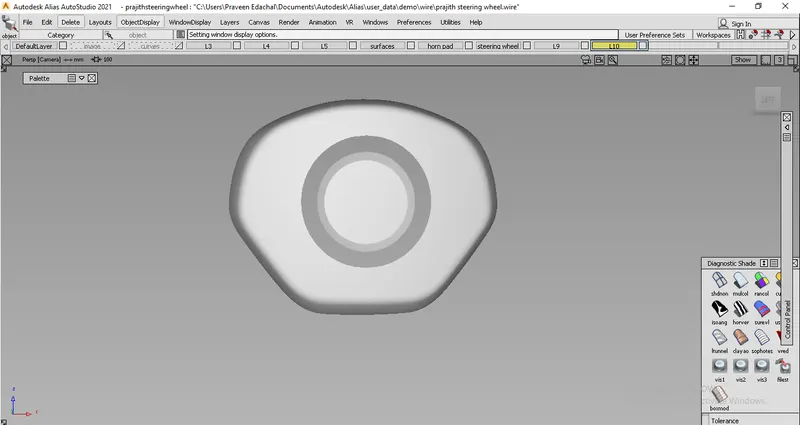
The above figure is the hornpad of a steering wheel.
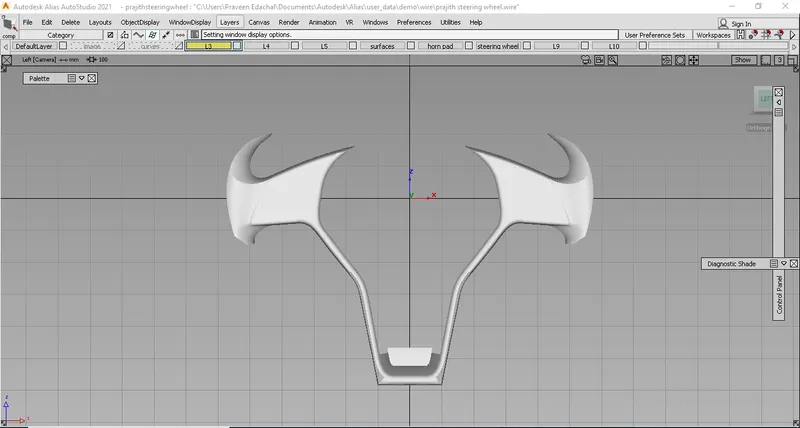
The above figure shows the commection hub between wheel and the hornpad and the most important part in its design.
There are many tools which are helps to design this model like cv curve, freeform blend, etc
CV curve and blend tool:


CV curve tool is the basic tool to design any structure. We can make lines in any shape by the use of cv curves. By the help of blend curves we create a single curve that accurately matches a series of edges (or Curves-on-surface).
Duplicate tool :

duplicate tool as its name says it is used to create the duplicate of curves or curves on surfaces or edges of surfaces ,and then we can manipulate it for our design.
Attach, Detach and Extend :


Attach and detach tools are use to attach or detach a curve or surfaces. By just click on the tool and then click on the curve or surface that we have to attach or detach we can easily done the operation.
Extend tool is used to extend the curve or surface without affecting its origin.
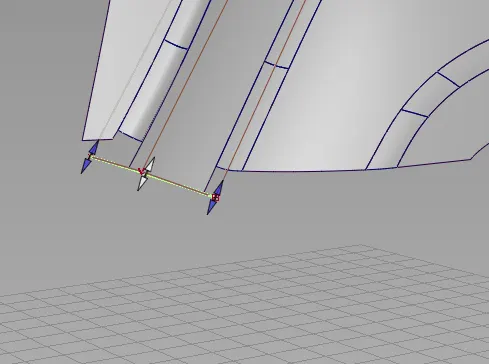
The above figure shows the operation of extension of surface.
Align tool :

The Align tool moves or reshapes a curve or surface to achieve positional, tangent, or G2 curvature continuity with another curve or surface, and it offers G3 curvature continuity.
Query edit tool :

It gives the construction history of a curve or surfaces. It gives the information about the last operation that done on the surface or curves.
Rail , Square and Freeform blend :


These are surface making tools. In rail tool there is option such as we can make surface by two connected curves or by two edge of surfaces. We can make surfaces for three side by one generation and 2 rails and for four side 2generation and 2 rails.
In square tool we should need 4 connected sides of curve or edge of surfaces to make the surfaces.
We could give the continuity options such as G0,G1 tangent, G2 curvature and G3 curvature
Freeform Blend enables us to create a transitional surface based on two input contact lines. Those contact lines can be surface curves or free curves.
Multisurface draft tool :

Multi-Surface Draft tool helps to create surfaces from a set of curves or surface. We can decide the angle, direction of draft that going to making.
surface fillet tool :

Fillet tool creates transtion surfaces between two surfaces or set of surfaces. It helps to make sharp edges of surface into smooth.
Project and trim :

Project tool is used to project any curve into the surface. Trim tool is used to trimming the portion of surfaces. We can trim out the portion from surface by means of projecting the curves into the surface or intersecting surfaces.
There is an option for untrim also. Trim converts is an another tool in trim tool which helps us to devide the surface into two and we can ,anipulate them as our desire.
NURBS to Bezier tool :

This tool splits multi-span NURBS surfaces into single span Bezier patches.This tool operates on both regular and trimmed surfaces. By splitting multispan nurbs surface to bezier we got single surfaces and we can delete the main surface.
CONCLUSION
By doing this project i got to familiarise with different tools in Autodesk ALIAS and go through different designing ideas.