Challenge 9 : Project : Technical Surfacing Kia Sportage
TECHNICAL SURFACING OF KIA SPORTAGE
OBJECTIVE :
- Design the structure of Kia sportage using Autodesk Alias with the help of front, back, top and side views.
- Make surfaces with good quality.
INTRODUCTION :
The project is to design the Kia sportage of model 2016. It's a five seater super utility vehicle.A sport utility vehicle or SUV is a car classification, that combines elements of road-going passenger cars with features from off-road vehicles, such as raised ground clearance and four wheel drive. Design of the structure has done using Autodesk Alias.
Basically the main parts in the body of a car are front and back bumber, hood, fenders, doors etc. The bumpers are the safty parts in the car in which it absorbs the energy while collision and makes passenger in safe condition. Hood is the part which covers the engine room.
The structure is designed according to the blue print which contains side, back, top, and front views of the car. Since the car body is symmetric we have to draw single half of the structure. And the we have to visualise those image into 3D structure and design according to the dimesnions.
DESIGN METHODOLOGY
- Make the dimension box of the vehicle data taken from internet.
- Import the views of the car contains front, back side and top views .
- Align the views properly with other views carefull about the dimension box.
- split the structure into three such as front side containing bumper, hood, fender and then back side and middle side.
- Decide and select the part to design first and then draw the edges of the parts using cv curves , blend curves etc.
- Make surfaces one by one accoringly with the completion of drawing edges of the parts.
- Carefull about the flow and continuity of the surfaces it can be edit and updated viewing the surfaces through different diagonostic shades.
- If there is any sharp edged surface smooth them by using fillet surfacing.
DESCRIPTION :
In this case we have to design the structure in a dimension box and split the over all structure into three parts such as front middle and then back. design the the parts precisely and we have to make sure that the parts are designed with good quality. For that firstly draw the cv curves with good quality after that make the surfaces by using different surfacing tools.
Front part :
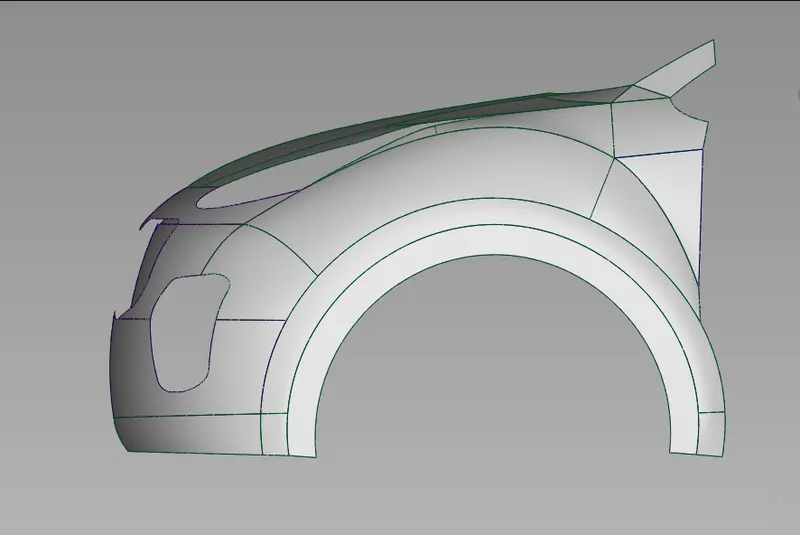
Middle and roof part :
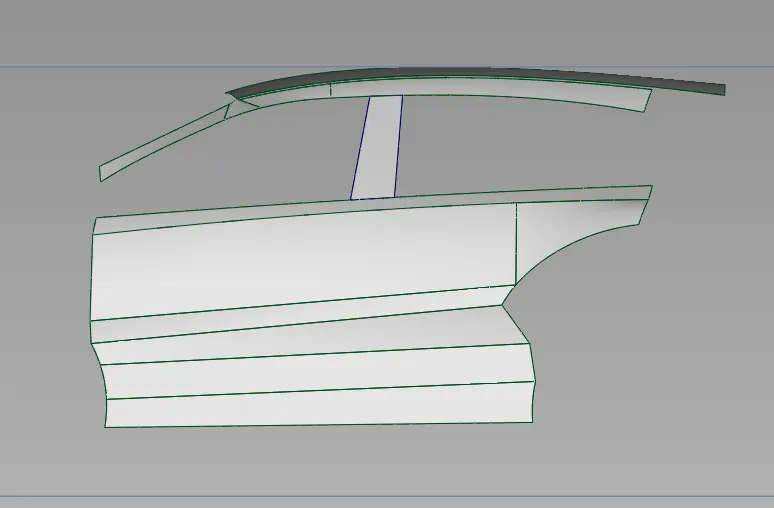
Back part :
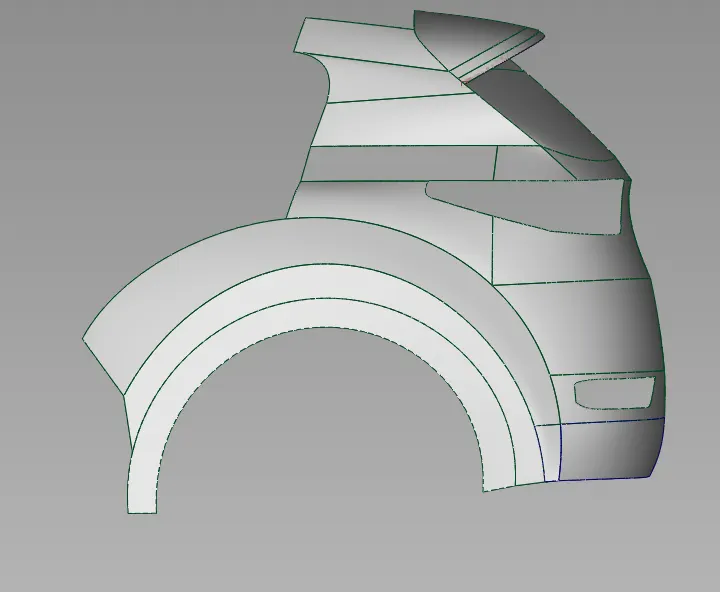
The above figures shows the 3 different sections of a complete structure of car, which contains hood, front bumper, fender, doors, back bumper, roof.
For making good quality surfaces there are many tools in Autodesk Alias such as Cv curve, blend tool, rail, ff blend, square etc.
Cv Curve and Blend tool


We can't complete a design in Autodesk alias without using these tool. These are the basic tool that helps to draw the edges of the part through that we build the surfaces.
We can draw any shape of edges of parts with Cv curve tool. For getting good quality surfaces we should make good quality curves . So that we should draw the curves with single span and with less degree.
Blend Curves are used to create a single curve that accurately matches a series of edges or curve on surfaces. We can edit the tightness and flow by using edit tool inside blend tool.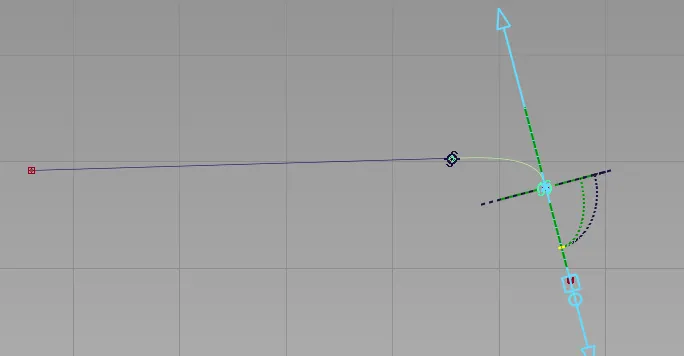
The above figure shows the operation of blend tool. As the figure shows we can change the direction and edit tightness.
Attach and Detach :


Attach tool is used to joints the curves by connecting the end points, joints surfaces by connecting edges.
Detach tool is used to separate a curve or surfaces in to two or more at any points.
Extend tool :

Extend tool is used to increse the length or width of surfaces, curves or curves on surfaces without changing it's origin.
Align tool :

Align tool is used to force fully align a curve over other curve or a surface over another surface attached with it.
The align tools moves or reshapes a curve or surface to achieve postional, tangent, or G2 curvature with another curve or surface. We can decide the continuity in which we need on that surfaces or curves.
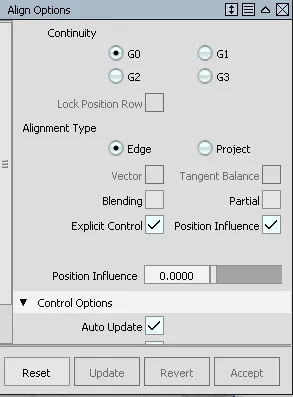
By forcefully aligning the curves or surfaces we lost the history of that one.
Query tool :

Query tool is used to show the information of last operation that we have done on a surface or curve, and hence we can further edit that operation.This operation can do simply by just click on the query tool and then click on the surface or curve and then the last operation window will open. If there is no history found query tool doesn't work.
Square, Rail and Skin surface tool :


These tools are used to create surfaces.
Rail tools has different options such as if there is only 3 sides and to make surface we can use the option one generation and 2 rails if there are four sides we use 2 generation and 2 rails.
Square tool can only use when there is for sides. Skin toolcan use when there is two sides we can connect them with the skin surface.
We can decide the continuty of the side over the other side or surface.
Surface fillet tool :

Fillet tool is used to create a transition surfaces between two surfaces or set of surfaces. It helps to make sharp edged surfaces to smooth surfaces.

The above figure shows the filleted surface.
Free form blend :

Free form blend used to create a transitional surface based on two input contact lines.
Multi surface draft tool :

Ms draft tool is also a surfacing tool, which creates one or more ruled surfaces by pulling a group of surface curves at an angle to the normal of the original surfaces. We can deside the angle,length and ceown value of the surfaces.
Project and Trim :

Project tool, intersect tool and trim tool are connected to each other. Project tool is used to project certain curves to the surface and by using trim tool we can cut or divide the surface as the projected curve works as the edge.There is tool for untrim the operation also that is untrim tool
Intersect tool is operated when there is an intersected surfaces.

The above cut portion is done by using project and trim tool operation.
Surface continuity tool :

This tool helps to check the positional, tangent plane and curvature continuity between the surfaces.
CONCLUSION :
The design of the structure of kia sportage has done with good quality surface. This project helps me to interact with tool and makes improvement on my visualisation skill.