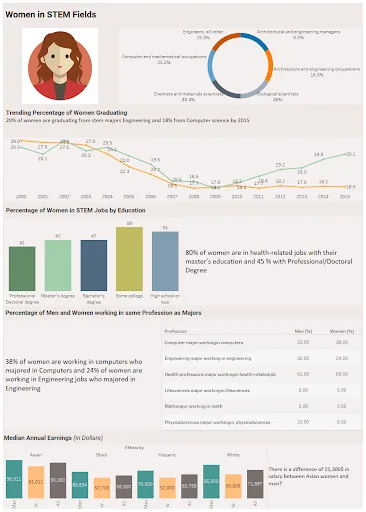
Developing a Dashboard on Tableau - Women in STEM Fields
Learners are required to develop a dashboard on Tableau with a given data set. The data set will have data about the women who graduated (year of graduation, number of employed wom…

Learn how to analyze and visualize data using Tableau like the experts do.
As organizations rely on data to make informed decisions and drive business forward, data analysis and visualization using software tools such as Tableau have become core skills sought after in the industry. Through data visualization, organizations can draw inferences, compare data, identify errors, recognize patterns, and present all their findings in one place.
In this course, you will learn how to analyze, visualize, and draw inferences from a dataset using Tableau - a platform widely used in the industry to interactively visualize and present data. You will gain an established understanding of key concepts such as data types, sorting, blending, grouping, filtering, and table calculations. By taking this course, you will learn how to build a complete dashboard, while adhering to best practices followed in the industry. This course will progress into advanced calculations and analytics, nested Level of Details (LODs), dynamic designs, and Tooltip visualizations.
Throughout this course, you will work on projects that require extensive use of Tableau to develop dashboards which effectively present data. This will expose you to how datasets are analyzed and visualized in the industry.
Who can enrol in this course?
Students and working professionals with an interest in gaining industry-relevant data analysis and visualization skills.
Tableau software allows businesses to clearly visualize, analyze, and report large data sets. In the industry, Tableau is a business intelligence tool used to make decisions supported by data. In order to develop effective dashboards and data visuals that can be studied and interpreted, learners must understand the UI and basic features.
This week will cover
The Tableau workspace has features such as shelves, cards, the Data Pane, Analytics Pane, toolbars, and menus. Each of these features has a specific function that learners must understand how to use when working with Tableau.
This week will cover
As not all types of data are the same, Tableau supports 7 different data types, which can be sorted and grouped according to requirements. In order to present and organize data visually, learners should understand the features of Tableau related to data types and sorting.
This week will cover
There are six different filters available for users on Tableau, each with their own unique function. By using filters, datasets can be condensed to illustrate concise information, thus improving the efficiency of dashboards. Data in a table can also be analyzed through performing table calculations. These features are essential for learners, as they can be used to develop efficient and concise dashboards.
This week will cover
Spreadsheets with data can be transformed into visually interactive dashboards that present the information. Dashboards can be combined with spreadsheets to tell a story and narrate performance through measured parameters. By learning the best practices, learners can design and develop effective dashboards and stories for businesses.
This week will cover
Tableau workbooks can be shared, exported, and published as required. As many individuals may work on a dashboard together, it is important for learners to understand how distribution and publishing work.
This week will cover
Tableau is also used to perform data blending and data joining. Through joining, data in tables and sheets from the same source can be combined. Data blending lets users combine data from different sources. It is important for learners to understand joins and blending as both are often required in the industry.
This week will cover
When analyzing data on Tableau, Relationships let you combine data from different tables. It is important for learners to understand how to work with multiple sets of data for effective analysis and visualization.
This week will cover
Before data is used in business intelligence, it goes through data preparation. This involves collecting, combining, and systematically organizing the dataset before it gets processed. It is important for learners to understand the parameters considered when preparing data.
This week will cover
When working with large sets of data, Tableau lets users perform advanced calculations and analytics to draw accurate inferences. It is important for learners to understand how to perform advanced calculations using Tableau to meet industry standards.
This week will cover
Nested LOD is an advanced topic in Tableau that lets users assess data sets in-depth. Users can also build maps using Tableau, and understand the related data. As certain data sets may require mapping functions, and analysis in-depth, it is important to know about these concepts.
This week will cover
Through dynamic designs, values in dashboards can automatically change when related data is modified. As it is common for data sets to have changing values, knowing how to work with dynamic designs is an essential skill for learners.
This week will cover
Our projects are designed by experts in the industry to reflect industry standards. By working through our projects, Learners will gain a practical understanding of what they will take on at a larger-scale in the industry. In total, there are 2 Projects that are available in this program.
Learners are required to develop a dashboard on Tableau with a given data set. The data set will have data about the women who graduated (year of graduation, number of employed wom…
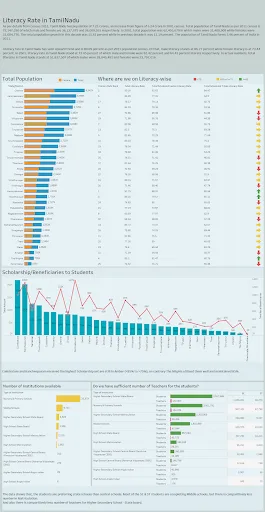
Learners are required to develop a dashboard titled “Literacy Rate in Tamil Nadu” showing the female literacy population when compared to the total. It should depict th…
Become job ready with our comprehensive industry focused curriculum for freshers & early career professionals
Students and graduates of computer science and related engineering streams can take the Data Analysis and Visualization with Tableau course. It is for anyone interested in extracting actionable insights from the given data.
Yes, the Tableau data visualization course is 100% online.
The Tableau visualization course is 12-week long.
According to Ambitionbox, the average annual salary of a Tableau Analyst reaches up to INR 6.3 LPA. However, your pay package would primarily depend on your experience and expertise.
Yes, you shall be given a course completion certificate after completing the Data Analysis and Visualization with Tableau course. The top 5% of the scorers will receive a merit certificate alongside the course completion certificate.
Yes, you can clear your doubts during coursework from our technical support team through email and forum support.
Data visualization is data representation in a graphical format or chart format to make it easy for the user to extract information. Tableau is one of the popular tools used to map, sort and prepare data.
Data Analysis means the process of arranging data logically and extracting actionable insights to make business decisions for organizations.
Skill-Lync is among India’s leading EdTech platforms dedicated to transforming engineering education. We equip young engineers with the latest skill sets and cutting-edge tools in new-age technologies.
The brainchild of two engineers from Chennai, Skill-Lync, is on a mission to bridge the skill gap between aspiring professionals and the industry’s demands through job-oriented courses.
A counsellor will walk you through the syllabus, projects and fee options — and tell you honestly if another course suits you better.