Meshing in CFD: Mesh Types, Cell Shapes, Quality and a Worked Grid Study
What meshing in CFD is and how to do it well: structured, unstructured, hybrid and polyhedral meshes, the five cell shapes, skewness, orthogonal quality and aspect ratio limits from the Fluent manual, and a three-grid study with the Grid Convergence Index checked against an exact answer.

Meshing in CFD means splitting the fluid region into small cells so a solver can turn the flow equations into algebra it can solve. Each cell becomes a control volume that stores its own pressure, velocity and other values, and the solver balances what flows through every face. The mesh you choose decides how accurate the answer is, how long it takes and whether it converges at all.
In short
- There are three families of mesh: structured (rows and columns of quads or hexes), unstructured (triangles, tetrahedra, polyhedra in any arrangement) and hybrid (thin prism layers at walls with an unstructured core). Ansys Fluent accepts hex, tet, pyramid, wedge and polyhedral cells (Fluent User's Guide 7.1, Release 2025 R2).
- Quality limits from the solver's own manual: keep maximum skewness of a tri/tet mesh below 0.95 and minimum orthogonal quality above 0.01, and never put fewer than 5 cells across a flow passage (Fluent User's Guide 7.2, 2025 R2).
- Converting a tet mesh to polyhedra cuts the cell count "almost 3-5 times" (Fluent User's Guide 7.11). Our script shows why: a random 3D Delaunay tet mesh has 6.76 tets per node, and the polyhedral mesh has one cell per node.
- Skill-Lync worked example, checked by script: laminar flow in a square duct on 10×10, 20×20 and 40×40 grids gives f·Re = 58.77, 57.37 and 57.02. The Grid Convergence Index puts the fine-grid uncertainty at 0.25%, and the exact value, 56.91, sits inside that band.
- Skill-Lync's public project index (177,222 student project pages, read 23 Nov 2026) has 7,946 titles that mention a mesh and 85 grid-dependency or grid-independence studies.
This guide is for mechanical and aerospace students and junior CFD engineers who are about to mesh their first real geometry in Ansys Fluent, OpenFOAM or a similar tool. It covers what a mesh is, the mesh types and cell shapes, the quality numbers to check, how to prove a mesh is fine enough, and how the mesh sets your time step. If you work mainly in structural FEA, our post on why meshing matters in FEA and CFD uses a cantilever example instead.
What is meshing in CFD?
Meshing is the step that replaces a continuous fluid domain with a finite set of cells and nodes. A mesh has two parts: its geometry (the x, y, z position of every node) and its topology (which nodes make up which cell, and which cells share a face). The solver needs both: geometry gives cell volumes and face areas, topology tells it which cells exchange flux.
Most commercial CFD codes, including Ansys Fluent, Simcenter STAR-CCM+ and OpenFOAM, use the finite volume method. The governing equations are written in integral (conservation) form, applied to each cell, and the fluxes of mass, momentum and energy are balanced across the cell's faces. The value stored in a cell is treated as an average over that cell. Finite difference codes store values at grid points instead, and finite element codes store them at nodes and interpolate with shape functions. The finite volume view is why CFD engineers talk about "cells" and "faces" rather than "elements" and "nodes".
Why can't a CFD solver work without a mesh?
The Navier-Stokes equations have no general closed-form solution for real geometries, so the solver approximates them at a finite number of places. The mesh defines those places. Discretising the equations on the mesh turns a few partial differential equations into a very large set of coupled algebraic equations, which a computer can solve iteratively.
The size of that set is easy to estimate. A steady RANS run with the k-ω SST model solves six variables per cell: pressure, three velocity components, k and ω. On a 1,000,000-cell mesh that is 6,000,000 unknowns, updated every outer iteration. Doubling the resolution in every direction of a 3D mesh multiplies the cell count by 8, which is why mesh size is the first lever on run time and memory.
What are the types of mesh in CFD?
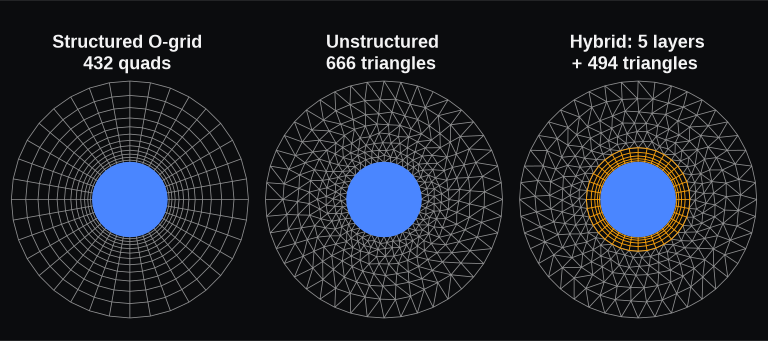
CFD meshes fall into three families. A structured mesh is a regular grid whose cells can be addressed by indices (i, j, k). An unstructured mesh lets any cell connect to any neighbour, so it needs an explicit connectivity list. A hybrid mesh combines the two, usually as structured-like prism layers along walls and an unstructured fill away from them.
Structured meshes
In a structured mesh the neighbours of cell (i, j, k) are always (i±1, j, k), (i, j±1, k) and (i, j, k±1). The solver does not need to store who is next to whom, so memory use is low and the data maps neatly onto arrays. The grid does not have to be rectangular: it can be curvilinear and fitted to a body, like the O-grid around the cylinder above, as long as the index pattern stays regular. Complex parts are usually split into several blocks, each structured, which is called a multi-block mesh. Structured hex meshes work best when the flow runs along the grid lines, as in a duct, a pipe or the boundary layer on an airfoil.
Unstructured meshes
An unstructured mesh stores every cell's nodes and neighbours explicitly. That costs memory, but it frees the mesher to fill any shape automatically and to cluster small cells only where they are needed. Tetrahedral meshes are the classic example because almost any closed CAD body can be filled with tets without manual blocking. Unstructured does not mean "tet only": a hex mesh can also be unstructured if its connectivity is irregular.
Hybrid meshes
Walls need thin cells stacked normal to the surface to capture the steep velocity gradient in the boundary layer. Tets are poor at this, so most industrial meshes extrude several layers of prism (wedge) cells from the wall, then fill the rest of the domain with tets, polyhedra or hexes. Pyramids connect a quad face of a hex to the triangle faces of tets. The first layer height comes from your target y+; our guide to y+ and first cell height works it through.
Hex-dominant and Cartesian cut-cell meshes
A fourth approach starts from a simple background hex grid and adapts it to the geometry. OpenFOAM's snappyHexMesh does this in three stages: castellation (refine and remove cells outside the body), snapping (move nodes onto the surface) and an optional layer-addition stage. Its user guide describes the result as hexahedra and split-hexahedra. Fluent's hexcore and CutCell meshes follow a similar idea: hexes fill the core and other cells connect them to the walls. Simcenter STAR-CCM+ calls its version the trimmed mesher, which Siemens describes as predominantly hexahedral.
| Mesh family | How neighbours are found | Strength | Weakness | Typical tools |
|---|---|---|---|---|
| Structured (single or multi-block) | From indices i, j, k | Low memory, cells aligned with the flow, low numerical diffusion | Blocking a complex part is slow, manual work | Ansys ICEM CFD blocking, OpenFOAM blockMesh, Pointwise |
| Unstructured (tet, poly) | Stored connectivity list | Automatic for any CAD shape, local refinement is easy | More cells for the same resolution (tets), more memory per cell | Ansys Meshing, Fluent Meshing, STAR-CCM+ |
| Hybrid (prism layers + core) | Stored connectivity list | Resolves boundary layers on complex shapes | Layer collapse at sharp corners and narrow gaps needs care | All of the above |
| Hex-dominant / cut-cell | Stored connectivity list | Mostly hexes with little manual work | Surface fit depends on refinement level; layers can thin out | snappyHexMesh, Fluent Meshing hexcore |
Which cell shapes can a CFD solver use?
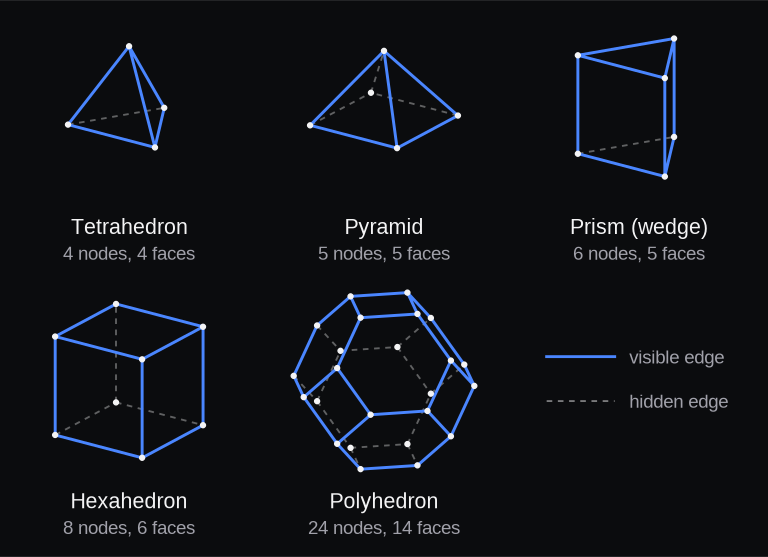
In 3D, a modern finite volume solver accepts five cell shapes: tetrahedra, pyramids, prisms (wedges), hexahedra and general polyhedra. In 2D the options are triangles, quadrilaterals and polygons. Fluent's user guide lists exactly these, and it accepts any mix of them in one mesh, including meshes with hanging nodes from local refinement.
| Cell | Nodes | Faces | Where it is used |
|---|---|---|---|
| Tetrahedron | 4 | 4 triangles | Automatic fill of complex volumes |
| Pyramid | 5 | 4 triangles + 1 quad | Transition between hex and tet regions |
| Prism (wedge) | 6 | 2 triangles + 3 quads | Inflation layers on walls |
| Hexahedron | 8 | 6 quads | Structured blocks, hexcore, ducts and channels |
| Polyhedron | Any | Any (about 15 on average in a converted tet mesh) | Fluent poly meshes (converted or generated), STAR-CCM+ polyhedral mesher |
Tetrahedral, hexahedral or polyhedral mesh: which is better?
No single shape wins. Hexes give the most accuracy per cell when they line up with the flow. Tets fill any shape automatically but need many more cells. Polyhedra keep the automatic fill of tets with far fewer cells and more neighbours per cell, which helps gradients and convergence. For complex internal or external flows, a poly or poly-hexcore mesh with prism layers is a common default today.
Worked example: how many cells? Take a 500 × 200 × 100 mm box meshed at 5 mm spacing. A hex mesh needs 100 × 40 × 20 = 80,000 cells on 86,961 nodes. Every cube can be split into 5 or 6 tetrahedra (our script checks that both splits fill the cube exactly), so a tet mesh on the same nodes has 400,000 to 480,000 cells: 5 to 6 times as many, for the same spacing.
A polyhedral mesh goes the other way. Fluent builds it by cutting each tet into "duals", one per corner node, and merging all the duals around each node into one polyhedron. The result has one cell per original node. On a random 3D Delaunay tet mesh of 60,000 points, our script counts 6.76 tets per interior node, and each node has 15.5 neighbours on average, so the polyhedra average about 15.5 faces. That is where Fluent's "almost 3-5 times lower" cell count comes from (the ratio drops below 6.76 because boundary nodes and prism layers are handled differently).
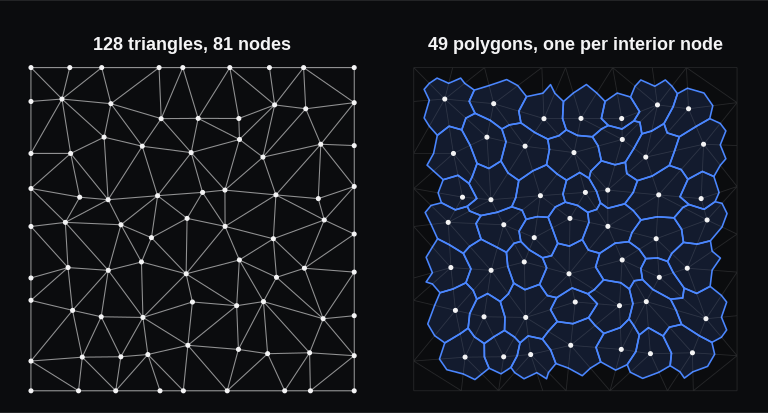
The trade-off: a polyhedron with 15 faces costs more memory and work per cell than a hex with 6, so the saving in run time is smaller than the saving in cell count. Fluent also notes some tools do not work on converted poly meshes, such as hanging-node adaption (it uses its PUMA method instead) and remeshing in dynamic-mesh cases.
How do you check mesh quality in CFD?
Check three numbers before every solve: skewness (how far a cell is from the ideal shape), orthogonal quality (how well face normals line up with the line joining cell centres) and aspect ratio (how stretched a cell is). Fluent's guidance is maximum skewness below 0.95 for tri/tet meshes and minimum orthogonal quality above 0.01, with averages well inside those limits.
Skewness
Ansys defines normalised equiangular skewness from the largest and smallest angles of a face or cell:
where is 60° for a triangle and 90° for a quad. A value of 0 is a perfect cell and 1 is a degenerate one. A triangle with angles 35°, 35° and 110° scores 0.42 ("good"). A long thin 80-80-20 triangle scores 0.67 ("fair"). A flattened 10-10-160 triangle scores 0.83 ("poor"). A parallelogram quad with 45° and 135° corners scores 0.50, right on the good/fair boundary.
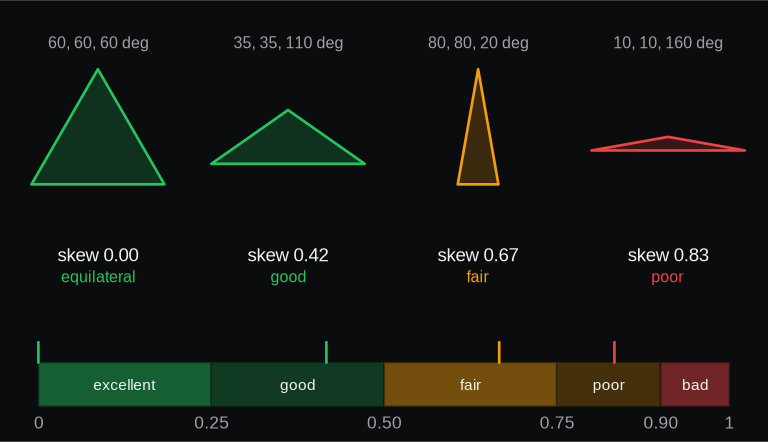
| Skewness | Cell quality (Ansys Meshing) |
|---|---|
| 0 | Equilateral (ideal) |
| above 0 to 0.25 | Excellent |
| 0.25 to 0.50 | Good |
| 0.50 to 0.75 | Fair |
| 0.75 to 0.90 | Poor |
| 0.90 to below 1 | Bad (sliver) |
| 1 | Degenerate |
The same Ansys page says good meshes average about 0.1 skewness in 2D and 0.4 in 3D, that all 2D cells should be "good" or better, and that a 3D mesh will usually have a few "fair" and "poor" cells. Ansys also has a second, equilateral-volume skewness for triangles and tets, which is often harsher: the 10-10-160 triangle scores 0.98 on that measure. Check which one your software reports. To compute these numbers (and HyperMesh's aspect, warpage and Jacobian) for any quad or triangle, use our free mesh quality calculator.
Orthogonal quality
For each face, Fluent compares the face's area vector with the vector from the cell centroid to the face centroid and with the vector to the neighbouring cell's centroid. The worst value over all faces is the cell's orthogonality, from 0 (worst) to 1 (best). For tets, prisms and pyramids the orthogonal quality is the smaller of that value and 1 minus the cell skewness. It matters because the finite volume method computes the flux across a face from the two cell-centre values; when the line joining them is far from the face normal, the solver needs a correction term that adds error and instability.
Aspect ratio
Fluent computes aspect ratio as the largest of the centroid-to-node and centroid-to-face distances divided by the smallest. Even a perfect unit cube scores 0.866 / 0.5 = 1.732 on this definition, which our script reproduces. A 1 × 1 mm prism-layer cell that is 0.01 mm tall scores 141. That is fine: thin wall cells are meant to be stretched along the flow. What hurts is a sudden jump in cell size or aspect ratio where the flow changes quickly, which is why Fluent advises smooth growth between neighbouring cells.
How fine should a CFD mesh be? A grid study, worked
A mesh is fine enough when refining it further no longer changes the result you care about by more than your tolerance. You prove this with a grid independence (grid convergence) study: solve on at least three systematically refined meshes, check the result settles, and estimate the remaining error with the Grid Convergence Index (GCI) from Richardson extrapolation.
The Journal of Fluids Engineering procedure (Celik et al., 2008) is the standard recipe. It asks for three grids with a refinement ratio above 1.3, ideally the same kind of cells at each level.
Worked example. Fully developed laminar flow in a square duct has an exact answer, so we can check the method honestly. With the Darcy friction factor and Reynolds number based on the hydraulic diameter , the product is a constant for the duct shape. Writing the momentum equation as on a unit square gives , where is the mean of . The series solution gives , the textbook value. Our script solves the same problem with second-order finite differences on six grids:
| Grid | Cells | f·Re | Error vs exact |
|---|---|---|---|
| 5 × 5 | 25 | 64.655 | +13.61% |
| 10 × 10 (coarse, φ3) | 100 | 58.772 | +3.28% |
| 20 × 20 (medium, φ2) | 400 | 57.371 | +0.81% |
| 40 × 40 (fine, φ1) | 1,600 | 57.024 | +0.20% |
| 80 × 80 | 6,400 | 56.937 | +0.05% |
| 160 × 160 | 25,600 | 56.916 | +0.01% |
Now pretend we only had the three middle grids and no exact answer, which is the real situation in a project. With , the apparent order of accuracy is
which matches the scheme's formal second order, a sign the grids are in the asymptotic range. The extrapolated value and the fine-grid GCI are
So the honest report is f·Re = 57.02 ± 0.14 on the 40 × 40 grid. The exact 56.91 lies inside that band, and the extrapolated 56.909 is within 0.002% of it. The 1.25 is the safety factor Celik et al. use for three-grid studies.
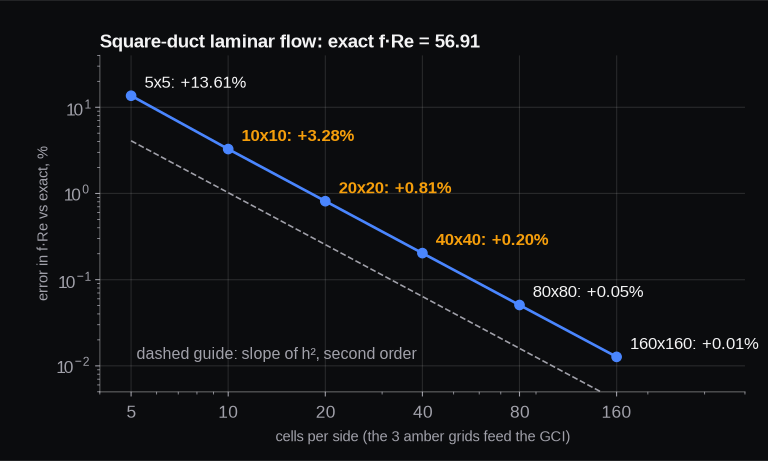
Two lessons carry over to real projects. First, the error falls as only once the mesh resolves the flow; the 5 × 5 grid is outside that range. Second, accuracy is expensive: on this case, 1% error needs about 19 cells per side, but 0.1% needs 58. In 3D, halving the cell size multiplies the cell count by 8, and in a transient run limited by the Courant number it also halves the time step, so the work grows about 16 times. Choose the tolerance from what the result is used for, not from habit. Ansys Workbench users can follow a structural three-mesh GCI example in our mesh sizing guide.
How does the mesh size set the time step in a transient CFD run?
In a transient simulation the time step and the cell size are linked through the Courant number, : how many cells the flow crosses in one step. Explicit schemes need at or below about 1 to stay stable (the Courant-Friedrichs-Lewy condition, 1928), and implicit ones usually need modest values to stay accurate. Smaller cells therefore mean smaller time steps.
For a 2 mm cell and a local speed of 15 m/s, gives , so simulating 10 ms of flow takes 75 time steps. Refine that region to 1 mm and the same physical time needs 150 steps on 8 times as many cells. Our Courant number calculator does this for any cell size and speed.
What is mesh adaptation, and what are h-, r- and p-refinement?
Mesh adaptation changes the mesh during or between solves so cells go where the error is largest, instead of refining everywhere. There are three basic kinds: h-refinement splits cells, r-refinement moves nodes without adding any, and p-refinement keeps the mesh but raises the order of the solution inside each cell.
- h-refinement divides cells (for example, a hex into 8) in regions flagged by a gradient or error estimate, and can coarsen (derefine) them where the error is low. It is the most common kind in finite volume codes. Splitting a cell without splitting its neighbour leaves hanging nodes, which Fluent accepts.
- r-refinement moves nodes towards a moving feature, such as a shock or a wave front, keeping the cell count and usually the connectivity the same.
- p-refinement raises the polynomial order of the solution in each cell. It belongs to finite element and high-order (discontinuous Galerkin, spectral element) methods more than to standard finite volume solvers.
Combinations exist: rh-refinement moves and splits, and adaptive remeshing builds a new mesh from the error estimate. Adaptation saves cells, but it is not a substitute for a sensible starting mesh: features the first mesh misses entirely, such as a thin boundary layer, may never be flagged.
Which software do CFD engineers use for meshing?
The tools you will meet most are Ansys Meshing and Fluent Meshing, OpenFOAM's blockMesh and snappyHexMesh, Simcenter STAR-CCM+, and pre-processors such as ANSA and HyperMesh. Ansys has been part of Synopsys since the acquisition closed on 17 July 2025, and Ansys Student is still a free download.
- Ansys Meshing and Fluent Meshing: tet, hexcore, poly and poly-hexcore meshes with inflation layers. The free Ansys Student licence limits fluids models to 1 million cells/nodes and structural models to 128K nodes/elements, enough for a coursework duct, airfoil or Ahmed body at moderate resolution.
- OpenFOAM blockMesh and snappyHexMesh: blockMesh writes structured multi-block hex meshes from a text dictionary; snappyHexMesh adds castellation, snapping and layers for complex STL geometry. Both are free and open source.
- Simcenter STAR-CCM+: a polyhedral mesher, a trimmed mesher that Siemens describes as predominantly hexahedral, and a prism layer mesher that adds prismatic cells next to walls to capture the boundary layer.
- ANSA and HyperMesh: pre-processors for geometry clean-up and surface meshing. In Skill-Lync's 2D-meshing project reports (4,230 read on 20 Nov 2026), 1,566 used ANSA and 490 HyperMesh.
A CFD meshing checklist before you press solve
- Clean the geometry: close gaps, remove tiny faces and features smaller than the cells you plan to use.
- Decide the near-wall treatment and compute the first layer height from your target y+.
- Put at least 5 cells, and usually many more, across every flow passage.
- Refine where gradients are strong: leading edges, wakes, shear layers, jets and separation zones.
- Keep growth between neighbouring cells smooth (Ansys Meshing's default inflation-layer growth rate is 1.2).
- Check quality: maximum skewness below 0.95 (aim lower), minimum orthogonal quality above 0.01 (Fluent asks for an average well above that), no negative volumes.
- Plan a three-grid study with r above 1.3 and report the GCI for the quantities you will quote.
- For transient runs, check the Courant number the smallest cells impose on the time step.
Where can you learn CFD meshing properly?
Meshing is learned by meshing: by fixing a stalled run and seeing the result change when the mesh does. It is also where our learners spend much of their project time. Skill-Lync's public project index (177,222 student project pages, read 23 Nov 2026) has 7,946 titles that mention a mesh, 171 OpenFOAM blockMesh projects and 85 grid-dependency or grid-independence studies, most of them on an Ahmed body or a bevel gear. This count covers titles only and is a starting point; we will update it as new projects come in.
Skill-Lync's Post Graduate Program in Computational Fluid Dynamics goes from writing your own solvers and meshes in MATLAB and Python to industrial meshing in Ansys and OpenFOAM, with mentor reviews of each project. For a shorter start, Introduction to CFD using MATLAB and OpenFOAM covers the numerics and blockMesh. Introduction to GUI based CFD using ANSYS Fluent covers meshing and solving in Fluent. You can talk to a Skill-Lync counsellor about which fits your background. For the theory behind all of this, read the free Computational Fluid Dynamics book.
Frequently asked questions
What is meshing in CFD in simple words?
Meshing is cutting the space the fluid occupies into many small cells. The solver cannot solve the flow equations everywhere at once, so it solves a balance of mass, momentum and energy for each cell and links neighbouring cells through their shared faces. More, smaller cells usually give a more accurate answer but take longer to compute.
What is the difference between a structured and an unstructured mesh?
A structured mesh is a regular grid where every cell is found by indices (i, j, k), so neighbours never need to be stored. An unstructured mesh stores each cell's connections explicitly, so any shape and any cell type can be used. Structured meshes are cheaper and more accurate per cell; unstructured meshes are faster to build on complex geometry.
Can a tetrahedral mesh be structured, and can a hex mesh be unstructured?
Yes to both. "Structured" describes the connectivity, not the cell shape. A hex mesh with irregular connectivity, such as one from an automatic hex-dominant mesher, is unstructured. A mesh of triangles or tets can be structured if it repeats a fixed pattern that indices can address, for example a structured quad grid with every quad split the same way.
Is a polyhedral mesh better than a tetrahedral mesh?
Usually, for the same geometry and accuracy. Converting tets to polyhedra gives one cell per original node, which Fluent says cuts the cell count almost 3 to 5 times. Each polyhedron has about 15 neighbours, which helps gradients and convergence. The catch is more memory and work per cell, and some adaption and dynamic-mesh tools do not support polyhedra.
What is a good skewness value for a CFD mesh in Ansys?
Below 0.25 is excellent, 0.25 to 0.5 good, 0.5 to 0.75 fair, 0.75 to 0.9 poor and above 0.9 bad. Fluent advises keeping the maximum skewness of tri/tet meshes below 0.95, with a much lower average. Ansys says good meshes average about 0.1 in 2D and 0.4 in 3D. A few cells above 0.9 can stall convergence.
How many cells do I need for a CFD simulation?
No fixed number is right; the mesh is fine enough when a finer one stops changing your key result beyond your tolerance. Run three meshes with a refinement ratio above 1.3 and compute the Grid Convergence Index. As a lower limit, Fluent says no flow passage should have fewer than 5 cells across it.
Sources and further reading
- Ansys, Fluent User's Guide 7.2: Mesh Requirements and Considerations, Release 2025 R2 (accessed 23 Nov 2026).
- Ansys, Fluent User's Guide 7.1: Mesh Topologies, Release 2025 R2 (accessed 23 Nov 2026).
- Ansys, Fluent User's Guide 7.11: Converting the Mesh to a Polyhedral Mesh, Release 2025 R2 (accessed 23 Nov 2026).
- Ansys, Meshing User's Guide: Skewness, Release 2025 R2 (accessed 23 Nov 2026).
- Celik, I. B., Ghia, U., Roache, P. J. and Freitas, C. J., "Procedure for Estimation and Reporting of Uncertainty Due to Discretization in CFD Applications", ASME Journal of Fluids Engineering 130(7), 078001, 2008 (accessed 23 Nov 2026).
- CFD Direct, OpenFOAM User Guide v12: Mesh generation with snappyHexMesh (accessed 23 Nov 2026).
- Ansys, Ansys Student: problem size limits (accessed 23 Nov 2026).
- Synopsys, Synopsys Completes Acquisition of Ansys, 17 Jul 2025 (accessed 23 Nov 2026).
- Square-duct value f·Re = 56.908 (Shah and London), quoted in "Numerical Investigation of the Effect of an Oblique Flow Entry on the Pressure Losses in Square Channels", arXiv 2502.07678, 2025 (accessed 23 Nov 2026).
- Siemens Digital Industries Software, Simcenter STAR-CCM+ meshing solutions fact sheet (accessed 23 Nov 2026).
- Ansys, Meshing User's Guide: Growth Rate, Release 2026 R1 (accessed 23 Nov 2026).
- Courant, R., Friedrichs, K. and Lewy, H., "Über die partiellen Differenzengleichungen der mathematischen Physik", Mathematische Annalen 100, 32-74, 1928.
- Skill-Lync public student project index, titles only, n = 177,222 project pages, read 23 Nov 2026.
- Skill-Lync Engineering Desk, calculation and figure scripts for this article (calc.py, draw.py), 23 Nov 2026.