Is Ansys Free for Students? Ansys Student Limits, Download and Install
Yes: Ansys Student is free for verified students, now behind a one-time SheerID check. Here is what the 2026 R1 bundle includes, every published limit (128K structural nodes/elements, 1 million fluid cells/nodes, 4 cores), the system requirements, step-by-step download and install, and a script-checked answer to whether a typical bracket or pipe-flow model fits.

Yes, Ansys is free for students. Ansys Student, the Workbench bundle that includes Ansys Mechanical, Fluent, CFX, Discovery and more, costs nothing for verified students and educators. It runs on Windows 10 and 11 and renews every year. The catch is the problem size: structural models are limited to 128K nodes/elements and fluid models to 1 million cells/nodes, and since 2026 you must pass a student verification check before you can download.
This guide is for engineering students who want Ansys on their own laptop. Product facts come from Ansys's own pages, checked on 18 November 2026. We also test whether two typical student models, a bracket and a pipe, fit the limits, using meshes built and counted by script, and compare Ansys Student with college licences and free tools.
In short (as of 18 Nov 2026)
- Price: ₹0. Ansys Student is free for verified students and educators, for "educational use only" (Ansys Student page).
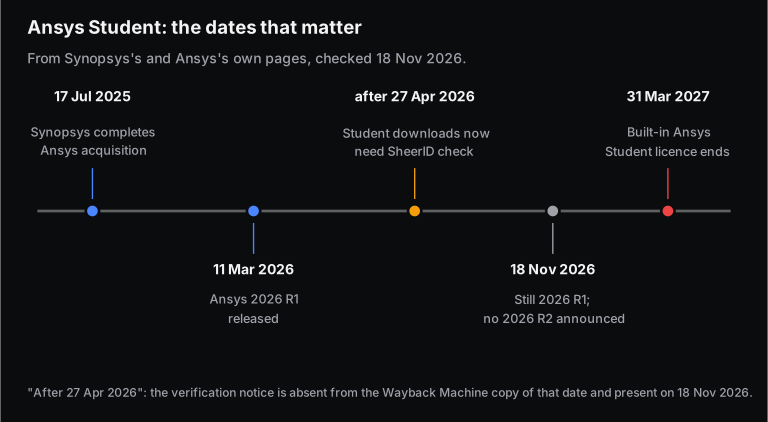
- Limits: 128K nodes/elements for structural physics and 1 million cells/nodes for fluids, up to 4 CPU cores. These have not changed since at least October 2025 (Ansys Student page; Wayback Machine copy of 6 Oct 2025).
- Version: the current release is 2026 R1, launched on 11 March 2026. We found no 2026 R2 announcement. The built-in student licence runs until 31 March 2027 (Synopsys; Ansys Student page).
- New in 2026: downloads are "NO longer openly available". You verify your student status once through SheerID, which Ansys says usually takes about 20 seconds, and the verification lasts a year. The notice appeared some time after 27 April 2026.
- Our worked example: a 5 mm thick L-bracket meshed with quadratic tets at 2.5 mm uses 42,385 nodes, or 33% of the limit. At 1.25 mm it needs 301,185, which is 2.4 times the limit (Skill-Lync calculation).
Is Ansys free for students?
Yes. Ansys Student is a free download for registered students and employed educators. It includes Ansys Mechanical, Ansys CFD (Fluent and CFX), Discovery, SpaceClaim, Autodyn, optiSLang, Rocky and more. The licence is a renewable 12-month lease, the software is Windows-only, and it may be used only for learning, coursework, student projects and demonstrations, not for paid work.
Ansys also offers LS-DYNA Student (explicit crash and impact), Electronics Desktop Student (HFSS, Maxwell, Q3D, Icepak), Scade One Student and the Rocky Student Add-Ins, all behind the same verification step. This post covers Ansys Student, the one mechanical and CFD students need.
What is included in Ansys Student?
Ansys Student includes the Workbench platform with Mechanical and Mechanical APDL, Fluent and CFX, Meshing, SpaceClaim, DesignModeler and Discovery, plus Autodyn, Rocky, optiSLang, SPEOS, Zemax OpticStudio, Polyflow, Forte, Chemkin-Pro, Aqwa, FENSAP-ICE and EnSight. The Workbench analysis systems a mechanical student uses are all there:
- Structural: Static Structural, Modal, Harmonic Response, Transient Structural, Linear and Eigenvalue Buckling, Random Vibration, Response Spectrum, Rigid Dynamics and Explicit Dynamics.
- Thermal and electric: Steady-State Thermal, Thermal-Electric, Electric and Magnetostatic.
- Fluids: Fluid Flow (Fluent), Fluid Flow (CFX), Turbomachinery Fluid Flow and IC Engine.
- Design: Structural Optimization (topology), Shape Optimization and Design Assessment.
Geometry comes in as STEP, IGES or Parasolid; export is switched off. New to Workbench? Our crash course in Ansys Workbench walks through the project schematic, and our guide to choosing the right structural analysis type explains static, modal, harmonic and transient.
Which version of Ansys Student is current: 2026 R1 or R2?
2026 R1 is the current version. Synopsys launched Ansys 2026 R1 on 11 March 2026 as "the first wave of integrated Synopsys-Ansys capabilities". As of 18 November 2026, Ansys's release-highlights, platform-support and Fluent product-update pages all list 2026 R1 as the latest, and we found no 2026 R2 announcement from Ansys or Synopsys.
The previous R2, 2025 R2, was announced on 29 July 2025, so some articles already talk about "2026 R2". It doesn't exist yet: the student page itself lists Ansys Motion as "2026 R1 only".
What are the limits of Ansys Student?
Ansys Student limits structural models to 128K nodes/elements and fluid models to 1 million cells/nodes. Discovery in Refine mode has the same limits. Solves use at most 4 CPU cores, plus 40 GPU streaming multiprocessors in Fluent. Rocky, SPEOS, Motion and Zemax have their own caps. Geometry export is disabled, and unsupported features stay visible but greyed out.
| Product or physics | Published limit (Ansys Student page, 18 Nov 2026) |
|---|---|
| Structural physics (Mechanical, Discovery in Refine mode) | 128K nodes/elements |
| Fluid physics (Fluent, CFX, Discovery in Refine mode) | 1 million cells/nodes |
| Parallel solving (HPC) | Up to 4 CPU cores; 40 GPU SMs on Fluent |
| Rocky (particles) | 32K DEM particles, 128K SPH elements, no GPU |
| Motion (multibody) | 100K nodes per flexible body, 25K contact patches, 50 bodies |
| SPEOS (optics) | 50 bodies, 300 faces, 32K triangles, no live preview |
| Geometry | Import STEP/IGES/Parasolid; no export |
| LS-DYNA Student (separate download) | 128K nodes/elements, 4 cores |
| Electronics Desktop Student (separate download) | HFSS/Maxwell/Q3D: 64,000 3D volume elements; Icepak: 512K elements |
Ansys writes "128K nodes/elements" without spelling out the counting. The safe reading, used below, is to keep both nodes and elements under 128,000. Ignore older forum posts quoting 32K or 512K: Wayback Machine copies of the page from October 2025, January 2026 and April 2026 all show today's figures.
How big a model fits in 128K nodes? A worked bracket example
A thin structural part fits comfortably at a sensible mesh size, but halving the element size of a 3D solid mesh multiplies its size by roughly eight. Quadratic tetrahedra, which Mechanical uses on solid bodies under its Program Controlled setting, hit the node limit first. In our 5 mm bracket, a 2.5 mm mesh uses 33% of the limit, while a 1.25 mm mesh needs 2.4 times the limit.
Start with the scaling. If a part has a characteristic length and you mesh it with elements of size , the element count grows like
where is the dimension of the mesh. A 2D or shell mesh () grows 4 times each time you halve ; a 3D solid mesh () grows 8 times. Think of tiling a floor versus filling a room with dice: halve the dice and you need 8 times as many.
The second effect is element order. In Ansys Meshing, Program Controlled element order gives quadratic elements (a midside node on every edge) on solid bodies and linear elements on shells and beams (Ansys Help, 2026 R1). A quadratic tet has 10 nodes, so the mesh has more nodes than elements, and the node count decides whether it fits.
The model: an L-bracket of 5 mm plate, 60 mm wide, with a 120 mm base and a 100 mm upright (64,500 mm³). We built each mesh in a script and counted every node and element. The tets come from splitting each brick into 6, so their density is close to an unstructured tet mesh; Ansys Meshing gives similar, not identical, counts.
| Element size | Elements through 5 mm | Quadratic tet: nodes / elements | Quadratic hex: nodes | Linear hex: nodes | Fits 128K with quadratic tets? |
|---|---|---|---|---|---|
| 5 mm | 1 | 6,525 / 3,096 | 3,890 | 1,144 | Yes |
| 2.5 mm | 2 | 42,385 / 24,768 | 23,589 | 6,525 | Yes (33%) |
| 1.25 mm | 4 | 301,185 / 198,144 | 159,953 | 42,385 | No (2.4 times) |
| 1 mm | 5 | 573,661 / 387,000 | 301,386 | 79,056 | No |
| 0.5 mm | 10 | 4,357,521 / 3,096,000 | 2,236,421 | 573,661 | No |
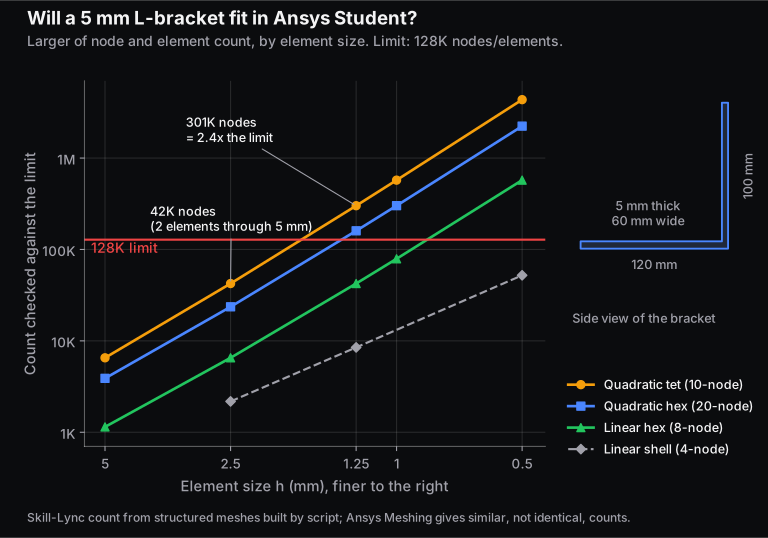
Four things to take from the table:
- Each halving costs about 7 times, approaching 8. Quadratic tet nodes grow 6.5 times from 5 to 2.5 mm, 7.1 times from 2.5 to 1.25 mm and 7.6 times from 1 to 0.5 mm; surface nodes keep it below 8 on coarse meshes.
- A 2.5 mm global size is the student-friendly plan. It leaves 85,615 nodes of headroom for refinement at the inner corner, where an L-bracket loaded at its tip concentrates stress. Our mesh sizing guide shows how, with sizing controls and a sphere of influence.
- Element type matters. At 1 mm a swept linear hex mesh fits (79,056 nodes, 64,500 elements) while quadratic tets need 573,661 nodes. Sweeping needs sweepable geometry, and Ansys's modelling guide warns against linear tets in high-gradient regions, so don't just switch tets to linear to save nodes.
- Thin parts can be shells. As a midsurface with linear 4-node shells, the bracket is 52,151 nodes even at 0.5 mm (155,901 with quadratic shells, over the limit).
Keep some headroom: the mesh statistics may not be the whole model the solver sees, since contact regions, for example, add contact and target elements. We keep about 20% spare, our own rule of thumb rather than an Ansys figure.
Will a CFD model fit in 1 million cells? A worked pipe-flow example
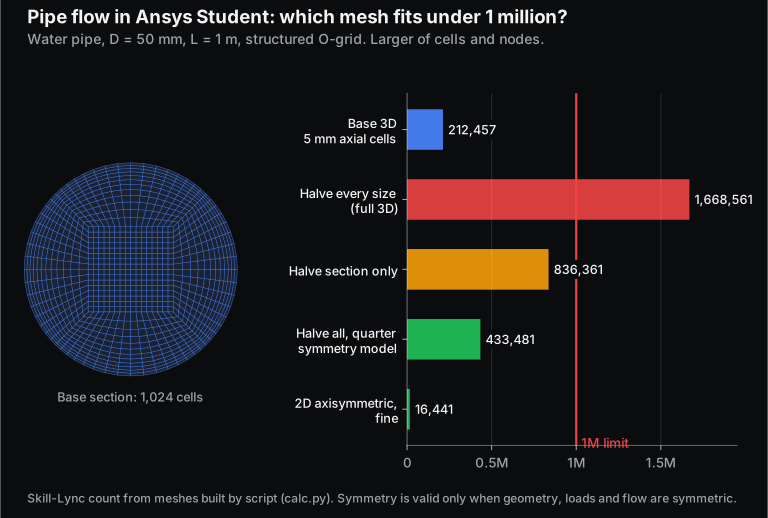
A simple 3D internal-flow model fits easily in 1 million cells, but halving every cell size multiplies the count by 8, which breaks the limit here. A symmetry model or a 2D axisymmetric model brings it back. In our 50 mm pipe, the base 3D mesh is 21% of the limit, and the fully refined mesh is 167%.
The model: water in a straight pipe, 50 mm in diameter and 1 m long, meshed with a structured "butterfly" O-grid (a square core block with four curved blocks around it, layers thinning towards the wall). The base section has 1,024 cells, with 5 mm cells along the pipe (200 divisions).
| Option | Cells | Nodes | Share of 1 million |
|---|---|---|---|
| Base 3D (1,024 cells per section, 200 along the pipe) | 204,800 | 212,457 | 21% |
| Halve every size (4,096 per section, 400 along) | 1,638,400 | 1,668,561 | 167%: over |
| Halve the section only (keep 200 along) | 819,200 | 836,361 | 84% |
| Halve everything, quarter-symmetry model | 409,600 | 433,481 | 43% |
| 2D axisymmetric, fine (40 radial × 400 axial) | 16,000 | 16,441 | 2% |
The fine-to-base cell ratio is exactly 8, the from the formula. With the fine section and 2.5 mm axial cells, the longest pipe that fits is 239 divisions, or 0.598 m; nodes run out first.
The cheapest fix is to model less pipe. A straight pipe with uniform inflow is symmetric about its axis, so Fluent's 2D Axisymmetric option solves the axisymmetric equations on one radial slice (Ansys Help, 2026 R1), at 2% of the limit. Symmetry needs symmetric geometry, loads and flow; a bend, a side inlet or vortex shedding breaks it.
How do you stay under the Ansys Student limits?
Use the smallest model that answers your question: exploit symmetry, use 2D or shell models for thin parts, keep the global mesh coarse, refine only where results change, and check the mesh statistics before solving. Large assemblies and fine transient CFD often won't fit even then.
- Estimate before you mesh. Divide the volume by and multiply by about 6 for tets to get an order of magnitude. On quadratic tets at practical sizes, the node count then runs at about 1.4 to 1.7 times the element count (1.71 at 2.5 mm, 1.52 at 1.25 mm and 1.41 at 0.5 mm in our bracket).
- Cut by symmetry, or drop a dimension. Half and quarter models, plane stress or strain, axisymmetric, shell and beam models all shrink the count when the physics allows.
- Refine locally. Keep a coarse global size, add refinement at fillets, holes and contact, then run a mesh convergence check (our mesh sizing guide has a worked three-mesh study).
- Defeature small fillets, holes and logos far from the region you care about, in SpaceClaim or Discovery.
What are the system requirements for Ansys Student?
Ansys Student runs only on 64-bit Windows 10 or 11. Ansys's minimum is a workstation-class processor, 4 GB of RAM, 50 GB of free disk, a physical C: drive and an OpenGL-capable professional 3D graphics card. Discovery also needs a dedicated NVIDIA GPU with at least 4 GB of video memory, or it will not run. There is no macOS or Linux build.
| Item | Ansys Student (all products except Discovery) | Discovery |
|---|---|---|
| Operating system | Windows 10 or 11, 64-bit | Windows 10 or 11, 64-bit |
| Processor | Workstation class | 64-bit, Pentium 4 2.0 GHz / Athlon 2000+ or faster |
| Memory | 4 GB RAM | 8 GB RAM |
| Disk | 50 GB free, physical C: drive | (same install) |
| Graphics | Professional workstation-class 3D card, OpenGL-capable | Dedicated NVIDIA GPU (Kepler, Maxwell or Pascal), 4 GB video memory minimum, 8 GB preferred |
Ansys's table puts the download at about 55 minutes on a 10 Mbps connection, 25 minutes at 25.6 Mbps and 15 minutes at 51 Mbps. The 4 GB of RAM is Ansys's stated minimum, not a recommendation.
How do you download and install Ansys Student?
Sign in or create a free Ansys ID with your college email and full legal name. Verify your student status through SheerID, which is usually instant, then download Ansys Student. Unzip it, run setup.exe as administrator, accept the defaults, reboot and launch Workbench from the Start menu.
- Check your laptop against the requirements above. Make sure you have administrator rights and about 50 GB free on C:.
- Uninstall any existing Ansys product, including an older student version or a college copy. Ansys warns that the student installation "will overwrite any existing installations".
- Open the Ansys Student page on ansys.synopsys.com (ansys.com now redirects there), choose Continue as Student, and sign in or create an Ansys ID with your school email and full legal name.
- Verify through SheerID. Ansys says most students are verified in about 20 seconds from their name, email and school details. If it can't confirm you, it asks you to upload a document and emails you when you are approved. The verification lasts a year.
- Download Ansys Student from the student download page. The same page has LS-DYNA Student, Electronics Desktop Student and SCADE.
- Extract the zip, right-click
setup.exe, choose Run as Administrator, accept the licence agreement and click through the defaults. - Reboot, then start Workbench from the Start menu. Drag a Static Structural or Fluid Flow (Fluent) system onto the project page to check it opens.
For installation problems, Ansys points students to its Learning Forum.
How long does the Ansys Student licence last, and how do you renew it?
The Ansys Student licence is a renewable 12-month lease counted from the date of release, not from the date you install. The current 2026 R1 download carries a built-in licence valid until 31 March 2027. To keep using it after that, you download and install the newer student release. Your SheerID verification is separately valid for a year.
Because the expiry is tied to the release, installing late in a release's life gives you fewer months, so check the date on the download page before a semester-long project. LS-DYNA Student and Electronics Desktop Student currently show licences valid until 31 July 2027.
What can't you do with Ansys Student?
You can't exceed the size limits, use more than 4 cores, export geometry, or use it for commercial or paid work such as company-billed internships, freelance jobs or consulting. Ansys allows self-learning, student instruction, student projects and student demonstrations only. Its academic terms also rule out commercial research and training company employees.
In practice, a full vehicle body, a complete engine or a fine external-aero case won't fit, and you can't use the software as a free CAD converter. Screenshots in your report or thesis are allowed with the line "Images used courtesy of ANSYS, Inc."
Ansys Student vs Ansys Academic vs free alternatives: which should you use?
Use Ansys Student on your own laptop for learning and small projects. Use your college's Ansys Academic licence, if it has one, for anything larger, such as final-year projects, research or student competition teams. Free tools like OpenFOAM and CalculiX have no node cap, and SimScale's Community plan runs in a browser, but none of them teaches the Ansys Workbench workflow.
| Option | Cost to you | Size limit | Who can use it | Best for |
|---|---|---|---|---|
| Ansys Student | Free | 128K nodes/elements structural, 1M cells/nodes fluids, 4 cores | Verified students and educators | Learning Workbench, coursework, small projects |
| Ansys Academic Teaching or Research (college licence) | Free to you; your college pays Ansys | No cap listed in Ansys's academic product guide; check your college's licence | Students and staff of the licensed college, for non-commercial work | Final-year projects, research, competition teams |
| SimScale Community | Free | 10 unrestricted simulations, up to 2,000 core hours, public projects | Anyone | Browser-based CAE on a weak laptop |
| OpenFOAM (CFD), CalculiX (FEA) | Free, open source (GPL) | None; limited by your hardware | Anyone (GPL licence) | Learning solvers in depth, large models, research |
Ansys's academic product guide (30 June 2026) lists Teaching bundles for classes, Research bundles for degree-related non-proprietary research (with 12 extra floating HPC cores per task), Associate bundles for research with industry partners, and a Multiphysics Campus Solution covering nearly every product. It lists no prices. If your department has an Ansys CAE lab, ask the lab in charge about using it for your project; academic licences work only within 50 miles of the licensed site. For the open-source route, see our OpenFOAM courses.
Did the Synopsys acquisition change anything for students?
Ansys Student is still free, and its problem-size limits are the same as before. Synopsys completed its acquisition of Ansys on 17 July 2025. Since then the student pages have moved to ansys.synopsys.com, and 2026 R1 is the first release launched by Synopsys. The new SheerID verification step appeared in 2026, but Ansys does not say whether the acquisition is the reason.
We compared Wayback Machine copies of the page from 6 October 2025, 19 January 2026 and 27 April 2026 with today's. The limits and the 12-month lease are identical in all four; only the "NO longer openly available" notice is new since April.
What is the catch?
Three limits matter most in practice.
First, 128K nodes is small for 3D solids. A thin part fits, but each halving of the mesh costs about 7 times the nodes, so a convergence study on a real assembly hits the limit fast. Plan around symmetry and local refinement from the start.
Second, it is Windows-only and wants a proper graphics card. A MacBook is not a supported platform, and Discovery won't run without a qualifying NVIDIA GPU.
Third, our counts come from clean structured meshes, not Ansys Meshing. Tet meshes on curved CAD with curvature and proximity refinement are usually larger, so read the mesh statistics before you click Solve.
Where should you learn Ansys after installing it?
Learn one workflow end to end first: geometry, mesh, boundary conditions, solve, then check the result against a hand calculation. At Skill-Lync, the Structural Analysis using Ansys Workbench course covers the Mechanical side, and Basics of FEA: Explicit and Implicit builds the theory underneath. For fluids, start with Introduction to GUI-based CFD using Ansys Fluent and move on to Aero-Thermal Simulation using Ansys Fluent. Every course is listed on the Ansys courses page, with broader tracks under FEA and CFD. If FEA itself is new to you, read what is FEA, with a worked example first.
Frequently asked questions
Is Ansys Student really free, or is it a trial?
It is free, not a time-limited trial. Ansys Student is a renewable 12-month lease at no cost for verified students and educators. The current download's built-in licence runs until 31 March 2027, and after that you install the next student release. Ansys lists no paid tiers of Ansys Student.
Can I install Ansys Student on a Mac?
Not natively. Ansys lists only 64-bit Windows 10 and 11 as supported platforms for Ansys Student, and there is no macOS or Linux build. A virtual machine is not a configuration Ansys lists, so a college lab PC or SimScale's browser-based plan is the safer route.
What happens if my mesh exceeds 128K nodes?
Expect the solve to stop with a problem-size error, because the limits are part of the student licence. You must then coarsen the mesh, use symmetry or a 2D or shell model, or move the job to your college's Academic licence. Check the mesh statistics before solving.
Can I use Ansys Student for my final-year project or a competition team?
Yes, if the project is non-commercial and fits the limits; Ansys's terms allow student projects. Competition teams such as Formula SAE can also apply for Ansys's student-team sponsorship, which gives free multiphysics bundles. Work done for a company, such as consulting or commercial design, counts as commercial use and is not allowed.
Do I need a college email ID to download Ansys Student?
Ansys asks you to sign up with your school email address and full legal name, then verifies your enrolment through SheerID, usually in about 20 seconds. If it can't confirm you automatically, you upload a supporting document and wait for an approval email. The verification lasts a year.
Is Ansys Discovery free for students?
Yes. Discovery is included in Ansys Student, with the same limits in Refine mode: 128K nodes/elements for structures and 1 million cells/nodes for fluids. It needs a dedicated NVIDIA GPU (Kepler, Maxwell or Pascal architecture) with at least 4 GB of video memory. Without one, Ansys says it will not run.
Sources and further reading
- Ansys, part of Synopsys, Ansys Student: Free Software Download (products, limits, requirements, install steps, licence; read 18 Nov 2026)
- Ansys, Ansys for Students (free student products, verification; read 18 Nov 2026)
- Ansys, Ansys LS-DYNA Student and Ansys Electronics Desktop Student (limits and licence dates; read 18 Nov 2026)
- Ansys, Ansys 2026 R1 Product Release and Updates, Platform Support and Fluent product updates (current release; read 18 Nov 2026)
- Synopsys, Synopsys Launches Ansys 2026 R1 (11 Mar 2026)
- Synopsys, Synopsys Completes Acquisition of Ansys (17 Jul 2025); Ansys, Ansys 2025 R2 announcement (29 Jul 2025)
- Internet Archive Wayback Machine, Ansys Student page copies of 6 Oct 2025, 19 Jan 2026 and 27 Apr 2026
- Ansys, Academic Product Reference Guide (PDF, version 30 Jun 2026)
- Ansys, Academic Terms and Conditions (licensing and terms of use; read 18 Nov 2026)
- Ansys Help 2026 R1, Meshing: Element Order and Fluent: General Task Page (Axisymmetric); Mechanical APDL Modeling and Meshing Guide, Choosing Between Linear and Higher Order Elements
- SimScale, Pricing and Plans (Community plan; read 18 Nov 2026)
- OpenFOAM Foundation, Free Software Licence; G. Dhondt and K. Wittig, CalculiX (GPL)
- Skill-Lync, bracket and pipe mesh counts: structured meshes built and counted by script, 18 Nov 2026