Wiring harness design in CATIA V5 - 3D modeling Week 7 Challenge
Wiring Harness Flattening
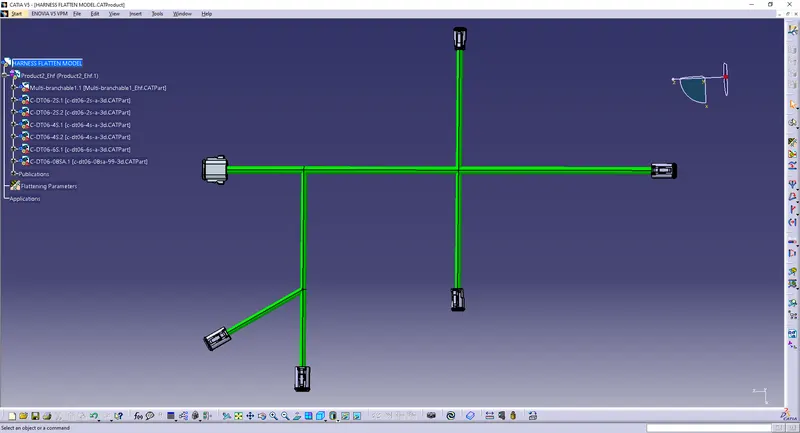
- This wiring harness bundle is from the week 4 challenge which we will use to perform the wiring harness flattening.
- Start by opening a new product and configure all the settings in tools and options inside wiring harness flattening and after the desired settings are done, we open a new product file and use the flattening parameters and set all the parameters.
- The next step is to use the extract option and extract the geometrical bundle of the wiring harness assembly.
- We then use the flatten option to flatten the harness bundle.
- Now to create a drawing of the flattened wirings harness bundle, open a new drawing and use the front view option and select one face of the connector and place it on the drawing sheet.
- Now we have the drawing of our flattened wiring harness bundle.
Flattening -
 \
\
Drawing -
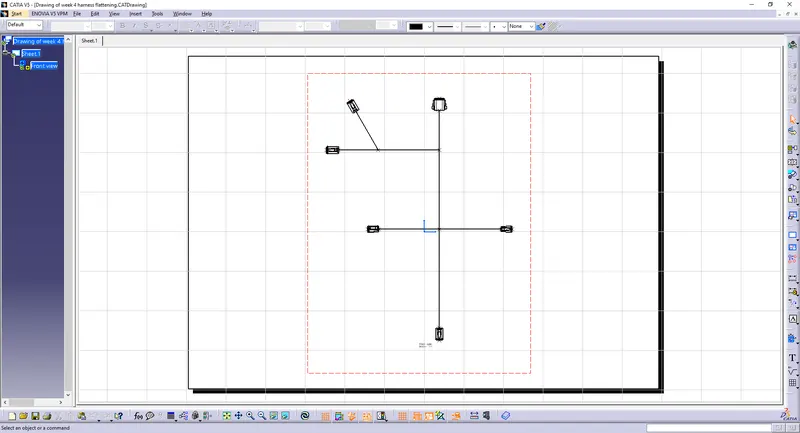
-> my cot tubes are not getting extracted.