Wiring harness design in CATIA V5 - 3D modeling Week 4 Challenge
Aim : To route the following harness layout in electrical workbench and add protective coverings on all branches connected to DT06-2S & DT06-4S with end extremities 30mm away from connectors end
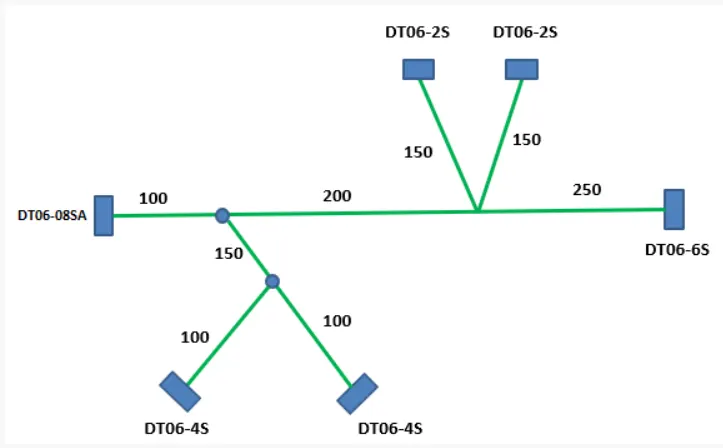
Procedure :
The wiring harness product assembly consists of
- Context assembly (which conatins the surrounding data for the wiring harness)
- Geometrical bundle (which contains all the harness components and multibranchables)
To route the harness layout
1. Go to file, create new product and give product name. This product is the main wiring harness assembly.
2. Add new product inside the assembly and save as geometrical bundle. This forms another assembly.
3. Add new product again inside the wiring harness assembly or main assembly and create a sketch with lines on a plane as per the distances mentioned in the above image. This is the harnesscontext assembly.
4. Insert harness components into geometrical bundle assembly. Before inserting harness components into the geometrical bundle make sure all of the components are electrically defined.
5. Position all the parts at the required position in the assembly using manipulation commands in the assembly design.
6. Go to electrical harness assembly workbench and highlight harness geometrical bundle in the model tree.
7. Select multibranchable document icon and in branch definition input required parameters. (which are diameter, bend radius ratio, slack, external curve) and click route definition. Select the components to be connected by bundles and also define tangency management for routing, and offset management if required and click ok.
8. Use add branch point command to add branches on the bundle, and select add branch command to add necessary branches.
9. Apply protective covering on harness bundles using protective covering command and selecting the appropriate covering from the catalog.
10. The harness assembly is ready as shown below.
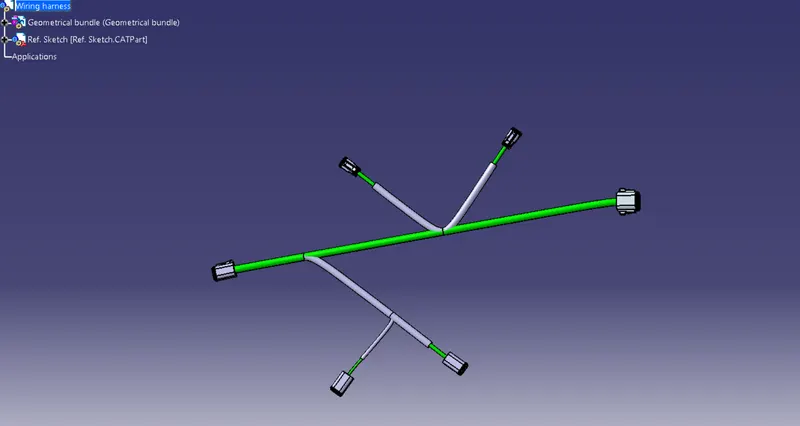
Conclusion : The harness layout is routed and protective covering is applied on the bundles as desired.