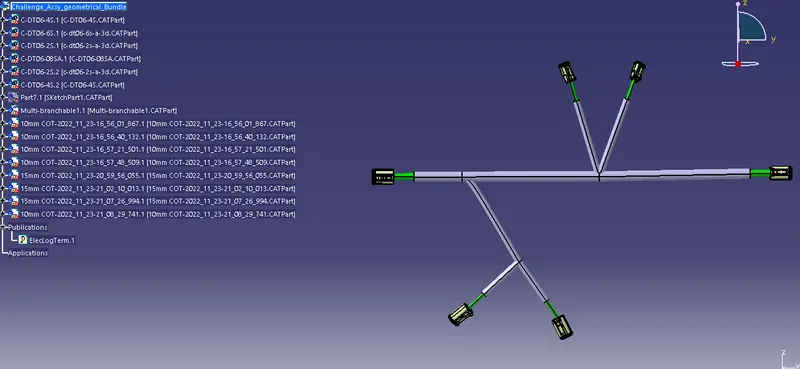
Wiring harness design in CATIA V5 - 3D modeling Week 4 Challenge
1)a) Download all the below listed connectors ,and define them electrically that is define connector connection point & Bundle connection point from Electrical part design workbench.
- DT06-4S
- DT06-6S
- DT06-2S
- DT06-08SA
b)Arrange all the connectors as asked in question using sketch, snap/snap move/compass/manipulation tools. Open Electrical harness assembly work bench. Select geometrical bundle folder, and define it as Geometrical bundle to define all the parts electrically. When we click on multibranchable document command, A multibranchable part will be added in work tree.
c)Now the workbench shifted to Harness installation. Use Branch definition command to connect the connectors as asked in question with required measurement of branch lenght and required size of 10 mm to main trunk. And branches to 5mm.. Use Add branch point command to devide the branches on the main trunk.
d) Add protective coverings of 15mm COT tubes to 10mm branches, 10mm COT tubes to 5mm branches.Open Protection covers(Cottubes) from catalog. Cover all the branches and give end extremity(Connector side) 30mm.
e)Use Save management to save the assembly file.